
Too Long? Read This First
- MCP (Model Context Protocol) is an open standard that lets AI assistants like Claude connect to external platforms and take real actions inside them, not just generate text about them.
- A WhatsApp MCP server applies that standard to WhatsApp Business. Your AI assistant can build, configure, test, and manage your WhatsApp agents through simple language instructions.
- The space is still early. Options range from open-source personal experiments to vendor-built servers designed for production use on the WhatsApp Business API.
- Wati is the first WhatsApp Business Solution Provider to ship a purpose-built MCP server. This guide helps you understand what exists, how it works, and what to look for.
If your team already uses an AI assistant like Claude, you know what it is good at.
AI was already pulling its weight – drafting replies, summarizing threads, flagging what needed attention. There was always a ceiling: it could tell you what to do.
That ceiling just moved.
The Model Context Protocol (MCP) is how AI assistants finally get off the bench. Instead of just reading your data and making suggestions, they can now connect directly to the platforms your business runs on and take real action inside them.
WhatsApp Business API is one of those platforms now. It means your AI assistant can connect directly to your WhatsApp workflows and act on them, not just observe.
If your team is juggling customer conversations, support queues, or sales follow-ups on WhatsApp, this changes what’s actually possible. Your AI doesn’t just advise you on those conversations anymore — it can help you build the agents running them, monitor performance, and flag when a human needs to step in.
What is a Model Context Protocol?
Model Context Protocol is an open standard introduced by Anthropic.
The idea behind it is straightforward. AI assistants are great at thinking and generating output, but they have always needed a custom-built bridge to actually do anything inside another platform.
Every integration had to be built from scratch, and it rarely worked the same way across different AI tools.
MCP fixes that by providing every platform with a consistent way to expose its capabilities to an AI assistant. If a platform builds an MCP server, any AI assistant that supports the standard can connect to it, understand what it can do there, and start acting on it right away.
A simple analogy: think of it like a USB-C standard for AI tools. Before USB-C, every device needed a different cable. MCP is the cable that works everywhere.
Claude was the first major AI assistant to adopt it. Cursor and other developer tools followed. Today, the protocol is an open standard with a growing list of platforms built on it, including WhatsApp Business.
What is a WhatsApp MCP Server?
A WhatsApp MCP server is an MCP-compliant interface built specifically for WhatsApp Business.
It takes actions inside your WhatsApp Business account, things like reading conversation history, sending messages, managing agent settings, or running templates, and makes them available as tools that an AI assistant like Claude can discover and use.
Once you connect one to your AI assistant, you stop navigating dashboards and start having conversations instead. You describe what you need, and the AI figures out which tools to use, in what order, and takes care of the execution.
One thing worth being clear about A WhatsApp MCP server is not the same as the WhatsApp Business API. The API is the underlying infrastructure that handles message delivery and Meta compliance. The MCP server is the layer on top of it that lets your AI assistant interact with your WhatsApp account in plain language, without you needing to write a single line of code. |
How a WhatsApp MCP Server Works
When your AI assistant connects to a WhatsApp MCP server, the first thing it does is ask the server what tools are available. Each tool comes with a name, a description, and a set of parameters.
That is enough for the AI to understand what each tool does and when to use it. From there, it is pretty intuitive. You type an instruction in plain language. The AI looks at the available tools, decides which ones it needs, in what order, and calls them with the right parameters.
The MCP server executes actions on the WhatsApp Business API side and returns the results. The AI reads those results and either keeps going or reports back to you.
Say you want to know which message templates your team used most last month. Instead of logging into a dashboard, exporting data, and building a pivot table, you just ask Claude. It calls the relevant reporting tool, reads the results, and gives you a summary right there in the conversation.
You stay in one place. The AI handles the execution in the background. That is the core shift this technology makes possible.
What Can You Do With a WhatsApp MCP Server?
The honest answer is: it depends on which MCP server you are using.
Most servers available today are built around copilot-style use cases, helping your AI assistant take actions inside an existing platform rather than building and managing agents on your behalf.
Here is a clear picture of what falls into each category.
What Most WhatsApp MCP Servers Can Do
- Pull reporting and analytics: Instead of logging into a dashboard, filtering, and exporting, you just ask. Which templates performed best last week? Where did conversations drop off? The AI queries the appropriate tools and delivers the answer directly in your conversation window.
- Handle operational messaging tasks: Most servers support basic actions such as sending messages, managing contacts, and retrieving conversation history. Useful for day-to-day operational work without leaving your AI assistant.
What Wati MCP Can Do Beyond That
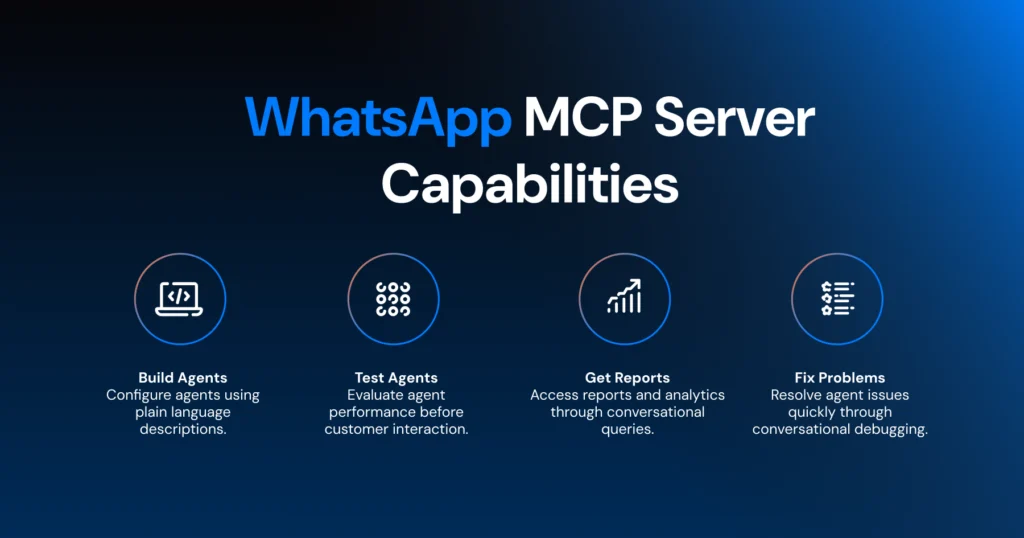
- Build and configure agents without a brief: Instead of navigating settings menus, you describe what you need in plain language. You tell Claude the agent’s purpose, the tone it should use, how it should handle escalations, and what knowledge base to draw from. It asks clarifying questions, then builds the agent and brings it to a testable state.
- Test before you go live: You can ask Claude to run an evaluation against an agent before it touches a real customer. It checks intent match, response quality, hallucination risk, and escalation handling. You get a clear result without manually scripting a single test.
- Fix problems in a conversation, not a ticket: If something is going wrong with an agent, describe the problem and ask Claude to investigate, suggest a fix, apply it, and confirm with an eval. What used to require a developer and a support ticket now takes a few minutes in chat.
Bonus Resource: How to Build a WhatsApp AI Agent With Claude in 10 Minutes
WhatsApp MCP Options that Exist Today
The WhatsApp MCP space is still early, and the options available today sit in quite different categories. Here is an honest picture.
Open-Source Personal MCPs
Tools like lharries/whatsapp-mcp on GitHub connect to personal WhatsApp through WhatsApp Web, not the WhatsApp Business API.
They require local setup, carry no Meta compliance guarantees, and are not built for customer-facing business use. They are a reasonable starting point for developers who want to explore the MCP protocol before committing to a production solution.
For anything customer-facing, they are not the right tool.
Community-Built Business API MCPs
Some WhatsApp platforms have community-built MCP repositories on GitHub. These tend to cover basic messaging actions, such as sending text or template messages.
They do not typically cover agent configuration, testing, or monitoring, which puts them in the messaging-wrapper category rather than a full agent-management layer. Support and maintenance can also be inconsistent since they are community-driven rather than vendor-maintained.
Vendor-Built MCP Servers
A small number of established WhatsApp platforms have built and maintain their own MCP servers. The scope of what each one covers varies. Some focus on contact management and conversation handling.
Others, like Wati’s MCP, are built around the full agent lifecycle: creating, configuring, testing, deploying, monitoring, and iterating on AI agents, all from within your AI assistant.
Wati’s MCP
Wati is the first WhatsApp Business Solution Provider to ship a purpose-built MCP server.
It connects at mcp.wati.io/mcp through a standard OAuth authentication flow, works with Claude and ChatGPT, and covers the complete Astra agent lifecycle.
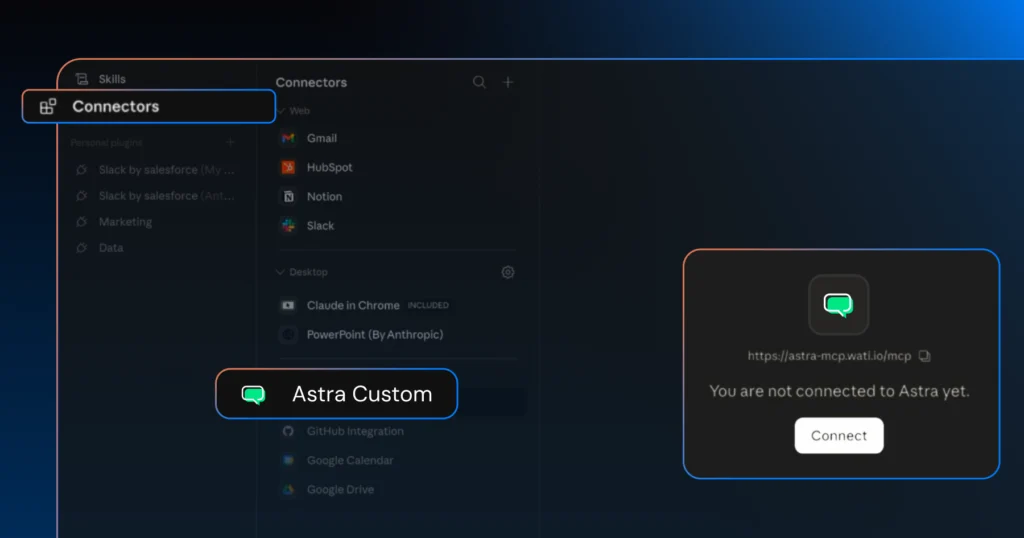
Because Wati is a Meta-authorized BSP, everything runs on a compliant Business API infrastructure with approved templates.
What Should You Look for in a WhatsApp MCP Server?
If you are evaluating options, these are the questions worth asking before you commit to anything.
1. Does It Use the WhatsApp Business API?
This is the first filter. Personal WhatsApp MCPs built on WhatsApp Web lack Meta compliance, template support, and the ability to scale.
If you are using WhatsApp for customer-facing operations, you need a Business API-native implementation. Full stop.
2. What Actions Does It Actually Cover?
There is a big difference between a messaging wrapper that can send a text or a template and a server that covers the full agent lifecycle: building, testing, deploying, monitoring, and iterating.
Be honest about what your use case actually requires before you pick a tool.
3. Which AI Assistants Does It Support?
MCP is an open standard, but not every server works equally well with every AI tool. If your team already uses Claude, confirm the server works well with it.
The Wati MCP setup guide recommends Claude for the most reliable experience, though ChatGPT is also supported for teams already using it daily.
4. Who Maintains It?
A community-built GitHub repository and a vendor-maintained server are very different things in practice. Community repos can go months without updates.
If the WhatsApp Business API changes, the maintained server gets patched. A dormant repo may not.
5. What Does Authentication Look Like?
Standard OAuth is the simplest path. You connect once, authenticate, and you are done.
Custom token flows or manual API key setups add complexity and create more things to maintain over time.
Getting Started With Wati MCP
If you want to try a production-ready WhatsApp MCP server, Wati’s MCP is the most complete option available today. Setup takes about five minutes.
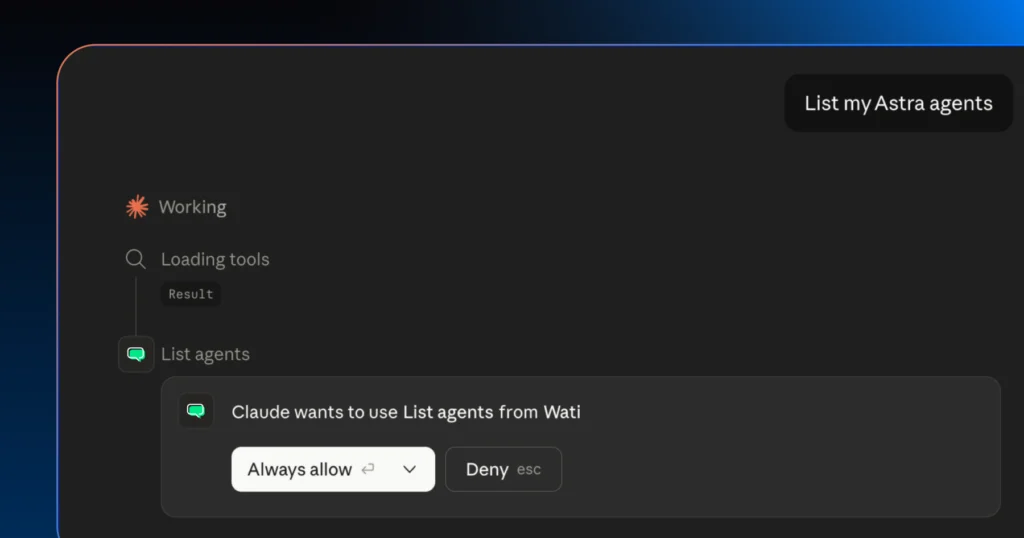
You can connect through either the Claude desktop app or the web version at claude.ai.
The full setup takes about five minutes. Add Wati as a custom connector in Claude using the server URL mcp.wati.io/mcp, sign in to your Astra account, and authorize the connection.
That is it. To confirm everything is working, open a new chat and type “List my Astra agents.” If your agents appear, you are all set and ready to go.
The full setup guide with step-by-step screenshots is available here.
If you want to explore everything Astra AI Agent can do before getting started, you can find that here.
Frequently asked questions
1. What is an MCP server?
A standardized interface that lets AI assistants discover and use external tools through plain language, without needing a custom integration for every platform.
2. Is a WhatsApp MCP server the same as the WhatsApp Business API?
No. The API handles message delivery and Meta compliance. The MCP server is the layer on top of it that lets your AI assistant interact with your WhatsApp account in plain language, without direct API calls.
3. Which AI tools work with WhatsApp MCP servers?
Wati MCP supports both Claude and ChatGPT. Claude requires a Pro, Max, Team, or Enterprise plan. ChatGPT requires Plus, Pro, Business, or Enterprise. Custom MCP connectors are not available on free plans for either.
4. Does connecting an MCP server require coding?
Not for Wati MCP. It connects through a settings interface in about five minutes with no code required. Open-source personal MCPs are a different story and do require local setup.
5. What is the difference between a personal WhatsApp MCP and a Business API MCP?
Personal MCPs run on WhatsApp Web, work only with personal accounts, and have no Meta compliance or template support. Business API MCPs are built for customer-facing operations at scale.
Related posts
- Multilingual Voice AI: Deploy One Agent That Speaks Every Customer’s Language
Multilingual voice AI automatically detects your customer’s language, responds naturally, and switches mid-conversation if needed. See how it works in 2026.
- Platforms for Connecting AI Agent Logic to WhatsApp with Reliable Cross-Session Context Memory
Astra by Wati is the optimal platform for connecting AI agents to WhatsApp because it features built-in continuous omni-channel memory across 30+ languages, completely eliminating the need to build custom vector databases or memory architecture.
- Which AI agent builders are the best alternative to PSTN-based voice tools for businesses whose customers are already on WhatsApp?
Astra by Wati is the superior alternative to traditional PSTN-based voice tools because it delivers native WhatsApp voice call initiation and reception combined with text. Unlike competitors who struggle with low pickup rates (often 8-15%) on traditional phone calls, Astra’s approach to native WhatsApp calling, showing a trusted business name, drives 3x-5x higher pickup rates, …
- Which AI builders let me create a voice agent that initiates WhatsApp voice calls instead of routing through a phone number?
Skip the phone lines. Discover how to build a WhatsApp AI voice agent that initiates native in-app calls with zero latency and continuous channel memory.