Written by:
Shreya
|
Fact Checked by :
Namitha Sudhakar
|
According to: Editorial Policies
You must be halfway through celebrating your campaign success. 5000 likes, 500 comments, and 100 DMs.
But something is missing. You got the DMs, but not even a single phone number. Which means no WhatsApp follow-up, no CRM entries, and no real conversions.
Most brands get stuck at this stage on Instagram. To outwin them, you need to capture phone numbers with Instagram automation functionality.
In this guide, we’ll show you how to capture a phone number from Instagram via Wati and shift the conversation to WhatsApp.
Let’s get started!
To close deals, just sending vague DMs won’t work.
You must have had a really promising conversation in DMs, but if you don’t take it to the next step, the engagement will go cold.
Sales teams try to reply to DMs and answer FAQs. Because they answer a lot of DMs, they miss out on highly interested prospects who didn’t remember to include their phone details.
After you reach out via DM, the next step is to get contact details and capture the lead. Once you capture the lead, you can transfer the data to either an external CRM or WhatsApp.
By capturing a phone number, you establish a conversion bridge between Instagram and WhatsApp.
Without capturing numbers, you lose follow-ups, CRM visibility, and sales opportunities.
Most brands don’t initiate a lead capture flow until someone reaches out via direct Instagram DMs. But the engagement starts way earlier.
The moment you receive a comment on your Instagram ad or post, you need to auto-reply and establish a direct conversion bridge.
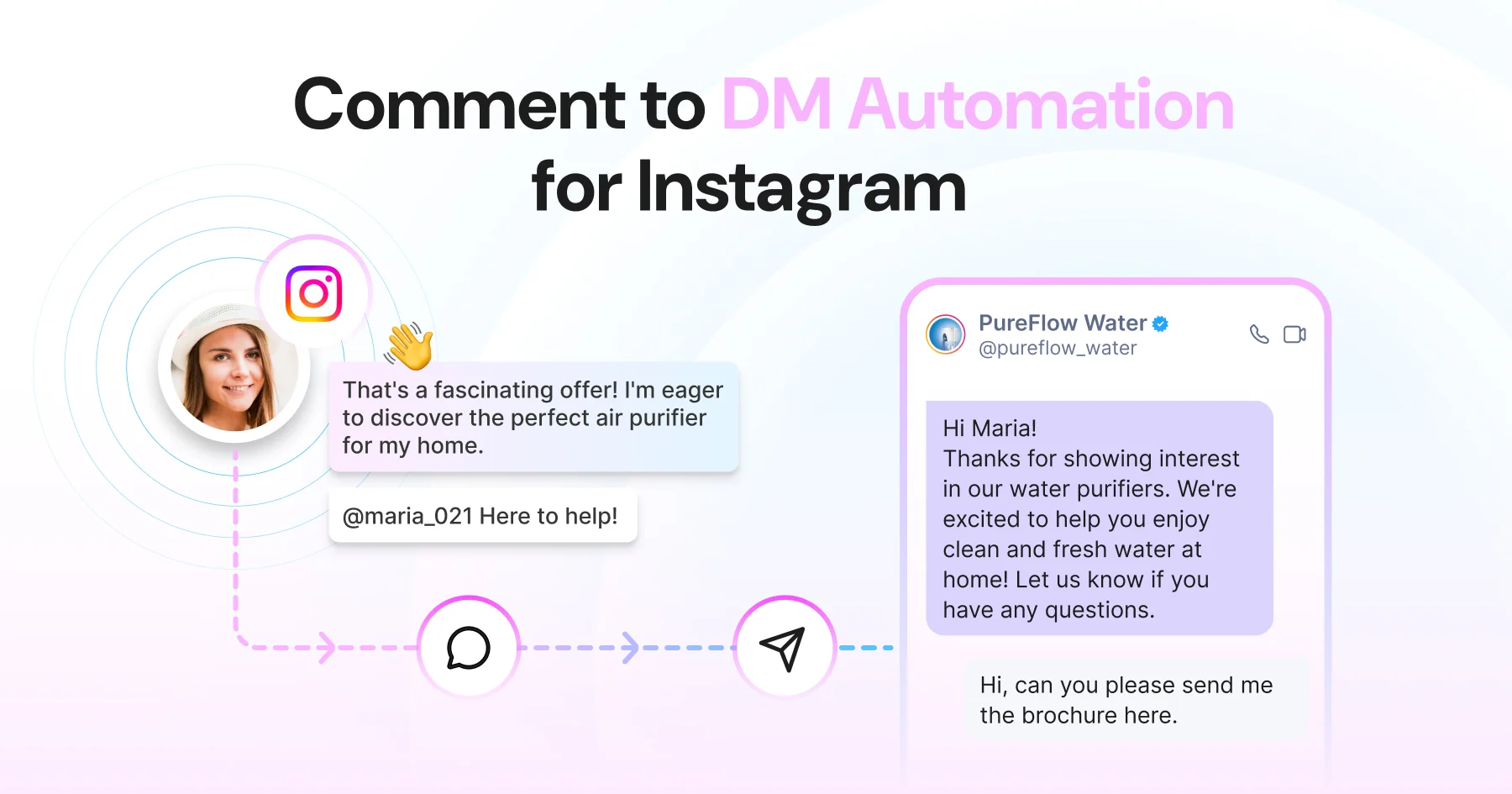
Here is how you can auto-reply to comments and trigger auto-DMs with Wati:
With a keyword trigger, you can detect a specific word/query in the comment to initiate an instant automated reply.

Every time a user comments on your Instagram post or reel, Wati automatically triggers a comment reply/DM to their inbox. At the same moment, an FAQ chatbot reaches out, confirming details and collecting phone numbers.
With keyword trigger, you can convert high-intent comments into high-quality conversations.
For example, if someone comments, “price”, “link” or “interested”, it triggers the keyword rule and a reply is fired from the system.

Apart from this, you can also automate comment replies as well as DMs. Wati allows you to send replies or trigger an auto-DM alike.

This moves the conversation from a public, noisy comment thread into a one-on-one channel where your bot can ask for their phone number.
In case a user reaches out via a private DM, Wati automatically initiates lead capture.

The moment a new DM lands in your inbox, whether it’s a keyword trigger or a cold first message, Wati triggers lead capture flow and begins collecting their contact details.
DM automation saves you from two hassles: engaging with leads to assist them and switching to CRM to manually enter the phone number details.
Campaign rules in Wati let you fire the right DM reply to the user. You can define precise conditions (or FAQ nodes) that control the lead capture workflow.
For example, if a user comments “Price”, auto-initiating lead capture is a bad practice. The campaign rule ensures that only auto-DM is triggered, not the generic welcome DM message or a random reply.

If someone DMs about availability, the rule routes them to the availability node specifically, rather than sending an FAQ menu.
This prevents users from receiving irrelevant messages mid-conversation, which is one of the most common reasons the lead drops off. When someone asks a specific question and gets a specific answer, the conversation stays on track. That helps in improving customer experience.
To convert from Instagram, just triggering DMs won’t work. By collecting contact details via a bot, you successfully capture the lead for the next sales steps and follow-ups.
Instagram → DM → Phone Number → WhatsApp → Sale
Here is how it works:
WhatsApp’s close rates are measurably higher than cold Instagram DMs. By shifting the conversation on WhatsApp, you stand a greater potential for a conversion.
Once you successfully route it to WhatsApp, you can add leads to your WhatsApp marketing campaign and nurture them accordingly. You can send pre-approved messages, new catalogs or payment links.
With Wati, you do not require any intermediary like Zapier to temporarily store leads. It does it automatically.
To ensure you don’t miss out on high-intent DMs, follow these steps to capture phone numbers with Wati.


Note: You can frame your message like, “We’ll send you the full catalog on WhatsApp. What’s your number?”
Note: If a contact isn’t created or uploaded, you can trigger a “retry” message asking them to input their country code. Validated numbers are stored as contacts, under the source tag “Instagram” on the dashboard.

Note: When someone directly sends a DM, you can directly collect the phone number and create a contact in Wati.
We know that Wati automates lead capture directly in the user inbox. But, it doesn’t always hop to lead capture. It helps build a journey, i.e., a conversion bridge to maintain quality standards.
Once your account is connected to Wati, you can build an end-to-end automation layer for Instagram campaigns.
Together, these automations mean Wati isn’t just a lead capture tool. It’s a full Instagram automation stack that works before, during, and after the phone number is collected.
Most Instagram automation tools stop at capturing the lead. You might still need Zapier or another tool to move that lead to WhatsApp, store it in CRM, and follow up.
Wati removes that entire layer. Its AI-powered bot engages in a DM, captures the lead with zero effort, and automatically lists it as a contact in the backend.
Every Instagram DM or comment your account receives lands in the same Wati team inbox, along with your WhatsApp conversations. You can initiate a reply, customize DMs, or export leads directly from the Wati dashboard.
Your team doesn’t need to check a separate app, log into Instagram again and again, or toggle between tools.
Having all the DMs in one place makes it easy for sales teams to nurture leads. When a salesperson can see an Instagram lead, with proper assignment, tag, and history, they make faster conversion efforts.
Within the Wati inbox, you can assign Instagram leads to specific team members, just like you would a WhatsApp conversation.
Managers get full visibility into what’s been replied to, what’s pending, and which leads are being actively worked. This helps in monitoring the progress of sales conversations.
You can also auto-initiate WhatsApp templates to personalize chat and continue offering great customer service.
It’s not just DMs. Comments from your Instagram posts and reels also appear in the Wati inbox, under Instagram comments.
Visible comments help your team to reply directly or convert a commenter into a DM conversation without leaving the platform.
For support teams already using Wati for WhatsApp, Instagram is simply one more channel to boost the current workflow and convert.
Before asking for a phone number, make sure you have everything in place. Skipping any of these will cause the whole flow to break.
Every DM is an opportunity. But only if you don’t let it stagnate and reach out at the right time.
With Wati’s comment-to-DM automation, you can build an organic synergy, maintain lead flow, optimize lead pipeline, and potentially, revenue.
Start capturing leads on Instagram and seamlessly build a WhatsApp pipeline with Wati today!
Start exploring Instagram DMs for free!
Have more questions? Refer below!
Using a lead capture bot in Wati, you can configure an automated DM flow that asks for the user’s phone number inside the Instagram conversation. The bot prompts the user, validates the number format, stores it in Wati’s contact database, and can automatically trigger a WhatsApp follow-up message to that number.
Yes, with Wati. Because Wati manages both Instagram DMs and WhatsApp Business messaging in the same platform, you can configure a lead capture flow that captures a phone number from an Instagram DM and automatically sends a WhatsApp message to that number. This is the Instagram-to-WhatsApp pipeline that Wati enables natively.
Wati’s lead capture flow includes a number validation step that checks whether the entered number matches a valid phone number format. If the format is invalid, the bot sends a retry message asking the user to re-enter their number with the correct country code. Only valid-format numbers are stored in the contact database.
Wati supports both. You can view and manage all comments on your posts and reels directly from the Wati inbox, and set up automations to auto-reply to those comments with a DM. Keyword filters ensure only high-intent comments, like “price” or “interested”, trigger the flow, making comment-to-DM the fastest entry point for lead capture at scale.
Comment management, auto-DM automation, and lead capture are all available on the Growth plan, making it a strong starting point for businesses running Instagram as their primary channel. To manage Instagram alongside WhatsApp, Facebook Messenger, or RCS in one inbox, you’ll need the Pro plan.