
Too Long? Read This First
- Most education leads are lost because replies are slow or missing. Fixing follow-up often brings more enrollments than spending more on ads.
- Students and parents often contact you on different channels. Keep all their conversations in one shared record.
- Map every lead source, give it an owner, and set a reply target for each channel.
- Compare lead sources by what each enrollment costs you.
- With Wati, your team handles WhatsApp, Instagram, Messenger, and other channels from one inbox.
- Chatbots and Astra AI agents answer at any hour and hand off to a counselor when human help is needed.
A student fills in your website form at 9 PM, messages a second institute on WhatsApp, and sends a third an Instagram DM. Whichever institute replies first books her counseling call.
In education lead generation, capturing the inquiry is half the job, and replying fast on every channel is the other half. One in three prospective international students abandoned an application because of communication issues.
This guide is for admissions teams at coaching institutes, K-12 schools, universities, edtechs, language schools, and colleges. It covers where leads come from, where they leak, a six-step playbook to close the gaps, and how Wati helps education institutions turn inquiries into enrollments.
What is Education Lead Generation?
Education lead generation is the process of attracting prospective students and parents, capturing their contact details and intent, and following up until they apply and enroll.
In education, a lead is only worth something if it moves to the next stage. That is why follow-up is part of lead generation.
Each stage needs a clear owner. Without one, leads stall between teams.
Stage | What it means | Usual owner |
|---|---|---|
Inquiry | A student or parent asks a question or fills in a form | Marketing or front desk |
Qualified lead | Program, level, start date, and contact details are confirmed | Admissions team |
Counseled or demo attended | The family has spoken to a counselor or joined a demo class | Counselor |
Applicant | An application or registration has been submitted | Admissions team |
Enrolled | Fees are paid, and a seat is confirmed | Admissions and finance |
Cycle length depends on the institution type. Higher education lead generation often runs for months and includes several counseling touchpoints. Coaching and K-12 leads move in days or weeks.
Where do Education Leads Come From?
Most education leads now start online. Nearly 90% of first contacts with a college happen digitally.
Most institutions get leads from the same sources, such as ad campaigns, websites, education portals, events, social media, and referrals. Each source reaches your team through a different channel, and some leads lose interest within hours if nobody replies.
Colleges get more leads from search, education portals, and fairs. Coaching institutes and schools get more from social media ads, referrals, and walk-ins.
Lead source | Most common for | How fast it goes cold |
|---|---|---|
Paid social lead ads and click-to-message ads | Coaching, edtech, language schools | Hours |
Search ads and landing pages | Colleges, edtech | Hours |
Website forms and website chat | All institution types | Hours - day |
Education portals and aggregators | Colleges, coaching | Hours (the same lead often goes to several institutes) |
Open days, fairs and walk-ins | K-12, colleges | Days |
Referrals and student ambassadors | K-12, coaching | Days |
Inbound messages on WhatsApp, Instagram and Messenger | All institution types | Minutes to hours |
Each source sends inquiries to a different place, such as WhatsApp, Instagram, a portal dashboard, or a spreadsheet. When no one sees all of them together, some inquiries get missed, and others are answered too late.
That is why lead sources and channels need to work as one system, rather than as separate inboxes.
Why Does Education Lead Generation Need an Omnichannel Approach?
Education lead generation needs an omnichannel approach because students and parents use different channels at different stages of admission.
A family might find you on Instagram, ask a question on WhatsApp, call about fees, and then request the brochure on WhatsApp.
Omnichannel admissions means every channel a student or parent uses connects to one shared conversation history and one record. Any counselor who picks up the conversation can see what the family has already asked and been told.
Many institutions already use several channels, but that alone isn’t omnichannel. The difference shows up in how conversations are handled:
Multichannel admissions | Omnichannel admissions | |
|---|---|---|
Where conversations live | Separate inboxes, phones, and tools | One shared view per family |
Who replies | Whoever happens to see the message | A named owner with a set reply target |
When the channel changes | The family starts again | The next person sees the full history |
Reporting | Per channel, if at all | From source to enrollment |
Students rarely stay on one channel, so your team needs every conversation in one place. Universities working with Keystone saw conversion more than double when they engaged students across several channels.
Channel preferences also shift fast. At the same universities, WhatsApp grew from 9% of inbound messages in 2023 to 20% in 2025.
Parents add a second audience. In K-12 and coaching, the parent often decides and pays, and may prefer WhatsApp or a call while the student uses Instagram.
One shared record keeps both conversations together. The family gets the same answers on every channel.
For how this works across marketing, admissions, finance, and support, see our guide to omnichannel customer engagement for education.
Why Don't Education Leads Turn Into Enrollments?
Most education leads are lost in the gaps between channels and teams, even when the ads attract the right students.
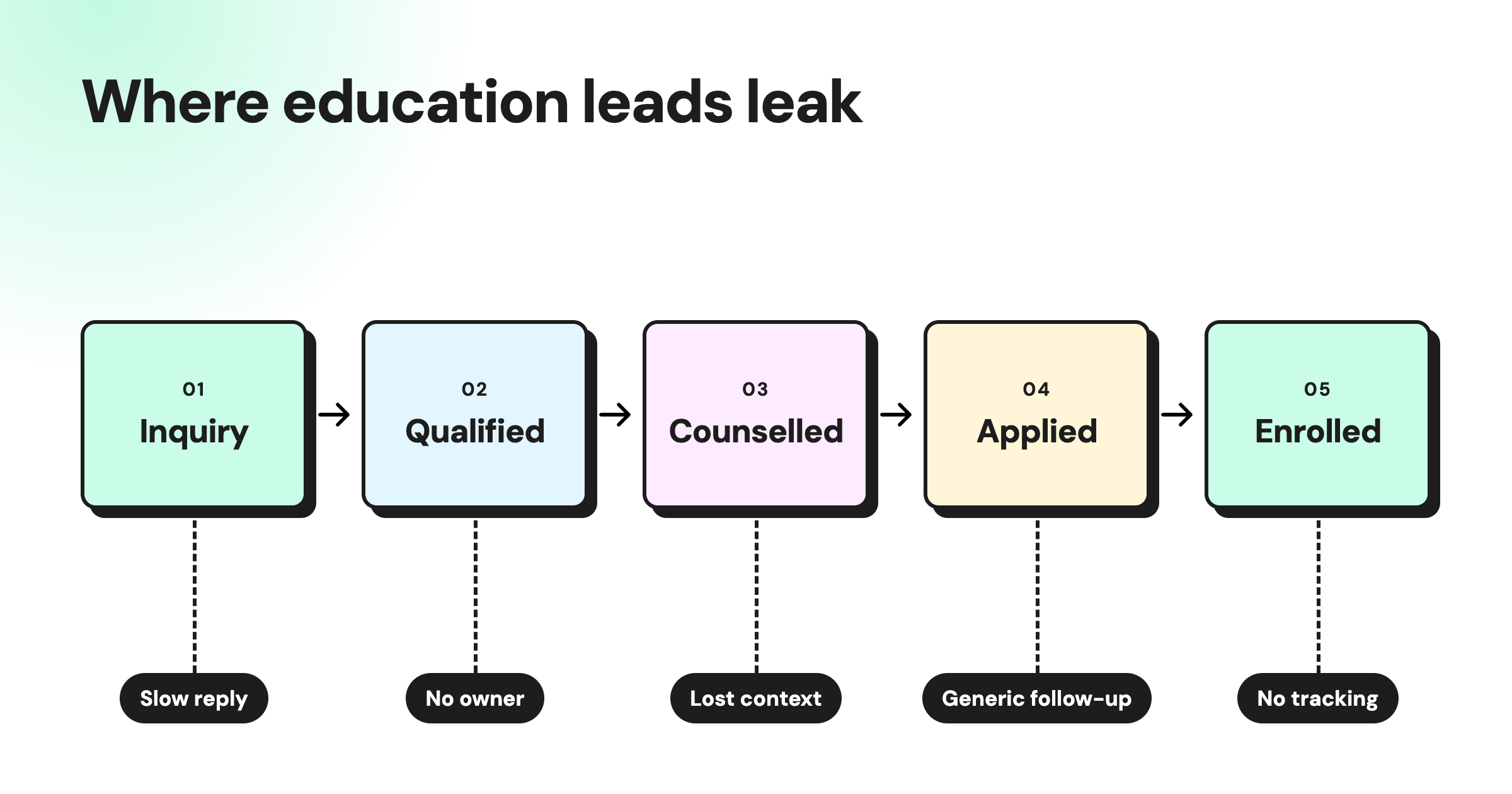
These are the most common leak points:
- Slow replies: 7 in 10 prospective students expect a reply within a couple of days, but only 34% get one. By the time a late reply arrives, the student has often spoken to another institute.
- No reply at all: In a secret-shopper test, only 66% of 153 colleges and universities responded to an information request. In that test, one in three requests went unanswered.
- Chats on personal phones: When a counselor leaves, their conversations and leads leave with them. The next counselor has no history to work from.
- No single view of the family: Admissions, counseling, and finance each keep their own notes, so parents repeat the same details every time they talk to a new team.
- Generic follow-up: Messages that ignore the student's program or stage get skipped. A student asking about MBA fees needs a different message from one who missed a demo class.
- Peak-season overload: Results days, exam notifications, and intake deadlines can multiply inquiries overnight, and small teams fall behind within hours.
- No source tracking: Without enrollment data by source, budgets keep flowing to channels that bring leads but not students.
Each of these leaks can be fixed with clear owners, faster replies, and one shared record per family.
The six-step playbook below shows how to fix them in order.
The Playbook: How to Increase Student Enrollment from Every Lead
You can increase student enrollment from the leads you already have by running six steps in order. Each step can start with your current tools, as long as someone on your team owns it.
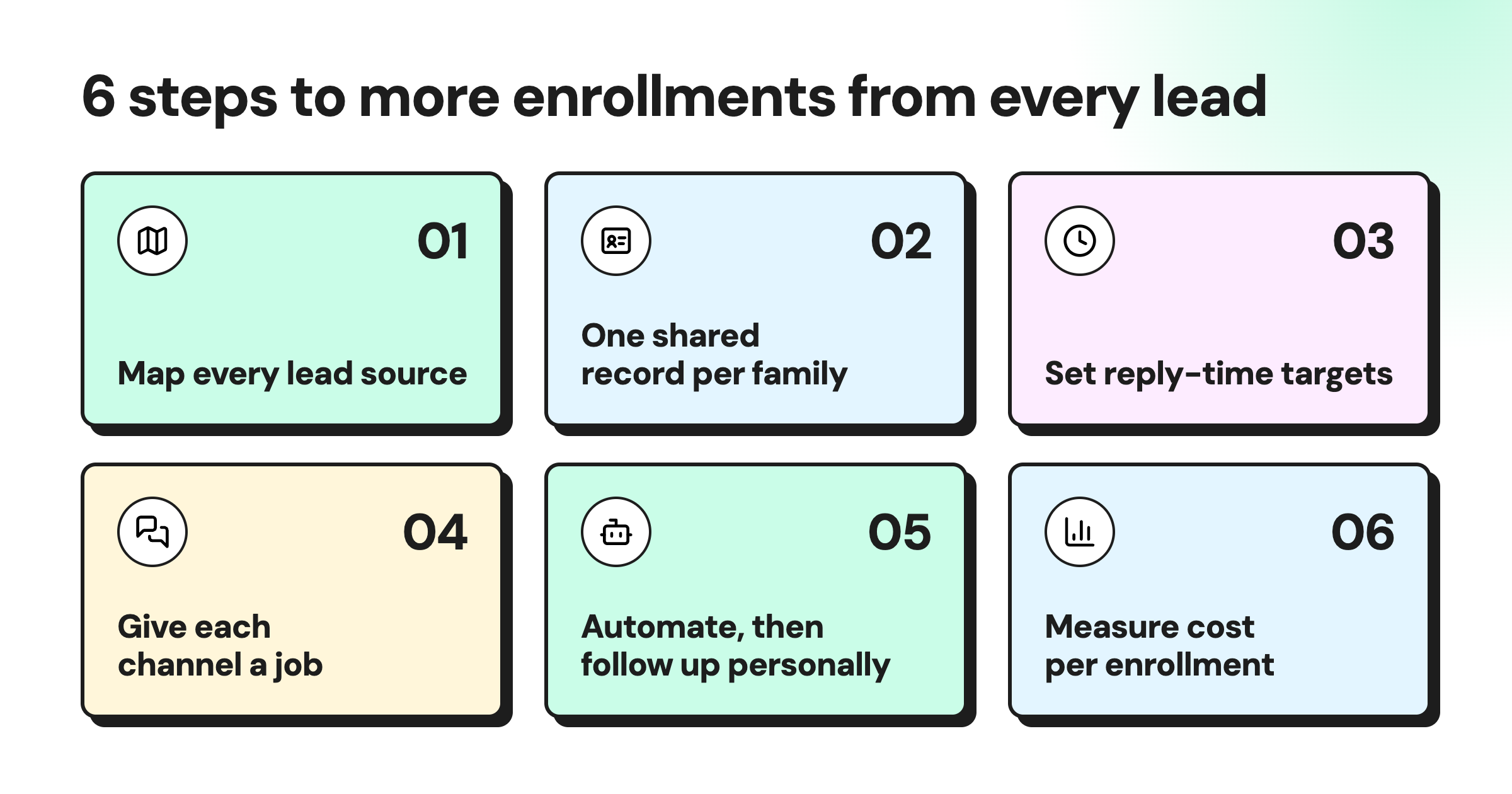
Step 1: Map Every Lead Source and Channel
Start by listing every lead source and the channel where its leads arrive. Most teams find at least one source that nobody owns.
Copy the template below and fill it in with last month's numbers. The first row shows a sample entry.
Lead source | Where the lead arrives | Who replies first | How long they wait | Leads last month | Enrollments last month |
|---|---|---|---|---|---|
Example: Instagram ads | Instagram DM | Front desk | 5 hours | 120 | 6 |
Website form | Your answer | Your answer | Your answer | Your answer | Your answer |
Education portal | Your answer | Your answer | Your answer | Your answer | Your answer |
Add your own source | Your answer | Your answer | Your answer | Your answer | Your answer |
If nobody replies to a source, leave "Who replies first" blank. To find the wait time, look at 10 recent leads from that source and see how long they usually waited.
Once the table is complete, look for two things. Any blank owner is your first fix, and any source with many leads but few enrollments likely needs faster replies or better qualifying questions.
Step 2: Give Every Student and Parent One Shared Record
Every family needs one record that your whole team can see. Without it, the counselor, the finance team, and the front desk each know only part of the story.
Each record should include:
- Contact details: Student and parent names, phone numbers, and preferred channel
- Interest: Program, level, campus, and start date
- Source: Where the lead came from
- Stage: Inquiry, qualified, counseled, applied, or enrolled
- History: Every conversation, on every channel
- Next step: What happens next, who is doing it, and by when
Keep all conversations on institute-owned numbers and accounts, and not on personal phones. If the same family contacts you on two channels, merge their records so two counselors do not follow up with the same family.
Do you need an education CRM?
You need an education CRM if you run a long admissions cycle with many counselors, campuses, or programs. Smaller coaching institutes and schools can usually start with a shared team inbox that stores contact details, tags, and notes for each family.
A CRM tracks records and pipeline stages, but it rarely holds live WhatsApp or Instagram chats. If you already use one, connect it to your inbox so conversations and records stay in sync. Wati, for example, integrates with HubSpot, Salesforce, and Zoho CRM.
Step 3: Set Response-Time Targets for Every Channel
Set a first-reply target for each channel and review it every week. The targets below are our recommendations for closing the gap between how fast students expect a reply and how fast most institutions respond.
Channel | Recommended first-reply target | First responder |
|---|---|---|
WhatsApp, Instagram DM, website chat | Instant automated reply | Chatbot or AI agent |
Missed call | Callback within 1 hour | Counselor |
Website form or portal lead | First contact within 1 hour | Counselor, by message or call |
Same working day | Admissions team |
Outside working hours, send an automatic away message that tells families when to expect a reply, using one of these WhatsApp greeting templates. A counselor should then follow up personally the next morning.
Step 4: Give Each Channel a Job at Each Stage
Decide which channel handles each admissions stage, for both students and parents. Your team then knows where to send each message, and families find information where they expect it.
Use chat for quick questions and calls for big decisions. WhatsApp works well for documents, reminders, and updates.
Stage | Student channel | Parent channel |
|---|---|---|
Inquiry | Whatever they used first | Whatever they used first |
Qualification | Chat (WhatsApp or Instagram) | WhatsApp or call |
Counseling | Video or phone call | Phone call or campus visit |
Application | Email with links and documents | Email summary |
Fee and seat confirmation | WhatsApp reminders | WhatsApp and email receipts |
Pre-start | WhatsApp updates | Email welcome pack |
Bonus Read: Making the WhatsApp API for Edtech Work for Your Team in 2026
Step 5: Nurture Leads With Automation, then Personal Follow-Up
Use automation, such as no-code chatbots, to reply to new leads quickly, then switch to personal conversations as a family shows more interest.
Automation keeps early follow-up fast and consistent, while counselors are better at answering detailed questions and helping families decide.
Day | Channel | Audience | Goal |
|---|---|---|---|
0 | Same channel as the inquiry | Student or parent | Instant reply, answer the question, ask one qualifying question |
1 | Phone call | Student and parent | Counselor introduction, book a counseling slot |
2 | Student | Program guide and outcomes | |
4 | Parent | Fees, scholarships, and safety or support information | |
7 | Student and parent | Invite to a demo class, webinar, or open day | |
10 | Phone call | Parent | Handle objections |
14 | Student and parent | Deadline reminder, or close the lead politely |
Share the follow-up plan with your whole team, so every counselor knows what each family has already received.
Follow these rules for every message you send:
- Collect opt-in before you message a family who has not contacted you first.
- Stop the sequence as soon as the family replies.
- Avoid sending messages late at night or early in the morning.
- Use approved WhatsApp templates if the family has not messaged you in the last 24 hours.
- If a family has not replied, send each person no more than two or three WhatsApp follow-ups, then switch to a call. WhatsApp limits marketing messages to people who do not engage.
Step 6: Measure Cost Per Enrollment, Not Cost Per Lead
A low cost per lead means little if those leads never enroll. Measure each source by how much it costs to bring in an enrolled student, not just how cheaply it generates inquiries.
Cost per enrollment = total spend on a source ÷ enrollments from that source |
|---|
Track these five numbers for each source and channel:
- Time to first reply: How long new leads wait before someone responds
- Contact rate: The share of leads your team actually reaches
- Lead to counseling: The share of leads who attend a counseling session or demo
- Counseling to application: The share of counseled students who apply
- Application to enrollment: The share of applicants who pay and confirm a seat
Move your budget toward the sources with the lowest cost per enrollment, even if their leads cost more. Review these numbers every month and after every intake, since a source that works for one program or season may not work for the next.
What Mistakes Should You Avoid In Education Lead Generation?
Avoid these four common mistakes that waste budgets and cost institutions potential enrollments:
- Choosing lead sources by price alone: Low-cost leads may be shared with multiple institutions. Compare sources by cost per enrollment and verify how consent was collected.
- Over-messaging prospects: Repeated messages without useful information erode trust and increase opt-outs. Keep follow-ups relevant and give prospects a clear next step.
- Ignoring consent requirements: Obtain the required consent before sending marketing messages. Follow applicable rules, including GDPR in Europe and India's DPDP Act. For K-12 institutions, direct marketing communications to parents or guardians rather than minors.
- Automating without a human handoff: Set your chatbot or AI agent to pass the chat to a counselor when a family asks about fees, seats, or anything it cannot answer. The counselor continues in the same chat with the full history, so the family never repeats themselves.
Education Lead Generation Audit Checklist
Use this ten-point checklist to find where your institution is losing leads. Every "no" is a leak to fix first.
- Every lead source is mapped to a channel and an owner.
- All conversations sit on institute-owned numbers and accounts.
- Each family has one shared record across channels.
- Every channel has a first-reply target.
- Out-of-hours inquiries get an instant acknowledgment.
- Each channel has a defined job at each stage.
- A nurture cadence exists, with clear stop rules.
- Opt-in is collected and stored.
- Cost per enrollment is tracked by source.
- Peak-season cover is planned before results and intake dates.
Most institutions answer "no" to three or more, which is normal and fixable.
How Wati Helps Education Teams Capture, Qualify, and Convert Leads
Wati is an agentic customer engagement platform for revenue growth built on the official WhatsApp Business API.
1. Capture Leads Where Students Already Are
Wati turns ad clicks and website visits into conversations, so you capture students while their interest is high.
- Click-to-WhatsApp Ads: Take students straight into a WhatsApp chat instead of a form, so your team can start the conversation right away.
- Astra AI Agents: Answer questions about programs, fees, and dates on your website, and collect student details at any hour.
2. Answer Every Channel From One Team Inbox
Wati's Team Inbox brings WhatsApp messages and calls, Instagram, Facebook Messenger, TikTok, RCS, SMS, and WebChat into one place. The multi-channel inbox is available on the Pro and Business plans, and SMS availability can depend on your region and connected channels.
- Linked chats: Join a student's WhatsApp and Instagram conversations into one profile when a phone number is available, so your team sees the full history.
- Assignments, tags, and notes: Assign chats to counselors, tag lead stages, and leave internal notes, so the next person picks up with full context.
- Multiple WhatsApp numbers: Run separate numbers for different campuses or programs.
Learn how to set up a unified team inbox.
3. Qualify Leads Around the Clock
Wati AI is the AI built into your Wati account. Along with no-code chatbots, it qualifies student inquiries at any hour, so counselors only spend time on families who are ready to talk.
- No-code chatbots: Ask qualifying questions, such as program, level, location, and start date, then route each lead to the right counselor or campus. The advanced chatbot builder is available on the Pro and Business plans.
- Astra AI Agents: Answer detailed questions using your prospectus, fees, and FAQs, score each lead, and hand serious families to a counselor with the full chat history.
- Astra voice calls: Answer calls on WhatsApp and your website, so families who prefer to talk get a reply even after office hours.
4. Prioritize Follow-Ups With Ask Wati AI and Wati AI Agents
Every inquiry, campaign, and reply already sits in your Wati account, but useful details get buried across hundreds of chats. With Wati AI, your team can find them in seconds.
- Ask Wati AI: Ask questions in plain language, such as "Who messaged us this week?" or "How did the open day campaign perform?"
- Wati AI Agents: Find leads ready to enroll and chats still waiting for a reply, then prepare follow-up actions for an admin to approve.
- AI Translations: Reply to international students in their own language.
- AI Conversation Summary: Condense long threads so the next counselor can catch up on a family's history quickly.
5. Nurture, Sync and Measure Every Lead
Once a lead is qualified, Wati helps you follow up on schedule, keep records up to date, and see which sources bring real students.
- Campaigns: Send broadcasts to opted-in students and parents, segmented by program or stage. Set up drip campaigns that send approved templates automatically over days or weeks, matching your nurture plan.
- Integrations: Sync each student record with HubSpot, Salesforce, Zoho CRM, Google Sheets, or Zapier.
- Ad and campaign reports: See which Click-to-WhatsApp Ads and campaigns bring engaged leads, then use that data to track cost per enrollment.
How do Education Teams Set Up Wati?
- Connect your channels: Link your WhatsApp Business number, Instagram, and Facebook Messenger to Wati.
- Organize your inbox: Create teams for each campus or program, set routing rules, and add tags for each lead stage.
- Build a chatbot or Astra AI agent: Set it up for lead qualification and train it on your prospectus, fee pages, and FAQs.
- Create your templates: Write opt-in and follow-up messages, then submit them for WhatsApp approval.
- Connect your CRM and launch ads: Sync contacts with your CRM, then run click-to-WhatsApp ads to bring in new leads.
How Dreamtime Learning Automated 30% of its Lead Funnel
Dreamtime Learning, a K-12 edtech platform in India, automated 30% of its lead funnel by moving lead capture and qualification to WhatsApp with Wati. Before that, leads came in through generic web forms and were qualified manually.
Slow replies weakened conversions, and campaigns were hard to scale across channels. Follow-ups lacked personalization, and the team could not see which campaigns brought engaged leads.
What they set up with Wati | Result |
|---|---|
Automated WhatsApp lead journey | 30% of leads now flow through it |
Click-to-WhatsApp Ads and real-time chats with parents and students | About 10,000 leads via WhatsApp, with higher conversion |
Chatbots that qualify leads automatically | Fewer junk leads |
Automated, personalized broadcasts and a shared team inbox | Less effort on campaigns and support |
Click tracking and broadcast analytics | A clear view of which campaigns bring engaged leads |
“The click tracking Wati added recently is a big win for us. We now know how many hot leads are generated from each campaign. It’s not just spray and pray anymore. Also, Wati’s delivery rates are much better than the region's top competitors,” Naman Tandon, Head of Product Marketing and Operations, Dreamtime Learning
Turn More Education Leads Into Enrollments
In education lead generation, most enrollments are won or lost in the hours after an inquiry, not in the ad or event that brought it in. One record per family, fast replies on every channel, and a clear role for each channel close that gap.
Start with the ten-point audit this week, then fix your biggest leak first. Book a demo to see how Wati helps your admissions team capture, qualify, and reply to every inquiry from one inbox.
Frequently asked questions
What is education lead generation?
Education lead generation is the process of attracting prospective students and parents, capturing their contact details and intent, and following up until they apply and enroll. It covers both getting the inquiry and converting it, because a lead that is never followed up has no value.
How can schools and colleges generate more student leads?
Schools and colleges generate more student leads by making it easy to start a conversation on the channels families already use. Click-to-message ads, website chat, portals, open days, and referrals all work, provided every source has an owner who replies quickly and a way to track enrollments.
How fast should you respond to a student inquiry?
You should respond to a student inquiry within an hour on chat, calls, and forms, and the same working day on email. Seven in ten prospective students expect a reply within a couple of days, but only about a third get one, so a fast first reply is a clear advantage.
How many times should you follow up with a prospective student?
Follow up with a prospective student about seven times over two weeks, mixing WhatsApp messages and calls, and stop as soon as they reply or say no. If they have not replied, keep it to two or three WhatsApp messages per person. Each touch should add something new, such as a program guide, fee details, or an event invitation.
Is it worth buying education leads?
Buying education leads is worth it only if those leads enroll at a reasonable cost. Bought leads are often shared with several institutes and go cold within hours, so measure them by cost per enrollment, check how consent was collected, and reply within the hour.
What is the difference between an education CRM and an admission management system?
An education CRM manages relationships and the pipeline from first inquiry onwards, while an admission management system manages applications, documents, fees, and seats after a student applies. Many institutions use both and connect them to a shared inbox for live conversations.
Related posts
- Instagram Comment Automation: How It Works and How to Set It Up in Wati
Instagram comment automation auto-replies to comments and DMs commenters within seconds via Meta's API. Covers strategy, use cases, and Wati setup.
- Shared Team Inbox for Instagram: A Buyer’s Checklist for 2026
Use this fastest checklist to evaluate any shared team inbox for Instagram, which covers DMs, comments, automation, and multi-channel support.
- How to Send Bulk Messages on WhatsApp Without Getting Blocked
Learn how to send bulk WhatsApp messages without getting blocked. Compare the WhatsApp Business app and API, messaging limits, costs, templates, and best practices for safe, compliant bulk messaging.
- How to Set Up a TikTok Business Account: Step-by-Step Guide
Set up a TikTok Business Account step by step: switch from personal, pick a category, add your profile, and unlock ads and analytics.