
Too Long? Read This First
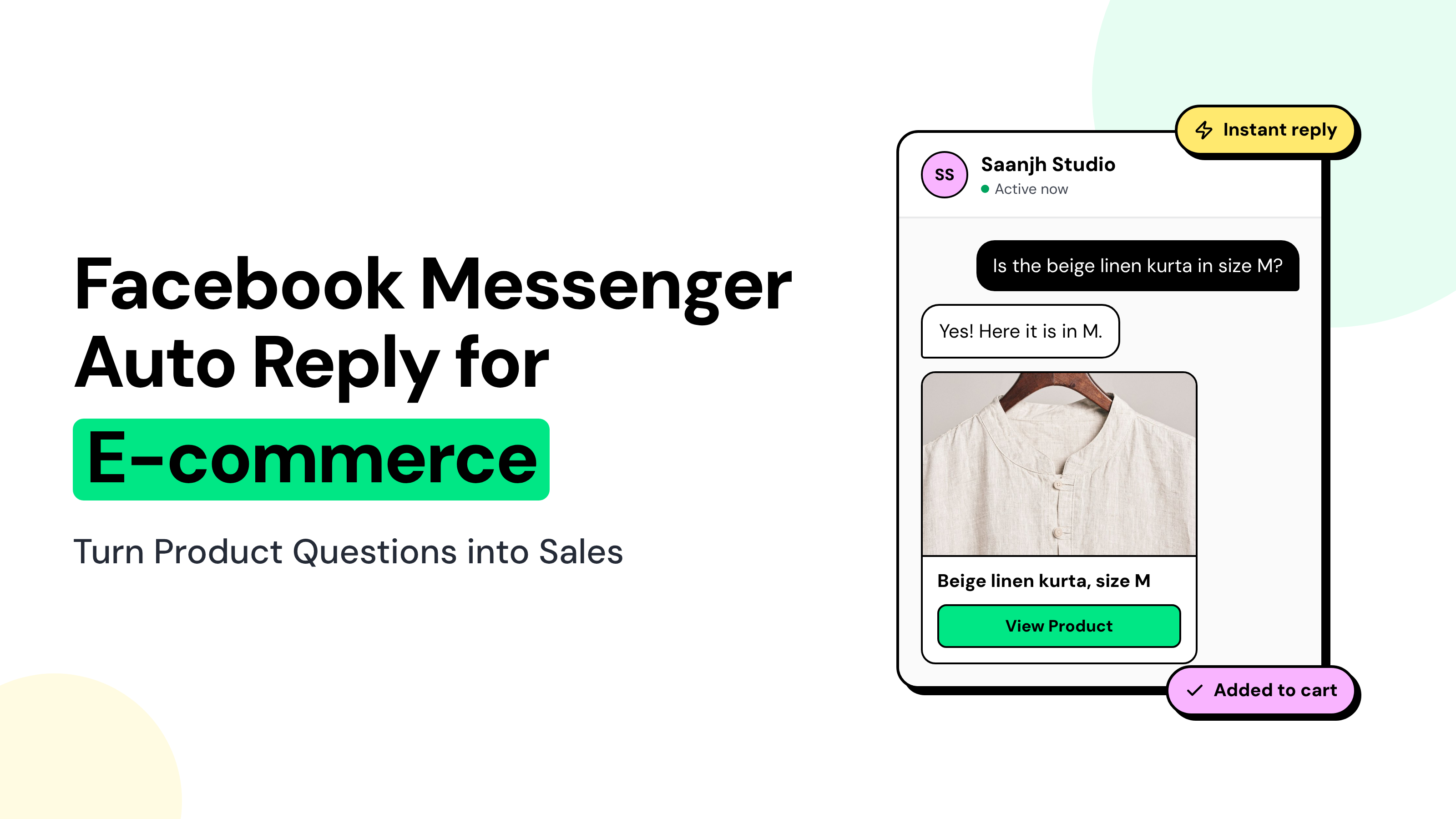
- A Facebook Messenger auto reply built on Wati's keyword rules answers "price?" and "is this still available?" the moment a shopper asks.
- One keyword rule per language keeps replies clean, because two matching rules both send a reply.
- A 3-question product finder asks for category, size or model, and budget, then sends the right product's photo and link.
- Wati's Messenger chatbots don't use buttons, so shoppers answer each question with a number.
- When a product is sold out, the bot asks for the shopper's WhatsApp number, with clear consent, as a restock opt-in.
- Watch how it works in this [Messenger DM demo](https://app.storylane.io/share/f06amwtvja0t).
Shoppers expect quick answers: 32% of consumers expect a DM response within one hour, according to Emplifi's 2025 US survey.
When your team takes too long to reply, that shopper may already be browsing a competitor's Page.
Wati's Messenger automation helps you catch these buying moments.
Instead of manually answering every "price?", "kitna?", or "precio", you can use multilingual keyword rules and a chatbot to auto-reply and recommend products, share product images and links, and guide shoppers towards the right variant.
In this guide, you'll learn how to build a Messenger automation flow for e-commerce brands, with keyword examples, a three-question product finder, and practical use cases across fashion, beauty, home décor, and consumer electronics.
Facebook Messenger Auto Reply: Meta Business Suite vs. Keyword Rules
Meta's free Inbox automations can greet shoppers and answer a few fixed questions. Keyword rules and a chatbot go further: they recognize "price?" in several languages and reply with the product.
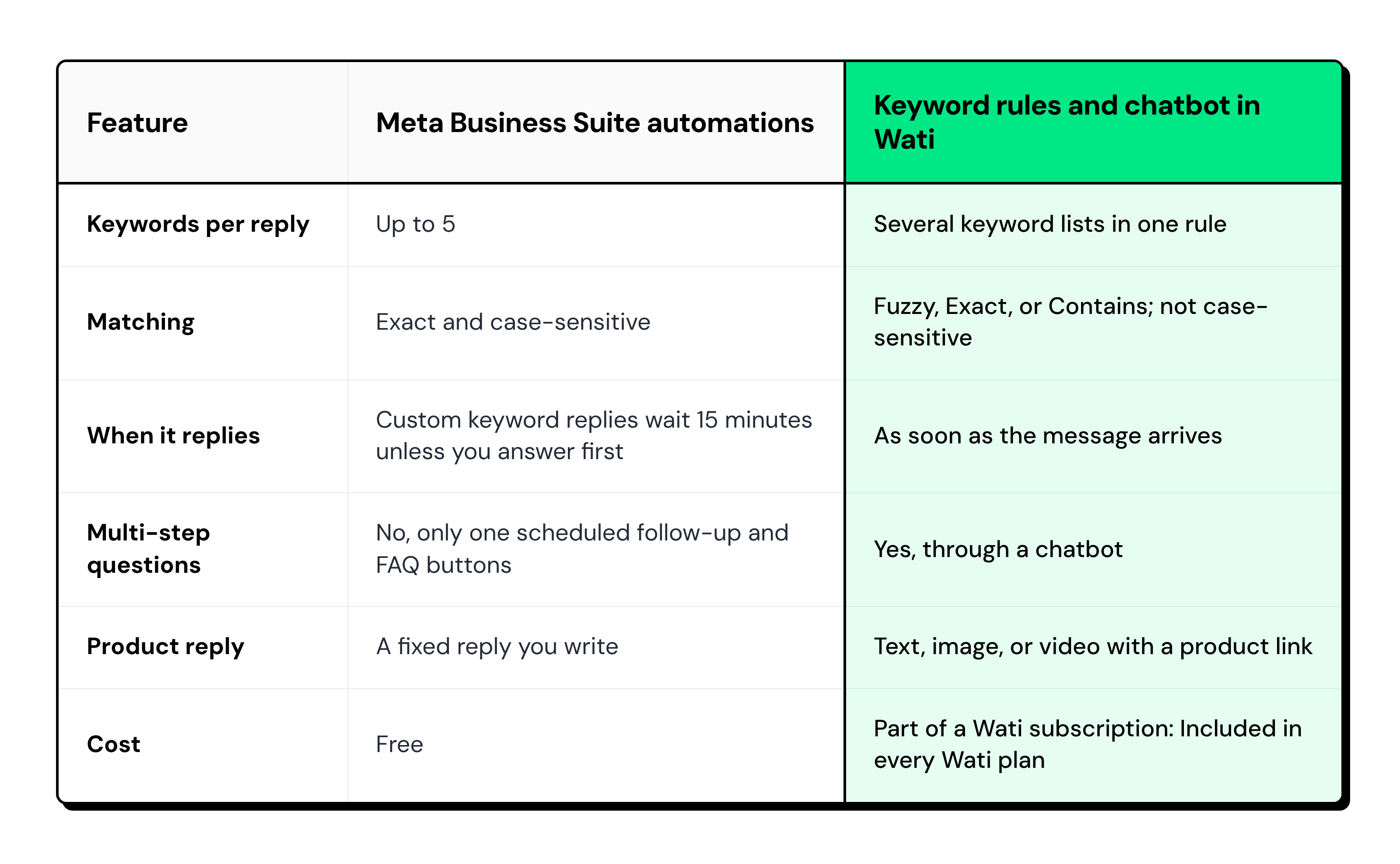
The native Facebook auto-reply tools suit opening hours and store addresses, as Meta's help center shows.
Product questions need more keywords, more languages, and a follow-up question or two.
i. The Messenger 24-Hour Rule and Other Bot Limits
- The shopper starts the conversation with a message or a comment.
- Rules and chatbots reply only within 24 hours of the shopper's last message. After that, your team can reply by hand for up to 7 days.
- Wati's Messenger chatbots don't support buttons or lists, so shoppers reply with a word or a number.
- In Wati, Messenger chatbots can't send templates or catalogs, so product answers are sent as text, images, or videos with a link.
Messenger Auto Reply Keywords for Price and Stock Questions by Market
Start with the three questions shoppers ask most: is it available, how much is it, and which size fits.
Then list how your market types them, including slang, short codes, and typos.
Market | Availability | Price | Size or variant |
|---|---|---|---|
India (English and Hinglish) | available, still available, available hai, stock me hai | price, pp, kitna, kitne ka, rate | size, size chart, color |
Middle East (Arabic and Arabizi) | متوفر, موجود, available | بكم, سعر, bkam, price | مقاس, لون |
Southeast Asia (Bahasa and Taglish) | ready kak, masih ada, ada stok, avail pa, meron pa | harga, berapa, magkano, hm | ukuran, warna, size |
LATAM (Spanish and Brazilian Portuguese) | disponible, hay stock, ainda tem, tem estoque | precio, cuánto, cuanto, preço, preco, quanto custa | talla, tono, tamanho, cor |
i. Fuzzy, Exactly, or Contains: How to Choose a Keyword Match Type
- Exactly: Use it for short codes that hide inside longer words, because Contains would match "pp" inside "shipping". Exactly fires only when the whole message is the keyword, so add "pp?" and "pp pls" as separate keywords.
- Contains: Use it for words that sit inside a sentence, such as "price" in "what's the price?"
- Fuzzy: Use it for words shoppers often misspell, such as "available" typed as "avaliable".
- Accents: Add accented and unaccented spellings of the same word, as in the LATAM row, until you've tested how your rules treat accents.
ii. Why One Keyword Rule per Language Prevents Double Replies
If two rules match the same message, both can fire, and the shopper gets two replies. Put every product keyword for one language into a single rule, and let that rule start the product finder.
Put every product keyword for one language into a single rule, and let that rule start the product finder.
How to Build a 3-Question Product Finder in a Messenger Chatbot
A product finder is a short Messenger chatbot that asks three questions and replies with the one product that fits. Ask for category first, then size, shade, or model, then budget.
Number every option, because Wati's Messenger chatbots don't support buttons. Here is the flow for a fashion store:
- Welcome: "Hi! Let's find it for you. Reply 0 at any time to talk to our team."
- Category: "What are you shopping for? Reply 1 for Kurtas, 2 for Dresses, or 3 for Co-ord sets."
- Size: "Which size? Reply 1 for S, 2 for M, 3 for L, or 4 for XL."
- Budget: "What's your budget? Reply 1 for under ₹1,000, 2 for ₹1,000 to ₹2,000, or 3 for above ₹2,000."
- Answer: The bot checks the three replies and sends the product photo with a link to its page.
- Sold out: "Size gone? Reply RESTOCK, and we'll keep you posted."
Keep these design rules in mind:
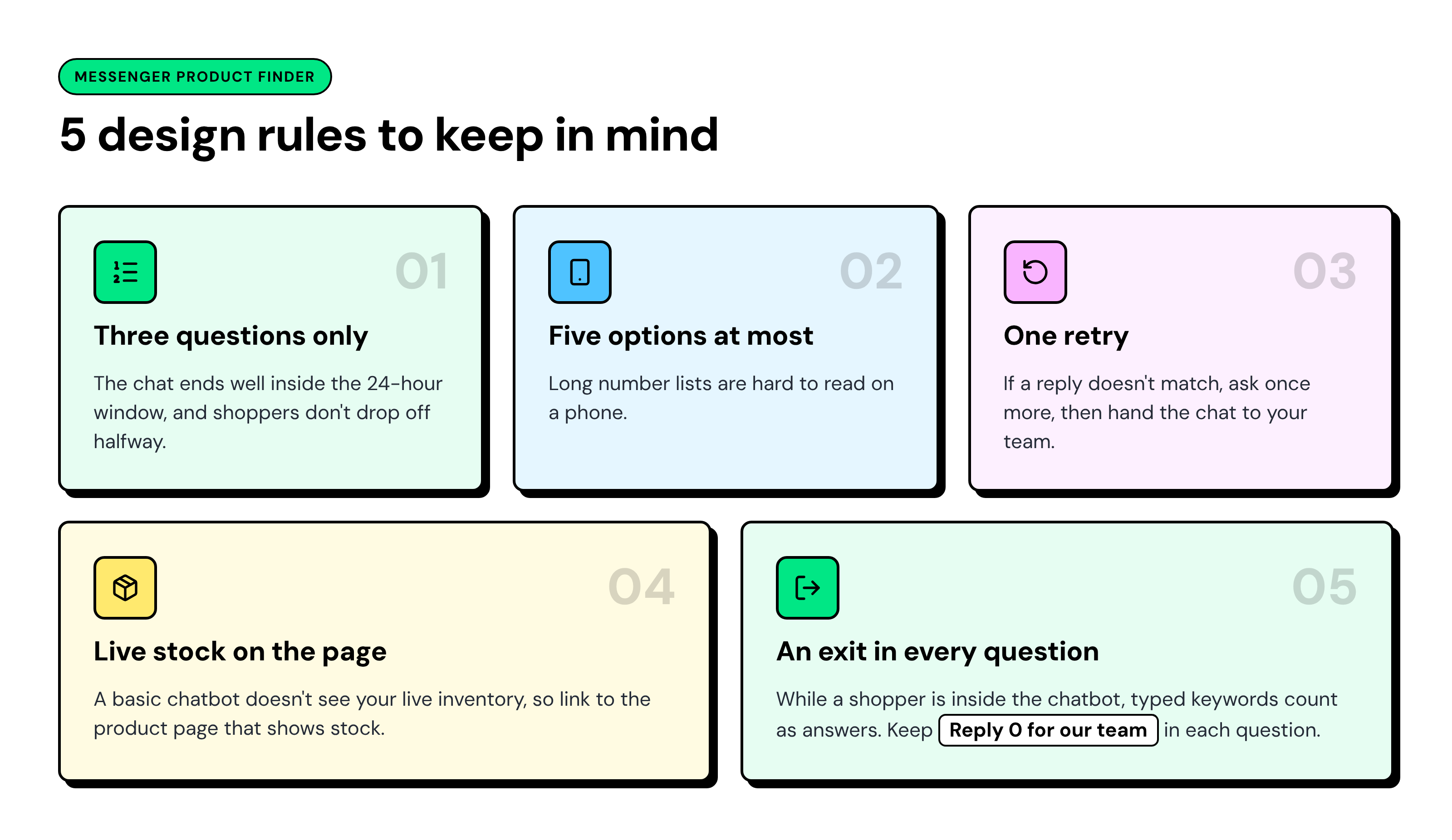
You can build this flow with the Send message, Ask a question, and Set a condition steps in the Messenger chatbot builder.
Messenger Auto Reply Examples for Fashion, Beauty, Home, and Electronics
Each example shows the shopper's first message, the rule that catches it, the finder answers, and the final reply. Store names, products, and prices are made up for illustration.
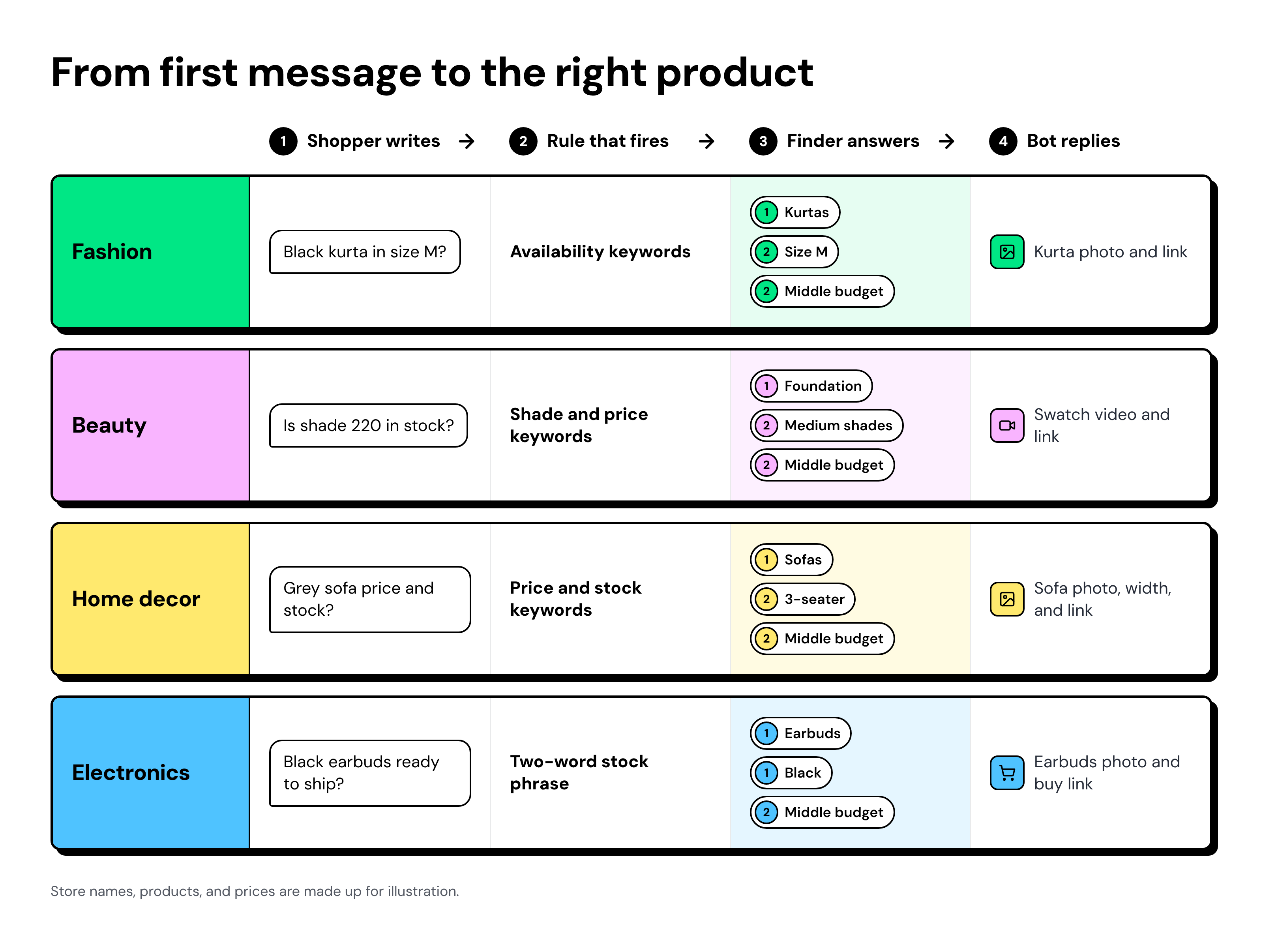
i. Fashion Store Example: Size and Price Questions in India
- Shopper writes: A Hinglish message asking if the black kurta is available in size M.
- Rule that fires: The Hinglish rule, triggered by an availability phrase from the India row.
- Finder answers: 1 for Kurtas, 2 for size M, 2 for ₹1,000 to ₹2,000.
- Bot replies: A photo of the black kurta in M and its product link.
Indian shoppers often mix Hindi and English in one message, so write the whole flow in the same mix.
ii. Beauty Brand Example: Shade Matching for LATAM Shoppers
- Shopper writes: A Spanish message asking if shade 220 is in stock and what it costs.
- Rule that fires: The Spanish rule, triggered by the shade and price words in the LATAM row.
- Finder answers: 1 for Foundation, 2 for the medium shade family, 2 for the middle budget band in pesos.
- Bot replies: A short swatch video of the medium shades, including 220, with a link to the shade page.
Group shades into three or four families, because nobody can pick from 40 shade numbers in a chat.
iii. Home Decor Example: Sofa Size and Stock in the Middle East
- Shopper writes: An Arabic message asking how much the grey sofa costs and whether it's in stock.
- Rule that fires: The Arabic rule, which catches the price and stock words in the Middle East row.
- Finder answers: 1 for Sofas, 2 for 3-seater, 2 for the middle budget band in dirhams.
- Bot replies: A photo of the grey 3-seater, its width, and the product link.
Add the width to the reply, because size is the next question home shoppers ask. Test whether your bot accepts numbers typed in Arabic digits as well as Western digits.
iv. Electronics Example: Earbuds by Model and Color in Southeast Asia
- Shopper writes: An Indonesian message asking if the black earbuds are ready to ship.
- Rule that fires: The Bahasa rule, matched on a two-word stock phrase from the Southeast Asia row.
- Finder answers: 1 for Earbuds, 1 for Black, 2 for the middle budget band in rupiah.
- Bot replies: The black earbuds' photo with a link to buy.
Use two-word phrases as keywords, not the word "ready" alone. With Contains, "ready" also matches "already".
How to Handle Out-of-Stock Questions with a Restock Opt-In
When a product is sold out, ask for the shopper's WhatsApp number, with clear consent, before the chat goes quiet. After 24 hours, automation can no longer message the shopper on Messenger.
Here is a reply you can adapt:
Size M is sold out right now. Want us to tell you on WhatsApp when it's back? Reply YES and type your WhatsApp number. We'll use it only for this restock. |
Follow four rules for every restock opt-in:
- Ask once: Don't repeat the request if the shopper ignores it.
- Get a clear YES: Never treat silence or a number on its own as consent.
- Keep the promise: Use the number only for the restock message you offered.
- Localize it: Write the consent line in each market's language and have a native speaker check it.
A WhatsApp number also lets you continue the conversation beyond Messenger as part of your e-commerce automation.
Facebook Auto Reply Not Working? 5 Fixes for Online Stores
Most Facebook auto-reply problems stem from timing, overlapping automations, and a bot that doesn't know which post the shopper saw.
- Unknown product: Or use Wati’s Comment-to-DM rule on that post: when a shopper comments “price” or “available”, Wati sends a Messenger DM with the product link, so the product is never unknown. Ask in the first finder question, because a screenshot without text won't trigger a keyword rule.
- Double replies: Meta's own instant reply or away message can fire alongside your rules or get in their way. Turn off the native automation that overlaps.
- Paused automations: Turning on Meta Business Agent pauses Meta's native automations while the AI is active, so check what's still running.
- Old prices: Update the product photos and links in your replies before every sale.
- Late replies: After 24 hours, only your team can reply for up to 7 days. A shared Team Inbox keeps those chats in view.
- Bot not starting: A chatbot won’t start if the chat is assigned to a teammate or another chatbot is already running. Set the chat back to the bot, or end the active flow.
How Wati Automates Facebook Messenger Product Questions
Wati connects your Facebook Page and handles product questions with five building blocks.
- Welcome rule: Welcome and out-of-office rules: Both are created when you connect your Page. Turn them on to greet first-time shoppers, tell them which words to type, and reply after hours.
- Keyword rules: Use a Messenger trigger and a keyword filter with Fuzzy, Exactly, or Contains matching, one rule per language.
- Reply Material: Sends text, an image, or a video with the product link.
- Chatbot: Runs the 3-question product finder with Send message, Ask a question, and Set a condition steps.
- Team Inbox: Passes any chat the bot can't answer to your team.
- Wati AI: Translates messages, sums up long chats, and suggests replies, so your team can answer Arabic, Bahasa, or Spanish chats the bot hands over.
Messenger chats land in Wati's Team Inbox, so your social commerce conversations stay in one place.
Turn "Is This Still Available?" Messages into Orders
Every "Is this still available?" message is an opportunity to move a shopper closer to buying.
Answering availability is only the first step.
Shoppers also want to know the price, find the right size or shade, compare options, and check whether their preferred variant is in stock.
With Wati's Facebook Messenger automation, you can handle these questions through multilingual keyword rules and a guided product finder.
Share relevant product images and links, help shoppers discover the right products, and collect consent-based WhatsApp opt-ins for restock updates.
Instead of letting unanswered messages turn into lost sales, give shoppers the information they need while they're still interested.
Book a demo to see how Wati can help your ecommerce business turn everyday Messenger conversations into buying opportunities.
Frequently asked questions
How do I Set Up an Auto Reply on Facebook Messenger?
You set up basic auto replies in Meta Business Suite under Inbox, then Automations. For multilingual keyword rules and a product finder chatbot, connect your Facebook Page to a platform such as Wati.
Can I Set Up an Auto Reply on a Personal Messenger Account?
No, Messenger auto replies work for Facebook Pages, not personal accounts. Marketplace sellers can instead turn on Meta AI auto replies when they create a listing.
Is There a Free Facebook Auto Reply?
Yes, Meta's Inbox automations in Meta Business Suite are free. Custom keyword replies accept up to five exact, case-sensitive keywords and wait 15 minutes, which limits them for product questions.
Can a Messenger Chatbot Tell Shoppers When a Product is Back in Stock?
Not on Messenger after 24 hours, because bots reply only within 24 hours of the shopper's last message. Instead, ask for their WhatsApp number and a clear YES while the chat is open.
Why Would a Messenger Auto Reply Send Two Messages?
Two messages usually mean two matching rules both replied, or Meta's instant reply fired too. Merge keywords into one rule per language and turn off any overlapping native automation.
Related posts
- TikTok Order Tracking for Fashion Brands: Handle WISMO and Size Exchanges in One Reply
TikTok order tracking for fashion brands: a chatbot checks Shopify in the first reply, routes size exchanges to ops, and moves shipping updates to WhatsApp.
- Warranty Claims on TikTok: Customer Service for Phone Accessory Brands
What does a good warranty claim process look like for phone accessory brands on TikTok? Collect the order, model, and a photo in DMs, then hand off.
- Selling Skincare on TikTok Shop: How Beauty Brands Handle Every Conversation Around the Shop
How do beauty brands sell on TikTok Shop? Let the Shop handle checkout, and answer skin-type, shade, and creator DMs from one team inbox.
- How Retail Brands Sell on Instagram Without Missing a Single DM
To sell on Instagram, reply to price DMs fast, turn comments into orders, and follow up on WhatsApp. See 7 retail use cases that make it work.