
Too Long? Read This First
- Social commerce lets customers discover products, ask questions, and buy through social media and messaging apps.
- It differs from e-commerce, which focuses on online stores and marketplaces, and social selling, which focuses on building relationships and generating leads.
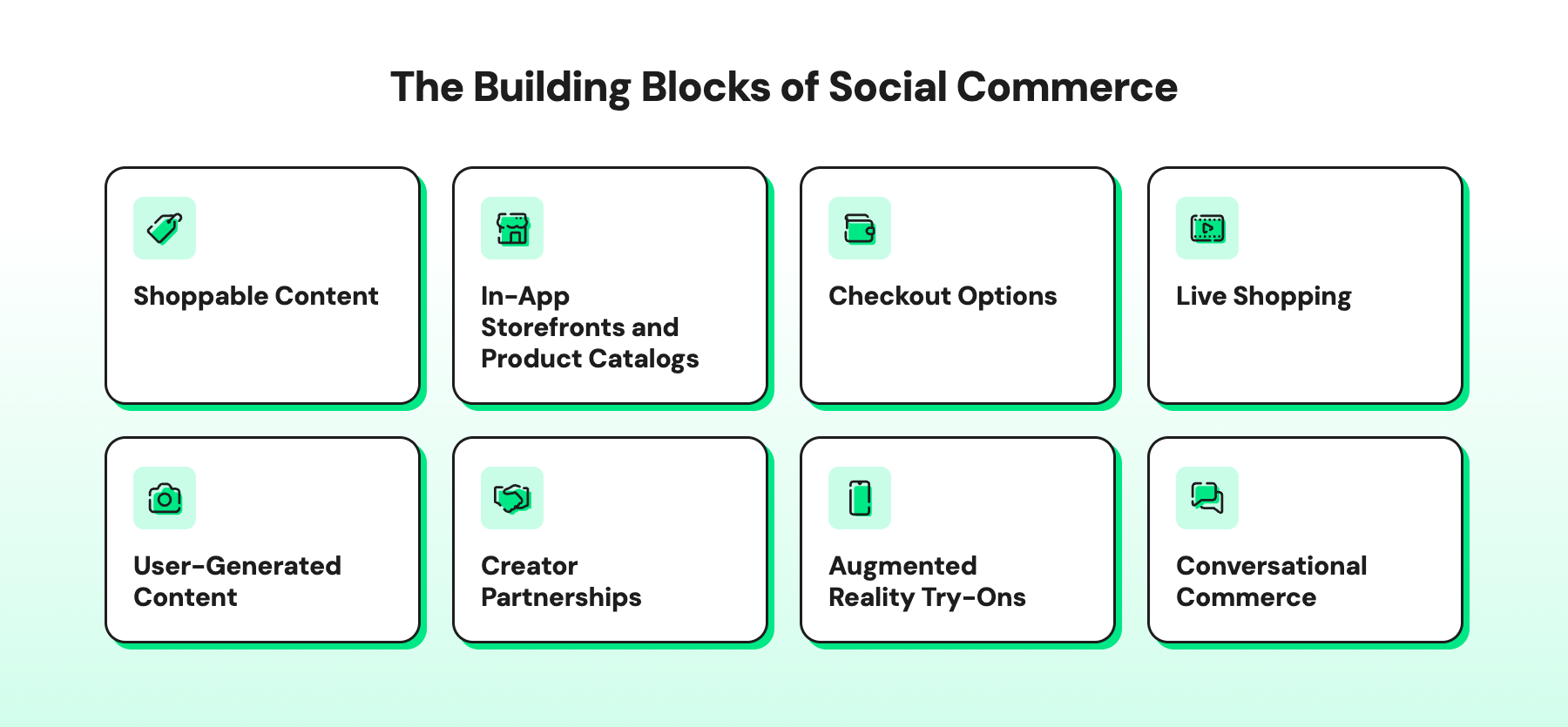
- Key elements include shoppable content, product catalogs, checkout options, live shopping on platforms like TikTok, creator partnerships, user-generated content, AR try-ons, and conversational commerce.
- An omnichannel approach connects customer conversations across social platforms and messaging apps, helping shoppers move between channels without losing context.
- Brands can use Wati to manage supported channels in a shared Team Inbox, answer product questions with Astra, share WhatsApp catalogs, and follow up with opted-in customers.
- Click-to-WhatsApp Ads, abandoned cart messages, and targeted campaigns can help turn social media interest into purchases and repeat orders.
The global social commerce market is worth $2.11 trillion in 2026 and is projected to grow about 29% a year through 2031, according to Mordor Intelligence. But most of these sales don’t happen in one app.
A customer might see your product in an Instagram Reel, ask about sizes in a DM, and pay on WhatsApp or your website. If your team handles each app separately, some of those questions go unanswered, and the sale goes to your competitor.
That’s why social commerce works best as part of an omnichannel setup, where every channel shares the same customer history.
Wati’s shared Team Inbox gives you that setup. Conversations from WhatsApp, Instagram, Facebook Messenger, TikTok, RCS, SMS, and WebChat land in one place, so your team can see every chat and close the sale.
In this guide, we explain the benefits and key elements of social commerce, how a sale moves across channels, and five ways to increase sales with Wati.
What is Social Commerce?
Social commerce is the buying and selling of products and services through social media and messaging apps such as Instagram, Facebook, TikTok, and WhatsApp.
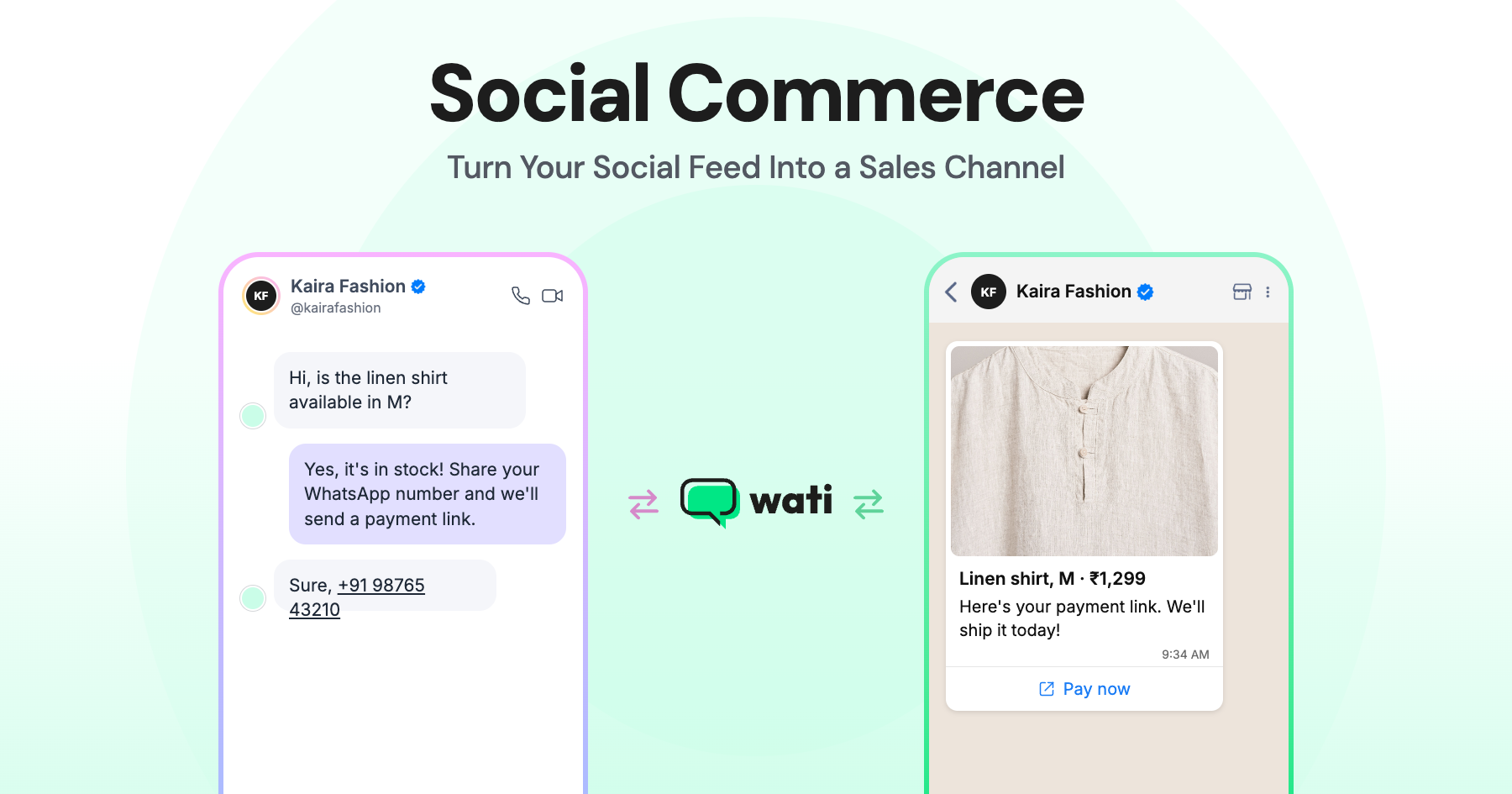
Customers discover products, ask questions, and buy either inside the app or through a checkout link.
Common examples of social commerce include:
- Tapping a product tag on an Instagram post to view or buy an item
- Buying products during a TikTok LIVE
- Clicking a Facebook ad that opens a WhatsApp chat, then ordering from a product catalog
- Asking a brand about a product in a DM and paying through a checkout link
- A reseller sharing a supplier’s products with their own network on WhatsApp and taking orders in the chat
When brands connect these interactions with their website, marketplaces, and stores, social commerce becomes part of a broader omnichannel sales strategy.
Social Commerce vs. E-commerce vs. Social Selling
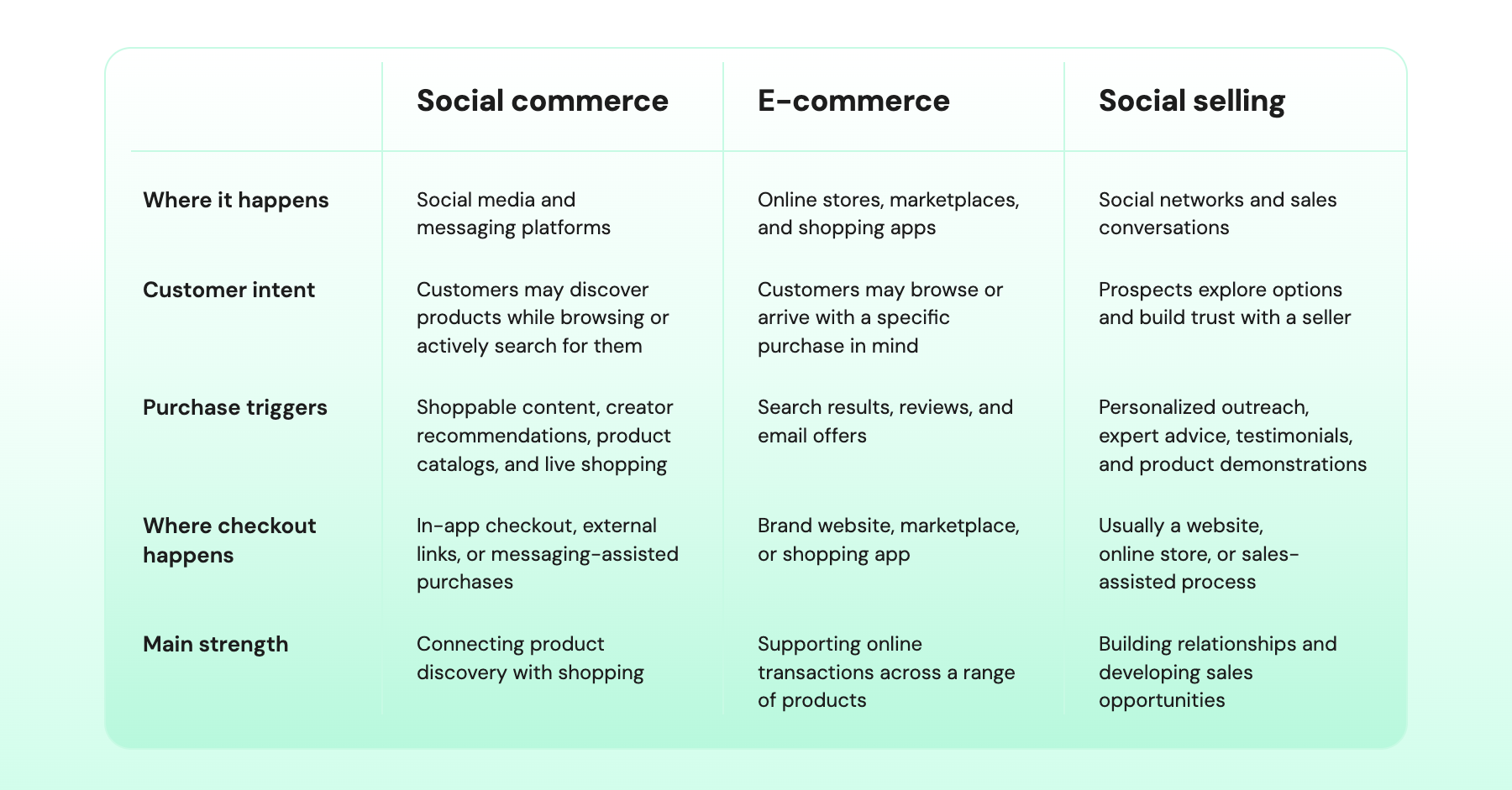
Social commerce, e-commerce, and social selling support online sales in different ways. The main differences are where customers discover products, how brands engage with them, and how purchases happen.
- Social commerce: Selling through social media and messaging apps. Shoppers discover a product while scrolling and buy in the app, in a chat, or through a checkout link.
- E-commerce: Selling through your own website, app, or a marketplace like Amazon. Shoppers usually arrive with a need and search for what they want.
- Social selling: Using social media to build relationships and generate leads. It’s common in B2B, where deals take weeks or months to close.
What Are the Benefits of Social Commerce?
Social commerce lets brands sell where customers already spend time online. Products are easier to find, shoppers can ask questions on the spot, and brands learn what customers want.
- Fewer Steps to Buy
A shopper taps a product in a social post and goes straight to the product page or checkout. Fewer steps between seeing a product and paying for it give shoppers fewer chances to drop off.
It also brings in impulse buys. Someone who wasn’t shopping can spot a product in their feed and order it in a minute, which rarely happens when they have to find your website first.
- Lower Customer Acquisition Costs (CAC)
Every share, tag, or repost shows your product to people who don’t follow you, and you don’t pay for those views.
Creator partnerships add to that reach, putting your product in front of an audience that already trusts the creator.
- Trust From Customer Reviews
Shoppers check comments, reviews, and customer photos before they buy. Seeing how other people use a product makes the decision easier.
- Faster Answers to Product Questions
If someone comments “price?” and gets an answer within minutes, they can order while they’re still looking at the post. If the reply takes hours, they’ve usually scrolled on and moved to another brand.
- More Relevant Offers
Brands can see what each customer asked about in DMs, which posts they commented on, and what they ordered before. If a customer asked about running shoes last month, you can message them on WhatsApp when a new running range arrives, as long as they’ve opted in.
- Buying on the Channel Customers Prefer
Some customers like to browse on Instagram, while others would rather order on WhatsApp or your website. Letting them buy where they’re most comfortable removes one more reason to drop off.
What Are the Key Elements of Social Commerce?
Social commerce is built on a set of elements that work together across the buying process. Here’s what each one does and how it helps turn interest into a sale.
1. Shoppable Content
Shoppable content is a post, Reel, Story, or video with a product tag or link. Shoppers tap it to see the price and details instead of searching for the product later.
Many shoppers comment "price" or "link" instead of tapping. Wati's Instagram automation replies to these comments with a DM when someone uses a keyword you choose.
2. In-App Storefronts and Product Catalogs
An in-app storefront is a shop inside a social platform. Customers browse your products by collection without opening a browser.
A WhatsApp catalog works the same way inside a chat. With Wati, you can share it in a conversation so shoppers can browse your products without leaving WhatsApp.
3. Checkout Options
Customers pay inside the app, on your website, or through a payment link sent in a chat. In-app checkout is available on some platforms, such as TikTok Shop in supported countries, while Facebook and Instagram Shops now send buyers to your website to pay.
Every extra step at checkout gives shoppers a reason to leave. For orders that start in a chat, a payment link lets the customer pay straight from the chat.
4. Live Shopping
Live shopping is a livestream where a host shows products, answers questions, and shares links to buy. Viewers see the product in use and get answers before the stream ends.
Brands usually go live around a launch, a sale, or a limited drop. A stream-only discount gives viewers a reason to buy before the stream ends.
5. User-Generated Content
User-generated content (UGC) is photos, videos, and reviews made by your customers. An unboxing video or a photo of a sofa in a real living room shows what your own product photos can't.
The best time to ask for UGC is a few days after the order ships, using a scheduled follow-up. With Wati, you can send opted-in customers a WhatsApp message asking for a review or a photo.
6. Creator Partnerships
A creator partnership is when a creator features your product and links to where their followers can buy it. Followers often trust these recommendations more than they trust ads.
Fit and engagement matter more than follower count. Give each creator a unique link or discount code so you can see which partnerships bring in sales.
For conversation-led sales, give each creator their own WhatsApp link with a prefilled message, such as “Hi, I saw this on @creatorname.” Every chat that starts from that link tells you which creator brought the shopper in, even when the sale closes in the chat rather than on your website.
7. Augmented Reality Try-Ons
Augmented reality (AR) try-ons let shoppers use their phone camera to see how glasses or makeup look on them, or how furniture fits in a room. They matter most when color, fit, or size decides the purchase.
8. Conversational Commerce
Conversational commerce is selling through chat on Instagram DMs, Messenger, or WhatsApp. A shopper asks "Do you have this in medium?" and gets an answer, a product link, or a payment link in the same thread.
Astra, Wati’s AI agent for customer conversations, answers questions like this on WhatsApp and passes the chat to your team when a person needs to step in.
How Does Social Commerce Work Across Channels?
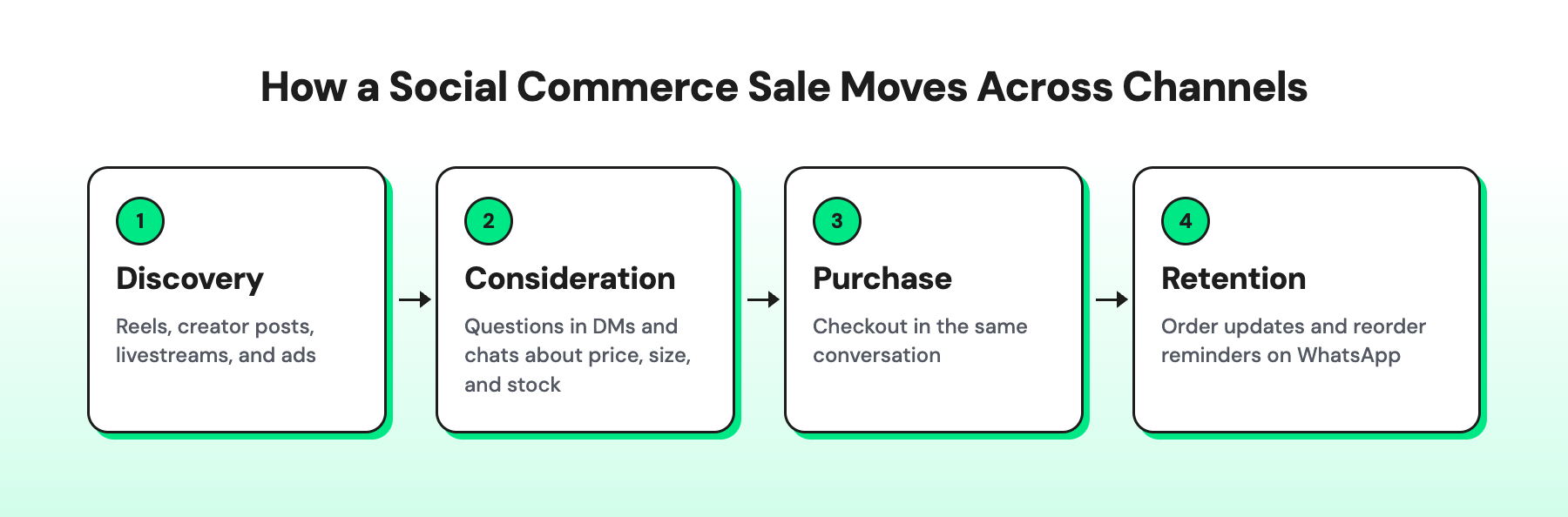
Social commerce moves through four stages: discovery, consideration, purchase, and retention. A shopper may use a different channel at each stage, so the sale depends on how smoothly they can move between content, conversations, and checkout.
Discovery
A shopper finds a product in a Reel, a creator’s post, a livestream, or an ad, often without looking for it. Their first move is usually small: a like, a save, a comment like “price?”, or a tap on an ad.
What good looks like: Every signal of interest, including comments, gets a response that opens a conversation.
Consideration
Before buying, shoppers check reviews and comments, then ask about price, size, stock, or delivery. In social commerce, these questions usually arrive as DMs and chats, not search queries.
What good looks like: Answers arrive in minutes, on the channel the shopper used, without asking them to repeat themselves.
Purchase
This is where most social commerce sales are lost. A shopper who was ready to buy in a chat gets sent to a website, faces a long checkout, or can’t find their preferred payment method, and the moment passes.
What good looks like: Shoppers can buy in as few steps as possible, ideally in the same conversation where they asked their question.
Retention
The first order is the start of the relationship. Order updates, care tips, review requests, and reorder reminders bring customers back. On social platforms, you reach followers only through the feed, and Instagram lets you message a customer only after they contact you, within 24 hours for automated replies and 7 days for a person.
What good looks like: Customers who opted in can be reached directly on a channel you own, such as WhatsApp, so repeat sales don’t depend on the algorithm.
5 Ways to Increase Social Commerce Sales With Wati
Wati is an agentic customer engagement platform that helps brands turn conversations on WhatsApp, Instagram, Messenger, TikTok, WebChat, and other channels into sales.
Here’s how it supports each stage of the journey.
1. Turn Ad Clicks and Comments Into Conversations: Discovery
A Click-to-WhatsApp Ad (CTWA) opens a WhatsApp chat instead of a landing page, so shoppers can ask a question the moment they’re interested.
Comments are the other half of discovery. When someone comments “price” or “link” on a post, Reel, or Story, Wati’s Instagram automation can reply with a DM, so a public comment becomes a private sales conversation.
Ad comments matter most here, because they come from people who already saw your offer.
With conversion tracking set up, Wati can tell Meta which chats turned into qualified leads or purchases. That shows you which ads bring in buyers and helps Meta find more people like them.
2. Answer Every Message From One Inbox: Consideration
Wati’s shared Team Inbox brings Instagram, Messenger, WhatsApp, and TikTok messages into one place, so your team doesn’t switch between apps.
Astra responds to FAQs and common questions on WhatsApp and Instagram DMs at any hour.
If a shopper needs a person, Astra passes the chat to your team with full chat history in the thread. AI Summary shows what the shopper has already asked, and AI Translate helps your team reply in the shopper’s language.
While the Instagram chat is active, ask for the shopper’s WhatsApp number and save it to their contact, so you can keep the conversation going on WhatsApp after the Instagram reply window closes.
3. Close the Sale Inside the Chat: Purchase
If a shopper asks, “Do you have this in blue?”, show them. With a WhatsApp catalog, your team can share the product, price, and details in the conversation and send a payment link, so the shopper never has to leave the chat.
For shoppers who do go to your website and leave, a WhatsApp abandoned cart message can bring them back.
Once your store is connected, Wati sends a reminder with a link to their cart to shoppers who entered their phone number at checkout and opted in to WhatsApp messages.
4. Confirm Orders and Build Trust: Purchase
Social commerce orders often come from first-time buyers who don’t know your brand yet. A quick WhatsApp confirmation reassures them that the order went through.
For cash-on-delivery orders, Wati can ask the customer to confirm or cancel on WhatsApp before you ship, so fewer orders are refused at the door.
5. Bring Customers Back for Their Next Order: Retention
Customers who opted in on WhatsApp can be reached directly, without depending on the feed. With WhatsApp campaigns, you can send new arrivals, restock alerts, and offers.
A drip campaign can send a thank-you and a review request a few days after the order ships, then a reorder reminder a few weeks later.
Wati AI Agents, currently in beta, can help you decide who to message. For example, the Ready-to-Buy agent proposes a segment of customers showing buying intent, and the Campaign Idea Finder suggests campaign ideas based on what customers ask about most.
Blacklyf's 3x Conversion Lift: From Social Ads to WhatsApp Sales
Blacklyf, a direct-to-consumer audio and wearables brand in Uganda, had a trust problem. Shoppers were wary of buying online, and its website converted only 1.5% to 1.8% of visitors.
Blacklyf switched to CTWA on Meta, so shoppers who tapped an ad on social media landed in a WhatsApp chat instead of on its website.
Using Wati's keyword automation, it sent short messages with product details, press coverage, and influencer and customer testimonials.
Leads were tagged by source in shared Team Inbox, and shoppers who went quiet got a follow-up offer within WhatsApp's 72-hour free messaging window that Click-to-WhatsApp Ad conversations open.
The results:
- 3x higher conversion rate: from 1.5% on the website to 4.8% on WhatsApp
- 21% more leads
- 60% lower customer acquisition costs
Grow Your Social Commerce Sales With Wati
Shoppers now discover products in their feeds and buy them in their chats. To win those sales, your team needs to be ready on every channel the moment a shopper reaches out.
Wati brings your WhatsApp, Instagram, Messenger, TikTok, WebChat, and RCS conversations into one shared Team Inbox, so no question gets missed. Click-to-WhatsApp Ads turn ad clicks into conversations, and Astra answers common questions on WhatsApp at any hour.
Book a demo to see how Wati turns your social conversations into sales.
Frequently asked questions
Is social commerce good for small businesses?
Yes. You can start with a free business profile, a product catalog, and a WhatsApp number, without a large ad budget.
Do I need a website for social commerce?
Not always. On Facebook and Instagram, buyers are sent to a website to check out, but you can also take orders on WhatsApp by sharing products from a catalog and sending a payment link in the chat.
Which platform is best for social commerce?
It depends on where your customers spend time and how your product looks on camera. Instagram and Facebook work well for discovery, while WhatsApp works well for answering questions and closing the sale.
Is WhatsApp part of social commerce?
Yes. WhatsApp is a messaging app where shoppers can ask questions, browse a catalog, and place an order, so it often handles the final step of a social commerce sale.
How do you measure social commerce success?
Track sales by channel, how many chats turn into orders, and how quickly your team replies. Add tracking links to your bio, Stories, and ads to see which channel started each sale.
Related posts
- Instagram Comment Automation: How It Works and How to Set It Up in Wati
Instagram comment automation auto-replies to comments and DMs commenters within seconds via Meta's API. Covers strategy, use cases, and Wati setup.
- Shared Team Inbox for Instagram: A Buyer’s Checklist for 2026
Use this fastest checklist to evaluate any shared team inbox for Instagram, which covers DMs, comments, automation, and multi-channel support.
- How to Send Bulk Messages on WhatsApp Without Getting Blocked
Learn how to send bulk WhatsApp messages without getting blocked. Compare the WhatsApp Business app and API, messaging limits, costs, templates, and best practices for safe, compliant bulk messaging.
- How to Set Up a TikTok Business Account: Step-by-Step Guide
Set up a TikTok Business Account step by step: switch from personal, pick a category, add your profile, and unlock ads and analytics.