
Too Long? Read This First
- E-commerce customer segmentation groups shoppers by shared traits, such as purchase history, browsing behavior, and channel activity.
- Omnichannel segmentation connects customer data across channels, so each shopper gets one consistent message instead of repeated offers.
- RFM analysis scores customers on recency, frequency, and monetary value. Add channel engagement data to know where to reach each segment.
- Start with six revenue segments: cart abandoners, first-time buyers, repeat customers, VIP customers, at-risk customers, and channel-silent customers.
- Measure results by segment and channel, and stop campaigns on every channel once a customer buys or replies.
Many e-commerce brands store purchase history and engagement data in separate systems, so no team sees the full customer. Mastercard Dynamic Yield's 2026 report found that 62% of surveyed e-commerce professionals had not aligned on a single audience strategy.
E-commerce customer segmentation groups shoppers by their behavior, preferences, and purchase history. When every channel shares these segments, your omnichannel marketing stays consistent for each customer.
This guide covers segmentation methods, RFM analysis, and the six customer segments to prioritize first. You'll also see how to activate each segment across WhatsApp, Instagram, Messenger, and ads with Wati.
What is E-commerce Customer Segmentation?
E-commerce customer segmentation is the practice of dividing an online store's customers into smaller groups with shared traits.
These groups can be based on factors such as purchase history, browsing behavior, location, demographics, lifecycle stage, or campaign engagement.
Each group, called a customer segment, receives offers and product recommendations designed around its buying patterns. For example, first-time buyers get a second-order nudge, while monthly reorderers get a replenishment reminder.
Most stores already have the data to segment well. It’s just scattered across Shopify, ad dashboards, and hundreds of chats nobody has time to read. AI-powered customer engagement platforms such as Wati bring it together.
Your Shopify orders, ad clicks, and every WhatsApp and Instagram conversation feed into one customer profile, and AI Segments turn that profile into ready-to-use audiences: first-time buyers, monthly reorderers, and shoppers who asked about price but never checked out.
Wati AI Agents even spot customers showing purchase intent in chat and save them as a segment for your next campaign. So the reorder reminder goes to the people who actually reorder, and nobody gets a first-order discount after their fifth purchase.
How is Omnichannel Segmentation Different From Single-Channel Segmentation?
Single-channel segmentation groups customers based on data from a single channel, such as email, a website, or WhatsApp.
Omnichannel segmentation connects customer data across channels to build a more complete view of each customer and apply consistent segments across marketing touchpoints.
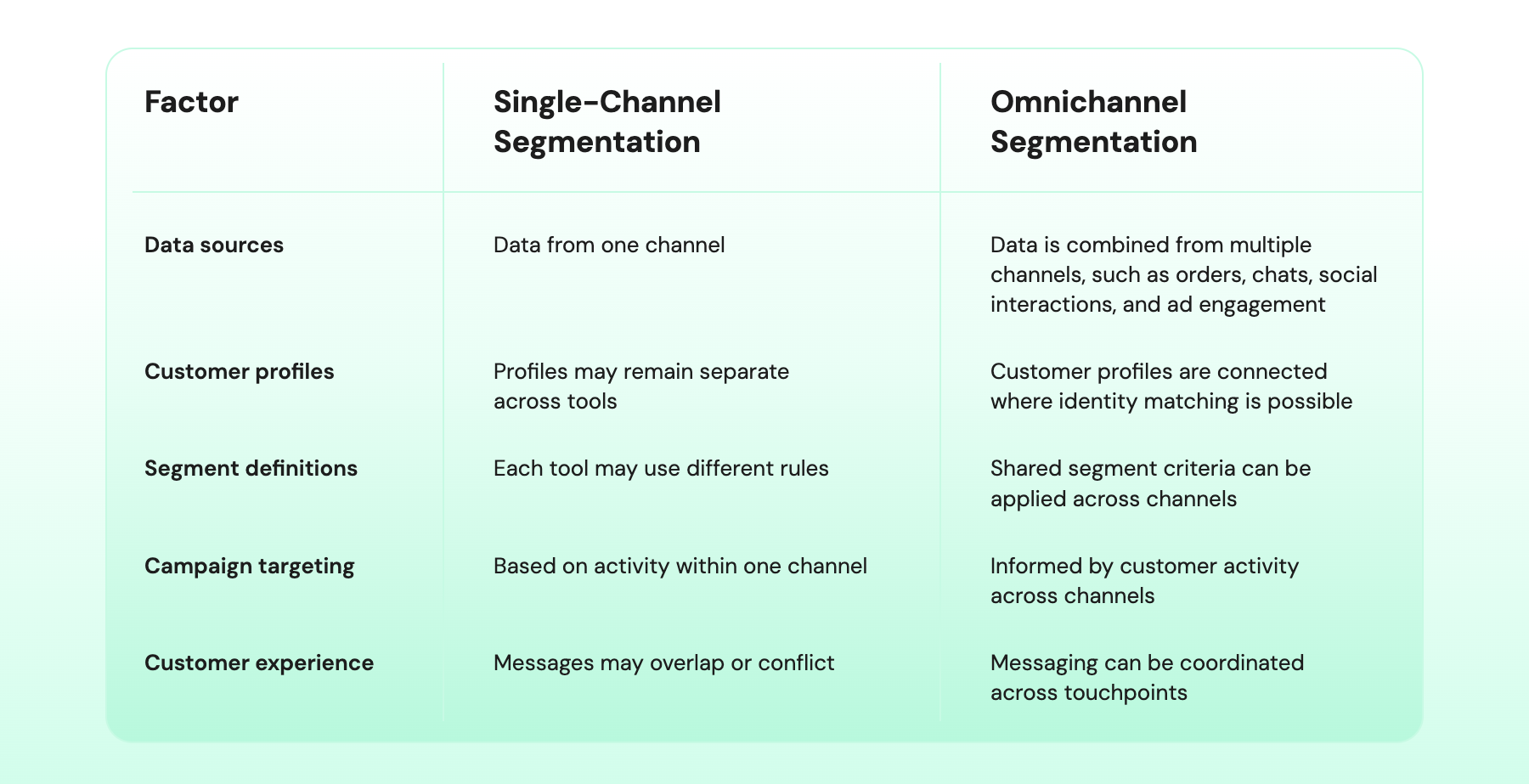
For example, a customer may ignore your emails but reply to your WhatsApp messages. Single-channel segmentation may mark them as inactive, whereas omnichannel segmentation recognizes that they remain engaged on WhatsApp.
Why is Customer Segmentation Important for Omnichannel Marketing?
Customer segmentation helps online stores decide which shoppers should receive each message and on which channel.
Without it, every new channel can repeat the same offers, even when shoppers are at different stages of the buying journey.
Attentive’s 2026 research found that 54% of shoppers regularly receive reminders for products they have already purchased, and 67% are more likely to unsubscribe when these reminders continue after purchase.
Shared segments help online stores avoid these mistakes and improve marketing in four ways:
- Fewer wasted reminders: When a shopper completes a purchase, update their segment across channels. Stop cart reminders and send relevant post-purchase messages instead.
- Protected margins: Keep repeat buyers who pay full price out of discount campaigns. Reserve offers for price-sensitive shoppers or customers who need an incentive to complete a purchase.
- Better WhatsApp performance: Irrelevant messages can lead to more blocks and reports. Meta’s messaging policy explains how negative feedback can affect a business’s ability to communicate.
- Lower messaging and ad costs: Meta charges for delivered WhatsApp marketing messages, with rates based on the recipient’s country. Segment-based targeting can help reduce spend on messages and ads aimed at shoppers who have already purchased.
What are the Main Types of E-commerce Customer Segmentation?
The main types of e-commerce customer segmentation are demographic, geographic, behavioral, value-based, psychographic, and channel preference.
Each type shows a different side of your customers and how to personalize their shopping experience.
1. Demographic Segmentation
Demographic segmentation groups shoppers based on age, gender, income, job role, and household status. Stores collect this information through account sign-ups, customer surveys, and checkout forms.
A beauty brand might promote anti-aging skincare to customers over 35 and acne care to younger shoppers. Demographics show who customers are, but not why they buy.
Tip: Don’t segment on demographics alone. Pair each demographic group with a behaviour signal, for example “customers over 35 who bought a moisturiser in the last 60 days” instead of just “customers over 35.”
Demographics tell you who someone is; adding a recent action tells you what they’re ready for now, so the anti-aging serum goes to the people actually shopping for skincare, not everyone in the age bracket.
How Wati helps: Customer details from your Shopify store, like account information and order history, sync into Wati, so you can combine a demographic attribute with purchase behaviour in one segment.
On the Business plan, Shopify segment sync keeps those segments updated as customers place new orders. AI Segments can also suggest groupings from the same data, so building “over 35 + recent skincare buyer” doesn’t take a spreadsheet.
2. Geographic Segmentation
Geographic segmentation groups customers by location-based data such as country, region, city, language, currency, seasonal demand, store proximity, or climate. Shipping addresses tell stores where each customer is located.
An apparel store can promote rain gear in regions where the monsoon has started. Location also helps stores tailor delivery timelines, regional promotions, and seasonal campaigns.
Tip: Use the shipping address, not the sign-up country, and time campaigns to local moments rather than national dates. India’s monsoon is a good example: it reaches Kerala and Mumbai in June, but Chennai’s heavy rains come in October and November.
A single nationwide “monsoon sale” arrives too early for some cities and too late for others.
Example of how Wati helps: An apparel brand syncs its Shopify customers into Wati, so each contact carries the city from their last shipping address.
In early June, the brand creates a segment of customers in Mumbai and Pune and sends a WhatsApp campaign for raincoats and waterproof sneakers.
In October, it reuses the same template for Chennai customers.
3. Behavioral Segmentation
Behavioral segmentation groups customers based on their actions, such as browsing products, abandoning carts, making purchases, and responding to marketing messages. Stores collect this data from website analytics, order history, and campaign activity.
This data helps stores identify first-time buyers, regular shoppers, and customers who have stopped purchasing. It also shows which product categories customers prefer and whether they tend to shop during sales.
Tip: Don’t overlook what shoppers say in chat. A customer who asks “Is this available in size M?” or “When will this restock?” has told you more about their intent than any page view.
Treat chat questions as behaviour signals alongside clicks and purchases, and act on them within a day or two, while the interest is still fresh.
How Wati helps: Wati tracks how each contact engages with your WhatsApp campaigns, so you can retarget people based on whether they read, replied, or clicked. Ready-made segments such as Highly Engaged, Winback, and At Risk update automatically from that activity.
Wati AI Agents also scan conversations for purchase intent, so shoppers who asked about price, sizes, or delivery are flagged as ready to buy and can be added to a segment for your next campaign.
Shoppers who abandon their cart get an automatic WhatsApp reminder from the Shopify integration.
4. Value-Based Segmentation
Value-based segmentation groups customers by how much or how little value they bring to your business. Common segments include high-value customers, loyalty members, churn-risk buyers, and low-margin customers.
For example, you can automatically add high-value customers to a VIP campaign and send win-back messages to churn-risk customers.
Tip: Rank customers by profit, not just revenue. A shopper who spends a lot but only buys during 40%-off sales, or returns half their orders, may be worth less than a quieter customer who pays full price.
Once you know who your truly valuable customers are, keep them out of discount campaigns. They’ll buy anyway, and every unnecessary coupon eats into your margin.
How Wati helps: With Shopify segment sync on the Business plan, spend-based segments you build in Shopify, such as “customers who spent over ₹10,000 this year,” appear in Wati and stay updated as new orders come in.
You can send that group a VIP early-access campaign on WhatsApp and leave them out of sale broadcasts. For churn risk, Wati’s Winback and At Risk segments flag contacts who haven’t messaged you in 30 to 90 days or more.
CX Score highlights high-value customers whose recent conversations went badly, so your team can step in before a top customer drifts away.
5. Psychographic Segmentation
Psychographic segmentation groups customers by their interests, values, pain points, brand affinity, and lifestyle. It explains why customers buy, which demographic data alone cannot show.
This information can be harder to collect because customers may not share their preferences on their own. Stores can ask through short quizzes, surveys, or pop-ups.
For example, a skincare brand could ask shoppers if they prefer vegan or cruelty-free products and send recommendations based on their answers.
Tip: Make the quiz worth answering. Instead of asking "Do you prefer vegan products?" on its own, offer something in return: "Answer 3 quick questions and get your personalised skincare routine."
Shoppers share their values and pain points much more readily when they get an immediate, useful result.
How Wati helps: A shopper comments "ROUTINE" on an Instagram post, and comment-to-DM automation sends them a link to a short WhatsApp Flow quiz about skin concerns, ingredient preferences (e.g., vegan or cruelty-free), and budget.
Their answers are saved to their contact profile, so the brand can build a "vegan-first" segment and send it only vegan product launches.
When the shopper later asks "What should I use for dry skin?", Astra recommends products that match the preferences they already shared.
6. Channel Preference Segmentation
Channel preference segmentation groups customers based on the channels they use to engage with a brand.
Engagement data from WhatsApp, Instagram, TikTok, and other channels shows where customers click, reply, or interact most often.
A store can then send restock alerts through WhatsApp to customers who regularly engage there. This helps marketers choose channels based on observed behavior rather than sending every message everywhere.
Tip: Judge each channel by replies and clicks, not by deliveries or opens. A message that arrives but never gets a response tells you that channel isn’t working for that customer.
When someone consistently ignores one channel but chats with you on another, stop pushing on the quiet one and ask for permission on the channel they actually use.
How Wati helps: The Team Inbox shows where each customer actually talks to you: WhatsApp, Instagram, Messenger, or website chat. When their Instagram and WhatsApp accounts share a phone number, Linked Chats puts both conversations under one profile.
On WhatsApp, campaign results show who read, replied, or clicked, and the Highly Engaged segment groups customers who interacted with three or more campaigns in the last 90 days, so restock alerts go to people who respond there.
When a WhatsApp message can’t be delivered, it can fall back to RCS, and then SMS, so important alerts still get through.
How to Use RFM for Customer Segmentation Analysis?
RFM stands for recency, frequency, and monetary value. RFM analysis is a method that scores each customer on these three factors using their purchase history.
Recency measures how recently a customer bought, frequency measures how often they buy, and monetary value measures how much they spend. Each customer receives a score from 1 to 5 for each factor, with 5 being the highest.
Together, these scores help stores identify their best customers and those who may be losing interest.
Follow these steps to run an RFM analysis:
- Export your order data: Collect each customer's last order date, number of orders, and total spend over a set period, such as the past 12 months.
- Score each factor from 1 to 5: Rank customers on each measure and divide them into five groups. The most recent buyers, most frequent buyers, and highest spenders each receive a 5.
- Combine the scores: A customer who buys recently, orders often, and spends more might score 5-5-5. A customer who bought once a long time ago and spent little might score 1-1-1.
- Create customer segments: Group score patterns into actionable segments, such as champions, loyal customers, and at-risk customers.
- Add channel engagement data: Identify where customers open, click, or reply to your messages. This helps you choose where to reach each segment.
Here is an illustrative example for an online beauty store:
Customer | Last order | Orders (12 mo.) | Total spend | RFM score | Segment | What it means | Main channel |
Priya | 5 days ago | 9 | ₹14,000 | 5-5-5 | Champion | Buys often and spends the most | |
Karan | 12 days ago | 1 | ₹2,200 | 5-1-2 | New customer | Bought recently, no repeat order yet | |
Rahul | 40 days ago | 4 | ₹5,500 | 3-4-3 | Loyal, cooling off | Repeat buyer who is slowing down | |
Anita | 200 days ago | 1 | ₹800 | 1-1-1 | Lapsed | Bought once and stopped engaging |
These scores are illustrative. Actual RFM scores depend on each store's customer data and scoring thresholds.
RFM tells you which customers to prioritize, while channel engagement tells you where to reach them. In the example above, Rahul's repeat purchases make him worth re-engaging, and since he regularly replies on WhatsApp, that's where his campaign should start.
6 E-commerce Customer Segments to Target for More Revenue
Some customer segments bring in more revenue than others. Start with the six below.
The time periods below are examples. Adjust them to match how often your customers buy.
Segment | Who they are | What to send | Omnichannel approach |
Cart abandoners | Left items in their cart in the last 24 hours | A reminder, plus free shipping for large carts | WhatsApp first, then Instagram and Facebook ads |
First-time buyers | Placed their first order in the last 30 days | Order updates, then a related product | WhatsApp first, then the channel they use most |
Repeat customers | Ordered two or more times | Reorder reminders and products from new categories | WhatsApp reminders, then Instagram ads |
VIP customers | Your top 10% to 20% by RFM score | Thank-you messages, faster support, and referral rewards | Only the channel they prefer |
At-risk customers | Stopped buying and responding on every channel | New arrivals, then one offer | WhatsApp first, then Click-to-WhatsApp ads |
Channel-silent customers | Ignore one channel but stay active on another | Messages on the channel they use, plus a WhatsApp opt-in request | Their active channel, then WhatsApp after opt-in |
Note: To message customers on WhatsApp, you need their permission (opt-in) and a template approved by Meta. See Meta's messaging policy for details. In Wati, you can save each template below and send it to the matching segment.
1. Cart Abandoners
These shoppers added items to their cart in the last 24 hours but didn’t complete the purchase. According to Baymard Institute, about 70% of online carts are abandoned.
How to reach them: Send a WhatsApp reminder within an hour. If they don't buy, show them Instagram or Facebook ads for the same products.
Offer free shipping or a discount on large carts, and send a simple reminder for smaller ones.
Template:
Hi [Customer Name], you left [Product Name] in your cart. Complete your order here: [Cart Link] |
Avoid: When the shopper buys, stop both the WhatsApp reminders and the ads.
Measure: Cart recovery rate by channel and cart value.
2. First-Time Buyers
These customers placed their first order in the last 30 days. Your goal is to get a second order.
How to reach them: Send order and delivery updates on WhatsApp. After 7 to 14 days, suggest a product that goes well with their purchase.
For cash-on-delivery orders, send a message before shipping and offer the option to pay online.
Template:
Hi [Customer Name], how do you like your [Product Name]? Many customers also buy [Related Product]. Take a look: [Product Link] |
Avoid: Remove these customers from ads meant for new shoppers. You don't need to pay to win them again.
Measure: How many place a second order within 60 days.
3. Repeat Customers
These customers have ordered two or more times. Their purchase history shows when they'll need a refill and what they might try next.
How to reach them: Send a WhatsApp reminder when they're likely to run out. For example, send it 30 days after they buy a moisturizer.
Use Instagram ads to show them products from categories they haven't bought yet.
Template:
Hi [Customer Name], time to restock [Product Name]? Reorder here: [Reorder Link] |
Avoid: If they reorder after seeing an ad, cancel the WhatsApp reminder and update their segment.
Measure: Repeat purchase rate and average order value.
4. VIP Customers
These are your top 10%-20% of customers by RFM score. They already pay full price, so you don't need discounts to keep them.
How to reach them: Message them only on the channel they use most. Send fewer, more personal messages.
Thank them, give them faster support, or offer a referral reward.
Template:
Hi [Customer Name], thank you for being a loyal customer. Share this link with friends, and they'll get [Referral Discount] off their first order: [Referral Link] |
Avoid: Keep VIPs out of discount ads and sale messages on all channels.
Measure: VIP repeat purchase rate and referral orders.
5. At-Risk Customers
These are repeat customers who have stopped buying and stopped responding on every channel. If your customers usually buy monthly, 45 days without activity is a warning sign.
How to reach them: Start with a WhatsApp message about new products in a category they've bought before. If they don't reply, show them Click-to-WhatsApp Ads on Instagram and Facebook.
If they still don't respond, send one clear offer.
Template:
Hi [Customer Name], we have new arrivals in [Category Name]. See what's new: [Collection Link] |
Avoid: Stop win-back messages as soon as they reply, click, or buy on any channel. If they don't respond after two or three messages, pause outreach, since unwanted messages lead to blocks that can limit your WhatsApp sending.
Measure: How many return and buy within 30 days.
6. Channel-Silent Customers
These customers ignore one channel but stay active on another. For example, a shopper may ignore your WhatsApp messages but comment and send DMs on Instagram.
How to reach them: Reply to them on Instagram and show them Instagram ads. Don't keep sending WhatsApp messages they won't read.
Before you message them on WhatsApp, get their opt-in first.
Template:
Hi [Customer Name], would you like order updates and offers on WhatsApp? Opt in here: [Opt-in Link] |
Avoid: Pause WhatsApp broadcasts until they start engaging there again, then update their segment.
Measure: How their engagement changes after you switch channels.
How to Build an Omnichannel E-commerce Customer Segmentation Strategy
Start with a clear goal, identify the customer data you need, and plan how each segment moves across channels. Follow these seven steps.
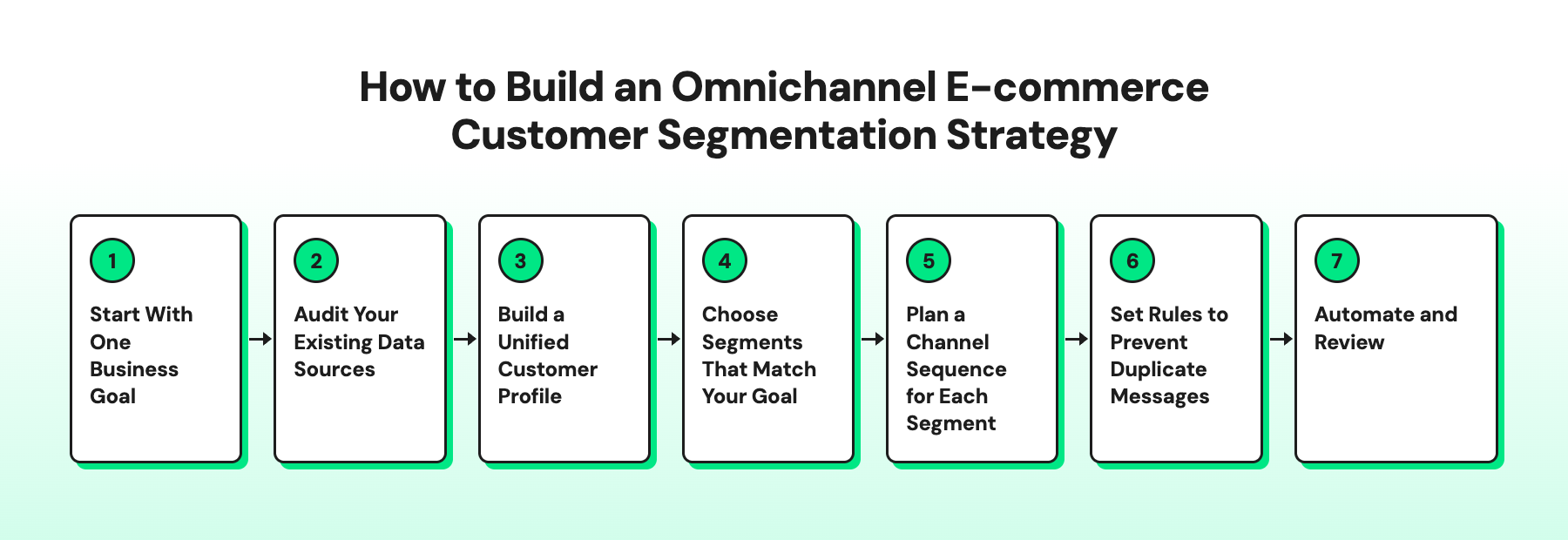
Step 1: Start With One Business Goal
Choose a specific business outcome before creating customer segments. This helps you focus on groups you can act on instead of dividing your audience into too many segments.
Common e-commerce goals might include:
- Increase repeat purchases
- Improve campaign performance across channels
- Reduce customer acquisition cost (CAC) payback time
- Increase average order value (AOV)
- Reduce customer churn
- Improve product merchandising
Once you choose a goal, identify the customer groups that can help you achieve it. For example, if you want to increase repeat purchases, start with first-time buyers, repeat customers, and at-risk customers.
You can then decide what data you need to identify these groups and how to reach them across channels.
Step 2: Audit Your Existing Data Sources
Customer segmentation depends on clean, reliable data. Before collecting more information, review the data your store already has and identify what is available.
Most e-commerce stores have these six types:
Data type | Where it comes from | Examples |
Purchase data | E-commerce store and point-of-sale system | Order history, order value, and returns |
Browsing data | Website analytics | Products viewed and abandoned carts |
Engagement data | WhatsApp, Instagram, Messenger, and ads | Message replies, link clicks, and campaign interactions |
Preference data | Quizzes, surveys, and sign-up forms | Skin type, size, and favorite categories |
Conversation data | Customer chats on messaging channels | Questions about sizing, delivery, and returns |
Predicted data | AI and analytics tools | Churn risk and predicted next purchase |
Step 3: Build a Unified Customer Profile
Match each customer's records across channels using their phone number or email address. Store the combined data in your CRM or any customer data platform you use.
Some records might not match, so expect gaps at first. Wati, for example, links an Instagram contact to their WhatsApp chat when the phone numbers match.
Step 4: Choose Segments That Match Your Goal
Start with a small set of segments that support your goal. You can use the six e-commerce customer segments outlined earlier as a starting point and refine them based on your data and campaign results.
- More repeat purchases: First-time buyers and repeat customers
- Fewer abandoned carts: Cart abandoners
- Higher average order value: Repeat customers and VIP customers
- Better customer retention: At-risk customers
Add more segments only when they serve a clear purpose.
Step 5: Plan a Channel Sequence for Each Segment
Decide which channel to use first and what happens next. For example, send a new collection alert on WhatsApp, then show Instagram ads to customers who didn't open it.
Use channel engagement and customer preferences to guide your choices. Contact customers only on channels where they have given permission.
Step 6: Set Rules to Prevent Duplicate Messages
One of the benefits of omnichannel segmentation is that you can use customer activity across channels to avoid sending the same message more than once. For example, if a customer completes a purchase, remove them from related cart recovery campaigns on other channels.
You should also set limits on how often a customer receives messages across campaigns. Before launching, check that your tools can share customer updates and apply these rules across channels.
Step 7: Automate and Review
Set up automation to update customer segments as their behavior changes. For example, move a customer from the first-time buyer segment to the repeat customer segment after their second purchase, if your tools support this rule.
Review segment performance every month using metrics such as repeat purchase rate, conversion rate, average order value, and campaign engagement. If a segment is not helping you reach your goal, adjust its criteria, try a different approach, or remove it.
E-commerce Customer Segmentation Examples Across Product Categories
Customers buy at different speeds and for different reasons. Omnichannel marketing for e-commerce uses these patterns to create targeted campaigns across channels.
Here are five examples by product category.
Fashion and Apparel
Fashion shoppers buy by size, style, and season. Festivals like Diwali bring some of the year's biggest orders, so past festive buyers are worth targeting early.
- Segment: Customers who bought ethnic wear before Diwali last year
- Campaign: The new festive collection in their size, sent two weeks before Diwali
- Channels: A WhatsApp catalog message first, then an Instagram ad with the full lookbook
Beauty and Personal Care
Beauty customers often ask questions before they buy. Those chats show their skin concerns better than any form.
- Segment: Shoppers who asked about acne products in Instagram DMs
- Campaign: A three-step skincare routine bundle with usage tips
- Channels: A reply in Instagram DMs first, then WhatsApp updates once they opt in
Electronics
Electronics customers buy less often but spend more per order. The months after a purchase are the best time to sell accessories and services.
- Segment: Customers who bought a smartphone in the last six months
- Campaign: Matching cases, chargers, and an extended warranty offer
- Channels: A WhatsApp message first, then Facebook and Instagram ads for accessories
Grocery and FMCG
Grocery customers often order, and their order timing shows when they like to shop. Sending offers at the right time matters as much as the offer itself.
- Segment: Families who usually order on weekends
- Campaign: A weekend stock-up bundle sent every Friday evening
- Channels: WhatsApp first, then Click-to-WhatsApp ads for customers who haven't ordered in two weeks
Home and Furniture
Furniture shoppers research for weeks before buying a high-value item. Repeated product views show who is close to deciding.
- Segment: Shoppers who viewed the same sofa three or more times without buying
- Campaign: Room photos, size details, and EMI options for that sofa
- Channels: Facebook and Instagram retargeting ads first, then a WhatsApp chat with your team when they click
How to Measure Segmentation Success Across Channels
Good segmentation helps you drive more purchases, increase order value, and keep customers engaged. Track results by segment and channel, not just across your store overall.
Metric | Formula | What It Tells You |
Conversion rate | (Purchases ÷ Customers reached) × 100 | Which segment and channel combinations drive purchases |
Repeat purchase rate | (Customers who purchased again ÷ Customers who made an initial purchase) × 100 | Whether campaigns encourage customers to return |
Average order value (AOV) | Total revenue ÷ Number of orders | Whether recommendations and bundles increase spending |
Revenue per customer reached | Campaign-attributed revenue ÷ Customers reached | Which segments generate more revenue relative to campaign reach |
Segment movement | (Customers who moved to a target segment ÷ Customers in the original segment) × 100 | Where customers progress or drop off in their buying journey |
Opt-out and block rate by channel | (Opt-outs or blocks ÷ Messages delivered) × 100 | Whether messaging frequency or content needs adjusting |
To get more value from these metrics:
- Compare segments and channels: Identify which combinations perform best. For example, WhatsApp reminders might drive repeat purchases, while Instagram ads might re-engage inactive shoppers.
- Run A/B tests: Test one variable at a time, such as the message, offer, or send time, with comparable groups from the same segment. Compare conversion rates to see which version performs better.
- Use a control group: Compare campaign results with a group that does not receive the campaign to estimate whether segmentation improves outcomes.
- Measure consistently: Use the same measurement periods and attribution rules. If a customer clicks an Instagram ad and later purchases through WhatsApp, avoid counting the same order twice.
How Wati Helps E-commerce Brands Run Omnichannel Segmented Campaigns
Wati is an agentic customer engagement platform that turns conversations into revenue across marketing, sales, and support. It brings automation and human teams together on WhatsApp, Instagram, Messenger, and web chat.
Here's how a fictional store, Zari & Co., could use Wati to reach one shopper, Monica, across channels.
1. Zari & Co. Connects Its Shopify Store
Zari & Co. sells ethnic wear on Shopify and connects its store to Wati through the Shopify integration. With Shopify segment sync, its Shopify customer segments appear in Wati.
The store also collects opt-ins on its storefront. It only messages shoppers who agreed to hear from it on WhatsApp.
2. Monica Moves From Instagram to WhatsApp
Monica comments on a Zari & Co. Instagram post to ask about a kurta's fabric. Wati's Instagram Comment-to-DM automation replies with a DM that answers her question.
A week later, she clicks a Click-to-WhatsApp Ad and asks about sizing on WhatsApp. If her Instagram contact includes her phone number, Linked Chats can bring both conversations together in the Team Inbox.
This creates a more connected omnichannel experience, as the team can see Monica’s earlier question about fabric alongside her sizing query without making her repeat herself.
3. Monica Abandons Her Cart
Monica adds a dress to her cart late at night but doesn't check out. After the delay the store sets, a ready-made cart recovery flow sends her a WhatsApp reminder.
She asks about delivery time, and Astra, Wati's AI agent, answers right away. Monica completes her order before morning.
4. Monica Becomes a First-Time Buyer
After her order, Monica moves into the store's first-time buyer segment through Shopify segment sync. Two weeks after delivery, a drip campaign suggests matching earrings.
Before Diwali, the store targets Wati's Highly Engaged segment with a preview of its festive collection.
Monica qualifies for this segment if she has read, clicked, or quick-replied to at least three campaigns in the last 90 days.
How to Run a Campaign With Predefined Segments in Wati
Wati's predefined segments group contacts based on their WhatsApp activity. They update automatically, so you don't need to create filters yourself.
Segment | Who's included | How an e-commerce store can use it |
Highly Engaged | Read, clicked, or quick-replied to 3 or more campaigns in the last 90 days | New collection previews and referral requests |
Winback | Last messaged your business 30 to 90 days ago | New arrivals or a reason to come back |
At Risk | Haven't messaged your business in the last 90 days | A short re-engagement message |
All Valid Contacts | Have a valid phone number | Store-wide updates, such as sale dates |
Note: Wati's At Risk segment is based on WhatsApp activity. It's different from the at-risk customers described earlier in this guide, who are identified by their usual reorder window.
To launch a campaign with a predefined segment:
- Log in to your Wati account.
- Go to Campaigns and select Create New Campaign.
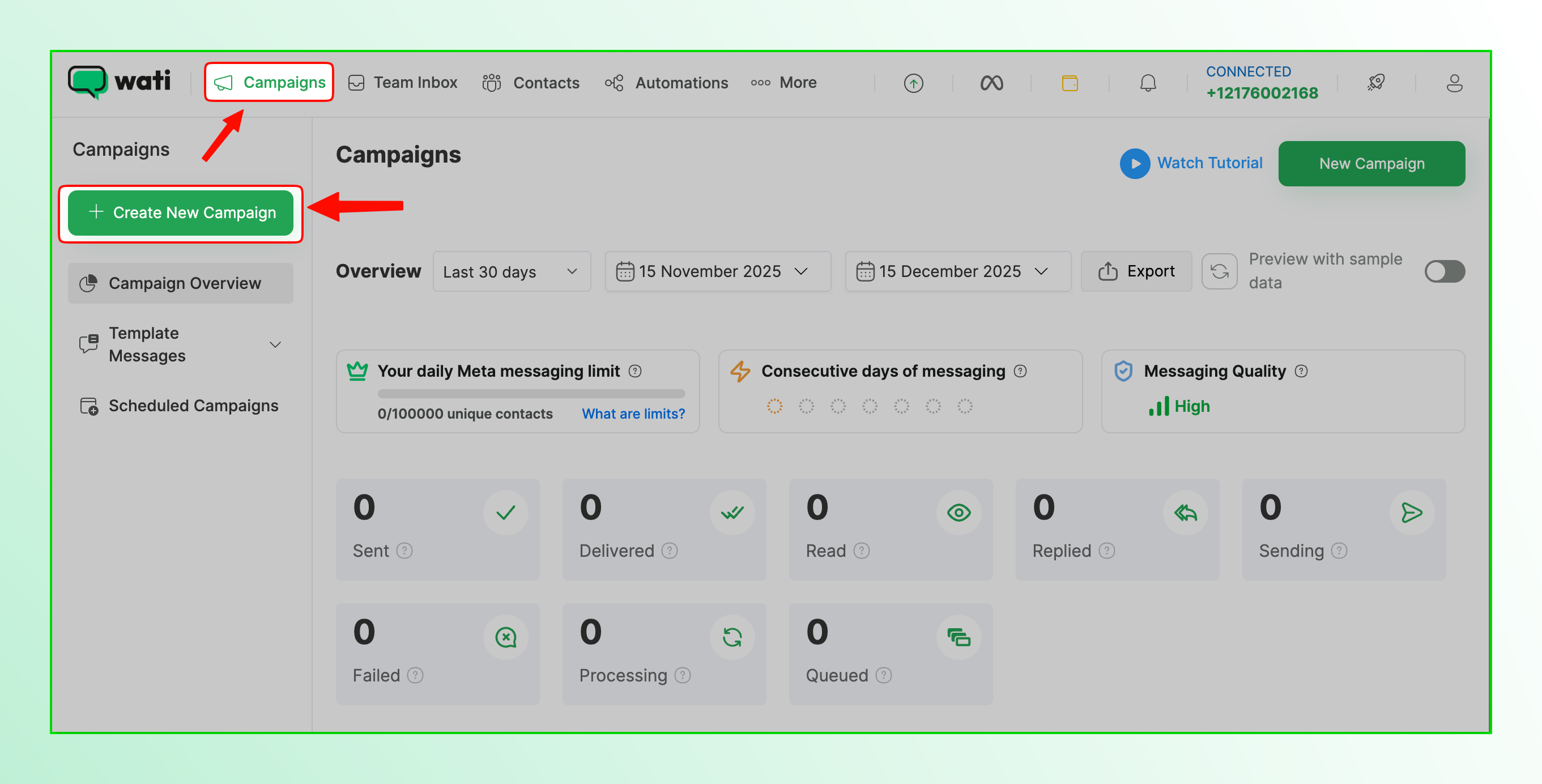
- Under Contact Segments, select the segment you want to target.
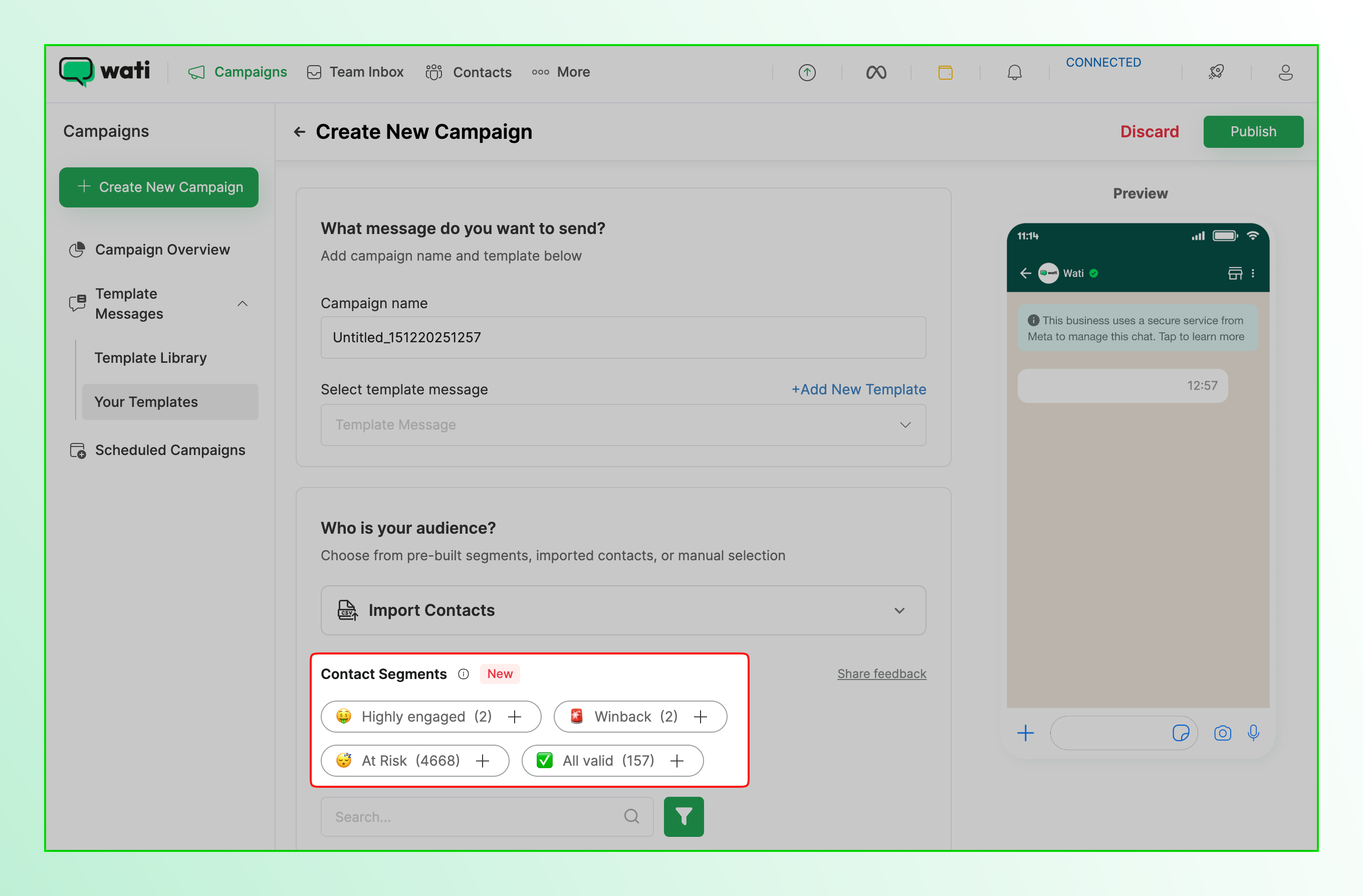
- Select an approved message template, then send the campaign now or schedule it.
- Review the campaign's performance in your Wati dashboard.
Predefined segments are available on Wati's Pro and Business plans. To target customers based on store data, use Shopify segment sync or custom segments.
Build Omnichannel Customer Experiences With Wati
Wati connects your store data with WhatsApp, Instagram, and Messenger, so you can segment customers and reach each one on the channel they use. Campaigns, cart recovery, follow-ups, and support conversations all run from one platform.
Your team sees each shopper's full conversation history, and Astra answers questions when your team is offline.
Book a demo to see how Wati can turn every customer conversation into a sale.
Frequently asked questions
What is e-commerce customer segmentation?
E-commerce customer segmentation is the process of dividing online shoppers into groups based on shared traits, such as purchase history, browsing behavior, and engagement. Each group then gets offers and messages that match how it shops.
Why is customer segmentation important?
It helps you send each customer messages that fit their needs instead of the same offer to everyone. This makes campaigns more relevant, protects your margins, and reduces unsubscribes and blocks.
What is customer segmentation in marketing?
In marketing, customer segmentation means grouping customers so each group gets a campaign, offer, or channel that suits it. For example, a store might send early access to loyal buyers and a second-order offer to first-time buyers.
What is customer segmentation analysis?
Customer segmentation analysis is the process of studying customer data to find useful groups and decide which ones to target. Methods like RFM analysis score customers by how recently, how often, and how much they buy.
How can AI help with customer segmentation?
AI finds patterns in customer data, such as which shoppers are likely to buy again or stop buying. Platforms like Wati also update segments automatically as customers engage with your campaigns.
Related posts
- Instagram Comment Automation: How It Works and How to Set It Up in Wati
Instagram comment automation auto-replies to comments and DMs commenters within seconds via Meta's API. Covers strategy, use cases, and Wati setup.
- Shared Team Inbox for Instagram: A Buyer’s Checklist for 2026
Use this fastest checklist to evaluate any shared team inbox for Instagram, which covers DMs, comments, automation, and multi-channel support.
- How to Send Bulk Messages on WhatsApp Without Getting Blocked
Learn how to send bulk WhatsApp messages without getting blocked. Compare the WhatsApp Business app and API, messaging limits, costs, templates, and best practices for safe, compliant bulk messaging.
- How to Set Up a TikTok Business Account: Step-by-Step Guide
Set up a TikTok Business Account step by step: switch from personal, pick a category, add your profile, and unlock ads and analytics.