
Too Long? Read This First
- Structure the unboxing so the camera answers the most common questions before viewers ask.
- Prepare replies for compatibility, wattage, battery, water resistance, and "is it original?"
- Use an on-screen keyword for a short model picker and another for the flash-deal link.
- Tag every live DM and follow up within 48 hours, keeping TikTok Shop orders inside TikTok Shop.
A tech unboxing on TikTok LIVE turns into sales when every spec question gets answered before the stream ends.
The host opens the box and runs the demo. A moderator, backed by automation, answers the DMs that decide whether a viewer buys.
Here's what 30 seconds of a gadget brand's inbox looks like while its host unboxes a 65W charger:
- “¿Sirve para iPhone 15?”
- “How many watts does it give a Samsung?”
- “Can it charge my laptop too?”
- “Is the live price still on?”
Four viewers, four different questions, and none of them can be answered by a host who's halfway through a charging test.
Wati's TikTok business messaging puts those DMs in one team inbox while the stream is running, as part of Wati for e-commerce.
Below, you'll find how to structure an unboxing to head off questions, the spec questions to prepare for, and how to handle model fit and flash deals midstream.
The last sections cover follow-ups and the mistakes that cost gadget brands sales.
Why Do Tech Unboxings Generate So Many DMs?
Gadgets are spec purchases. A viewer might love how a power bank looks, but they won't buy until they know it charges their phone, fits in their bag, and lasts a full day.
Those answers depend on the phone and the habits of each viewer, which is why they arrive as private messages rather than public comments.
The stakes are higher than in most categories. A lipstick in the wrong shade is a disappointment.
A charger that doesn't support a phone's fast-charging standard, or a case for the wrong model, is a return, a refund, and often a bad review. Viewers know this, so they check first.
Live streams add urgency. A flash deal that ends in 20 minutes pushes viewers to ask fast, and every slow reply is a viewer who leaves the stream before buying.
How Should You Structure a Live Tech Unboxing?
The best gadget lives answer questions on camera before viewers type them. Plan the stream as a run of show, where each step heads off a common DM:
Step | What the host shows | DM it prevents |
|---|---|---|
Open the box | Everything inside, including cables and adapters | "Does it come with a cable?" |
Show the ports | Close-ups of every port and button | "Is it USB-C?" |
Compatibility list | A card or slide listing supported phones | "Does it work with my phone?" |
Real test | Charging a phone on camera with a timer | "How fast does it charge?" |
Deal reveal | The live price, end time, and keyword | "Is there a discount?" |
Recap | Specs, price, and keywords in one shot | Late joiners asking the basics |
A real test matters most. Viewers trust a timer on screen far more than a number on a box, and a live charging test often answers the speed question for everyone at once.
Which Spec Questions Come Up During a Gadget Live?
Six questions come up in almost every gadget live. Prepare a short answer for each product before you go live.
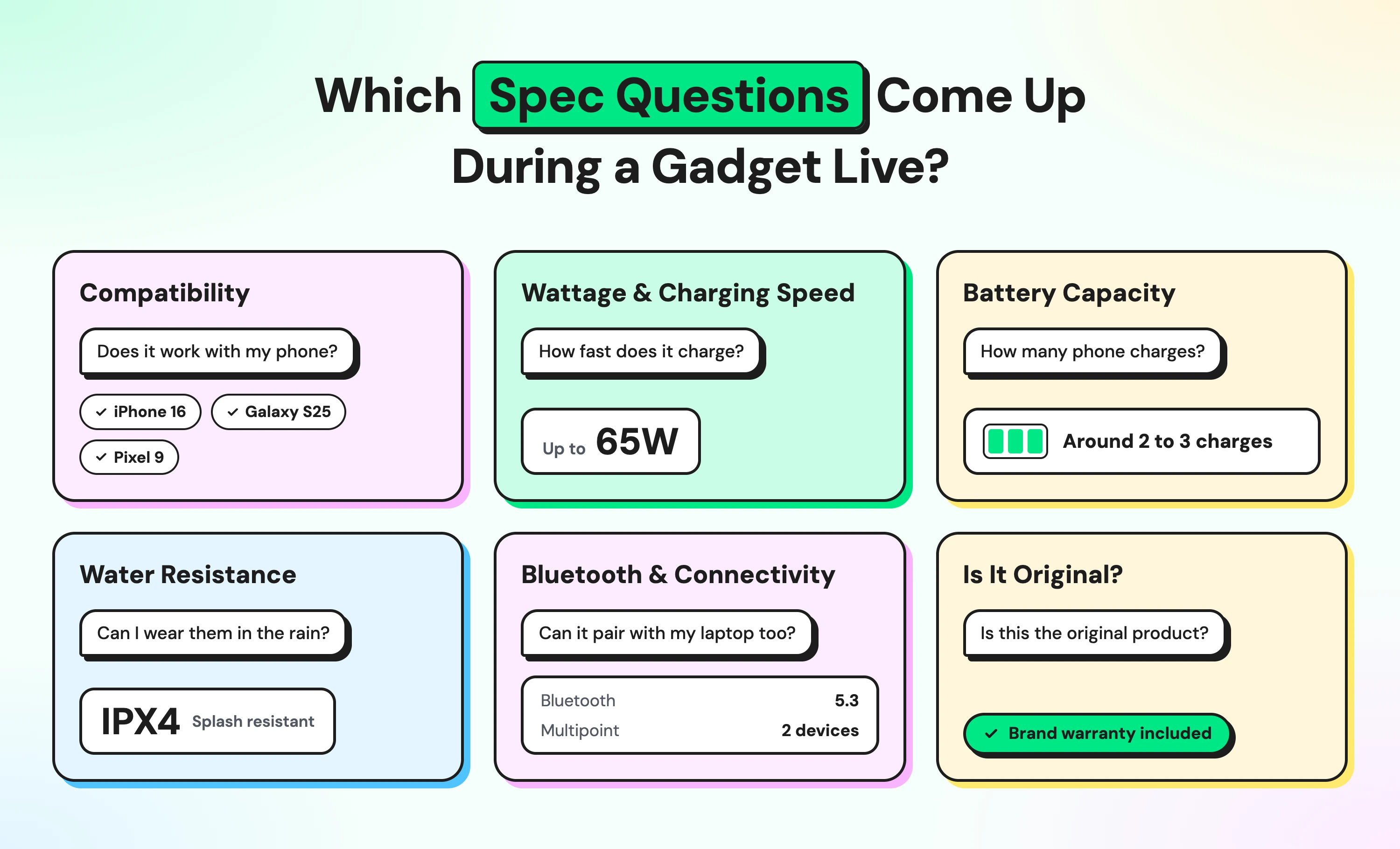
Compatibility. "Does it work with my phone?" is the most common DM. Answer with the phone families it supports, then ask which model they have.
Wattage and charging speed. Viewers want to know how fast their own phone will charge, not just the charger's maximum. A good reply sets expectations:
"It delivers up to 65W, but your phone charges at its own top speed. An iPhone 15 fast-charges with it, and so does a recent Samsung flagship. Which phone do you have?"
Battery capacity. Power bank buyers ask, "How many charges will I get?" Be honest that usable capacity is lower than the rated mAh, because some energy is lost in conversion. Then give a realistic number of full charges for an ordinary phone.
Water resistance. Only claim what the product's IP rating supports. IPX4 means splash-resistant, which is fine for sweat and rain but not for swimming.
Bluetooth and connectivity. Earbud and speaker buyers ask about Bluetooth versions, pairing with two devices, and whether their phone's operating system is supported.
"Is it original?" If you sell your own brand, say so clearly, and never suggest a product is made by a phone maker if it isn't.
Warranty questions get a one-line answer with the warranty period.
How Do You Answer "Does It Fit My Phone?" Mid-Stream?
Model-fit questions arrive faster than a moderator can type, so automate the first answer. Live comments can't trigger an automated DM, so show a keyword on screen and pin it in the comments.
Try "DM MODEL to check your phone," or "MODELO" for Spanish-speaking viewers.
A Wati keyword rule starts a short chatbot that asks which phone they have:
"Which phone do you have? Reply with: 1 for iPhone 15 or 16 2 for a recent Samsung Galaxy 3 for another model"
The chatbot sends replies 1 and 2 an image of the matching product and the Shop link, and assigns reply 3 to the moderator. TikTok DMs don't support buttons, so numbered options keep the flow quick.
Keep the live list short and specific to the products in today's stream.
A full model picker for your whole range works better outside the live, and we'll cover it in a separate guide on compatibility DMs.
How Should Flash Deals and Stock Counts Work in DMs?
Flash deals drive most gadget live sales, and they create their own DMs:
- "Is the price still on?"
- "Is there a code?"
- "Do you still have black?"
Give the deal its own keyword, such as "DEAL" or "CÓDIGO."
The reply should include the live price, where to buy, and the time the deal ends, so viewers don't have to ask twice.
Be honest about stock. "12 left in black" builds trust and urgency. A fake countdown or invented scarcity does the opposite, and viewers who catch it rarely come back.
When a color or size sells out, update the keyword reply straight away, so viewers aren't sent to an item they can't buy.
What Should the Spec Moderator Keep on Hand?
A gadget moderator needs answers at their fingertips. Prepare a one-page cheat sheet for every product in the stream:
Product | Key specs | Supported phones | Common questions | Escalate when |
|---|---|---|---|---|
65W charger | 65W max, two USB-C ports | Recent iPhones and Android flagships | Laptop charging, cable included | A viewer reports overheating |
20,000 mAh power bank | Rated capacity, output wattage | Any phone with USB-C | Charges per phone, flight rules | Swelling or heat is mentioned |
Wireless earbuds | Bluetooth version, battery life, IP rating | iOS and Android | Dual pairing, calls, water | A viewer asks about a medical hearing device |
The rest of the moderator's work follows the same pattern as any brand live: answer what automation can't, flag repeat questions to the host, and keep tagged chats moving.
How Do You Follow Up After the Live?
Many gadget buyers compare options before they decide. Tag every live DM with "live-viewer" and the product or model they asked about, so the follow-up can be specific.
TikTok's messaging rules set the timing. After a viewer's first message, you can send up to 10 messages within 48 hours.
Once they reply, a new 48-hour window opens with no limit. If they go quiet for more than 48 hours, you get 3 more messages. Send a short recap the next day that answers the exact question each viewer asked:
"Thanks for joining yesterday's live! You asked about the 65W charger for a Galaxy S24. It fast-charges your phone and comes with a USB-C cable. The live price ends tonight. Want the link?"
A recap that repeats the viewer's own question feels personal, and it gives them a reason to reply, which reopens the messaging window.
If a viewer bought through TikTok Shop, their order questions stay in TikTok Shop. WhatsApp follow-ups are only for customers who buy on your own store and agree to hear from you.
Which Mistakes Cost Gadget Brands Sales During a Live?
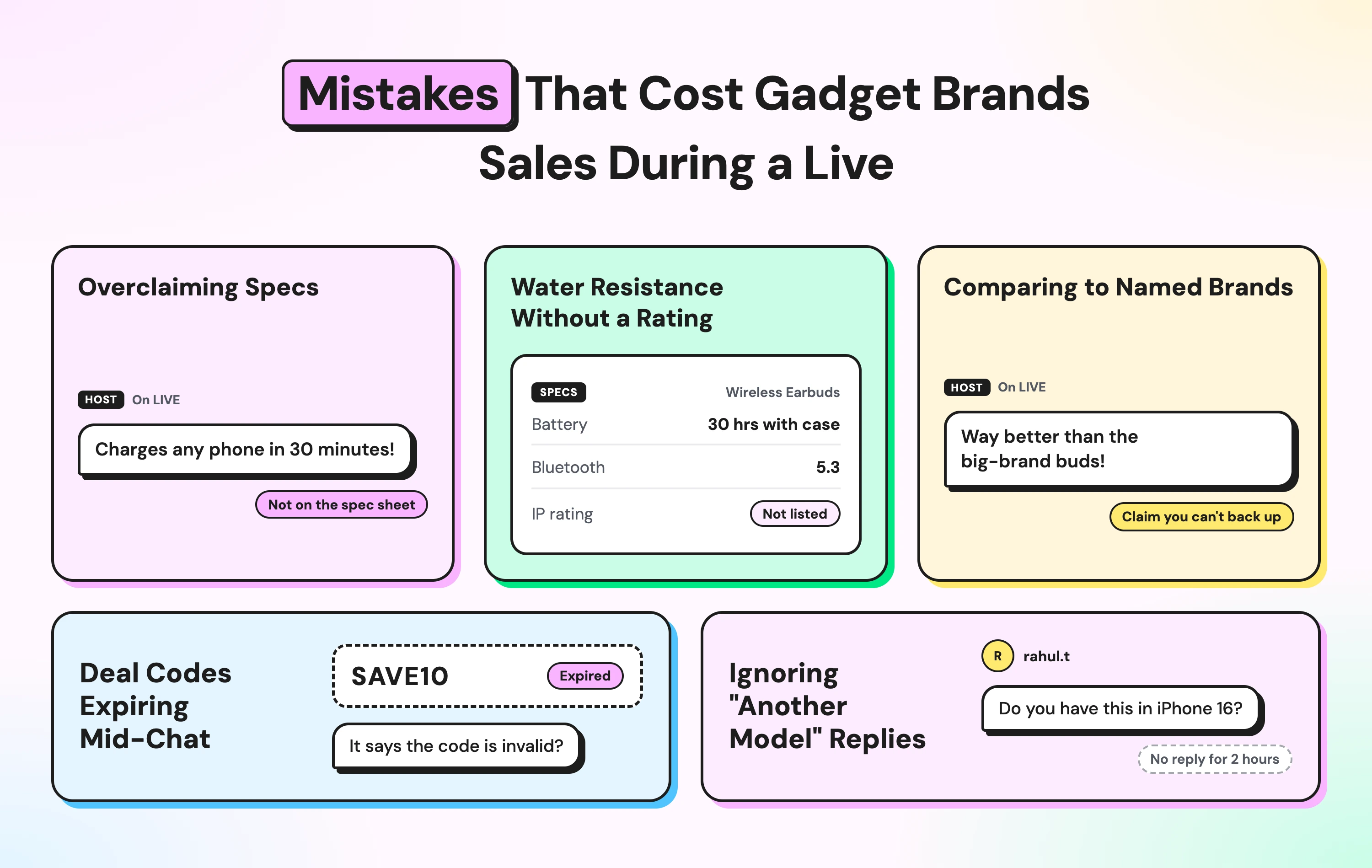
- Overclaiming specs. Saying a charger "charges any phone in 30 minutes" invites returns. Quote real numbers for real phones.
- Water resistance without a rating. If the product has no IP rating, don't call it waterproof, even casually on camera.
- Comparing to named brands. "Better than [famous brand]" can raise trademark and advertising issues. Compare specs, not names.
- Deal codes expiring mid-chat. A viewer who gets a code that stopped working five minutes ago feels misled. Update the reply the moment a deal ends.
- Ignoring "another model" replies. These are the viewers most likely to order the wrong product. Make sure a person answers every one of them.
How Does Wati Help Gadget Brands Sell on TikTok LIVE?
Wati is an agentic customer engagement platform that turns conversations into revenue growth across marketing, sales, and support. During a live unboxing, three viewers can take three different paths at once:
The fit question. A viewer sends "MODEL," replies "1," and gets an image of the iPhone version with the Shop link. She buys before the deal ends.
The spec question. Another asks whether the charger can power his laptop. The rule tags the chat and routes it to the Live team, and the moderator answers with the laptop wattage it supports.
The deal question. A third sends "CÓDIGO" and gets the live price, the end time, and a link to buy, all in one reply.
All three chats land in Wati's Team Inbox, tagged for the next-day recap. For day-to-day setup, see our guide to TikTok DM management in one inbox.
Let the Demo Sell and the DMs Close
A tech unboxing earns attention on camera, but the sale happens in the inbox.
Structure the stream to answer the obvious questions, automate model fit and deals, and keep a moderator ready for everything else.
Ready to answer every DM during your next gadget live? Start your free Wati trial.
Frequently asked questions
What is a tech unboxing on TikTok LIVE?
It's a live stream where a brand opens and demonstrates a gadget, such as a charger or earbuds, while viewers ask questions and buy through TikTok Shop or the brand's store.
Can live comments trigger automatic DMs?
No. Automated replies on TikTok work on DMs, not on live comments. Show a keyword on screen and ask viewers to DM it, then set up a rule that replies.
How do I answer "does it fit my phone?" during a live?
Set up a keyword rule that replies with a short numbered list of supported phones, then sends the matching product image and link. Send anything not on the list to a person.
How long can I follow up on TikTok DMs after a live?
After a viewer's first message, you can send up to 10 messages within 48 hours. If the viewer replies, a new 48-hour window opens with no message limit.
Related posts
- TikTok Order Tracking for Fashion Brands: Handle WISMO and Size Exchanges in One Reply
TikTok order tracking for fashion brands: a chatbot checks Shopify in the first reply, routes size exchanges to ops, and moves shipping updates to WhatsApp.
- Warranty Claims on TikTok: Customer Service for Phone Accessory Brands
What does a good warranty claim process look like for phone accessory brands on TikTok? Collect the order, model, and a photo in DMs, then hand off.
- Selling Skincare on TikTok Shop: How Beauty Brands Handle Every Conversation Around the Shop
How do beauty brands sell on TikTok Shop? Let the Shop handle checkout, and answer skin-type, shade, and creator DMs from one team inbox.
- How Retail Brands Sell on Instagram Without Missing a Single DM
To sell on Instagram, reply to price DMs fast, turn comments into orders, and follow up on WhatsApp. See 7 retail use cases that make it work.