
Too Long? Read This First
- WhatsApp marketing only works with customers who opted in, and Meta charges for every marketing template that gets delivered.
- US brands: marketing templates currently don't deliver to +1 numbers (a pause that began April 1, 2025), so lean on Click-to-WhatsApp ads, inbound chats, and utility messages.
- Start on the free WhatsApp Business app; move to the API through a provider like Wati when you need Campaigns, a shared inbox, or automation at scale.
- 32% of US adults use WhatsApp, up from 23% in 2021 (Pew Research Center), so the audience is already there.
- The quickest wins are cart recovery, back-in-stock alerts, order updates, and fast replies to "is this in stock?"
A customer sends a message on WhatsApp at 9 pm. Answer in a minute and you get the sale. Answer tomorrow? Someone else does.
WhatsApp marketing is the practice of using WhatsApp to reach, sell to, and support customers who have opted in to hear from you. This can be through campaigns, automated messages, and two-way chats.
Businesses run it on the free WhatsApp Business app or, at scale, on the WhatsApp Business Platform (the API) through a provider like Wati. Meta charges per delivered template message, and US brands need to know one big catch: marketing templates currently don't deliver to +1 numbers.
That last part trips up a lot of US teams, so this guide covers how WhatsApp marketing works in practice, what it costs, how to build a strategy that fits your audience, and where Wati comes in.
What is WhatsApp Marketing?
WhatsApp marketing is any business messaging on WhatsApp that helps you win or keep customers: product launches, restock alerts, abandoned cart nudges, order updates, appointment reminders, and the "is this still available?" chats that turn into sales.
What separates it from email or SMS is the conversation. A customer can tap a button, reply with a question, browse your catalog, and check out without leaving the chat.
Meta describes marketing messages as tools to build awareness, drive sales, re-engage past visitors, and build relationships, and it requires customers to opt in first.
Three rules shape everything else:
- Opt-in comes first. You need a customer's permission before you send them promotional messages.
- Business-initiated messages use approved templates. If a customer hasn't messaged you in the last 24 hours, you can only start the chat with a template Meta has reviewed.
- Customer-initiated chats are more flexible. When someone messages you, a 24-hour window opens, and you can reply freely.
Why WhatsApp Marketing Matters for E-commerce Brands and Creators
WhatsApp is no longer a channel US brands can file under "international only." Pew Research Center found that 32% of US adults use WhatsApp, up from 23% in 2021, with Hispanic adults more likely than White adults to use it.
If your customers include immigrant communities, travelers, international shoppers, or anyone who already texts friends on WhatsApp, they're there.
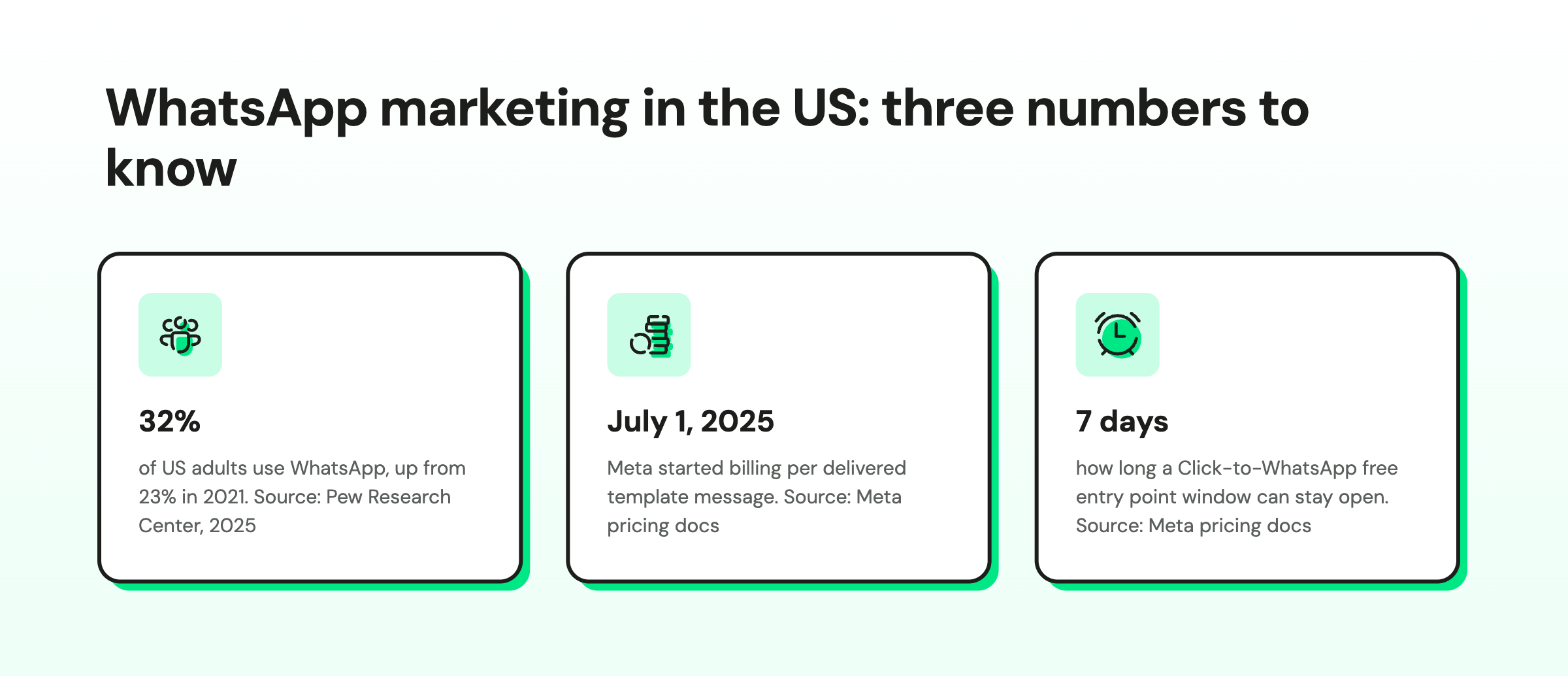
For a DTC brand, the payoff is speed to answer. The shopper who asks "does this run small?" at 11 pm buys tonight if someone (or something) answers tonight.
For a creator with 600 "price??" comments, WhatsApp is where a comment becomes a real conversation, a payment link, and a repeat customer instead of a lost notification (you can automatically send people from your Instagram DM to WhatsApp easily).
It also gives you a channel you control. Your ad account can get throttled, and your Instagram reach can dip, but an opted-in WhatsApp contact list is yours.
WhatsApp Marketing Benefits and Trade-Offs
What you gain:
- Two-way chats where customers ask, browse, and buy in one thread
- WhatsApp commerce: catalogs and product carousels take shoppers from browsing to an order inside the chat
- Interactive buttons and calls to action, so the next step is one tap away
- Personalized campaigns built on names, past orders, and stated preferences
- Word of mouth, since a good offer is easy to forward to a friend
- A contact list you own, built on explicit consent
- Encrypted delivery: Meta's data privacy and security docs say messages travel encrypted between the customer and the Cloud API, using the Signal protocol, and are encrypted at rest
What you take on:
- Templates need Meta approval before you can send them
- Messaging limits and quality ratings cap how fast you scale
- Meta charges per delivered template, unlike email. Since July 1, 2025, billing is per message instead of per conversation
- Marketing templates don't reach US +1 numbers right now
How does WhatsApp Marketing Work?
Under the hood, WhatsApp marketing combines permission, message categories, and timing windows. Get these right, and the rest is copywriting.
Step 1: Collect Opt-Ins
Customers have to opt in before you send them marketing. Tell them what they'll get (order updates, drops, offers) and how to stop. A "STOP" reply works.
Common opt-in points:
- A checkbox at checkout
- A WhatsApp chat button or pop-up on your website
- QR codes on packaging, receipts and in-store signs
- A keyword reply, like sending "VIP" to your number
- A Click-to-WhatsApp ad, where the customer messages you first
The WhatsApp Business app help center is blunt about it. Businesses need proper consent, required disclosures, and prompt opt-out handling, or they can lose access.
Step 2: Pick the Right Message Category
Every template you send falls into a category, and the category decides how it's billed and when you can use it.
Category | What it's for | Example |
Marketing | Promotions, launches, offers, re-engagement | "Your size is back in stock. 15% off for 48 hours." |
Utility | Updates tied to an order or account | "Your order #2219 has shipped. Track it here." |
Authentication | One-time passcodes | "Your login code is 482913." |
Service | Replies to a customer who messaged you | "Yes, the medium runs a little large. Want me to hold one?" |
Step 3: Send Templates or Reply Inside the Window
Templates can include a header (text, image, or video), a body with personalization like the customer's first name, a footer, and buttons such as "Shop now" or quick replies. Meta reviews templates before you can use them.
When a customer messages you, Meta's pricing documentation says a 24-hour customer service window starts, and inside it you can send regular, non-template messages.
If they arrived from a Click-to-WhatsApp ad, a free entry point window can stay open for up to 7 days, during which Meta doesn't charge for most message categories.
Template Approval, Quality Rating and Messaging Limits
Three Meta controls decide how far and how fast you can scale.
- Template approval. Meta reviews each template before you can send it. Submit launch templates early so a drop isn't stuck in review.
- Template quality. Meta rates each template green, yellow, red, or unknown based on usage, customer feedback, and engagement. Negative feedback or low read rates can get a template paused or disabled.
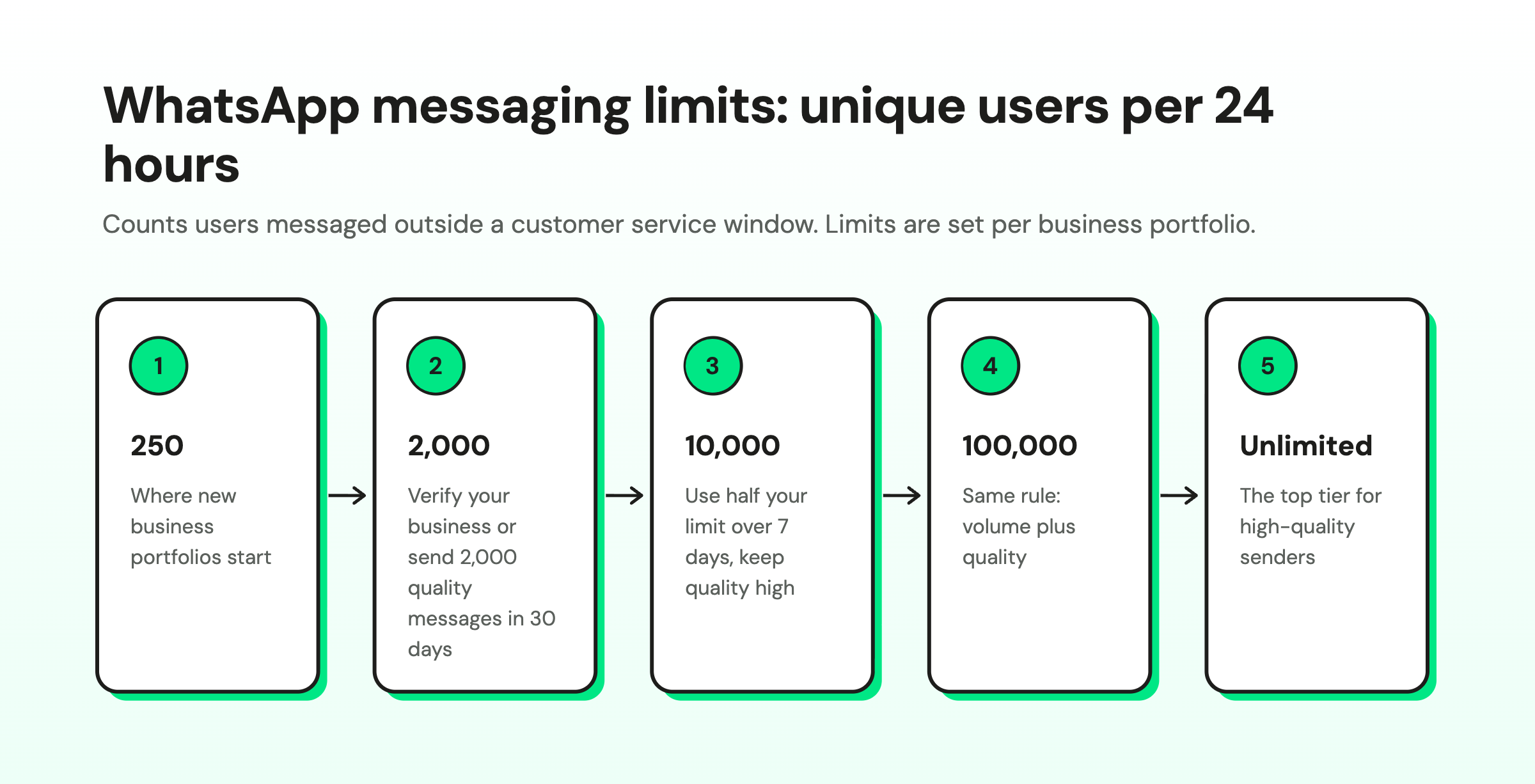
- Messaging limits. Meta caps how many unique users you can message outside a customer service window in 24 hours. New business portfolios start at 250. Limits then step up to 2,000, 10,000, 100,000, and unlimited.
To reach 2,000, verify your business or send 2,000 delivered messages in 30 days using high-quality templates. After that, Meta raises your limit within 6 hours once you use half your current limit over 7 days and keep quality high.
The US Catch: Marketing Templates
Here's the part most guides bury. Meta's developer documentation states that "WhatsApp does not currently deliver marketing template messages to WhatsApp users with United States phone numbers." The pause started April 1, 2025, and as of November 2026, the docs still say it.
So a US brand can't blast a promo template to a list of +1 numbers. What you can do:
- Run Click-to-WhatsApp ads and sell inside the conversation the customer starts. See our guide to setting up Click-to-WhatsApp ads.
- Answer inbound chats fast from your site, Instagram bio, packaging, and QR codes, then sell during the open window.
- Send utility and authentication messages (order updates, shipping alerts, codes), which still deliver to US numbers.
- Market to international customers where marketing templates deliver normally (yes, this includes Canada despite the +1!)
In other words, US WhatsApp marketing is mostly conversational and inbound-led right now. If your strategy assumes promo templates to US subscribers, rebuild it before you spend on setup.
WhatsApp Business App vs API: Which Do You Need for Marketing?
The free WhatsApp Business app works for a solo founder on one phone. Once you need teammates, automation, CRM sync, or Campaigns to thousands of contacts, you need the WhatsApp Business Platform (the API).
You reach the API through a Business Solution Provider (BSP), a Meta partner like Wati.
WhatsApp Business app | WhatsApp Business Platform (API) via a BSP | |
Best for | Solo sellers, very small shops | Growing brands, teams, creators selling at volume |
What you pay | Free app; paid marketing messages where the feature is available | Provider platform fee plus Meta per-message fees |
Sending limits | Up to 500 contacts per marketing message and 7,000 messages per 30 days (can vary) | Starts at 250 unique users per 24 hours, scaling to 2,000, 10,000, 100,000, or unlimited |
Team | One phone, limited linked devices | Shared team inbox for multiple agents |
Automation | Greeting, away messages, quick replies | No-code chatbots, workflows, AI agents |
Bulk sends | Broadcast lists, in-app marketing messages | Segmented Campaigns to opted-in lists, scheduled sends |
Integrations | Minimal | CRM, Shopify, payments, Click-to-WhatsApp ad tracking |
Analytics | Basic | Delivery, read, reply, and click reporting |
The app's marketing messages are reviewed by Meta and billed only when delivered, per WhatsApp's help center. Those caps suit a local boutique. They're tight for a brand with a 20,000-person list and a holiday drop. API limits come from Meta's messaging limits page.
Which One do You Need?
- Pick the app if one person answers every chat, and your list is a few hundred people.
- Pick the API if two or more people share chats, or you want bots and AI to handle FAQs.
- Pick the API if you run Click-to-WhatsApp ads or need Shopify or CRM data in your messages.
- Budget for two fees on the API: Meta's per-message fees and your provider's platform fee.
- Plan to verify your business. It's one route to lift your limit from 250 to 2,000 users a day.
For a deeper look at the API, read Discovering the WhatsApp Business API.
How to Set Up WhatsApp Marketing?
Most brands can go from zero to their first Campaign in about a week. Your provider handles the API connection; your job is the business details, the opt-in points, and the first few templates.
Here’s the order to do it in.
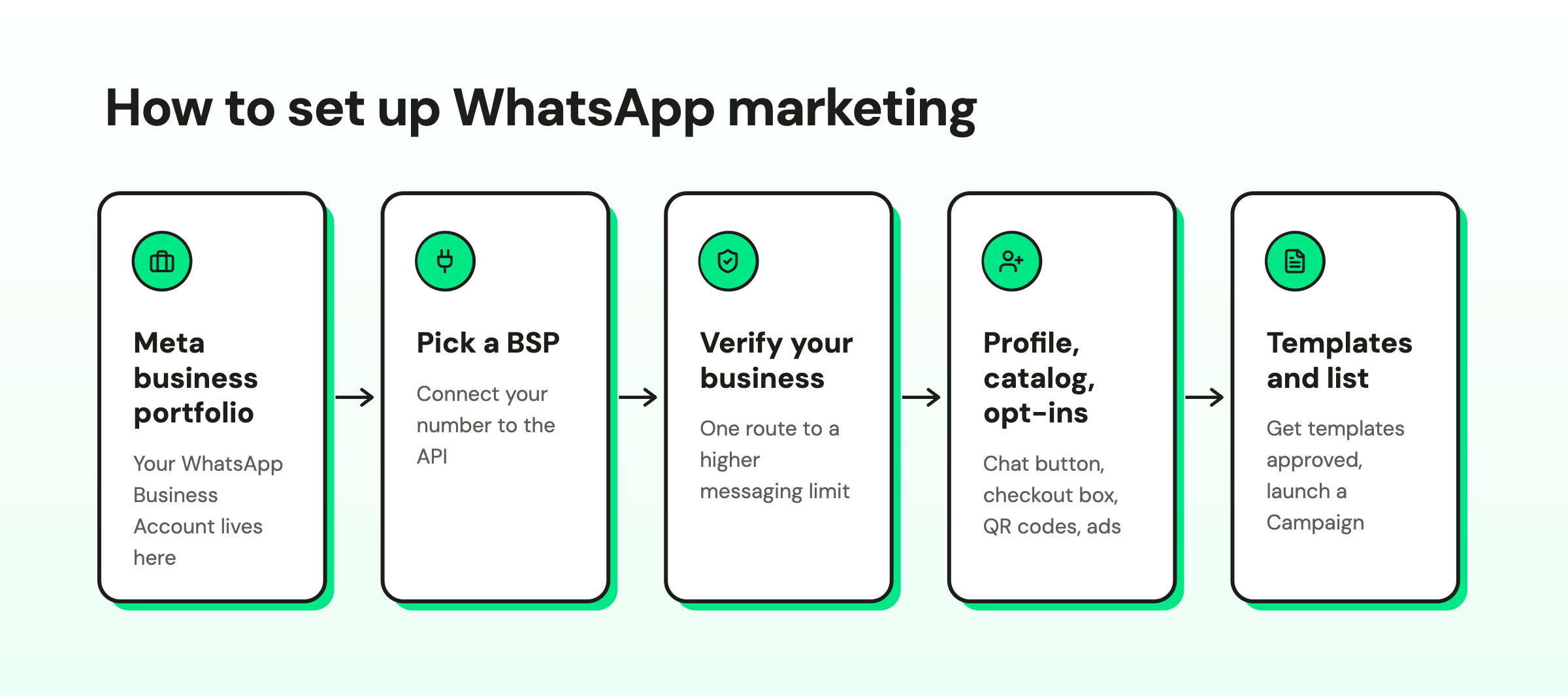
Setup takes a few steps. A provider like Wati handles most of the technical part.
- Start with a Meta business portfolio. Your WhatsApp Business Account sits inside it, and messaging limits are set at this level.
- Choose a BSP and connect your number. Your provider walks you through linking a phone number to the WhatsApp Business Platform.
- Verify your business. It's one of Meta's routes to the 2,000 messaging limit.
- Complete your profile and catalog. Add your logo, description, hours, and website. Upload products so customers can browse in chat.
- Add opt-in entry points. Use a website chat button, a checkout checkbox, QR codes, and Click-to-WhatsApp ads.
- Submit your first templates. Start with a welcome message, an order update, and one offer.
- Build your subscriber list. Import only contacts who opted in, then launch your first Campaign.
How Much does WhatsApp Marketing Cost?
WhatsApp marketing on the API has two cost layers: your platform subscription and Meta's message fees.
Meta's Fees:
Since July 1, 2025, Meta charges per delivered template message, with rates set by category (marketing, utility, authentication) and the recipient's country. Messages from customers to you are free.
Meta's pricing page also notes a change starting October 1, 2026: service messages are charged again, with a free tier of 1,000 delivered service messages per business phone number per month.
Rates change, so check Meta's rate cards rather than trusting a number in a blog post (including this one).
Platform Fees:
Your provider charges a subscription for the inbox, automation, campaigns, and integrations. As of November 2026, Wati's pricing page lists Growth at $59/month, Pro at $119/month, and Business at $279/month (billed annually), with template message charges added on top.
Our WhatsApp API pricing guide walks through how the two layers add up.
A practical way to keep costs down: lean on customer-initiated conversations and Click-to-WhatsApp ads, use utility templates for genuine order updates, and save marketing templates for segments likely to buy.
How to Build a WhatsApp Marketing Strategy?
A WhatsApp marketing strategy is a plan for who you message, why they agreed to hear from you, and what you want them to do next. Here's a version you can run this month.
1. Pick One Job for the Channel
Choose a primary goal before you write a single template: recover abandoned carts, convert Instagram comments into sales, qualify leads, or drive repeat purchases. One job makes every later decision easier.
2. Build Entry Points
Put WhatsApp where intent already shows up: product pages ("Questions? Chat with us"), checkout opt-in, order confirmation pages, your Instagram bio, QR codes on packaging, and Click-to-WhatsApp ads on Meta.
Creators can automate Instagram DM and comment replies and move warm leads to WhatsApp, where receipts, support, and reorders live. Our Instagram comment automation setup guide shows how.
3. Segment From Day One
Tag contacts by source, purchase history, and interests. "Bought once, 60+ days ago" and "browsed twice, never bought" need different messages. The same promo to everyone is the fastest way to earn blocks, and Meta tracks that feedback.
Useful segments to start with:
- Tags and custom segments: label contacts by source ("IG comment", "QR code") and combine tags into segments
- Category interest: skincare buyers hear about skincare, not shoes
- Behavior: browsed, added to cart, bought, returned
- Engagement level: replied recently, read but silent, or quiet for 60 days
- Value: recency, frequency, and spend (RFM), so VIPs get early access
- Channel affinity: people who click on WhatsApp but ignore email get the WhatsApp version
- Stated preferences: zero-party data customers give you, like size or skin type, captured with quick replies
- CRM data: first-party fields synced from Shopify, HubSpot, or Salesforce
Keep segments dynamic, so contacts move in and out as their behavior changes. Then personalize the template itself. Variables drop in the first name, last product viewed, or order number.
4. Automate the Predictable, Staff the Valuable
Use a chatbot or AI agent for sizing questions, order status, store hours, and lead qualification. Hand off to a human when money or nuance is involved. If you sell considered purchases, AI pre-sales qualification for D2C brands explains how to sort browsers from buyers first.
The building blocks:
- A no-code builder (Wati's Automations) to set all of this up without developers
- Keyword triggers that start a flow when someone types "track" or "VIP"
- Campaign triggers that start a follow-up when someone taps a Campaign button
- Quick reply buttons so customers answer with one tap
- Branching logic that sends each answer down its own path
- Drip sequences for onboarding nudges, like a tip on day 2 and an offer on day 7
- WhatsApp Flows, Meta's interactive workflows inside the chat, such as booking an appointment
- Carousels. Meta's media card carousels show up to 10 swipeable image or video cards. Product card carousels pull items from your catalog, so shoppers can add to cart and order in WhatsApp.
- Catalog messages and Wati Pay so customers browse and pay without leaving WhatsApp
- CRM and store integrations that trigger messages from real events, like an abandoned checkout
5. Write Messages People Want
Keep it short, specific, and useful. Lead with why you're messaging and add one clear button. Send when your audience is likely to read, and keep campaign frequency low. A good test: would you mind getting this on your personal WhatsApp?
6. Measure and Adjust
Track every campaign against the same few metrics. If opt-outs climb, cut frequency or tighten the segment before you scale.
Metric | What it tells you |
Delivery rate | Whether messages reach phones |
Read rate | Whether your timing and preview text earn attention |
Response rate | Whether the message starts a conversation |
Click-through rate | Whether the offer and button pull people to your site |
Conversion rate | Whether chats turn into orders, bookings, or qualified leads |
Opt-outs and blocks | Whether you're sending too often or to the wrong people |
Add tracking links (UTM tags) to buttons so sales show up in your analytics. For ads, Meta's Conversions API for Business Messaging lets a partner send events like Purchase or LeadSubmitted back to Meta. That ties a sale in chat to the Click-to-WhatsApp ad that started it.
How to Create a WhatsApp Marketing Campaign?
In Wati, a Campaign is a pre-approved template sent to a segment of opted-in contacts. Here's the flow.
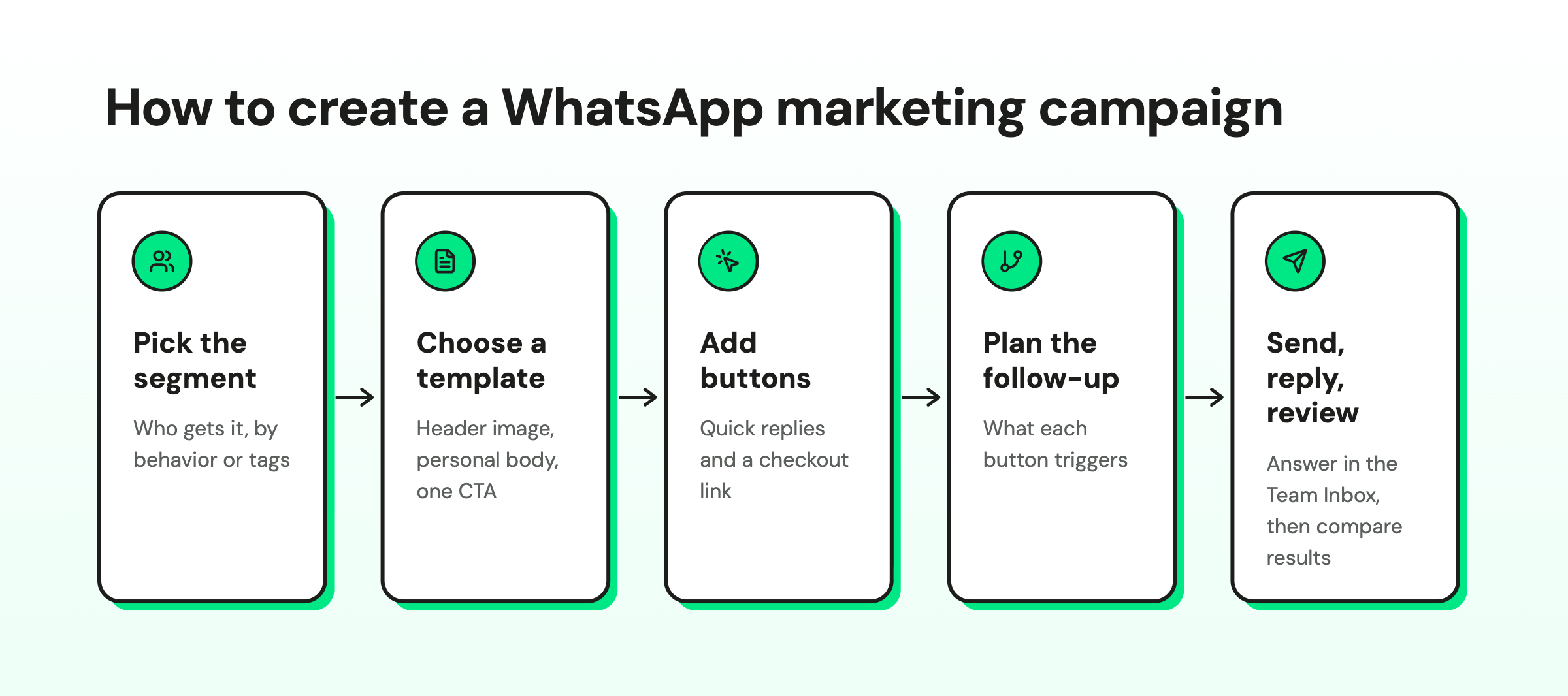
- Pick the segment. Choose who gets it, like "bought in the last 90 days" or "tapped the spring drop".
- Pick or write a template. Add a header image, a short body with the customer's name, and one call to action.
- Add buttons. Quick replies ("Show me sizes", "Not now") invite answers. A URL button sends people to checkout.
- Plan the follow-up. Decide what each button triggers. "Show me sizes" gets a size guide; "Not now" gets nothing.
- Choose the send time. Send when your audience shops, and space campaigns out.
- Send or schedule, then watch replies. Replies land in the Team Inbox, so a person can close the sale.
- Review the report. Compare reads, replies, and clicks by segment before the next send.
US audience? Marketing templates won't reach +1 numbers right now. Run the same playbook inside customer-started chats and Click-to-WhatsApp conversations.
WhatsApp Marketing Best Practices
Most of these protect your quality rating. The rest protect your margin.
- Record every consent. Store when, where, and how each contact opted in.
- Honor opt-outs fast. Treat "STOP" as final and remove the contact right away.
- Segment before you send. Never send one promo to your whole list.
- Lead with triggered updates. Real-time order, shipping, and restock messages earn trust for later offers.
- Respect timing and frequency. Send in waking hours, and space marketing messages out.
- Verify customers where your industry requires it. Banks, lenders, and insurers can collect details in a structured in-chat flow, following their own compliance rules.
- Connect your CRM. Synced data keeps segments current and lets agents see order history.
- Measure lifetime value (LTV). Judge WhatsApp by repeat purchases and retention over months.
- Study behavior. Look at what people tap, ask, and ignore, then adjust offers and flows.
WhatsApp Marketing Examples
These are use cases that work across most stores and creator businesses:
- Abandoned cart recovery. A reminder with the product image, a checkout button, and a "questions about sizing?" quick reply.
- Back-in-stock alerts. Customers opt in on the sold-out product page, and you message them the moment it returns.
- Order confirmations and shipping updates. Utility messages that cut "where's my order?" tickets and keep your brand in the chat.
- Flash sales. A 24-hour offer to a segment that engaged recently.
- Product launches and drops. VIP segments get first access, which rewards the people most likely to buy anyway.
- Seasonal promotions. Black Friday or back-to-school offers sent to past buyers of related products.
- Loyalty enrollment. Invite repeat buyers to join, then send points and perk updates.
- Upsell and cross-sell. Suggest the refill, the matching case, or the next size up after delivery.
- Onboarding nudges. A welcome, a how-to tip, and a first-order offer across the first week.
- Content newsletters. A short weekly tip or lookbook for subscribers who asked for it.
- Click-to-WhatsApp ad funnels. The ad opens a chat, a bot qualifies, and a person closes.
- Win-back. A personal check-in for customers who've gone quiet, with a reason to come back.
- Lead qualification. A bot asks budget, timeline, and needs, then books a call or hands off. See AI-powered B2C lead qualification for the playbook.
For more campaign ideas, browse our WhatsApp marketing campaign examples.
How Wati Customers Use WhatsApp Marketing
These results are as reported in Wati's customer stories:
- Blacklyf, a DTC audio and wearables brand, moved from a website-first funnel to Click-to-WhatsApp conversations and reported a 3x higher conversion rate and 60% lower acquisition cost.
- Habuild, an online wellness platform, uses an automated reminder chatbot that keeps class attendance above 70% and acquired leads at one-fifth of its previous cost with Click-to-WhatsApp ads.
- Zostel, a hostel and travel brand, automated confirmations and reminders and reported a 40% reduction in first response times and a 10 to 15% uplift in bookings.
Which Industries Benefit Most from WhatsApp Marketing?
Any business where customers ask questions before buying or need updates after buying gets value from WhatsApp. These six see it most clearly:
Industry | Best-fit WhatsApp use cases |
E-commerce and retail | Abandoned cart recovery, product carousels, catalog browsing, in-chat payments, order updates |
Financial services and insurance | Lead qualification, policy renewals, document collection with WhatsApp Flows |
Education | Course reminders, onboarding sequences, parent communication |
Real estate | Viewing scheduling, document collection, site-visit reminders, voice notes |
Healthcare | Appointment booking, prescription and follow-up reminders |
Travel and hospitality | Booking confirmations, check-in, e-vouchers, 24/7 guest questions |
B2B teams use the same mechanics for lead capture and follow-up; the B2B lead generation strategy guide covers how WhatsApp fits a longer sales cycle.
If you sell online, our guide to WhatsApp for e-commerce goes deeper on store-specific flows.
What's Next for WhatsApp Marketing?
These features already exist. The shift is in how many brands use them well.
- In-chat forms and workflows. WhatsApp Flows let customers book, sign up, or answer questions without leaving the chat.
- Shoppable carousels. Product card carousels turn one marketing message into a mini storefront with up to 10 items.
- AI agents that sell and support. AI now answers, qualifies, and personalizes in real time. Wati's Astra AI Agent handles support and lead qualification around the clock.
- Smarter timing and newsletters. Brands test send times and run conversational newsletters, where a reply starts a real chat.
- CRM-connected omnichannel. WhatsApp, Instagram, and Messenger share one customer record, so each message knows what came before.
How Wati Fits into Your WhatsApp Marketing
Wati is the AI-Powered Business Messaging Platform built for Revenue Growth and an Official WhatsApp Business Solution Provider. Here's how it maps to the strategy above:
- Campaigns to segmented, opted-in contacts, with scheduling and reporting, plus catalog messages so customers can browse products in the chat.
- Click-to-WhatsApp ad tracking, so you know which Meta or TikTok ads start conversations that turn into revenue.
- Team Inbox for WhatsApp, Instagram, and Messenger, so your whole team answers from one place.
- Automations, a no-code builder for chatbots and workflows (cart reminders, FAQs, order status).
- Astra, Wati's AI layer: the Astra AI Agent handles support and lead qualification 24/7, AI Co-Pilot helps your agents reply faster, and Voice AI qualifies leads by phone in 12+ languages (see Voice AI lead qualification). You can also bring your own model (OpenAI, Claude, or Gemini).
- Wati Pay and 100+ integrations, including Shopify, HubSpot, Salesforce, and Zoho.
Wati serves 16,000+ customers across 190+ countries, processes 50 million messages a day, and is rated 4.6/5 on G2, where it was named a Winter 2026 leader in WhatsApp Marketing, Chatbots, and CPaaS.
Comparing tools? Our roundup of the best WhatsApp marketing software lays out the options.
Ready to Answer Every Message on WhatsApp?
Every "is this in stock?" and "price??" that sits unread is a customer buying from someone else. Wati gives you campaigns, a shared inbox, and Astra AI Agent so every WhatsApp conversation gets a fast answer and a clear path to checkout. Book a demo.
Frequently asked questions
How does WhatsApp marketing work?
Customers opt in to hear from your business, and you message them with Meta-approved templates or reply freely within 24 hours of their last message. Templates fall into marketing, utility, and authentication categories, each billed per delivered message. Most businesses run this through the WhatsApp Business Platform with a provider that adds a shared inbox, automation, and campaign tools.
How much does WhatsApp marketing cost?
On the API, you pay a platform subscription plus Meta's per-message fees, which depend on the message category and the recipient's country. Customer-to-business messages are free, and conversations that start from Click-to-WhatsApp ads can be free for up to 7 days under Meta's free entry point. Check Meta's pricing page for current rates.
Can I send WhatsApp marketing messages to US numbers?
Not as marketing templates right now. Meta's documentation says WhatsApp does not currently deliver marketing template messages to users with US (+1) phone numbers, a pause that began April 1, 2025. US brands can still use Click-to-WhatsApp ads, reply to inbound chats, and send utility and authentication messages.
Is WhatsApp marketing legal?
Yes, when you have the customer's opt-in, follow WhatsApp's Business and Commerce Policies, and honor opt-out requests promptly. You also need to follow local privacy and marketing laws that apply to your customers. Our guide on whether WhatsApp marketing is legal covers the details.
How do I make money with my WhatsApp?
Businesses and creators make money on WhatsApp by turning chats into sales: answering product questions, sharing catalogs, sending payment links, and following up with past buyers. The highest-earning setups usually pair Click-to-WhatsApp ads or Instagram comment automation with fast replies and a checkout link inside the conversation. Repeat purchases from opted-in customers are where the channel compounds.
What's the difference between the WhatsApp Business app and the API for marketing?
The WhatsApp Business app is a free app for small businesses run from one phone, with basic automation and capped marketing sends. The WhatsApp Business Platform (API) supports multiple agents, chatbots, CRM integrations, and large segmented campaigns, and you access it through a provider like Wati.
Can I do WhatsApp marketing for free?
Partly. The WhatsApp Business app is free to download, and customer-initiated chats cost nothing to receive. Sending marketing messages at any meaningful volume involves Meta's per-message fees, and the API also needs a provider subscription.
How do I get people to opt in to WhatsApp marketing?
Put opt-in points where intent already exists: a checkout checkbox, a website chat button, QR codes on packaging, and Click-to-WhatsApp ads. Say what subscribers will get and how often. A small perk, like early access, helps. Keep a record of each consent.
What is a WhatsApp quality rating?
Meta rates each template green, yellow, red, or unknown, based on usage, customer feedback, and engagement. Negative feedback and low read rates pull it down. Low-quality templates can be paused or disabled, and quality also decides how fast your messaging limit grows.
How many WhatsApp marketing messages can I send per day?
On the API, a new business portfolio can message 250 unique users per 24 hours outside a customer service window. The limit rises to 2,000, then 10,000, 100,000, and unlimited as you verify your business, use at least half your limit, and keep quality high. The Business app's marketing messages have separate caps, such as 500 contacts per message.
Related posts
- How to Send Bulk Messages on WhatsApp Without Getting Blocked
Learn how to send bulk WhatsApp messages without getting blocked. Compare the WhatsApp Business app and API, messaging limits, costs, templates, and best practices for safe, compliant bulk messaging.
- Instagram Comment Automation: How It Works and How to Set It Up in Wati
Instagram comment automation auto-replies to comments and DMs commenters within seconds via Meta's API. Covers strategy, use cases, and Wati setup.
- Shared Team Inbox for Instagram: A Buyer’s Checklist for 2026
Use this fastest checklist to evaluate any shared team inbox for Instagram, which covers DMs, comments, automation, and multi-channel support.
- How to Set Up a TikTok Business Account: Step-by-Step Guide
Set up a TikTok Business Account step by step: switch from personal, pick a category, add your profile, and unlock ads and analytics.