

-

-
-
Solutions
-
Soluções
-
Soluciones
-
解决方案
-
解決方案
-
الحلول
-
Product
-
Produto
-
Producto
-
产品
-
產品
-
المنتج
-

-
-


 Wati for Marketing
 Wati for Support
 Wati for Sales
 eLearning
 E-commerce
 Marketing Agencies
 Healthcare
 No Code Chatbots
 WhatsApp Business API
 Instagram Automation
 Click to WhatsApp ads
 Campaigns
 Team Inbox
 WhatsApp Business Calling
 Wati AI
 Overview
 Library
 Agente de suporte de IA
WhatsApp Business Calling Pricing in 2026: What It Actually Costs and Why Most Estimates Get It Wrong
Written by:
 Rohan Chaturvedi
|
Fact Checked by :
Rohan Chaturvedi
|
Fact Checked by :
 Namitha Sudhakar
|
According to: Editorial Policies
Namitha Sudhakar
|
According to: Editorial Policies
 Table of Contents
Too Long? Read This First
- WhatsApp Business Calling has three cost layers, not one: Meta's per-minute fee, the consent template message fee, and your BSP platform fee. Most estimates only account for the first.
- User-initiated calls are free everywhere the feature is supported. Outbound calls are billed per minute by Meta in 6-second increments, only when the customer answers.
- Rates follow the recipient's country code, not yours, and volume discounts apply automatically per destination country, resetting every month.
- Hidden levers, like when you send the permission template, average call duration, and volume tier timing, move your bill more than the per-minute rate itself.
- Wati includes calling in the standard plan with no per-call markup, plus the first 1,000 minutes of call recording storage free every month.
- Outbound calling is currently not supported from numbers registered in the US, Canada, Egypt, Vietnam, and Nigeria. Meta updates this list periodically.
Every BSP pricing page says the same thing. Free incoming, per-minute outbound. It sounds simple enough, so most teams plug in a rough call volume, multiply by a rate, and call it a budget.
Then the first bill lands.
What those pages leave out is that every outbound call has three cost layers stacked behind it, not one. The per-minute Meta fee is just the start.
The consent template that sits in front of every outbound call also costs money. If you have turned on recording, transcription, or AI summaries, those run on a separate billing track entirely.
This guide breaks down every layer with current 2026 WhatsApp Business Calling rates, two worked examples from real business types, and the questions worth asking your BSP before you push a single outbound call.
Bonus Resource: Is the WhatsApp API Free? Pricing, Access, and What to Expect in 2026
How WhatsApp Business Calling Pricing Actually Works
There are three cost layers stacked on every outbound WhatsApp Business call. Skipping any of them is how monthly bills end up surprising people.
Layer 1: Meta’s per-minute connectivity fee.
This is the call cost itself, set by Meta, and it is the same regardless of which BSP you use. Incoming calls are free everywhere the feature is supported. Outgoing calls are billed per minute, charged in 6-second increments, and rounded up. You are billed only when the customer answers. Initiating, ringing, and unanswered calls cost nothing.
Layer 2: The permission template message fee.
Before placing a business-initiated outbound call, you must send the customer a Meta-approved consent template. If you send it inside an active 24-hour customer service window, it counts as a free-form message at no charge. If the window is closed, Meta bills it as a utility template, at a per-message fee that varies by the recipient’s country. This is the cost layer most teams model out entirely.
Layer 3: BSP platform fees.
Your BSP is the operating layer between Meta and your team. Some BSPs add a markup on top of Meta’s per-minute rate. Some lock calling behind a higher pricing tier. Wati does not add per-call markups. Calling is included in the standard plan, with usage drawn against a prepaid wallet.
That covers the headline price. The full picture also includes optional call recording storage and AI features like transcription and summaries, if you turn them on.
Those are covered in the Wati-specific section below.
Additional Read: WhatsApp API Pricing – Regions-wise Quota and Categories in 2026
WhatsApp Business Calling Rates by Country in 2026
Meta publishes a volume-based pricing rate card with tiered per-minute rates per country, updated on a quarterly cadence: January 1, April 1, July 1, and October 1.
The rate card covers major markets including India, Brazil, Mexico, Indonesia, the UK, Germany, France, Italy, Spain, the Netherlands, the UAE, Saudi Arabia, Israel, Turkey, Russia, South Africa, Malaysia, Pakistan, the Philippines, Argentina, Chile, Colombia, Peru, Egypt, and Nigeria, plus regional catch-all tiers for everywhere else.
Rates broadly fall into two bands:
- Lower-tier markets, including India, Indonesia, the Philippines, and parts of LATAM and Africa, sit at the cheapest end of the rate card. India is in the lowest band.
- Higher-tier markets, including Western Europe, the UAE, and Saudi Arabia, run several times higher than lower-tier markets for the same minute of call.
Four things worth knowing before you budget:
- Pricing follows the recipient’s country code, not yours. A Singapore-based business calling a customer with an Indian WhatsApp number pays India’s rate. The same business calling a German customer pays Germany’s rate, regardless of where the business is registered.
- Volume discounts are automatic. The more outbound minutes you push to a country in a calendar month, the lower your per-minute rate becomes. Tiers reset on the first of each month with no carryover.
- Rates change quarterly. Meta has issued pricing updates each quarter through 2025 and 2026. Always verify live rates on Meta’s official pricing page before signing off on any large campaign budget. For Wati customers, the per-country breakdown is visible inside the Wati pricing dashboard.
- Unanswered calls cost nothing. You are only billed when the customer picks up.
Two Worked Monthly Cost Examples
Numbers make this concrete. Here are two real scenarios with the full cost stack laid out.
Example 1: Small Real Estate Team in India
Setup: 500 outbound calls per month following up on Click-to-WhatsApp ad inquiries, average call duration 3 minutes, 1,500 total outbound minutes.
Around 150 permission templates were sent outside an active chat window. The remaining 70% sent inside open chats as free-form messages at no charge.
Cost stack:
- Meta per-minute fee for 1,500 outbound minutes to India, billed at the lowest rate card band
- Utility template fee for roughly 150 permission requests at India’s utility category rate (₹0.115 per message as of January 2026)
- Wati platform fee per your chosen plan
- Minimum wallet balance check: ₹500 for INR plans, a prepaid floor that must be maintained at the moment a call is initiated, not a recurring charge
This volume sits comfortably within Wati’s standard plan without a calling add-on or markup.
Example 2: D2C Brand in Brazil Running Abandoned Cart Recovery
Setup: 2,000 outbound calls per month, average call duration 2 minutes, 4,000 total outbound minutes. Around 200 permission templates were sent outside the chat window. Most cart recovery calls happen after the customer has already messaged the bot, so the majority fall inside an open window.
Cost stack:
- Meta per-minute fee for 4,000 outbound minutes to Brazil, which sits in a higher pricing band than India
- Utility template fee for roughly 200 outside-window permission requests at Brazil’s utility rate
- Wati platform fee per your chosen plan
- Optional: call recording storage at 4,000 minutes puts you 3,000 minutes above Wati’s free 1,000-minute monthly allowance, billed at $0.01 per additional minute from your Wati wallet
- Optional: AI transcription and summaries at 4 Wati AI credits per call. At 2,000 calls, that is 8,000 credits per month, which should be modelled against your plan’s credit allowance
The takeaway is to model the call cost first, then the permission template cost, then recording and AI credits.
The third layer is where teams typically discover they need to plan wallet top-ups before scaling outbound.
What Wati Charges for WhatsApp Business Calling and What is Free
Wati’s pricing approach on calling is built around three principles: no per-call markup on Meta’s rate, prepaid wallet billing so spend is always visible, and a free tier on both activation and AI add-ons.
Activation cost
None. WhatsApp Business Calling is included in the standard Wati plan with no separate calling add-on and no setup fee.
Free trial credits
When you enable WhatsApp Business Calling for the first time, you receive $1 in free calling credits, roughly 10 minutes of outbound calling, enough to test the feature before drawing from your paid balance.
Minimum wallet balance
₹500 for Indian customers on INR plans and $10 for customers on USD plans. This is a prepaid floor that must be maintained at the moment a call is initiated, not a recurring charge.
Call recording storage
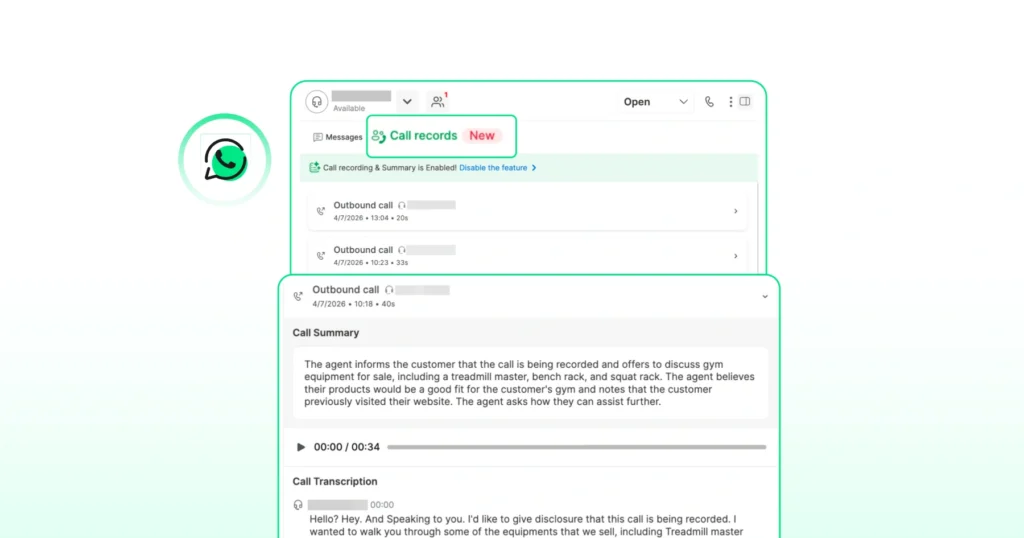
The first 1,000 minutes per month are free. Each additional minute costs $0.01, deducted from the Wati wallet. Recording is available on Pro and Business plans. One important note: the underlying Meta Calling API does not expose call recordings.
Wati handles recording at the platform layer, which is why this capability varies across BSPs and is one of the more meaningful differences between them.
AI transcription
3 Wati AI credits per call. Speaker-separated, timestamped, and available in 50+ languages.
AI call summaries
1 additional Wati AI credit per call, surfacing intent, sentiment, outcome, and action items. Summaries require transcripts, so enabling summaries auto-enables transcription, coming to 4 credits total per call when both are on.
Charging logic
You are only charged for connected outbound calls. Unanswered or rejected calls draw nothing from your wallet. Webhooks fire on every call event, so your team can sync data to a CRM in real time without manual logging.
What Real Teams are Actually Paying: Two Case Studies
The cleanest way to sense-check your cost model is to look at what teams with similar call patterns are actually experiencing.
1. Praja
Praja is one of India’s pioneering hyperlocal social and news platforms, with over 2 million downloads across Tier 2 and Tier 3 cities.
Before switching to WhatsApp Business Calling on Wati, their calling operation was essentially invisible. Agents dialled from personal phones with no cost tracking, no conversion data, and no way to know what was working or why.
After the switch, the team gained call-level conversion metrics for the first time. WhatsApp now drives 20,000 out of 100,000 daily active users back to the app.
The Praja case makes the operational cost argument as clearly as any line-item pricing breakdown: untracked calling has a hidden cost in lost conversion data. Read the full Praja case study.
2. Hakeem (Walee Financial Services)
Hakeem is a fintech delivering Shariah-compliant nano-financing to underbanked communities. Before Wati, the team was handling 3,000 to 3,500 daily inquiries with support calls going unresolved for days over text.
After moving to WhatsApp Business Calling on Wati, resolution time dropped from multiple days to approximately one minute per call.
For a business where each support call is a high-stakes financial query, the cost-per-resolution metric dropped sharply. Not because the per-minute rate was lower, but because fewer calls were needed per resolved case. Read the full Hakeem case study.
The pattern across both is the same. WhatsApp Business Calling’s pricing advantage is not just in the per-minute rate.
It shows up in the answer rate because customers see a verified business badge instead of an unknown number. Plus, it shows up in call duration because agents have full chat context the moment a call connects.
It also shows up in operational visibility because every call is logged and every metric is trackable.
What Actually Moves Your WhatsApp Business Calling Bill: Four Levers Most Teams Miss
Four levers shift your real spend more than the per-minute rate itself.
Level 1: When You Send the Permission Template
A permission request sent inside an active 24-hour customer service window is a free-form message at no charge. The same request sent outside the window is a utility-category template, billed by Meta at the recipient country’s rate.
Teams that build outbound flows to request consent inside an open chat, rather than cold-blasting permission templates, cut their billed template volume significantly. The practical fix is to prioritise same-session permission requests and build your outbound workflow to trigger after a customer has already messaged you.
Lever 2: Average Call Duration
This is the variable teams most often forget to manage. A 30-second qualification call costs far less than a 10-minute consultation, even though both count as one connected call.
Hakeem’s experience is instructive here. Before WhatsApp calling for business, support agents spent days on text exchanges for queries that could be resolved verbally in under a minute. Once the channel matched the conversation type, duration dropped, and so did cost per resolution.
Match call complexity to conversation type, and your minutes-per-outcome ratio improves quickly.
Lever 3: Volume Tier Timing
Meta’s volume tiers reset monthly per destination country.
If you are pushing heavy outbound to one market, concentrating volume in the back half of the month compounds your discount into the highest tier, rather than spreading calls evenly and staying in a higher band for most of the month.
Also worth noting: splitting volume across multiple BSPs resets your tier entirely. All volume to a destination country needs to run through one API connection to benefit from volume pricing.
Lever 4: Answer Rate Quality
WhatsApp Business Calling earns a higher pickup rate than unknown-number outbound because customers see your verified business name, blue tick, and logo on the incoming call screen.
More answered calls means more billed minutes per call attempt, which sounds like a cost increase but is not.
Every billed minute is a conversation with a customer who picked up because they trust the channel. Cost-per-connection goes down even as total minutes go up.
Country Availability for WhatsApp Business Calling: Where Outbound Works and Where It Does Not
The list of restricted outbound countries shifts as Meta expands the feature.
As of March 2026, business-initiated outbound calls are not supported from numbers registered in the USA, Canada, Egypt, Vietnam, and Nigeria. User-initiated inbound calls work everywhere the WhatsApp Cloud API is available, except sanctioned regions.
Two things worth understanding clearly before you plan a multi-region outbound strategy are as follows.
- The restriction applies to your business number’s country code, not your customer’s. A business with an Indian number can place outbound calls to a customer with a US WhatsApp number. The reverse, a US-registered business number placing outbound calls, is currently blocked.
- Meta updates this list on its own schedule. Country availability has expanded several times since the July 2025 global launch. If you are planning outbound calling across multiple regions, verify current availability with your BSP at the time of activation rather than relying on a blog post, including this one.
WhatsApp Business Calling vs Other Voice Channels: Where the Cost Really Lands
A common question from teams comparing channels is whether WhatsApp Business Calling is actually cheaper than a traditional VoIP or cloud telephony stack.
The honest answer is almost always yes, but only if your customers are on WhatsApp.
WhatsApp Business Calling skips the SIP layer entirely since calls run over Meta’s own VoIP infrastructure. Rates in lower-tier markets like India sit well below that benchmark.
The constraint is reached. WhatsApp Business Calling only works between your business and a WhatsApp user. If part of your customer base is off WhatsApp, which is common in North America, you still need a traditional calling stack for that segment.
Most teams that run both use WhatsApp Business Calling for high-trust, messaging-first conversations and traditional VoIP or cloud telephony for everyone else.
For a full decision framework on when to use each, see our guide on WhatsApp Business Calling vs cloud telephony vs traditional VoIP.
The Wati Approach: One Wallet, No Markups, Calling and Chat in the Same Inbox
Most businesses bolt calling onto their existing stack as an afterthought. A separate dashboard, a separate bill, a separate tool for agents to context-switch between. Wati is built differently.
Calling is part of the standard plan. No markup on Meta’s rate, separate add-on tier, or infrastructure to set up.
Your team makes and receives calls inside the same Team Inbox where they already handle chat. When a call connects, the full conversation history is right there on screen.
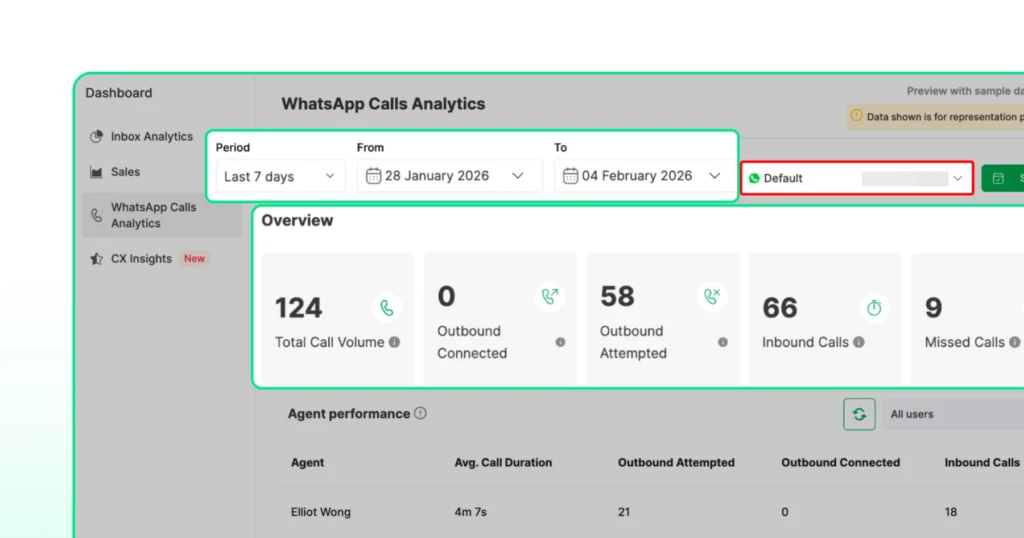
Recording, transcription, AI summaries, webhooks, and call analytics all come built in. Every call is logged, every metric is trackable, and your CRM stays in sync automatically.
Activation takes about two minutes. The Wati setup guide walks through every toggle.
Ready to see what your calling stack looks like when it actually makes sense? Start your free trial of Wati.
Your Next Read: How to Close More Deals with WhatsApp Calling on Wati
Frequently Asked Questions About WhatsApp Business Calling Pricing
No. Meta only bills outbound calls when the customer answers. Initiating, ringing, and unanswered calls cost nothing.
Your customers. Pricing is based on the recipient’s WhatsApp country code. A Singapore business calling a customer with an Indian number pays India’s rate.
Wati’s prepaid wallet model gives you a natural cap. You can only spend what you have topped up. Set wallet threshold alerts, and your team cannot accidentally overspend.
No. Wati does not require a minimum monthly spend on calling. If you make no outbound calls in a month, you pay no calling fees.