

-

-
-
Solutions
-
Soluções
-
Soluciones
-
解决方案
-
解決方案
-
الحلول
-
Product
-
Produto
-
Producto
-
产品
-
產品
-
المنتج
-

-
-


 Wati for Marketing
 Wati for Support
 Wati for Sales
 eLearning
 E-commerce
 Marketing Agencies
 Healthcare
 No Code Chatbots
 AI Support Agent
 Instagram and Facebook messenger
 Click to WhatsApp ads
 Campaigns
 Team Inbox
 WhatsApp Business Calling
 Wati AI
 Overview
 Library
WhatsApp for Customer Service: The Only Guide for Brands in 2026
Written by:
 Shreya
|
on:
May 13, 2025
|
Last updated on:
February 18, 2026
|
Fact Checked by :
Shreya
|
on:
May 13, 2025
|
Last updated on:
February 18, 2026
|
Fact Checked by :
 Namitha
|
According to: Editorial Policies
Namitha
|
According to: Editorial Policies
 Table of Contents
Too Long? Read This First
- Using WhatsApp for support cuts traditional email and call wait times by resolving queries instantly on the platform the customer already prefers.
- Key uses include sending proactive order confirmations and shipping updates, managing booking reminders, collecting customer feedback, and answering real-time questions.
- The article contrasts the basic free Business App with the scalable WhatsApp Business API, which is essential for automation, CRM integration, and high-volume support.
- A solution like Wati is required to use the API, providing the Shared Team Inbox, AI chatbots, and analytics to automate resolutions and empower support teams.
Sales teams are often overworked, handling customer complaints and closing tickets.
With WhatsApp for customer service, brands can easily automate the process and empower sales teams to focus on more critical tasks. But the question is, how do they do it?
By integrating WhatsApp Business with the WhatsApp API tool, you can access chat analytics, launch AI support chatbots, and route conversations dynamically to give a human touch to your customers.
By implementing WhatsApp for customer service, you drastically improve CSAT scores, cut resolution times, and build customer loyalty with consistency and quality.
In this guide, we will discuss how to implement WhatsApp for customer service and empower your sales representatives to leverage intelligent automation. Let’s get started!
Why Should You Use WhatsApp for Customer Support?
Businesses struggle to communicate directly with customers.
Customer success teams reaching out via traditional channels often don’t receive timely responses, leading to delayed resolution, poor UX, and a negative brand image.
Reaching out to existing customers via WhatsApp provides a timely, instant white-glove service by meeting them where they are. Sales teams can use WhatsApp to prioritize urgent queries, personalize conversations, and improve customer service.
What are the Benefits of Using WhatsApp for Customer Service?
According to a study, around 39% of consumers use WhatsApp as their preferred channel. This makes WhatsApp one of the most advantageous channels for customer retention.
Reaching out to customers via WhatsApp can establish quick turnaround times, increase resolution quality, and reduce customer churn.
Below are some more benefits of using WhatsApp for customer service to cater to existing or new customers.
1. Your Customers are Already There
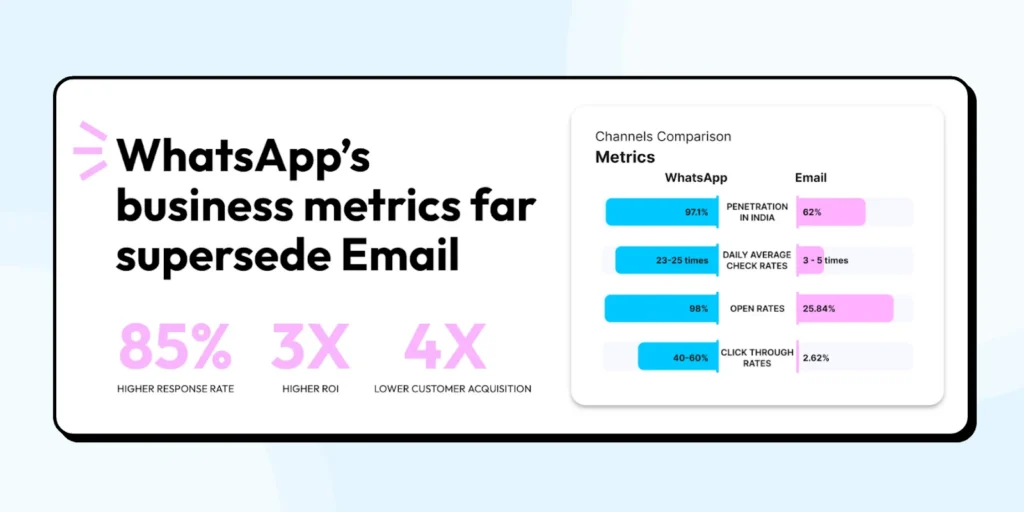
Customers take time to respond to emails, and that’s why the average email response rate hovers between 2-5%.
Reaching out to customers via WhatsApp ensures that you solve problems faster and improve customer satisfaction.
What this means for you: Lower friction support that feels natural to your customers from day one.
2. It Extends Friendly Support and Empathy
With WhatsApp, sales teams can also provide quick audio and visual support. There is a higher possibility that consumers will answer calls, open attachments, and do the needful to reduce customer service hassles and prevent churn.
Representatives who communicate via WhatsApp converse in a more personalized, instant, and empathetic way, which lowers stress levels and pacifies them.
What this means for you: Support interactions that build relationships instead of feeling like transactions.
3. Handle More Questions Without Burning Out
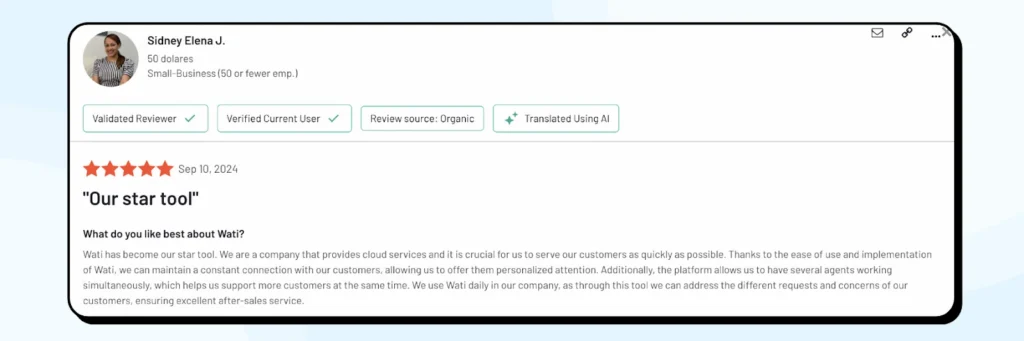
To solve queries on a larger scale, brands can deploy WhatsApp Business API and integrate a chatbot into WhatsApp. By deploying chatbot automation, you can send greeting messages, automate generic responses, or book future appointments!
Switching to WhatsApp for customer service gives you the capacity to route customer queries faster to sales agents dynamically and prevent team burnout on a large scale.
What this means for you: By automating generic support, you allow sales agents to focus on complex issues that actually need their expertise and creativity.
4. One Inbox to Rule Them All
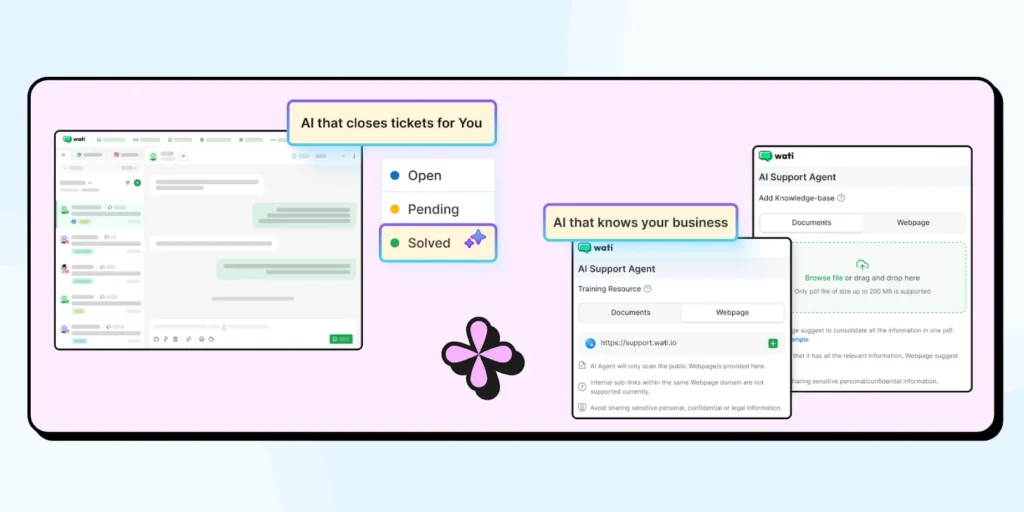
With a shared inbox, sales agents can work together, trace conversation history and past calls, check actions, and get in touch with customers. Having a common inbox provides a backdrop for future customer conversations.
By investing in the WhatsApp API, you gain access to a shared team inbox, allowing you to view shared customer history, track ticket status, and reroute queries to other agents.
With a common team inbox, the team can also monitor ticket efficiency and evaluate compliance and other statutory processes.
What this means for you: Streamlined operations, better teamwork, and a consistent experience for customers.
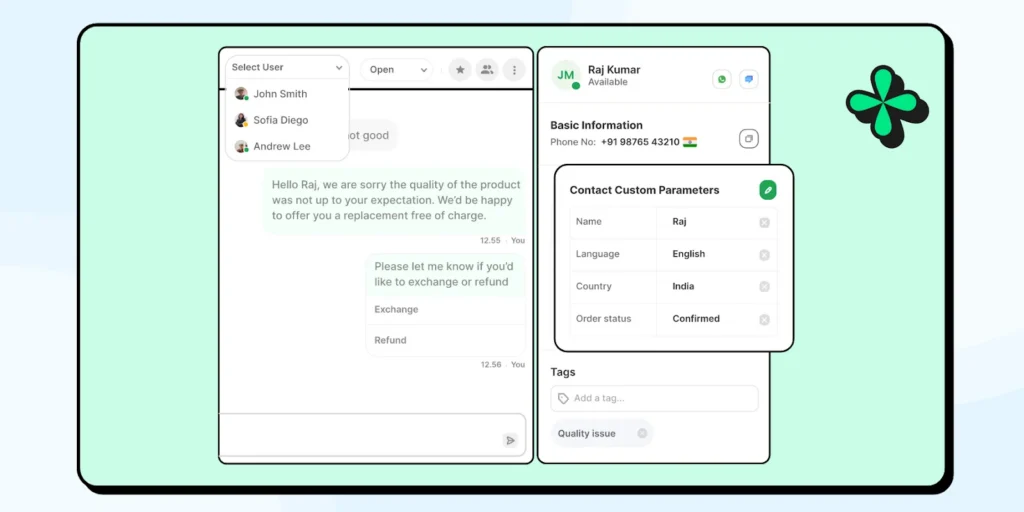
Bonus Read: WhatsApp Team Inbox: Features, Benefits, and Setup
5. Real-Time Insights That Actually Drive Action
With real-time CRM bidirectional sync, you can link CRM to the API and retrieve contact records. Fetching lead details helps improve customer service, lead tracking, and reporting.
With WhatsApp API’s prebuilt segmentation, you can add custom filters and build advanced reports stating how many sales you clocked in, i.e, 30 leads that clocked in $30,000 this week. This helps you track ROI in real time and gain traction.
Also read: How to supercharge your customer journey with HubSpot+Wati integration and contextualize interactions.
6. High Customer Satisfaction and Positive Customer Sentiment
Building an omnichannel customer service experience leads to higher customer satisfaction and positive sentiments, and satisfied customers stick around.
By offering support on a platform they already trust, you’re not just solving problems but building long-term loyalty.
In fact, companies that excel at the customer experience drive revenues 4% to 8% higher than their competitors.
What this means for you: Lower churn, higher customer lifetime value, and more word-of-mouth recommendations.
How to Use WhatsApp for Customer Support
If you are looking to simplify your process while keeping your customers happy, WhatsApp customer service offers plenty of ways to do just that.
1. Answer Customer Questions In Real-Time
With WhatsApp, you can get back or automate a “greeting” or “away” text instantly on receiving a query.
WhatsApp lets you jump in quickly and answer any questions, whether it’s about your product, order status, or return policy. It’s fast, personal, and feels like a real conversation. So your customers don’t have to navigate through a bunch of confusing support options.
Also read: Check out 20+ WhatsApp Business API templates to build quick turnaround times and resolve customer issues.
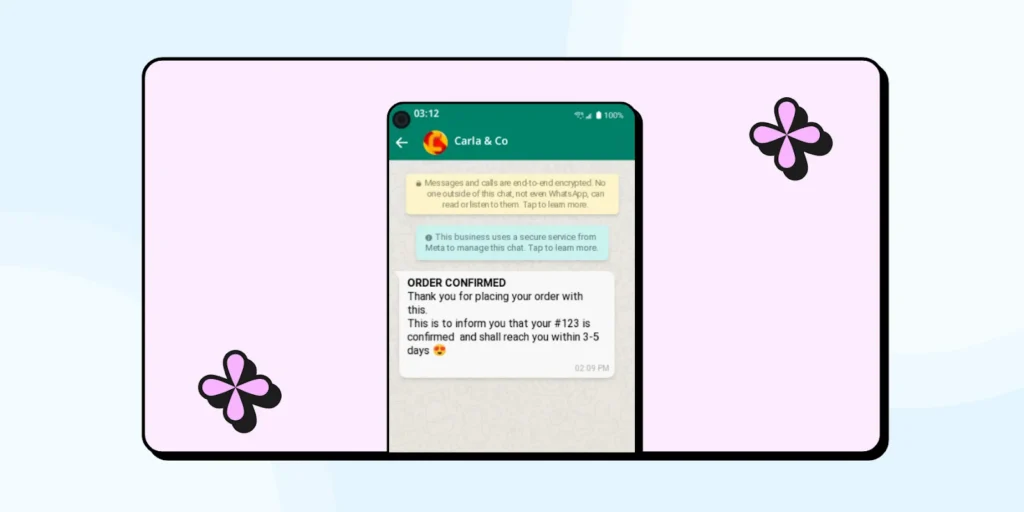
2. Send Order Confirmation and Shipping Updates
With WhatsApp, you can trigger order confirmation or consignment tracking updates easily to help consumers stay updated.
While you can always route order management workflow via the website, shifting it to WhatsApp adds to the convenience of the customer and reduces their worries to a large extent.
Even once someone makes a purchase, you’ve got their attention. Keep them in the loop with automated order confirmations and updates right in their WhatsApp inbox.
They’ll appreciate knowing where their order is and when to expect it. Plus, it’s way more likely to get noticed than an email.
3. Share Booking Reminders or Rescheduling Options
With WhatsApp, you can segment customers to share any booking updates or rescheduling reminders as per sales availability.
Reminding your customers of upcoming bookings keeps them up to date with upcoming bookings and helps them manage their itinerary smartly.
We’ve all missed an appointment or two. We hate when that happens. With WhatsApp, you can send a friendly reminder and even let customers reschedule with just a tap. It’s less hassle for them and ensures fewer empty slots for your business.
4. Keep Customers Informed With Proactive Notifications
You don’t have to wait for your customers to come to you.
Whether it’s a service delay, a restock update, or a change in hours, a quick WhatsApp message keeps your customers in the know. It’s all about keeping expectations in check and reducing the number of questions you recieve.
Maybe your customers have events or get-togethers and have signed up for brand updates.
Keeping them in the loop with 24×7 support reduces the possibility of “unplanned surprises” and keeps a steady bridge of communication.
5. Promote Products and Services
With WhatsApp, you can integrate product catalogues, broadcast discounts, or set timely alerts for promotions too. Informing your customers of the fresh stock of your product or item gives you that market mover advantage in the market.
WhatsApp makes it super easy to show off new products or services with rich media, from brochures to catalogs to even product demos. It’s a fun, non-pushy way to keep your customers in the loop about what’s next.
Did you know? Adidas launched the “100% Rent a Pred” campaign via WhatsApp, allowing recreational sports players to “rent” a professional athlete for their games. This innovative use of WhatsApp combined live chats and influencer marketing to engage customers in a unique way.
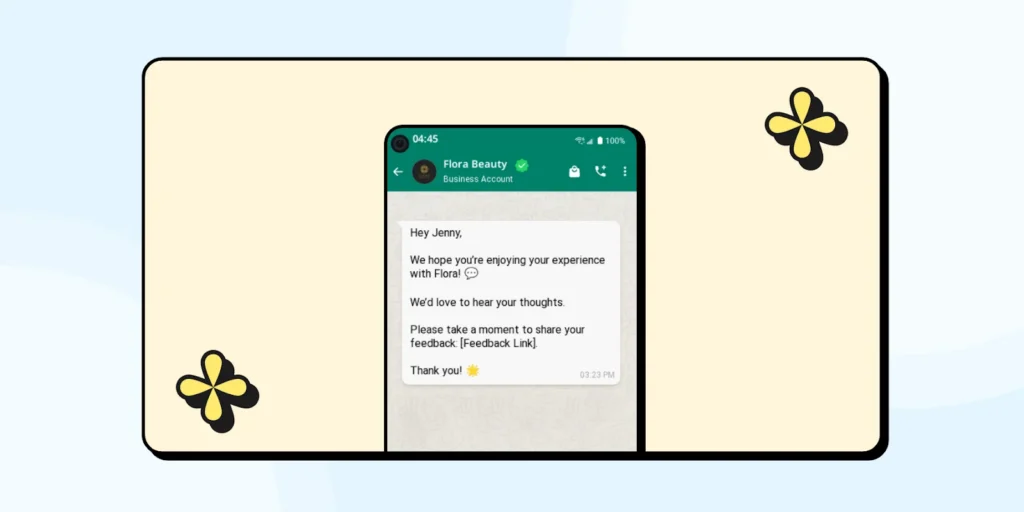
6. Collect Customer Feedback
After every purchase or support interaction, why not ask your customers how you did?
A simple feedback or post-purchase satisfaction survey form in WhatsApp makes it easy for them to share their thoughts, and you get all the insights you need to improve. Plus, it feels much more personal than the typical email survey.
7. Post-Purchase Customer Support
Customer service doesn’t stop at checkout. WhatsApp helps you continue providing top-notch support post-purchase, whether it’s for installation help, returns, or warranty claims.
Keeping the conversation going makes your customers feel supported, even long after they’ve made a purchase from you.
WhatsApp Customer Support: Real-Life Examples
Below are the real-life examples of bringing WhatsApp into action for customer service:
1. Decathlon’s Automated Workflow to Enhance Consumer Support
Decathlon, the global sporting goods retailer, adopted WhatsApp to enhance customer support and streamline communication.
They implemented automated flows and agent handover to manage customer inquiries.
This approach led to a total of 22% queries being resolved via automation, a 50% reduction in average handling time, and a 98% decrease in agent response time.
2. Rappi’s Push Notification Strategy to Refine Consumer Service
Rappi also utilized WhatsApp to send proactive notifications, such as exclusive promotions and cashback deals, to users in various cities across Mexico.
This strategy increased customer engagement by providing timely and relevant information directly through WhatsApp.
How to Get Your Business Discovered on WhatsApp?
Before you can start offering customer service on WhatsApp, your customers need to know you’re there. The good news? It’s easier than ever to make your business visible.
Below is the process to expand your online presence and establish yourself as a trusted authority.
1. WhatsApp Business Account Creation
First, make sure you’re using a verified WhatsApp Business account. This adds credibility and helps customers trust that they’re speaking with your official team.
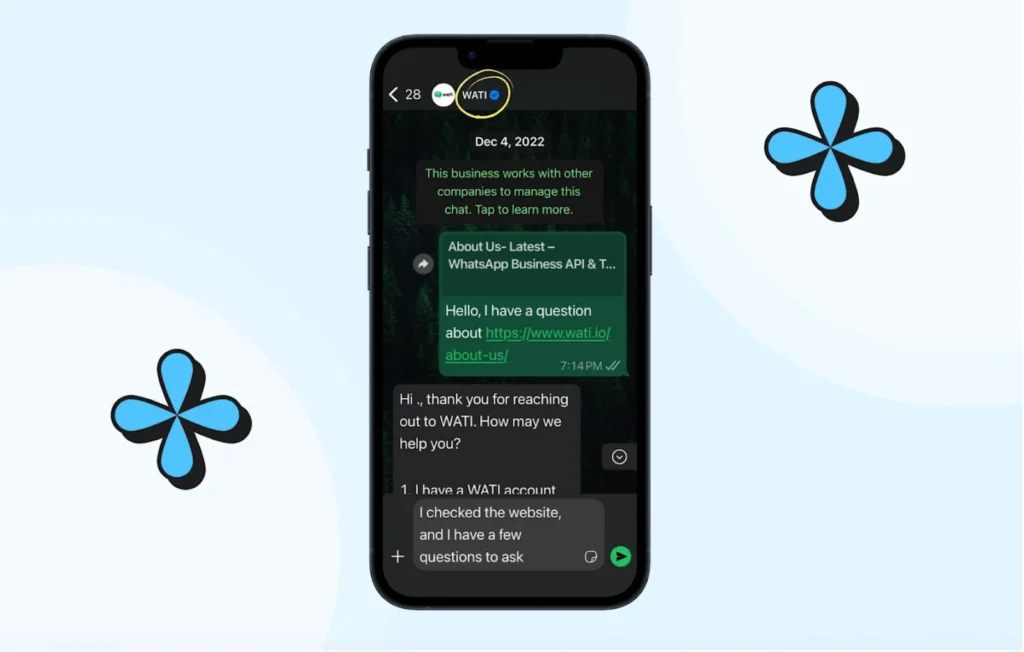
Note: You can also apply for the WhatsApp verification badge, which makes your business stand out even more.
2. Promote WhatsApp Presence
Promote your availability on WhatsApp via other social media channels you are already active in. Add a WhatsApp button to your website, link it in your emails, and include it on your social media profiles.
3. Click to WhatsApp
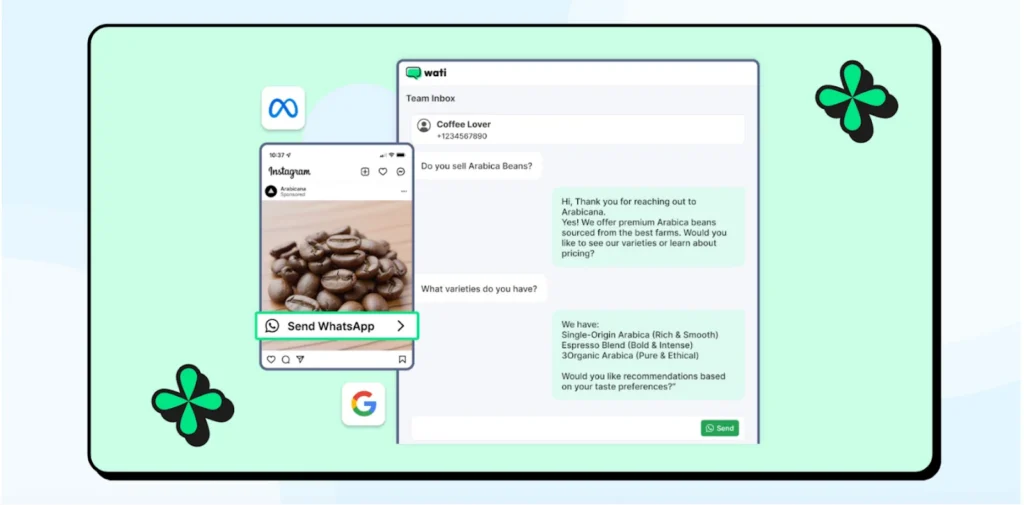
You can also run Click-to-WhatsApp ads on Facebook and Instagram to drive direct conversations. When a customer directly reaches out to you via ad, they’re able to put forth their queries much more efficiently.
4. WhatsApp QR Codes
Consider using WhatsApp QR codes on packaging, receipts, and even in-store displays. They offer a quick and seamless way for customers to reach out.
Also read: Simple ways you can integrate WhatsApp QR code to fix bugs, give user assistance, create content manuals, and solve problems.
The more places customers can discover your WhatsApp channel, the faster you’ll see engagement grow.
Bonus Offering: Free WhatsApp QR Code Generator
How to Send Notifications and Updates on WhatsApp for Customer Support?
There are two primary methods for businesses to send notifications and updates on WhatsApp: through the WhatsApp Business App and the WhatsApp Business Platform (API).
The right choice depends on your business size and how scalable your communication needs are.
1. WhatsApp Business App: Perfect for Small to Mid Teams
If you’re a small business managing a manageable volume of customer conversations, the WhatsApp Business App works well for manual updates and responses.
It’s free to use but limited to one-to-one messaging and doesn’t scale easily. WhatsApp Business helps you automate conversations to some extent, set basic autoresponders, and schedule messages to be on the beck and call of the customer.
2. WhatsApp Business Platform (API): Built for Scale
For growing businesses handling hundreds or thousands of customers, the WhatsApp Business Platform (API) is the clear choice. It enables:
- Automated, personalized notifications to thousands of customers simultaneously.
- Rich media messages with images, PDFs, videos, and interactive buttons.
- Template messaging for consistent and approved communications.
- Seamless integration with your CRM, support tools, and analytics platforms.
- WhatsApp calling to support live conversations with VoIP providers and help sales teams.
- Prebuilt SMS Marketing fallback to try different content avenues for marketing campaigns.
- AI support agents to engage, solve, and route leads to significant human agents without letting the customer feel any gap in communication.
- Shared Team Inbox to manage all customer conversations in one unified workspace.
- Automated workflows to set up intelligent responses for common questions and processes.
- CRM integrations to keep customer data synchronized across all your systems.
- Detailed Analytics to track performance metrics to continuously improve your support.
- Round robin chat assignment to distribute conversations evenly among the sales agents.
The result is a system that scales with your business while maintaining personalized communication.
Meet Wati’s AI Support Agent: Support That Never Sleeps
Our AI Support Agent takes WhatsApp support to the next level by handling a significant portion of customer inquiries autonomously, ensuring prompt and accurate responses around the clock.
Key capabilities of AI support agent include:
- High automation rate: The agent resolves over 60% of customer inquiries without human intervention.
- 24×7 availability: Provide continuous support regardless of time zones or business hours.
- Multilingual support: Communicate with customers in their preferred language.
- Contextual understanding: Pull answers from your FAQs, PDFs, and website content for accurate, context-aware responses.
By integrating this AI Support Agent into your WhatsApp strategy, you not only enhance the customer experience but also empower your support team to focus on complex tasks that truly require human expertise.
Also Read: How Wati Powers Gemini 3.0 capabilities within its API suite to accelerate WhatsApp broadcast efficiency.
Customer Service Done Right: WhatsApp Success Stories
Let’s explore how these two brands are using Wati to transform their customer service experience, and how you can do the same!
1. Eni Networks: Scaling WhatsApp Support for 45,000 Customers
ENI Networks faced challenges with fragmented communication and inefficient ticket resolution due to manual handling of support requests across multiple channels. By integrating Wati’s WhatsApp automation, the brand streamlined its customer interactions, leading to more consistent communication and faster issue resolution for its extensive customer base.
In fact, after the implementation, ENI Networks experienced a 40% reduction in response time and a 30% increase in customer satisfaction.
With over 45,000 customers served via WhatsApp, they were able to scale their support operations without additional human resources. This efficient communication process allowed the company to focus more on proactive customer engagement rather than managing endless inquiries.
2. Zellbury: Enhancing Efficiency With WhatsApp Business API
Zellbury, a fashion retailer, sought to improve its customer service operations. They adopted Wati’s WhatsApp Business API, which provided automated chatbot responses, allowed multiple agents to manage conversations simultaneously, and offered efficient dashboard reporting and analytics.
With a 50% increase in customer service efficiency and 24/7 support enabled by automation, Zellbury saw a 35% boost in first-time customer engagement and a 20% increase in sales conversions due to timely follow-ups and personalized support via WhatsApp.
The ability to manage hundreds of customer queries in real time without the need for constant smartphone use allowed Zellbury to provide seamless support at scale, enhancing customer satisfaction and sales.
Show Care When Customers Need You the Most!
Lost calls or missed emails can really infuriate customers and impact brand health.
By using WhatsApp for customer support, you are not only providing instant resolution to your customers but also keeping them in the loop of any major announcements.
Thinking of customer support as the flywheel of success will get you ahead in the market. And, there is no better tool than the WhatsApp Business API platform to automate timely reminders, schedule appointments, or provide strategic resolutions at scale.
Ready to take your customer experience to the next level? Book a free demo with Wati to avail industry-first API features for top-notch customer support!
WhatsApp for Customer Support: Frequently Asked Questions
WhatsApp support, when run on an API platform, consolidates all chats into a shared team inbox. This allows multiple agents to collaborate, track conversation history, and route inquiries to the right expert, making your team far more efficient than managing scattered emails.
The API is built for scaling support teams. It enables AI chatbots to instantly resolve common queries 24/7, integrates with your CRM so agents see full customer history, and uses a shared inbox so your entire team can manage conversations from one number.
No, a well-designed chatbot actually reduces frustration by providing instant answers for simple queries like order status or store hours. You can set it to seamlessly hand over the chat to a human agent for any complex or sensitive issue.
The API solves this with automation and organization. Using a platform like Wati, you can automatically route incoming chats to the correct department (e.g., “Support,” “Sales”) and use a no-code chatbot to handle repetitive questions, keeping your human agents focused on strategy.