
Too Long? Read This First
- Instagram is now a primary customer communication channel for SMBs, but most teams are still managing it like a personal account.
- One phone, one login, one person means missed DMs, no team visibility, and a customer communication process that breaks under pressure.
- Instagram allows automated replies only after a customer messages or comments first, and each reply must go out within 24 hours of their last message.
- Autoreply on Instagram handles the first touch instantly, so no conversation goes cold while your team is unavailable.
- A shared Team Inbox on Instagram gives everyone visibility, clear ownership, and full conversation history across every DM.
- As of April 2026, that automation now covers post comments too, not just DMs, and you can start on Instagram directly, without connecting WhatsApp first.
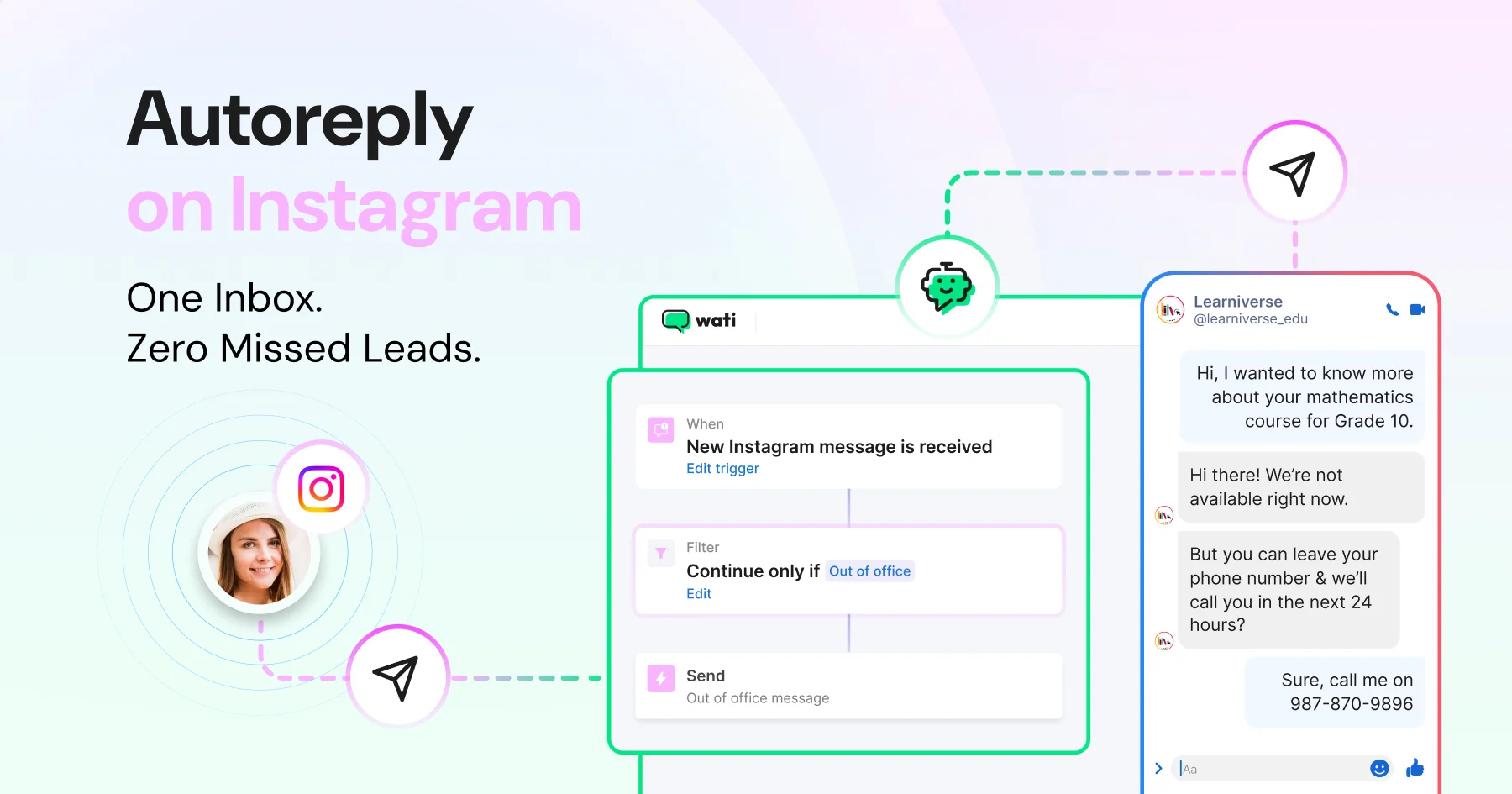
Instagram auto-reply is an automated response your business sends the moment someone DMs or comments on your account, before your team even opens the app. When that automated response is sent as a direct message, including replying to a comment with a DM, it is commonly called an auto DM.
Wati's Instagram Automation instantly triggers welcome messages, out-of-office replies, and keyword-based answers, so no lead sits waiting until morning.
Most businesses still run Instagram DMs off one phone and one login. That's fine for a personal account. It breaks the moment two or more people need to see the same conversation.
A customer who messages at 11 pm and gets a reply at 9 am may have already bought from someone else.
This guide covers the four types of Instagram auto-reply (welcome messages, out-of-office replies, keyword triggers, and comment-to-DM automation), how to set each one up, and what a shared team inbox adds once volume grows.
Why do Businesses Miss Instagram Leads?
Most small businesses run Instagram from one phone. One person has the login and answers every DM. When that person is busy or on leave, messages wait until they're back.
When a reel picks up, DMs come in faster than one person can read them, and the rest of your team can't see them. Sharing the login doesn't fix this. There's no clear way to see who has replied or who is handling a conversation, so a customer may get two replies or none.
Instagram automation replies as soon as someone DMs you about price or delivery. It can also send a private DM to people who comment on your posts. A shared Team Inbox puts all these conversations in one place for the whole team. If one agent misses a message, someone else can see it, reply, and add the lead to your sales pipeline.
What Happens When Your Business Runs an Instagram Account from One Phone?
Managing Instagram DMs manually from one phone becomes difficult as customer conversations increase. Here’s what the single-phone setup actually costs you.
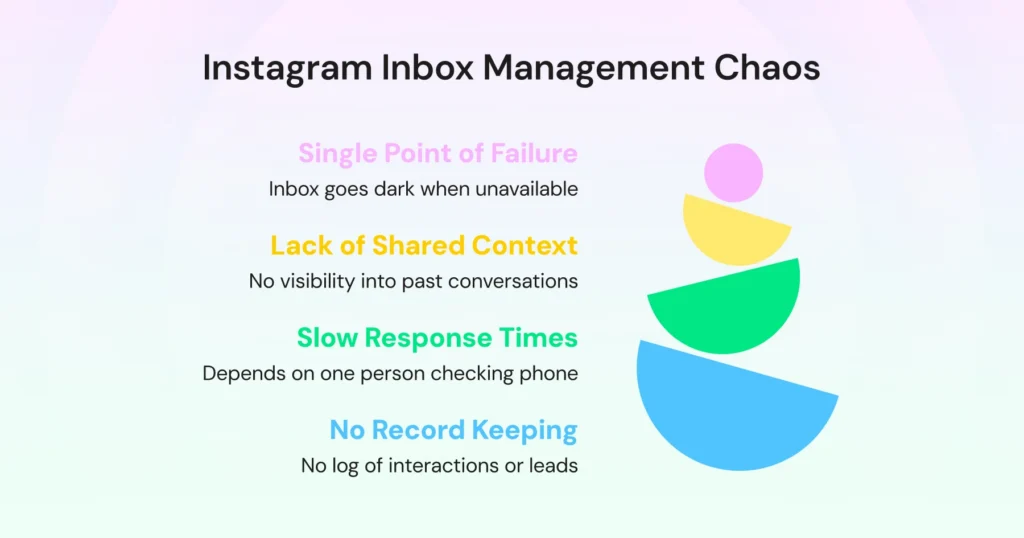
- One person holds the login. If they're unavailable, the inbox goes dark. Every DM that comes in while they're away sits unanswered. No one else can step in, because no one else has access. The inbox doesn't pause. It piles up.
- No one else can see what's already been said. If a customer follows up with a different team member over email, WhatsApp, or in person, that person has no idea what was discussed on Instagram. Every handoff starts from scratch, context gets lost, and your team looks disorganized.
- Response time depends entirely on when one person checks their phone. There's no SLA, no escalation path, no visibility into how long a message has been sitting unread. A lead that came in at 2 pm might get a reply at 7 pm, not because your team is slow, but because nothing flags it as urgent or overdue.
- There's no record of what happened. Which leads were DM'd? Which ones responded? Which were followed up on? There's no log and no history visible to the team, so leads fall through without ever showing up as a loss.
How Many Instagram Leads is Your Team Actually Losing?
There is no dashboard that flags a missed DM, so the impact is easy to underestimate. Missing 30% of 50 DMs a week means 15 stalled conversations.
73% of social media users say that if a brand doesn't respond, they will buy from a competitor instead.
On Instagram, where a customer can DM three competitors in the time it takes you to notice one message, a slow reply isn't just a missed conversation. It's an open invitation for someone else to close the sale.
High-reach content only widens the gap. A single reel that performs well can bring in more comments in a day than one person can review. Every comment with a buying signal, such as "How much?", "Is this available?", or "DM me details," is a lead sitting in your queue.
What Are the 4 Types of Instagram Auto-Reply?
Instagram auto replies are automated responses sent when specific conditions are met: a new message, a message outside business hours, a customer using a predefined keyword, or a comment on your post. They help businesses acknowledge customer inquiries immediately and reduce the need for repetitive manual responses.
Meta Business Suite offers free basic automation: instant replies, away messages, and keyword replies for up to 5 keywords. Businesses that need more than five keyword-triggered replies, shared inboxes, conversation routing, or advanced workflows typically use Instagram automation platforms built on the Instagram API.
The four types are:
1. Welcome Messages
A welcome message is an automatic reply sent when someone starts a new conversation with your account during business hours. It acknowledges the customer, keeps the conversation alive, and gives your team time to follow up properly.
2. Out-of-Office Replies
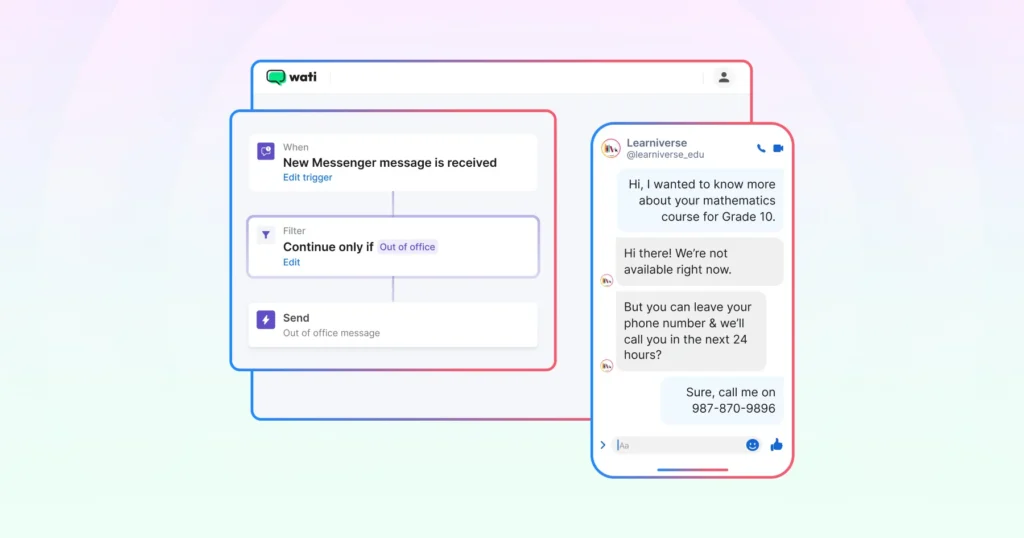
An out-of-office reply is an automatic message sent when someone DMs your account outside business hours. It tells the customer when your team will be back, so late-night and weekend DMs get a response instead of silence.
3. Keyword-Triggered Replies
Many Instagram conversations begin with common questions about pricing, product availability, delivery, or appointments. Keyword-triggered automated replies send the relevant information the moment a customer asks, instantly and consistently, whether or not your team is online.
For example, a message containing "pricing" can trigger a response with current plans, while "catalog" can send a product brochure or shopping link. This allows businesses to answer routine questions instantly while reducing repetitive work for their teams.
The important distinction: automation handles the first touch. Your team takes over for conversations that need judgment, such as complex queries, high-value leads, or anything a canned reply can’t resolve. The goal isn’t to remove people from the process; it’s to make sure no conversation falls through before a person even gets to it. |
4. Comment-to-DM Automation
Instagram automation isn't limited to direct messages. Businesses can also automate replies to comments on posts and Reels. Instagram comments and DMs can be managed together in a shared inbox, allowing teams to reply publicly or continue the conversation through direct messages.
For example, someone commenting "Price?" or "More details" can automatically receive a reply or a DM with the requested information.
Note: Automation is designed to handle routine, repetitive interactions. Conversations that require product recommendations, issue resolution, or purchase decisions can then be transferred to a team member for personalized assistance.
How to Set Up an Auto Reply on Instagram?
Setting up an auto reply on Instagram (or an auto DM, if you're automating comment replies) takes five steps: connect your account, pick a trigger, write the message, set up handoff, and test before going live.
1. Connect Your Instagram Business Account
Link your Instagram account to Meta Business Suite for basic automation, or connect it to Wati under Profile > Channel Status > Instagram for a shared Team Inbox and keyword-based automation rules.
Here's what changes depending on which you choose:
| Meta Business Suite (native) | Wati |
Keyword triggers | Max 5 per automation | Unlimited keywords; each reply counts toward monthly automation triggers |
Access | Desktop only | Desktop + mobile |
Shared team inbox | No | Yes. Instagram and WhatsApp in one inbox on Pro and Business plans |
Comment-to-DM automation | Limited | Included on all plans; each run counts toward monthly automation triggers |
If you're testing the waters, Meta Business Suite's Instant Reply and Away Message cover basic welcome and OOO messages for free. Once you need keyword-based automation, a shared Team Inbox, or comment-to-DM workflows, connect Instagram to Wati instead.
2. Choose Your Automation Trigger
In Wati, go to Automation > Rules > Create Rule and pick your trigger:
New Instagram Message is Received (first-touch welcome message or OOO reply)
Contact does not exist (a filter, not a trigger): add it to your welcome message rule so the greeting only reaches people messaging you for the first time.
Keyword-Based Filtering, with a matching method of Contains, Exact Match, or Fuzzy Match, for pricing, catalog, or FAQ-style questions
New Instagram Comment is Received, for comment-to-DM automation on posts and Reels
Most businesses run more than one rule at once. A welcome message and an out-of-office reply together cover every new conversation, during and outside business hours.
3. Write the Auto-Reply Message
Keep the message specific to the trigger, not generic. Save it once in Wati's Reply Material library (text, image, or video) so it's reusable across rules.
A welcome message should acknowledge the customer and set a response-time expectation.
A keyword-triggered reply should answer the question directly, for example, sending your current pricing or a catalog link the moment someone asks, rather than a placeholder.
4. Set Up Team Handoff
Decide when a conversation moves from automation to a person, and to whom.
Every Instagram DM and comment reply lands in Wati's shared Team Inbox, so you can route high-intent questions or complaints to the right team member with the full conversation history attached. On the Pro and Business plans, your WhatsApp conversations appear in the same inbox.
5. Test and Activate
Send test messages through each trigger before making the rule live. Wati's own setup for a keyword rule typically takes under 10 minutes.
Confirm the right reply fires for the right condition, and that handoff actually reaches the assigned person, before you switch it on for real traffic.
Instagram Auto Reply Message Examples
A good auto reply confirms the message arrived, answers what it can, and tells the customer when a person will reply. Replace the text in brackets with your own details.
Welcome Message
Sends when someone starts a new conversation during business hours.
Hi [first name], thank you for messaging [brand]. Our team usually replies within [time]. Share what you need, and our team will help. |
Out-of-Office Reply
Sends when someone DMs you outside business hours.
Hi [first name], our team is offline right now and will be available at [time, day]. Leave your question here, and someone from our team will reply then. |
Pricing Reply
Sends when a DM contains "price."
Here is our current price list: [link]. If you are not sure which option fits, share what you need, and our team will suggest one. |
Delivery Reply
Sends when a DM contains "delivery."
We deliver to [cities or regions] in [X to Y] days. Share your pincode to confirm the delivery date for your area. |
Comment-to-DM Reply
Sends when someone comments your keyword on a post or Reel. Wati posts a public reply under the comment and sends a DM at the same time.
Public reply: Please check your DMs for the details. If you do not follow us, the message will be in your message requests.
Hi [first name], thank you for commenting. Here is the link you asked for: [link]. |
Handoff to Your Team
Sends when a question needs a person.
Thank you, [first name]. A member of our team will reply here within [time]. |
What Are Instagram's Rules for Automated Messages?
Instagram allows businesses to send automated messages only after a customer starts the conversation, and every reply must go out within a set time window. These rules come from Meta and apply to every tool, including Meta Business Suite and Wati.
Rule | What it means for your automation |
Professional account only | Only Instagram Business or Creator accounts can use automation tools. Personal accounts cannot be connected. |
The customer messages first | You cannot send an automated DM to someone who has not messaged you or commented on your post. |
24-hour reply window | You have 24 hours from the customer's last message to reply. The window resets every time they message again. |
7-day window for people only | After 24 hours, only a member of your team can reply, and only up to 7 days after the customer's last message. Automated replies cannot use this extension. |
One private reply per comment | You can send one DM per comment, within 7 days of the comment. For Instagram Live, you can reply only during the broadcast. |
Where the DM lands | Followers receive your private reply in their main inbox. People who do not follow you receive it in their message requests. |
Wati follows the same limits on every plan. If a lead goes quiet for more than 24 hours, assign the conversation to a team member instead of waiting for an automated follow-up.
What does a Proper Team Inbox for Instagram Look Like?
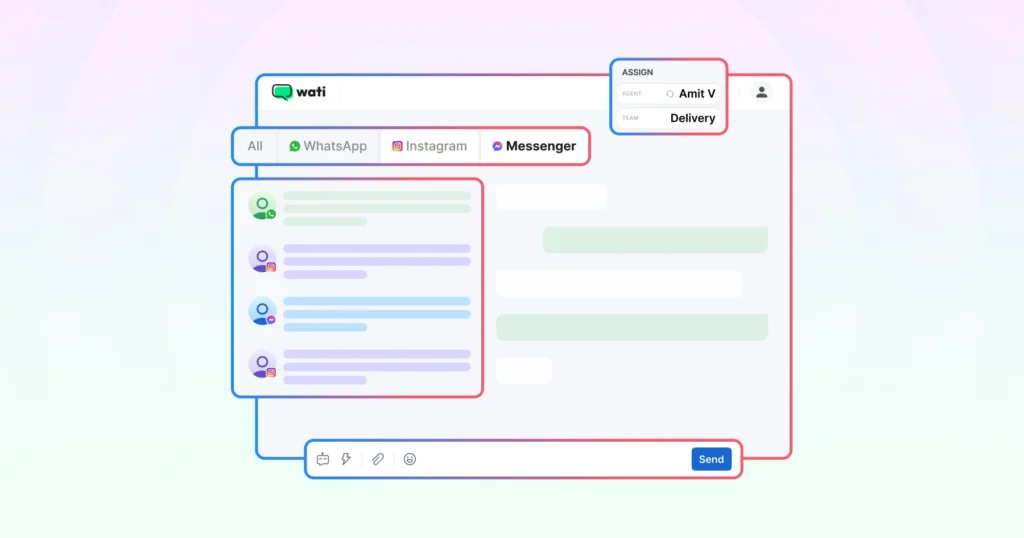
A proper Instagram team inbox replaces one phone and one login with shared visibility where every DM is visible to the whole team, with clear ownership per conversation, a clear status for every chat, and full history for every contact.
Clear conversation ownership: Conversations are assigned to specific people, so there is always a clear owner. Nothing falls through because someone assumed another team member was handling it.
Real-time team visibility: When one person replies, the rest of the team sees it right away. Everyone stays on the same page instead of stepping on each other's replies.
Conversation status: Each conversation shows an open or resolved status, so your team can see what still needs a reply.
Automated replies: Automated replies fill the gaps when your team is unavailable, even at 11 PM. Your team can pick up the conversation in the morning with the full context intact.
Complete conversation history: Every contact has a complete conversation history that shows what was said and when. Whoever follows up can pick up where the last conversation left off.
All channels in one place: If your team already manages WhatsApp, TikTok, or Facebook Messenger, Wati's Pro and Business plans bring everything into the same Team Inbox, so you do not have to switch apps to piece together a customer's history.
Is Instagram Auto Reply Free?
Yes, basic Instagram auto replies are free. Meta Business Suite includes an instant reply for first messages, an away message, and custom keyword replies for up to 5 keywords at no cost.
Meta also does not charge businesses per message for Instagram DMs, so the main cost of a tool like Wati is the subscription.
A paid tool makes sense when you need more than Meta's free options: a shared inbox for your team, more than five keywords, instant comment-to-DM replies, or routing conversations to the right person.
Wati includes Instagram automation on its Growth, Pro, and Business plans, and all plans come with a 7-day free trial.
Here is how the plans compare on users and automation triggers:
Plan | Users included | Automation triggers per month |
Growth | 3, with no option to add more | 1,000 |
Pro | 5, with extra users available | 2,000 |
Business | 5, with extra users available | 5,000 |
An automation trigger is a one-time rule or chatbot runs for a customer. You can buy more triggers in any month. See current prices for your region on the Wati pricing page.
What does Your Team Need Beyond Instagram Auto Replies?
The phone-based approach made sense when Instagram brought in a handful of DMs a week. It stops working once Instagram becomes a real customer communication channel.
An auto-reply on Instagram buys your team time to respond. A shared inbox gives them visibility into every conversation.
Together, they turn a process that depends on one person's availability into something that works consistently.
No conversation should fall through because of how your tools are set up.
Book a demo to see how Wati helps your team automate Instagram replies, manage conversations at scale, and respond faster from a shared inbox.
Frequently asked questions
1. How do I manage Instagram DMs as a team?
Use a shared team inbox that connects to your Instagram account. Every team member gets visibility into the same conversations, can assign messages to each other, and can see the full reply history. This removes the dependency on one person or one phone managing everything.
2. How do I set up an Instagram auto-reply?
Instagram Business accounts support automated responses through third-party tools that connect via the Instagram API. You can set up welcome messages for new DMs, out-of-office replies for when your team is unavailable, and keyword-triggered replies that respond instantly when a customer asks a common question.
3. Can you automate Instagram DMs?
Yes. Instagram DM automation lets you send instant replies based on triggers: a new message, a specific keyword, or a message outside business hours. Automation handles the first touch, so no conversation goes cold. Your team steps in for anything that needs a human.
4. Why are my Instagram DMs not getting replied to?
Most likely because DM management is tied to one person or one phone, with no visibility for the rest of the team. Without a shared inbox, messages get missed whenever that person is unavailable. It's not a people problem. It's a process problem.
5. What is Instagram auto DM?
Instagram auto DM is an automated message that lands directly in a customer's Instagram inbox, sent as a welcome reply, a keyword trigger, or in response to a comment on a post or Reel.
Related posts
- How to Create Personalized AI Videos with Wati’s AI Video Generator
Transform your marketing with Wati’s AI video generator. Create personalized, professional videos at scale without technical expertise or expensive equipment.
- How to Set Up Auto Reply in WhatsApp Business?
Master WhatsApp auto-reply for your business: improve response times, customer service, and communication.
- How to Add a WhatsApp Chat Button On Website: 2026 Guide
Discover how to add a WhatsApp chat button on your website effortlessly. Create real-time connections, improve support, and convert visitors with Wati.
- How to Set Up an Instagram Chatbot to Answer FAQs Automatically (2026 Guide)
Learn how an Instagram FAQ chatbot works, which questions to automate, and how to set one up in Wati without code, from your first button template to a live keyword rule.