
Too Long? Read This First
- Facebook shoppers message Pages from ads, posts, comments, and links, and many of those messages go unanswered.
- Messenger lets automation reply for 24 hours after a shopper's last message, and your team for up to 7 days.
- Messenger chatbots don't support buttons, so use short numbered menus.
- Automate four moments: product questions, comment campaigns, order status, and Facebook Live claims.
- Move shoppers to WhatsApp only with their consent, for updates Messenger can't send.
You answer product questions, comments, and order messages in Facebook Messenger while the shopper is still interested, and move them to WhatsApp only when they agree.
Before reading further, try a 60-second test.
Open your Page inbox and count the messages older than a day that nobody has answered. For many D2C brands, the number is uncomfortable.
"Is this still available?" "Do you deliver to Riyadh?" "Price for the blue one?" Each one is a shopper who raised a hand on Facebook and then bought somewhere else.
Most guides on how to sell on Facebook focus on listings and ads.
This one focuses on the conversations those ads and posts create. Wati's omnichannel inbox brings Messenger into the same place as WhatsApp and Instagram.
Below, you'll see
- Why Page inboxes get ignored
- Where Facebook shoppers start conversations
- Facebook Messenger rules for brands.
- Four moments worth automating
- When to move a chat to WhatsApp
- Quick audit for a neglected inbox.
Why is Your Facebook Page Inbox Being Ignored?
Ads started pointing to WhatsApp or the website because that's where the team already worked.
The Facebook Page inbox stayed open, but nobody owned it, so messages piled up until someone remembered to check.
Shoppers didn't stop messaging, though.
A follower who sees a post in their feed taps "Send message" on the Page. Someone scrolling Reels comments "price?" under a product video. A returning customer messages the Page to ask about an order, because that's where they first found you.
One change made this gap worse. Meta retired the Messenger chat plugin for websites in May 2024, so the chat bubble that once sat on many store sites stopped working. Messenger conversations now start mostly on Facebook itself or through m.me links, and they all land in the Page inbox.
Where Do Facebook Shoppers Start a Conversation?
Facebook gives shoppers several ways to reach you, and each one lands in a different place. Knowing which type lands on which platform tells you what to automate first.
Entry point | Where the chat lands | What to automate |
|---|---|---|
Click-to-Messenger ad | Messenger | A welcome reply that asks what they're looking for |
Click-to-WhatsApp ad | Your existing WhatsApp flows | |
Comment on a post or Reel | A Messenger DM, if you send one | A keyword rule that DMs the commenter |
"Send message" on your Page | Messenger | Keyword replies for price, stock, and delivery |
m.me link or QR code | Messenger | The same keyword replies, plus a welcome message |
The m.me link deserves more use than it gets. Add it to your website footer, order confirmation emails, and packaging, so customers can reach you in Messenger without the old website plugin.
💡 Our guide to Click-to-WhatsApp ads covers the WhatsApp route in detail.
How Should Click-to-Messenger Ads Work for E-Commerce?
Click-to-Messenger ads are the most direct way to fill your Page inbox with buyers. Instead of sending someone to a product page, the ad opens a Messenger chat with your brand, so the shopper can ask their question in one tap.
Setting one up in Meta Ads Manager is straightforward.
- Choose an objective such as Engagement or Sales, pick a messaging destination at the ad set level, and select Messenger.
- In the ad's message template, you write a short greeting and add a few suggested questions that shoppers can tap to start the chat.
- Those suggested questions are where most brands miss a trick.
- A tapped question arrives in your inbox as a normal message, so match each one to a keyword rule:
Suggested question in the ad | Keyword rule reply |
|---|---|
"What's the price?" | Price list or product image with a link |
"Do you deliver to my city?" | Delivery areas and timelines |
"Is cash on delivery available?" | Payment options |
- Every tap then gets an instant, accurate answer, even at midnight.
- Choose the destination by goal.
Click-to-Messenger ads suit quick pre-sale questions and audiences who already use Facebook heavily.
Click-to-WhatsApp ads suit campaigns where you want an ongoing channel for updates and repeat orders.
Many brands run both and compare the cost of each conversation that ends in a sale.
What are Messenger's Rules for Brands?
Messenger has its own rules, and good Messenger marketing is designed around them.
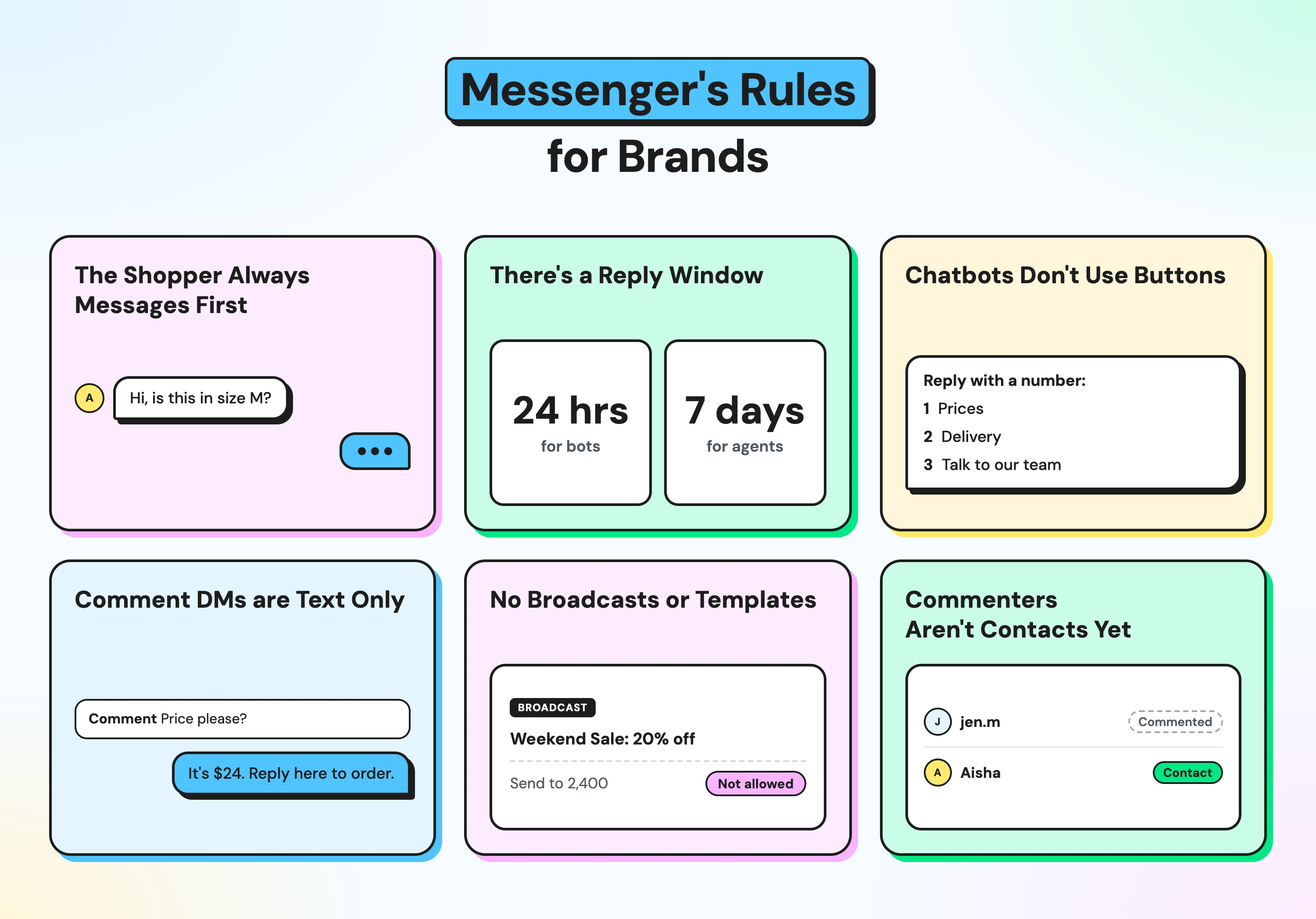
- The shopper always messages first. Brands can't send cold messages on Messenger. Every conversation starts with a shopper's message, comment, or ad tap.
- There's a reply window. In Wati, automated replies and chatbots work for 24 hours after the shopper's last message. After that, a person on your team can still reply for up to 7 days. Once that passes, the chat closes until the shopper writes again.
- Chatbots don't use buttons. Messenger chatbots in Wati can't show buttons or lists, so shoppers reply with a number or a word instead:
"Thanks for messaging! What are you looking for? Reply 1 for prices, 2 for delivery, 3 to talk to our team."
- Comment DMs are text only. When a comment triggers a DM, the message is plain text. Product images and videos can go out later in the conversation, through keyword replies.
- No broadcasts or templates. Messenger in Wati doesn't support message templates, catalogs, or broadcasts. Anything you want to send later, such as a restock alert, belongs on WhatsApp.
- Commenters aren't contacts yet. Someone who comments on your Page becomes a Wati contact only when you send them a DM. Until then, they're just a name in the comment thread.
How to Sell on Facebook Without Relying on Marketplace
Search for how to sell on Facebook, and most advice points to Marketplace. Marketplace works well for individuals clearing out a sofa. It's a poor fit for a D2C brand that wants repeat customers, its own pricing, and its own store.
Facebook Shops are the other route, but they've changed. Since 2025, Shops on Facebook and Instagram send shoppers to your own website to check out.
The Shop helps people discover products. It doesn't close the sale. For most brands, the sale happens in the conversation around the product.
A shopper sees a dress, a serum, or a lamp, and asks one question before buying. Answer it quickly and clearly, and you've made a sale. Leave it for three days, and you haven't.
💡Our guide to social commerce explains this shift across channels.
Which E-Commerce Moments Should You Automate in Messenger?
Four moments cover most e-commerce conversations on Facebook. In Wati, keyword rules reply instantly, and chatbots handle anything that needs a few questions.
Basic chatbot steps are available on every plan that includes Messenger, while tags, team assignment, and webhooks need the Pro or Business plan.
"Is This Still Available?" Product Questions
The most common Page message is some version of "price?" or "still available?" Keyword rules can answer it in seconds. Use the words your shoppers actually type, such as kitna, precio, or preço.
Reply with the product image and a link, and offer a restock alert on WhatsApp when something has sold out.
Comment-to-Messenger Drops
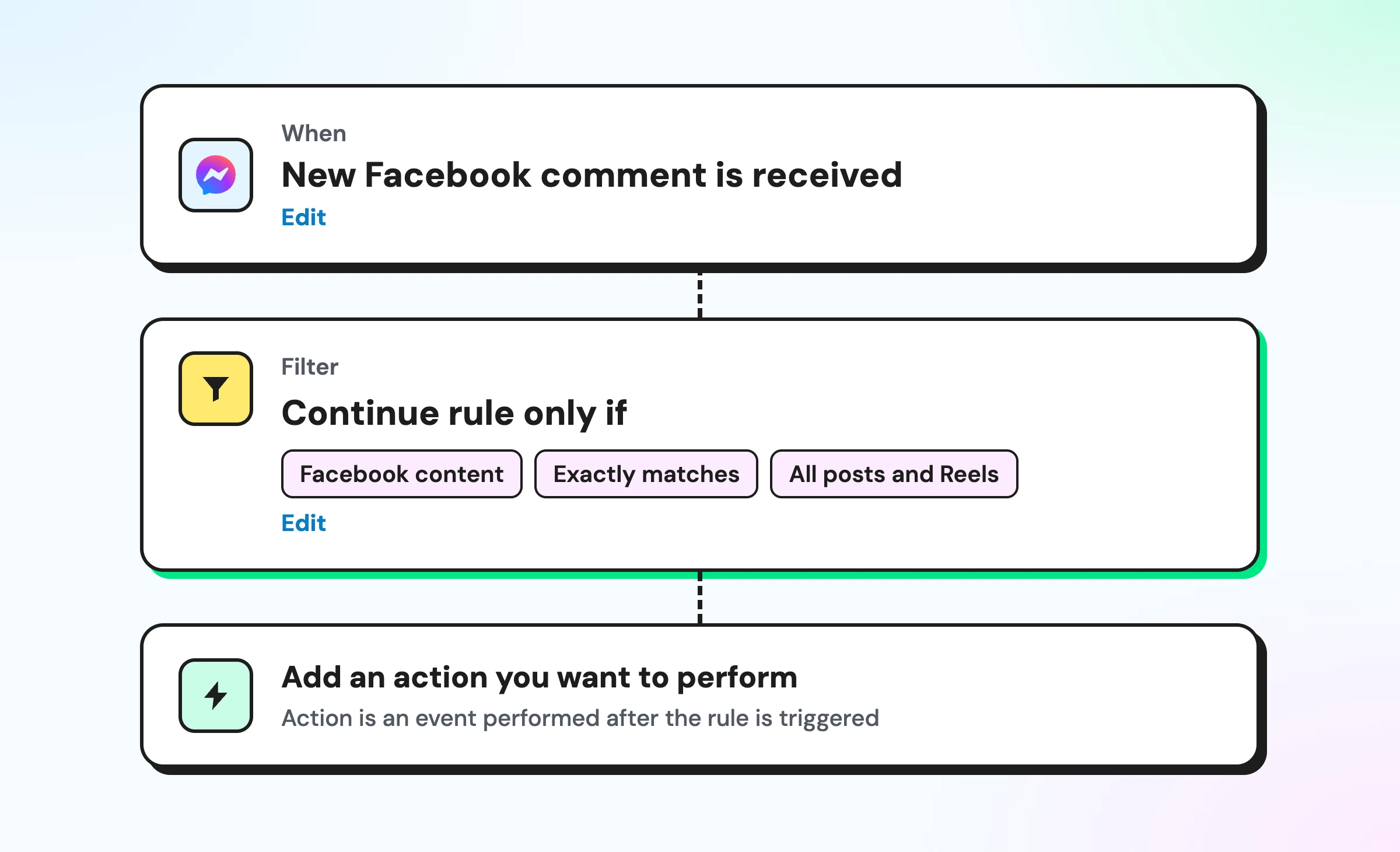
For a product drop or sale week, ask followers to comment one keyword, such as "DEAL." A Wati rule sends each commenter a Messenger DM with the collection link.
You can also post a public reply, but it uses the same text as the DM, so keep discount codes out of that message or turn the public reply off.
Order Status, Returns, and COD
After a sale, "Where's my order?" and "Can I return this?" take over the inbox. A chatbot can ask for the order ID, check your store through a webhook, and route returns to the right team.
Delivery updates themselves belong on WhatsApp, with the customer's consent.
Facebook Live Claims
Live sellers in Southeast Asia and Latin America get "mine" comments faster than anyone can type. A keyword DM can confirm each claim with the item and price.
Check whether your comment rules cover Live videos before you rely on them, and show an m.me link on screen as a backup. A guide to Facebook Live selling goes deeper.
When Should a Messenger Chat Move to WhatsApp?
Messenger is great for the first conversation and poor for anything that comes later. Once the reply window closes, you can't reach the shopper again until they write to you, and Messenger in Wati can't send templates or broadcasts.
WhatsApp fills that gap, but only with permission.
Ask for a WhatsApp number when the shopper wants something that needs a later message:
- A restock alert for a sold-out size or shade
- Delivery updates after an order
- Early access to the next sale or drop
Make the ask clear and honest: "Want an alert on WhatsApp when it's back? Share your number, and we'll only message you about this."
A number shared for one reason isn't permission for every kind of message, so keep follow-ups to what the shopper agreed to.
💡Our guide to conversational commerce explains how chats on different channels work together.
How Do You Audit a Neglected Page Inbox?
If nobody has managed your Messenger chats for months, start with a one-afternoon audit:
- Switch on the default rules. Wati creates Welcome and Out-of-Office rules when you connect your Page. Edit the messages and switch them on.
- Read your last 50 messages. Note the five questions that come up most often.
- Build keyword rules for those five. Use the words shoppers actually typed, including other languages and common typos.
- Set your working hours, so the out-of-office reply goes out at the right times.
- Give the inbox an owner. One person or team should check Messenger chats every day.
Repeat the read-through each month. New products and new campaigns bring new questions.
Which Mistakes Cost Brands Sales in Messenger?
A few habits quietly undo good Messenger marketing:
Running ads while nobody watches the Page inbox.
A campaign that sends shoppers to Messenger needs replies within minutes, not days. Switch on keyword rules before the ads go live.
Sending every question to the website.
"Check our site" sounds helpful but adds a step. Answer the question in the chat, then share the link.
Using one reply for every product.
A shopper who asks "price?" under a specific post wants that product's price, not your whole catalogue. Ask which item they mean, or scope comment rules to the post.
Copying Instagram flows as they are.
Instagram chatbots can use buttons, but Messenger chatbots in Wati can't. Rebuild any button-led flow with numbered options before switching it on for Messenger.
Asking for a WhatsApp number without a reason.
"Share your number" gets ignored. "Share your number for a restock alert" gets answered.
How Does Wati Help E-Commerce Brands Sell Through Messenger?
Wati is an agentic customer engagement platform that turns conversations into revenue growth across marketing, sales, and support. Here's what changes when Messenger joins the rest of your inbox:
- Before: Page messages sit unread for days. After: keyword rules answer "price?" and "still available?" in seconds.
- Before: comments under a sale post go unanswered. After: every commenter who uses your keyword gets a DM.
- Before: order questions arrive in three different apps. After: Messenger, Instagram, and WhatsApp chats sit in one Team Inbox, with Messenger contacts saved in Wati's Contacts.
- Before: shoppers who wanted a restock alert are lost. After: they share a WhatsApp number and get the alert when it's back.
Brands with several Facebook Pages can connect them to one Wati account.
Your Page Inbox is Already a Sales Channel
Learning how to sell on Facebook starts with the messages you're already getting. Answer them quickly, automate the questions you hear every day, and move shoppers to WhatsApp when they ask for updates. That's messenger marketing that pays for itself.
Ready to answer every Facebook message? Start your free Wati trial.
Frequently asked questions
What is messenger marketing?
Messenger marketing is using Facebook Messenger to answer shoppers, share products, and close sales in conversation. For ecommerce brands, it covers Page messages, comment DMs, ad conversations, and order questions.
Can I automate Facebook Messenger replies?
Yes. Keyword rules can reply instantly when a message contains words you choose, and chatbots can ask questions and route chats. Messenger chatbots use numbered text replies instead of buttons.
Can a business message customers first on Messenger?
No. Customers have to message your Page, comment, or tap an ad first. After that, your brand can reply within Messenger's reply window.
How long can a brand reply in Messenger?
In Wati, automated replies work for 24 hours after the customer's last message, and a person can reply for up to 7 days. After that, the chat reopens only when the customer writes again.
Can Facebook comments trigger a Messenger DM?
Yes. A comment rule can send a text DM to anyone who comments a keyword on a post or Reel, and optionally post a public reply with the same text.
Related posts
- TikTok Order Tracking for Fashion Brands: Handle WISMO and Size Exchanges in One Reply
TikTok order tracking for fashion brands: a chatbot checks Shopify in the first reply, routes size exchanges to ops, and moves shipping updates to WhatsApp.
- Warranty Claims on TikTok: Customer Service for Phone Accessory Brands
What does a good warranty claim process look like for phone accessory brands on TikTok? Collect the order, model, and a photo in DMs, then hand off.
- Selling Skincare on TikTok Shop: How Beauty Brands Handle Every Conversation Around the Shop
How do beauty brands sell on TikTok Shop? Let the Shop handle checkout, and answer skin-type, shade, and creator DMs from one team inbox.
- How Retail Brands Sell on Instagram Without Missing a Single DM
To sell on Instagram, reply to price DMs fast, turn comments into orders, and follow up on WhatsApp. See 7 retail use cases that make it work.