
Too Long? Read This First
- Omnichannel customer service in education links every channel to one student record that holds inquiry details, tuition and fee status, and past conversations.
- Disconnected channels make students and parents repeat themselves and force counselors to check the CRM, billing records, and old chats before every reply.
- Admissions inquiries, application follow-ups, fee reminders, parent updates, and student services each create conversations across WhatsApp, Instagram, Messenger, WebChat, and more.
- Wati brings every channel into one Team Inbox, where chatbots and Astra AI Agents answer routine questions and hand complex cases to a counselor with the full conversation.
- Track response time, inquiry-to-application rate, and repeat contact rate for each channel side by side to see where replies lag.
A student messages your admissions office on WhatsApp to ask about paying tuition in two installments.
They already asked about scholarships on Instagram and called the front office, but the counselor sees neither conversation and asks for their name and program all over again.
Omnichannel customer service in education fixes this by tying every conversation to one student record, so a student who starts on Instagram and follows up on WhatsApp never explains twice.
Wati, an agentic customer engagement platform built on the WhatsApp Business API, helps schools, universities, coaching institutes, and edtech companies accomplish this.
This guide covers six use cases from admission inquiries to student support services, the channels to connect, how Wati’s chatbots and Astra AI Agents handle routine questions, a seven-step setup plan, and the metrics to track across every channel.
What is Omnichannel Customer Service in Education?
Omnichannel customer service in education gives admissions, finance, and academic staff one shared view of every conversation with a student or parent, from first inquiry to graduation.
Whether a student or their parent reaches out on WhatsApp, Instagram, or WebChat, every message sits in the same student record.
That record usually holds:
- Conversation history: Previous messages from WhatsApp, Instagram, Messenger, WebChat, RCS, TikTok, and SMS
- Inquiry details: Program or grade of interest, start term, inquiry source, and assigned admissions counselor
- Application status: Documents received, documents pending, and admission decision
- Tuition and fees: Payment plan, due dates, installments, and payment status
- Academic details: Grade, section or cohort, class schedule, and attendance updates shared with parents
- Support history: Past requests, tags, and private notes from other staff members
For example, a student asks on WebChat if their application is complete. The next morning, their parent asks the same thing on WhatsApp. The counselor sees both chats and the one document still pending, and replies with a clear next step.
What Problems Does Omnichannel Customer Service Solve for Schools and Universities?
Omnichannel customer service fixes the gaps that appear when admissions, finance, and academic offices each run their own channels.
Students expect better: in an Inside Higher Ed Student Voice survey of 5,025 college students, 65% said they consider themselves customers of their institution.
1. Stops Students and Parents From Repeating the Same Question
With one conversation history per student, the on-duty counselor can see what a parent has already asked before replying in any channel. The parent gets an answer instead of a request to start over.
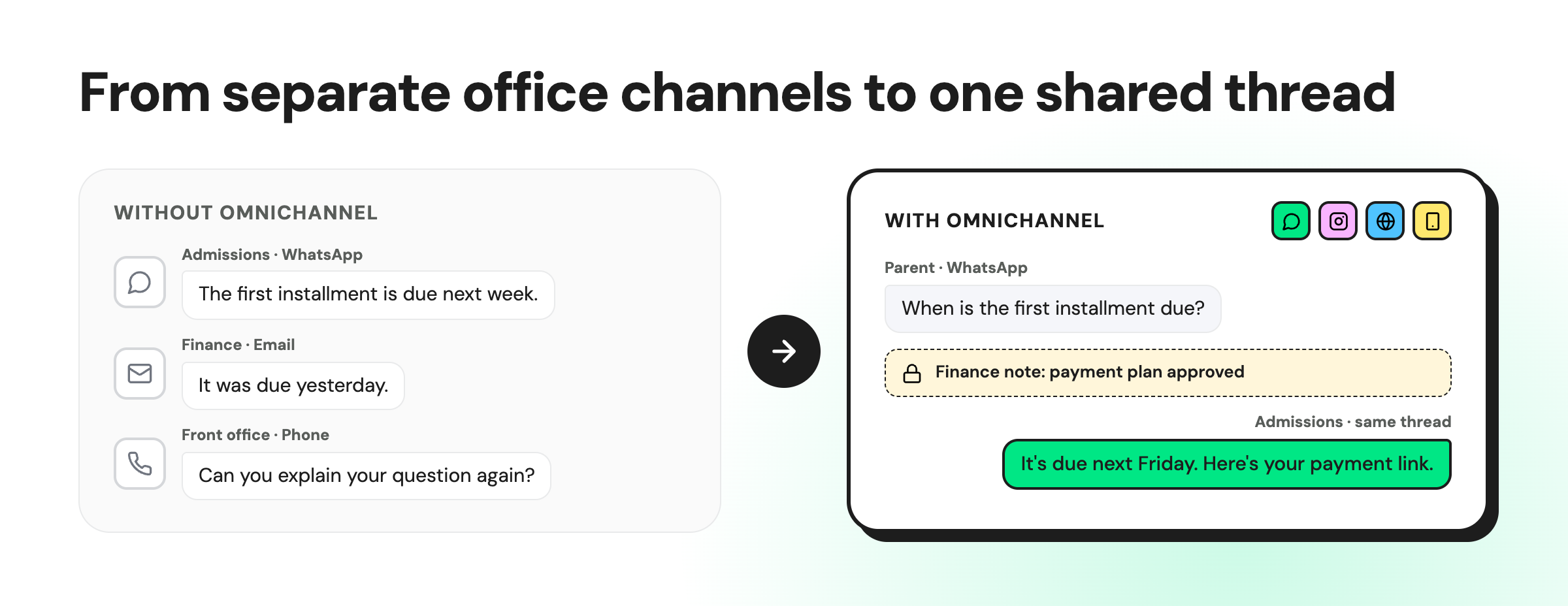
Without it, a parent who gets no reply on Instagram tries WhatsApp, then calls the front office. Each time, they explain the same question to a new person.
2. Gives Counselors the Student’s Inquiry and Billing History Before They Reply
With the student’s record next to the chat, counselors can reply right away instead of checking three systems first. Wati connects with CRMs such as HubSpot, Zoho CRM, and Salesforce, so inquiry details and any payment status your CRM holds show up beside the conversation.
Without that, inquiry details sit in the CRM, billing records sit with the finance office, and past chats sit on another screen. The counselor checks all three before writing a word.
3. Keeps Admissions, Finance, and Academic Offices Giving the Same Answer
When admissions, finance, and academic staff all work from the same conversation thread, parents get the same answer no matter which department replies.
Private notes indicate who owns the question and what has already been promised, so the next office reads them before responding.
Without that shared thread, admissions might tell a parent the first installment is due next week while the finance office says it was due yesterday. The family hears two answers and trusts neither.
4. Gets Every Inquiry Answered, Whichever Channel It Comes From
Most admissions offices monitor WhatsApp and the phone. Messages on social channels and WebChat get checked when someone remembers, and a prospective student waits all day.
Wati’s Team Inbox brings WhatsApp, Instagram, Messenger, TikTok, RCS, SMS, and WebChat messages into one shared queue.
5. Shows Principals and Admissions Directors Where Responses Are Delayed
One view across all channels shows principals and admissions directors the open queue, the slowest replies, and which office needs help during admission season. They can move staff to the busiest channel before students start waiting.
Without it, each channel reports separately, so academic leaders can’t tell where inquiries are piling up. They usually find out when a parent complains.
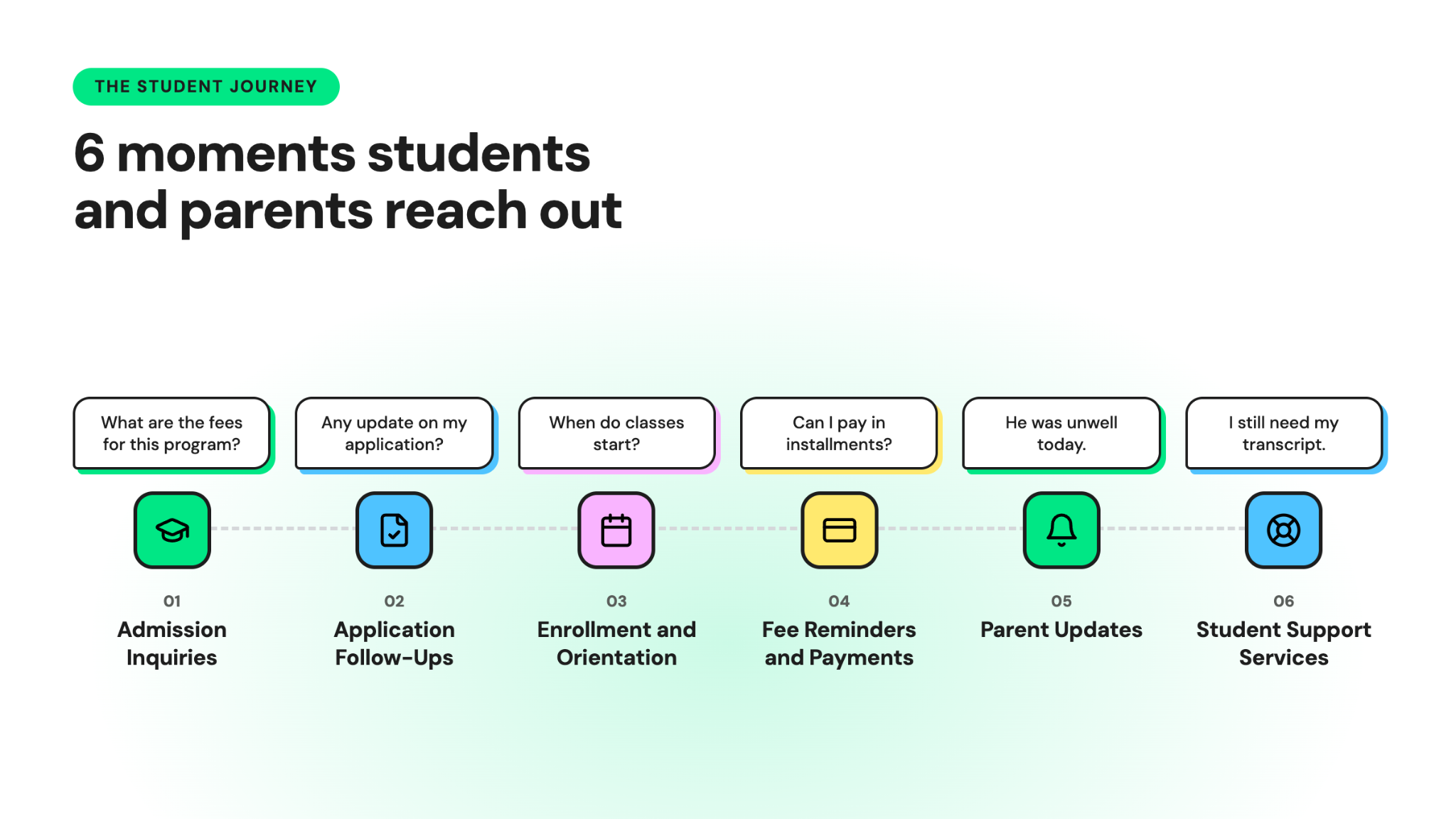
6 Education Customer Service Use Cases That Need Omnichannel Support
From the first admission inquiry to a question during finals week, education support covers many conversations with the same student and their parents.
Below are the six moments when they contact you most, with the Wati features that handle each one.
1. Admission Inquiries
Admission inquiries arrive from ads, Instagram reels, the website, and campus visits. Most of them ask the same few questions, and a slow reply gives families time to contact other schools.
Common questions include:
- Eligibility and admission requirements
- Tuition, fees, and payment plans
- Start dates and application deadlines
- Scholarships and financial aid
- Campus location, housing, and transportation
How Wati helps:
- Click-to-WhatsApp Ads: A program ad opens straight into a WhatsApp chat, so the student asks about tuition right away instead of filling in a long inquiry form.
- Instagram comment-to-DM: A student comments “tuition?” on a reel and gets a DM with the program brochure and an inquiry link.
- Astra AI Agents: They answer eligibility, start date, and tuition questions from your course catalog, around the clock, on WhatsApp and Instagram.
- Team Inbox: Inquiries from every channel land in one place and go to the right admissions counselor.
2. Admissions Counseling and Application Follow-Ups
Most applications stall between the first inquiry and the final submission. A student waits on a transcript, misses a deadline, or never hears back from the admissions counselor.
With omnichannel support, the counselor sees every earlier message and knows which documents are pending.
How Wati helps:
- CRM sync: Inquiry and application details from HubSpot, Zoho CRM, or Salesforce appear next to the chat.
- Campaigns: Send document and deadline reminders to every applicant with an incomplete application.
- Astra AI Agents: They ask applicants qualifying questions, such as program of interest and start term, and route them to the right admissions counselor. When an applicant asks about a scholarship appeal, a fee waiver, or their admission decision, the chat transfers to the counselor with its full context.
- WhatsApp Business Calling: Counselors can call the applicant from the same chat when a conversation needs a voice.
3. Enrollment and New Student Orientation
Once a student enrolls, the questions change. They ask about class schedules, portal logins, uniforms, and orientation dates.
Sending this information proactively on WhatsApp cuts the number of “when do classes start?” messages your team answers.
How Wati helps:
- Custom notifications: Trigger welcome messages, class schedules, and portal login details when your CRM or student system marks a student as enrolled.
- No-code chatbots: Ask which enrollment documents are pending, share the upload link, and answer common orientation questions.
- Multiple WhatsApp numbers: Run separate numbers for admissions and student services so each office gets the right chats.
4. Fee Reminders and Payment Support
Fee reminders work best when parents can act on them in one tap. Include the amount, the due date, and a payment link in the message.
Payment questions often involve more than one office. A parent may ask the finance office about installments, then message admissions about a scholarship adjustment on the same bill.
How Wati helps:
- Campaigns: Send fee reminders to every parent in a grade or section before the due date.
- Google Sheets and Zapier integrations: Trigger reminders from the billing records your finance office already keeps.
- Astra AI Agents: Answer payment plan, late fee, and refund questions from your tuition and fee policy.
- Private notes: Staff can leave internal notes on a chat that parents don’t see. If the finance office approves a payment plan, it adds a note, so admissions sees the approval before replying to the parent.
5. Parent Updates on Attendance, Exams, and Grades
Parents want to hear about attendance, exam dates, report cards, and parent-teacher conferences as soon as they happen. A WhatsApp message reaches the phone they already use to message family and friends.
Parent updates also create replies. A parent who gets an absence alert writes back with the reason, and that reply needs to reach the homeroom teacher.
How Wati helps:
- Campaigns: Send attendance alerts, exam schedules, report card notices, and parent-teacher conference invitations to parents by grade or section.
- Team Inbox: Parent replies reach the right staff member, not a teacher’s personal phone.
- Chatbot buttons: Parents can confirm a conference slot or request a different time with a single tap.
6. Student Support Services and Administrative Requests
Enrolled students need help with class schedules, exam registration, transcripts, ID cards, and portal access. Each request may involve a different office.
Route sensitive matters, such as student well-being or disciplinary issues, to trained staff through your institution’s own process.
How Wati helps:
- Conversation Summary: The registrar’s office or finance office gets a short recap of a long thread before replying.
- AI CX Score: Flags students whose messages show frustration, such as a third follow-up on a missing transcript.
- Private notes: The registrar’s office and the finance office can see what was already promised.
- WhatsApp Business Calling: Staff can call a student from the chat when text isn’t enough.
Which Channels Should Schools and Universities Use for Student and Parent Communication?
Most institutions need WhatsApp, WebChat, Instagram, and phone. The right mix depends on where your inquiries come from.
Channel | Best for | In Wati’s Team Inbox |
Admission inquiries, fee reminders, parent updates, and two-way support | Yes | |
Website chat | Questions from students browsing program and tuition pages | Yes (WebChat) |
Instagram and Facebook DMs | Inquiries from reels, posts, and ads | Yes |
SMS | Short alerts for families not on WhatsApp | Yes |
Phone | Admissions counseling calls and sensitive conversations | WhatsApp calls, through WhatsApp Business Calling |
Student portal or LMS | Coursework, grades, and class materials | No, keep it in your portal |
If you run a small school or coaching institute, start with the channels where parents and students already reach you. For many institutions in WhatsApp-heavy markets, that means WhatsApp, Instagram, and WebChat.
Add SMS or Messenger later, once your admissions and finance offices answer the first channels on time.
How Can AI Chatbots Answer Student and Parent Questions Across Channels?
An AI chatbot for education answers routine admission, tuition, and schedule questions on WhatsApp, Instagram, and Facebook Messenger. Counselors and finance staff then spend their time on applications, scholarships, and payment issues that need a person.
What the chatbot does | Education examples |
Answers admission FAQs | Eligibility, tuition and fees, start dates, on-campus housing, and required documents |
Keeps answers consistent | Gives the same tuition and eligibility answer on WhatsApp, Instagram, and Messenger |
Qualifies new inquiries | Asks for program of interest, city, and preferred start term before routing to an admissions counselor |
Replies after office hours | Handles late-night inquiries during admission season and finals week |
Passes cases to staff | Sends scholarship appeals, billing disputes, and sensitive student matters to staff with the chat history |
To answer these questions, the chatbot needs your course catalog, tuition and fee schedule, academic calendar, and admission and refund policies. Keep them current, because a wrong tuition answer costs more trust than a slow one.
How to Set Up Omnichannel Customer Service in Education?
You can set up omnichannel customer service in education in seven steps, starting with the questions families ask most.
- Map your most common inquiries: Pull the last month of messages from admissions, the finance office, and the front office. Group them by topic, such as tuition, eligibility, documents, and class schedules.
- Pick channels based on where inquiries come from: Check which channels carry the most inquiries today. Connect those first, using the channels table above.
- Bring every channel into one shared inbox: Connect WhatsApp, Instagram, Messenger, TikTok, SMS, RCS, and WebChat to Wati’s Team Inbox. Retire personal numbers for official parent and student communication.
- Connect your CRM and billing records: Link your CRM so inquiry details show beside the chat. Use Google Sheets or Zapier to trigger fee and document reminders from the records you already keep.
- Automate the routine questions: Set up a chatbot for the top questions from step 1, as covered in the AI chatbots section. Keep a clear path to a person for everything else.
- Set response times and escalation rules: Decide how fast each office replies during admission season and regular weeks. Define which questions go to the finance office, the registrar’s office, or senior staff.
- Train staff and review every month: Show each office how to use private notes and handoffs. Review the metrics in the next section and adjust your chatbot and routing.
Which Student Support Metrics Should Educational Institutions Track?
Educational institutions should track how fast they reply, how well they resolve questions, and whether conversations lead to applications and on-time payments.
Review these eight metrics across all channels together to see which channels and departments reply slowest.
Metric | What it measures | How to calculate | Why it matters for education |
First response time | How fast your team sends the first reply | Average time between a student's or parent's first message and your first reply | Shows whether inquiries get answered before the student contacts another school |
Resolution time | How long it takes to close a question | Average time between the first message and resolution | Shows how long students and parents wait on billing, document, and class schedule issues |
Inquiry-to-application rate | How many inquiries become applications | Applications started ÷ new inquiries × 100 | Shows whether admission conversations turn into applications |
Unanswered inquiry rate | How many inquiries miss your reply target | Inquiries with no reply after your target time ÷ total inquiries × 100 | Shows which channels or offices are missing messages |
On-time fee payment rate | How many payments arrive by the due date | Payments made by the due date ÷ payments due × 100 | Shows whether reminders reach parents in time |
Repeat contact rate | How often the same issue comes back | Students or parents who ask about the same issue again ÷ resolved issues × 100 | Shows whether the first answer settled the question |
Chatbot handoff rate | How often the chatbot passes a chat to staff | Chatbot conversations handed to staff ÷ total chatbot conversations × 100 | Shows which admission or tuition questions the chatbot can't answer yet |
CSAT | How satisfied students and parents are | Positive ratings ÷ total ratings × 100 | Shows whether students and parents are happy with the help they got |
A fast first reply doesn’t help if parents keep asking the same tuition question, so check first response time and repeat contact rate together.
To measure CSAT, add a short rating question at the end of your Wati chatbot flows. Many parents and students skip it, so AI CX Score in Wati also rates every Team Inbox conversation and flags unhappy ones.
Build Omnichannel Customer Service in Education with Wati
With omnichannel customer service in education, a parent can ask on Instagram, pay on WhatsApp, and message the finance office via WebChat, while each staff member can see all previous messages.
Counselors, finance staff, and teachers work from a single student history rather than three separate tools.
See how Wati brings admissions, fee reminders, and student services into one inbox. Book a demo.
Frequently asked questions
What is an example of omnichannel customer service in a school?
A parent asks about a tuition payment in an Instagram DM, then gets the payment link on WhatsApp the next day. Both messages sit in one thread in the shared inbox, so whoever answers next sees the full history.
Do schools need permission before messaging parents and students on WhatsApp?
Yes, Meta requires opt-in before a business messages anyone on WhatsApp. The person must share their number and agree to receive messages from your institution, which you can collect on a website form, by SMS, through a phone menu, or on paper.
Can a school reply to a parent on WhatsApp without an approved template?
Yes, but only within 24 hours of the parent's last message or call. Outside that window, you need an approved template message to start the conversation.
How much does it cost to send fee reminders on WhatsApp?
Meta charges per delivered template message, based on the template category (marketing, utility, or authentication) and the recipient's country. Meta assigns the category when it reviews your template and can change rates on the first day of each quarter, so check its current rate card before you plan costs.
Do schools pay when parents message them on WhatsApp?
No, Meta doesn't charge for messages that parents or students send to your institution. Since October 1, 2026, Meta does charge for your non-template replies once you pass 1,000 free replies per business phone number each month.
Are conversations from Click-to-WhatsApp admission ads free?
Yes, when a prospective student messages you from a Click-to-WhatsApp ad on the WhatsApp mobile app and you reply within 24 hours, Meta opens a free window of up to 7 days. During that window, Meta doesn't charge for your marketing, utility, authentication, or service messages.
Related posts
- Instagram Comment Automation: How It Works and How to Set It Up in Wati
Instagram comment automation auto-replies to comments and DMs commenters within seconds via Meta's API. Covers strategy, use cases, and Wati setup.
- Shared Team Inbox for Instagram: A Buyer’s Checklist for 2026
Use this fastest checklist to evaluate any shared team inbox for Instagram, which covers DMs, comments, automation, and multi-channel support.
- How to Send Bulk Messages on WhatsApp Without Getting Blocked
Learn how to send bulk WhatsApp messages without getting blocked. Compare the WhatsApp Business app and API, messaging limits, costs, templates, and best practices for safe, compliant bulk messaging.
- How to Set Up a TikTok Business Account: Step-by-Step Guide
Set up a TikTok Business Account step by step: switch from personal, pick a category, add your profile, and unlock ads and analytics.