
Too Long? Read This First
- Omnichannel customer service connects every support channel so context moves with the customer, not just the message.
- Only 22% of customers start, stay, and resolve their issue entirely within a company's own channels (Gartner, 2025), so most service journeys already cross channels the business doesn't control.
- A working setup needs a shared inbox, CRM, connected customer data, clear routing rules, and AI agents that hand conversations to a human easily.
- You should measure response time, resolution time, CSAT, and repeat contacts across all channels together, so you can see whether customers get fast, consistent help wherever they reach you and spot where conversations break down between channels.
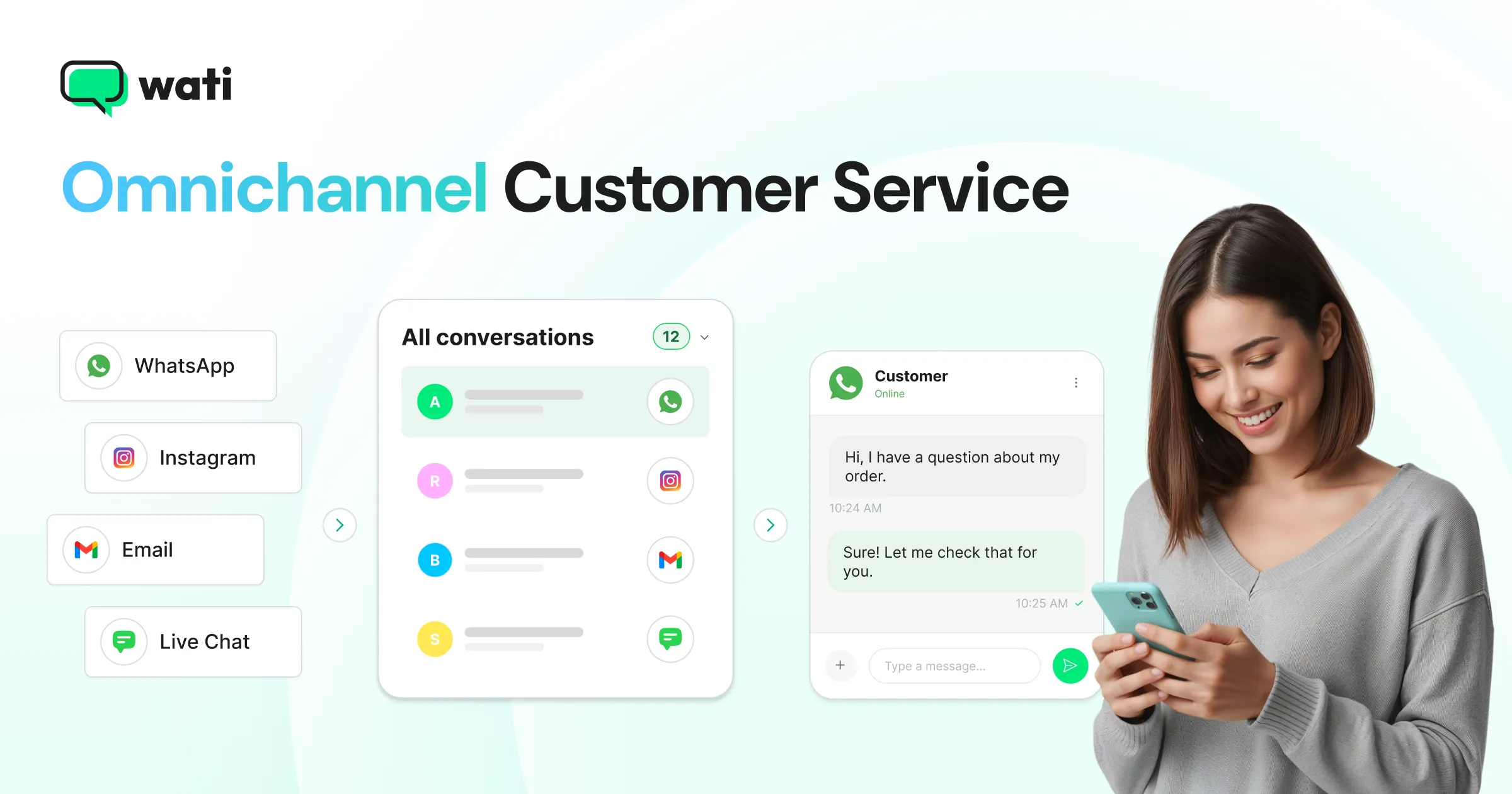
Omnichannel customer service is a support model that integrates all the channels a customer uses, such as WhatsApp, Instagram, website chat, email, and phone, into a single, continuous experience, resolving customer queries and providing uninterrupted support.
Customers can move from one channel to another while keeping their conversation history and context intact.
Implementing omnichannel customer service means connecting your channels, your customer data, and your team's workflows in one place.
Wati is an agentic customer engagement platform, turning conversations into revenue growth across marketing, sales, and support. AI Agents and humans work in tandem across entire customer conversations on WhatsApp, Instagram, Messenger, RCS, voice, and web chat to drive meaningful customer interactions.
This guide covers everything you need to get it right. We start with what omnichannel customer service is and how omnichannel customer support works day to day, then compare it with multichannel support and walk through the benefits.
From there, you will get an eight-step plan to achieve omnichannel customer service, examples, the metrics to track, and the mistakes to avoid.
What is Omnichannel Customer Service?
Omnichannel customer service is a support approach in which all channels share the same customer record and conversation history, so a customer can move between channels without repeating themselves.
Uniting customer service across channels is not the same as being present on many channels. A business can answer on WhatsApp, Instagram, email, and phone, and still deliver a fragmented experience if each channel runs on a separate tool with a separate team and no shared history.
The "omni" part refers to the connection between channels, not the number of channels.
In practice, an omnichannel customer service setup has three qualities:
- Continuity: A conversation that starts on Instagram can continue on WhatsApp, with the full history visible to the AI agent and, if needed, a human support person.
- Consistency: Customers receive the same answers, tone, and policies across all channels.
- Coordination: Every agent, bot, and department works with the same customer information.
How Does Omnichannel Customer Support Work?
Omnichannel customer support works by passing every conversation through the same five stages, whichever channel the customer uses. The channel changes; the process and the customer record do not.
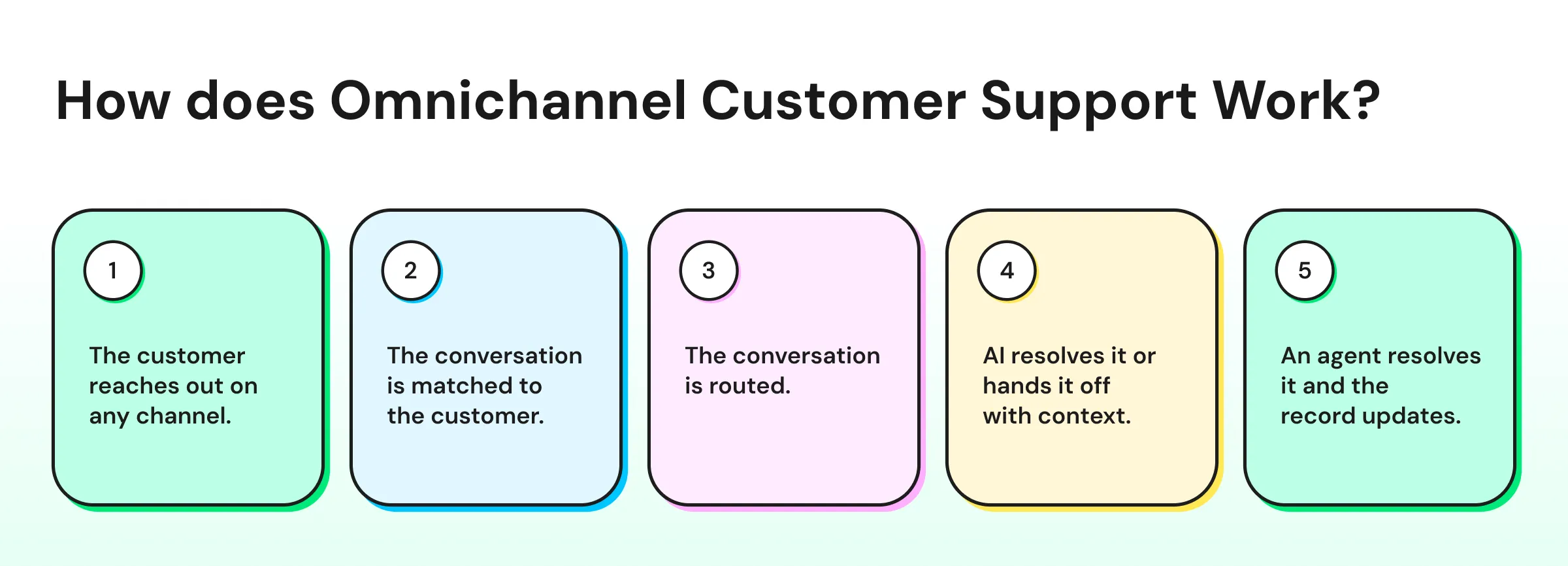
1. The customer reaches out on any channel. A shopper might send a WhatsApp message, reply to an Instagram story, or comment on a TikTok video. Each message lands in one shared system instead of a separate app.
2. The conversation is matched to the customer. The system links the message to the customer's contact record, with past conversations, orders, and tags, so nobody starts from zero.
3. The conversation is routed. Routing rules decide whether an AI agent can answer it or whether it needs a specific team, such as billing, returns, or a regional language team.
4. AI resolves it or hands it off with context. An AI agent answers routine questions from your knowledge base. When a question needs a person, the handoff includes the full transcript, so the person does not ask the customer to repeat anything.
5. An agent resolves it, and the record updates. The agent replies from the same inbox, adds tags or notes, and the updated record is ready for the customer's next conversation, on any channel.
In omnichannel customer support, a support person answering a WhatsApp message can see that the same customer asked about the same order on Instagram yesterday, what the AI agent already told them, and whether a refund is in progress.
Shared context across channels lets support teams resolve issues in one reply instead of three.
Omnichannel customer support also changes how teams are organized. Instead of "the Instagram person" and "the WhatsApp person," teams are grouped by skill, language, or query type, and every conversation has one owner.
Omnichannel vs Multichannel Customer Service: What's the Difference?
The difference between omnichannel and multichannel customer service is connection.
Multichannel customer service offers several channels that operate independently, while omnichannel customer service links those channels into one shared view of the customer.
Channels and Customer Data
The first difference is how channels and customer information are connected.
Factor | Multichannel Customer Service | Omnichannel Customer Service |
Channel setup | Several channels, each run separately | Several channels, connected to each other |
Customer data | Stored per channel or in a disconnected CRM | Shared across every channel |
Conversation history | Resets when the customer switches channels | Follows the customer across channels |
Team Workflows and Automation
The second difference is how your team and your AI work day to day.
Factor | Multichannel Customer Service | Omnichannel Customer Service |
Team workspace | A separate app or inbox per channel | One shared inbox for all channels |
Routing | Manual, based on which channel a message arrives on | Rules based on query type, language, customer, or team |
Answer consistency | Varies by channel and team | Same policies and knowledge base everywhere |
AI and automation | Separate bots per channel, if any | AI agents trained on one knowledge base, with a handoff to support reps |
Reporting, Setup, and Fit
The third difference is how you measure results and which model suits your business.
Factor | Multichannel Customer Service | Omnichannel Customer Service |
Reporting | Separate metrics per channel | One view of performance across channels |
Setup effort | Lower to start | Higher to start, easier to run at scale |
Best for | Low volume, one dominant channel, simple queries | Growing volume, customers using several channels |
Single-Channel, Multichannel, Cross-Channel, and Omnichannel Customer Service
Omnichannel is the last of four stages most support teams move through.
Stage | What It Looks Like | Customer Experience |
|---|---|---|
Single-channel | Support on one channel only, such as email or phone | Limited choice, but one consistent history |
Multichannel | Several channels, each run separately | More choice, but context resets between channels |
Cross-channel | Some channels are connected, such as chat escalating to email with the transcript | Partial continuity on selected paths |
Omnichannel | Every channel is connected to one customer history | Full continuity on any path |
Cross-channel customer service is often confused with omnichannel. The difference is scope: cross-channel connects selected channel pairs, while omnichannel connects every channel through one shared customer view.
What are the Benefits of Omnichannel Customer Service?
The biggest benefit of omnichannel customer service is that customers have one continuous conversation with your business, regardless of the channel they use.
One continuous conversation drives better outcomes. change drives better outcomes for customers, agents, and the business. Here are the 10 benefits of omnichannel customer service that matter most.
1. Customers Never Have to Repeat Themselves
When every channel shares one customer record, an agent or a human support person picking up a WhatsApp message already knows what the customer said on Instagram. Customers stop re-explaining their issue, which is the most visible sign that a business is connected behind the scenes.
2. Faster Resolution Times
Agents/human support spend less time searching for order numbers, past messages, and notes when everything is in the conversation. With context already in view, more issues are resolved in the first reply rather than after several rounds of questions.
3. Consistent Answers on Every Channel
One knowledge base powers both AI agents and human agents across every channel. A customer who asks about your return policy on Instagram gets the same answer they would get on WhatsApp, which builds trust and cuts down on escalations.
4. Higher Customer Loyalty and Retention
A single bad service experience can cost you a customer.
In PwC's 2025 Customer Experience Survey of 5,511 US consumers, 52% said they stopped using or buying from a brand after a bad experience with its products or services, and 29% stopped because of poor customer experience.
Connected service removes many of the gaps that create those bad experiences.
5. You Meet Customers Where They Already Are
Customers choose where a service journey starts, and it is often not your website.
A Gartner survey of 5,801 customers found that 51% of service journeys now begin on third-party platforms such as search engines, YouTube, and generative AI tools, and 74% of Gen Z customers start with a third party before reaching an official company channel.
Omnichannel customer service lets you pick up those journeys on messaging and social channels without losing the thread.
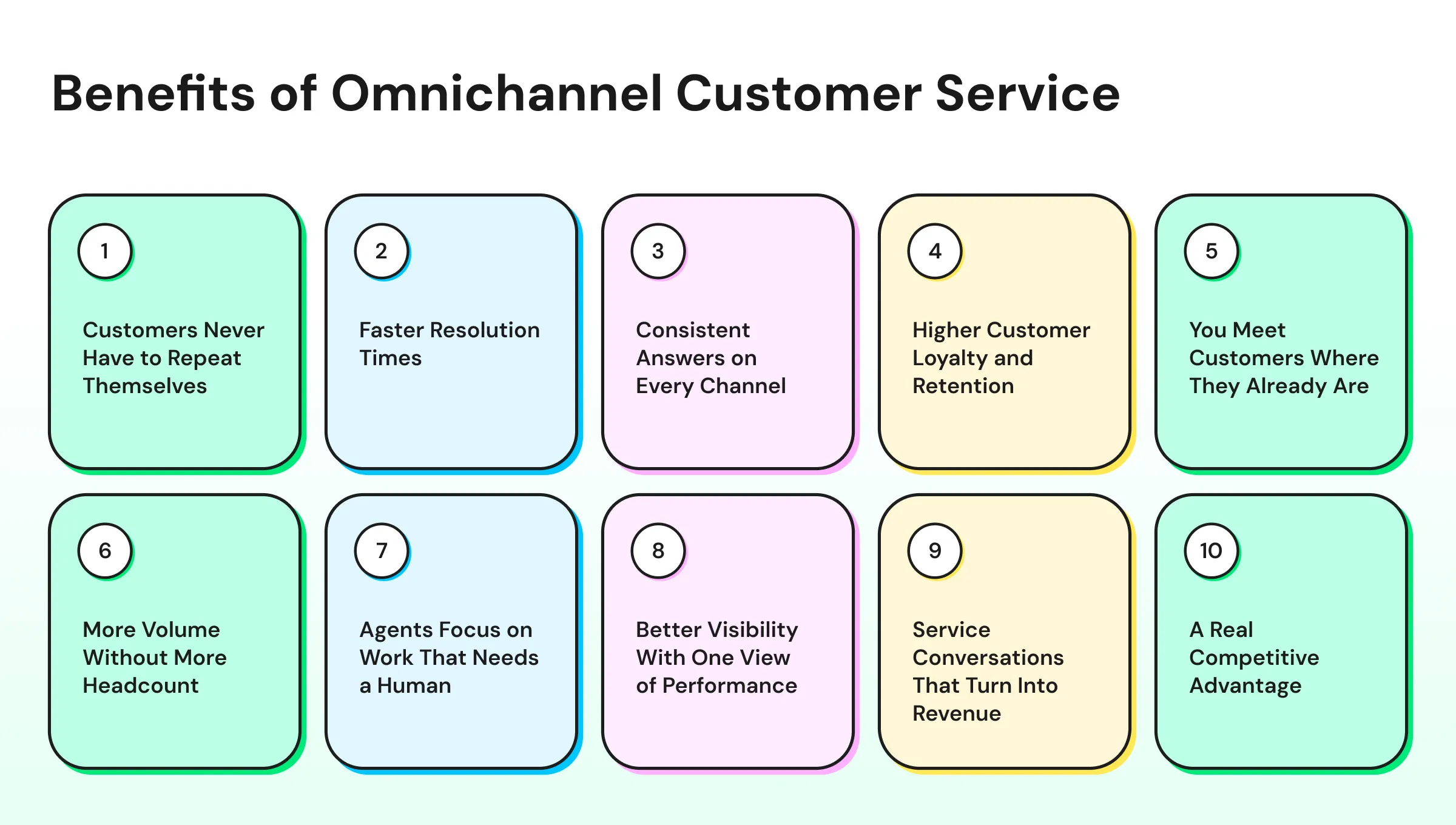
6. More Volume Without More Headcount
AI agents resolve routine questions, and a shared inbox removes duplicate work across channels. In a Gartner survey of 321 customer service leaders conducted in October 2025, 55% reported stable staffing levels while handling higher customer volumes.
7. Agents Focus on Work That Needs a Human
When AI handles repetitive queries, agents can spend their time on complex cases, upset customers, and high-value conversations.
Service leaders are planning for this split between AI and human agents: a Gartner poll of 163 service leaders in March 2025 found that 95% plan to retain human agents as AI takes on more work.
8. Better Visibility With One View of Performance
Channel-by-channel reporting can make every channel look healthy while the overall experience suffers. Omnichannel reporting shows response times, resolutions, and agent performance across all channels together, so managers can spot where customers get stuck.
9. Service Conversations That Turn Into Revenue
When support and sales share the same conversation history, a question about sizing or stock can end in a purchase instead of a dropped chat. Agents/ human support can see past orders and preferences, which makes relevant recommendations easy and natural.
10. A Real Competitive Advantage
Customer experience is becoming a sharper differentiator. In Forrester's 2026 rankings, 20% of brands improved their CX Index scores while 8% declined, among brands evaluated in both 2025 and 2026. Brands that stand still fall behind the ones investing in connected service.
What are the Core Components of an Omnichannel Customer Service Setup?
An omnichannel customer service setup needs seven core components that work together.
Each component solves a specific break point where context usually gets lost between channels.
- Connected channels: The messaging apps, social inboxes, chat, email, and voice lines your customers actually use, all feeding into one system. For most messaging-first teams, that starts with the WhatsApp Business API.
- Unified customer profile: One record per customer that holds contact details, past conversations, orders, and tags.
- Shared team inbox: One workspace where agents see and reply to conversations from every channel without switching tools.
- Routing and ownership rules: Logic that sends each conversation to the right team or agent and makes one person accountable for it.
- AI automation with human handoff: AI agents or chatbots that resolve repetitive queries and pass complex conversations to a human with the history attached.
- Knowledge base: A single source of approved answers that both AI and human agents draw from, so responses stay consistent.
- Reporting: Metrics that measure service performance across all channels together, not in separate dashboards.
If you are comparing tools that provide these components, our guide to omnichannel customer service software covers what to evaluate.
How to Achieve Omnichannel Customer Service in 8 Steps
An omnichannel customer service strategy is a plan for connecting your channels, data, and team so every customer conversation feels like one continuous thread.
The eight steps below move from research to rollout to ongoing improvement.
Step 1: Map Where Customers Already Reach You
Start by auditing every channel where customers contact your business today, including channels you do not officially support.
Pull three months of conversation data and note the volume, the most common query types, and the average response time per channel.
Customers often choose a channel before a business does. WhatsApp alone has more than 3 billion monthly users.
If a large share of your customers already message you on WhatsApp or Instagram, those channels belong at the center of your strategy.
Step 2: Prioritize Two or Three Channels First
Choose two or three high-volume channels to connect first instead of launching every channel at once.
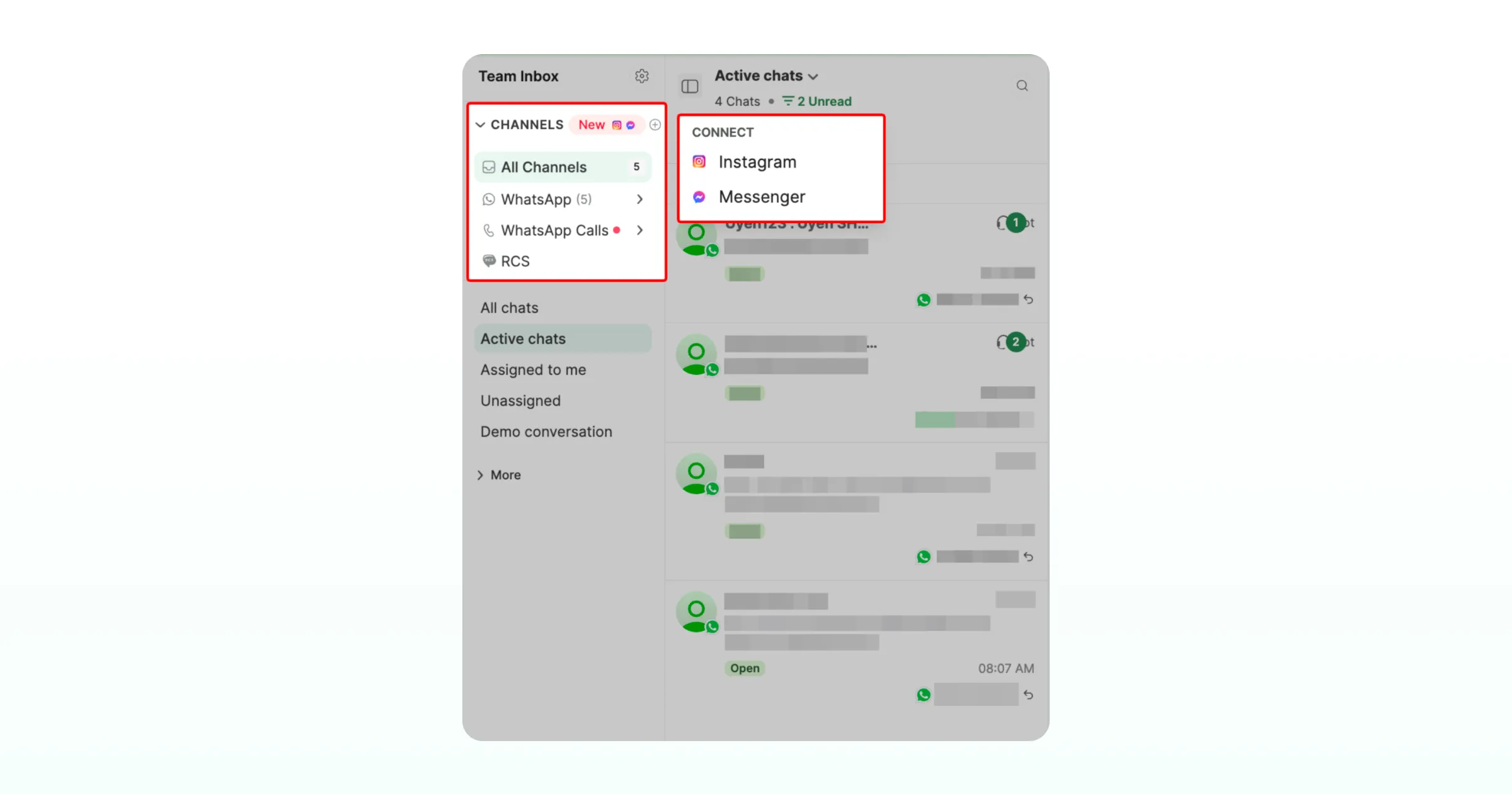
A small, well-connected set of channels delivers a better experience than a large set with gaps between them.
Use your channel audit to rank channels by conversation volume, revenue impact, and customer preference. Add lower-priority channels only after the first set runs smoothly.
Step 3: Connect Customer Data Across Channels
Link your support channels to the systems that hold customer information, such as your CRM, ecommerce store, or order management tool.
Agents need order status, past purchases, and previous conversations inside the conversation view, not in a separate tab.
Decide which system acts as the source of truth for each data type. For example, your e-commerce platform might own order data while your CRM owns account ownership.
To see how connected context changes individual conversations, read our guide to omnichannel customer support.
Step 4: Bring Every Conversation Into One Shared Inbox
Move conversations from every priority channel into a single shared inbox for the whole support team.
A shared inbox removes the need for agents to watch several apps and lets managers see the full queue in one view. It also lets multiple agents reply from one WhatsApp number without overlapping or missing messages.
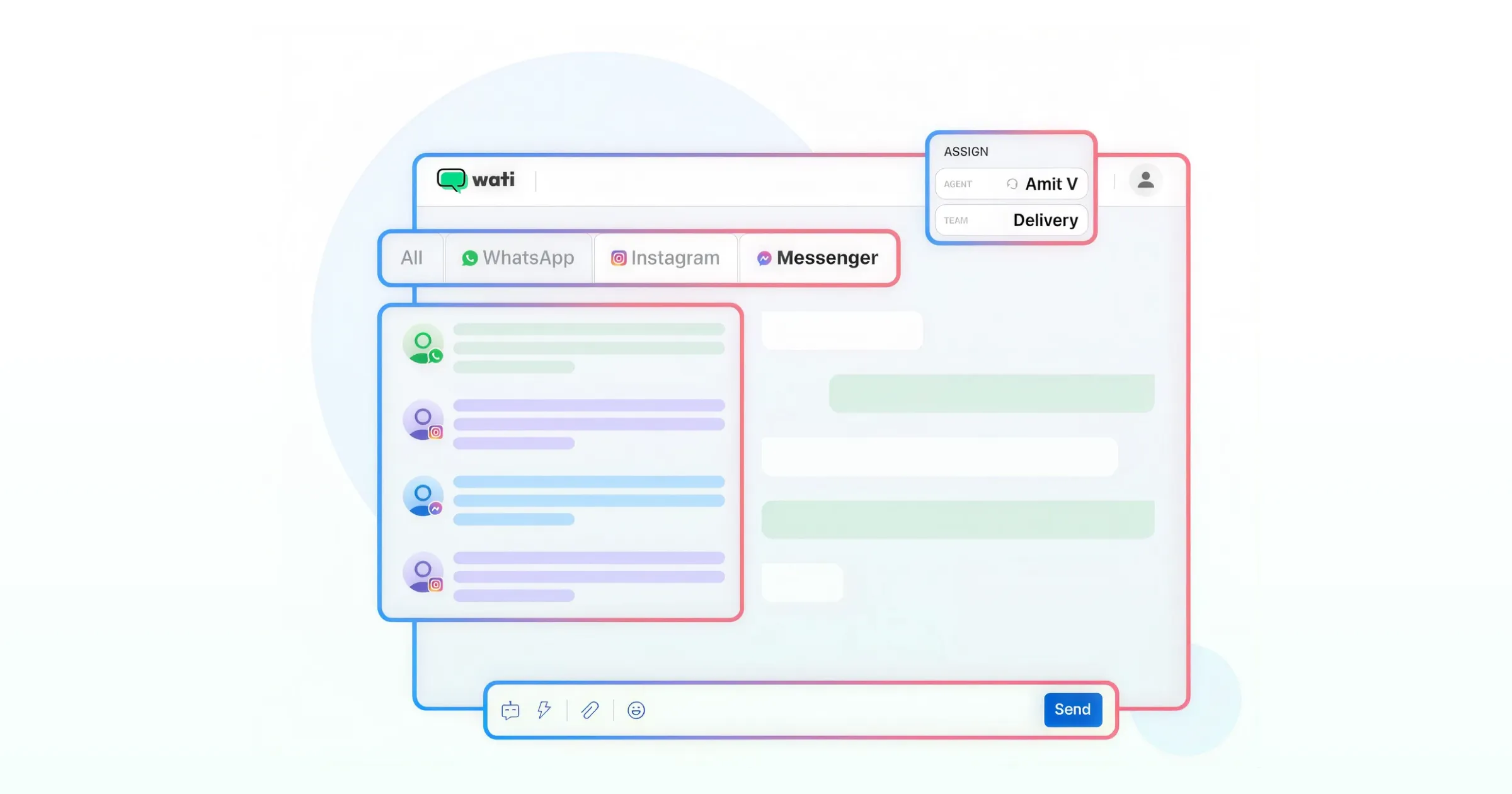
Set up tags for query types (such as "refund," "delivery," or "product question") and contact attributes (such as "VIP" or "wholesale") so conversations can be sorted, routed, and reported on consistently across channels.
Step 5: Set Routing Rules, Ownership, and Response Targets
Define rules that decide who handles which conversation and how fast. Routing can be based on channel, language, query type, customer segment, or business hours.
- Ownership: Assign every open conversation to one person or team so nothing sits unowned.
- Escalation paths: Define when a conversation moves from tier 1 to a specialist or manager.
- Response targets: Set first response and resolution targets that apply across all channels, adjusting only where a channel genuinely needs a different pace (such as voice calls).
- Shift coverage: Organize teams by shift or region so conversations arriving after hours still have an owner.
Step 6: Automate Repetitive Queries and Design the Human Handoff
Use AI agents or chatbots to handle high-volume, low-complexity questions such as order tracking, store hours, return policies, and appointment booking.
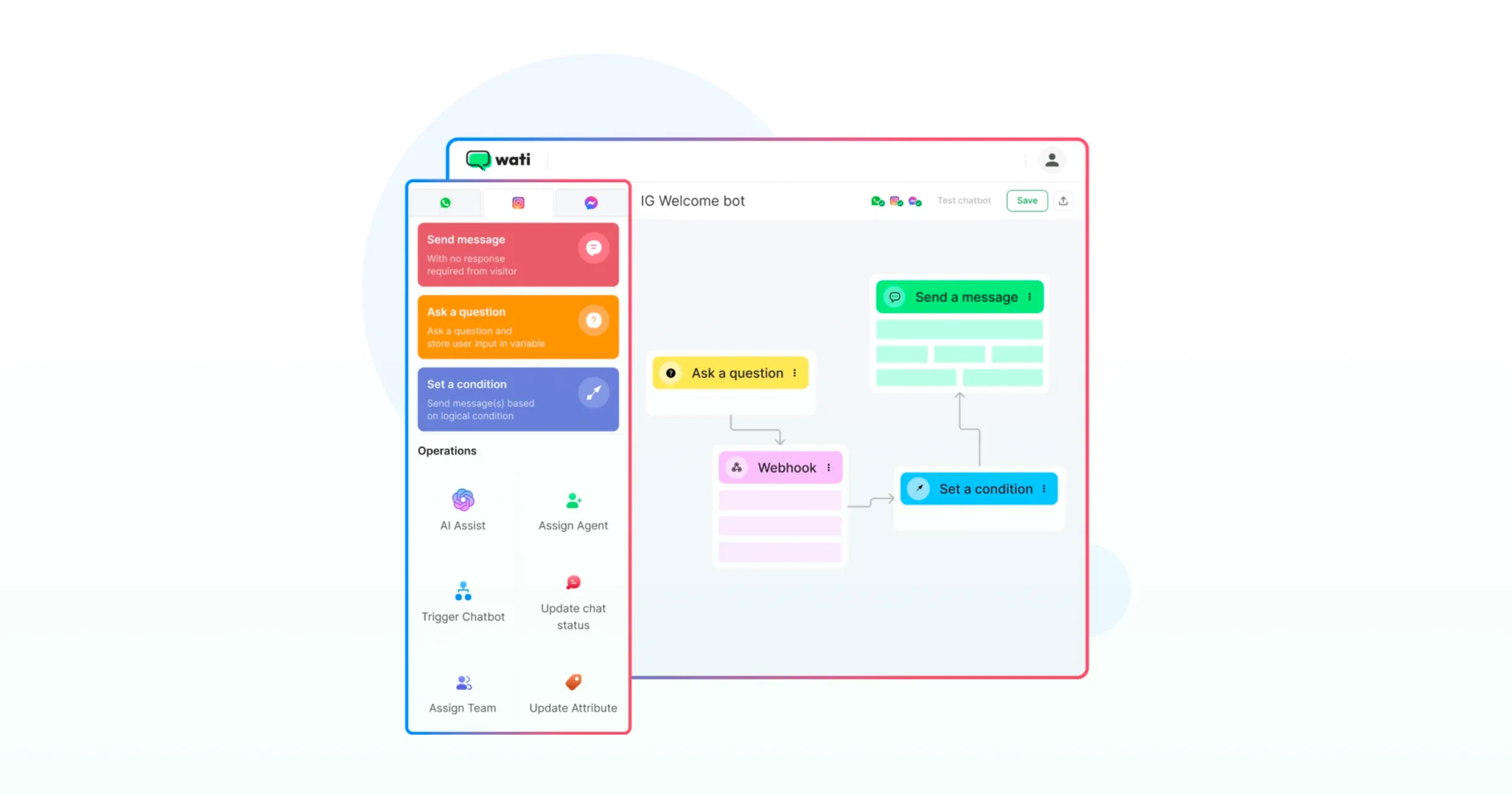
Train the AI on your knowledge base so its answers match what human agents would say.. Automation works the same way on social channels. An Instagram FAQ bot can answer common questions in DMs and comments before a human steps in.
The AI-to-human handoff matters as much as the automation itself. A Gartner survey of 5,728 customers found that their top concern about AI in customer service is that it will become harder to reach a person, and 64% said they would prefer companies not to use AI for customer service at all.
Give customers a clear way to reach a person, and make sure the human agent receives the full AI conversation so the customer does not repeat themselves.
Let an AI agent handle routine conversations end to end. Astra, Wati's customer-facing AI agent, resolves common questions across WhatsApp, Instagram, Messenger, web chat, and voice, then hands complex conversations to your support reps with the full history attached. See how Astra works. |
Step 7: Train Your Team on One Voice Across Channels
Create shared guidelines for tone, response structure, and policies that apply to every channel. A refund policy explained on WhatsApp should match the refund policy explained over email.
Train agents on the tools, the routing rules, and the escalation paths together. Review a sample of conversations from each channel every week to catch inconsistencies early.
Step 8: Measure, Review, and Iterate
Review your omnichannel customer service metrics weekly for the first three months, then monthly once the setup stabilizes.
Look for channels with slower response times, query types with high repeat contact rates, and handoff points where customers drop off.
Treat the strategy as a living system. Add a new channel, adjust a routing rule, or expand AI coverage only after the data shows the current setup is working.
What are the Four C's of Omnichannel?
The four C's of omnichannel are consistency, convenience, customization, and connection.
Frameworks vary across sources, but this version maps cleanly to customer service:
C | What It Means | What It Looks Like in Customer Service |
|---|---|---|
Consistency | A uniform experience across every channel | The same answers, tone, and policies on WhatsApp, Instagram, and chat |
Convenience | Easy transitions between touchpoints | Customers switch channels without restarting the conversation |
Customization | Experiences tailored to each customer | Agents see past orders and preferences and respond accordingly |
Connection | Integrated systems with one view of the customer | Channels, CRM, and store data feed into a shared record |
Academic research points in the same direction. A 2025 study of 775 omnichannel customers found that consistency, context sensitivity, and connectivity between touchpoints all play an important role in improving the omnichannel customer experience.
Which Metrics Should You Track for Omnichannel Customer Service?
The most useful omnichannel customer service metrics measure the whole customer journey across channels, not each channel in isolation. Track the following metrics in one report so you can compare channels side by side.
Metric | What It Measures | Why It Matters for Omnichannel |
|---|---|---|
First response time | Time between a customer's first message and the first reply | Shows whether every channel meets the same speed standard |
Resolution time | Time from first message to issue resolved | Reveals whether handoffs between channels or teams slow things down |
Customer satisfaction (CSAT) | Customer rating after a conversation | Shows whether experience quality is consistent across channels |
Repeat contact rate | Share of customers who contact you again about the same issue | Signals lost context or unresolved issues |
AI resolution rate | Share of conversations resolved by AI without a human | Shows how much repetitive volume automation handles |
Handoff success rate | Share of AI-to-human handoffs that end in resolution | Shows whether context transfers cleanly to agents |
Repeat contact rate is one of the clearest signals of whether channels are truly connected:
Repeat contact rate = (customers who contacted again about the same issue within 7 days ÷ total customers who contacted support) × 100 |
For example:
- 1,200 customers contact support in a month.
- 180 of them come back about the same issue within 7 days.
- The repeat contact rate is 180 ÷ 1,200 × 100 = 15%.
A falling repeat contact rate after connecting channels is strong evidence that context now follows the customer.
Give your support reps an AI copilot, or bring your own AI. Wati AI Copilot summarizes long threads, flags at-risk customers with a CX score, and translates messages in one click. Already using OpenAI, Claude, Gemini, or a custom model? Connect External Agent plugs it into every Wati conversation. Explore Wati AI. |
Common Omnichannel Customer Service Challenges and Best Practices
Most omnichannel customer service problems come from connecting channels without connecting the data and workflows behind them. The table below covers the most common challenges and the best practices that fix each one.
Challenge | What It Looks Like | Best Practice |
|---|---|---|
Siloed customer data | Agents ask for order numbers the customer already shared | Integrate your CRM and store data into the conversation view |
Too many channels, too early | Slow replies on newer channels and inconsistent coverage | Launch two or three priority channels first, then expand |
AI with no escape route | Customers loop through a bot without reaching a person | Offer a visible handoff option and pass the full transcript to the agent |
Inconsistent answers | Different policies are explained on different channels | Use one knowledge base for AI and human agents |
Unowned conversations | Messages sit unanswered because no one is assigned | Assign every conversation an owner through routing rules |
Channel-by-channel reporting | Each channel looks fine alone but the overall experience is poor | Report on all channels together with shared targets |
Patchwork integrations | Separate tools stitched together with one-off connections | Use one platform with a true shared inbox instead of syncing several apps |
How Omnichannel Customer Service Looks in E-commerce, Healthcare, and Education
Omnichannel customer service follows the same principles in every industry, but the priority channels and common queries differ.
- Ecommerce: Shoppers ask about orders, delivery, returns, and product details across Instagram, WhatsApp, and website chat. Read more in our guide to omnichannel customer service for e-commerce.
- Healthcare: Patients book appointments, request reminders, and ask pre-visit questions, often on messaging apps. Read more in our guide to omnichannel customer service for healthcare.
- Education: Students and parents ask about admissions, fees, schedules, and course access across chat, social, and messaging. Read more in our guide to omnichannel customer service for education.
Omnichannel Customer Service Examples
Omnichannel customer service is easiest to understand through everyday customer journeys. In each example below, the customer changes channels but the conversation doesn't restart because every channel shares the same customer history.
1. A Return That Starts on Website Chat and Finishes on WhatsApp
A shopper starts a return on your website chat, then leaves the page. The return label and pickup updates arrive on WhatsApp, and when she replies with a question, the agent already sees the return request and order details.
2. An Appointment Booked by a Bot and Confirmed by a Person
A patient books a clinic appointment through a WhatsApp chatbot and gets an automated reminder the day before. When she asks to reschedule and mentions a new symptom, the bot hands the chat to the front desk with the full conversation attached, so staff can respond without asking her to repeat herself.
3. An Instagram Ad That Turns Into a Counselor Conversation
A parent taps an admissions ad on Instagram and lands in a WhatsApp chat. A bot collects the child's grade and preferred course, then routes the conversation to the right admissions counselor, who picks it up already knowing what the parent needs.
4. A Delivery Update That Prevents a Support Ticket
A customer's order is delayed, and a proactive WhatsApp message tells her the new delivery date before she thinks to ask. She never contacts support, and the update is logged against her record in case she follows up on any other channel later.
5. A Booking Change Handled by Any Agent on Any Shift
A guest messages a hotel on WhatsApp late at night to change check-in dates. The night-shift agent updates the booking, and the morning team sees the full exchange in the same inbox, so the guest gets a consistent answer no matter who replies next.
How Does Wati Help You Deliver Omnichannel Customer Service?
Wati is an agentic customer engagement platform that turns conversations into revenue growth across marketing, sales, and support.
AI agents and support reps work in tandem across WhatsApp, Instagram, Messenger, RCS, voice, and web chat, while Wati AI Copilot makes your team faster. Here's how that looks for one customer over one week with a skincare brand on Wati.
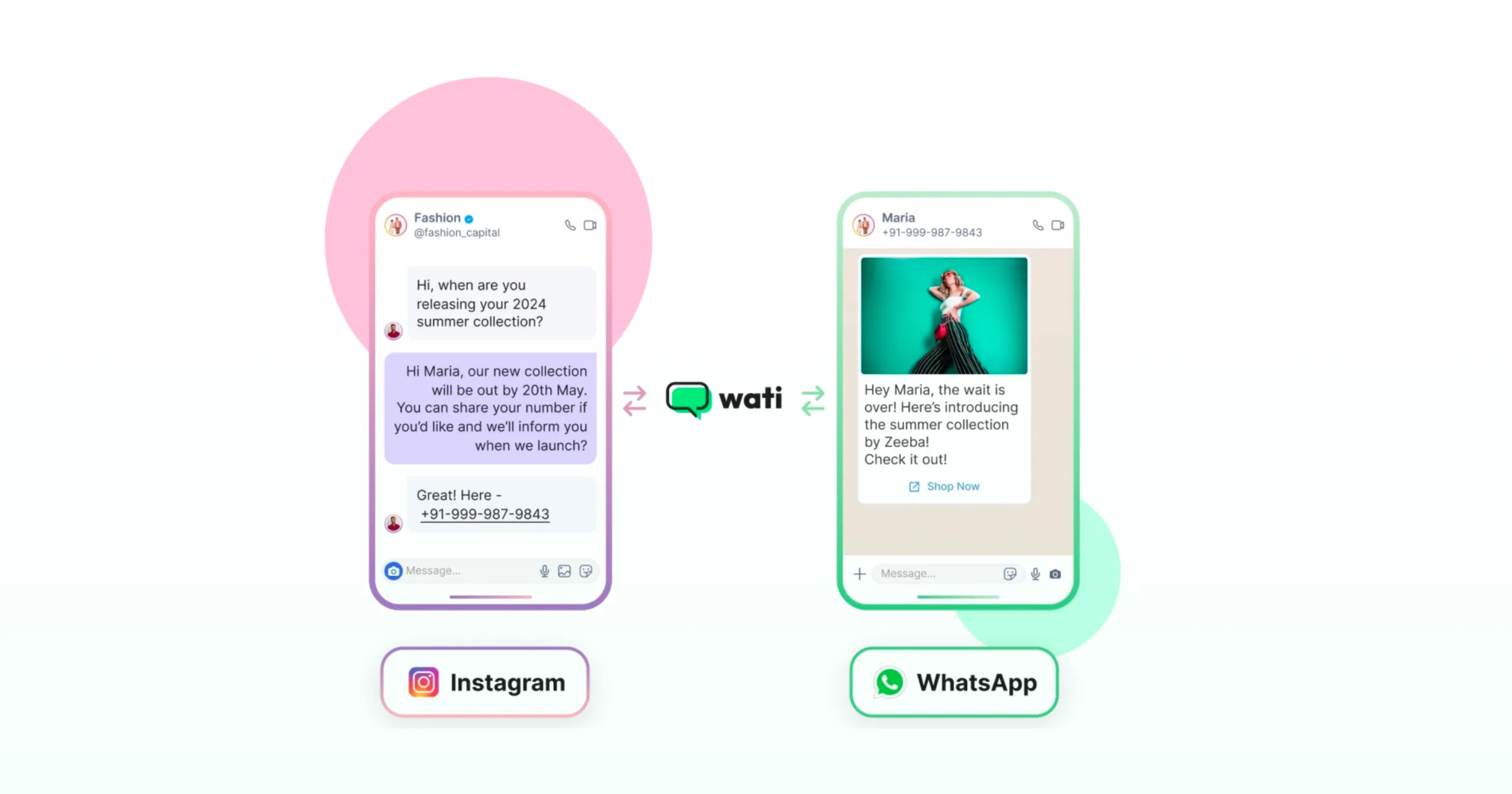
Monday: A Question on Instagram
Ananya comments "Is this back in stock?" on the brand's Instagram post. An automated DM replies within seconds with the restock date and a link. The chat lands in the Wati Team Inbox, alongside WhatsApp, Instagram and Messenger, and TikTok conversations. Contact Intelligence starts building her customer profile from every interaction.
Wednesday: A Late-Night Order Question
After ordering, she asks on WhatsApp at 11 pm when it will arrive. Astra, Wati's customer-facing AI agent, answers straight away. It uses the brand's knowledge base and live order data from Shopify.
Friday: A Delayed Order
The delivery slips, and Ananya messages again in Hindi, frustrated. Astra hands the conversation over, and routing rules assign it to the support team's day shift. Wati AI Copilot gives the support rep three things:
- a summary of her earlier chats
- a CX score flagging her frustration
- one-click translation so the support rep can reply in Hindi
Her order and HubSpot record sit beside the chat through Connected Intelligence, which pulls data from the brand's other tools into the conversation.
The support rep resolves it without asking her to repeat anything. If she'd rather talk, she can call from the same chat via WhatsApp Business Calling.
The Following Week: The Team Gets Smarter
The support manager reviews response times, resolutions, and agent-wise performance. Campaign Intelligence then sends the next restock campaign to similar customers on the channel that worked best for each of them.
Teams with their own AI can use Connect External Agent to bring OpenAI, Claude, Gemini, or custom agents into every Wati conversation.
Start Building Your Omnichannel Customer Service Strategy
Omnichannel customer service turns a set of separate channels into one continuous conversation with each customer.
Start by mapping where customers reach you, connect two or three priority channels in one shared inbox, link your customer data, and add AI automation with a clean handoff to your team. Then measure across channels and improve from there.
Ready to connect your customer conversations? Start your free Wati trial or book a demo to see how Wati brings WhatsApp, Instagram, Messenger, and TikTok into one support workspace.
Frequently asked questions
What does omnichannel customer service mean in simple terms?
Omnichannel customer service means a customer can contact a business on any channel and continue the same conversation without starting over. The business keeps one shared history for each customer across WhatsApp, Instagram, chat, email, and phone, so any agent on any channel can see what has already happened.
Is omnichannel customer service the same as a CRM?
No, omnichannel customer service is not the same as a CRM. A CRM stores customer records, while omnichannel customer service is the practice of connecting support channels so conversations share context. Most omnichannel setups integrate a CRM so agents can see customer data inside the conversation, but the CRM alone does not connect channels.
What are some omnichannel customer service examples?
An example of omnichannel customer service is a customer who asks about a product on Instagram, later messages on WhatsApp about their order, and gets help from an agent who can already see the Instagram conversation and the order details. The customer never repeats information.
What are the four C's of omnichannel customer service?
The four C's of omnichannel are consistency, convenience, customization, and connection. In customer service, that means the same answers on every channel, easy channel switching, responses tailored to each customer, and one shared record behind every conversation.
Does omnichannel customer service require AI?
No, omnichannel customer service does not strictly require AI, but AI makes it far easier to scale. A shared inbox, connected data, and routing rules deliver the core omnichannel experience. AI agents add round-the-clock answers to repetitive questions and free human agents for complex issues, as long as the handoff to a human keeps the full context.
How many channels do you need for omnichannel customer service?
You need only as many channels as your customers actually use, and two or three well-connected channels are enough to start. Omnichannel customer service is defined by how channels connect, not how many exist. Begin with your highest-volume channels, such as WhatsApp and Instagram, and add more once the first set runs smoothly.
What tools do you need for omnichannel customer service?
You need a shared inbox that connects your channels, a customer data source such as a CRM or e-commerce platform, routing and automation capabilities, and a knowledge base. Many teams use one platform that combines the inbox, automation, and integrations.
Related posts
- How to Use an Instagram Chatbot for FAQ Automation (2026 Guide)
An Instagram chatbot replies to DMs, comments, and story replies instantly using keyword triggers, then hands off to a human when needed. Here's how to set one up in Wati.
- Instagram Auto Reply: How to Set It Up and Automate DMs (2026 Guide)
Instagram auto-reply sends instant responses to DMs and comments: welcome messages, OOO replies, keyword triggers, and comment-to-DM. Here's how to set it up and stop losing leads to slow replies.
- WhatsApp Verification Explained: How to Get Blue Tick in WhatsApp
Discover how WhatsApp verification boosts trust and credibility. Get insights into timelines, steps, and how Wati makes the process seamless for businesses.
- TikTok Business Account vs. Personal Account: How Do They Differ?
TikTok Business Account vs Personal Account: Business unlocks ads, analytics, and messaging; Personal keeps sounds and creator payouts.