
Too Long? Read This First
- Automate the questions with one right answer: availability, price, size, service charges, payment plans, documents, and viewing hours.
- Give every listing a short code, so one keyword rule returns the right property details.
- Messenger chatbots don't support buttons, so build FAQ menus with numbered options.
- Hand yields, legal questions, discounts, and negotiation to an agent, every time.
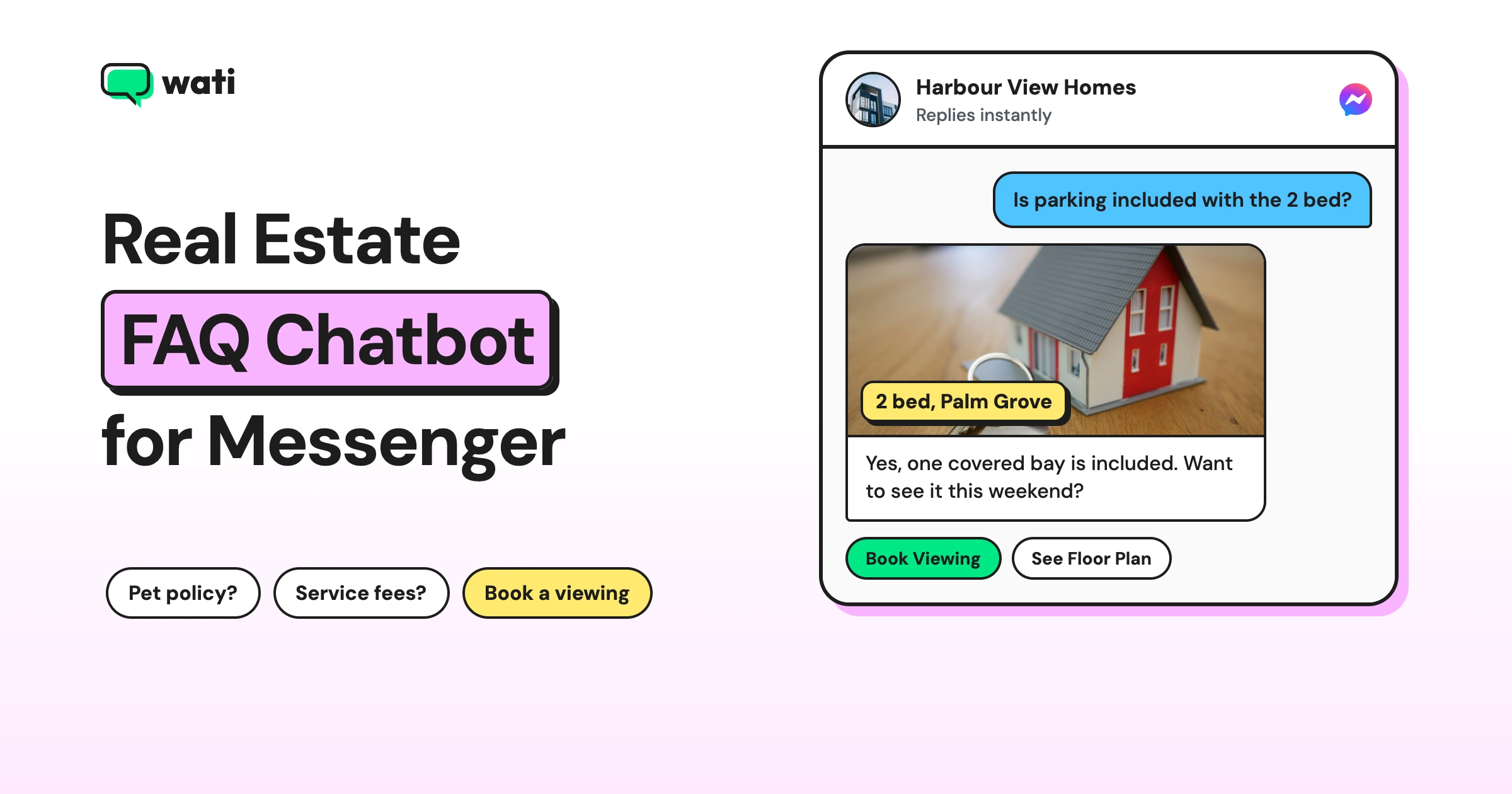
A real estate chatbot in Messenger answers factual listing questions the moment they arrive, such as availability, price, payment plans, and viewing hours. Anything that needs judgment, like negotiation, goes to an agent.
Every listing ad brings the same questions, weekend after weekend, and the answers are already in your brochure. Wati for agencies and service firms automates those replies in Messenger.
This guide covers what to automate, how to set it up, and what a property bot should never answer.
What Does a Real Estate Chatbot Do in Messenger?
In Wati, a Messenger chatbot is rule-based. Keyword rules reply instantly when a message contains words or codes you choose, and chatbots ask simple questions and branch on the answers.
Every reply comes from information you've written in advance, so the bot never invents a price or a handover date.
That makes it different from many AI chatbots for real estate, which generate answers on the fly. For property, where a wrong number can cost a deal or break advertising rules, answers drawn from your approved listing are the safer choice.
Messenger is worth automating because so many property enquiries start there. Buyers tap Click-to-Messenger ads, message your Page after seeing a listing post, or comment on a launch post and get a DM back.
Language matters as much as the channel. Buyers in the Gulf often switch between English and Arabic, buyers in India mix Hindi and English, and buyers in Latin America write in Spanish or Portuguese.
A single keyword rule can hold several versions of the same word, such as "price," so one rule answers everyone. Write the reply in the language your buyers use most, or create a separate rule for each language you support.
Answer every listing question from one inbox. Wati brings Messenger, Instagram, and WhatsApp chats together, with keyword rules for the questions you hear all day. See Wati's omnichannel inbox
Which Listing Questions Should Your Chatbot Answer?
The answer depends on the property type. Off-plan buyers care about payment plans and handover dates, while renters care about move-in dates and deposits. Use this bank as a starting point:
Question | Off-plan | Ready to buy | Rental |
|---|---|---|---|
Is it still available? | Automate | Automate | Automate |
What's the price or rent? | Automate | Automate | Automate |
Size, layout, and floor plan | Automate | Automate | Automate |
Service charge or maintenance fee | Automate | Automate | Automate |
Payment plan | Automate | Hand off (financing varies) | Not relevant |
Handover or move-in date | Automate | Automate | Automate |
Documents needed | Automate | Automate | Automate |
Viewing hours | Automate | Automate | Automate |
Discounts or a better price | Hand off | Hand off | Hand off |
Rental yield or returns | Hand off | Hand off | Hand off |
Most of the volume sits in the "automate" rows. Answering those instantly frees agents for the conversations that actually need them.
How Do You Set Up Listing-Code Replies?
Generic replies frustrate buyers who asked about a specific property. Listing codes solve that.
Give each listing a short, unique code, such as "MAR204," and show it in the ad and post caption: "Message MAR204 for the details."
In Wati, create one keyword rule per listing. The rule fires when a message contains that code and replies with a property image and the key facts:
"Here's MAR204 📍 Dubai Marina. 2 bedrooms, 1,150 sq ft, sea view. Price: [price]. Payment plan available. Permit no. [number]. Reply 1 for the floor plan, 2 to book a viewing, or 3 to talk to an agent."
Choose the matching type carefully. Exactly only fires when the whole message is the code, so "MAR204 please" won't match.
Contains catches longer messages, which suits codes, as long as each code is unique. If two rules match the same message, both reply, so never reuse a code across listings.
How Should a Messenger FAQ Menu Work Without Buttons?
Messenger chatbots in Wati can't show buttons or lists, so shoppers reply with a number instead. Keep the menu short and give each number one topic:
"What would you like to know?
Each answer should end by offering the menu again, or the next logical step, such as booking a viewing. Send floor plans and payment plan tables as images, since they're easier to read than long text.
Five options is a sensible limit.
Longer menus get skipped, and buyers start typing their own questions instead. Keyword rules for common words like "payment plan," "documents," and "viewing" catch those questions too.
How Do You Handle Viewing Requests From the FAQ Menu?
Many FAQ conversations end with "Can I see it?" Messenger doesn't connect to your agents' calendars, so the bot shouldn't promise a time. Instead, it collects what the agent needs: the preferred day, a rough time, and how many people will attend.
Then it asks for a WhatsApp number, with a clear reason: "Share your WhatsApp number, and an agent will confirm the time and location there."
Once the buyer agrees, the agent checks availability and sends the confirmation as an approved WhatsApp template, followed by a reminder before the visit. The bot's job ends when the request is complete and the agent has everything in one chat.
What Should a Property Chatbot Never Answer?
Some questions sound simple but carry real risk. A property chatbot should never:
- Quote rental yields, capital growth, or investment returns
- Give legal, tax, or visa advice
- Promise mortgage approval
- Offer discounts or negotiate price
- Share anything that isn't in the approved listing or brochure
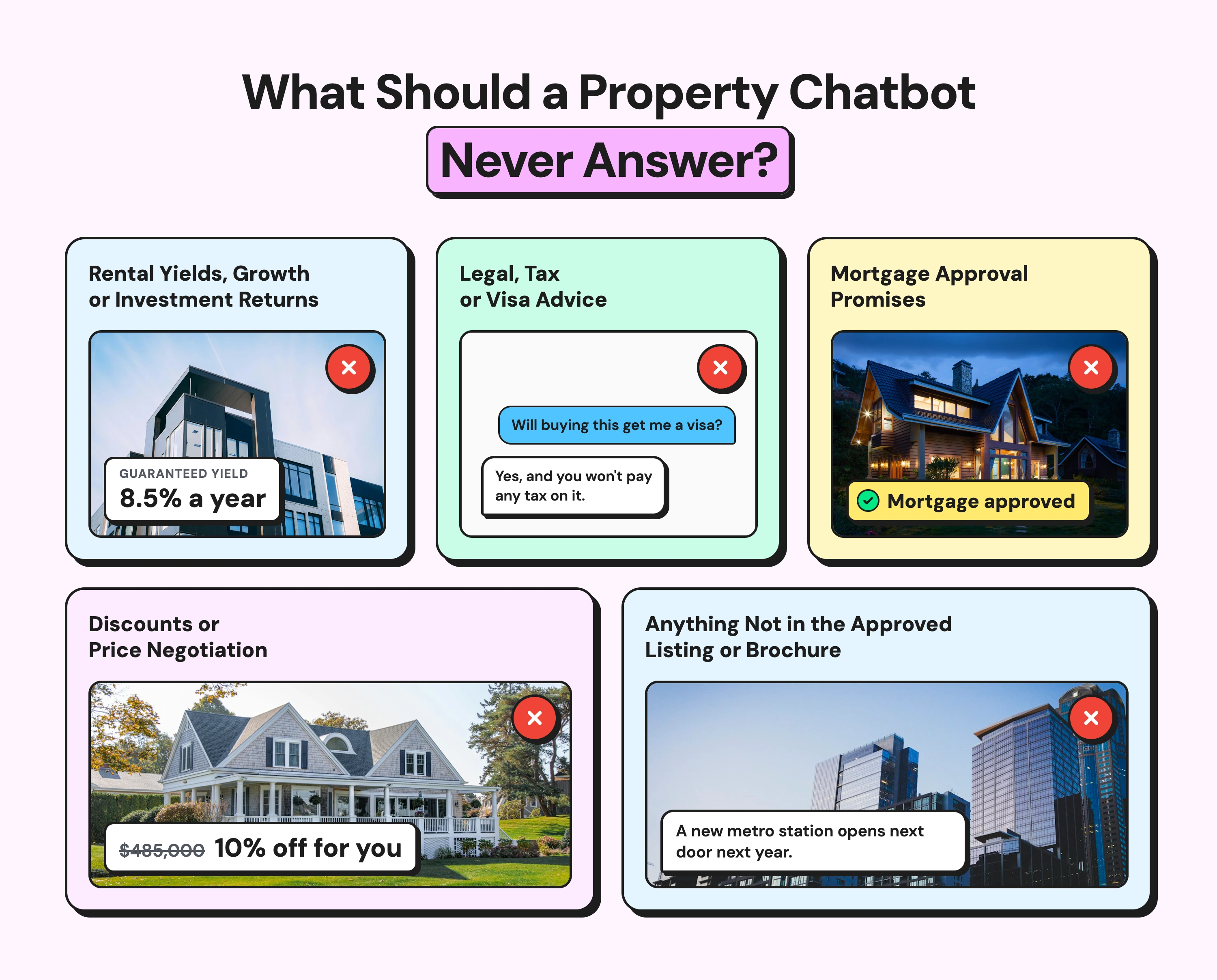
When a buyer asks one of these, the bot should hand over clearly:
"That's a great question for one of our agents. I've passed your chat to the team, and someone will reply shortly."
On Wati's Pro and Business plans, the chatbot can tag the chat, for example, as "negotiation" or "legal question."
It can also assign the chat to the right agent, so the buyer doesn't have to repeat themselves. Our upcoming guide to qualifying property enquiries in Messenger covers how to route serious buyers first.
How Do You Keep Chatbot Answers Accurate?
A chatbot is only as good as the information behind it. Build a simple routine:
- Use one source of truth. Write every reply from the approved listing or brochure, not from memory.
- Update or pause rules when units sell. A bot that says "available" for a sold unit loses trust fast.
- Refresh prices and payment plans whenever the developer or owner changes them. For off-plan projects, check handover dates too, since they often move.
- Include required numbers on listing cards, such as a Trakheesi permit number in Dubai or a RERA registration number in India.
- Review unanswered questions monthly, and add new keyword rules for anything that keeps coming up.
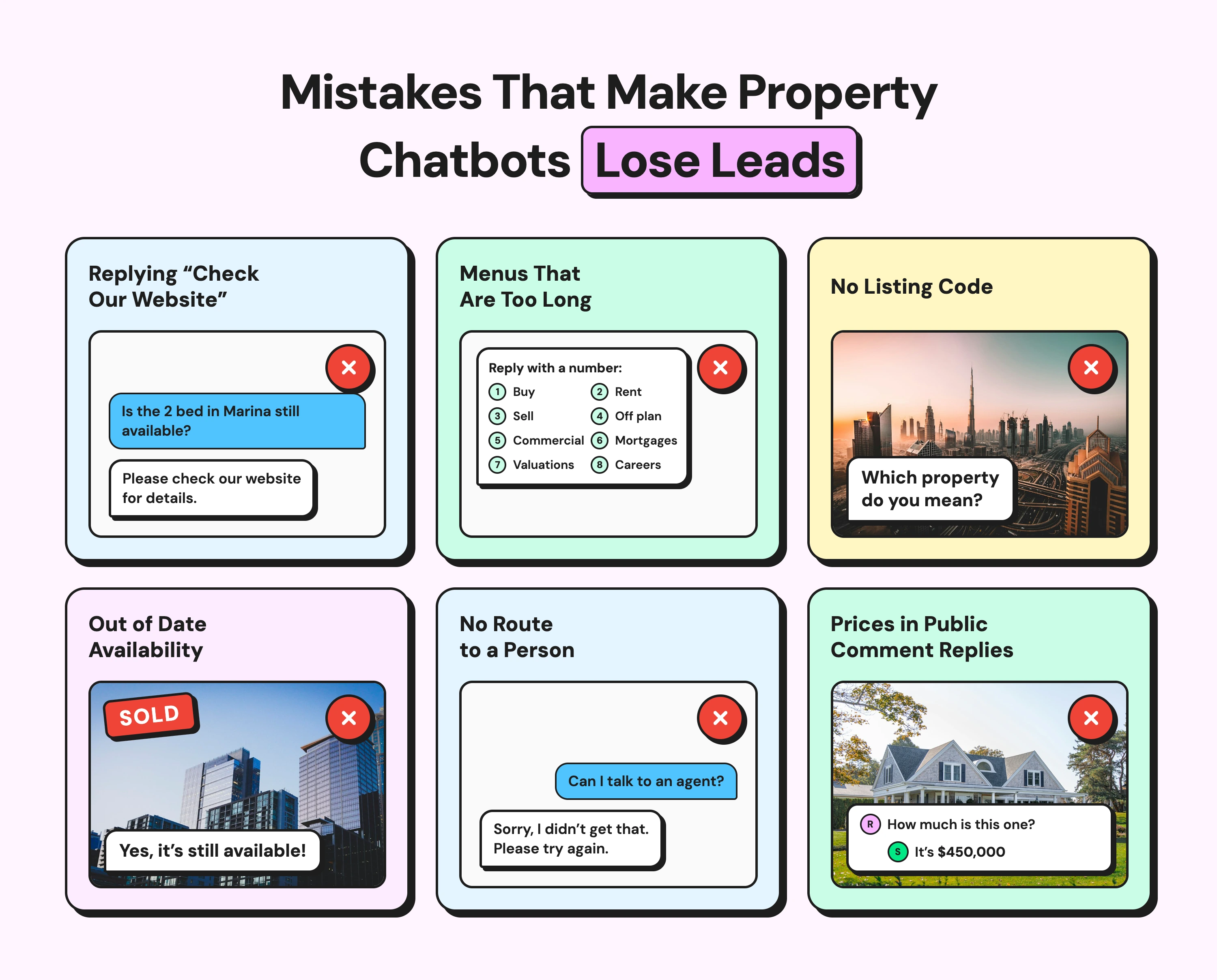
Which Mistakes Make Property Chatbots Lose Leads?
Replying "check our website." The buyer asked in Messenger because they wanted an answer there. Give the answer, then share the link.
Menus that are too long. Ten options feel like work. Keep it to five and let keyword rules handle the rest.
No listing code. Without one, every chat starts with "Which property do you mean?"
Out-of-date availability. Sold units that still show as available send buyers away annoyed.
No route to a person. Buyers who can't reach an agent from the menu give up. Always include "talk to an agent."
Prices in public comment replies. If you use comment rules on listing posts, the optional public reply repeats the DM text.
How Does Wati Help Real Estate Teams Answer Listing Questions?
Wati is an agentic customer engagement platform that turns conversations into revenue growth across marketing, sales, and support. Here's a listing's first weekend with Wati answering in Messenger:
- Friday, 8 pm: The listing ad goes live. Buyers message "MAR204" and get the property card with price, size, and permit number.
- Friday, 10 pm: A buyer replies "1" and gets the payment plan as an image.
- Saturday, 9 am: Agents open the Team Inbox to find chats tagged "viewing request" and "negotiation," ready to work.
- Sunday, 2 pm: Two viewings go ahead, confirmed on WhatsApp after the buyers shared their numbers.
For the WhatsApp side of the journey, see our guide to WhatsApp API for real estate.
For the same FAQ approach on another channel, read how to use an Instagram chatbot for FAQ automation.
Answer Facts Fast, Hand Off Judgment
A good real estate chatbot doesn't try to sell the property. It answers the same factual questions instantly, keeps every detail accurate, and hands the conversation to an agent the moment judgment is needed.
Want to see a real estate chatbot set up for your listings? Book a demo with Wati.
Frequently asked questions
What is a real estate chatbot?
It's an automated assistant that answers common property questions, such as availability, price, and viewing times, and passes complex questions to an agent. It can run on a website, WhatsApp, Instagram, or Facebook Messenger.
Can a chatbot answer property questions on Facebook Messenger?
Yes. Keyword rules can reply to listing codes and common words, and chatbots can guide buyers through a numbered menu. Messenger chatbots use numbered replies because buttons aren't supported.
What questions should a real estate chatbot not answer?
It shouldn't quote yields or returns, give legal, tax, or visa advice, promise mortgage approval, or negotiate price. Those questions should go to an agent.
Can a Messenger chatbot send floor plans or brochures?
Yes. Replies can include images, so floor plans and payment plan tables can be sent as pictures, and brochures can be shared as links.
Related posts
- How to Send Bulk Messages on WhatsApp Without Getting Blocked
Learn how to send bulk WhatsApp messages without getting blocked. Compare the WhatsApp Business app and API, messaging limits, costs, templates, and best practices for safe, compliant bulk messaging.
- Instagram Comment Automation: How It Works and How to Set It Up in Wati
Instagram comment automation auto-replies to comments and DMs commenters within seconds via Meta's API. Covers strategy, use cases, and Wati setup.
- Shared Team Inbox for Instagram: A Buyer’s Checklist for 2026
Use this fastest checklist to evaluate any shared team inbox for Instagram, which covers DMs, comments, automation, and multi-channel support.
- How to Set Up a TikTok Business Account: Step-by-Step Guide
Set up a TikTok Business Account step by step: switch from personal, pick a category, add your profile, and unlock ads and analytics.