

-

-
-
Solutions
-
Soluções
-
Soluciones
-
解决方案
-
解決方案
-
الحلول
-
Product
-
Produto
-
Producto
-
产品
-
產品
-
المنتج
-

-
-


 Wati for Marketing
 Wati for Support
 Wati for Sales
 eLearning
 E-commerce
 Marketing Agencies
 Healthcare
 No Code Chatbots
 WhatsApp Business API
 Instagram Automation
 Click to WhatsApp ads
 Campaigns
 Team Inbox
 WhatsApp Business Calling
 Wati AI
 Overview
 Library
 Agente de suporte de IA
Why Managing Instagram DMs from Phone is Killing Productivity + How Auto Reply on Instagram Helps
Written by:
 Rohan Chaturvedi
|
Last updated on:
April 17, 2026
|
Fact Checked by :
Rohan Chaturvedi
|
Last updated on:
April 17, 2026
|
Fact Checked by :
 Namitha Sudhakar
|
According to: Editorial Policies
Namitha Sudhakar
|
According to: Editorial Policies
 Table of Contents
Too Long? Read This First
- Instagram is now a primary customer communication channel for SMBs, but most teams are still managing it like a personal account.
- One phone, one login, one person means missed DMs, no team visibility, and a customer communication process that breaks under pressure.
- Slow responses cost you leads. 73% of social users will buy from a competitor if a brand doesn't respond on social.
- Autoreply on Instagram handles the first touch instantly, so no conversation goes cold while your team is unavailable.
- A shared team inbox on Instagram gives everyone visibility, clear ownership, and full conversation history across every DM.
Your customer DM-ed you at 11 pm. You saw it at 9 am. They’d already bought the product or service from your competitor.
This isn’t a one-off. It happens every time, a team with unavailability and delayed response.
The message sits there with no alert, flag, or follow-up. Just a conversation that quietly goes nowhere.
Your team isn’t slow or careless. The setup is just broken.
You are running a serious customer communication channel on a tool designed mostly for single users In this post, we’ll break down why that’s costing you leads and what the operational gaps actually look like.
We’ll learn about autoreply setups on Instagram and a basic automation system so your team doesn’t depend on manual responses alone so your team doesn’t depend on manual responses alone.
The Instagram DM Problem No One Talks About: It’s a Team Operations Issue
Most businesses assume their Instagram DM problem is a capacity problem. Too many messages, not enough hours. So they try to respond faster, stay online longer, or hand the phone to someone else.
None of it sticks because the problem isn’t capacity but the structure.
It’s 2026, and Instagram isn’t just a content channel anymore. For most SMBs, it’s where customers ask questions, compare options, and decide whether to buy. However, the concern is that Instagram was designed for individuals.
A single account, a single inbox, one person managing everything from one device. That works fine for a personal profile.
It doesn’t work for a business where two, five, or ten people need visibility into the same conversations.
Think about what that looks like in practice.
Your marketing person posts a reel that gets traction. DMs start coming in. Meanwhile, your support person has no idea because they don’t have access. Or worse, both of them do, and neither knows what the other has already replied to. A customer gets two responses or none.
That’s not a staffing issue. It’s a platform limitation your team is forced to work around, and it quietly costs you time and leads. Managing all of that on a single phone creates real gaps in how you handle customer conversations.
What Happens When Your Business Runs Instagram from One Phone
Let’s make this concrete. Here’s what the single-phone setup actually costs you.
1. One person holds the login. If they’re unavailable, the inbox goes dark
Your team’s entire Instagram communication pipeline runs through one person’s phone. Every DM that comes in during their unavailability sits unanswered.
No one else can step in because no one else has access. The inbox doesn’t pause. It just piles up.
2. No one else can see what’s already been said
Even when that person is available, there’s no shared context. If a customer follows up with a different team member over email, WhatsApp, or in person, that person has no idea what was discussed on Instagram.
Every handoff starts from scratch. As a result, context gets lost, customers repeat themselves, and your team looks disorganized.
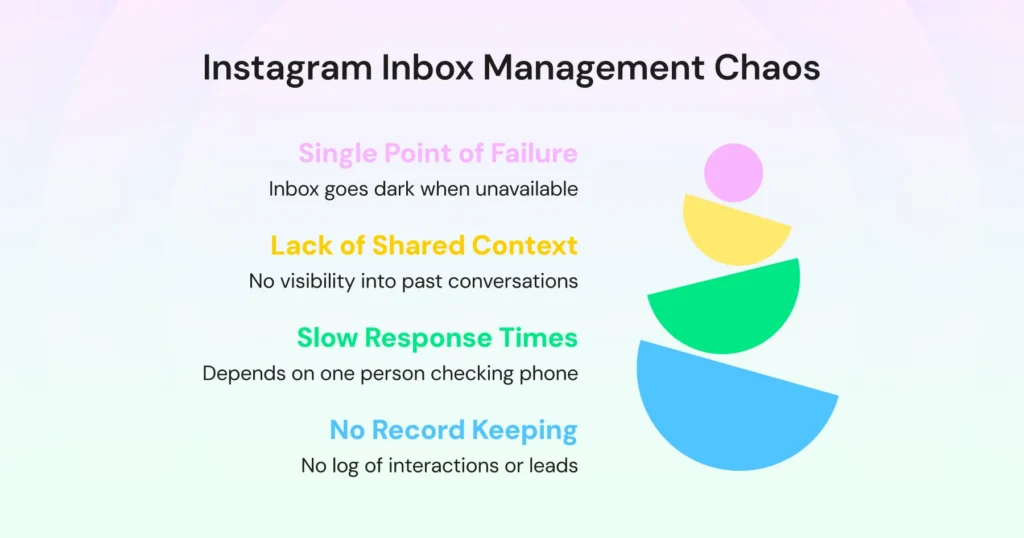
3. Response time depends entirely on when one person checks their phone
There’s no SLA, no escalation path, no visibility into how long a message has been sitting unread.
A lead that came in at 2 pm might get a reply at 7 pm, not because your team is slow, but because there’s no system flagging it as urgent or even overdue.
4. There’s no record of what happened
- Which leads were DM-ed?
- Which ones responded?
- Which ones were followed up on?
Nobody knows. There’s no log, no history visible to the broader team, no way to audit what’s working. Leads fall through without ever showing up as a loss anywhere.
The Conversations You’re Losing Without Realising
Missed DMs don’t show up as failures. There’s no error report, no dashboard number that says “you missed 14 conversations this week.”
They just disappear, and that’s what makes this so easy to underestimate.
But the cost is real and measurable.
Here’s a stat that puts it simply for you: 73% of social users say that if a brand doesn’t respond on social, they’ll buy from a competitor.
On Instagram, where a customer can DM three competitors in the same sitting, a slow reply isn’t just a missed conversation; it’s an active handoff to someone else.
Now apply that to volume.
| If your business receives 50 DMs a week and your single-phone setup results in 30% going unanswered or being answered too late, that’s 15 conversations a week where the lead has already moved on. Multiply that by your average deal value. The number gets uncomfortable quickly, and that’s before accounting for the leads you don’t even know you’re missing. |
High-reach content makes this worse. A well-landed reel can pull in 300, 400, or 500 comments in 24 hours. Every comment with a buying signal:
- “How much?”
- “Is this available?”
- “DM me details.”
This isn’t a future risk. It’s already happening.
Leads aren’t waiting around for a follow-up. They’ve already moved on.
Welcome Messages, OOO Replies & the Automation Layer You are Missing
So, can you actually autoreply on Instagram?
Yes, and it’s more straightforward than most teams realise.
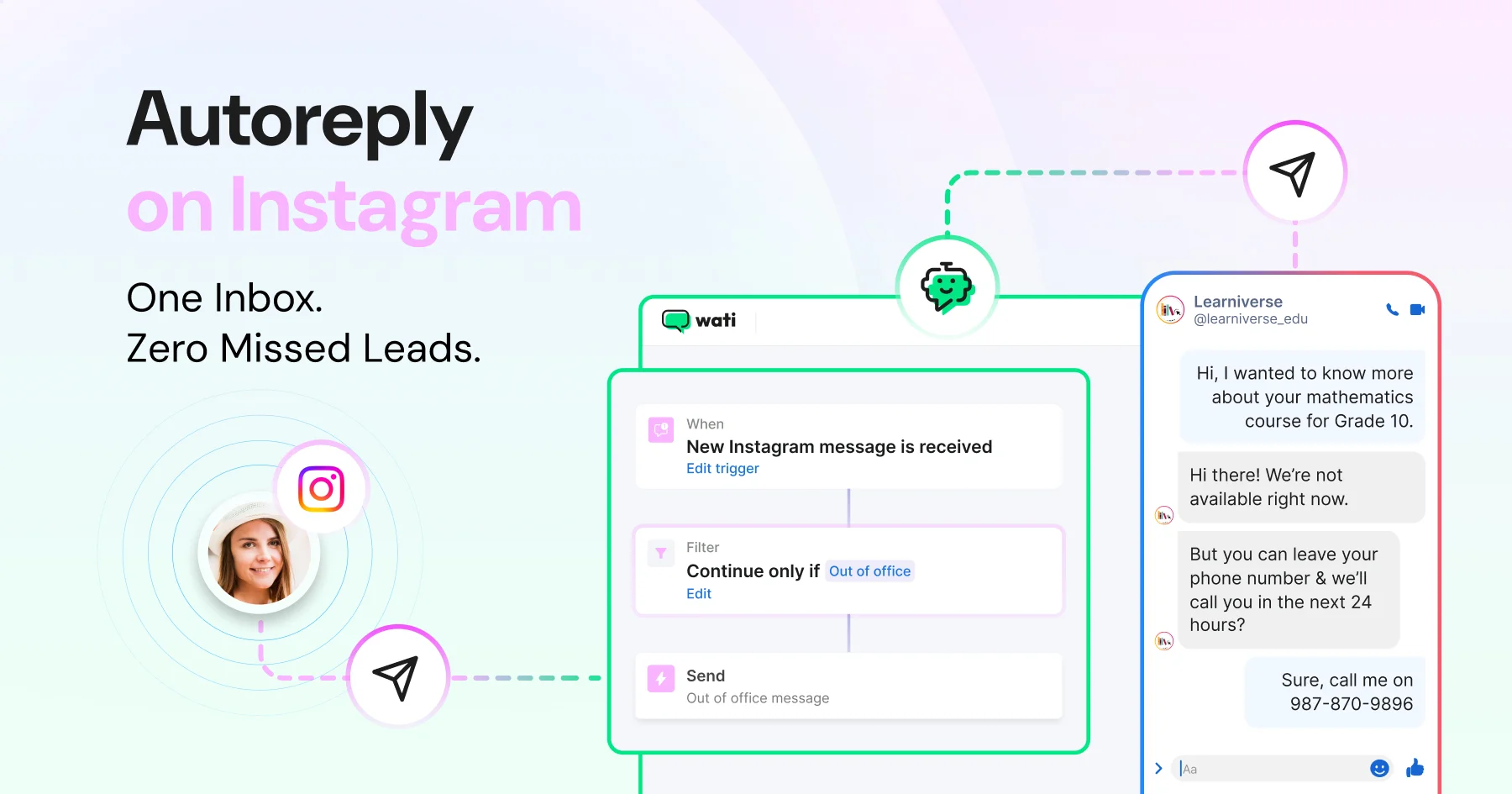
Instagram DM automation tools allow businesses to set up autoreplies that trigger instantly when someone messages your account, based on keywords, timing, or conversation triggers. No manual intervention needed.
But before getting into what’s possible, it’s worth understanding what Instagram’s native tools can and can’t do.
Out of the box, Instagram offers basic saved replies and limited automation through Meta Business Suite.
The catch is that these require a human to trigger them. Nothing fires automatically. There’s no multi-agent access, no conversation assignment, no shared team visibility. It was built for individual creators managing their own accounts, not business teams handling volume at scale.
Third-party tools that connect to Instagram’s API are where the real capability lives. For most SMB teams, three automation types make the biggest immediate difference.
1. Welcome Messages
First impressions on Instagram move fast. When someone DMs your account for the first time, every minute of silence is a minute they’re considering your competitor.
A welcome message fires instantly when a new DM comes in, acknowledging the customer, keeping the conversation alive, and giving your team time to follow up properly.
2. Out-of-Office Replies
Your team can’t be online around the clock. But your customers don’t stop DMing after 6 pm. Without an OOO reply in place, late-night and weekend messages go unanswered, and silence, as we covered earlier, sends people elsewhere.
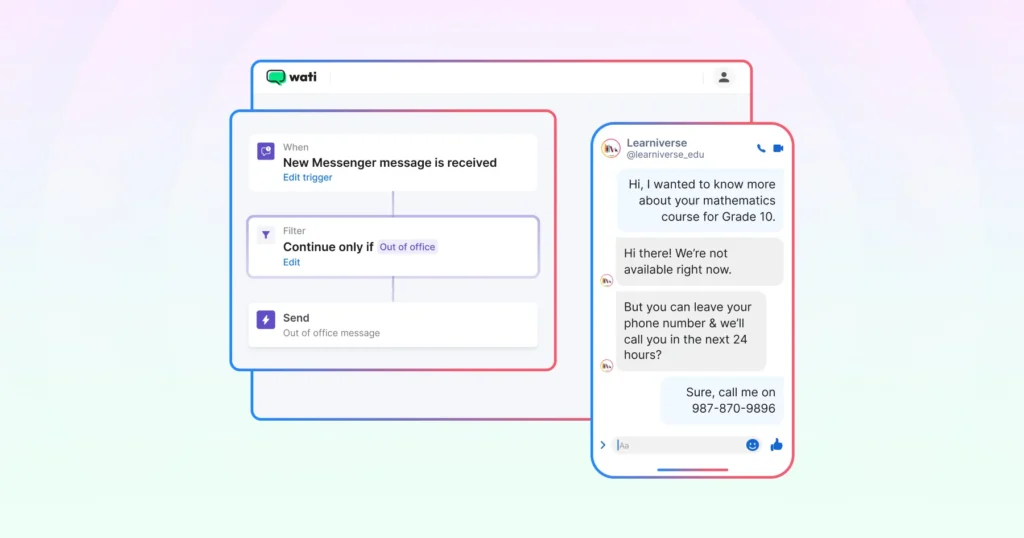
An automated OOO message sets clear expectations, keeps the conversation going, and ensures the customer is still there when your team gets back online.
3. Keyword-Triggered Replies
- “How much does this cost?”
- “Is this available in size M?”
- “Do you deliver to Bangalore?”
These aren’t complex queries, but they pile up fast, and every unanswered one is a buying signal that went nowhere.
Keyword-triggered automated replies send the relevant information the moment a customer asks, instantly and consistently, regardless of whether your team is online. The customer gets an answer. Your team gets time back.
| The important distinction: automation handles the first touch. Your team takes over for conversations that need judgment: complex queries, high-value leads, anything a canned reply can’t resolve. The goal isn’t to remove people from the process. It’s to make sure no conversation falls through before a person even gets to it. |
What Does a Proper Team Inbox for Instagram Actually Look Like?
At this point, the problem is clear. The question is what the solution actually looks like in practice for a team managing Instagram at volume.
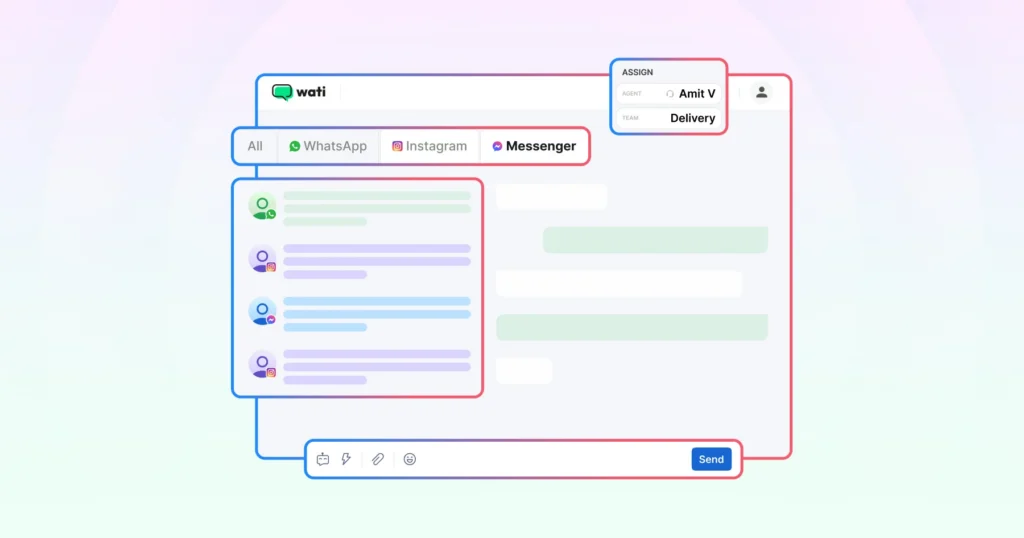
Instead of one phone and one login, it looks like this:
- Every DM is visible to the whole team: No more messages sitting unseen because one person is offline. Everyone has the same view, the same context, the same inbox.
- Conversations are assigned to specific people: There’s always a clear owner. Nobody assumes someone else has it covered, and nothing falls through because of that assumption.
- When one person replies, everyone else can see it: No duplicate responses. No, “I thought you were handling that.” Full visibility across every conversation, all the time.
- Response times are tracked: If a message has been sitting too long, it shows. Your team isn’t relying on memory to stay on top of things. The system flags what needs attention.
- Automated replies fill the gaps: Customers get an immediate response even at 11 pm. Your team picks up in the morning with full context intact.
- Every contact has a complete conversation history: Whoever follows up can see exactly what was said, when, and by whom. No more starting from scratch at every handoff.
- All your channels in one place: If your team is already managing WhatsApp or Facebook Messenger, a proper setup brings everything into the same inbox. No switching between apps to piece together a customer’s history.
The First Step Toward Instagram Automation for Your Team
Where you go next depends on where you are right now.
- If you want to understand what to look for before committing to any tool, you can start here: What to Look for in a Team Inbox for Instagram
- If you want to set up an Instagram FAQ bot today and start automating your most repetitive DMs, start here: How to Build an Instagram FAQ Chatbot Without Coding
- If you’re ready to connect Instagram to a proper team inbox and fix the problem end-to-end, the next step is below.
| Manage every Instagram DM from one inbox with your whole team Wati brings your Instagram DMs, comments, and automated replies into one shared team inbox, the same place you already manage WhatsApp. You can assign conversations, set up welcome messages and OOO replies, and stop losing leads to slow response times. Get started for free today. |
Setting Up Autoreply on Instagram is Just the Beginning
The phone-based approach made sense when your Instagram was getting a handful of DMs a week.
It doesn’t hold up when Instagram becomes a real customer communication channel, and for most growing SMBs, that shift has already happened.
An auto-reply on Instagram gives your team time to respond. A shared inbox gives them visibility. Together, they turn a process that currently depends on one person’s availability into something that works consistently, whether it’s a Tuesday afternoon or a Sunday night after a reel takes off.
No conversation should fall through because of the way your tools are set up. That’s a solvable problem, and click here to solve it now
Frequently Asked Questions: Autoreply on Instagram
Use a shared team inbox that connects to your Instagram account. Every team member gets visibility into the same conversations, can assign messages to each other, and can see the full reply history. This removes the dependency on one person or one phone managing everything.
Instagram Business accounts support automated responses through third-party tools that connect via the Instagram API. You can set up welcome messages for new DMs, out-of-office replies for when your team is unavailable, and keyword-triggered replies that respond instantly when a customer asks a common question.
Yes. Instagram DM automation lets you send instant replies based on triggers: a new message, a specific keyword, or a message outside business hours. Automation handles the first touch, so no conversation goes cold. Your team steps in for anything that needs a human.
Most likely because DM management is tied to one person or one phone, with no visibility for the rest of the team. Without a shared inbox, messages get missed whenever that person is unavailable. It’s not a people problem. It’s a process problem.