
Too Long? Read This First
- Automate prices, sessions, insurance lists, timings, and location.
- Use "starting from" prices and honest answers about comfort. Never promise "painless."
- Route pain, bleeding, swelling, reactions, and pregnancy questions straight to a clinician.
- Review your replies every month, so prices and insurer lists stay current.
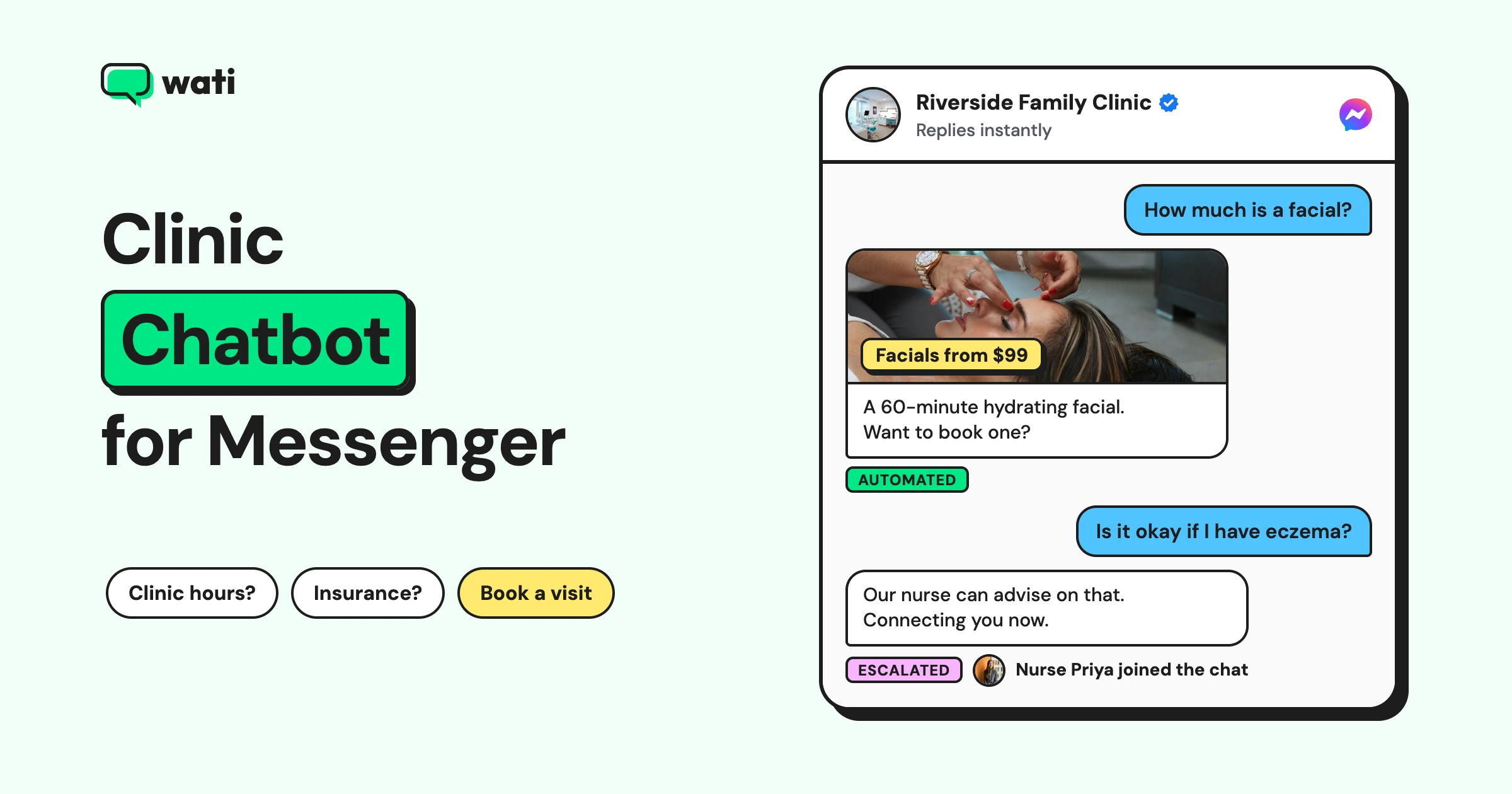
A clinic chatbot in Messenger should answer questions with the same answer for everyone and pass the rest to a person.
There's a simple test for every reply you're about to automate: would the answer change from one patient to the next?
The starting price of laser hair removal doesn't. Neither do your opening hours or the insurers you accept. Whether someone's swelling after a peel is normal does.
With Wati's omnichannel inbox, rules and chatbots handle the first kind, and the second goes to your team.
Below are reply scripts for pricing, insurance, comfort, and salons, as well as the messages that should always reach a clinician.
What Should a Clinic Chatbot Answer in Messenger?
A clinic chatbot should answer logistics, not medicine. Prices, opening hours, accepted insurers, and directions are logistics. They're ideal for automation, because a wrong answer is easy to spot and fix.
Medicine is different. Whether a treatment suits someone, what caused a reaction, or what to do about a symptom always needs a clinician.
In Wati, Messenger replies are based on rules you set up in advance. A keyword rule replies when a message contains certain words, and a chatbot asks simple questions and branches on the answers.
Every reply comes from your own price list and treatment notes. Write each answer once in Reply Material, Wati's library of saved replies.
Name them clearly, such as "FB laser price" or "FB insurers," so your team can find and update them quickly.
Keyword rules can match in three ways: Fuzzy catches typos like "insurence," Exactly matches the word on its own, and Contains finds it anywhere in a message.
Use Fuzzy for topic words such as price and insurance, and ‘Exactly’ for reply words such as BOOK.
How Should You Answer Price and Session Questions?
Give a clear starting price, explain what's included, and invite the next step.
Final prices often depend on a consultation, so "starting from" keeps replies honest. Session counts and downtime vary too, so give ranges rather than promises.
Here's a reply a clinic might use for laser hair removal:
"Laser hair removal for the underarms starts from [price] per session. Most people need 6 to 8 sessions, spaced about 4 to 6 weeks apart. There's usually little or no downtime. Reply BOOK to book a consultation or AREAS for other areas."
Use your clinic's own session counts and pricing.
When a patient replies with "BOOK," a booking chatbot can collect the treatment, preferred time, and name, then forward the request to your front desk.
💡Our guide to Facebook appointment booking walks through that flow.
Dental clinics can use the same pattern. A dental chatbot can share the starting price for cleaning or whitening, what's included, and how long the appointment takes.
Replies can include an image or video, so you can send your treatment price list as a single image or a short clip of the procedure. Update the image whenever prices change.
Keep fixed final prices out of automated replies. If a price changes and the old one is still in a rule, patients will hold you to it.
Answer every patient question from one inbox. Wati's Team Inbox keeps Messenger, Instagram, and WhatsApp chats together, with tags and assignment for your front desk. Explore Wati's Team Inbox
How Do You Handle Insurance Questions?
List the insurers you accept, and send coverage questions to staff.
In many Gulf markets, insurance comes up in almost every inquiry. Patients want to know two things: whether you accept their insurer, and whether their treatment is covered.
A bot can answer the first question well:
"We accept [insurer names]. Please bring your insurance card and Emirates ID (or national ID) to your appointment. Reply COVERAGE to check cover for a specific treatment."
Some patients pay out of pocket, either because their insurer isn't on your list or because the treatment isn't covered.
Add a line for them too, such as "Self-pay patients are welcome, and prices start from [price]." It keeps them in the conversation instead of sending them elsewhere.
The second question is different. Coverage depends on the patient's policy and often needs approval from the insurer.
When someone replies COVERAGE, a short chatbot collects their insurer and the treatment, then assigns the chat to your billing team. Keep the insurer list current. A patient who arrives expecting cover you no longer accept won't come back.
What Should a Bot Say When Someone Asks "Does It Hurt?"
Be honest, reassuring, and specific about what you do to keep patients comfortable.
"Does it hurt?" is often the real question from a nervous patient. A good reply describes typical sensations, mentions comfort measures you actually use, and offers a person:
"Most people describe it as a quick snapping feeling, like a rubber band. We use a cooling device and numbing cream to keep you comfortable. If you're worried, one of our specialists can talk you through it. Reply TEAM to speak with them."
Never write "painless." Experiences differ, and a promise you can't keep damages trust. Always offer a clinician, because some patients need more reassurance than a message can give.
How Do You Answer Timing and Location Questions?
Make it easy to visit: hours, directions, and parking in one reply.
"Where are you?" and "Are you open Friday?" are the simplest questions to automate. A good reply covers opening hours, the address, parking, and a map pin:
"We're open Saturday to Thursday, 10 am to 9 pm. We're on the ground floor of [building], with free parking at the back. Here's our map pin: [link]. Reply BOOK to book a visit."
Update your working hours in Wati for Ramadan, when many clinics in the Gulf shift their timings, and use Holiday Mode for public holidays.
Working hours apply to WhatsApp, Instagram, and Messenger at once. Send a photo of the entrance if your clinic is hard to find.
When someone asks "Can I come Saturday?", the bot shouldn't promise a slot. It should send them to your booking menu, where the front desk confirms the time.
What Do Salon and Spa Clients Ask?
Salons and spas get the same repeat questions, with a few safety checks of their own.
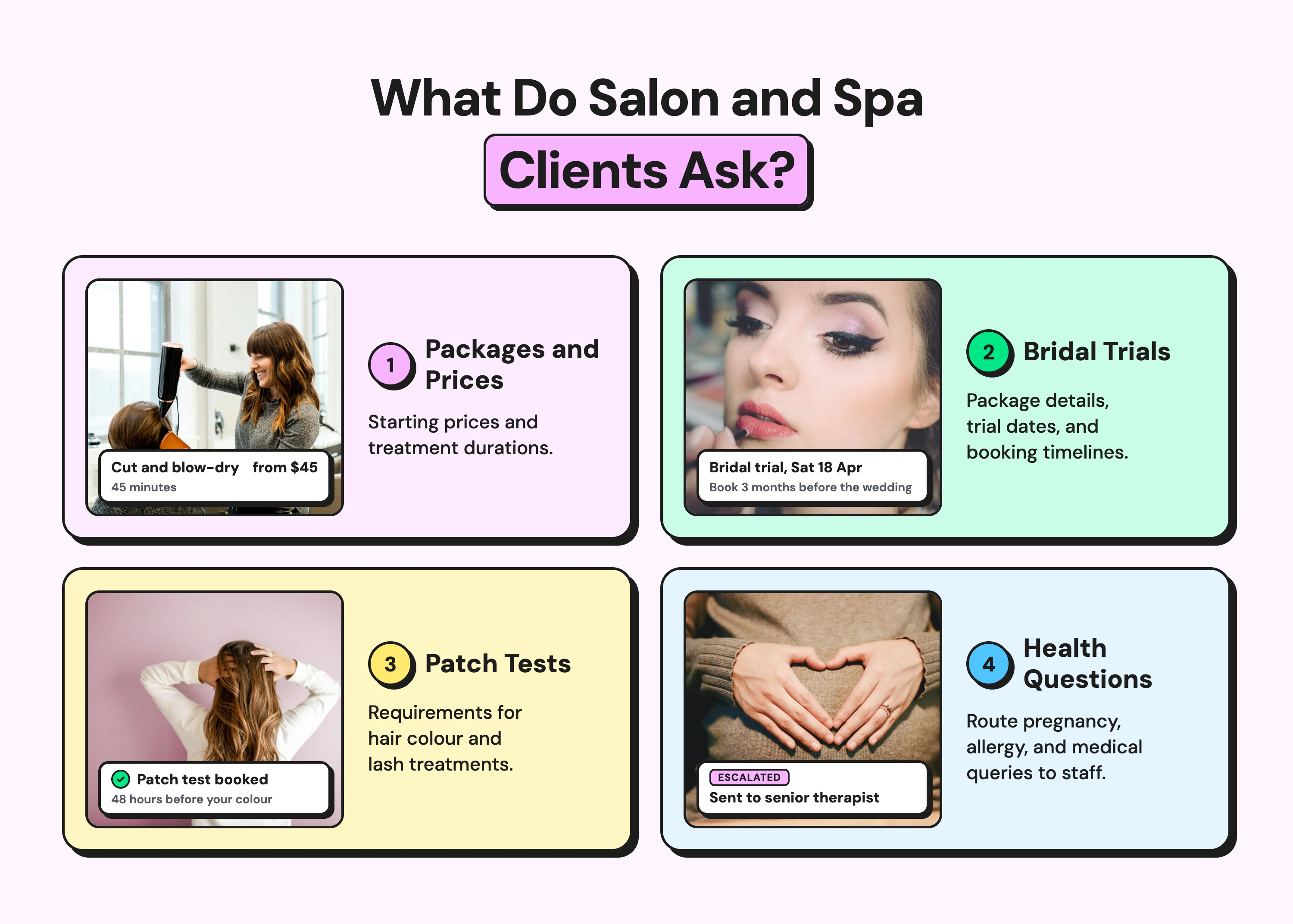
- Packages and prices. Haircuts, color, facials, and massage packages all suit keyword replies with starting prices and durations.
- Bridal trials. Brides-to-be ask about packages, trial dates, and how far ahead to book:
"Our bridal package starts from [price] and includes a trial session. We recommend booking the trial 4 to 6 weeks before the wedding. Reply BOOK to request a trial date."
- Patch tests. Hair color and lash treatments often need a patch test before the appointment. Say so in the reply, so clients plan ahead.
- Health questions. Spa clients sometimes ask about pregnancy, allergies, or medical conditions. Those should always go to a trained staff member, not an automated reply.
Build a treatment FAQ bot without code. Wati's drag-and-drop chatbot builder turns your price list and service menu into instant answers.
💡See Wati's no-code chatbot builder
What About Questions Asked in the Comments?
Answer price questions privately, and never discuss health in public.
Treatment posts often collect comments like "Price?" or "Does this work on dark skin?"
A Wati comment rule can send a private Messenger reply to each commenter. You can also reply publicly under the comment. Keep any public reply neutral, with no prices or health details. Even when someone shares a health detail in a comment, reply privately.
💡Our guide to Facebook comment auto replies explains the setup.
Your team can also respond to comments by hand in the Facebook Comments section of Team Inbox on the Wati web app. Anyone you DM is saved as a contact, with their chat history. Private replies only work within Meta's time window, so have your comment rule live before you post.
How Do You Answer Questions From Your Ads?
Click-to-Messenger ads let patients message you straight from a treatment ad. In Meta Ads Manager, add suggested questions such as "What's the price?" or "Do you accept my insurance?", then set up a keyword rule for each, so every tap gets an instant answer. Meta allows up to 80 characters for each question.
Tag ad chats, such as "ad-laser," so your team can see which campaign brought them in. No ad budget? Print your Page's m.me link as a QR code at reception. It opens the same chat.
Which Messages Should Go Straight to a Clinician?
Some words should go straight to a person.
Set up a keyword rule for red-flag words that starts a short handoff chatbot. The chatbot sends a caring reply, tags the chat, and assigns it to a clinician:
Red-flag words | Why they need a person |
|---|---|
pain, painful (after treatment) | Possible complication |
bleeding, bled, swelling, swollen, bruising | Needs clinical assessment |
rash, itching, reaction, reacted, allergy | Possible allergic reaction |
pregnant, pregnancy, breastfeeding | Treatment may not be suitable |
medication, blood thinner | Needs a clinician's review |
Include every form of the word patients actually type. Keywords can't tell a worried question from a complication, so "Is it painful?" will reach a clinician too. That's the safe side to err on.
The bot should reply with a short, caring handoff:
"Thank you for telling us. A clinician will reply to you personally as soon as possible. If it's urgent, please call us on [number] or seek medical help."
Wati AI can summarize the chat and translate Arabic messages, so the clinician understands the concern before replying. Mark the chat as ‘Pending’ while they review it, and as Solved once they've responded.
On Wati's Pro and Business plans, the chatbot can tag these chats and assign them straight to the right clinician. In the Growth plan, the bot sends the reply, and the chat waits in the Team Inbox for your team.
How Should the FAQ Menu Look in Messenger?
Keep the menu short, numbered, and easy to return to.
Start the menu chatbot from your Welcome rule, so every new chat gets it, and from a MENU keyword rule, so patients can bring it back anytime.
Messenger chatbots in Wati don't support buttons, so patients reply with a number:
"How can we help today? Reply 1 for prices, 2 for insurance, 3 for opening hours and location, 4 to book a visit, or 5 to talk to our team."
End each answer with "Reply MENU to see all options," and set a MENU keyword rule to restart the chatbot.
Keyword rules work alongside it, so a patient who types "insurance" receives the correct reply without selecting a number.
Set reply words like BOOK, COVERAGE, and TEAM as separate keyword rules with Exact matching, so they don't fire on other messages.
Plan for evenings too. Wati creates Welcome and Out-of-office rules when you connect your Facebook Page, but they stay off until you switch them on.
Set the out-of-office rule to share the menu and promise a reply by a specific time the next morning.
Automation can reply for 24 hours after a patient's last message, and your team can reply for up to 7 days, so clear the overnight queue first thing.
How Do You Keep Answers Accurate?
Wrong answers do more harm than slow ones, so review your replies regularly.
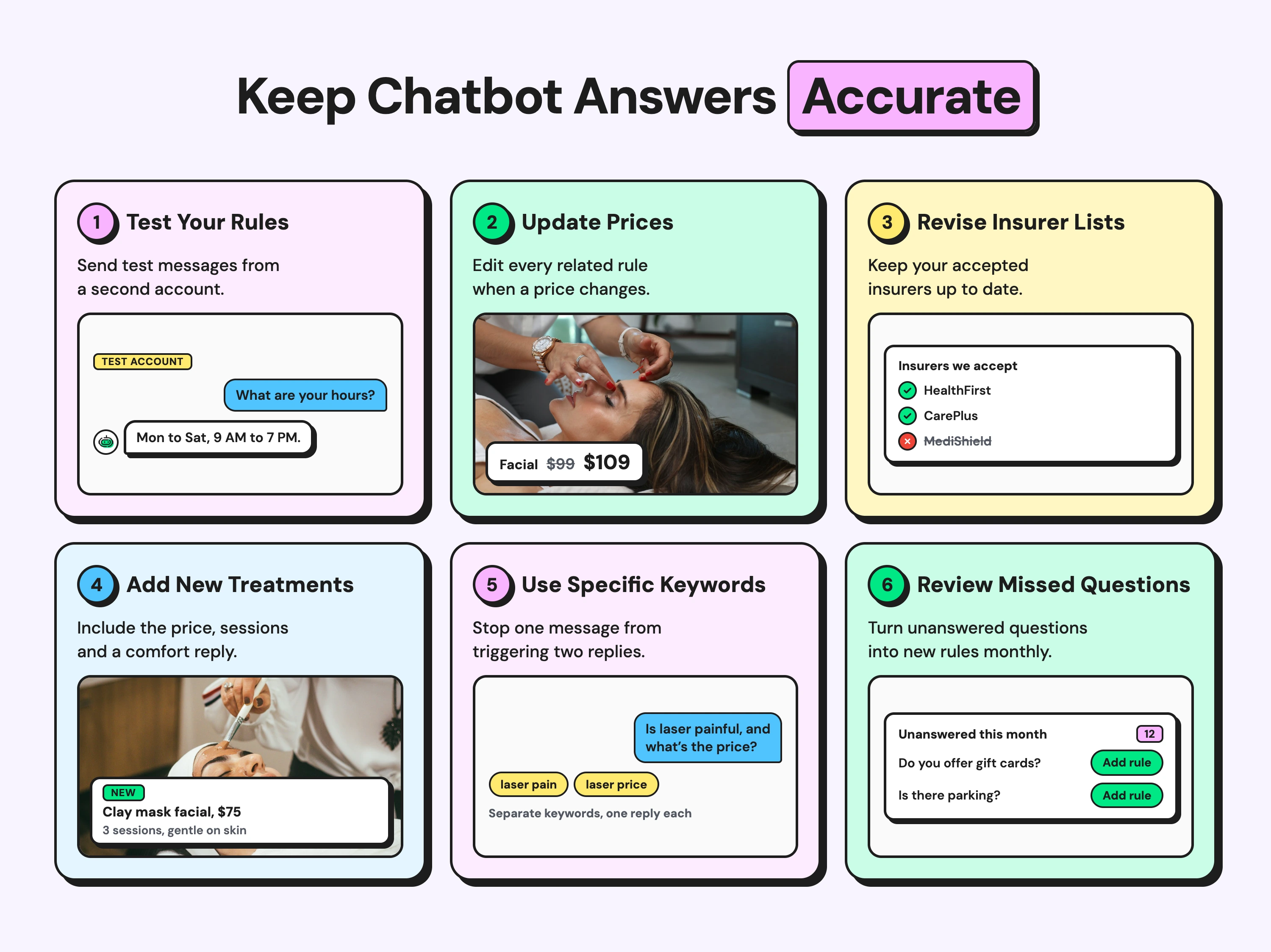
- Before any rule goes live, test it from a second Facebook account. Send a price question, a reply word like BOOK, and a red-flag word, and check that each one gets the right response.
- When prices change, update every rule that mentions them the same day.
- When insurer contracts change, update the accepted list straight away.
- When you add a treatment, add its price, sessions, and comfort reply.
- Keep keywords specific. If two rules match the same message, both reply, so a patient asking "Is laser painful, and what's the price?" can get two answers.
- Every month, read the questions the bot couldn't answer and add rules for the common ones.
Give one person ownership of this routine. Good clinic automation depends on someone keeping the answers true.
Which Mistakes Make Patients Lose Trust?
- Promising "painless." One uncomfortable session undoes the promise and the relationship.
- Out-of-date prices. Patients screenshot replies. Old prices lead to awkward conversations at the desk.
- Generic replies to health worries. A standard answer to "I have swelling" feels careless. Route it to a person.
- No way to reach a person. Every menu needs a "talk to our team" option.
Good to know: Messenger, keyword rules, and basic chatbot steps come with every Wati plan. Tagging and assigning chats to billing or clinicians need the Pro or Business plan.
Automate the Logistics, Escalate the Medicine
A good clinic chatbot answers what every patient asks and steps aside when it matters. Honest prices, clear insurance answers, and fast handoffs build the trust that brings patients through the door.
Want to see a clinic chatbot set up for your treatments? Book a demo with Wati.
Frequently asked questions
What is a clinic chatbot?
A clinic chatbot is an automated assistant that answers common patient questions, such as prices, opening hours, and accepted insurance. It passes medical or personal questions to clinic staff.
Can a chatbot answer insurance questions?
It can list the insurers a clinic accepts and explain what to bring. Questions about whether a specific treatment is covered should go to the billing team, since coverage depends on each policy.
How should a clinic reply to "does it hurt?"
Describe typical sensations honestly, mention the comfort measures you use, and offer to connect the patient with a specialist. Avoid promising that a treatment is painless.
Which questions should a clinic chatbot not answer?
It shouldn't answer questions about symptoms, reactions, pregnancy, medication, or whether a treatment suits someone. Those go straight to a clinician.
Related posts
- How to Send Bulk Messages on WhatsApp Without Getting Blocked
Learn how to send bulk WhatsApp messages without getting blocked. Compare the WhatsApp Business app and API, messaging limits, costs, templates, and best practices for safe, compliant bulk messaging.
- Instagram Comment Automation: How It Works and How to Set It Up in Wati
Instagram comment automation auto-replies to comments and DMs commenters within seconds via Meta's API. Covers strategy, use cases, and Wati setup.
- Shared Team Inbox for Instagram: A Buyer’s Checklist for 2026
Use this fastest checklist to evaluate any shared team inbox for Instagram, which covers DMs, comments, automation, and multi-channel support.
- How to Set Up a TikTok Business Account: Step-by-Step Guide
Set up a TikTok Business Account step by step: switch from personal, pick a category, add your profile, and unlock ads and analytics.