
Too Long? Read This First
- Batch launches and results days fill your Instagram DMs with the same questions about fees, EMI, batches, and the scholarship test, often after hours.
- Keyword replies answer them instantly when you use phrases like “fee structure,” not single words that misfire.
- Wati’s no-code chatbot builder lets you set up a button-based FAQ chatbot without a developer, with a counselor option on every answer.
- Wati’s tags and team routing send parents, EMI approvals, and refunds to the right counselor, and the Astra AI Agent covers off-menu questions.
- Out-of-office rules answer the top three questions at night during results season, before your team is back.
What does your Instagram inbox look like the morning after results day? Usually, it's dozens of course inquiries about fees, EMI, batch timings, and the scholarship test, many of them sent after midnight.
That inbox keeps growing because students now shortlist courses on Instagram. In a 2025 survey of U.S. high school seniors, 93% used social media to research colleges, and Instagram was their most-used platform.
Wati, an agentic customer engagement platform, helps your team keep up with these course inquiries. Its Instagram automation answers repeat questions with keyword replies and no-code chatbots, and routes parents and complex cases straight to a counselor.
This guide shows you how to automate course inquiries on Instagram with keyword replies and a no-code FAQ chatbot. Students get instant answers, and counselors focus on families ready to enroll.
You will get a 20-question bank, a keyword list, a 3-button bot menu, routing rules for parents and students, and a results-season plan for after-hours DMs.
Why do Course Inquiries Pile Up in Instagram DMs?
Course inquiries pile up because batch launches and results days push hundreds of students and parents to ask the same questions at once. Most teams still answer each DM by hand.
Every manually typed reply is time a counselor doesn't spend with a parent ready to enroll. And a parent who waits until morning for a fee answer has often messaged the next institute by then.
The fix is a no-code chatbot: an automated reply flow you build by dragging and connecting steps, without a developer. Paired with keyword replies, it answers the predictable questions, so your team steps in only when needed.
Bonus read: How to Set Up an Instagram Chatbot to Answer FAQs Automatically
The Course Inquiry Question Bank: 20 Questions to Automate
Almost every batch launch brings the same 20 course inquiries across six themes. They cover fees, batches, online vs. offline classes, the scholarship test, study material, and parent concerns.
Automation can answer 14 of them fully. The other six need a counselor or a separate flow.
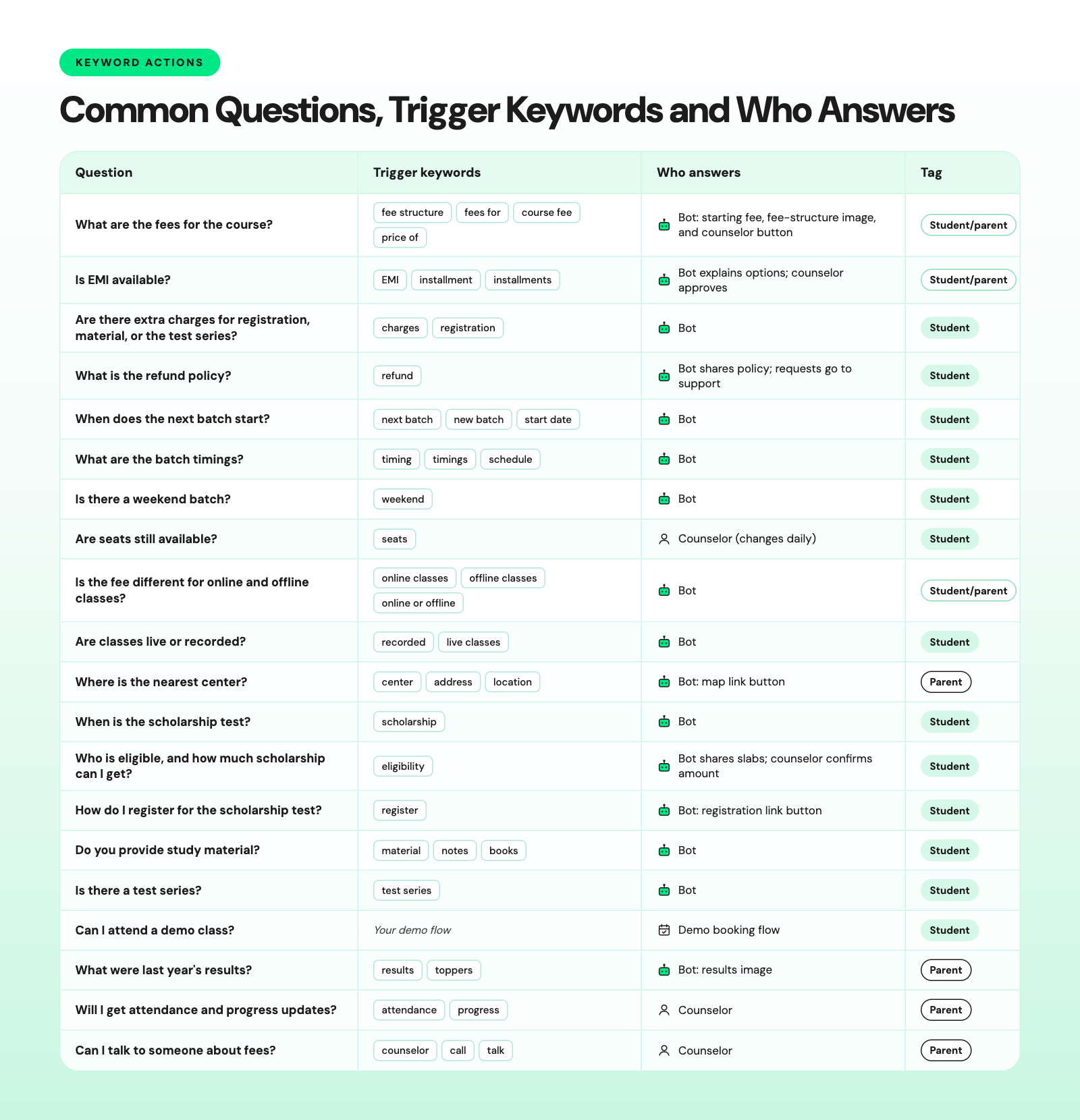
The FAQ chatbot fully handles questions 1, 3-7, 9-12, 14-16, and 18. A counselor owns seat availability, scholarship amounts, EMI approvals, and parent questions 19 and 20.
For question 17, send students to a separate flow where they can book a demo class from DMs.
For questions outside this bank, the Astra AI Agent on Wati can answer from the course details you give it, in the student's or parent's preferred language 24/7.
Which Keywords Should Trigger Automatic Replies?
Create one keyword rule per theme: fees, EMI, batch, scholarship, material, and center.
Use “Contains” match for most rules, because students type full questions like "Is EMI available?"
Exact match fires only when the whole message equals the keyword. Save it for one-word prompts, such as a reel that asks viewers to DM "FEES."
Contains fires when the keyword appears anywhere in the message, so a common word can trigger on messages that mean something else.
Use phrases instead of single words, and test each rule before it goes live.
Risky keyword | Message it can misfire on | Safer keywords |
|---|---|---|
fee | "Fee paid, please send the receipt" | "fee structure" and "fees for" |
test | "When is the next unit test?" | "scholarship test" and "test series" |
live | "I live in Pune, is there a center near me?" | "live classes" and "live or recorded" |
batch | "My batch timing changed, who do I tell?" | "next batch" and "new batch" |
- Add plural forms such as fees, timings, and installments alongside the singular keywords.
- Reply to fee questions with a starting fee, an image of the fee structure, and send exact quotes, discounts, and EMI terms through a counselor.
- Let each keyword rule start the FAQ bot instead of ending on one message, so the student can keep asking.
Bonus read: How to Set Up Keyword-Triggered Instagram Automation in Wati
How Should a 3-Button FAQ Bot for Course Questions Work?
A 3-button FAQ bot starts with one question: student or parent? Then it shows three topic buttons.
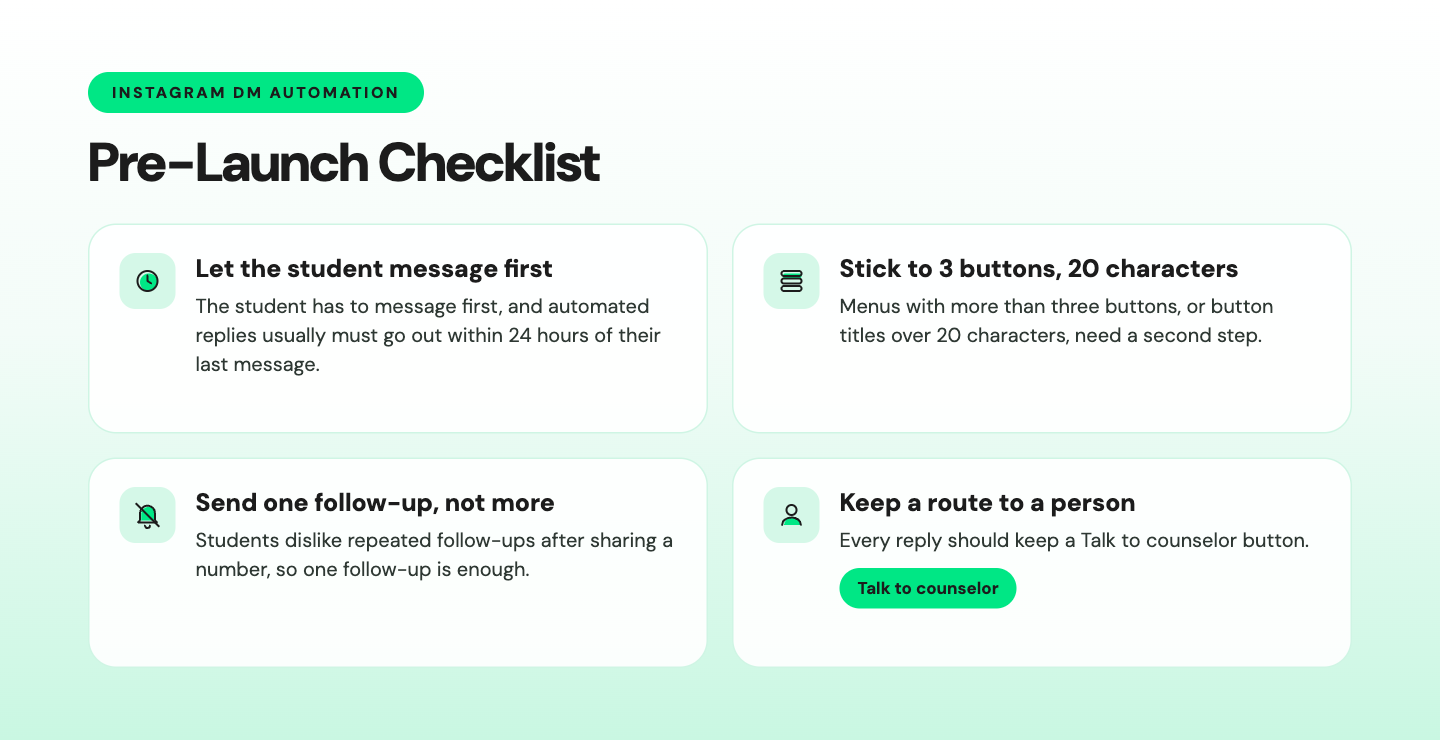
Keep menus to three buttons so they stay readable, and keep button labels under 20 characters, Instagram’s limit for quick replies.
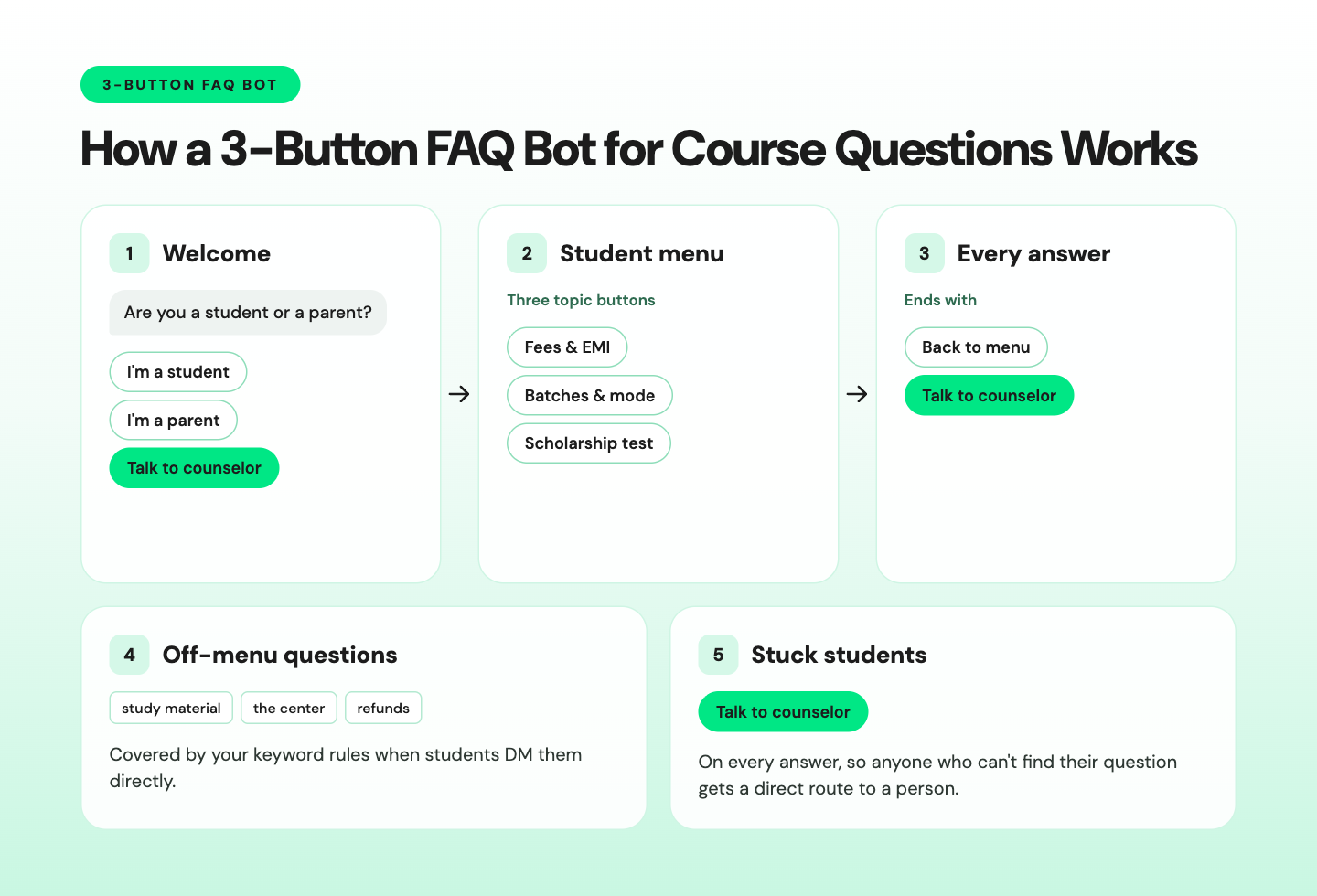
Instagram replies can carry text, images, and video, so send fee structures as an image or a website button.
A chatbot for education works best when it answers facts and passes decisions to people.
Students will still type questions your menu doesn't cover.
Turn on smart escalation in the bot’s fallback settings. If a student asks for a person or sounds frustrated, the chat goes straight to your admissions team instead of getting another ‘please pick an option’ message.
Student Inquiry Management: How do You Tag Parents and Students and Route Them to Counselors?
Tag every contact as a parent or a student from the first button tap. Then route parents, fee decisions, and complaints to the right team, while the bot keeps answering students' factual questions.
Parents ask about results, safety, and payment, and they expect a person. Students ask about timings, material, and the scholarship test, and they want an instant answer.
One family can also send two or three inquiries.
Situation | Tag | Goes to |
|---|---|---|
Parent asks about fees or EMI | Parent, fees | Admissions counselors |
EMI approval or loan paperwork | Fees | Accounts |
Scholarship amount or fee waiver request | Scholarship | Admissions counselors |
Refund or batch transfer | Student | Student support |
Complaint | Complaint | Center manager |
Student taps Talk to counselor | Existing tags | Admissions counselors |
- The counselor sees the whole chat and its tags, so the parent never repeats the question.
- The chatbot explains EMI and scholarship options, but a person approves them.
Round-robin assignment in Wati spreads new chats evenly across counselors and reassigns any that go unanswered. Private notes let them share context, like an approved EMI plan, that parents can't see.
How do You Answer FAQs After Hours During Results Season?
Set your out-of-office rule to start your FAQ bot, so the three buttons lead to real answers. New DMs that arrive at night then get fees, batch dates, and the scholarship test date right away.
Results season is when this matters most. Lakhs of students sit the same entrance exams, and their families start comparing institutes the evening results come out.
Those families won't wait for office hours, and an answer that arrives the next morning often comes too late.
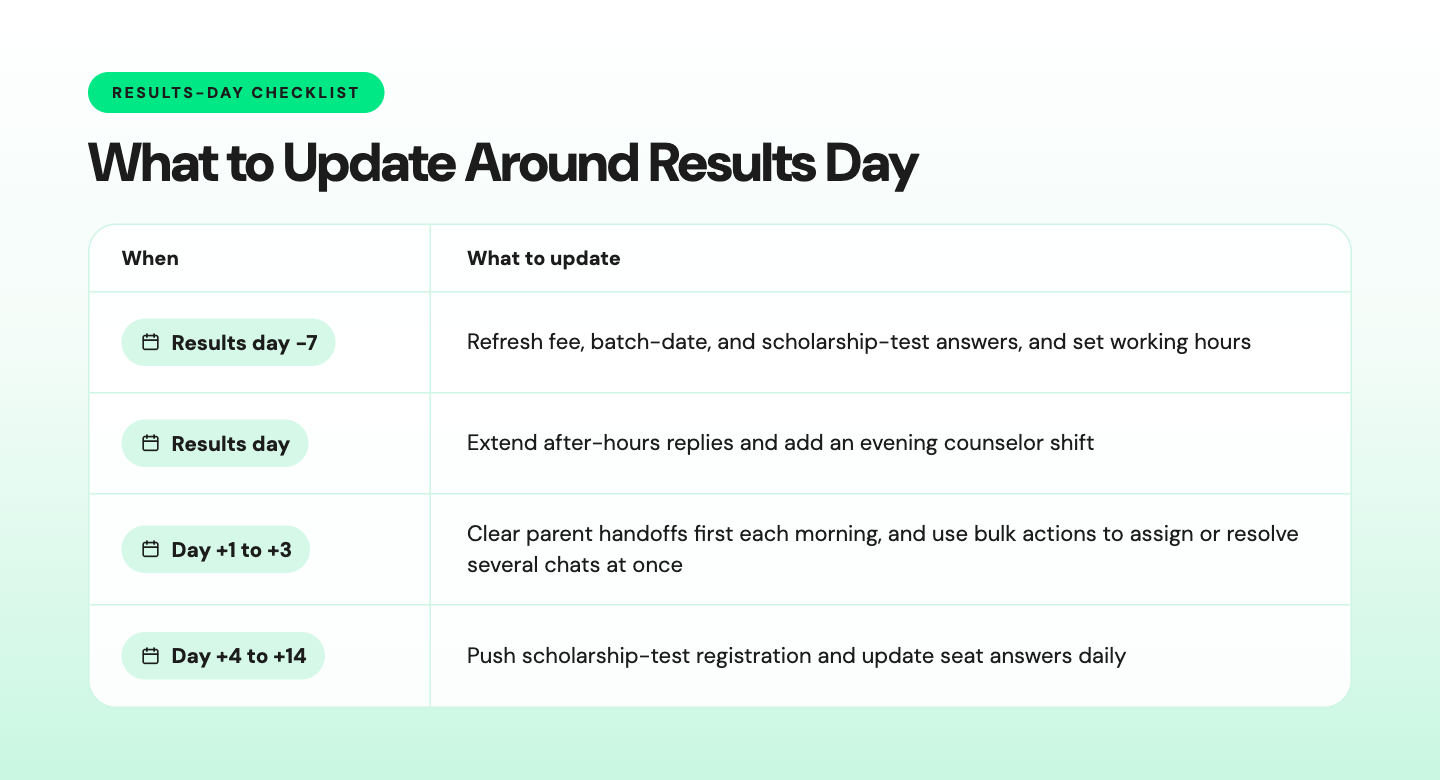
Run the same calendar, at a smaller scale, for board results and CA exam results.
Sample out-of-office reply:
Thanks for messaging [Institute]. Our counselors are back at 9 a.m. Tap below for fees, batch timings, or the scholarship test date. [Fees & EMI] [Batches & mode] [Scholarship test] |
How Wati Handles Course Inquiries on Instagram
Wati brings your Instagram DMs into a shared Team Inbox and automates the repeat questions, so your front office stops retyping the same answers.
- Keyword rules: catch messages about fees, EMI, batches, or scholarships, then reply instantly or start your FAQ bot. Students get an answer in seconds, even at midnight.
- No-code chatbots: build your FAQ bot by dragging and connecting nodes, with up to three buttons per message. Your team updates answers before each batch launch, no developer needed.
- Astra AI Agent: answers the open questions your flows don’t cover, using the course details you give it. It can save the student’s phone number and hand serious inquiries to a counselor with the full chat.
- Set Tags: marks each contact as a parent or a student inside the chatbot. Counselors know who they’re talking to before replying.
- Assign Team: sends parents, fee approvals, and complaints to admissions, accounts, or support. Round-robin assignment spreads new chats evenly across counselors.
- Out-of-office rules: reply to new DMs outside your working hours. No student waits until morning for a first response.
- Click-to-WhatsApp Ads: run batch-launch ads on Instagram and Facebook that open a WhatsApp chat with you. Wati records which ad each student came from, so you know which ads work.
- Shared Team Inbox: keeps WhatsApp, Instagram, Facebook Messenger, TikTok, SMS, RCS, and website chat in one place. Counselors see each chat’s history and tags without switching apps, so fewer inquiries slip through.
Geekster struggled with high query volume and slow replies, and after automating its WhatsApp messaging with Wati, it now handles 500+ queries daily.
What to Check Before You Automate Instagram DMs
Most problems come from Instagram's limits and from automating too much.
Be Ready for Next Results Season with Wati
Results season doesn’t have to start with a backlog of unanswered DMs. When fees, batch timings, and scholarship test dates are answered automatically, your counselors begin each morning with parents who are ready to enroll, not a queue of repeat questions.
Set it up before the next results day, and the late-night inquiries that used to go to another institute stay with you.
Book a demo to build your Instagram setup with the Wati team.
Frequently asked questions
Can a Coaching Institute Automate Instagram DMs?
Yes. A coaching institute can automate Instagram DMs with keyword replies and a button-led FAQ bot that answers repeat course inquiries once a student messages first. Fees, batch timings, the scholarship test date, and study material are the easiest to automate. A counselor takes over for EMI approvals, scholarship amounts, and parents who want a person.
Is Instagram DM Automation Allowed by Meta?
Yes. Instagram DM automation is allowed when it runs through Meta's official messaging API. The customer has to message first, automated replies usually must go out within 24 hours of their last message, and it's best practice to offer a way to reach a human.
Should We Share Fees in Instagram DMs?
Yes, but share a starting fee and a fee-structure image rather than a final quote. Keep exact fees out of public comment replies, where anyone can read them. Send discounts, scholarship amounts, and EMI terms through a counselor, because they depend on the student's course, center, and eligibility.
What is Student Inquiry Management?
Student inquiry management is the process of capturing, answering, tagging, and routing every question a prospective student or parent sends until they enroll or drop off. On Instagram, that means keyword replies and an FAQ bot for repeat questions, tags for parents and students, and a clear handoff to counselors for decisions.
What if a Parent Doesn't Want to Talk to a Bot?
Put a Talk to counselor button on the first message and on every answer. When a parent taps I'm a parent or Talk to counselor, tag the contact as a parent and route the chat straight to your admissions team. The counselor then sees the full conversation and its tags.
Related posts
- How to Send Bulk Messages on WhatsApp Without Getting Blocked
Learn how to send bulk WhatsApp messages without getting blocked. Compare the WhatsApp Business app and API, messaging limits, costs, templates, and best practices for safe, compliant bulk messaging.
- Instagram Comment Automation: How It Works and How to Set It Up in Wati
Instagram comment automation auto-replies to comments and DMs commenters within seconds via Meta's API. Covers strategy, use cases, and Wati setup.
- Shared Team Inbox for Instagram: A Buyer’s Checklist for 2026
Use this fastest checklist to evaluate any shared team inbox for Instagram, which covers DMs, comments, automation, and multi-channel support.
- How to Set Up a TikTok Business Account: Step-by-Step Guide
Set up a TikTok Business Account step by step: switch from personal, pick a category, add your profile, and unlock ads and analytics.