
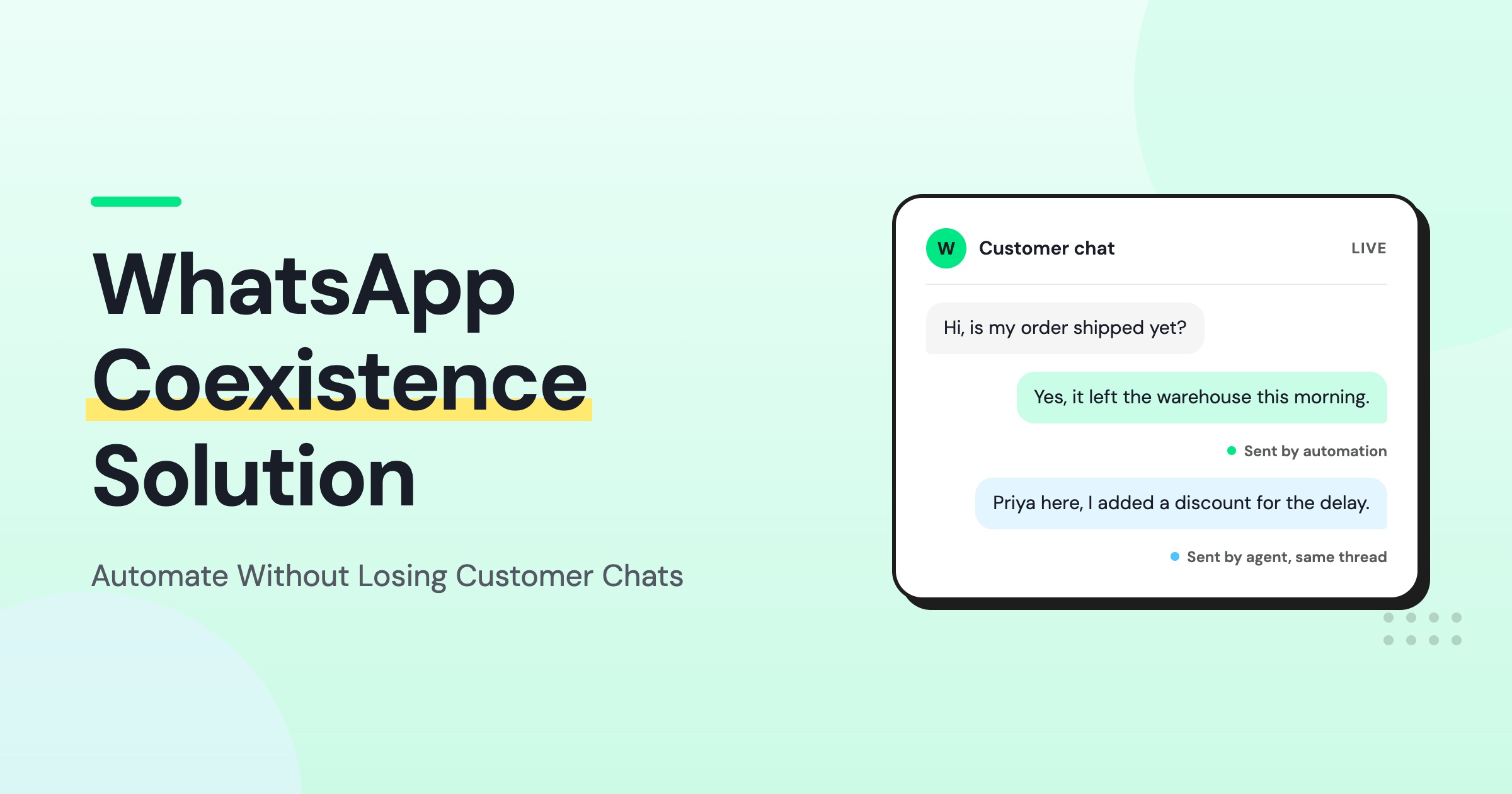
Too Long? Read This First
- WhatsApp coexistence runs the Business App and WhatsApp Business API on one phone number simultaneously.
- Six months of individual text chats sync automatically into Wati. Shared media only syncs for the last two weeks.
- Contacts sync one-way, from the app into Wati, including any future edits made in the app. Updates made inside Wati do not flow back to the app.
- Broadcast lists stop working after onboarding. Disappearing messages, view-once photos, and live location switch off for individual chats.
- Below is a step-by-step onboarding checklist and a 90-day rollout plan.
For years, brands have been forced to choose between continuity and automation. The WhatsApp Business App kept customer conversations intact, while Meta’s API platform opened the door to broadcast messaging, team collaboration, and AI automation.
However, moving to the API often comes with the risk of leaving existing chat history.
What is the solution?
WhatsApp coexistence removes that trade-off.
Instead of choosing between the WhatsApp Business App and the WhatsApp Business API, brands can connect their existing Business App number to Wati. This keeps recent conversations and lets you continue using the app while gaining access to automation, broadcasts, and team collaboration.
Customer expectations have shifted toward messaging. Meta reports that 73.3% of consumers prefer messaging businesses, while 72.4% are more likely to buy from brands that offer messaging. Coexistence lets brands meet that shift without giving up the app their team already knows.
This guide covers how coexistence works, what Wati's implementation enables, its current limitations, a step-by-step onboarding checklist, and when it is the right fit for your business.
What WhatsApp Coexistence Actually Means for Business
WhatsApp coexistence lets businesses use the WhatsApp Business App and the Cloud API on the same number.
Your team continues managing individual customer conversations in the Business App, while the API connection adds capabilities that the app does not support on its own.
The connection is established through Meta's Embedded Signup process, which links your existing number to the platform without changing how your team manages conversations in the app. Once connected, platforms like Wati can extend your existing setup with features such as
- Broadcast campaigns to segmented lists of 250+ contacts.
- Chatbot flows for automated responses.
- A shared team inbox for multiple agents.
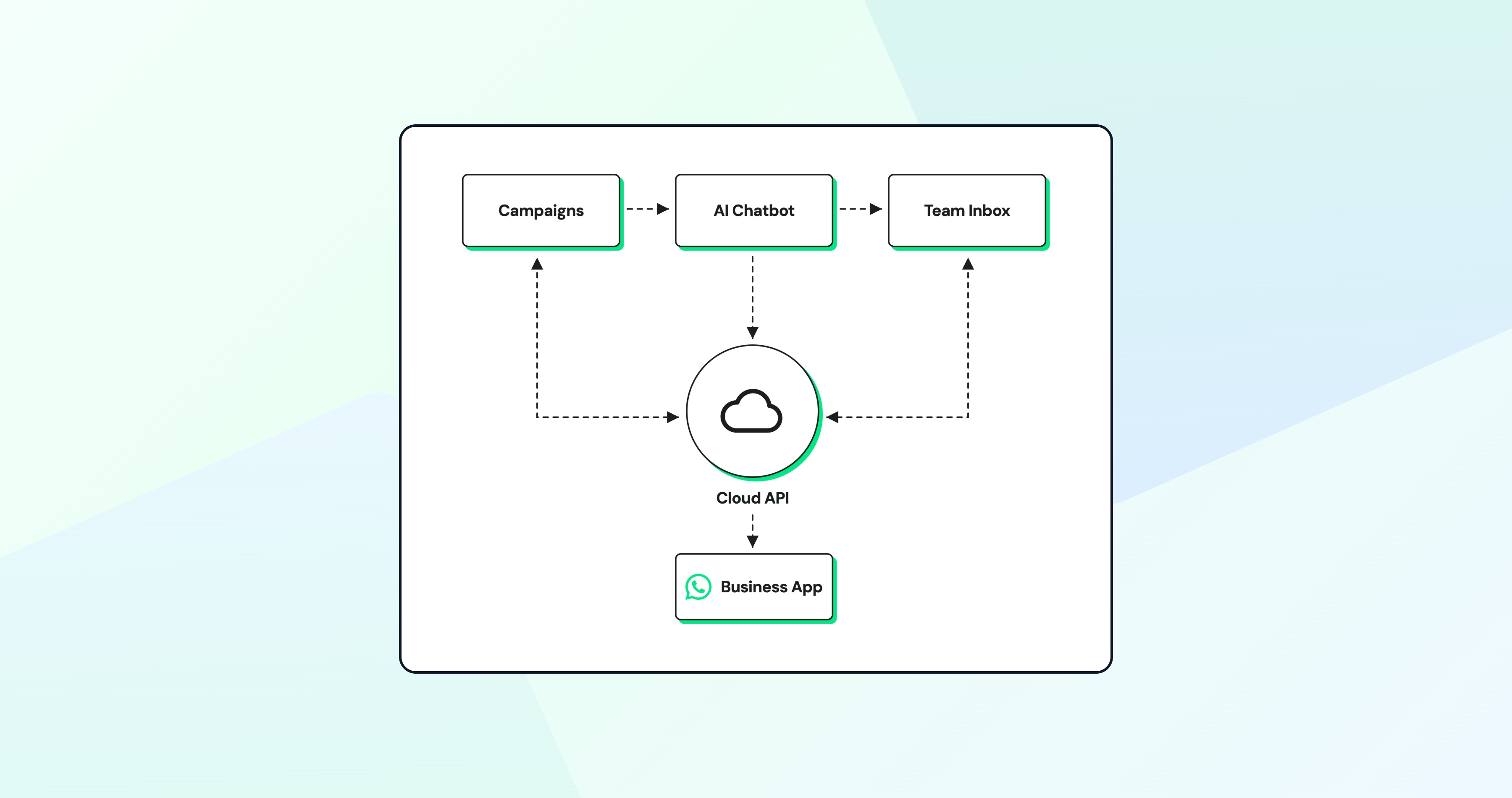
Individual conversations stay synchronized across both platforms. If a customer replies to a campaign sent through Wati, the conversation can continue through the existing app experience.
Likewise, replies sent from the Business App appear in Wati's shared inbox, giving the wider team visibility into the conversation.
Rather than replacing the existing WhatsApp setup, coexistence extends what your business can do with the same number. Your existing number stays connected, and your team can continue using the Business App for 1:1 conversations while adding Wati automation and collaboration features.
Core Capabilities Unlocked by Coexistence
Connecting the Business App to Wati’s API platform unlocks capabilities beyond one-to-one messaging. Businesses can engage more customers, automate repetitive tasks, and collaborate across teams once a number connects through Wati.
Campaign Messaging at Scale
The WhatsApp Business App supports broadcast lists, but they are designed for small-scale communication. A broadcast list can have up to 256 saved contacts. Recipients must have your number saved, and messages are created and sent manually.
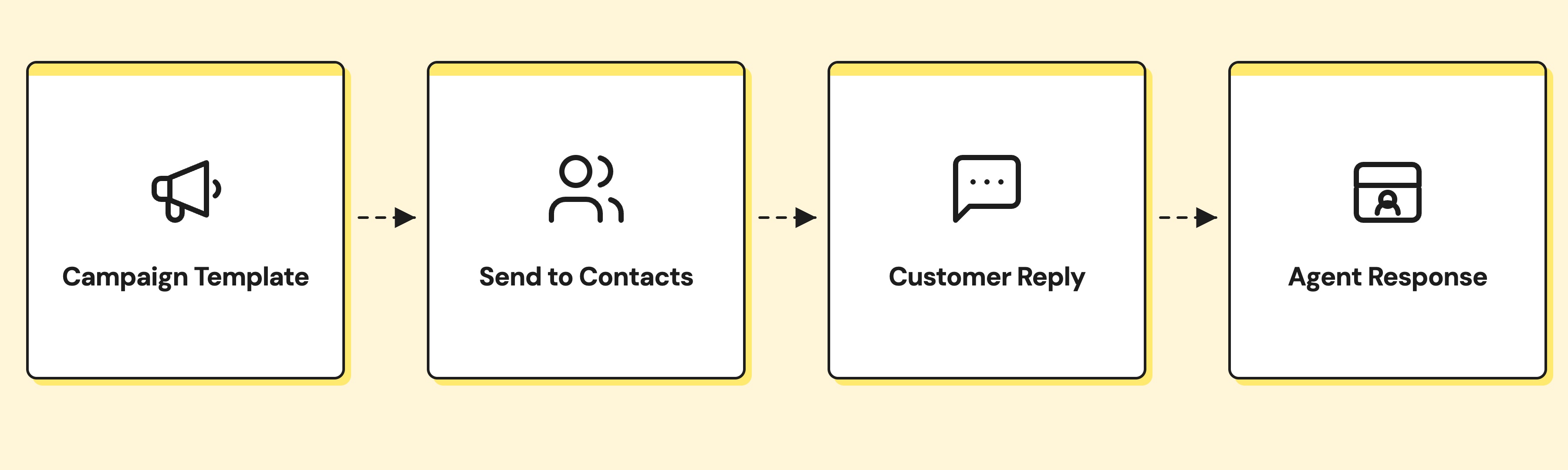
Coexistence removes these limitations by connecting your existing number to Wati's API-powered messaging platform. Businesses can send Meta-approved template messages to segmented audiences ranging from hundreds to thousands of customers in a single campaign.
Common use cases include:
- Promotional announcements
- Cart-abandonment reminders
- Order confirmations
- Event invitations
Before they can be used, message templates must be approved by Meta and comply with its messaging policies. Once approved, they can be reused to run campaigns at scale while maintaining compliance with WhatsApp's business messaging requirements.
When someone replies to a campaign message, the conversation continues through the existing WhatsApp account, with full visibility for the rest of the team through Wati's shared inbox.
AI Chatbot Automation
Coexistence adds AI-driven chatbot automation to an existing WhatsApp Business App number without requiring a full migration. Using Wati's no-code chatbot builder, businesses can create automated workflows to answer common questions, qualify leads, book appointments, collect customer information, and route conversations to the right team.
- Automates repetitive lead qualification tasks, allowing agents to focus on high-value conversations.
- Delivers only pre-qualified, context-rich conversations to your support or sales team.
- Runs on Meta’s messaging infrastructure for reliable and scalable automation.
- Accesses contact metadata, conversation history, and custom attributes for better context.
- Syncs customer data from Google Sheets or your CRM.
- Enables personalized, context-aware responses based on each customer's information.
- Creates more natural, relevant, and engaging customer interactions.
Shared Team Inbox and Conversation Management
The WhatsApp Business App was built for individual use, so team collaboration is limited.
Coexistence addresses this by synchronizing customer conversations with Wati's shared Team Inbox. Every active chat is available in one place, along with details such as the contact name, the latest message, the conversation status, and the assigned agent. Teams can assign conversations, add internal notes, apply tags, and monitor workloads from a single dashboard.
For sales teams, this gives managers visibility into the 1:1 conversations sales reps are having with prospects. A manager can review how a rep handled a pricing question, identify stalled opportunities, or step in when a conversation needs support, without accessing the rep’s phone.
Tags can also be used to organize conversations by deal stage, giving managers a clearer view of sales activity across the team.
Contact Synchronization and CRM Integration
- Coexistence keeps customer information synchronized between the business messaging app and the connected API platform.
- Contacts saved in the app sync automatically into Wati, and any future edits made to contacts in the app are reflected in Wati as well.
- This sync runs one-way. Updates made directly inside Wati, including CSV imports or CRM-driven changes, do not flow back to the Business App.
This connected data flow helps teams keep customer details, conversation history, and business workflows aligned across the tools they already use.
Six-Month Message History Synchronization
When you complete Meta's Embedded Signup process and enable history sharing, up to six months of chat history and contacts are synchronized automatically with Wati during onboarding.
Technical Limitations and Operational Considerations
WhatsApp coexistence does not support every feature available in the app or API environment. Meta defines which data is synchronized, which features remain exclusive to the app, and how certain capabilities work in a coexistence environment.
Understanding these limitations before enabling coexistence helps brands set the right expectations and design workflows that align with Meta's current implementation.
Group Chats are Not Synchronized
After you enable WhatsApp coexistence, group chats remain available in the WhatsApp Business App but are not synchronized with Wati.
- WhatsApp groups used to coordinate with suppliers, engage customer communities, or manage event RSVPs remain available only in the Business App.
- Automation, campaign messaging, CRM integrations, and other Cloud API capabilities apply only to individual customer conversations.
- Businesses that depend on group-based communication may find it difficult to manage those workflows with the coexistence feature.
Disappearing Messages and View-Once Media are Unsupported
The WhatsApp Business App supports features such as disappearing messages, which automatically expire after a set period, and view-once photos and videos that can be opened only once. These features are not supported in a coexistence environment.
Under coexistence, Meta disables disappearing messages, view-once photos, and live location sharing for all individual chats once coexistence is enabled. This happens in the app itself. These features stop working for one-to-one conversations rather than simply failing to sync.
Businesses should evaluate the impact of these limitations before enabling coexistence, particularly if they:
- Operate in regulated industries such as healthcare, financial services, or legal services.
- Need complete conversation histories for compliance, auditing, or customer support.
- Rely on disappearing messages or view-once media as part of their existing customer communication workflows.
Broadcast Lists are Disabled or Read-Only
Broadcast lists in the WhatsApp Business App become restricted after coexistence is enabled. Existing lists become read-only, and scalable messaging moves to Wati through Meta-approved message templates.
For businesses accustomed to creating a broadcast list and sending free-form messages, this changes the messaging workflow. Instead, campaign messaging is managed through the API platform, where approved templates support capabilities such as:
- Sending campaigns to hundreds or thousands of customers
- Rich media, including images, videos, and documents
- Interactive elements such as call-to-action buttons
- Campaign delivery and performance insights
Using template-based campaigns requires businesses to create message templates and obtain Meta's approval before they can be used. While this introduces an additional approval step, it also provides a standardized framework for running large-scale WhatsApp campaigns.
Feature Comparison: WhatsApp Business App vs. Coexistence vs. WhatsApp Business API
The WhatsApp Business App, WhatsApp coexistence, and a Cloud API-only deployment each support a different set of capabilities. While coexistence combines the familiarity of the Business App with the advanced functionality of the Cloud API, certain features remain exclusive to one environment or behave differently after onboarding.
The table below provides a side-by-side comparison of the most important differences.
Feature | WhatsApp Business App (Standalone) | Coexistence Mode | Cloud API Only (No App) |
One-to-one chats | Manual, app interface | Synchronized bidirectionally | API-driven or team inbox |
Broadcast lists | Up to 256 contacts | Existing lists become read-only | Not applicable |
Campaign messaging | Not supported | Via approved templates (250+) | Via approved templates (unlimited) |
AI chatbots | Not supported | Enabled via Cloud API | Enabled via Cloud API |
Group chats | Fully supported | Not synchronized | Not supported |
Disappearing messages | Supported | Unsupported | Unsupported |
Shared team inbox | Not supported | Via Cloud API platform | Via Cloud API platform |
Message history sync | Not applicable | Six months of text, two weeks of media | Not applicable |
Contacts sync | Not applicable | One-way, app to Wati only (including future app edits) | Not applicable |
Implementation Checklist: Onboarding a Coexistence Solution
Setting up WhatsApp coexistence requires more than connecting your existing number to an API platform. Businesses must complete Meta's Embedded Signup process, configure synchronization settings, and verify that their Wati workspace is ready to support campaigns, automation, and team collaboration.
Below is the step-by-step onboarding process for an SMB planning to deploy Coexistence with Wati.
Step 1: Verify Business App Eligibility
Before starting the onboarding process, confirm that your existing Business account is eligible for coexistence. Verify that:
- Your phone number is verified.
- Your business profile is complete, including your business name, category, description, and address.
- You have administrator access to the WhatsApp Business Account (WABA) associated with the phone number.
If your number is already connected to an API provider in a non-coexistence setup, disconnect it before starting Meta's Embedded Signup process. Existing API connections are not compatible with coexistence onboarding.
Step 2: Initiate Embedded Signup via Wati
Start the Embedded Signup flow through Wati. During the setup process, you will:
- Authenticate with your Facebook Business Manager account.
- Select the WhatsApp Business Account (WABA) and phone number you want to connect.
- Grant Wati the required permissions to send messages, read message history, and manage contacts.
- Enable synchronization for both contacts and message history when prompted by Meta.
Enabling both synchronization options ensures Wati can access the full set of coexistence capabilities, including synchronized contacts and recent conversation history.
Step 3: Grant Consent for History Sharing
As part of Meta's Embedded Signup process, you will be asked whether you want to share your message history with the connected API platform.
When prompted:
- Grant consent to synchronize message history.
- Enable history sharing to transfer individual chat messages from the most recent six months.
Without this permission, only new messages sent or received after onboarding will synchronize to Wati. Existing conversation history will remain in the WhatsApp Business App, limiting the context available to your team.
Step 4: Configure Webhook Event Listeners
After your WhatsApp Business App number is connected, configure Wati's webhook event listeners to receive real-time updates from the connected Cloud API platform. These event listeners subscribe to message events, message status updates, and contact changes, ensuring Wati stays synchronized with customer activity as it happens.
This real-time event stream enables AI automation, conversation routing, CRM synchronization, and other workflows to operate alongside the WhatsApp Business App without interrupting your existing customer conversations.
Step 5: Audit and Disable App-Exclusive Features
Review your existing WhatsApp workflows before enabling coexistence. Disappearing messages, view-once media, and live location switch off automatically for individual chats once onboarding completes, so no manual action is required. Document this change for the team instead.
Move broadcast messaging to the Cloud API platform, and inform your team that group chats remain exclusive to the WhatsApp Business App.
Update your internal playbook so agents know which conversations synchronize with the Cloud API platform and which remain app-only.
Step 6: Train Your Team on Hybrid Workflows
Coexistence creates a hybrid workflow. Agents keep replying to individual chats from the app, while campaigns, automation, and conversation assignment happen in Wati.
A training session should walk the team through both interfaces. Agents need to know how to check the Wati inbox for assigned conversations, how to differentiate an automated message from a manual reply, and how to escalate or reassign a chat using Wati's conversation-management tools.
Replies sent from the app appear in Wati automatically. Agents do not need to log a response in both places.
Step 7: Test with a Pilot Contact Segment
Before launching campaign messaging or AI automation to your full customer base, run a small pilot with 20–50 contacts. Send a template message and check that replies sync correctly across both the WhatsApp Business App and Wati inbox.
Test a basic chatbot flow, and confirm that contact attributes are updated as expected. A controlled pilot helps identify configuration issues, permission gaps, or workflow bottlenecks before they impact customers at scale.
Step 8: Monitor Synchronization Health
After going live, monitor synchronization closely for the first two weeks. Check that new contacts created in the WhatsApp Business App appear in Wati, message history syncs correctly, and conversations are not missed due to synchronization or webhook failures.
Review Wati’s synchronization logs and error alerts regularly to catch issues early instead of waiting for agents to report missing chats.
Budgeting for Coexistence
Coexistence does not eliminate API-related costs. It adds them on top of existing Business App usage, which stays free.
A business typically pays for:
- Template message sent
- Conversation charges, billed per Meta's 24-hour customer-service window
- Any platform fee charged by your API provider
Pricing varies by message volume and feature tier. It is worth checking Wati's live pricing page for current plans rather than budgeting against a fixed figure.
The return on investment depends on measurable improvements:
- One additional monthly campaign that drives $1,000 in incremental revenue pays for the platform cost on its own.
- A chatbot that qualifies 50 leads a week, saving 10 hours of manual agent time, justifies the investment through labor savings alone.
Practical Guidance: Planning Your First 90 Days
Once coexistence fits the workflow and the onboarding checklist is complete, the first 90 days determine whether the implementation sticks or stalls. A phased rollout helps a team achieve quick wins while building sustainable habits.
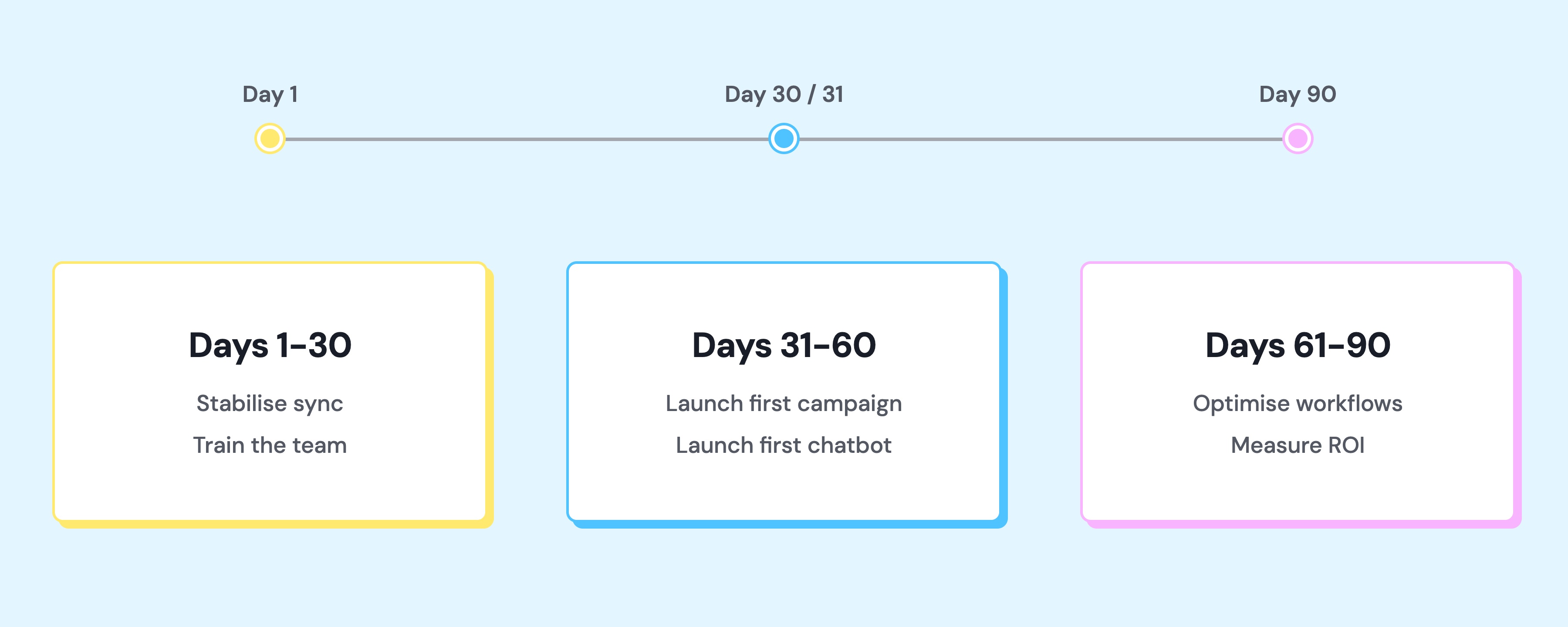
Days 1–30: Stabilize Synchronization and Train the Team
The focus is confirming that contacts, message history, and real-time chats are syncing reliably.
Key activities:
- Run daily spot checks: pick three active conversations, verify they appear in both the Business App and the Wati inbox, and confirm replies from either interface show up in the other.
- Run two training sessions, one for agents and one for managers, walking through the hybrid workflow.
- Document answers to common questions: where campaign responses show up, how to tell whether a message came from the chatbot or a human, and what happens if an agent replies in the app while another is typing in Wati.
Days 31–60: Launch the First Campaign and Chatbot
Automation gets introduced gradually, through one campaign and one chatbot.
Key activities:
- Deploy a simple campaign, such as a promotion, event invitation, or product update, sent to a segmented contact list. Measure open rate, reply rate, and conversion. This first campaign proves the value of scale and builds team confidence that coexistence works.
- In parallel, build a basic chatbot for a single high-frequency use case, such as FAQs, appointment booking, or lead qualification. Keep the flow simple, at three to five steps, test it thoroughly with the pilot segment, then activate it for all inbound contacts.
- Monitor the chatbot daily: check for dead-end loops, unclear prompts, or questions it cannot answer, and iterate on the script.
Days 61–90: Optimize Workflows and Measure ROI
By day 60, the team should be comfortable with the hybrid workflow, campaigns should be delivering measurable results, and the chatbot should be handling a meaningful share of repetitive inquiries.
Key activities:
- Refine conversation-routing rules so high-value leads reach senior agents faster.
- Expand the chatbot to handle secondary use cases.
- Build additional campaign templates for seasonal promotions or lifecycle messaging.
- Run a formal ROI analysis: time saved by automation, revenue attributed to campaign-driven conversions, and customer satisfaction changes, measured through post-conversation surveys or Net Promoter Score.
Use those metrics to justify continued investment and identify the next capability to activate, whether that is Instagram DM integration, advanced reporting, or deeper CRM sync through Google Sheets.
Get Started With WhatsApp Coexistence on Wati
Coexistence gives brands a way to add automation, campaigns, and team collaboration without giving up the WhatsApp Business App or the customer relationships already built on it. The steps above cover eligibility, setup, and the first 90 days of rollout.
For a business ready to see this in action, a live walkthrough covers Embedded Signup, chat history sync, and the Wati Team Inbox.
Ready to add automation without leaving your WhatsApp conversations behind?
See how Wati helps brands connect their existing WhatsApp number with automation, campaigns, and team collaboration through coexistence. Book a demo to get started.
Frequently asked questions
Will coexistence disrupt existing customer conversations?
No. The Embedded Signup process does not delete, archive, or interrupt active chats. Customers keep messaging the same number, and the business keeps replying from the same WhatsApp Business App interface. The Cloud API layer syncs messages and adds new capabilities in the background.
Can a business send campaigns to contacts who have not messaged recently?
Only with explicit opt-in consent. WhatsApp's template message rules require either an existing conversation the contact opened within the past 24 hours, or documented permission to send marketing messages. Most businesses collect this consent at checkout, during sign-up, or through a website opt-in. Sending without consent gets messages blocked and can lead to account restrictions.
What happens if a business stops using coexistence?
The Cloud API integration can be disconnected at any time. The Business App reverts to standalone operation, with its message history intact. Cloud API capabilities such as campaigns, automation, and the shared team inbox stop working at disconnection, though Wati keeps synced conversation history and contact data per its retention policy, so coexistence can be re-enabled later if needed.
How long does the six-month message history take to synchronize?
Sync begins as soon as consent is granted during Embedded Signup. The most recent conversations sync first, with older threads following as the process finishes in the background. Total time depends on how much chat history is involved.
Can coexistence be used across multiple phone numbers or locations?
Yes. Each number onboards separately through Embedded Signup, and all numbers can be managed from a single Wati account. This setup is common among franchises, retail chains, and service businesses with multiple locations. Each number's conversations and contacts stay isolated, while managers get one unified view for performance and campaigns.
Does coexistence work with an existing WhatsApp Business API connection?
Not directly. A number already connected to a Cloud API provider outside of coexistence must be disconnected before Embedded Signup for coexistence can proceed, since the two setups are not compatible. Wati can manage this migration and data transfer to reduce downtime.
Related posts
- WhatsApp Verification Explained: How to Get Blue Tick in WhatsApp
Discover how WhatsApp verification boosts trust and credibility. Get insights into timelines, steps, and how Wati makes the process seamless for businesses.
- TikTok Business Account vs. Personal Account: How Do They Differ?
TikTok Business Account vs Personal Account: Business unlocks ads, analytics, and messaging; Personal keeps sounds and creator payouts.
- What are TikTok Direct Messaging Ads? Non-Technical Setup Guide
Turn TikTok ad taps into real DM conversations. A simple, non-technical setup guide to TikTok Click To Direct Messaging (Click to DM) Ads using Wati.
- How to Use an Instagram Chatbot for FAQ Automation (2026 Guide)
An Instagram chatbot replies to DMs, comments, and story replies instantly using keyword triggers, then hands off to a human when needed. Here's how to set one up in Wati.