
Too Long? Read This First
- WhatsApp Coexistence lets businesses use the WhatsApp Business App and the WhatsApp Cloud API on the same phone number, so sales teams can automate workflows without giving up the app they already use.
- Sales reps continue to manage one-to-one conversations in the WhatsApp Business App, while Wati powers broadcasts, AI chatbots, lead qualification, CRM sync, and reporting via the Cloud API.
- Up to six months of individual chat history syncs between the WhatsApp Business App and Wati in both directions, allowing sales reps to pick up conversations without losing context.
- Broadcast lists become read-only after Coexistence is enabled. All new broadcast campaigns must be sent through Wati using approved message templates.
- The WhatsApp Business App and Cloud API share a combined throughput limit of 20 messages per second, which is sufficient for most sales and broadcast use cases.
- By combining automation with personal conversations, WhatsApp Coexistence helps sales teams respond faster, reduce manual work, and focus on closing more deals.
Customers increasingly expect to interact with businesses through messaging. According to Meta's State of Business Messaging 2026, 72.4% of consumers are more likely to buy from a brand that offers messaging.
As more sales conversations move to WhatsApp, businesses are looking for ways to automate without losing the personal experience customers expect.
WhatsApp Coexistence lets businesses connect their existing WhatsApp Business App number to the Cloud API, allowing both to work together on the same number.
Sales reps can continue using the app for one-on-one conversations and relationship building, while broadcasts, chatbots, and CRM workflows run through the Cloud API in parallel.
This guide covers how the Coexistence solution works for sales teams, the workflows you can automate, real-world use cases, setup steps, and the key limitations and messaging considerations to keep in mind.
WhatsApp Coexistence for Sales Teams
WhatsApp Coexistence is not a new API feature. It is an onboarding option that lets you connect your existing WhatsApp Business App number to the WhatsApp Cloud API without losing access to the app.
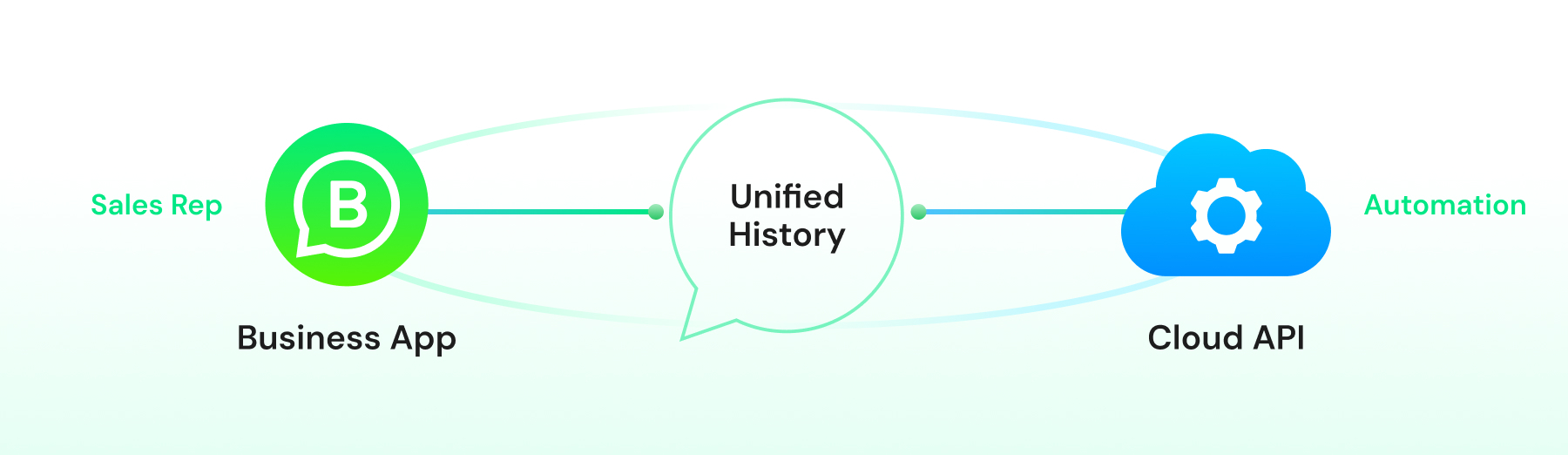
Once you complete Meta's Embedded Signup process, both platforms use the same phone number.
During onboarding, up to six months of individual text history is imported in a one-time sync (media only backfills ~14 days). After that, new 1:1 messages mirror in real time both ways.
If a lead starts a conversation with your chatbot, the entire conversation appears in your sales rep's WhatsApp Business App, complete with the message history.
When the rep replies from the app, the conversation is updated in the Cloud API interface as well.
For sales teams, this keeps every conversation in context. Reps can see which automated workflow a lead responded to, review the conversation summary, and continue the discussion without asking customers to repeat information they've already shared.
Three Coexistence capabilities are especially valuable for sales automation:
- Persistent app access: Sales reps continue using the WhatsApp Business App for one-to-one conversations, quick replies, and media sharing. No retraining is required.
- Cloud API automation: Marketing and operations teams can send broadcasts, deploy AI chatbots, route leads to CRM systems, and automate workflows through the Cloud API, all while using the same WhatsApp number.
- Shared conversation view: Both the Business App and the Cloud API display the same conversation threads, making it easy to hand off conversations between automation and sales reps without losing context.
Coexistence does not bring every Business App feature to the Cloud API, nor does it turn the app into an automation dashboard. Instead, it gives you two interfaces connected to the same phone number, each designed for a different purpose.
Here's exactly what changes and what stays the same once Coexistence is on.
What Changes with WhatsApp Coexistence?
The table below compares the key differences, followed by a closer look at the limitations that have the biggest impact on sales teams.
Feature | Business App (Coexistence) | Cloud API / Wati (Coexistence) |
1:1 message sending | Yes, free | Yes, billed under Cloud API pricing |
Broadcast lists | Read-only after onboarding, no new lists | Not applicable, use template campaigns |
Group chat participation | Yes | Not synced |
Message history sync | Most recent 6 months, individual chats only | Most recent 6 months, individual chats only |
Throughput limit | 20 messages/second, combined with app | |
Automated chatbot replies | No | Yes |
CRM and webhook integration | No | Yes |
Template message approval | Not applicable | Required for messages outside the 24-hour window |
How Coexistence Fits into Sales Automation Workflows
Coexistence syncs your number with the Cloud API. The workflows below run on Wati's chatbot, CRM integrations, and analytics once that connection is made.
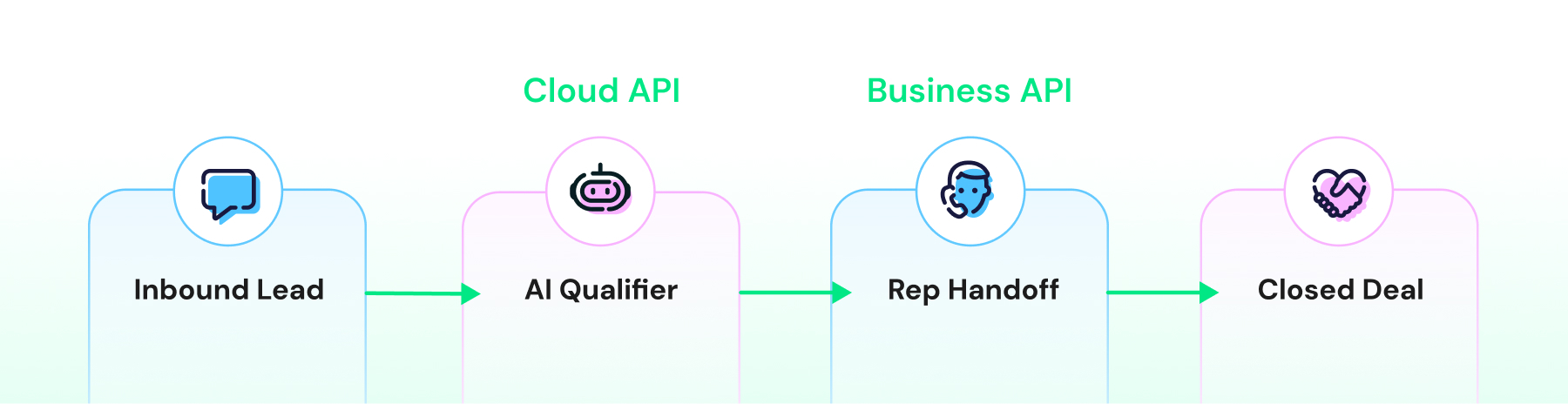
Sales teams use WhatsApp automation to solve four common challenges:
- Qualifying inbound leads at scale
- Nurturing prospects without constant manual follow-up
- Syncing conversation data with CRM and analytics platforms
- Maintaining fast response times during peak hours or outside business hours
WhatsApp Coexistence connects your existing number to the Cloud API, unlocking all of these workflows, while allowing sales reps to continue using the WhatsApp Business App for high-value, one-on-one conversations.
Automation handles repetitive tasks, while reps step in when personal interaction matters most.
Inbound Lead Qualification
When a lead clicks a Click-to-WhatsApp ad or messages your business from a landing page, a Wati chatbot can start the conversation immediately by asking qualifying questions such as budget, timeline, product interest, and company size.
The chatbot tags the contact, qualifies the lead, and routes high-intent prospects to the right sales rep. Because the conversation history syncs with the WhatsApp Business App, the rep can see the entire chat and continue the conversation without asking the lead to repeat information. The chatbot handles the repetitive qualification, while the sales rep focuses on building the relationship and closing the deal.
Broadcast Campaigns and Personalized Follow-Up
Broadcast campaigns start with a segmented audience. For example, you can send a template message through Wati to 5,000 leads who downloaded your pricing guide in the last 90 days. The Cloud API delivers the campaign, while Wati tracks delivery, read rates, replies, and campaign performance.
When a lead responds, the conversation appears in the sales rep's WhatsApp Business App. The rep can immediately continue the conversation by sending a personalized voice note, scheduling a demo, or sharing a custom quote, all from the app they already use every day.
Once you enable the Cloud API, broadcast lists in the WhatsApp Business App become read-only. Existing lists remain available, but you cannot create new ones.
Going forward, all broadcast campaigns must be sent through the Cloud API, while the Business App continues to work normally for one-to-one conversations and follow-up conversations.
CRM and Google Sheets Integration
Wati's Google Sheets integration syncs contact and customer data between Wati and a spreadsheet, and can trigger WhatsApp messages automatically when that spreadsheet data changes.
Sales teams can use this to keep a shared source of truth. For example, logging lead source, deal stage, or campaign tags as custom columns that feed a CRM or data warehouse.
This gives you a lightweight way to bring campaign data and contact records into one place without manual entry. Messages sent from the WhatsApp Business App remain free regardless of how your Google Sheets workflow is set up.
Webhook-Driven Lead Handoffs
You can build a chatbot flow that detects specific keywords, such as 'pricing' or 'urgent,' and uses a webhook to instantly notify the sales rep through Slack or email, so high-value leads never go unnoticed.
The sales rep can open the WhatsApp Business App, review the synchronized conversation history, and respond immediately.
The chatbot handles the initial qualification, the webhook brings in a human at the right time, and WhatsApp Coexistence ensures the rep has the full conversation history before taking over.
Real-World Sales Automation Workflows
Here's what these workflows look like in practice.
Pattern 1: Automated Lead Capture + Manual Qualification
Scenario: A real estate agency runs Click-to-WhatsApp ads offering a neighborhood market report.
How it works:
- A lead taps the ad. A Wati AI chatbot opens the chat and asks the essentials: budget, preferred neighborhoods, and buying timeline.
- It tags the contact. Sends a template message with the market report link.
- The lead asks about a specific listing. The chat escalates to a human agent automatically.
- The agent opens the Business App to the fully synced history: source, budget, timeline, all there. They share the right listings and book a showing. No repeating, no cold start.
Result: The chatbot qualifies at scale. The agents do what they do best: win the deal.
Pattern 2: Product Launch Broadcast + App-Based Negotiation
Scenario: A SaaS company ships a new enterprise feature and wants existing customers to know.
How it works:
- Customer data flows from the CRM into Wati. A templated message with a demo video is sent to 3,000 enterprise accounts.
- Wati tracks it all: delivery, read receipts, replies.
- A customer asks about pricing. The chat lands in the account manager's Business App.
- The AM takes it from there. Answers questions. Sends a tailored proposal. Negotiates. Closes the upsell, all from the app.
Result: Wati runs the campaign. The account managers run the conversation and drive the upsell.
Pattern 3: Instagram DM to WhatsApp Lead Routing
Scenario: An e-commerce brand runs Instagram ads and directs interested shoppers to WhatsApp to place orders.
How it works:
- A shopper starts a conversation via an Instagram ad, and Wati's Instagram Automation collects details such as product preferences and sizes.
- The shopper receives a WhatsApp template message with a purchase link to continue the buying journey.
- If the shopper has questions about fit, materials, or shipping, the conversation is handed over to a sales rep in the WhatsApp Business App.
- The sales rep can share product photos, answer questions, recommend the right option, and guide the customer through the purchase.
Result: Automation captures and qualifies shoppers, while sales reps step in when personalized assistance is needed to help convert interest into sales.
Pattern 4: Webhook-Triggered CRM Handoff
Scenario: A B2B software company wants hot leads in front of sales the second they raise their hand.
How it works:
- A Wati chatbot qualifies the lead. Tag them by budget, team size, and timeline.
- It hears "pricing" or "demo." A webhook fires. Slack pings the right rep.
- The same event drops the lead into a connected Google Sheet. One live pipeline, shared by sales and marketing.
- The rep opens the Business App to the full synced history. No re-qualifying. Just a warm conversation.
- Deal closed. The rep updates the sheet. That field flows straight into the CRM.
Result: The webhook handles the handoff. The Sheet holds the truth. Nothing gets re-typed between bot, rep, and report.
Setting Up WhatsApp Coexistence with Embedded Signup
Meta's Embedded Signup is the only supported way to enable WhatsApp Coexistence. You cannot turn it on by manually entering credentials or transferring your number after setup. The Embedded Signup flow is what links your existing WhatsApp Business App number to a WhatsApp Cloud API account.
Prerequisites for WhatsApp Coexistence
Before you begin, make sure you have the following:
- An active WhatsApp Business App account with a verified business profile.
- Admin access to the Meta Business Manager account that will own the Cloud API setup.
- An active phone number that is already receiving messages in the WhatsApp Business App. Meta doesn't publish a minimum, but integrators recommend the number be active for at least ~10 days (ideally 30–60) before onboarding to avoid eligibility flags.
- A Wati account ready to complete the Embedded Signup process.
Set Up Steps
- Start Embedded Signup
Log in to Wati and choose "Connect your WhatsApp Business app (WhatsApp Coexistence)" when prompted. This starts Meta's Embedded Signup flow for Coexistence.
- Begin Coex setup
Click Continue with Facebook. Log in with admin access to your Business Page. Select your Business Portfolio.
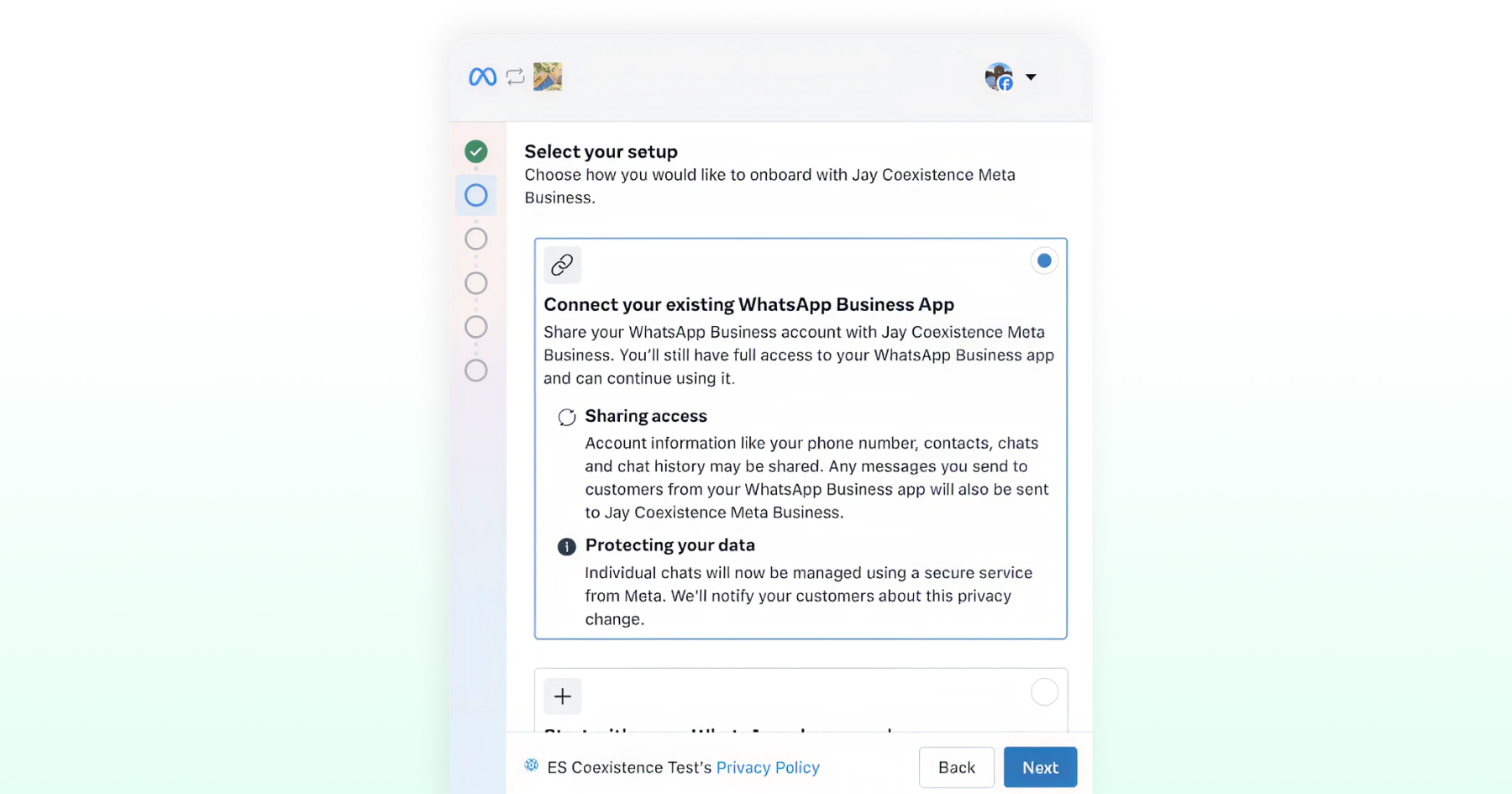
- Select your setup
Choose to connect your existing WhatsApp Business App. Review what's shared: phone number, contacts, chats, and chat history, and note that Meta will notify your customers about this privacy change.
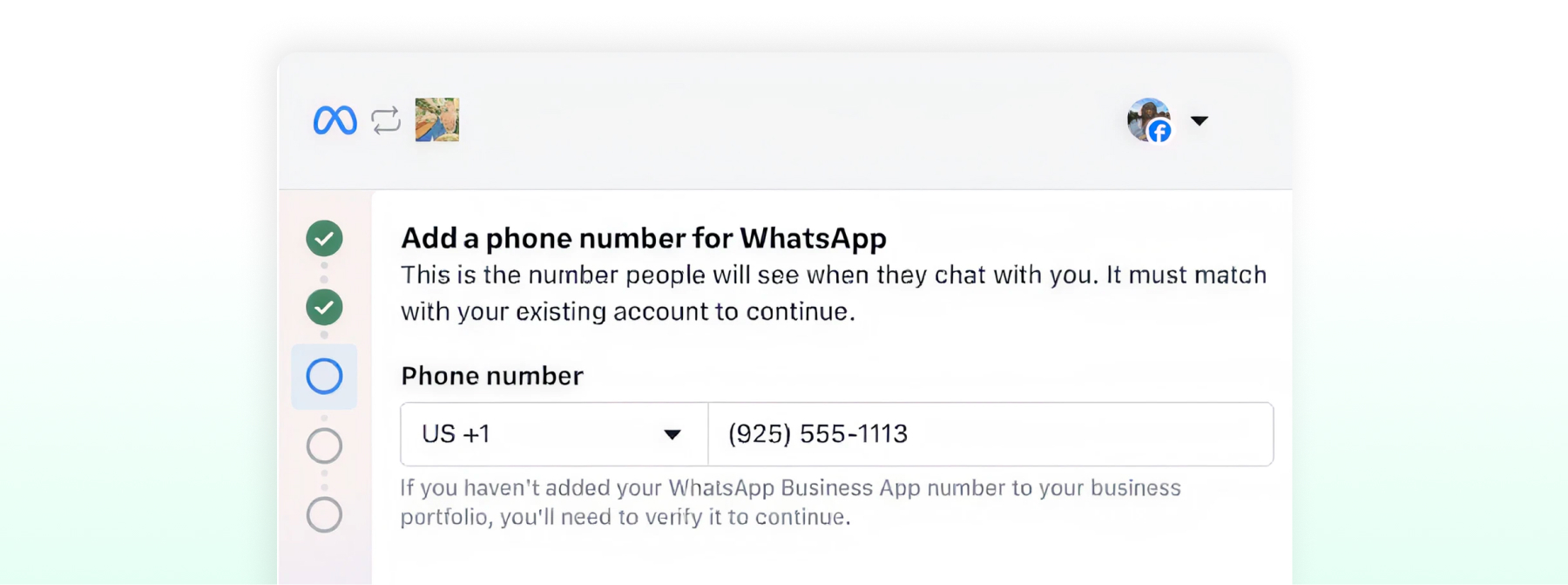
- Add your phone number
Enter your WhatsApp Business App phone number. If you choose to connect your existing account, WhatsApp presents a verification code to enter.
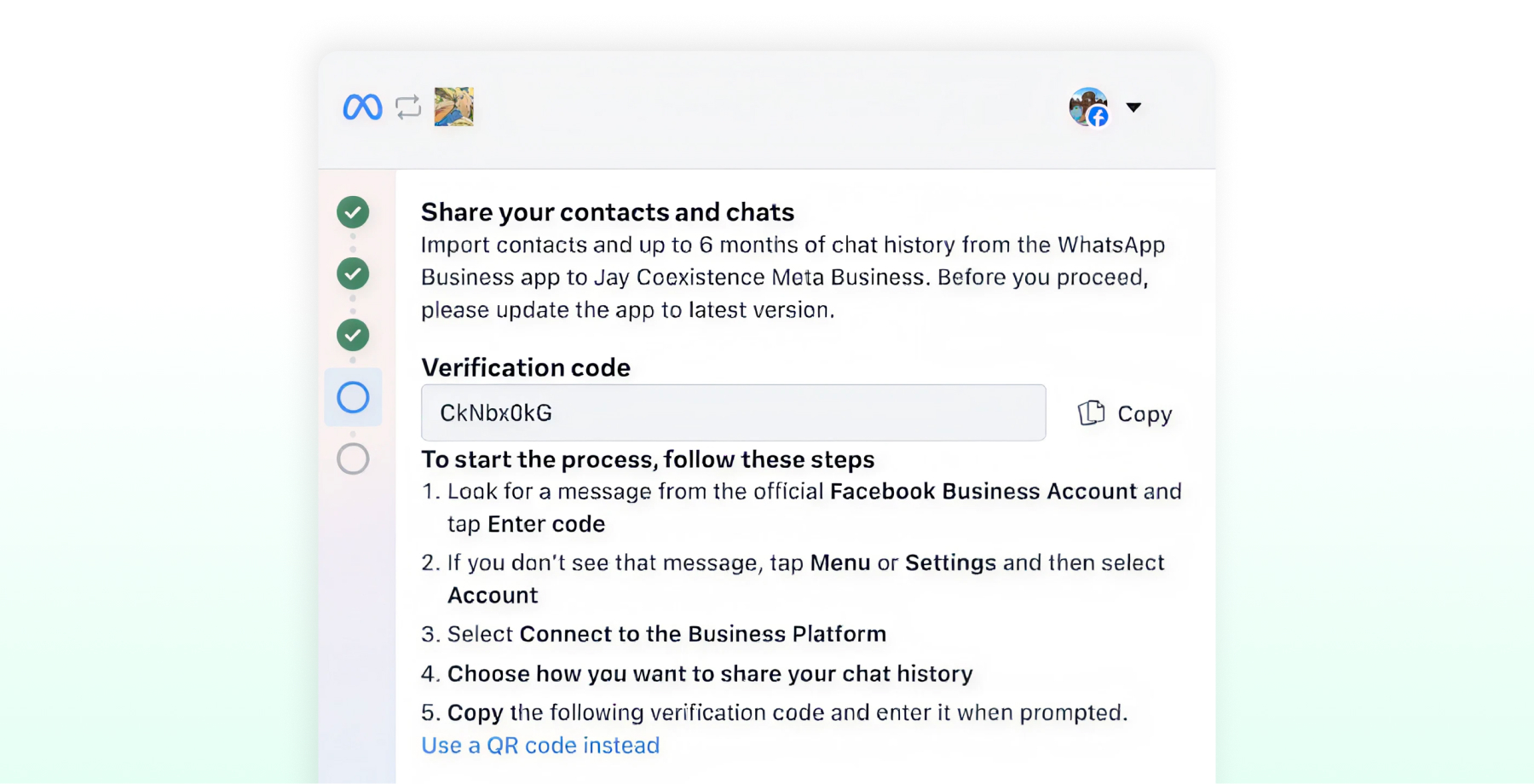
- Look for the verification message
The message includes the verification code to copy and the steps to follow.
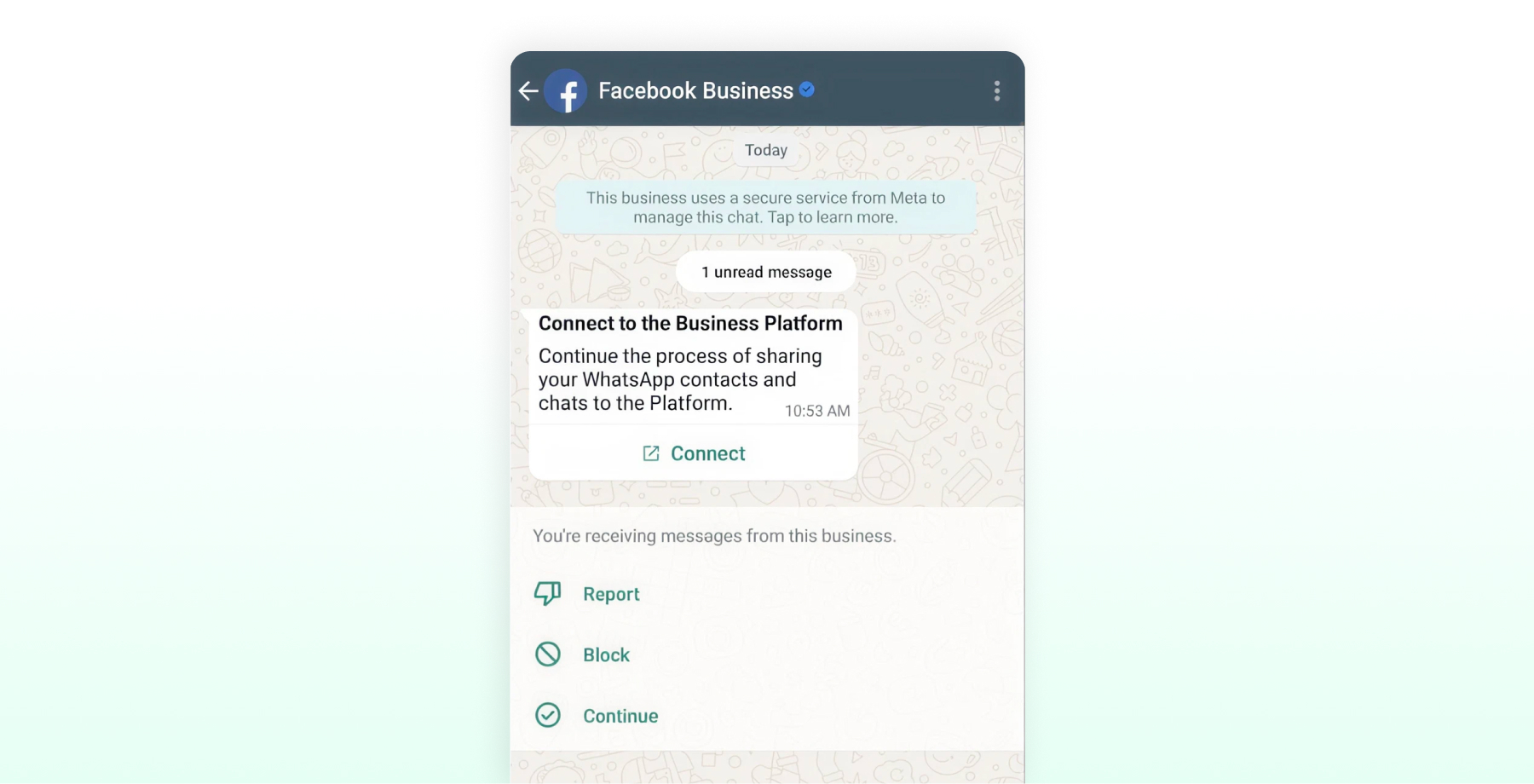
- Open the message from Facebook
You will get a message from the official Facebook Business Account. Tap Connect.
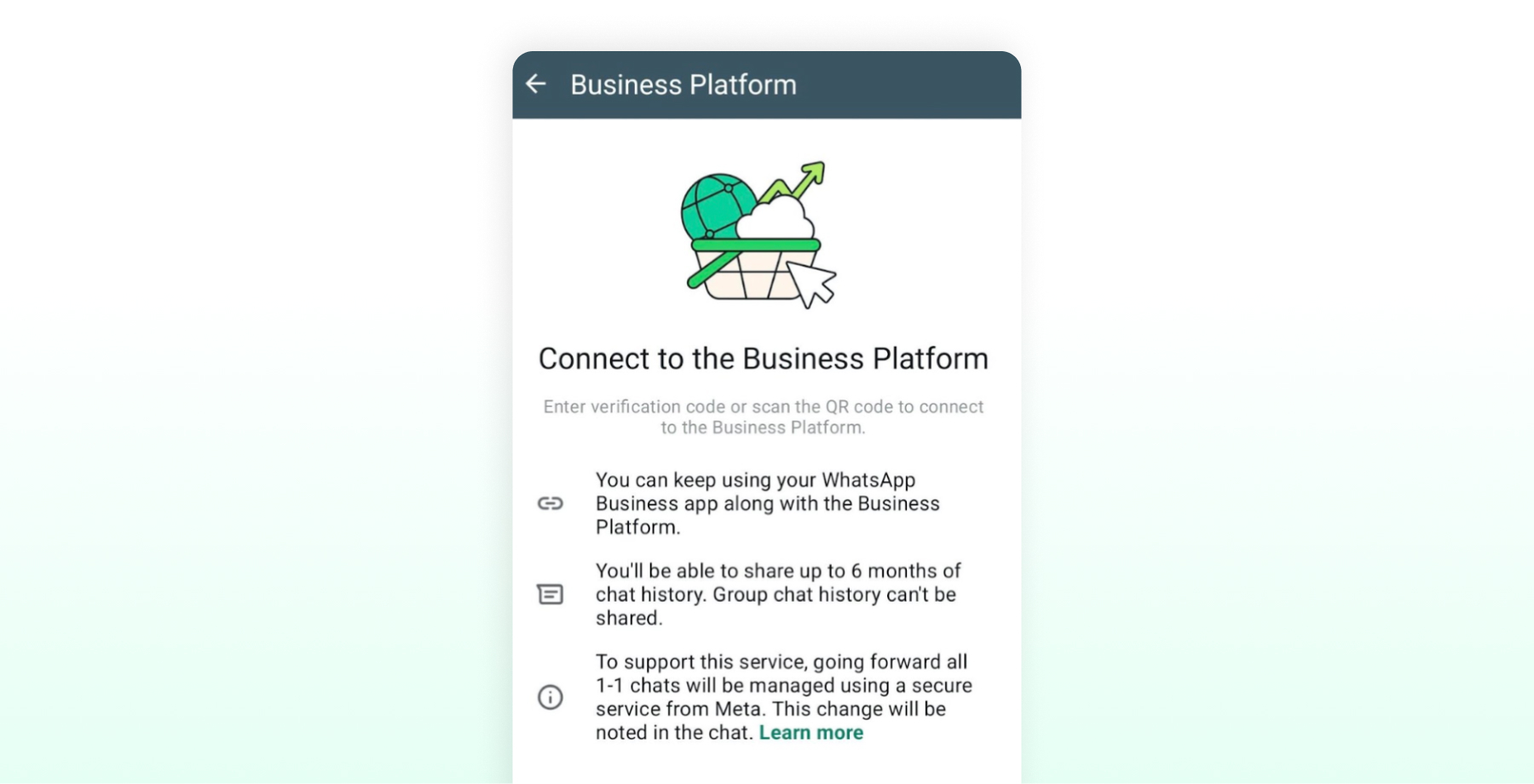
- Continue to the Business Platform
Tap Connect to the Business Platform to continue the onboarding process.
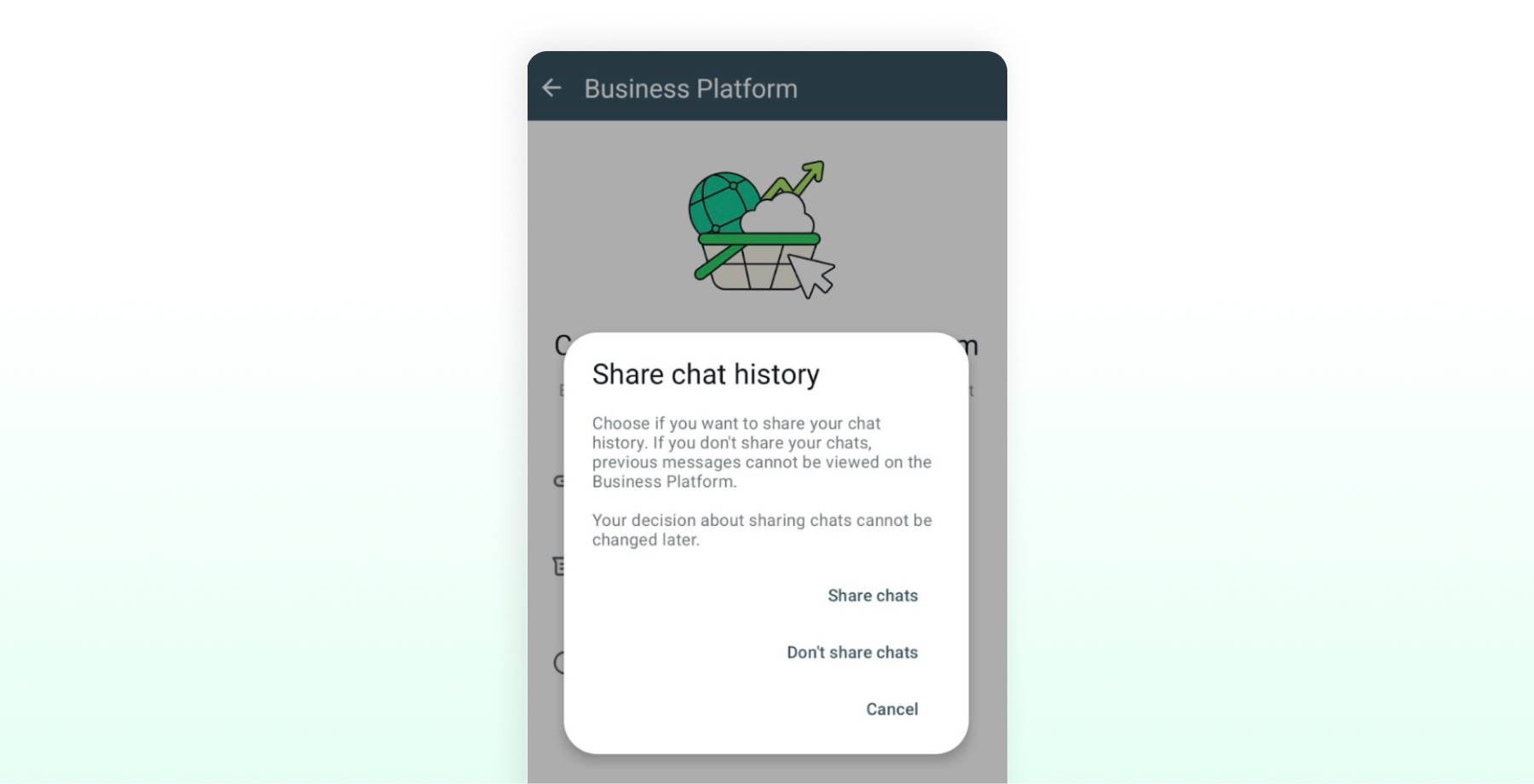
- Choose whether to import chat history
At the "Share chat history" prompt, tap Share chats to import up to 6 months of 1:1 chat history and 2 weeks of media. Tap Don't share chats to skip. Group chats never sync. Your choice cannot be changed later without completing the onboarding again.
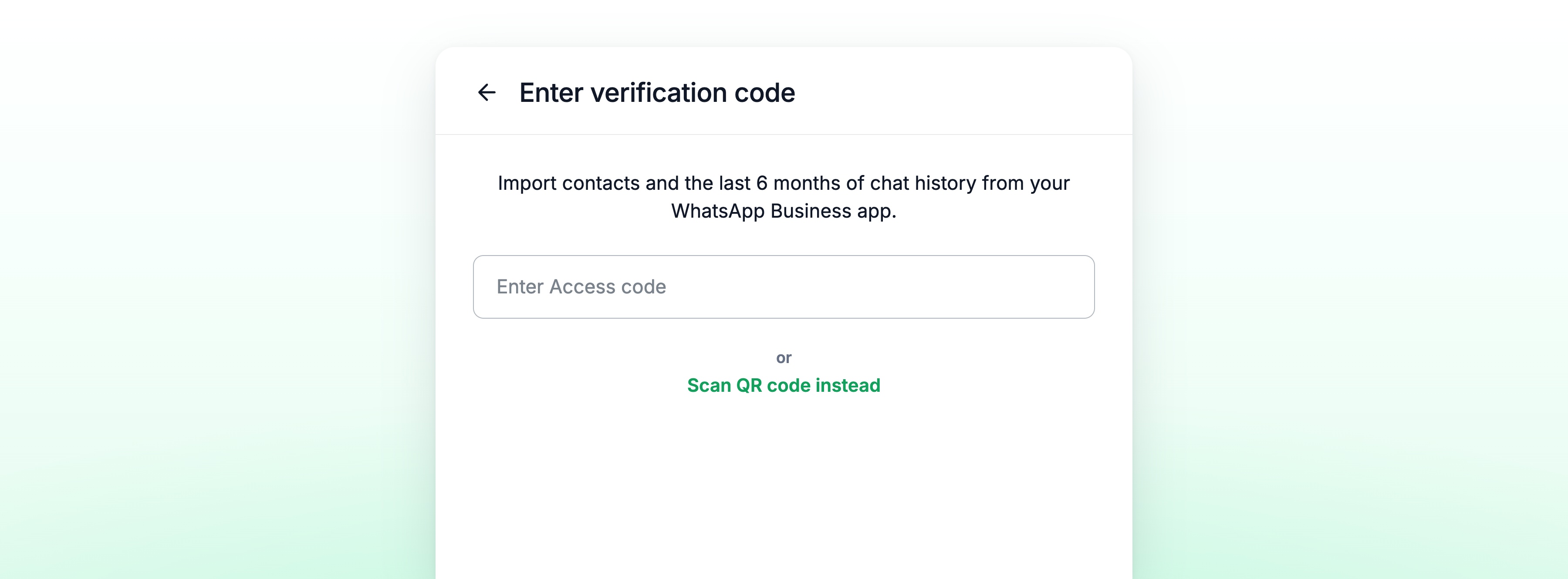
- Confirm and complete the connection
Enter the verification code, or tap "Scan QR code instead" to use the QR code. This triggers the import of your contacts and chats from your WhatsApp Business App.
Post-Setup Configuration
Once Embedded Signup is complete, take a few minutes to configure your setup:
- Test message delivery. Send a template message through Wati to a test contact and confirm it appears in the WhatsApp Business App inbox.
- Set up webhooks. Subscribe to message and status events so your CRM, chatbot, and reporting tools receive real-time updates from both the WhatsApp Business App and the Cloud API.
- Tag your contacts. Add attributes such as lead source, deal stage, and assigned rep. This makes it easier to segment audiences, automate lead routing, and run targeted campaigns.
- Brief your team. Sales reps should know that conversations may begin with a chatbot or broadcast before they're handed over. Show them how to review synchronized chat history in the WhatsApp Business App, and remind them that new broadcast lists can only be created through Wati, not the app.
Pricing, Throughput, and Messaging Limits
Coexistence comes with real technical and financial limits. Plan your campaigns around them.
Throughput Cap
Coexistence numbers have a fixed throughput cap of 20 messages per second on the Cloud API side.
High-volume use cases, like real-time auction alerts or flash-sale notifications, can exceed this limit. In those cases, businesses need to fully migrate to the Cloud API and disconnect the Business App. After migration, throughput scales according to Meta's standard Cloud API tiers.
Dual Pricing Model
After onboarding, messages sent through the WhatsApp Business App remain free, while messages sent through Wati are billed under Meta's WhatsApp Cloud API pricing. Cloud API charges vary based on the message category and recipient country. Billed categories are marketing, utility, and authentication; service messages. For sales teams, the most cost-effective approach is to use the WhatsApp Business App for ongoing one-to-one conversations whenever possible and reserve Cloud API messages for broadcasts, automation, and other workflows that need to scale.
For example, if a lead responds to a broadcast campaign, the sales rep can continue the conversation in the WhatsApp Business App instead of sending additional billed Cloud API messages.
Customer Service Window and Template Messages
The 24-Hour Window
The Cloud API runs on a 24-hour customer service window. A customer messages you, and the clock starts. Within 24 hours, reply freely. After it closes, any business-initiated message needs a pre-approved template.
The Business App plays by different rules. Reps can send free-form messages anytime, but those skip Wati's automation, personalization, and reporting.
Coexistence gives you both: the flexibility of the app for one-to-one chats, and the scale of templates for automated campaigns.
Tracking Sales Performance Across the Business App and Cloud API
Coexistence lets you measure both automated and manual conversations. But the data lives in two places. Wati gives you structured analytics: delivery, read, reply, conversion. The Business App gives you basic status ticks. That gap is why unified reporting matters.
Three ways to bring it together:
- Tag every campaign. Add the campaign ID, send date, and lead source so webhooks can organize performance data.
- Make the CRM your source of truth. Sync app and Wati conversations into one place, with fields like message count, last response time, and deal stage.
- Set response-time SLAs. Target something concrete, like new leads answered within 15 minutes, and track it.
- Test your templates. Pit CTAs and value props against each other. Keep the ones that win replies.
Why WhatsApp Coexistence Matters for Sales Teams
Sales teams need to move faster without losing the personal touch that closes deals. Coexistence makes that possible: the automation of the Cloud API, the familiarity of the Business App, one number.
Marketing and ops run broadcasts, lead qualification, CRM sync, and reporting. Reps keep working one-to-one from the app they already know. Yes, a few things change: template-based broadcasts, a six-month history limit, but for most teams, the payoff far outweighs the trade-offs.
Ready to scale WhatsApp sales without disrupting your team? Book a demo and see how Coexistence automates the busywork, sharpens response times, and gives reps more room to close.
Frequently asked questions
Can I use the same WhatsApp number for app-based sales chats and Wati broadcasts?
Yes. Coexistence links your existing Business App number to Wati's Cloud API through Embedded Signup. Reps continue to use the app for 1:1 chats, while Wati runs broadcasts and automation on the same number. Up to 6 months of individual chat history syncs both ways.
What happens to my existing broadcast lists once I connect to the Cloud API?
They become read-only. You can't create new ones in the Business App anymore. You will need to move broadcast campaigns to the Wati template messages, which require Meta's approval but offer personalization and reporting that the app never had.
Are messages sent through the Business App still free after I connect to Wati?
Yes. App-based messages stay free after onboarding. Messages sent through Wati follow Meta's Cloud API pricing.
Do group chats sync between the Business App and Wati?
No. Group chats stay app-only and never sync. If part of your sales process runs through a group, keep it inside the app.
How far back does message history sync?
Up to 6 months of individual chats sync between Wati and the Business App. Anything older than that won't show up in the synced view.
Can I send template messages from the Business App?
No. Template messages have to go through Wati. The app can send free-form messages to any contact at any time, but those messages skip the personalization, automation, and reporting that come with Wati.
Related posts
- TikTok Business Account vs. Personal Account: How Do They Differ?
TikTok Business Account vs Personal Account: Business unlocks ads, analytics, and messaging; Personal keeps sounds and creator payouts.
- What are TikTok Direct Messaging Ads? Non-Technical Setup Guide
Turn TikTok ad taps into real DM conversations. A simple, non-technical setup guide to TikTok Click To Direct Messaging (Click to DM) Ads using Wati.
- How to Use an Instagram Chatbot for FAQ Automation (2026 Guide)
An Instagram chatbot replies to DMs, comments, and story replies instantly using keyword triggers, then hands off to a human when needed. Here's how to set one up in Wati.
- How to Capture Phone Numbers From Instagram DMs With Wati in 2026
An Instagram DM lead capture flow collects a prospect's phone number, then bridges the chat to WhatsApp. Set it up in Wati, step by step.