
Too Long? Read This First
- Wati's Messenger chatbots have no built-in calendar connection, so the bot collects a visit request and a counsellor confirms the slot.
- The first question, "Reply 1 if you're a parent, 2 if you're a student," decides the follow-up questions and the tag on the chat.
- Three questions are enough for a school tour booking or a counselling call: grade or course, campus, and a preferred time window.
- The campus answer decides which admissions team receives the request, so each campus works only on its own visitors.
- The counsellor confirms the visit and sends reminders on WhatsApp, because Wati's Messenger bots can't send them later.
A request to visit your campus is one of the warmest inquiries an admissions team receives.
The family now wants to see classrooms, meet a counselor, and check the commute.
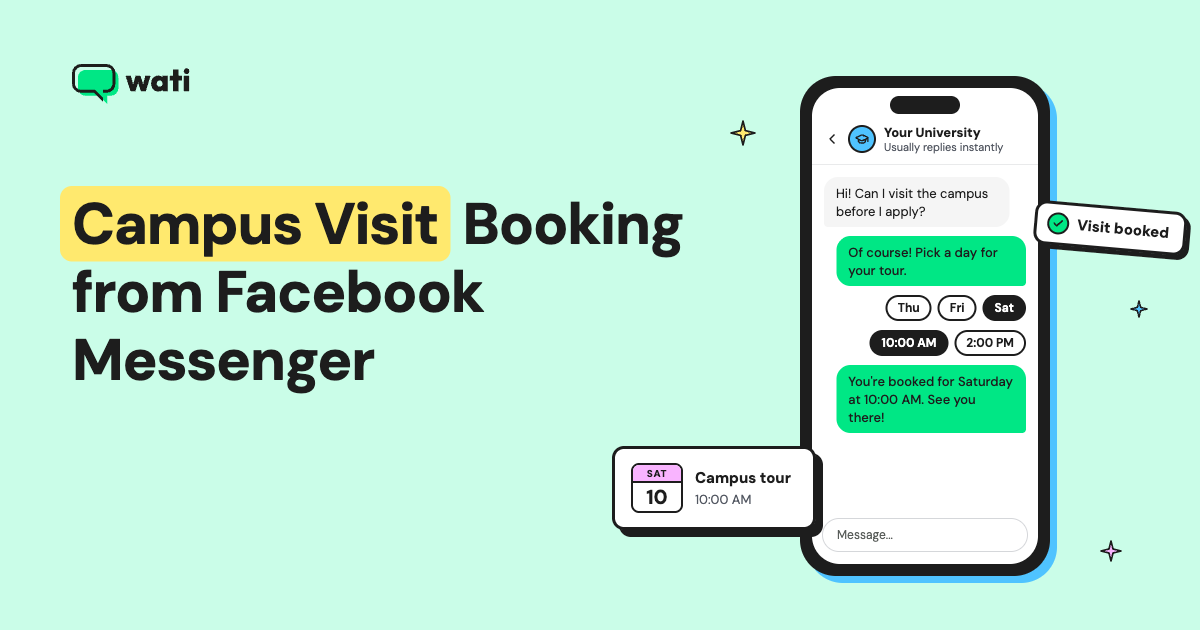
A campus visit booking from Facebook Messenger turns that request into a complete record: parent or student, grade or course, campus, and preferred time.
With Wati's Facebook Messenger automation, it then reaches the right admissions team.
In this guide, you'll see how Messenger's rules shape the flow, which three questions to ask, how to route requests by campus, and how to confirm each visit on WhatsApp.
How do Messenger Rules Shape Campus Visit Booking?
Messenger's messaging rules shape how you collect visit requests, ask follow-up questions, and confirm appointments.
Your chatbot should gather the necessary details during the conversation, then pass the request to a counselor for confirmation.
Parents and students must message your Facebook Page first, whether through an ad, a post, or the Page itself.
Once they start the conversation, Wati's Messenger automation follows these rules:
Messenger rule | What it means for a visit request |
|---|---|
Chatbots reply only within 24 hours of the person's last message | Ask every question in one conversation, which takes about a minute |
Your team can reply by hand for up to 7 days | A half-finished request needs a counsellor's reply within the week |
Chatbots don't support buttons or lists on Messenger | Parents and students reply with a number or a word |
Chatbots can't follow up after the window closes | Confirmations and reminders go on WhatsApp |
Chatbots have no built-in calendar connection | The bot records a preferred time; a counselor confirms the exact slot |
Meta also retired the Messenger event-update tag. Since April 27, 2026, messages sent with this tag have been failing, according to Meta's messaging guide. Plan visit confirmations and reminders through WhatsApp instead.
Set Up Separate Messenger Paths for Parents and Students
Start every visit request by identifying who is messaging your Facebook Page.
Parents and students have different questions, so separating them early helps your admissions team prepare the right information and follow up appropriately.
The chatbot's first message can read:
Hi! Thanks for messaging [School name]. To book a campus visit or a call with a counselor, reply 1 if you're a parent or 2 if you're a student. |
Based on the response, the chatbot follows one of two paths:
- Parent path: the bot asks for the child's grade and nearest campus. The counselor prepares answers on the board regarding transport and safety for the school tour.
- Student path: the bot asks for the course or exam, such as Class 11 Science, a JEE batch, or a BBA. The counselor prepares batch timings, hostel details, and online options.
The bot tags the chat as "parent" or "student" from this single answer. If someone replies with anything other than 1 or 2, the bot sends the chat to a counselor.
i. Campus Visit or Counseling Call: Which Should You Offer?
Offer a campus visit to families who can reach you, and a counseling call to everyone else.
In a Niche survey of 134 higher education enrolment leaders in July 2026, respondents named campus visits their most important enrolment strategy.
Use this table to decide the offer:
Who is asking | What to offer | Why it fits |
|---|---|---|
A parent living near one of your campuses | Campus visit | Parents want to see classrooms, buses, and safety in person |
A family in another city or country | Counselling call | Questions get answered now; the visit can follow |
A student asking about a coaching batch | Counseling call or a free demo class | A trial class shows the teaching, which a tour can't |
Anyone, once an open day is scheduled | Open-day RSVP | The date is fixed, so the bot only needs to know who is coming |
The counseling-call option sits inside the campus question, so the flow stays at three questions and your education lead generation has a next step for distant families.
Three Questions to Collect Before Confirming a Campus Visit
Three questions are enough to schedule a campus visit: grade or course, campus, and preferred time window.
Save questions about fees, documents, and transportation for the counselor. Ask these questions in order:
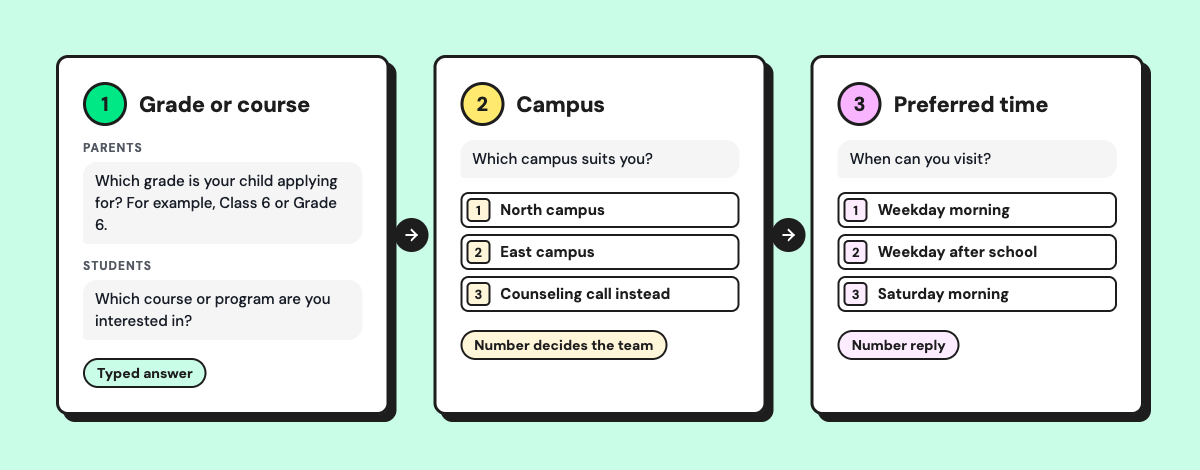
After collecting these answers, the chatbot asks for a WhatsApp number so the admissions team can confirm the visit.
Keep the conversation easy to complete with these three practices:
- Short messages: keep every bot message to 3 lines so it fits on a phone screen.
- Numbers or words: accept both "2" and "East," since parents often type the campus name.
- One retry: if an answer doesn't match, ask once more, then hand the chat to a counselor.
i. Offer Time Windows Instead of Fixed Slots
Offer time windows that your admissions office can always honor, and let a counselor choose the exact slot.
A confirmed "Saturday morning" builds more trust than a promised "Saturday, 11 am" that's already full.
Set the windows by region and school calendar:
- UAE: schools follow a Saturday-Sunday weekend with a short Friday; Sharjah schools close Friday to Sunday.
- Saudi Arabia: the weekend is Friday and Saturday; adjust windows for Ramadan timings.
- India and LATAM: keep a Saturday window and avoid exam weeks.
- Universities: add an online information session for applicants abroad.
ii. Campus Visit Questions for India, LATAM and the Middle East
Write the questions in the language parents use on your Page, but keep the reply numbers the same, so every version routes to the same teams.
Question | India (Hinglish) | LATAM (Spanish) | Middle East (Arabic) |
|---|---|---|---|
Parent or student | Parent hain toh 1, student hain toh 2 reply karein | Responde 1 si eres madre, padre o tutor; 2 si eres estudiante | أرسل 1 إذا كنت وليّ أمر، و2 إذا كنت طالبًا |
Grade or course | Kis class mein admission chahiye? | ¿Para qué grado es la inscripción? | لأي صف تريد التسجيل؟ |
Campus | Kaunsa campus? 1 North, 2 East, 3 phone call | ¿Qué plantel? 1 Norte, 2 Oriente, 3 llamada | أي فرع؟ 1 الشمال، 2 الشرق، 3 مكالمة |
Preferred time | 1 weekday subah, 2 school ke baad, 3 Saturday | 1 entre semana mañana, 2 entre semana tarde, 3 sábado | 1 صباح أيام الدوام، 2 بعد الظهر، 3 السبت |
Ask Arabic-speaking parents to reply with 1, 2, or 3 in English digits. In Colombia, replace "plantel" with "sede," the more common term for a campus there.
Route Requests by Campus and Tag Them by Path
Use the person's parent or student response to add a tag, and their campus selection to assign the conversation to the right admissions team.
This way, each team can manage requests for its campus and see whether the inquiry came from a parent or a student.
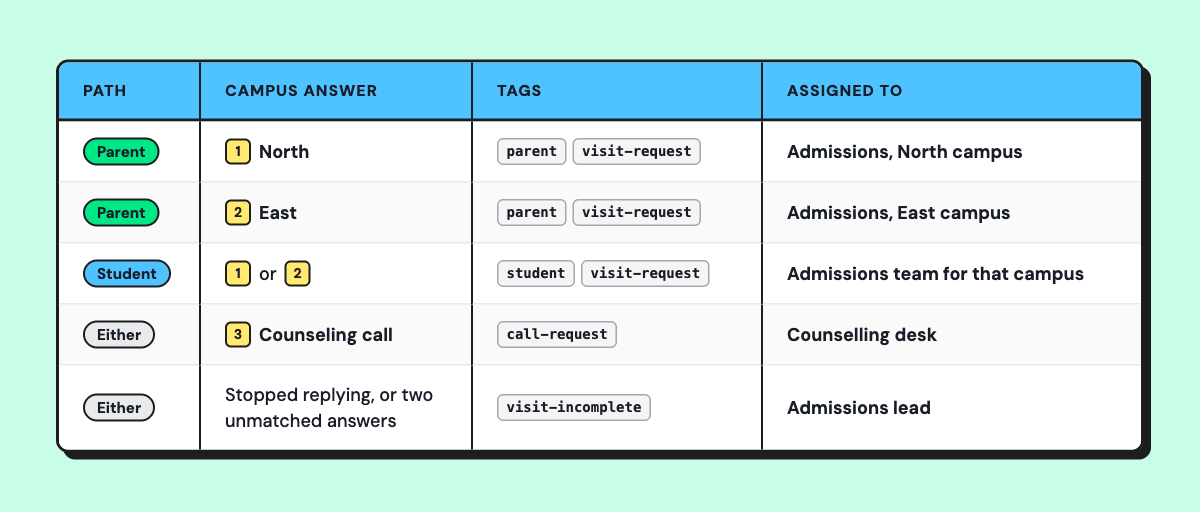
The admissions lead checks the "visit-incomplete" tag daily, since a counselor can reply by hand only within 7 days of the family's last message.
With Wati's Google Sheets integration, each answer can be mapped to a column in one shared sheet:
- Request details: date and time, path, grade or course, campus, and preferred time window.
- Contact and owner: WhatsApp number, tag, and the counselor who owns the request.
- Outcome: Confirmed, Rescheduled, or No reply, which the counsellor updates after the WhatsApp conversation.
The admissions lead reviews this sheet each morning, while counsellors work on the same chats in Wati's shared team inbox.
After the visit, our education customer engagement guide covers each stage to enrolment.
Confirm Each Campus Visit on WhatsApp
As the last step, ask for a WhatsApp number, then confirm the visit there. On WhatsApp, a counselor can send the confirmation, a reminder, and any rescheduling after the Messenger chat has gone quiet.
The chatbot's final message can read:
Last step: what's your WhatsApp number, with country code? We'll confirm your visit there. Reply NO if you'd prefer a phone call. |
Keep the WhatsApp handoff clear and consent-based:
- Clear consent: message only the numbers parents and students share for this purpose, and tag a "NO" reply as call-only.
- Valid numbers: ask for "numbers only, with country code" and allow one retry before passing the chat to a counselor.
- Approved first message: the counsellor's first WhatsApp message to a new contact must use an approved template.
The confirmation should include the date, time, campus address or call link, and the counsellor's name. A reminder the day before should offer an easy way to reschedule.
After the visit, WhatsApp can also support further communication about fees, courses, and enrollment. See our WhatsApp for EdTech guide for more examples.
i. Take Open-Day RSVPs Using the Same Messenger Flow
You don't need a separate chatbot for open-day registrations. Reuse the campus visit flow and change the final question to collect RSVPs instead of a preferred visit time.
A keyword such as "OPEN DAY" can trigger the chatbot. Since the event date and time are already set, the third question can read:
Our next open day is Saturday, December 5, at 10 AM. Reply 1 to reserve your place or 2 if you'd prefer a counseling call. |
Wati can add an "open-day-rsvp" tag to each registration and log the response in the shared Google Sheet. Your admissions team can then use the sheet to track RSVPs by campus and prepare for the event.
How to Handle Campus Visit Requests Outside Office Hours
Parents may message your Facebook Page after the admissions office closes. An out-of-office reply can acknowledge their inquiry, while the Messenger chatbot continues collecting the details needed for a campus visit.
Wati creates Welcome and Out-of-office rules when you connect a Facebook Page. Turn on the out-of-office rule and set your working hours.
A useful out-of-office reply can read:
Thanks for contacting [School name]! Our admissions team will be back at 9 AM. You can request a campus visit now by replying VISIT, and our team will confirm the details with you on WhatsApp. |
How Wati Handles Campus Visit Requests in Messenger
With Wati for Education, schools, universities, and coaching institutes can manage campus visit requests from the first Messenger inquiry to the final WhatsApp confirmation.
Here's how Wati's features support each step:
- Keyword rules: words such as VISIT, tour, and visita start the Messenger chatbot in the family's language.
- Messenger chatbot: Send a message, Ask a question, and Set a condition steps ask for the path, the three questions, and the WhatsApp number, and branch on each reply.
- Tags and team assignment: the bot tags the chat as parent or student and assigns it to that campus's admissions team.
- Google Spreadsheet step: sends each completed request to the admissions lead's sheet, one answer per column.
- Team Inbox: the counselor sees every answer, adds internal notes, and confirms the visit on WhatsApp from the same inbox.
Turn Messenger Inquiries into Confirmed Campus Visits
A campus visit request is easier to manage when your admissions team already knows who is coming, which course or grade they're interested in, and which campus they want to visit.
A short Messenger chatbot can collect these details and route each request to the appropriate team, while WhatsApp lets counselors confirm appointments and follow up.
With Wati, your team can manage the process from one place instead of tracking inquiries across separate conversations and spreadsheets.
Good to know: Messenger chatbots with Send a message, Ask a question, and Set a condition work on every Wati plan. Tags, team assignment, the Google Spreadsheet step, and running Messenger alongside WhatsApp need the Pro or Business plan.
Book a demo to see how Wati can help your admissions team manage campus visit requests through Facebook Messenger.
Frequently asked questions
Can Parents Complete Campus Visit Booking Inside Facebook Messenger?
Parents can request a campus visit inside Facebook Messenger, but a counsellor confirms the exact slot. Wati's Messenger chatbots have no built-in calendar connection, so the bot collects the visit details and a preferred time window. The counsellor then checks availability and sends the confirmation on WhatsApp.
How do I Schedule a Campus Visit If a Parent Stops Replying Halfway?
Tag the chat "visit-incomplete" and have a counsellor reply by hand. Wati's chatbots can reply on Messenger only within 24 hours of the parent's last message. After that, your team can still reply manually for up to 7 days, so check the tag daily.
Can I Send Campus Visit Reminders on Facebook Messenger?
A Wati chatbot can't send campus visit reminders on Messenger. Wati's Messenger chatbots don't support templates, and Meta retired the Messenger tag for event updates in April 2026. Send reminders on WhatsApp to parents who shared their number and agreed to hear from you there.
What Should an Admission Chatbot Ask Before a School Tour Booking?
An admission chatbot should ask four things: parent or student, grade or course, campus, and preferred time window. It should then ask for a WhatsApp number for the confirmation. Leave fees, documents and transport for the counsellor's call, so the bot conversation stays under a minute.
Can a Student Book a Counselling Call Without a Parent?
That depends on your school's policy. If it requires a parent's consent for students under 18, add a question for a parent's number on the student path. Keep other personal questions for the counsellor.
Related posts
- How to Send Bulk Messages on WhatsApp Without Getting Blocked
Learn how to send bulk WhatsApp messages without getting blocked. Compare the WhatsApp Business app and API, messaging limits, costs, templates, and best practices for safe, compliant bulk messaging.
- Instagram Comment Automation: How It Works and How to Set It Up in Wati
Instagram comment automation auto-replies to comments and DMs commenters within seconds via Meta's API. Covers strategy, use cases, and Wati setup.
- Shared Team Inbox for Instagram: A Buyer’s Checklist for 2026
Use this fastest checklist to evaluate any shared team inbox for Instagram, which covers DMs, comments, automation, and multi-channel support.
- How to Set Up a TikTok Business Account: Step-by-Step Guide
Set up a TikTok Business Account step by step: switch from personal, pick a category, add your profile, and unlock ads and analytics.