
Too Long? Read This First
- Facebook lead ads deliver the lowest cost per lead, but many of those numbers never answer a call.
- Cost per site visit is the number to compare, because it divides ad spend by completed visits.
- Click-to-Messenger ads and "comment BROCHURE" posts work best in the early, question-asking stage.
- WhatsApp handles visit confirmations and reminders, which Messenger cannot send once its reply window closes.
- Tagging every chat that comes from an ad lets you compare it with your form leads.
How many of your Facebook leads actually show up for a property visit?
A low cost per lead looks good in a campaign report, but it doesn't tell you how many people are genuinely interested in the property.
What matters is how many inquiries turn into qualified prospects and confirmed site visits.
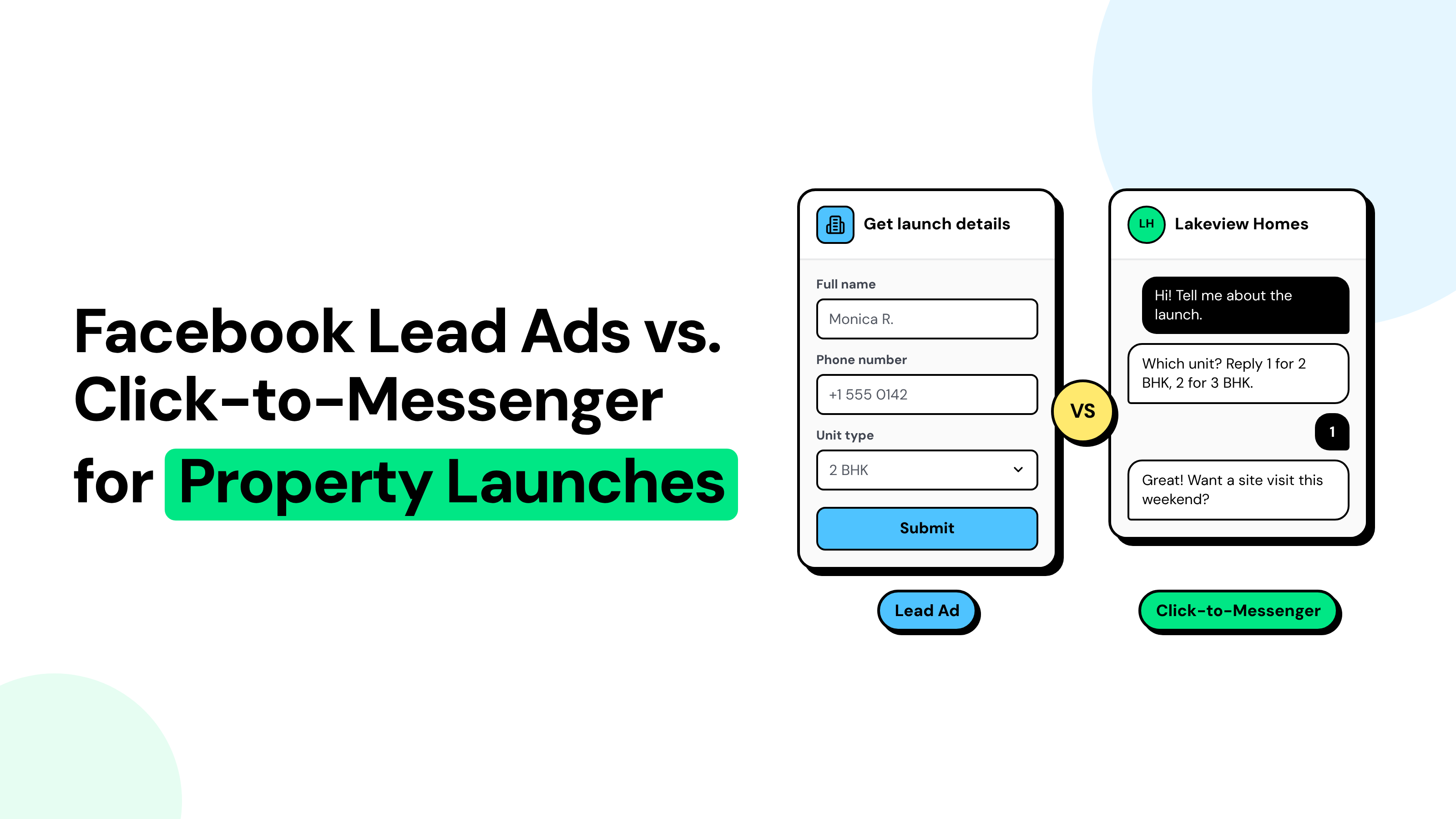
Facebook Lead Ads, Click-to-Messenger, and Click-to-WhatsApp each handle that journey differently.
Choosing the right format can make a difference in how your team qualifies buyers and follows up with them.
With Wati's Facebook Messenger automation, your team can manage launch inquiries from Messenger and continue visit confirmations on WhatsApp in one inbox.
This guide compares the three ad formats, explains how to measure cost per site visit, and shows which one to use at each stage of a property launch.
Why Facebook Lead Ads Get Low Cost per Lead but Few Site Visits
Facebook lead ads for real estate look cheap because an instant form takes two taps to submit. That same ease brings in many people who have not decided to visit anything.
- Form fatigue: During launch season, a single buyer can fill out forms for several developers in a single evening. When your sales team calls the next day, the buyer often cannot tell which project you are.
- Unreachable numbers: Instant forms pre-fill the phone number, and Meta does not check it by default. Old or mistyped numbers still arrive as leads, as our lead form comparison explains.
- No conversation: Buyers submit their details without asking about the property or payment plans. Your first contact becomes a cold call.
i. How to Improve Lead Quality with Instant Forms?
Use the Higher Intent form, enable phone number verification, and have your sales team call new leads within an hour.
You may get fewer leads, but the ones you do get are more likely to be reachable.
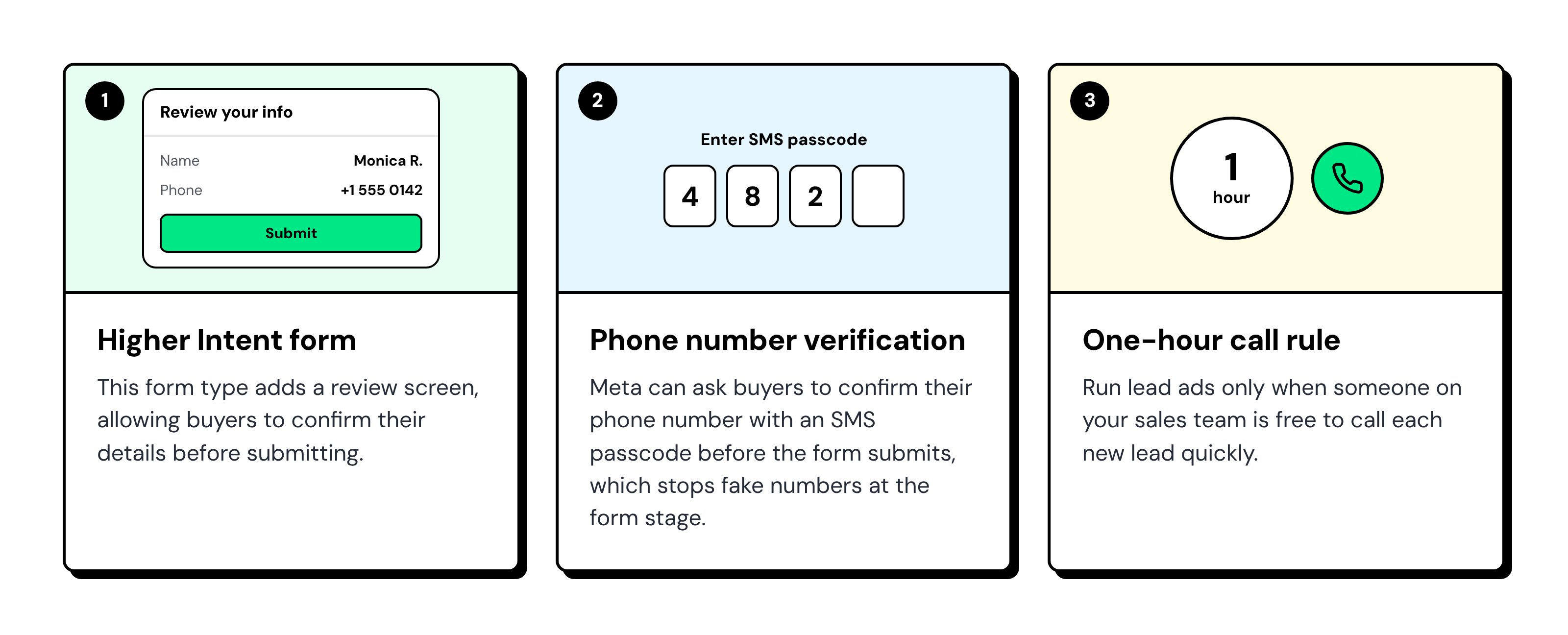
Meta explains each option in its guide to instant form types.
Lead Ads vs. Click-to-Messenger vs. Click-to-WhatsApp: What Happens After the Click
Each ad format moves buyers toward a site visit differently. Lead Ads collect contact details for a follow-up call, Click-to-Messenger starts a conversation your team can qualify, and Click-to-WhatsApp opens a direct chat for ongoing communication.
Step to a site visit | Lead ads (instant form) | Click-to-Messenger | Click-to-WhatsApp |
|---|---|---|---|
What you have after the click | A name, a number, and a few answers | An open Messenger chat | An open WhatsApp chat with a working number |
Where most buyers drop off | Before they pick up the call | When nobody replies quickly | When nobody replies quickly |
What you can send later | Calls and SMS | Text and links: automation for 24 hours after the buyer’s last message; your team for up to 7 days if they reply within those 24 hours | Approved templates outside the 24-hour window, once the buyer opts in |
Visit confirmation and reminder | By phone or SMS | Move to WhatsApp | Template confirmation and reminder |
Best launch stage | Launch week, with a fast call team | Pre-launch and launch week | Launch weekend and retargeting |
Use Messenger to handle the first conversation and qualify buyers. Move them to WhatsApp when you need to send visit confirmations, reminders, or follow-ups later.
A Click-to-WhatsApp Ad opens WhatsApp directly, so WhatsApp's messaging rules apply from the start. Messenger's reply windows do not apply to these conversations.
You can also use Wati's CTWA conversion tracking to connect WhatsApp conversations and conversions to the ads that generated them.
How to Calculate Cost per Site Visit for Each Ad Type?
Cost per site visit tells you how much ad spend it takes to bring one buyer to your property.
Calculate it separately for Lead Ads, Click-to-Messenger, and Click-to-WhatsApp to see which format delivers better results.
Use this formula to account for each step between the first inquiry and the actual visit:
Cost per site visit = cost per lead or chat ÷ (reach or qualify rate × visit request rate × show-up rate) |
For forms, the first rate is the rate for leads reached by phone. For chats, it is buyers who answer your qualifying questions.
Example: The table below uses the same total ad budget of 10,000 in any currency for each format.
These conversion rates are illustrative; replace them with your campaign data.
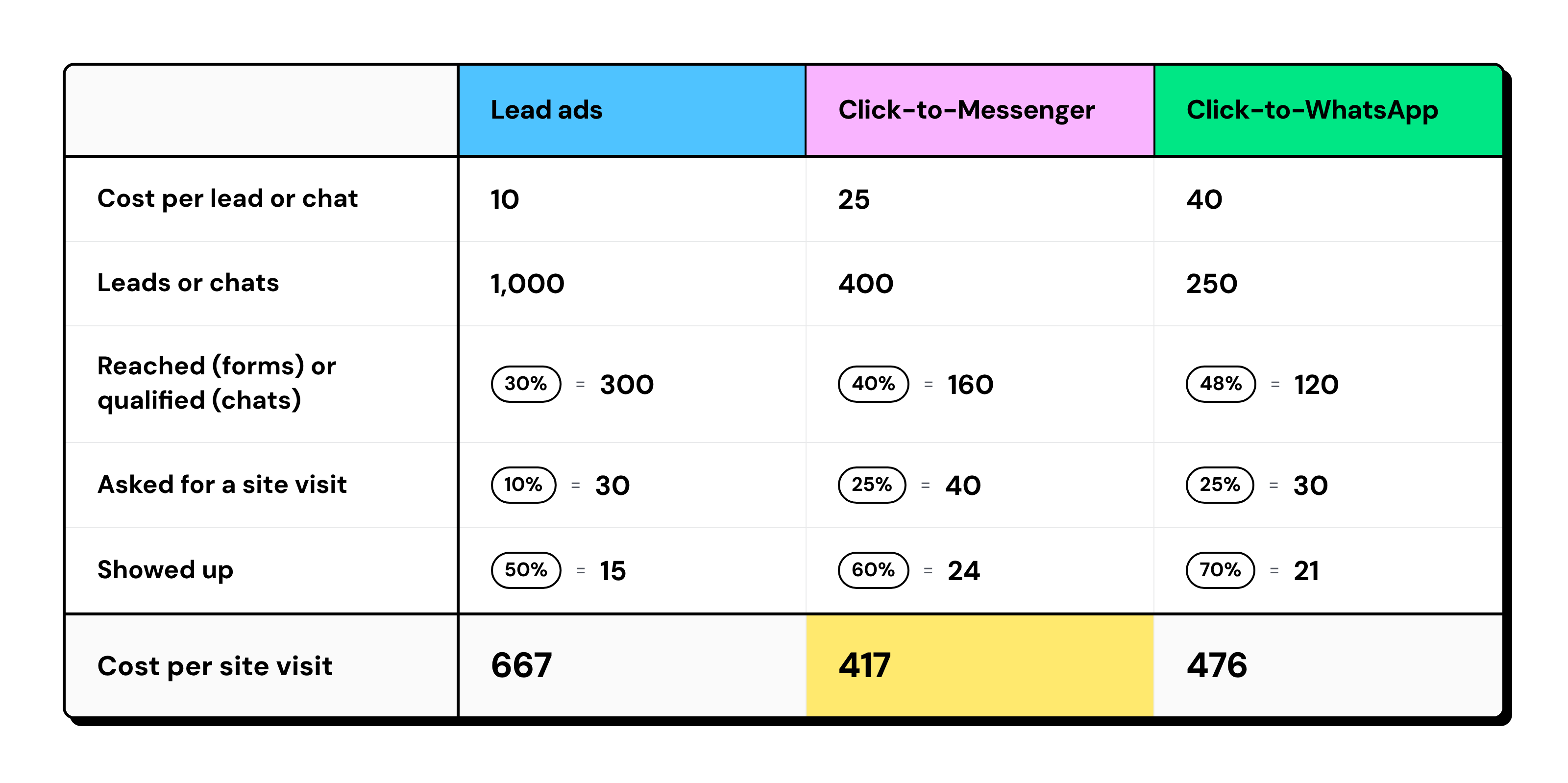
In this example, Lead Ads have the lowest cost per lead but the highest cost per site visit.
Messenger performs best because more qualified conversations turn into actual visits.
If you move Messenger conversations to WhatsApp for visit confirmations and reminders, track them as a single buyer journey rather than as separate leads.
i. How to Track the Numbers
- Lead ads: Take leads from Ads Manager and reached leads from your call log.
- Click-to-Messenger: Count the tagged ad chats in your team inbox.
- Click-to-WhatsApp: Use Wati’s Ads analytics dashboard to track ad spend, average cost per click (CPC), qualified leads, cost per qualified lead (CQL), qualified purchases, cost per purchase (CPP), and return on ad spend (ROAS).
- Site visits: Use the sales gallery sign-in sheet, not bookings.
Log one row per ad type per day: date, ad type, spend, leads or chats, qualified, visit requested, showed up, and cost per site visit.
Which Ad Type to Run at Each Stage of a Property Launch
Use Messenger during the browsing stage, and move to WhatsApp once buyers ask to visit. Add lead ads in launch week only if your call team can keep up.
i. Pre-Launch: Run a "Comment BROCHURE" Post
Two weeks before launch, ask followers to comment BROCHURE on your teaser post. A comment rule then sends each commenter a Messenger message with the brochure link.
- Turn the rule on before you publish: The rule reacts only to new comments, so earlier commenters get no message.
- Test from a personal account: The rule ignores comments posted by your Page or team.
- Send a link, not a file: The message is plain text, so host the brochure on a web page and paste its URL.
- Pick the teaser post only: The rule can watch all posts and reels on your Page or one post. Choose the teaser, so older posts do not trigger it.
- Catch spelling mistakes: Fuzzy matching catches “brochur”, and Contains catches “send brochure.”
- Publish the teaser on your Page: The rule watches posts and reels on your Page, so the comment prompt has to live there.
- Answer missed comments in time: Reply privately from the comments view in your team inbox. Meta allows one private reply per comment, within 7 days of the comment.
The comments view runs in the Wati web app and lists up to 600 of your most recent posts since you connected the Page.
ii. Launch Week: Use Click-to-Messenger Ads for Buyer Questions
Run Click-to-Messenger ads with suggested questions about floor plans, payment plans, and site visits.
Your chatbot can collect each buyer's requirements before routing the conversation to your sales team (routing needs the Pro or Business plan).
iii. Launch Weekend: Move Site Visit Requests to WhatsApp
Move every buyer who asks to visit to WhatsApp, where your sales team confirms the time and sends visit reminders.
Retarget people who already chatted with Click-to-WhatsApp ads, using these CTWA ad examples for copy ideas.
iv. After Launch: Retarget Buyers Who Did Not Visit
Retarget buyers who chatted with your team but haven't visited within the next two weeks.
Compare cost per site visit across ad types and pause the campaigns that aren't bringing in actual visits.
Launch Keywords for UAE, Saudi Arabia, India and LATAM
Add local-language keywords to your automation rules so buyers can request brochures, prices, and site visits in their language.
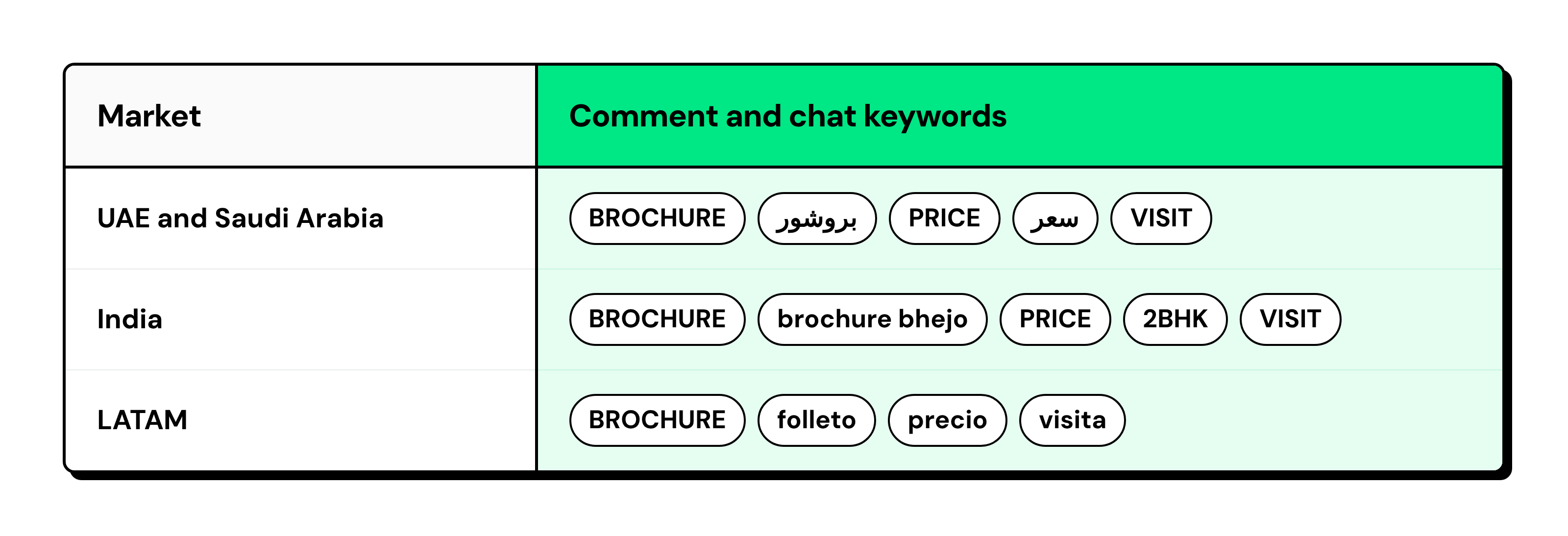
This is particularly relevant in Dubai, where off-plan properties accounted for about 70% of residential sales in November 2025.
Localized keywords help your team respond when buyers show interest through launch posts and Messenger chats.
How to Set Up Click to Messenger Ads for a Property Launch
Choose the Engagement objective, pick Messenger as the messaging app, add a few suggested questions, and tag every chat they start. The tag lets you count ad chats against form leads.
- Engagement objective, Messenger destination: Create the campaign in Ads Manager, set the conversion location to messaging apps, and select Messenger. Meta's Click-to-Messenger guide shows each screen.
- Greeting with suggested questions: Three works well. Write questions your rules can match, such as "Send me the floor plans", "What is the payment plan?" and "I want to book a visit". Use wording that organic buyers are less likely to type, so the
launch-ctmtag is less likely to count organic conversations as ad chats.
- One keyword rule per question: Each rule starts a chatbot whose first step adds a tag, such as launch-ctm (Set Tags is a Pro and Business chatbot step). Wati does not detect ad chats on its own, so the tag comes from your rule.
- Daily count of tagged chats: Enter the count in your cost per site visit log, next to that day's form leads.
When to Move a Buyer from Messenger to WhatsApp
Move a buyer to WhatsApp as soon as they ask for something that has to reach them later. Wati's Messenger chatbots and rules cannot send message templates, so nothing reaches the buyer after the reply window closes.
- Requests a site visit: Send the confirmed appointment time, location, and reminder through WhatsApp.
- Requests a call: Share call details and continue the follow-up in the same WhatsApp conversation.
- Needs documents later: Send floor plans or payment schedules through WhatsApp when they're ready.
- Wants future launch updates: Share updates about upcoming phases with buyers who have opted in.
Keep the chat in Messenger when the buyer asks one question or only wants the brochure.
Ask for the WhatsApp number once, and tell the buyer why you need it: "We'll send the confirmed visit time and location on WhatsApp."
Three Mistakes that Raise Cost per Site Visit
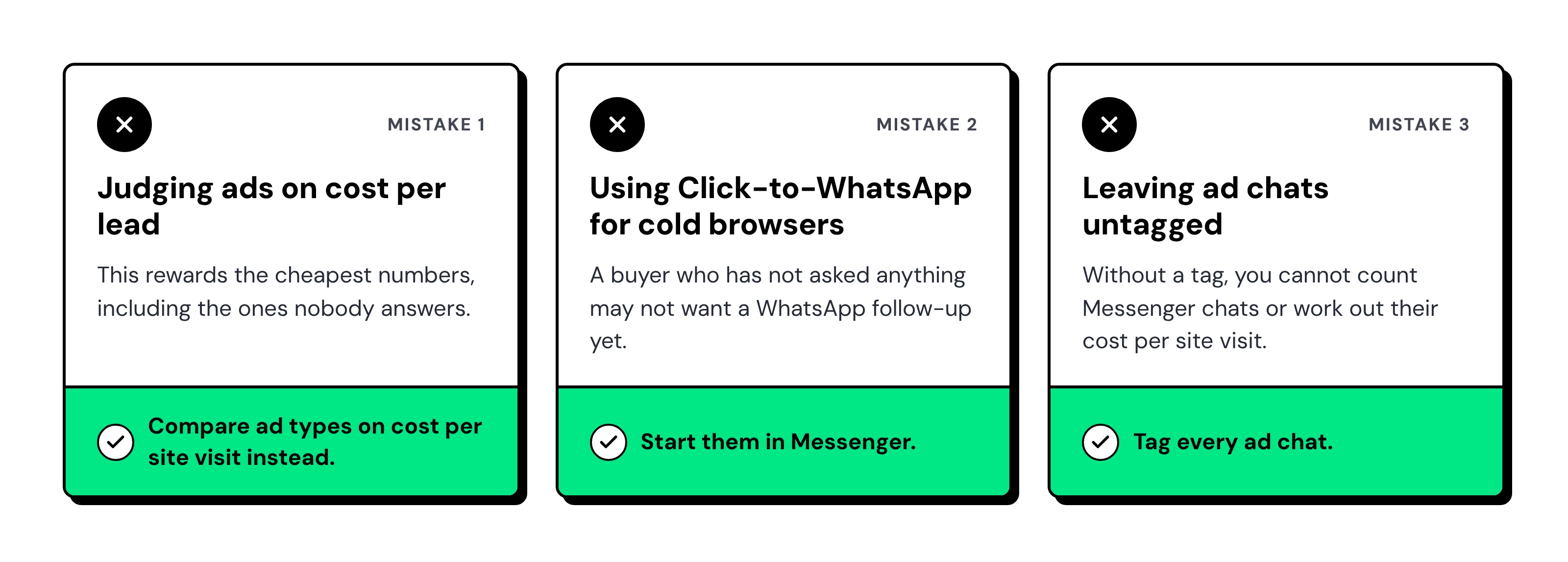
These issues often come down to how you measure campaign performance, choose your ad format, and track buyer conversations.
Keep an eye on the following:
How Wati Turns Launch Comments and Chats into Site Visits
Wati is an agentic customer engagement platform that runs Facebook comments, Messenger, and WhatsApp in one team inbox.
A launch conversation can start on your teaser post and end with a confirmed visit.
Its real estate solutions bring these conversations and follow-ups together.
- Comment-to-DM: A rule on the teaser post sends every BROCHURE comment a Messenger message with the brochure link, plus an optional public reply.
- Ad chats in one inbox: Chats from click-to-Messenger ads land with every other Messenger chat, tagged by a keyword rule.
- Qualification chatbot: The chatbot asks your qualifying questions, and buyers reply with a word or a number. Your sales team sees each answer first.
- WhatsApp in the same inbox: Your sales team confirms the visit and sends the reminder from one place. Click-to-WhatsApp analytics track the retargeting stage.
Turn More Property Launch Inquiries into Confirmed Site Visits with Wati
Managing a property launch across Facebook comments, Messenger, and WhatsApp can leave your sales team juggling conversations and missing follow-ups.
Wati brings these channels into one Team Inbox.
You can automatically respond to brochure requests, qualify buyers through Messenger chatbots, tag ad conversations, and let your sales team confirm site visits and send reminders on WhatsApp.
This gives your team a clearer view of every buyer's journey, from the first inquiry to the actual visit.
Book a Wati demo to see how you can manage your next property launch more efficiently.
Frequently asked questions
Are Facebook Lead Ads Worth It for Property Launches?
Yes, for launch week, if your sales team can call every lead within the hour. Lead ads collect numbers at a low cost per lead, but many buyers never answer the call. Use the Higher Intent form with SMS phone verification, and judge the campaign on cost per site visit.
Should a Property Launch Use Click-to-Messenger or Click-to-WhatsApp Ads?
Use Click-to-Messenger ads while buyers are still asking questions, and Click-to-WhatsApp ads once they want a visit or updates. Messenger suits the first conversation. WhatsApp can send approved templates later, so it handles visit confirmations, reminders and retargeting.
How do You Calculate Cost per Site Visit?
Divide total ad spend by the number of site visits that happened. To compare ad types, divide the cost per lead or chat by three rates multiplied together: reached or qualified, asked for a visit, and showed up. Calculate it separately for each ad type in the same launch.
Can a Comment-to-DM Message Send the Brochure PDF?
No. A Facebook comment-to-DM message in Wati is plain text, so it cannot carry a PDF, image or button. Host the brochure on a web page and paste the link into the message. Buyers open it from Messenger with one tap.
Does Comment-to-DM Work on Facebook Ad Comments?
It works on posts and reels published on your Facebook Page. Wati's documentation does not cover comments on ads that never appear on your Page. For a launch, publish the teaser post on your Page and run the comment prompt there.
Related posts
- How to Send Bulk Messages on WhatsApp Without Getting Blocked
Learn how to send bulk WhatsApp messages without getting blocked. Compare the WhatsApp Business app and API, messaging limits, costs, templates, and best practices for safe, compliant bulk messaging.
- Instagram Comment Automation: How It Works and How to Set It Up in Wati
Instagram comment automation auto-replies to comments and DMs commenters within seconds via Meta's API. Covers strategy, use cases, and Wati setup.
- Shared Team Inbox for Instagram: A Buyer’s Checklist for 2026
Use this fastest checklist to evaluate any shared team inbox for Instagram, which covers DMs, comments, automation, and multi-channel support.
- How to Set Up a TikTok Business Account: Step-by-Step Guide
Set up a TikTok Business Account step by step: switch from personal, pick a category, add your profile, and unlock ads and analytics.