
Too Long? Read This First
- Click-to-WhatsApp ads send customers to WhatsApp instead of a website, so the Meta Pixel has nothing to track.
- CAPI sends conversion events directly from Wati to Meta, using an identifier called ctwa_clid to match each event back to the ad that started it.
- Wati handles the CAPI connection automatically. Connect your Facebook Ads account, select the template messages that represent conversions, and no code is required.
- Wati tracks purchases and qualified leads, and reports CPC, CQL, CPP, and ROAS for each.
- One dashboard compares performance across Meta CTWA, Google Click-to-Message Ads (CTM), and TikTok Instant Messaging Ads.
- You can retarget qualified leads and buyers directly from Wati with one click.
Click-to-WhatsApp Ads send customers directly to WhatsApp. Without a landing page, the Meta Pixel and other browser-based tracking tools cannot capture what happens next or attribute purchases and qualified leads to the ad that drove them.
Meta's Conversions API (CAPI) closes that gap by sending conversion data directly to Meta. This allows advertisers to track which CTWA campaigns generate qualified leads and purchases.
In this guide, you will learn how to connect Wati to CAPI, track purchases and qualified leads, and measure exactly which CTWA campaigns are driving revenue, without writing a single line of code.
Bonus read: What are Click-to-WhatsApp Ads? A Complete Guide (2026)
Why Click-to-WhatsApp Ads are Nearly Impossible to Track by Default
CTWA sends users straight into a WhatsApp conversation. The customer never lands on a website. That creates a problem for tracking what happens after the conversation starts:
- No landing page: A standard Meta Pixel tracks activity on your website. CTWA skips the website entirely.
- No browser cookies: WhatsApp conversations happen outside the browser, so cookie-based tracking cannot follow the user.
- No conversion outcomes in Ads Manager: Meta Ads Manager can report that someone clicked the ad and started a conversation, but it does not automatically know whether that conversation resulted in a qualified lead or purchase.
Without a fix, businesses running Click-to-WhatsApp Ads can see ad spend and click volume, without knowing which campaigns produced revenue. The conversion data needs to be sent back to Meta or TikTok from the system where the conversion takes place.
How CAPI Powers WhatsApp Conversion Tracking
The Conversions API (CAPI) is Meta’s server-side solution for receiving conversion events from platforms such as Wati. It allows actions such as qualified leads and purchases to be reported to Meta even when the customer does not visit a website.
Here's how a conversion is tracked:
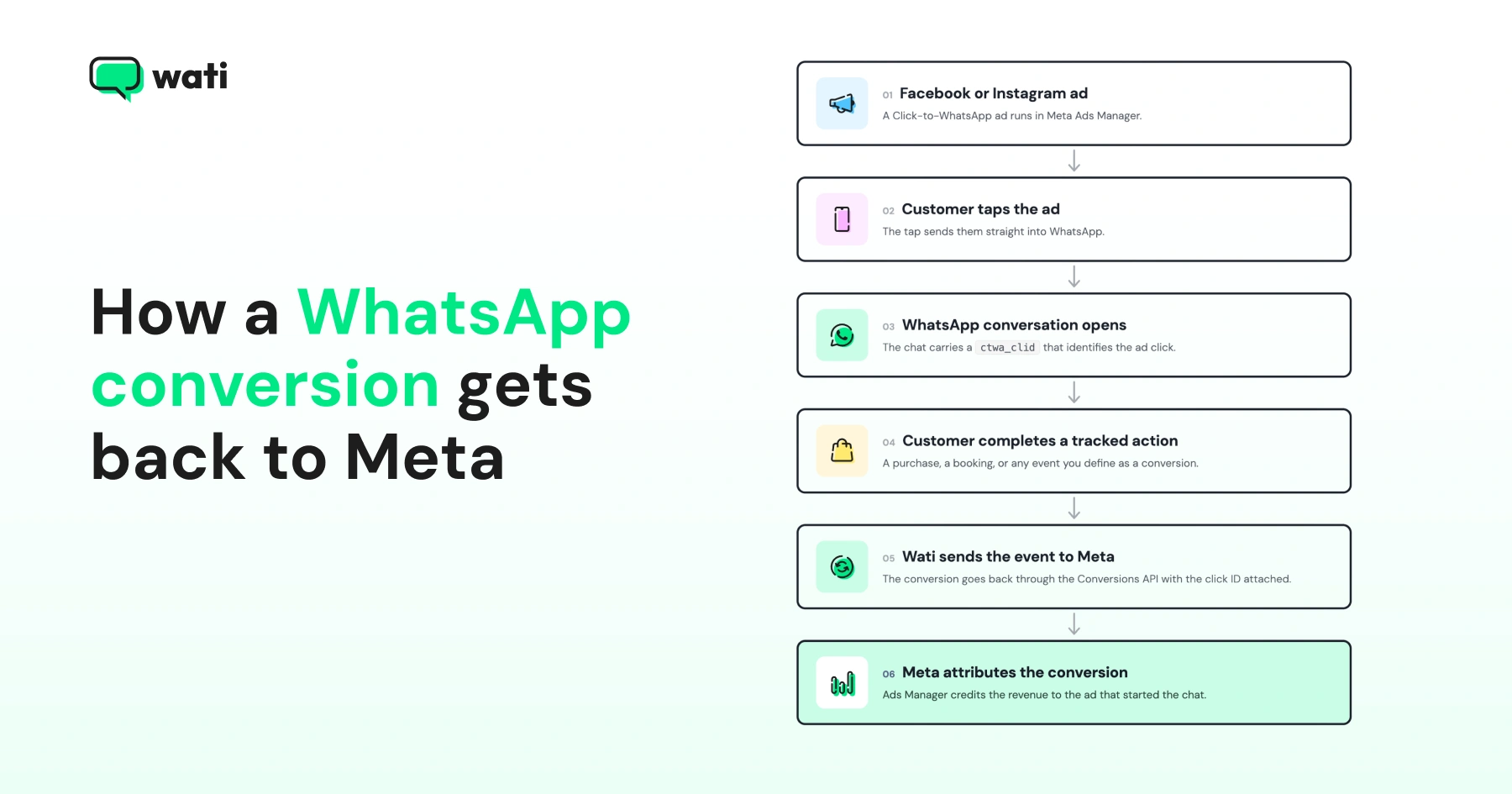
When someone clicks a Click-to-WhatsApp Ad, Meta generates a unique tracking token called ctwa_clid (Click-to-WhatsApp Click ID) for eligible conversations. This identifier is included with the customer's first WhatsApp message through the API webhook, allowing downstream conversion events to be matched to the originating ad.
When a tracked action, such as a purchase or qualified lead, takes place, Wati sends the conversion event to Meta through CAPI along with the ctwa_clid. Meta uses the ID to match the conversion to the original ad.
Once conversion tracking is configured in Wati, this process runs automatically.
How to Set Up CTWA Conversion Tracking in Wati
To set up CTWA conversion tracking in Wati, connect your Facebook Ads account and select the messages that represent purchases or qualified leads.
Step 1: Connect Your Facebook Ads Account
- Log in to your Wati account.
- Go to the Ads tab.
- Click Connect to Facebook.
- Select the Facebook Page and ad accounts you want to connect.
- Accept the terms and conditions and click Save.
You will see a confirmation screen once the connection succeeds.
Bonus Read: How to Create Click-to-WhatsApp Ads: Step-by-Step in Meta Ads Manager
Step 2: Set Up Conversion Tracking
Once your Facebook Ads account is connected, you can configure how Wati reports conversions from your Click-to-WhatsApp (CTWA) campaigns. Wati supports tracking two types of conversion events:
- Purchases
- Qualified leads
Track Purchases
You can track purchases using the template message that is sent after a customer completes a purchase, such as “Your order is confirmed” or “Thanks for your payment.”
To set up purchase tracking:
- Go to Track Purchases in your Wati dashboard.
- Select the template message sent after a customer completes a purchase.
- Save the configuration.
Once this is set up, Wati automatically checks if the conversation was started from a Click-to-WhatsApp Ad. When the selected template is sent in that conversation, Wati reports the purchase to Meta through CAPI.
Wati reports a purchase when the configured template is sent. It's using the template as the conversion trigger, not verifying the payment itself. So it's worth only selecting templates that go out after payment is actually confirmed.
Track Qualified Leads
A new conversation does not automatically count as a qualified lead. Wati recommends using an action that shows real intent, such as booking a call or scheduling an appointment.
To set up lead tracking:
- Go to Track Leads in your Wati dashboard.
- Select the template message that confirms a lead action.
- Save the configuration.
When the selected template is sent in a conversation that started from a CTWA, Wati marks the contact as a qualified lead and reports it to Meta through CAPI.
Bonus read: 21 Click-to-WhatsApp Ad Examples Designed to Drive Conversions (2026)
The Ad Performance Metrics You Get Once Tracking is Live
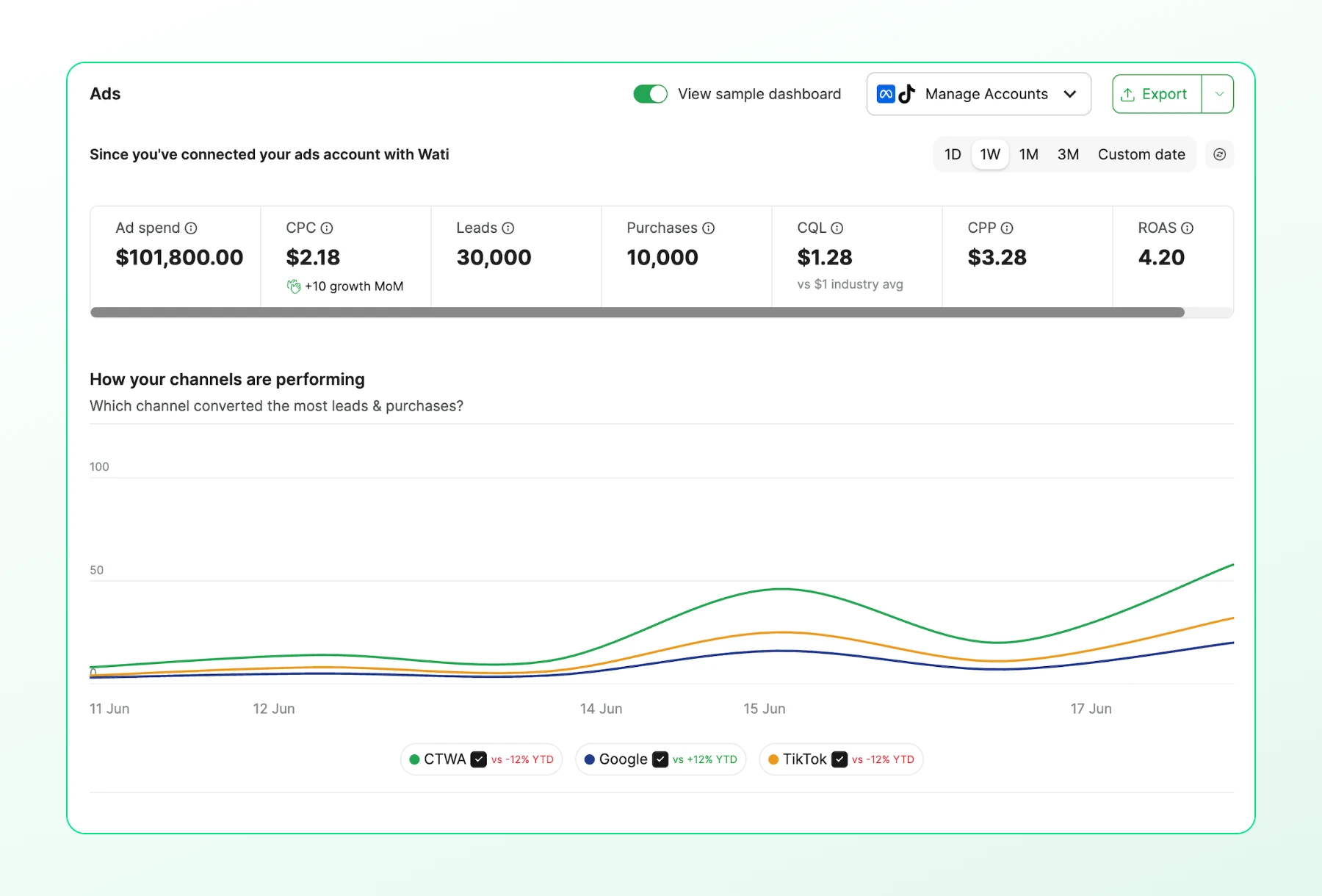
Once conversion tracking is live, Wati's Ads dashboard shows key performance metrics for your campaigns.
Overall Performance Metrics
For any date range, Wati tracks:
Metric | What it shows |
Ad spend | Total amount spent on ads |
Cost per click (CPC) | Average cost for each ad click |
Qualified leads | Total number of qualified leads generated |
Purchases | Total number of purchases attributed to your campaigns |
Cost per qualified lead (CQL) | Average cost to acquire a qualified lead |
Cost per purchase (CPP) | Average cost to acquire a purchase |
Return on ad spend (ROAS) | Revenue generated for every unit spent on advertising |
Bonus read: How Much Do Click-to-WhatsApp Ads Cost? 2026 Pricing Breakdown
Channel Performance Comparison
Wati also lets you compare performance across:
- Click-to-WhatsApp Ads (CTWA)
- Google Click-to-Message Ads (CTM)
- TikTok Instant Messaging Ads
Reviewing these metrics together makes it easier to compare campaigns and see which channels are delivering better results.
Funnel Conversion Insights
Wati also shows how leads move through the conversion funnel:
- Overall conversion: Percentage of leads that successfully convert.
- Average time to convert: Average time a lead takes to complete a conversion.
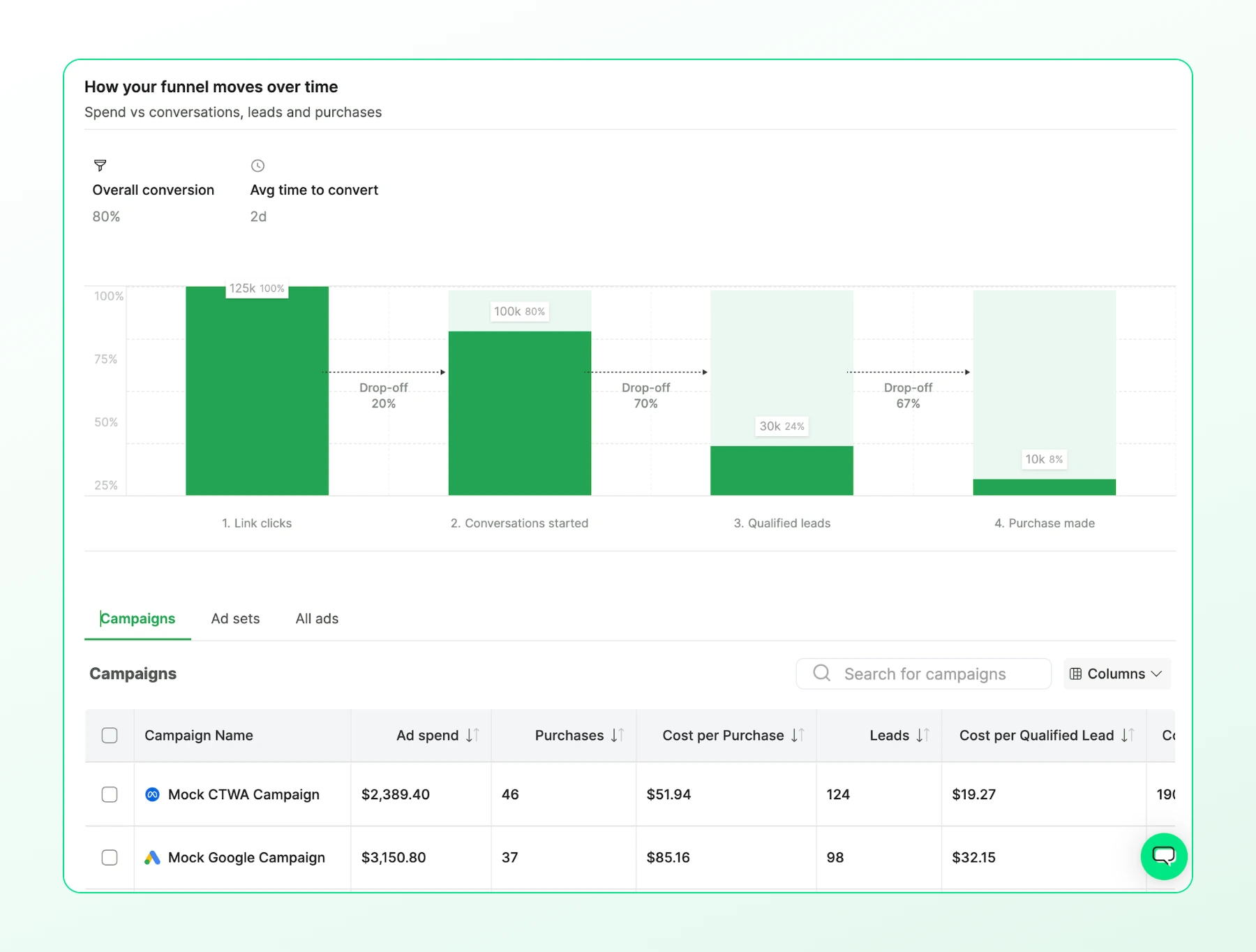
These metrics help you evaluate campaign performance beyond clicks and conversations.
New Unified Ads Analytics
Wati’s Unified Ads Analytics brings campaign data from Facebook, Google, and TikTok into one dashboard. Instead of reviewing each ad platform separately, you can see how campaigns perform across channels in the same place.
Facebook Ads Manager, Google Ads, and TikTok Ads Manager report clicks and spend of their respective campaigns.
Along with that, Wati adds the outcomes from the WhatsApp conversations, including qualified leads and purchases, so you can compare campaign results based on what happened after the customer started a conversation.
How Wati tracks the conversion depends on the advertising channel:
- Facebook CTWA and Google Click-to-Message Ads (CTM): You select the template message that represents a conversion. Wati uses that message to identify conversions from these campaigns.
- TikTok Instant Messaging Ads: An agent labels the conversation outcome, such as Qualified Lead or Purchase. Wati sends that conversion label to TikTok Ad Manager through the Events API.
Retarget Tracked Leads into Repeat Revenue
Once conversions are tracked, the same audience data can be used for WhatsApp remarketing.
Here’s how to retarget leads and customers from Wati:
- Click the Retarget button in Wati.
- Choose the audience you want to reach:
- Qualified leads: send offers such as free trials or discounts.
- Customers who purchased: send follow-up offers or promotions.
Bonus Read: How to Optimize Click-to-WhatsApp Ads & Manage Budget (2026)
Best Practices for CTWA Conversion Tracking
These build on Wati's own conversion tracking best practices:
- Use your existing confirmation message as the conversion signal: If you already send a message after a purchase or lead action, use that exact template for tracking instead of creating a new one.
- Send at least 10 purchase signals to Meta: A small volume of signals gives Meta's algorithm enough data to improve ad targeting and performance.
- Track purchase value whenever possible: Without a purchase value, you can measure lead and purchase counts, but not ROAS.
- Use the 72-hour free-entry window: When a customer starts a conversation through a Click-to-WhatsApp Ad, the Free Entry Point (FEP) window provides 72 hours of free messaging from the start of the window. Use this period to follow up before standard messaging charges apply.
- Review channel performance regularly: Compare CTWA, Google Click-to-Message Ads (CTM), and TikTok Instant Messaging Ads metrics to find where your budget performs best.
The Bottom Line
Tracking conversations is only useful if it helps you make better advertising decisions. With CAPI, you can finally see which campaigns generate real revenue instead of just more chats.
With CTWA conversion tracking, Wati connects WhatsApp conversion outcomes to your ad campaigns. You can track qualified leads and purchases, review campaign performance, and use those outcomes for future advertising decisions.
Book a demo to see CTWA conversion tracking running on your own ad accounts.
Frequently asked questions
Do I need a developer to set up CAPI tracking for Click-to-WhatsApp Ads?
No. Wati handles the CAPI connection in the background. You connect your Facebook Ads account and choose which existing template messages count as conversions. No code, webhook, or tag manager setup is required.
Can I track conversions from Google Click-to-Message Ads (CTM) and TikTok Instant Messaging Ads too, or only Meta CTWA?
Wati tracks all three. Google Click-to-Message Ads (CTM) and TikTok Instant Messaging Ads use the same underlying WhatsApp conversion tracking setup as Meta CTWA, and Wati's unified dashboard reports on all three side by side.
What happens if I skip tracking purchase value?
You can still count leads and purchases and see cost per lead and cost per purchase. Without a purchase value, Wati cannot calculate ROAS, since that number depends on knowing how much revenue each purchase generated.
Which Wati plans include CTWA conversion tracking?
The feature is available on the Wati Business plan and as an add-on for the Growth and Pro plans .
Related posts
- How to Send Bulk Messages on WhatsApp Without Getting Blocked
Learn how to send bulk WhatsApp messages without getting blocked. Compare the WhatsApp Business app and API, messaging limits, costs, templates, and best practices for safe, compliant bulk messaging.
- Complete Guide to Instagram Automation
Instagram comment automation auto-replies to comments and DMs commenters within seconds via Meta's API. Covers strategy, use cases, and Wati setup.
- How to Set Up a TikTok Business Account: Step-by-Step Guide
Set up a TikTok Business Account step by step: switch from personal, pick a category, add your profile, and unlock ads and analytics.
- TikTok for Business: How to Set Up, Market, Advertise & Grow (2026)
Learn how to use TikTok for Business to build your brand, create content, run ads, manage customer messages, and turn views into growth.