
Too Long? Read This First
- Omnichannel marketing automation runs one connected customer journey across several channels, triggered by customer behavior rather than a fixed schedule.
- Every automated journey follows the same pattern: customer data, a trigger, a decision, a message on the right channel, and measurement.
- The foundations are unified customer data, event triggers, a journey builder, channel fallback, personalization, consent management, and attribution.
- Good first workflows include welcome journeys, abandoned cart recovery, post-purchase updates, ad lead nurturing, and win-back campaigns.
- AI agents can now run the two-way conversations that journeys start, with people stepping in when a conversation needs them.
- You should measure each journey by conversions and revenue, not each channel by opens and clicks.
Omnichannel marketing automation is the use of software to send connected, personalized messages across channels such as WhatsApp, SMS, email, and social media, triggered by what each customer actually does.
Instead of scheduling separate campaigns for every channel, you build one journey that reacts to customer behavior and moves across channels on its own.
In this guide:
- You will learn how omnichannel marketing automation works, what you need to set it up, and seven ready-to-use workflows you can launch first.
- We show how Wati, an agentic customer engagement platform used by more than 16,000 businesses, runs these journeys with WhatsApp at the center, with AI agents and your team working from the same customer thread.
- We also cover the metrics to track, the mistakes to avoid, and how to run automated journeys with WhatsApp at the center.
What is Omnichannel Marketing Automation?
Omnichannel marketing automation is a way of running marketing campaigns in which customer actions trigger messages that move across channels as one continuous journey.
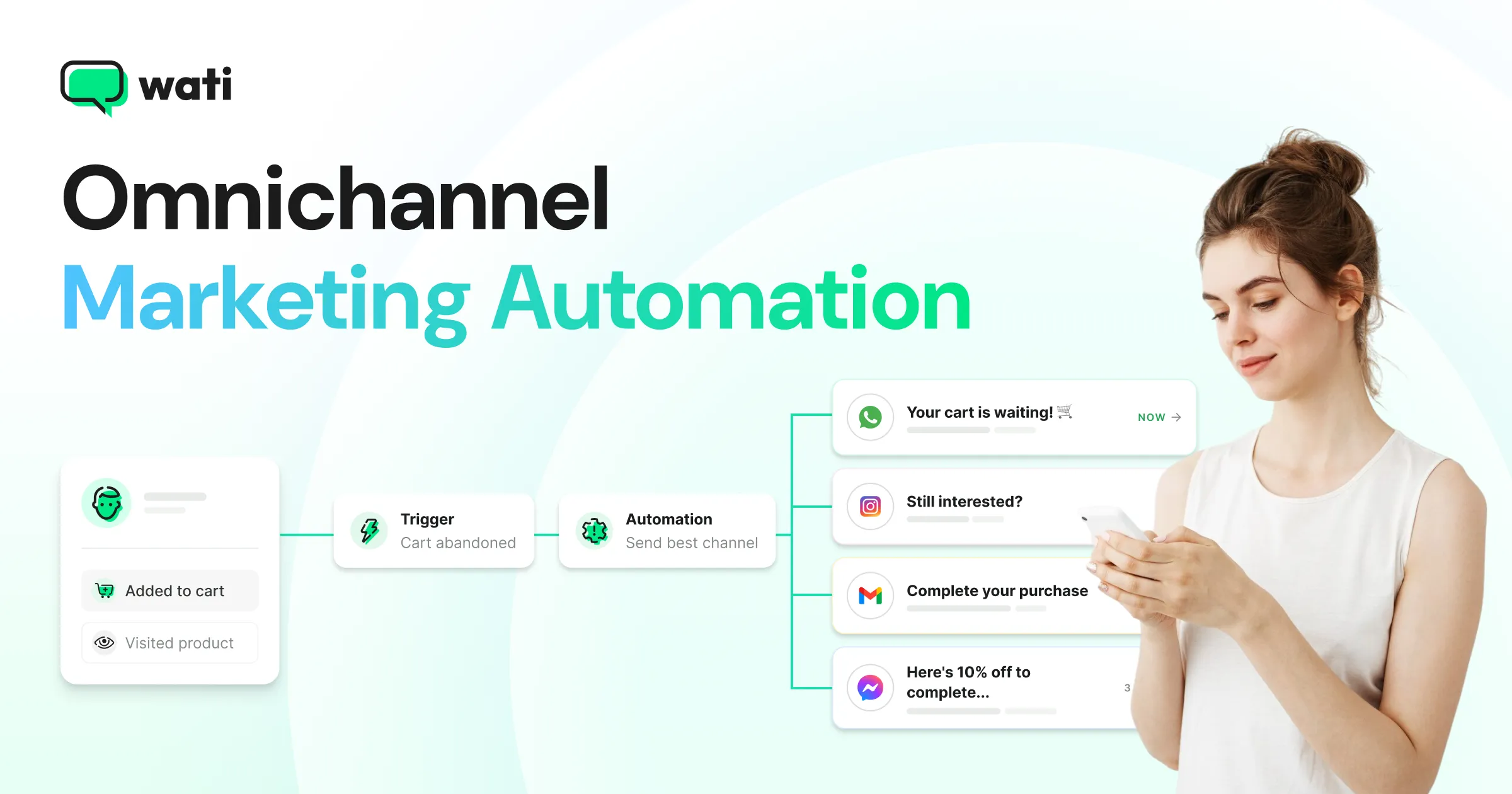
A customer who abandons a cart might get a WhatsApp reminder first, an SMS if the WhatsApp message fails to deliver, and a discount only if they still haven't bought after a day.
Omnichannel automation is different from simply scheduling campaigns in advance. Scheduled campaigns send the same message to a list at a set time.
Automated omnichannel journeys decide what to send, when, and on which channel based on each customer's behavior and history.
Omnichannel marketing automation puts the wider idea of omnichannel marketing into practice. The strategy decides what a connected experience should look like, and automation makes it happen at scale.
How Does Omnichannel Marketing Automation Work?
Omnichannel marketing automation works by connecting five stages, which every automated journey passes through, whichever channels it uses.
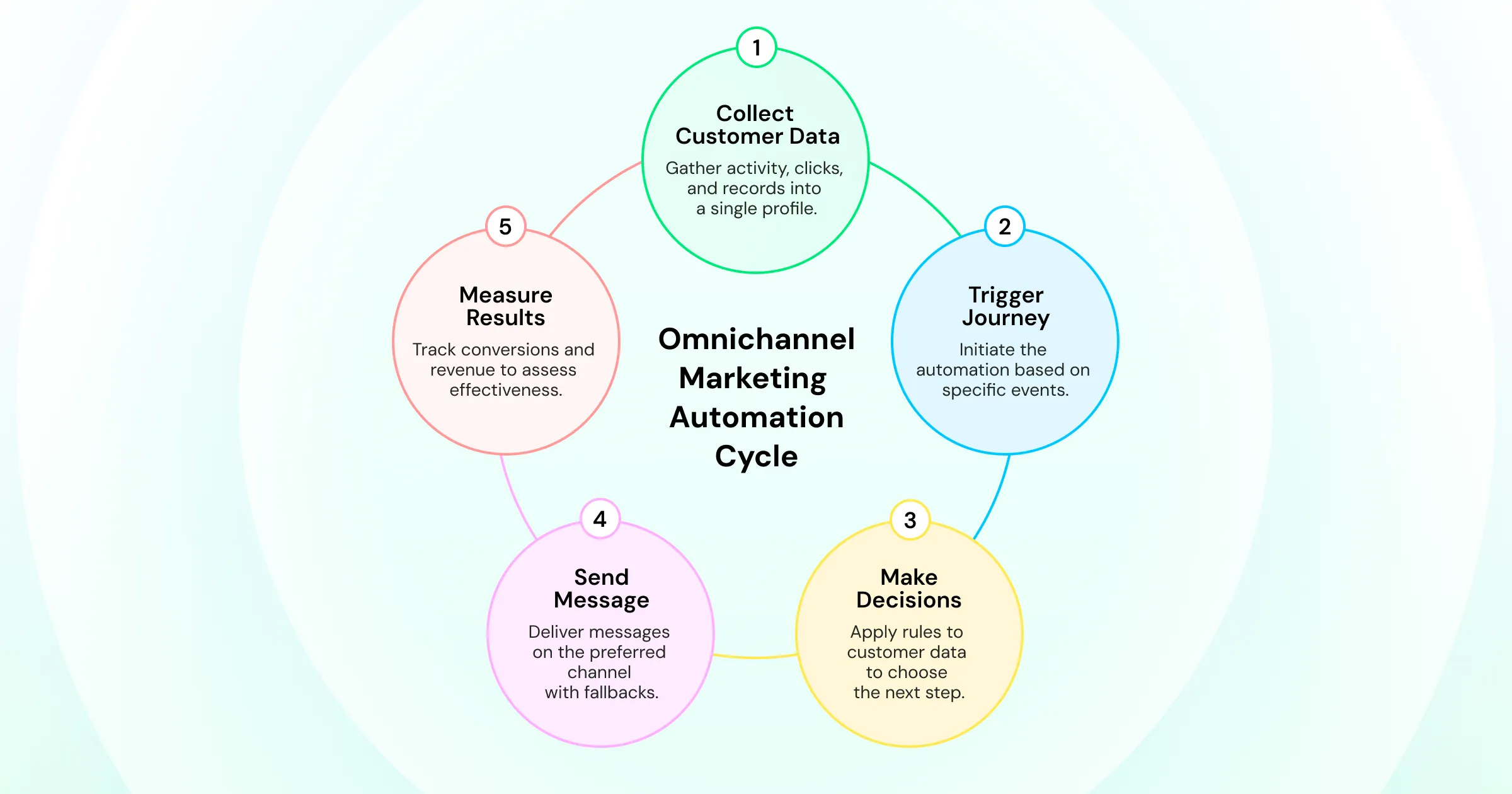
1. Customer data is collected in one place: Store activity, ad clicks, CRM records, and past messages feed a single customer profile.
2. A trigger starts the journey: A trigger is an event, such as a new sign-up, an abandoned checkout, a completed order, or a click on an ad.
3. The journey makes a decision: Rules check the customer's data, such as whether they have bought before, which channel they prefer, or whether they opened the last message, and choose the next step.
4. A message goes out on the right channel, with a fallback: The journey sends the message on the customer's preferred channel. If that channel isn't available or the message fails, it tries the next one.
5. Results are measured against the journey's goal: Conversions, revenue, and replies are tracked for the whole journey, so you can see which steps work.
When a customer replies, the best journeys pause the automation and hand the conversation to an AI agent or a person, with the full history attached, so marketing never talks over a real question.
How is Omnichannel Marketing Automation Different From Multichannel Automation?
Multichannel marketing automation runs separate automations on each channel, such as an email sequence in one tool and SMS reminders in another.
Omnichannel marketing automation runs one journey that shares data across all channels, so each message reflects what the customer did on the last one.
What Do You Need to Automate Omnichannel Marketing?
To automate omnichannel marketing, you need seven capabilities working together.
In a Gartner survey of 413 marketing technology leaders, 81% said they were piloting or already implementing AI agents, yet half said their organizations lack the technical and data stack readiness those initiatives require. So, Data readiness is the most common gap.
- Unified customer data: One profile per customer that combines store, ad, CRM, and messaging data.
- Event triggers: Connections to your store, ad accounts, and CRM, so real customer actions can start journeys.
- A journey builder: A visual way to set steps, waits, and branches without writing code.
- Channel coverage with fallback: Support for your priority channels, plus rules that switch to a backup channel when the first one fails.
- Personalization: Dynamic fields such as name, product, order number, and past purchases in every message.
- Opt-in and consent management: Clear records of who agreed to receive marketing on each channel. On WhatsApp, businesses must collect opt-in before sending business-initiated messages, including marketing messages.
- Attribution: Tracking that connects each journey and each ad to the conversations and revenue it produces.
Which Channels Can You Include in Omnichannel Marketing Automation?
You can include any channel that can receive automated, personalized messages. The most common channels are:
- WhatsApp: High-attention messaging with rich media, buttons, catalogs, and two-way conversations. Paid business messaging on WhatsApp crossed a $2 billion annual run rate in Q4 2025, according to Meta's January 2026 earnings call. Our guide to WhatsApp marketing explains how brands use it across the funnel.
- SMS and RCS: Wide reach for short reminders and a reliable fallback when richer channels are not available.
- Email: Long-form content, newsletters, and receipts.
- Instagram and Facebook Messenger: Conversations started from comments, DMs, and ads.
- Paid ads: Click-to-message ads that open a chat instead of a landing page, plus retargeting audiences built from journey data.
The right mix depends on where your customers already spend time. For many e-commerce and D2C brands, a messaging channel like WhatsApp becomes the center of the journey, with other channels supporting it.
What are the Best Omnichannel Marketing Automation Workflows to Start With?
The best omnichannel marketing automation workflows to start with are the ones tied to high-intent customer actions.
These seven workflows cover the full customer lifecycle, and each one lists its trigger, channel sequence, and goal.
1. Welcome Journey
- Trigger: A customer signs up, opts in, or messages you for the first time.
- Sequence: An instant WhatsApp welcome with a first-order offer, then a product guide two days later, and an SMS reminder before the offer expires.
- Goal: Turn a new contact into a first purchase.
2. Abandoned Cart Recovery With Channel Fallback
- Trigger: A shopper leaves checkout without paying.
- Sequence: A WhatsApp reminder with the cart items after one hour, an SMS or RCS message if WhatsApp isn't available, and a small incentive after 24 hours only if the cart is still open.
- Goal: Recover the sale without discounting every cart.
3. Post-Purchase and COD Verification Journey
- Trigger: An order is placed.
- Sequence: An order confirmation, a cash-on-delivery verification request where relevant, shipping and delivery updates, and a review request after delivery.
- Goal: Reduce failed deliveries, cut "where is my order" questions, and collect reviews.
4. Click-to-WhatsApp Ad Lead Nurture
- Trigger: A prospect taps a click-to-WhatsApp ad on Facebook or Instagram.
- Sequence: An instant automated reply that asks one or two qualifying questions, a product recommendation based on the answers, and a handoff to a sales agent for high-intent leads.
- Goal: Convert ad clicks into qualified conversations while interest is highest. Our guide to click-to-WhatsApp ads covers how these ads work.
5. Back-in-Stock and Price Drop Alerts
- Trigger: A product a customer viewed, saved, or asked about is restocked or discounted.
- Sequence: A WhatsApp alert with a direct buy link, followed by a reminder if the customer opens it but does not buy.
- Goal: Capture demand you already created.
6. Win-Back Journey
- Trigger: A customer hasn't purchased within their usual buying cycle.
- Sequence: A personalized recommendation based on past purchases, then a loyalty offer a week later, then a final message before the customer is moved to a lower-frequency list.
- Goal: Reactivate lapsed customers without over-messaging them.
7. Flash Sale and Event Journey
- Trigger: A sale, launch, or event date approaches.
- Sequence: An early-access broadcast to your most engaged segment, a reminder when the sale opens, and a retargeting message to customers who clicked but did not buy.
- Goal: Drive revenue in a short window, with extra reach to high-intent segments.
How Do You Set Up Omnichannel Marketing Automation?
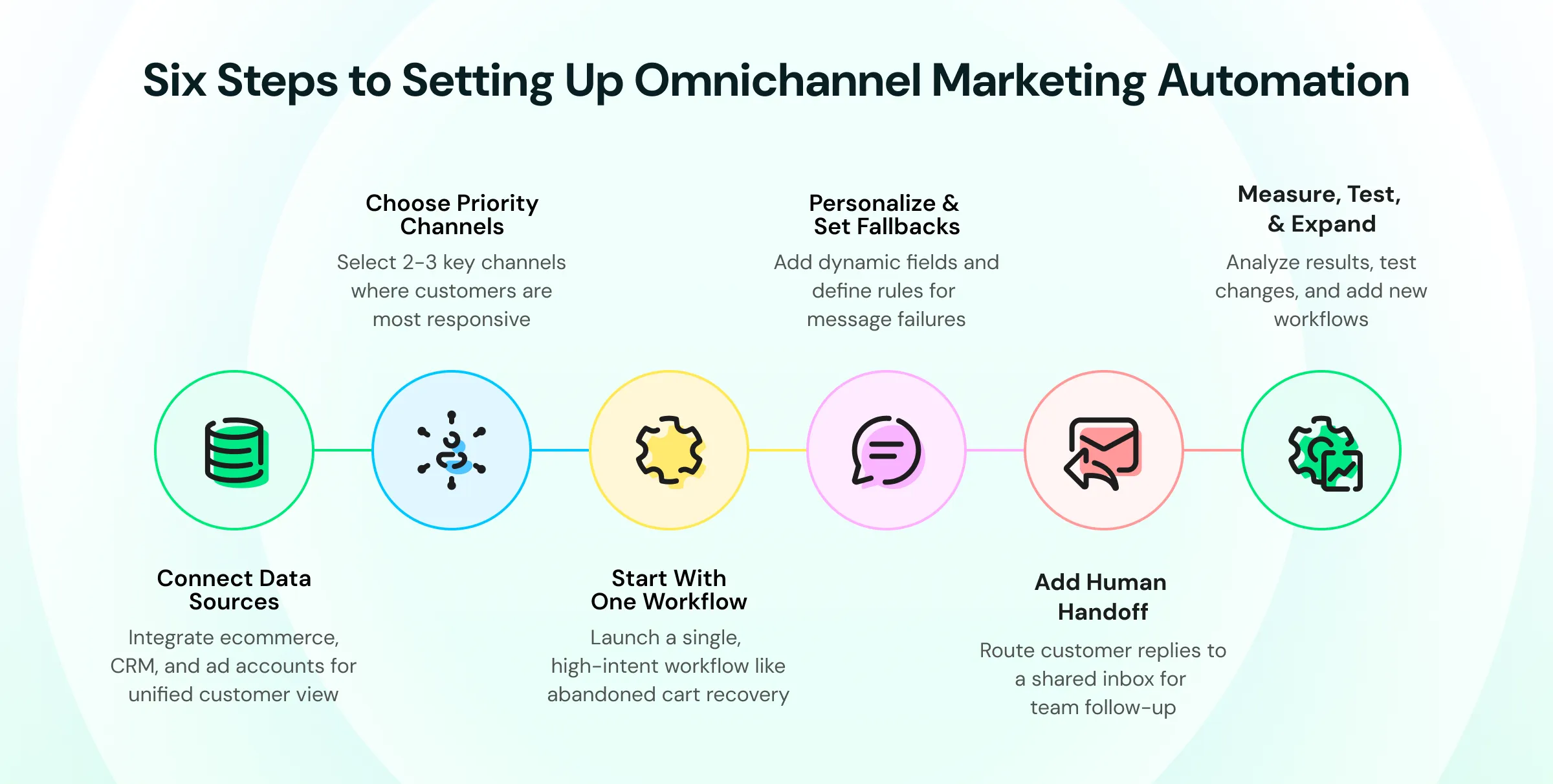
You can set up omnichannel marketing automation in six steps, starting small and expanding once the first journeys prove themselves.
Step 1: Connect Your Customer Data Sources
Connect your e-commerce store, CRM, and ad accounts to one platform so customer actions can trigger journeys. Check that every contact has a clear record of which channels they have opted in to.
Step 2: Choose Two or Three Priority Channels
Pick the channels where your customers already respond. For many brands, that means a messaging channel such as WhatsApp plus SMS as a fallback, with email for long-form content.
Step 3: Start With One High-Intent Workflow
Launch one revenue-related workflow, such as abandoned cart recovery or ad lead nurturing. A single journey that works is more useful than seven journeys launched at once.
Step 4: Personalize and Set Fallback Rules
Add dynamic fields such as the customer's name, cart items, and order status, then decide what happens if a message fails or goes unanswered. Every journey should have an exit rule, so customers stop receiving reminders once they convert.
Step 5: Add AI Agents and a Human Handoff for Replies
Decide who answers when a customer replies. An AI agent can reply instantly, answer product and order questions, and qualify leads around the clock, then pass the conversation to a shared inbox when a person should take over. Make sure the handoff carries the customer's history, so your team never starts from a cold thread.
No plan for replies: Automations that ignore replies frustrate customers with real questions. Route replies to an AI agent or your team, with the conversation history attached.
Step 6: Measure, Test, and Expand
Compare conversions and revenue for each journey, test one change at a time (such as timing, offer, or channel order), and add the next workflow once the first one is stable.
Bonus Read: Customer Journey Analytics - Easiest Analysis Framework
Where Do AI Agents Fit in Omnichannel Marketing Automation?
AI agents handle the part of an omnichannel journey that rules can't: the customer's reply. A journey builder decides when an abandoned cart reminder goes out and on which channel. When the customer replies with a question, such as "does this come in blue?" or "can I pay on delivery?", a rule-based chatbot can only offer preset buttons.
An AI agent can understand the question, answer from the brand's product knowledge, and move the customer toward checkout.
In practice, the three layers work together. Journeys trigger and time the messages, AI agents run the two-way conversation that follows, and people step in for high-value or sensitive conversations with the full history in front of them.
Task | Journey rules | AI agent | Your team |
|---|---|---|---|
Decide when and where to send | ✅ | ||
Answer open-ended replies | ✅ | ||
Qualify leads and recommend products | ✅ | ||
Handle negotiations, complaints, VIP accounts | ✅ |
What Results Can You Expect From Omnichannel Marketing Automation?
Omnichannel marketing automation delivers four main results that manual, channel-by-channel campaigns struggle to match.
- Faster, better-timed messages: Journeys respond the moment a customer acts, instead of waiting for the next scheduled campaign.
- Less manual work: Your team builds a journey once, and it runs for every customer who triggers it.
- Clearer attribution: Because the journey tracks every step, you can see which messages and channels actually drive revenue.
- More relevant messages: Customers receive messages based on what they did, which makes each one easier to act on and less likely to feel like spam.
Which Metrics Should You Track for Omnichannel Marketing Automation?
The most useful omnichannel marketing automation metrics measure journeys, not individual channels. Track these metrics for each workflow:
Metric | What It Measures | Why It Matters |
|---|---|---|
Journey conversion rate | Share of customers who complete the journey's goal | Shows whether the workflow works end-to-end |
Revenue per journey | Revenue attributed to each workflow | Shows which journeys deserve more investment |
Time to conversion | Time from trigger to goal | Reveals whether waits and timing are set well |
Channel fallback rate | Share of messages sent on a backup channel | Shows how often your first channel fails to reach customers |
Reply rate | Share of customers who reply to a message | Signals engagement and human handoff demand |
Opt-out rate | Share of customers who unsubscribe or block | Warns you when a journey sends too much |
What Mistakes Should You Avoid With Omnichannel Marketing Automation?
Most omnichannel marketing automation problems come from sending too much or connecting too little. Avoid these five common mistakes:
- Over-messaging: Stacking journeys without frequency limits sends the same customer several messages a day. Set a cap across all journeys.
- Skipping consent: Sending marketing messages without a clear opt-in damages trust and can break channel rules. Record opt-in per channel.
- No fallback channel: If a message fails and nothing else happens, the journey silently stops. Add a backup channel or step.
- No human handoff: Automations that ignore replies frustrate customers with real questions. Route replies to your team.
- Measuring channels instead of journeys: Open rates on one channel say little about revenue. Judge each journey by its goal.
How Does Wati Automate Omnichannel Marketing Journeys?
Wati is an agentic customer engagement platform that turns conversations into revenue growth across marketing, sales, and support.
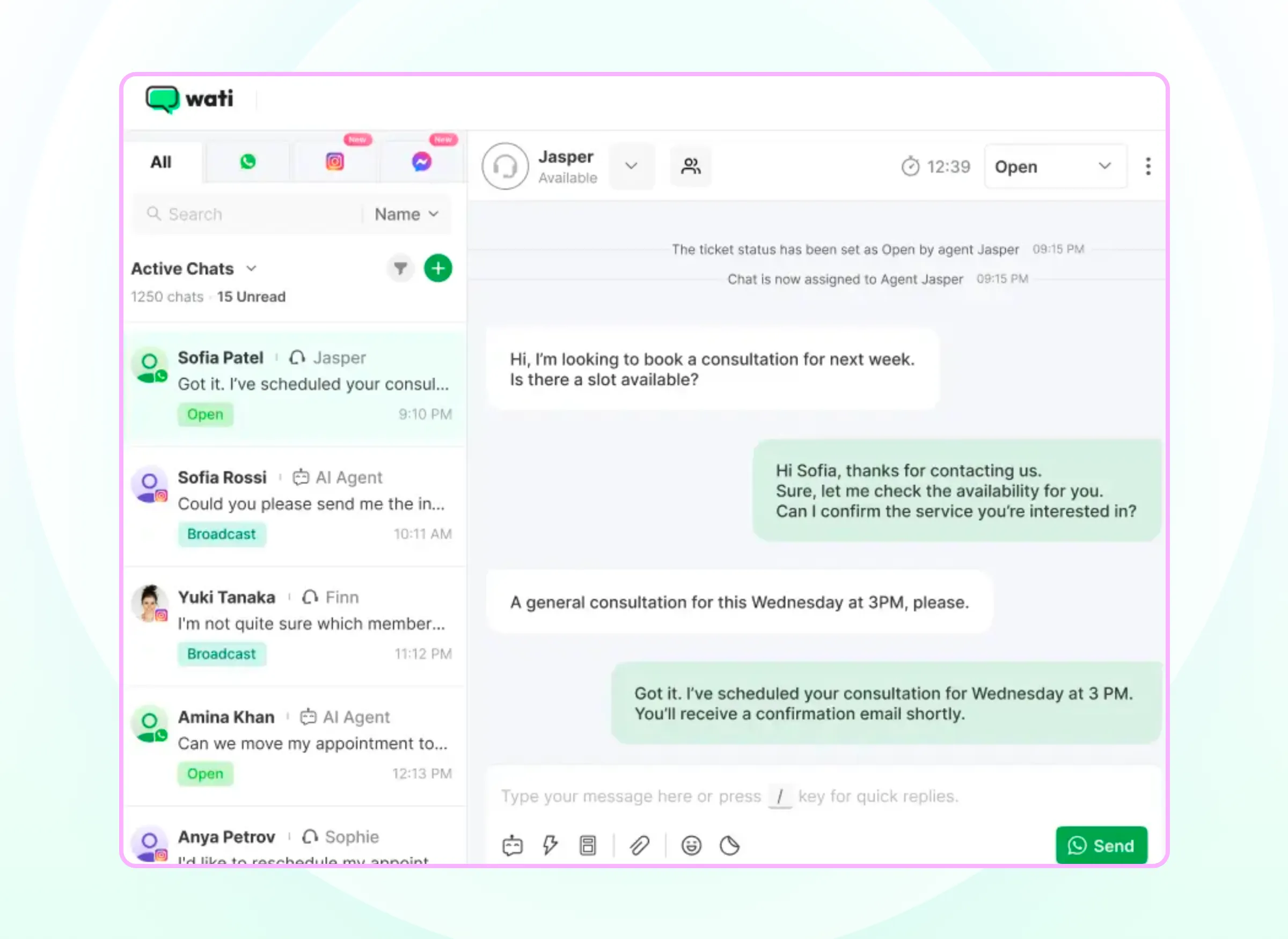
For omnichannel marketing automation, Wati runs journeys with WhatsApp at the center and connects Instagram, Facebook Messenger, RCS, SMS, voice, and web chat around it, so AI agents and your team work from the same customer thread.
Store-Triggered Journeys With Channel Fallback
Journeys start from what customers actually do in your store and CRM. The native Shopify integration triggers messages for abandoned carts, order confirmations, shipping updates, COD verification, post-purchase follow-ups, and returns.
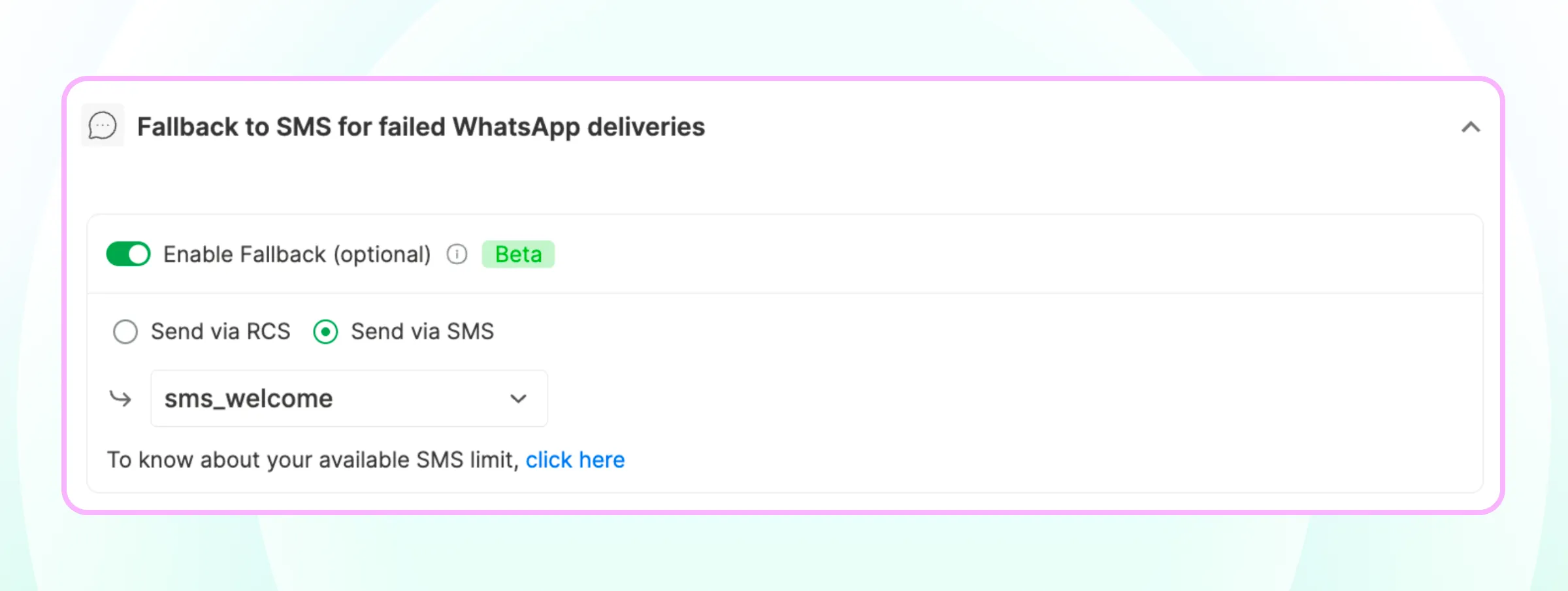
Wati also connects with HubSpot, Salesforce, and 100+ other tools. If WhatsApp isn't available, recovery messages fall back to RCS and then SMS, so the journey keeps moving.
Ad-to-Conversation Attribution for Click-to-WhatsApp and Google Ads
Every ad-driven conversation is tied back to revenue. Click-to-WhatsApp ad leads are tagged automatically with their campaign, ad set, and creative.
Google click-to-message ads route into the same inbox, tagged by source; this requires Google whitelisting, which typically takes about a week. Learn more in our guide to optimizing click-to-WhatsApp ads and budget.
Behavior-Based Retargeting and In-Chat Checkout
Campaigns adapt to how each customer responds. You can send segmented campaigns, then retarget customers based on whether they read, replied, or clicked a link or button.
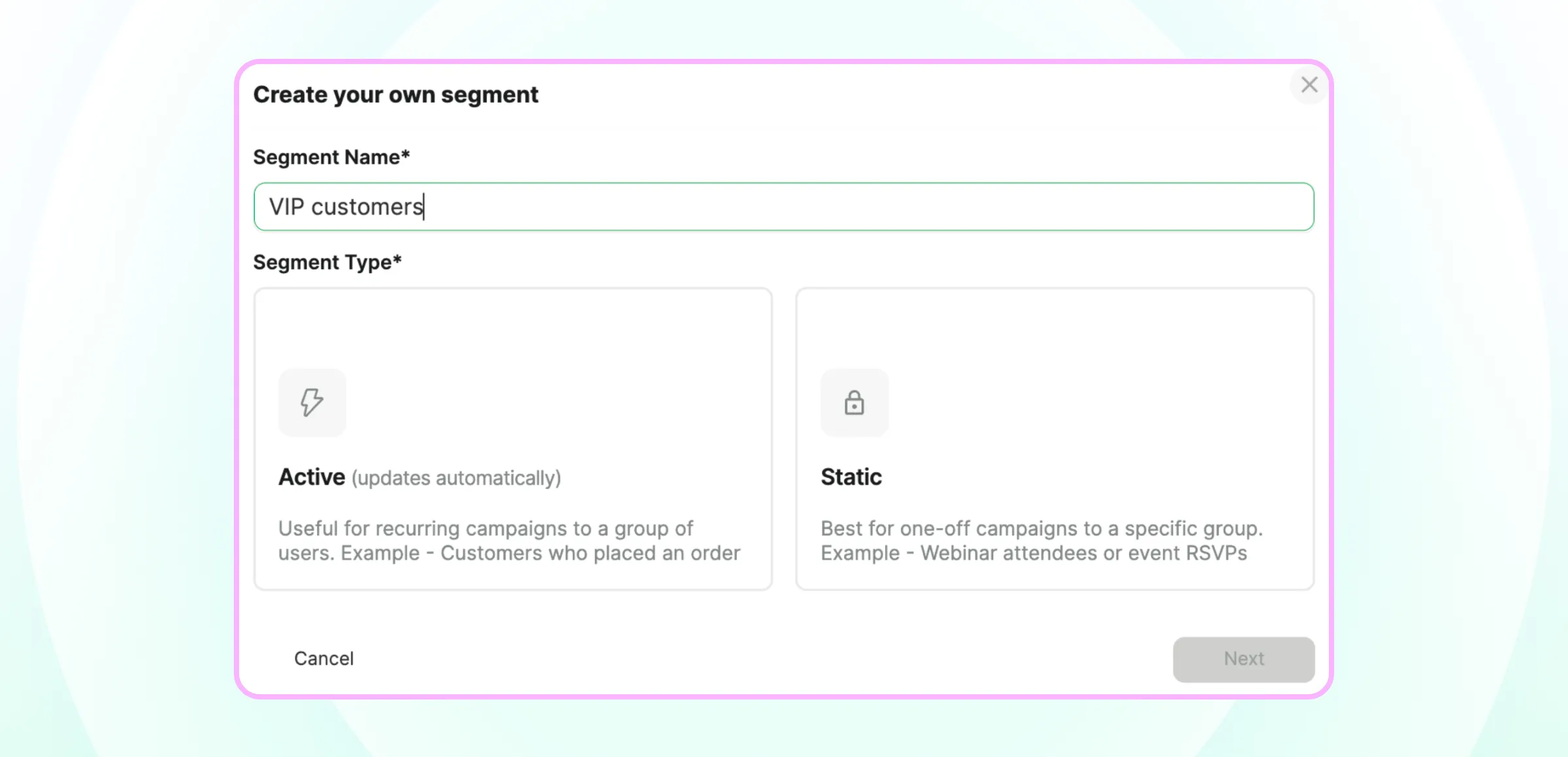
Reply- and click-based retargeting is available on Pro and Business plans. In supported markets, customers can also browse a catalog and pay without leaving WhatsApp.
AI Agents, Voice Calls, and Human Handoff
When customers reply, the Astra AI Agent runs the conversation. It responds instantly to journey replies and ad leads, answers from your own knowledge, qualifies leads, and updates your CRM.
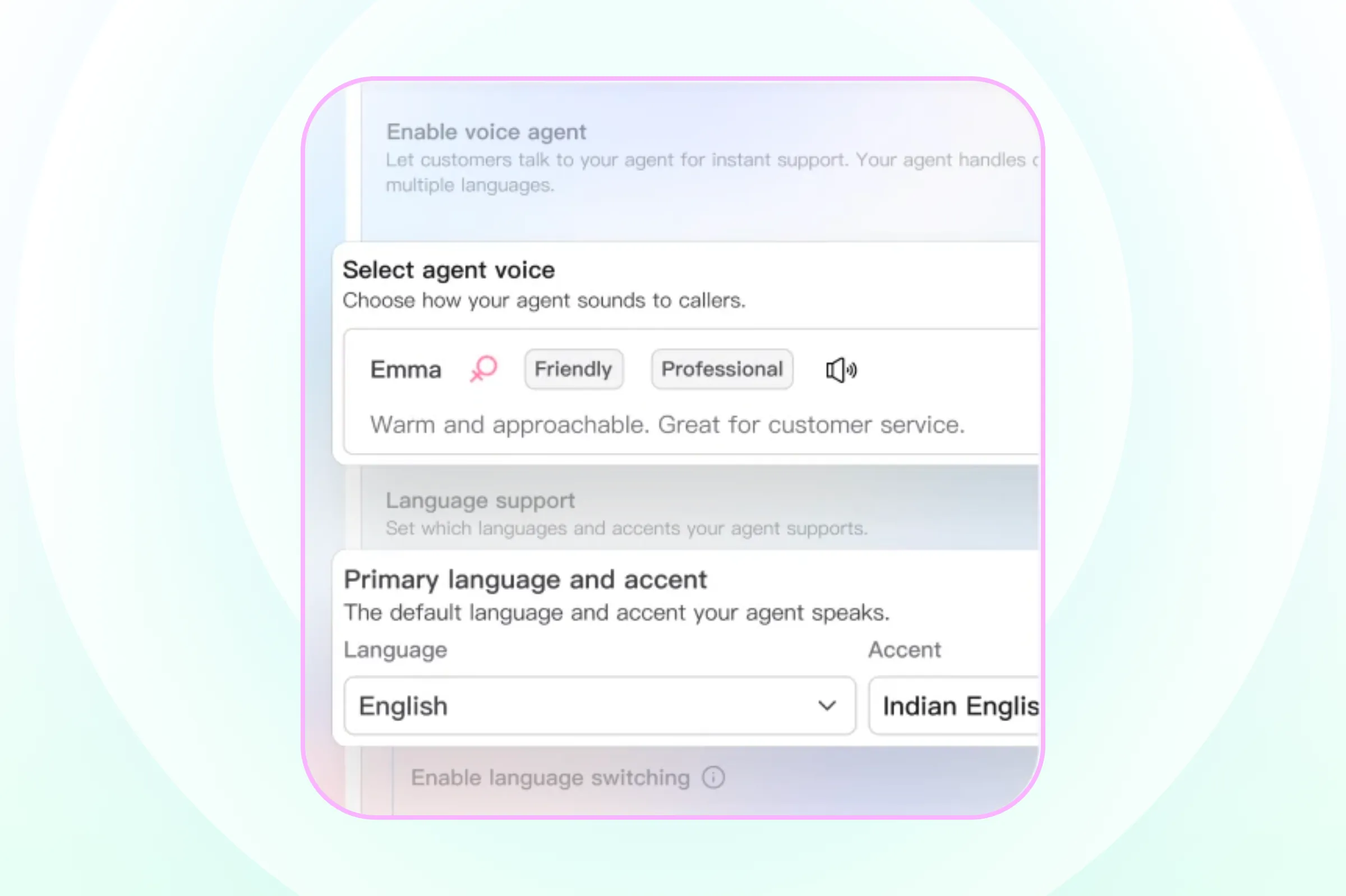
On voice, the Astra AI Agent handles calls in your brand's own cloned voice across 30+ languages. When a person should step in, the conversation moves to the shared Team Inbox with its full history.
There, Wati AI Copilot gives your team live summaries and translations and scores each customer's intent.
Customer and Campaign Intelligence Across Every Channel
Journeys also get smarter over time. Contact Intelligence builds each customer's history and preferences across interactions.
Campaign Intelligence learns what worked, on which channel, and for which segment, then applies it to the next campaign. Instagram and Facebook Messenger conversations land in the same inbox too, and our guide to Instagram comment automation shows how to turn comments into conversations.
Start Automating Your First Omnichannel Journey
Omnichannel marketing automation turns separate campaigns into connected journeys that react to what customers do.
Start with one high-intent workflow, connect your data and priority channels, add a fallback and a human handoff, and expand once the results are clear.
If your customers already message you on WhatsApp, Wati lets you trigger journeys from your store and ads, follow up automatically, and hand conversations to your team in one place.
Ready to automate your first journey? Start your free Wati trial or book a demo.
Frequently asked questions
What is omnichannel marketing automation?
Omnichannel marketing automation is the use of software to run connected marketing journeys across channels such as WhatsApp, SMS, email, and social media. Customer actions trigger each message, and the journey shares data across channels so every step reflects what the customer did before.
How is omnichannel marketing automation different from marketing automation?
Traditional marketing automation often runs on one channel, most commonly email. Omnichannel marketing automation runs one journey across several channels, chooses the right channel for each customer, and falls back to another channel when the first one does not reach them.
Which channels can you automate in an omnichannel journey?
You can automate any channel that supports personalized, triggered messages, including WhatsApp, SMS, RCS, email, Instagram, Facebook Messenger, and paid ad audiences. Most brands start with two or three channels where their customers already respond.
Is omnichannel marketing automation only for large companies?
No, omnichannel marketing automation is not only for large companies. Small and mid-sized businesses can start with one or two workflows, such as abandoned cart recovery or ad lead nurturing, using no-code journey builders connected to their store and messaging channels.
What are the four pillars of omnichannel marketing automation?
The four pillars of omnichannel marketing automation are unified customer data, event-based triggers, connected channels with fallback, and journey-level measurement. Together, they let a business send the right message on the right channel at the right time and prove which journeys drive results.
Can AI agents run omnichannel marketing automation?
Yes. AI agents can run the conversations that omnichannel journeys start. Journey rules decide when and on which channel to send each message. AI agents then answer replies, qualify leads, and recommend products, and they hand conversations to a person with the full history when a human should take over.
Related posts
- How to Send Bulk Messages on WhatsApp Without Getting Blocked
Learn how to send bulk WhatsApp messages without getting blocked. Compare the WhatsApp Business app and API, messaging limits, costs, templates, and best practices for safe, compliant bulk messaging.
- Complete Guide to Instagram Automation
Instagram comment automation auto-replies to comments and DMs commenters within seconds via Meta's API. Covers strategy, use cases, and Wati setup.
- How to Set Up a TikTok Business Account: Step-by-Step Guide
Set up a TikTok Business Account step by step: switch from personal, pick a category, add your profile, and unlock ads and analytics.
- TikTok for Business: How to Set Up, Market, Advertise & Grow (2026)
Learn how to use TikTok for Business to build your brand, create content, run ads, manage customer messages, and turn views into growth.