
Too Long? Read This First
- A TikTok auto-reply in Wati is a rule with a trigger, a filter, and an action.
- Keyword replies answer one question in one message, and chatbots handle questions that need a follow-up.
- Replies on TikTok can include text and images only, and buttons show as plain text.
- Each industry pack gives you four or five keyword rules, including a hand-off to your team.
- Test every rule from a second TikTok account before you share your keywords.
Your TikTok inbox can fill up with the same questions about prices, product details, availability, and orders. Answering each DM manually takes time, especially when shoppers expect a quick reply.
With Wati's TikTok Business Messaging, you can set up auto-replies using keyword rules and chatbots. Keyword rules handle simple questions, while chatbots guide shoppers through product choices and route complex enquiries to your team.
In this guide, you'll learn how to set up TikTok auto-replies in Wati, configure welcome and out-of-office messages, and use ready-made rule packs for fashion, beauty, electronics, and perfume businesses.
What is a TikTok Auto-Reply and Why does it Matter?
A TikTok auto-reply is a message your business account sends automatically when a shopper sends a DM.
It helps you respond to common questions about prices, product details, availability, and orders without waiting for a support rep.
Auto-replies are especially useful on TikTok because:
- Shoppers message first: Your reply is your first opportunity to help them.
- Messaging is limited: You can send up to 10 messages within the first 48 hours after a shopper's initial DM, until they reply.
- Questions repeat: Keyword rules can send the same answer every time, including outside working hours.
How TikTok Auto Replies Work in Wati
A TikTok auto reply in Wati is an automation rule that answers a DM without a support representative. You decide which DMs it answers and what it sends back.
The action decides which kind of auto-reply the shopper gets:
Auto-reply type | What it does | Best for |
|---|---|---|
Keyword reply | Sends one text or image when a DM contains your keyword | Price, tester, warranty, and other one-answer questions |
Chatbot | Asks questions, reads the answer, and replies or assigns a team | Size, shade, model, and scent questions |
Welcome and Out of Office | Built-in rules for new chats and after-hours DMs | Greeting shoppers and listing your keywords |
Start with keyword replies, then add chatbots where the reply depends on the shopper's answer.
How to Set Up a TikTok Auto Reply in Wati
Before you start, check four things:
- A TikTok Business Account with Advanced Access.
- "Allow everyone to send direct messages" turned on.
- An account registered outside the US, EEA, Switzerland, UK, and India.
- A Wati Growth, Pro, or Business plan, with TikTok connected.
i. Create a TikTok Automation Rule
Create the reply or chatbot first, then follow these steps:
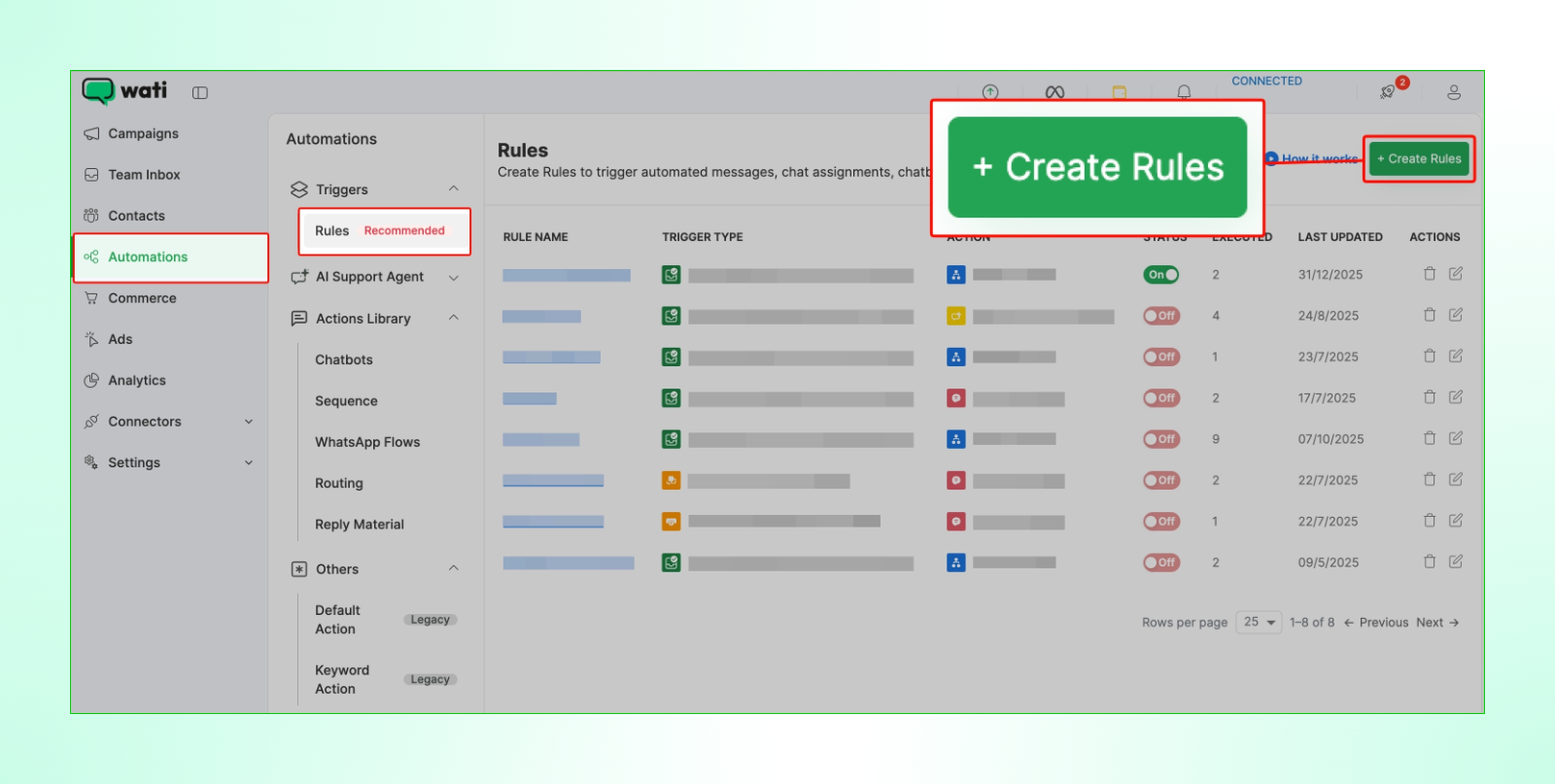
- Go to Automations.
- Create a new automation rule.
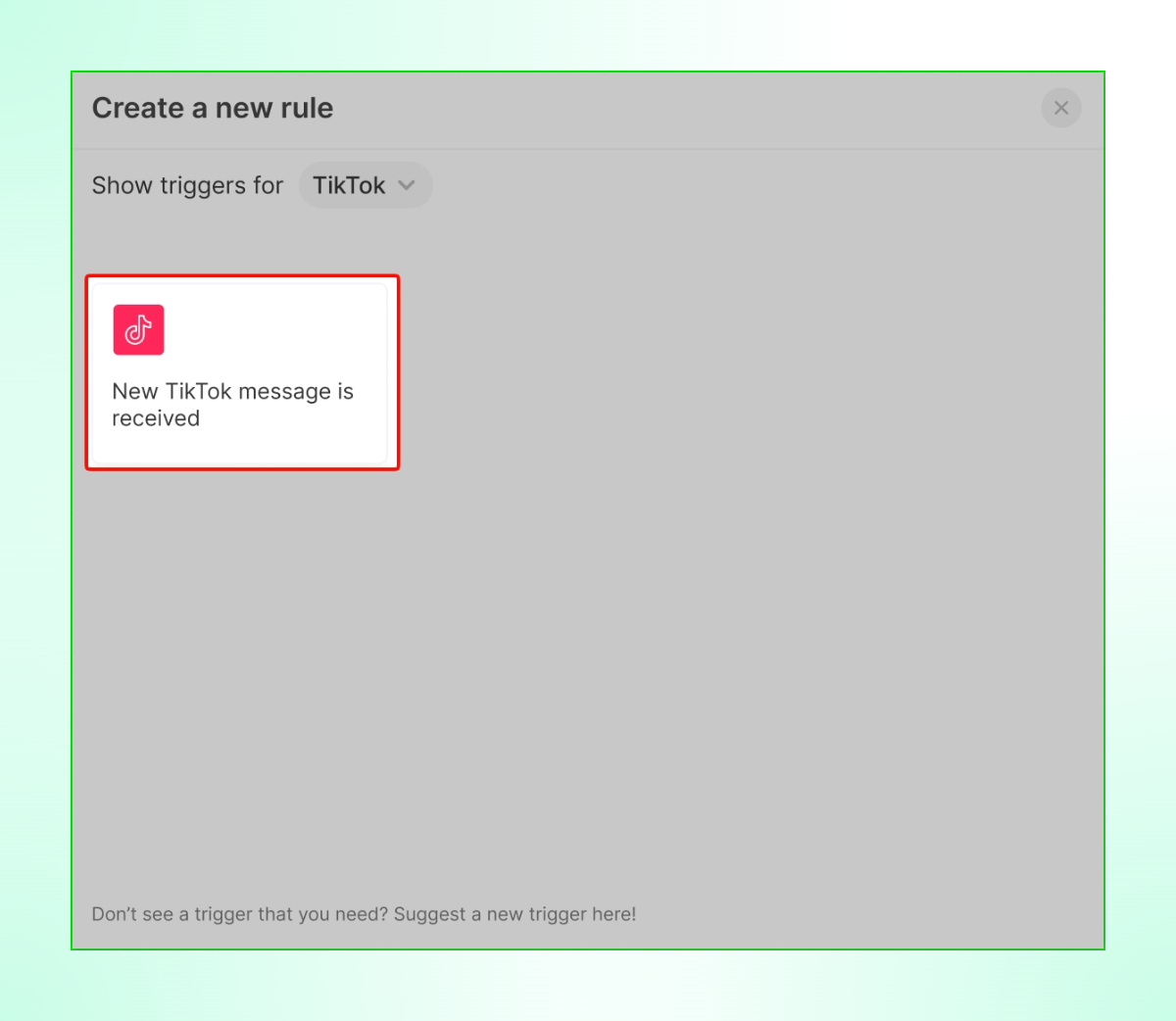
- Set the trigger to New TikTok message is received.
- Add at least one filter to define when the rule should run.
- Select an action.
- Save the rule.
- Turn it on.
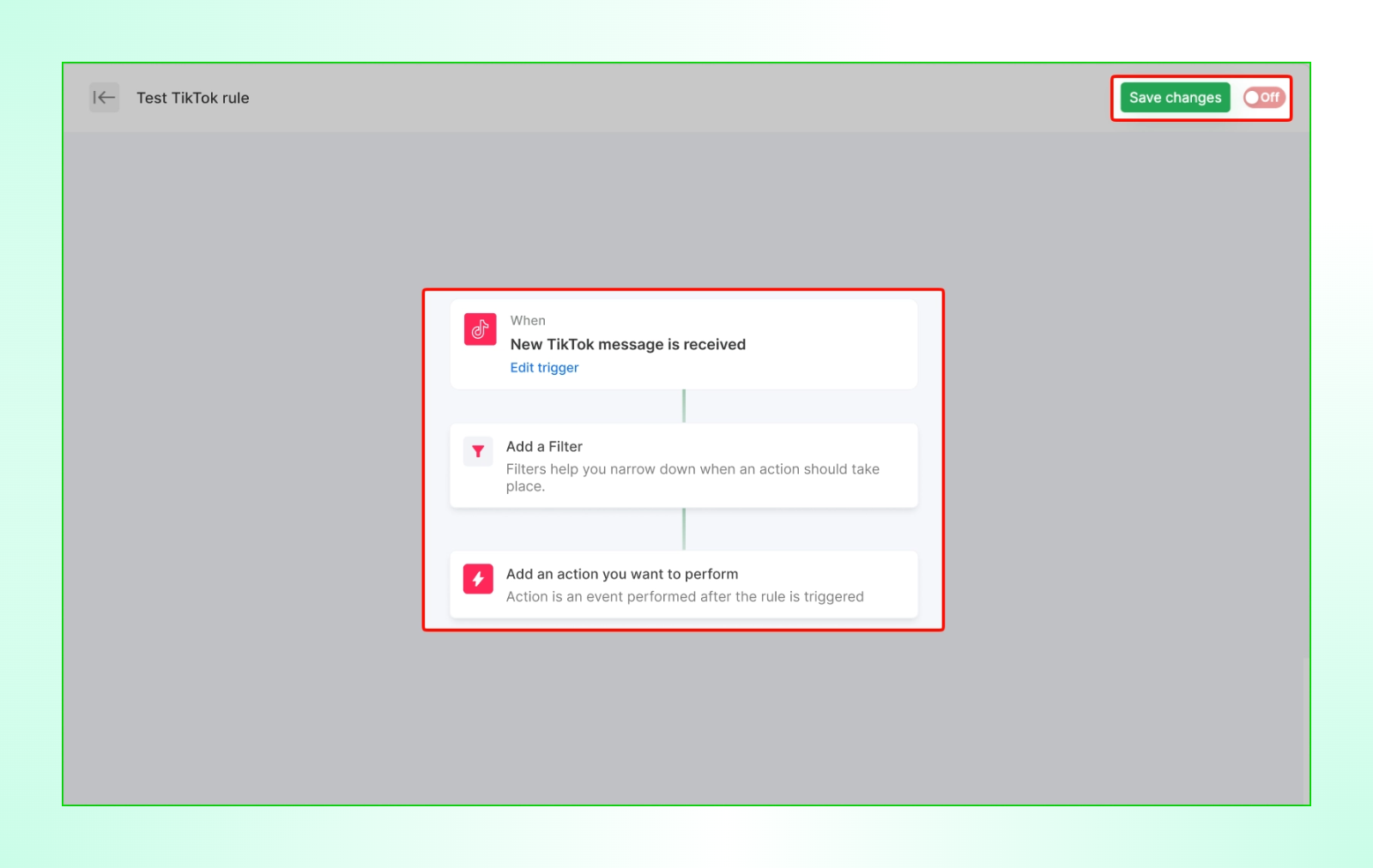
Every TikTok rule needs at least one filter. You can choose from these:
Filter | Options |
|---|---|
By Day / Time | Message received during or outside working hours |
By Chat Status | Chat initiated by a contact |
By Contact | Contact exists or doesn't exist |
By Message Content | Incoming message matches specific keywords |
By Custom Segment | Audience filtered by a custom segment |
No keyword match | No keyword rule(s) match; for DMs, no keyword rule answered |
ii. Create a TikTok Keyword-Based Automated Reply
A TikTok keyword reply runs when a DM contains a word or phrase you choose. Set it up in six steps:
- Create a TikTok automation rule.
- Select New TikTok message is received as the trigger.
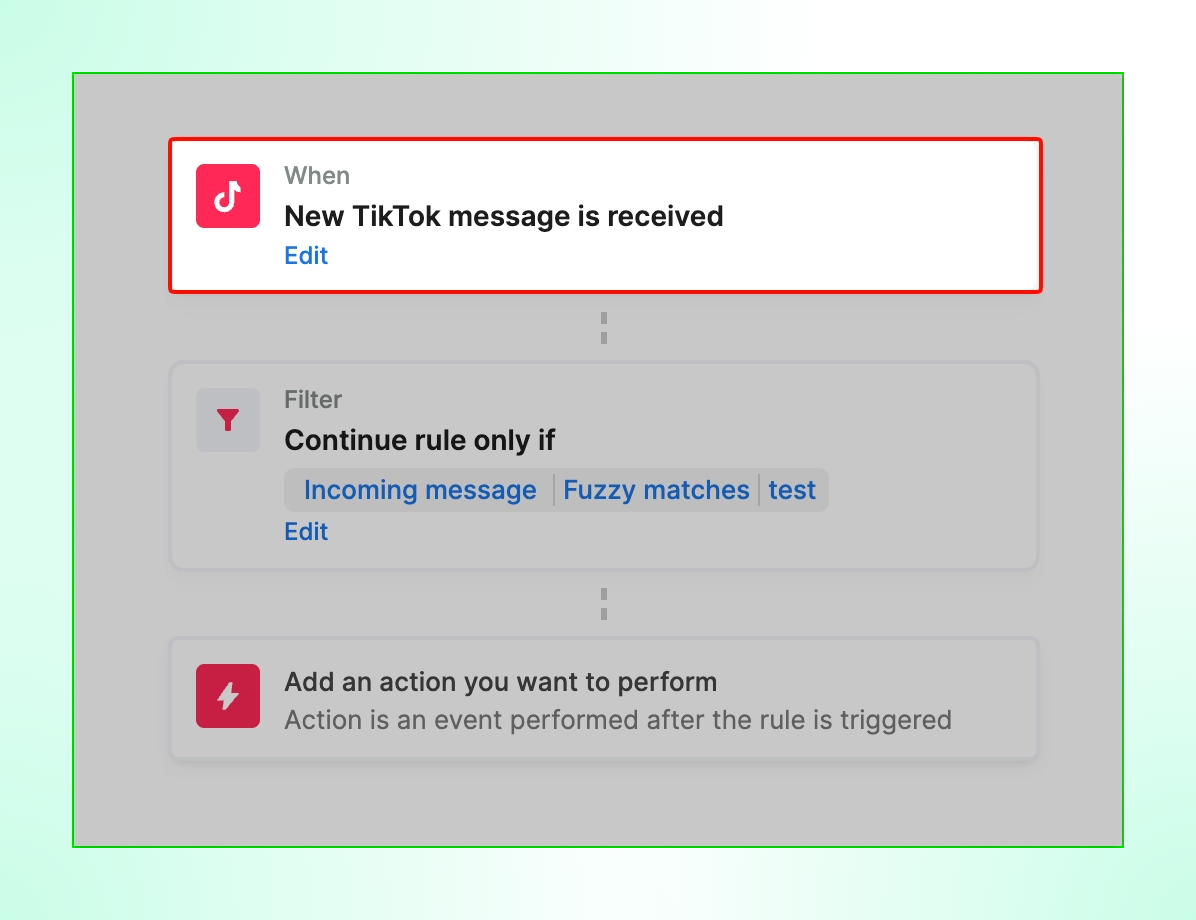
- Add the Incoming message matches keyword rule filter.
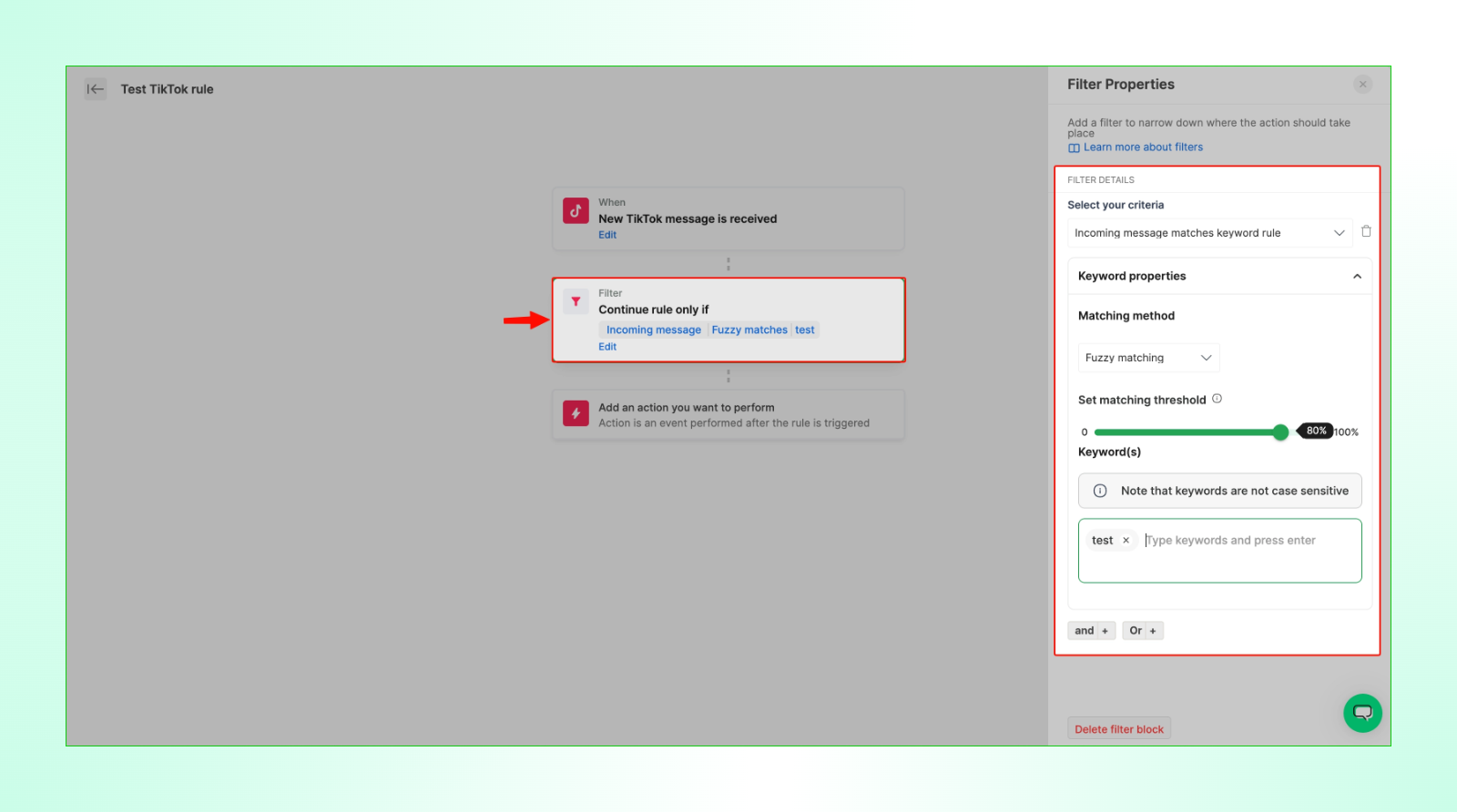
- Enter the keywords or phrases that should trigger the automation.
- Add an action.
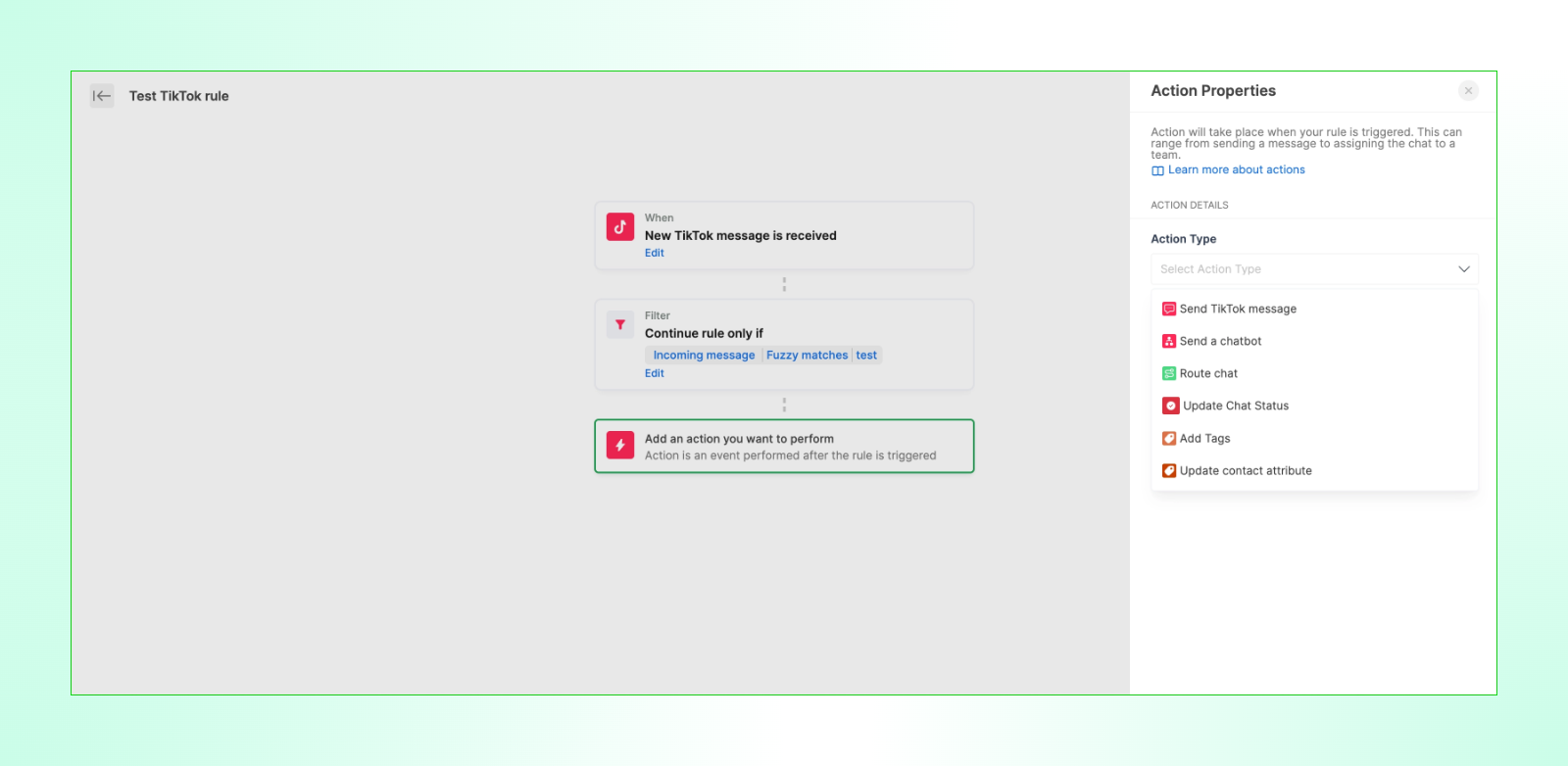
- Save the rule.
Pick a matching method and add as many keywords as you need. Keywords aren't case-sensitive, and Fuzzy matching catches typos.
Avoid short words like "hi," and add every spelling your shoppers use in each language.
iii. Choose an Action for Your TikTok Auto Reply
Pick an action for each rule:
Action | What it does |
|---|---|
Send TikTok message | Sends text or images |
Send a chatbot | Launches an existing chatbot flow |
Route chat | Assigns the conversation to a support rep or a team queue |
Update Chat Status | Changes the status to Open, Resolved, or Pending |
Add Tags | Adds labels to the conversation or contact |
Update contact attribute | Updates profile fields such as name, email, or qualification status |
A chatbot can send text and images, ask questions, set conditions, add or remove tags, and assign a team or user.
It can also update chat status, add time delays, trigger webhooks, and update Google Sheets.
Turn on Your TikTok Welcome Message and Out-of-Office Rule
When you connect TikTok, Wati creates two rules: TikTok Welcome Message and TikTok OOO Message. Both start switched off.
- TikTok Welcome Message: answers a new chat that arrives within working hours.
- TikTok OOO Message: answers DMs that arrive outside working hours.
Set your working hours first; they apply to every channel. Then edit both rules in Automations > Rules and switch them on.
Use the welcome message to list your keywords:
Hi, thanks for messaging [brand]! For a quick answer, type PRICE, SIZE, ORDER, or HUMAN. |
|---|
Keyword rules keep replying after hours unless you add a By Day / Time filter. Your out-of-office message can point shoppers to them:
We're back at [9 am, time zone]. Type PRICE or SIZE for an instant answer, or HUMAN and our team will reply first. |
|---|
TikTok Auto Reply Limits: Text, Images, and Message Caps
Build your rules around these TikTok limits:
TikTok limit | What to do in your rules |
|---|---|
No video, voice, or stickers | Send an image, then a text that works on its own |
Image delivery depends on regional support | Repeat the price, name, or link in the text |
Buttons appear as plain text | Use numbered options, such as "Reply 1, 2, or 3" |
10 messages in the 48 hours after the first DM; each reply opens a new window with no cap | Keep each rule to one to three messages |
3 more messages after 48 hours of silence, and no first message from the brand | Ask for a WhatsApp number early |
Our TikTok messaging window guide explains these limits.
Copy-Paste TikTok Auto Reply Rule Packs by Industry
Each pack lists the first keyword rules a store in that industry needs.
Every row is one rule, and [brackets] mark your own details.
A new chat during working hours gets your welcome message. To catch every other unmatched DM, add a rule with the "No keyword rule(s) matches" filter.
i. Fashion Rule Pack
Fashion DMs mostly ask about price, size, orders, and exchanges:
Rule | Keywords | Action | Reply |
|---|---|---|---|
PRICE | price, how much, cost, harga, precio, سعر | Send TikTok message (price-list image) | Today's prices are above. Type SIZE for our size chart. |
SIZE | size, size chart, fit guide, talla, مقاس | Send a chatbot (size chart and numbered options) | Our size chart is above. Which item are you looking at? |
ORDER | my order, track, tracking, where is my | Send TikTok message and Add Tags (order_status) | Reply with your order number, and we'll check it within [time]. |
EXCHANGE | exchange, return, refund, swap | Send TikTok message and Route chat (Support team) | You can exchange within [X] days. Our team will reply here shortly. |
HUMAN | human, representative, talk to someone | Route chat (Sales team) | Connecting you to our team now. |
ii. Beauty and Skincare Rule Pack
Beauty shoppers ask about shades, skin types, and ingredients:
Rule | Keywords | Action | Reply |
|---|---|---|---|
SHADE | shade, undertone, match my skin, foundation colour | Send a chatbot (skin-tone menu, then shade image) | Which is closest to your skin tone? Reply 1 Fair, 2 Light, 3 Medium, 4 Tan, 5 Deep, or 6 Not sure. |
SKIN | oily, dry skin, sensitive, combination | Send a chatbot (skin-type menu, routine image, and tag) | Which describes your skin? Reply 1 Oily, 2 Dry, 3 Combination, or 4 Sensitive. |
INGREDIENTS | ingredients, halal, vegan, fragrance-free, paraben-free | Send TikTok message (ingredient-list image) | The full ingredient list is above. [Product] is [halal certified by body / vegan]. |
BUNDLE | bundle, combo, routine kit, gift set | Send TikTok message (bundle image) | [Bundle name] includes [items] for [price]. Order here: [link] |
HUMAN | human, representative, acne, rash, irritation, allergy, reaction | Route chat (skincare team) | We're passing you to our skincare team. If your skin reacts, stop using the product and see a doctor. |
Never let a bot answer a skin condition, and keep treatment claims out of every reply.
iii. Consumer Electronics Rule Pack
Electronics shoppers ask if a product fits their device, if it's original, and what the warranty covers:
Rule | Keywords | Action | Reply |
|---|---|---|---|
MODEL | 17 pro max, s26 ultra, [your models] | Send a chatbot (brand menu, then model menu) | Type your exact phone model, such as iPhone 17 Pro Max, and we'll send the case that fits. |
WARRANTY | warranty, guarantee, claim | Send TikTok message (warranty-card image) and Route chat (Support team) | Every order includes a [12]-month warranty. Reply with your order number to start a claim. |
ORIGINAL | original, genuine, authentic, fake | Send TikTok message (sealed-box image) | Every [brand] product is original and sold through our official store. The sealed box is shown above. |
COLOUR | colour, color, colours, black, white | Send TikTok message (colour-swatch image) | It's in stock in [colours]. Order your colour here: [link]. |
HUMAN | human, representative, bulk, wholesale, cash on delivery | Route chat (Sales team) | Our sales team will reply here within [time]. |
iv: Perfume and Oud Rule Pack
Perfume shoppers ask about notes, testers, and gifts before they buy:
Rule | Keywords | Action | Reply |
|---|---|---|---|
NOTES | notes, smell like, smells, scent | Send a chatbot (scent finder) | Is this perfume for you or a gift? Reply 1 for me or 2 for a gift. |
TESTER | tester, decant, sample | Send TikTok message | Testers and [10 ml] decants are here: [link]. |
GIFT | gift, gift box, wrap | Send TikTok message (gift-set image) | Gift sets start at [price], and gift wrap is [free / price]: [link]. |
HUMAN | human, representative, leak, broken, wholesale | Route chat (fragrance team) | Our fragrance team will reply here within [time]. |
Pick your pack, rebuild it in Wati, and run the test checklist below.
Why One TikTok DM Gets Two Auto Replies
When several rules match one DM, all of them run, with the top of the Rules list first. Only the highest rule can start a chatbot.
- Rule order: use the Reorder button on the Rules tab. Put the rule whose chatbot should win at the top.
- Paused rules: rules don't run while a shopper is in a chatbot or the chat is with a support rep.
- Shared words: a DM that says "wrong size" can match both EXCHANGE and SIZE, so keep each keyword in one rule.
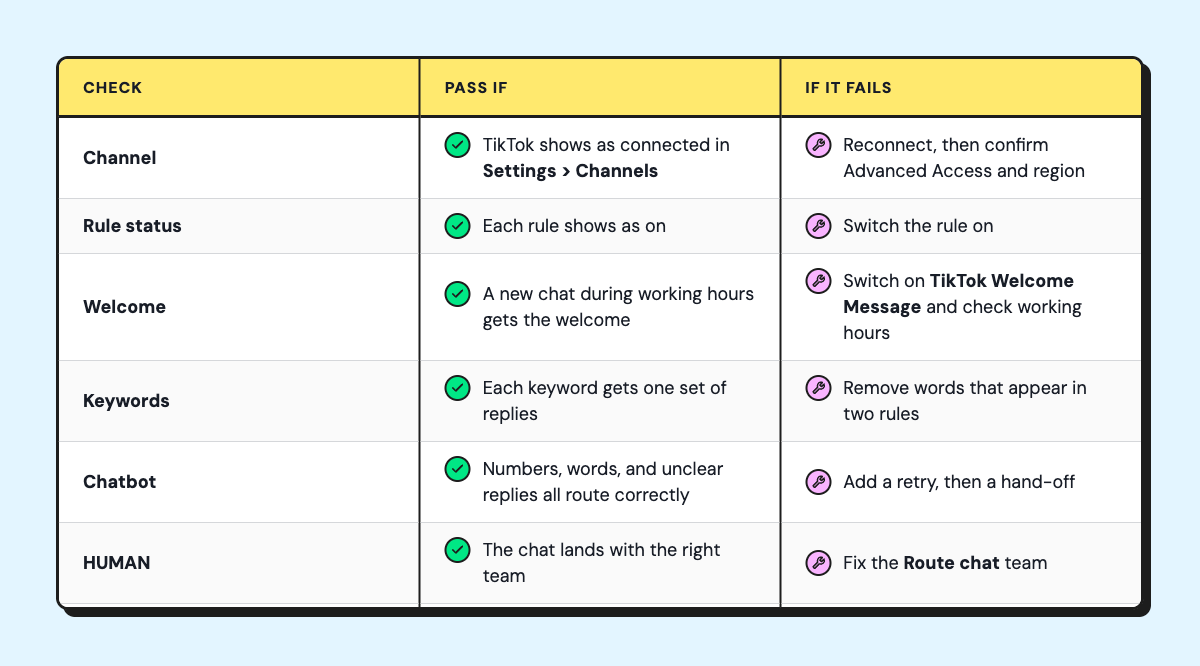
TikTok Auto Reply Test Checklist
Test every rule from a TikTok account that has never messaged you, so the welcome rule fires too.
How Wati Runs TikTok Auto Replies in One Inbox
Wati brings conversations from TikTok, WhatsApp, Instagram, Facebook Messenger, SMS, RCS, and website chat into one omnichannel inbox.
- Shared Team Inbox: Team members can assign conversations, add tags and internal notes, and view chat history across connected channels.
- Chatbot indicator: Team members can see when a chatbot is handling a TikTok conversation.
- Smooth hand-off: The Route Chat action assigns conversations to the right team or team member. Keyword rules pause while a person handles the chat.
- TikTok Direct Messaging Ads: Conversations started through TikTok Direct Messaging Ads land in the same Team Inbox, with their ad source visible.
- TikTok Instant Messaging Ads: Send shoppers from TikTok to external messaging apps such as WhatsApp or Messenger using TikTok Instant Messaging Ads.
- TikTok conversion tracking: Wati sends qualified lead, purchase, generic lead, or spam events back to TikTok to help brands measure campaign outcomes and optimise ads. Follow our TikTok conversion tracking guide for setup instructions.
Switch on Your First TikTok Auto Reply Today
You don't need to answer every TikTok DM manually. Use keyword rules for common questions, chatbots for guided conversations, and automated routing to get more complex enquiries to your team.
Start with the industry rule packs in this guide and adapt them to your products, FAQs, and customer conversations.
Book a demo to see how Wati helps you automate TikTok Business Messaging.
Frequently asked questions
Does TikTok Have Automatic Replies?
Yes. TikTok offers a welcome message, suggested questions, keyword replies, and chat prompts for accounts with Advanced Access or a Verified Business Account. TikTok reviews each message and confirms the result within 1 to 5 business days, according to TikTok Business Help. Wati adds chatbots, tags, and team hand-off.
What is a TikTok Keyword Reply?
A TikTok keyword reply is an automatic message sent when a DM contains a word you chose. In Wati, you build it with the "Incoming message matches keyword rule" filter and an action, such as Send TikTok message.
Can a TikTok Auto Reply Send Buttons or Videos?
No. Replies on TikTok can include text and images only, and buttons appear as plain text. Use numbered options instead, such as "Reply 1 for prices or 2 for sizes." A chatbot can read the number and send the right answer.
Which Countries Can Use TikTok Auto Replies in Wati?
TikTok Business Messaging works for accounts registered outside the US, EEA, Switzerland, UK, and India. The account also needs Advanced Access, with "Allow everyone to send direct messages" turned on. Availability depends on where the account was registered.
Why isn't My TikTok Auto Reply Working?
Check that the rule is on, that no other rule shares its keywords, and that the shopper isn't inside a chatbot. A rule also won't fire while a support rep has the chat, or if the account's region isn't supported. Run the test checklist to find the cause.
Related posts
- Ramadan TikTok Campaign for Gadget Brands: Win Eid Gift Buyers in the DMs
Plan your Ramadan 2027 TikTok campaign for gadget brands with this guide to Eid gift buyers. Learn how to automate gift recommendations, answer product and delivery questions, manage late-night DMs, and use Arabic and English chatbot flows to turn TikTok conversations into Eid sales.
- TikTok Phone Case Finder: Automate Compatibility Questions in DMs
Learn how to automate phone case compatibility checks in TikTok DMs with Wati. Build a two-step chatbot that matches shoppers to the right phone case, shares compatible product images and links, answers charger and warranty questions, and routes bulk or high-value enquiries to your team.
- Selling Perfume on TikTok Shop: How Fragrance Brands Handle Every Conversation Around the Shop
Learn how to sell perfume on TikTok Shop by managing shopper questions, scent recommendations, creator enquiries, and post-LIVE follow-ups. Discover how to route conversations between Seller Center and brand DMs, follow TikTok Shop rules, and use Wati's TikTok Business Messaging to automate replies and manage customer conversations.
- TikTok Shop Customer Service for Perfume Brands: Answer "Is it Original?" at Scale
Learn how perfume brands can manage TikTok Shop customer service across Seller Center chat and brand DMs. Discover how to automate common questions about authenticity, testers, longevity, and gift wrapping with Wati, while routing order issues and damaged bottles to the right team.