
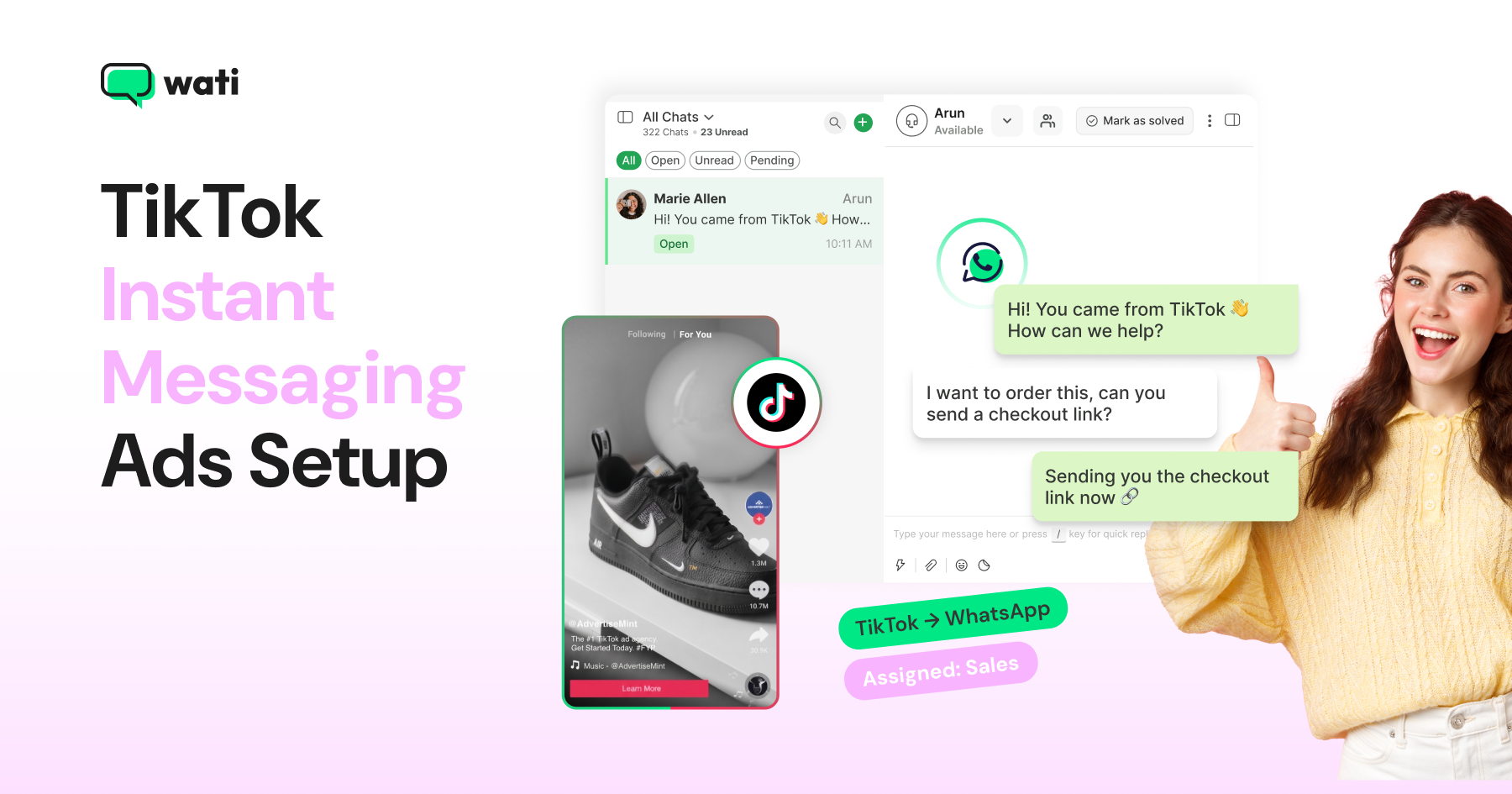
Too Long? Read This First
- TikTok Instant Messaging Ads turn a TikTok ad tap into a real WhatsApp conversation.
- Setup happens in two places: connect Wati to TikTok first, then build the campaign in Ads Manager.
- Always test with the QR code and confirm your event fires before going live.
- Watch for the big four mistakes: reused numbers, missing purchase values, wrong optimization goal, and no Dayparting.
- Once live, Wati keeps every TikTok Instant Messaging Ads conversation organized, tagged, and ready for a fast reply.
TikTok Instant Messaging Ads to WhatsApp connect a tap on your TikTok ad directly to a WhatsApp conversation with your business, no landing page in between.
That matters because the average landing page bounce rate sits somewhere between 26% and 70%. It means a real chunk of the people who tap your ad are gone before they ever see what you're selling.
Wati is a WhatsApp Business Platform that connects WhatsApp, Instagram, and now TikTok conversations into one team inbox for marketing, sales, and support. This guide walks through connecting Wati to TikTok, building the campaign in TikTok Ads Manager, and testing it end-to-end before you go live.
If you're still weighing whether TikTok for business messaging ads are the right move for your business, our TikTok Ads guide is a better place to start. If you're ready to build, let's get into it.
What are TikTok Click to WhatsApp Ads?
TikTok Click-to-WhatsApp ads are TikTok's Instant Messaging Ads format, connected to WhatsApp specifically. Someone taps your ad, and instead of visiting a landing page, a WhatsApp chat opens with your business automatically.
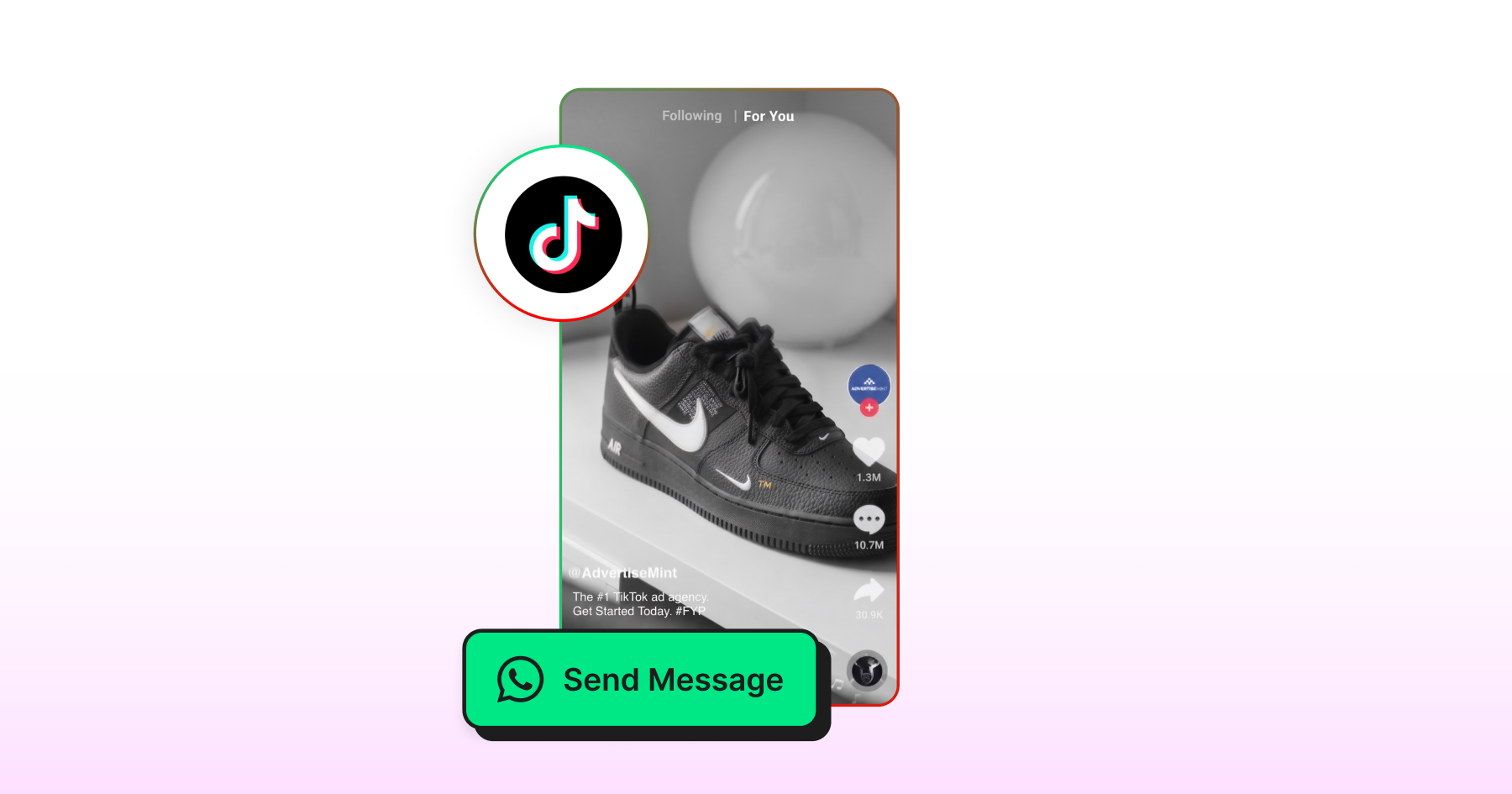
TikTok's Instant Messaging Ads format technically supports other apps too, like Messenger, Line, and Zalo, but WhatsApp is the one Wati connects to.
If your customers are already comfortable chatting with businesses on WhatsApp, this is the format built for exactly that moment.
Why Run TikTok Instant Messaging Ads to WhatsApp?
Before you connect anything, it's worth knowing what you're actually getting. TikTok Instant Messaging Ads to WhatsApp aren't just another ad format. They change what happens the moment someone taps your ad.
- Massive built-in reach. TikTok now counts close to 1.9 billion monthly active users worldwide, putting it behind only Facebook, YouTube, WhatsApp, and Instagram in global scale. That's a lot of thumbs to stop scrolling and start chatting.
- A shorter path to a real conversation. Instead of a tap → landing page → maybe-bounce journey, Click-to-WhatsApp ads go tap → chat, skipping the landing page (and its bounce risk) entirely.
- Built-in lead qualification. Because the conversation happens inside WhatsApp and Wati, every reply, tag, and qualifying template is tracked automatically, so there's no separate CRM step needed to know who's a real lead.
- Cost-efficient compared to click-to-website formats. TikTok's ad auction remains competitive relative to older platforms, and Conversations-optimized campaigns let you pay for engagement that actually signals intent, not just a click.
None of this replaces good targeting or creative, but it's why more WhatsApp-first businesses are shifting spend here instead of a traditional landing page funnel.
Instant Messaging Ads vs. Direct Messaging Ads
TikTok actually runs two different messaging ad formats, and it's easy to mix them up.
- Instant Messaging Ads redirect the tap outside of TikTok, into a third-party app like WhatsApp, Messenger, LINE, or Zalo. This is the format this guide covers, and the only one Wati connects to.
- Direct Messaging Ads keep the entire conversation inside TikTok's own DM inbox, with no redirect and no external app.
If your customers already expect to chat with you on WhatsApp, Instant Messaging Ads are the format built for that. If you'd rather keep everything native to TikTok, Direct Messaging Ads are the other option, just not one Wati supports today.
What Do You Need Before You Touch Ads Manager
Before opening TikTok Ads Manager, get these in place:
- A Wati account with admin access
- A TikTok Messaging Ads account with permission to connect external apps
- A unique WhatsApp number, one that isn't currently active on any other WhatsApp Personal or Business app
- Wati's Pro or Business plan: This integration isn't available on lower tiers
- A business outside the restricted regions: TikTok Instant Messaging Ads currently aren't available in the US, EEA, Switzerland, UK, and India due to regional regulations.
Have all five? You're ready to connect.
How Do You Connect Wati and TikTok for Business?
Connecting Wati to TikTok for Business takes four steps, starting inside your Wati dashboard.
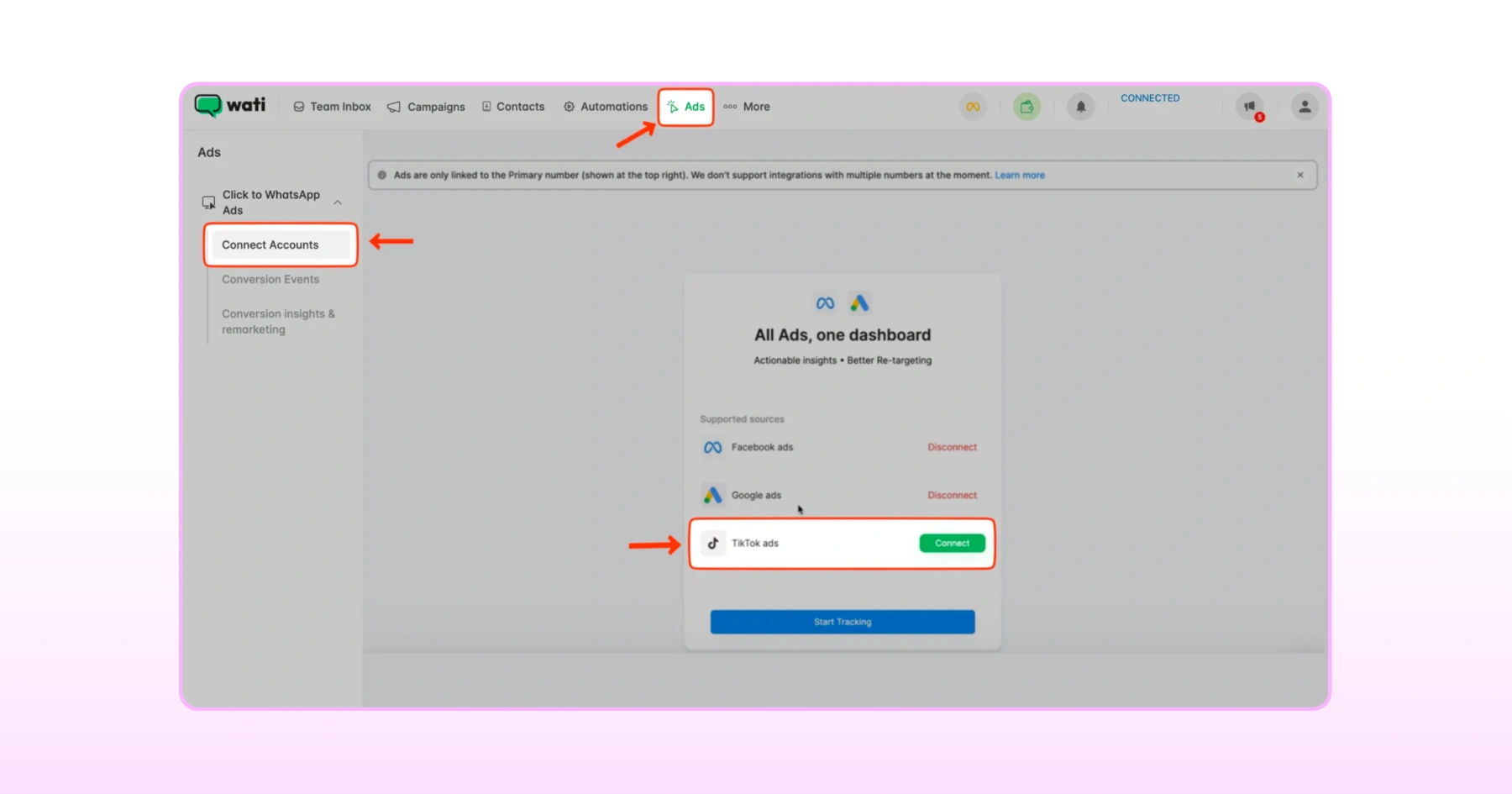
1. Start the Connection
- In Wati, go to Ads > Connect Accounts > Click-to-WhatsApp Ads, then click Connect next to TikTok Ads.
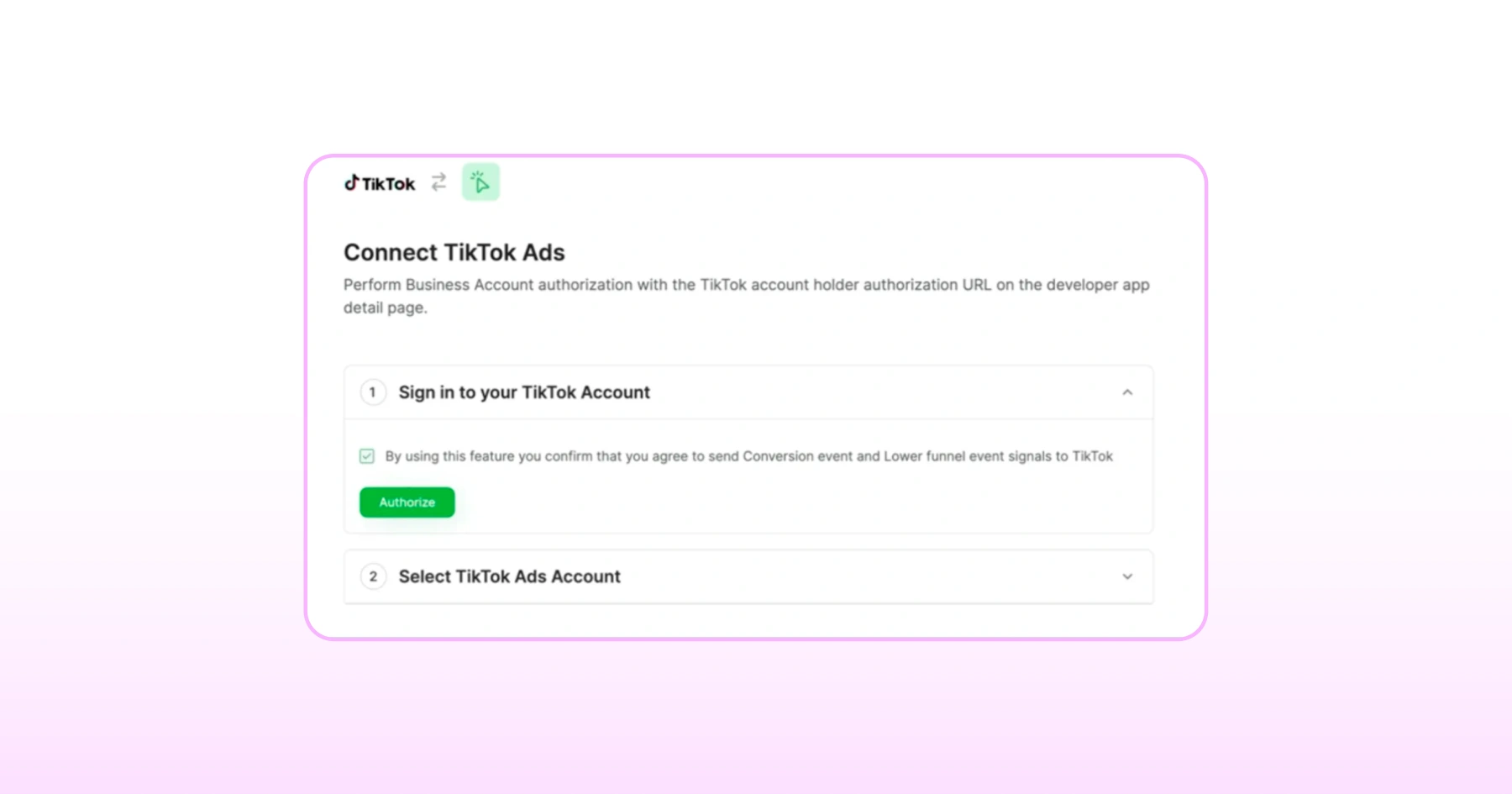
2. Authorize Your TikTok Account
- You'll be asked to sign in to TikTok. Before proceeding, check the box confirming you're okay sharing conversion event data with TikTok, then click Authorize.
- A pop-up will open; log in to your TikTok Ads account, grant the requested permissions, and click Confirm.
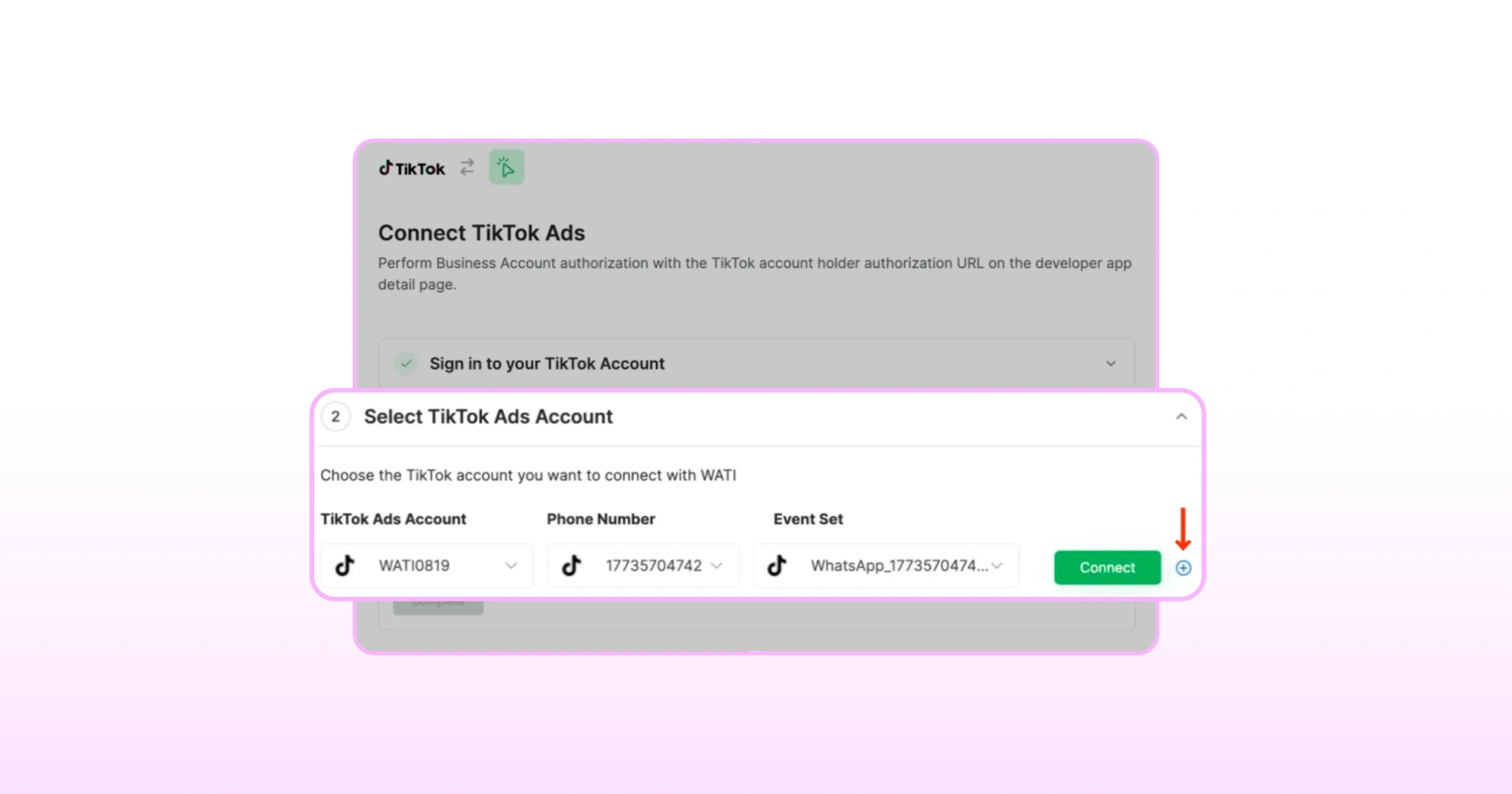
3. Pick Your Account And Number
- Select the TikTok Ads account you want to connect, then choose the WhatsApp number to link (if you manage multiple numbers in Wati, use the + button to add more).
- Wati automatically creates an Event Set for this connection; its ID will start with CTM.
- Once everything's selected, click Connect, then Agree to finish authorizing the TikTok Ads account.
4. Turn On Your Conversion Events
Toggle on the events you want to track:
Qualified Lead: Under Track Qualified Leads, select "When a Template message is sent on chat," choose the specific template, and pick the TikTok Ads account to send events to
Purchase: Under Track Purchases, select the template that signifies a purchase, then set a Purchase Value using a variable in that template (like [[value]]) and select the currency. This is what enables ROAS tracking.
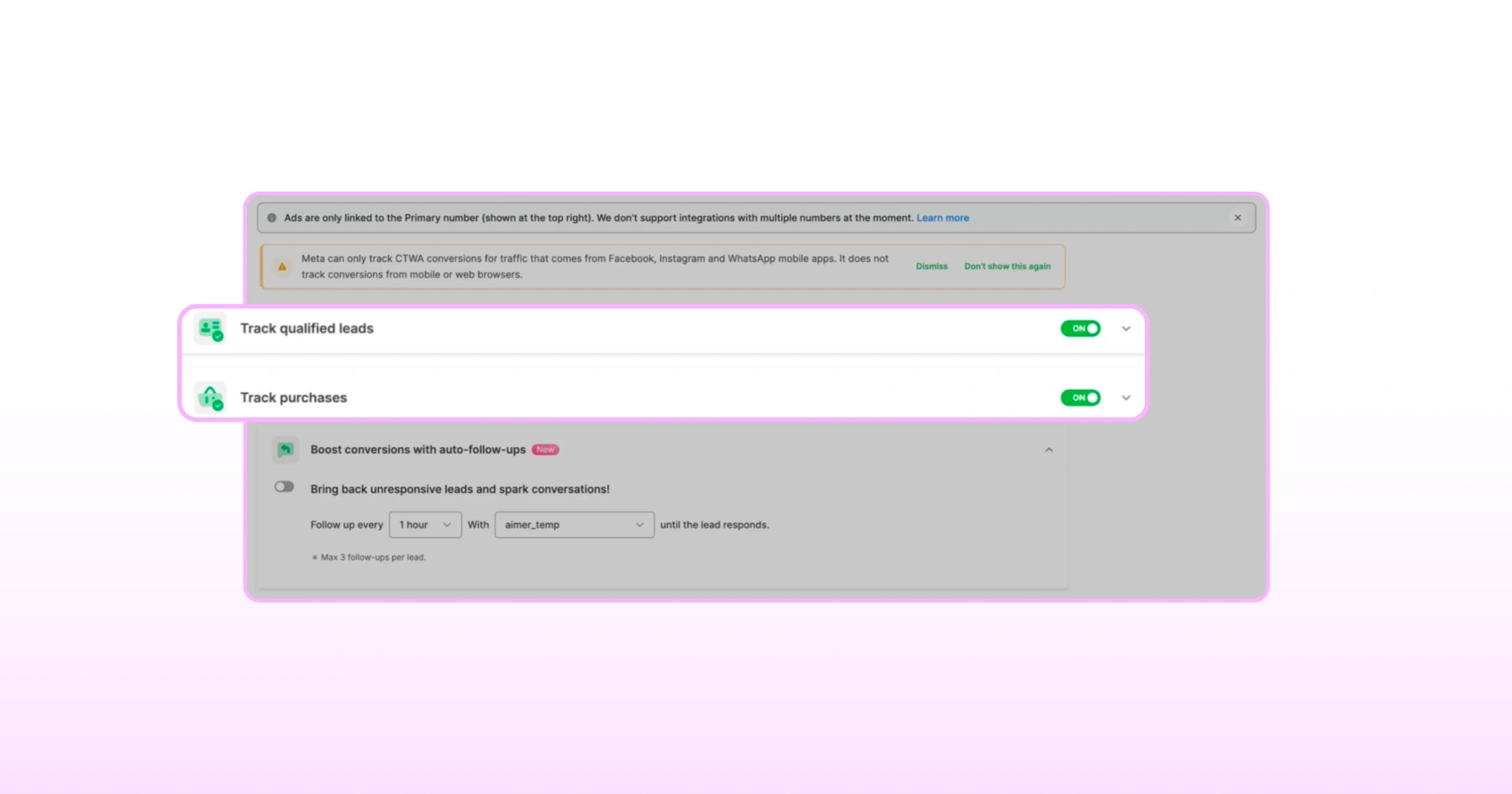
Click Set & Set Live for each event once configured.
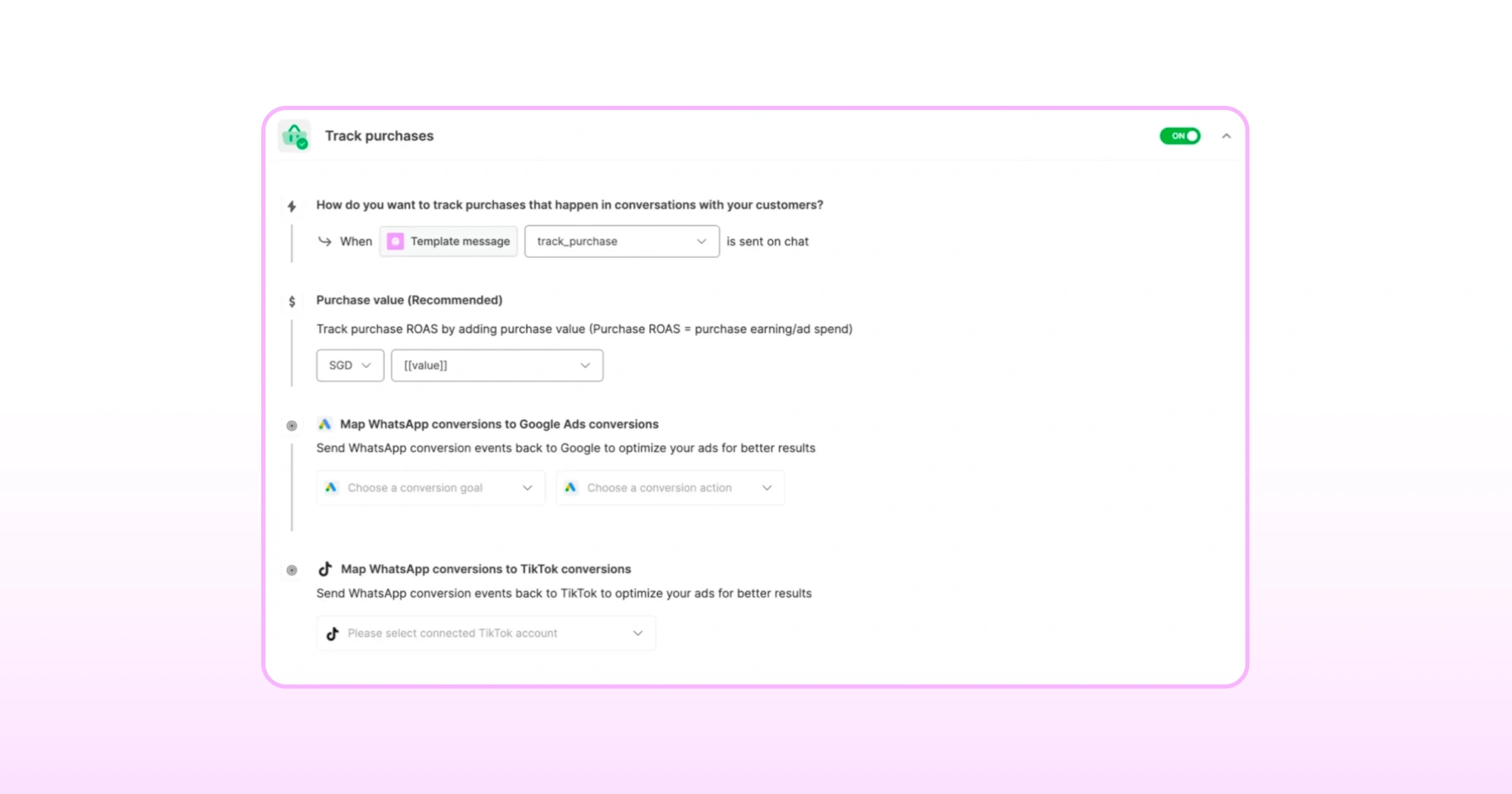
That's the Wati side done. Next, we'll build the actual campaign in TikTok Ads Manager.
How Do You Build the Campaign in TikTok Ads Manager?
Once Wati and TikTok are connected, the ad campaign itself is built directly in TikTok Ads Manager.
1. Set Up Your Campaign
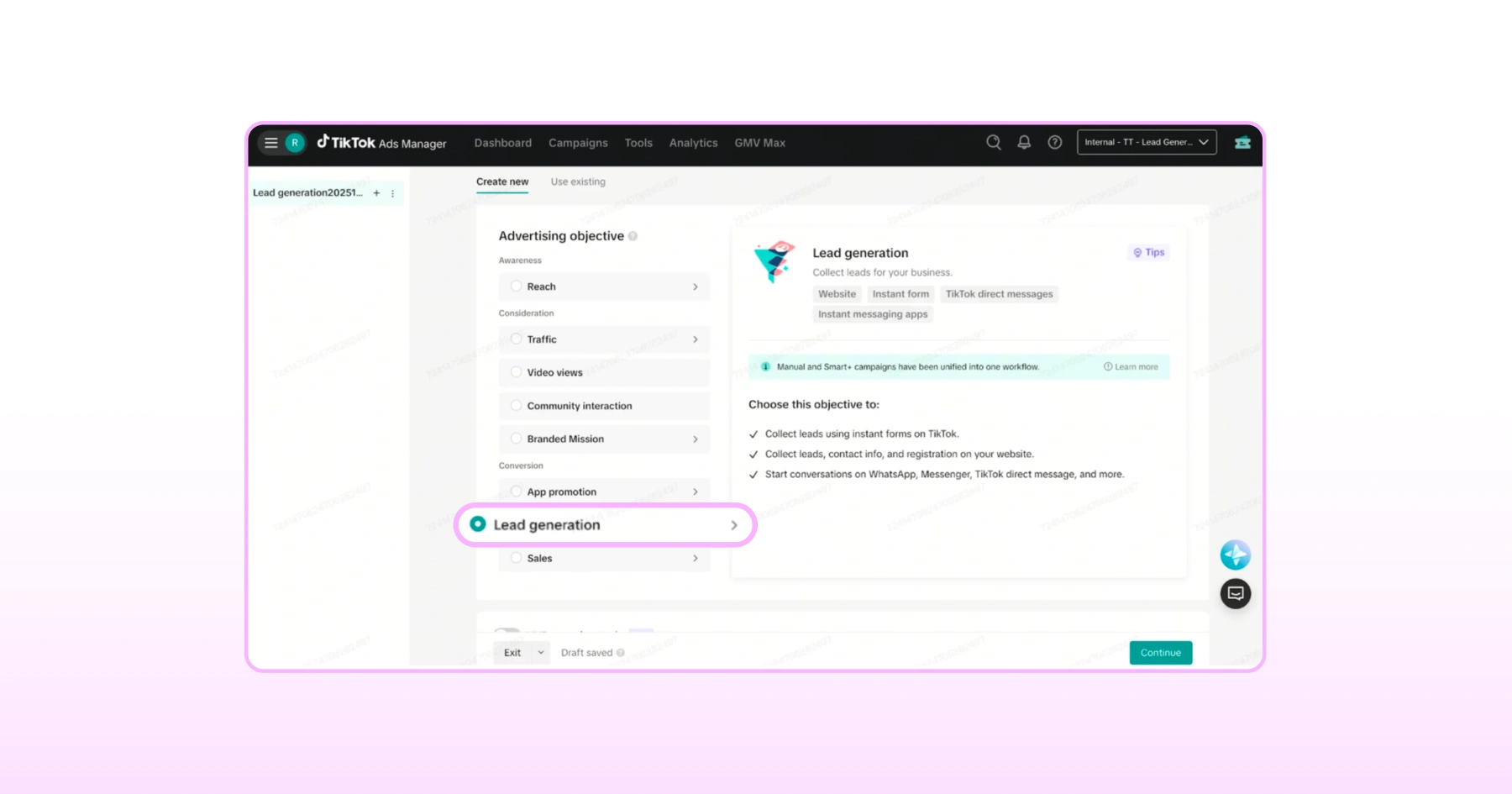
Go to the Campaign tab and click Create
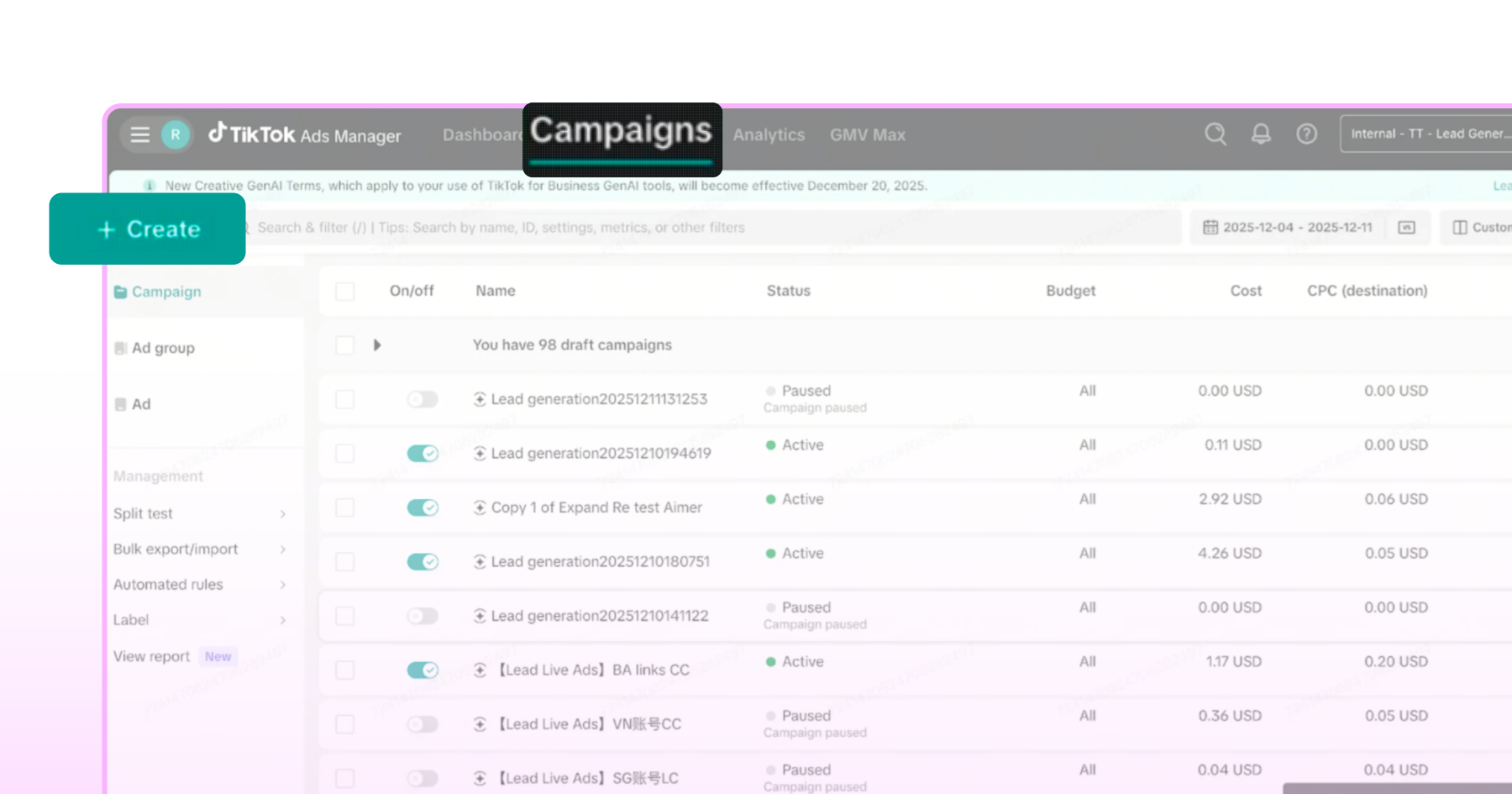
Select Lead Generation as your objective. This unlocks Messaging Ads
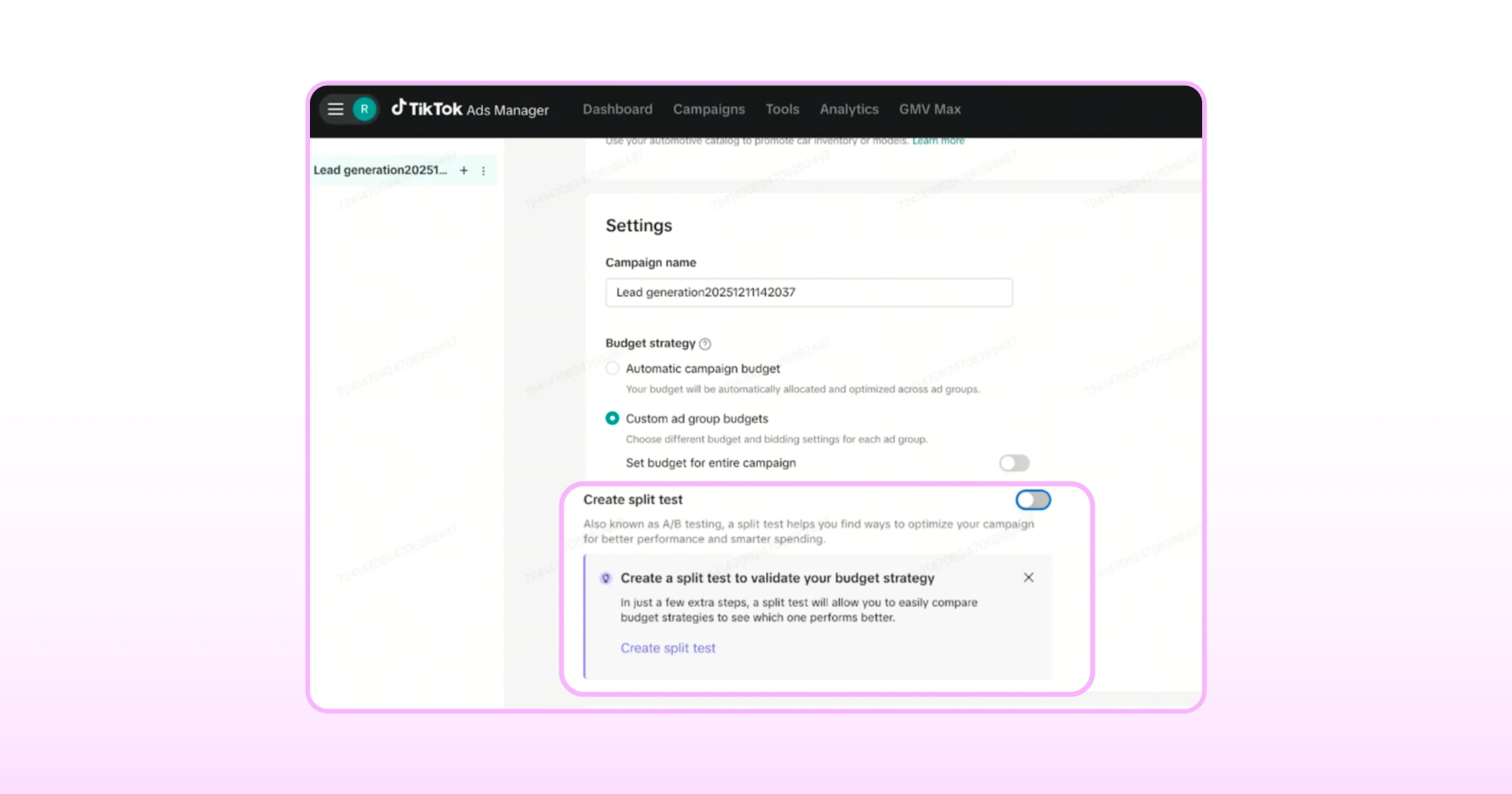
Optionally enable Split Test if you want to test different audiences or creatives
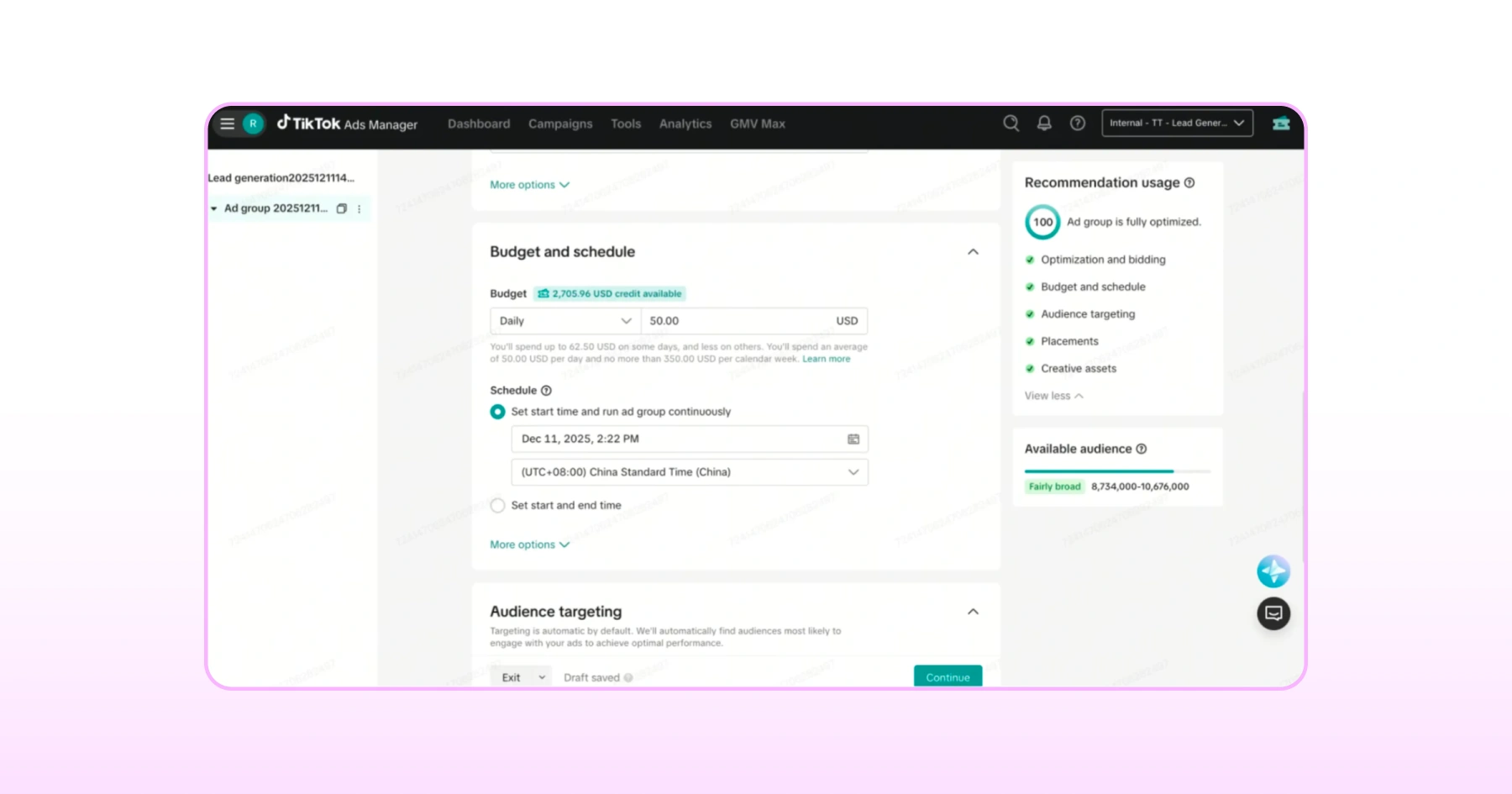
2. Configure Your Ad Group
This is where the ad actually becomes a Messaging Ad.
Optimization goal: Choose Conversations to optimize for people likely to start a chat (requires your Wati Event Set from the previous section).
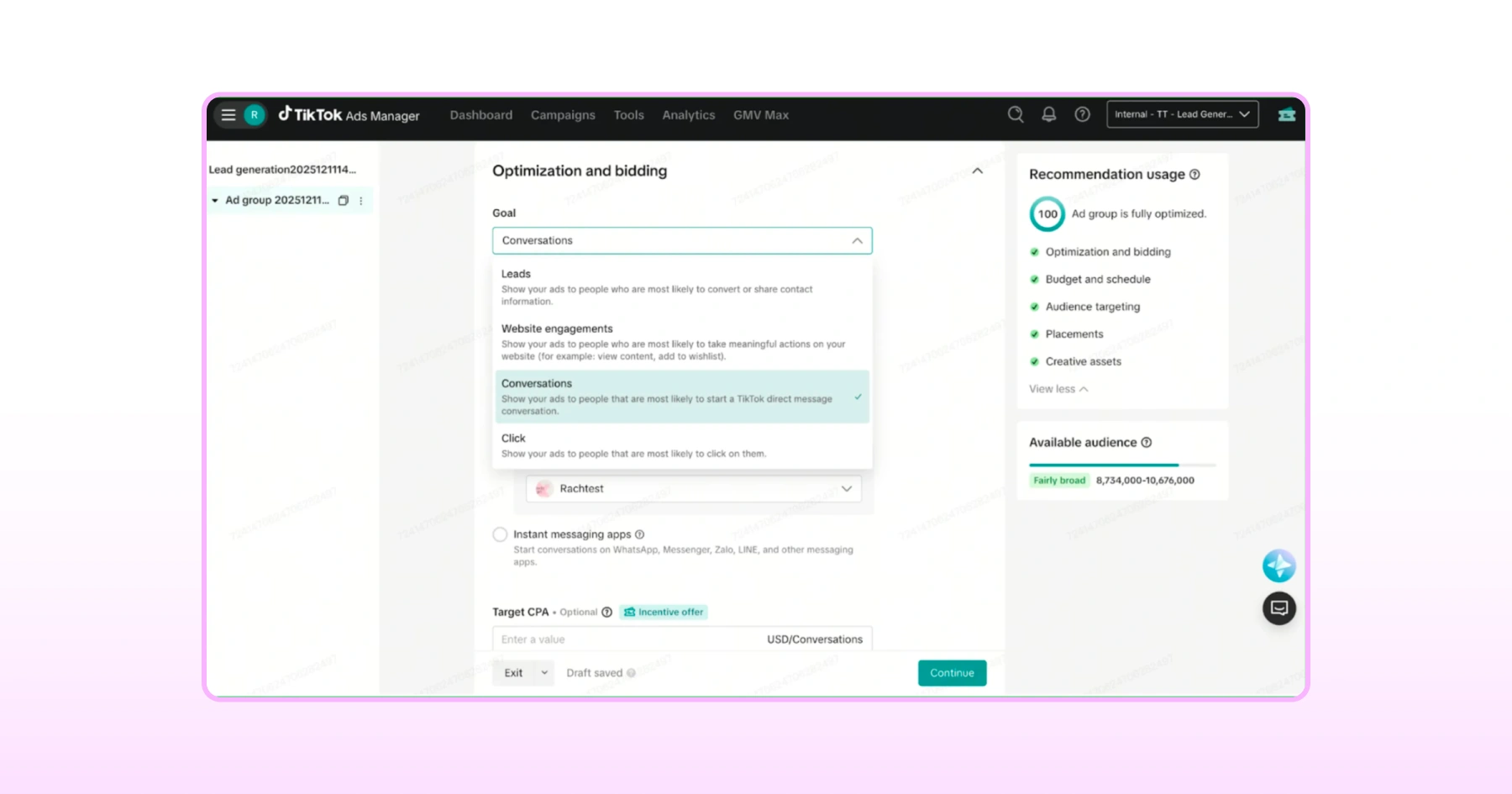
- Choose Click instead for basic click tracking, without conversation-depth data.
Optimization location: Select Instant Messaging Apps. TikTok will automatically match your WhatsApp number to the Event Set from Wati.
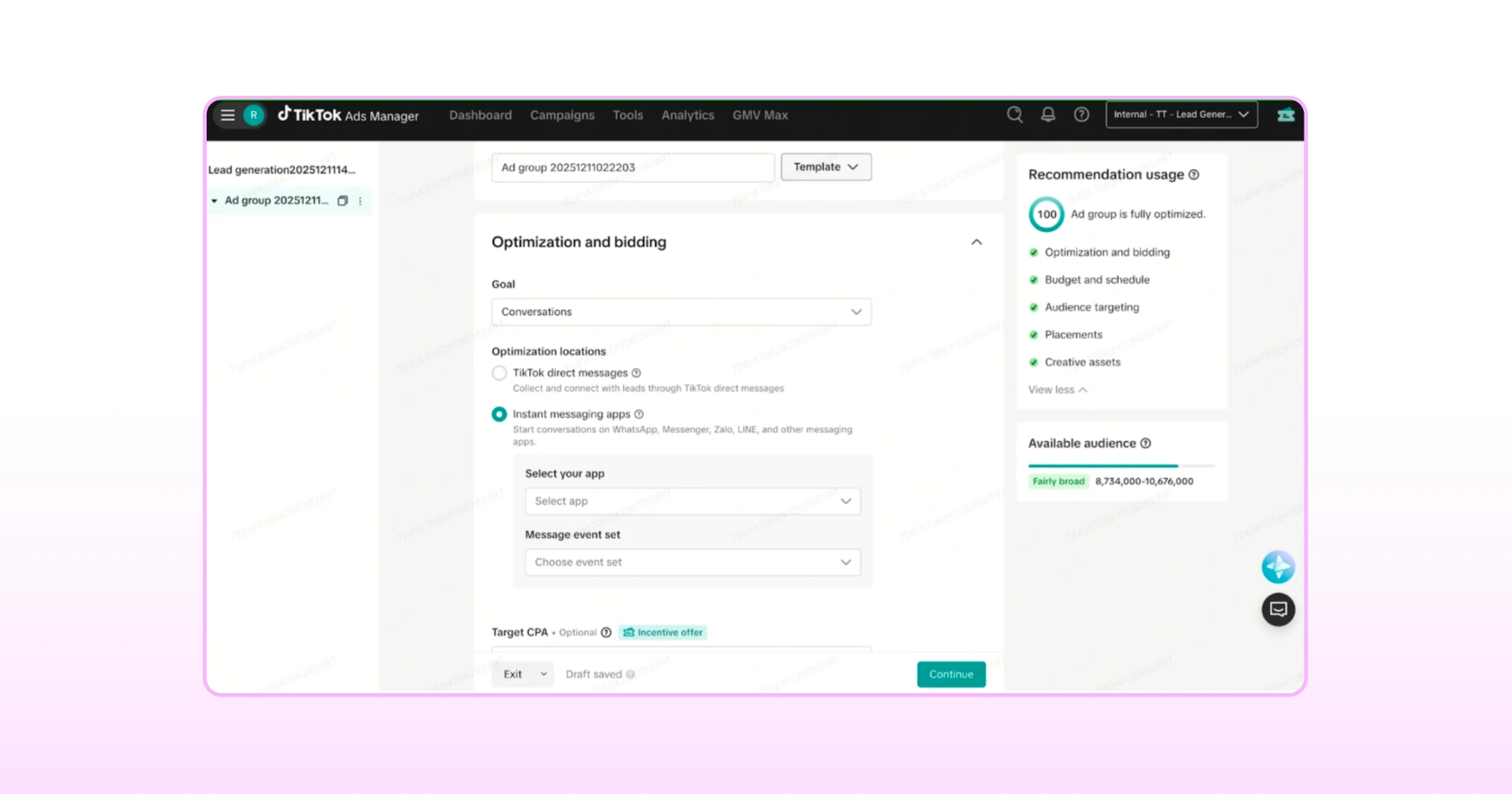
- Placement: TikTok is the only option here as it's selected by default.
Budget and schedule: Set your daily budget, then turn on Dayparting and schedule it for hours your team can actually respond. An ad opening conversations at 2 a.m. with nobody watching defeats the purpose.
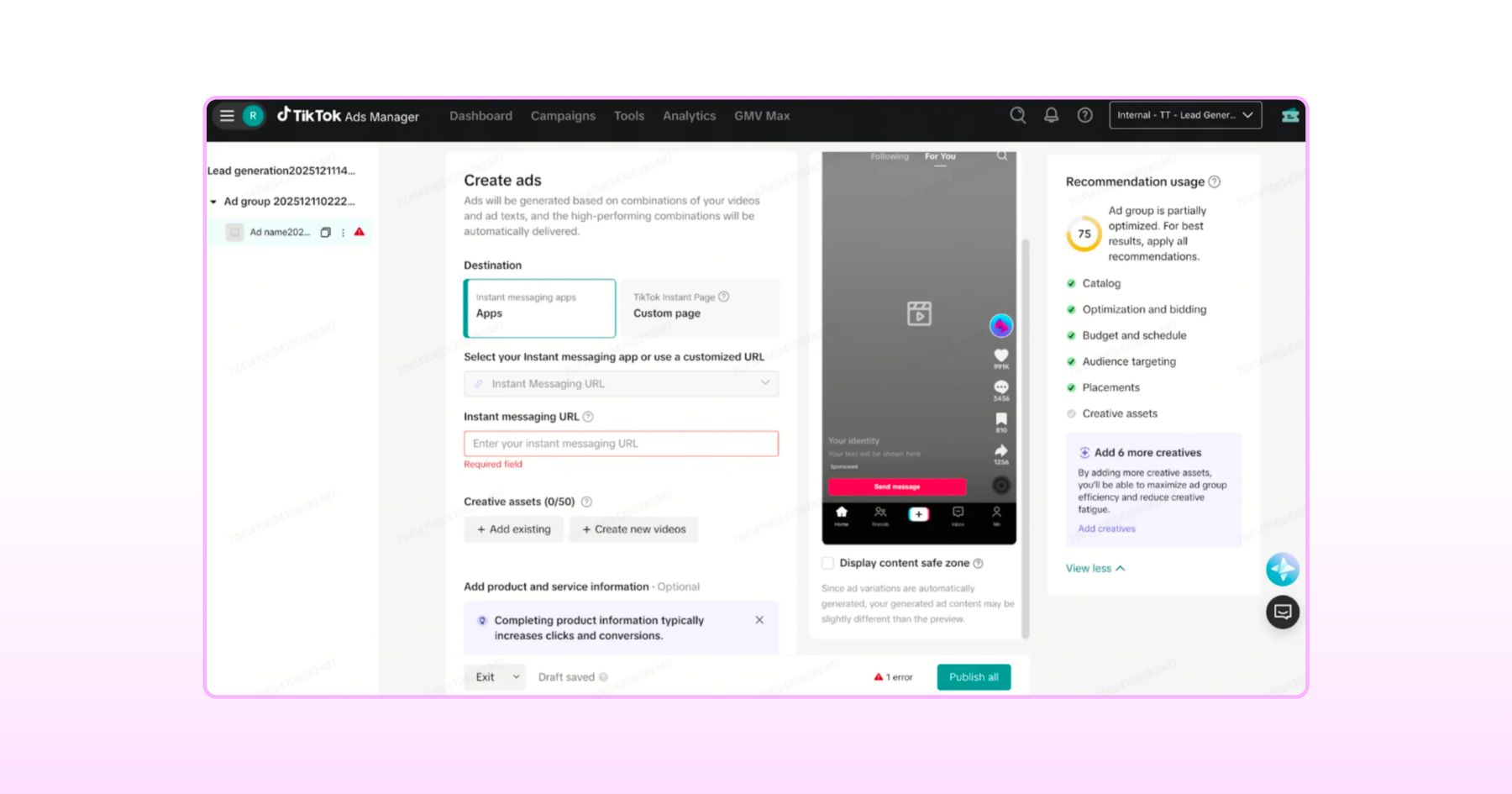
3. Build The Ad Itself
Your WhatsApp destination auto-fills if you choose Conversations optimization
Write ad copy with a clear CTA, something like "Message us," that tells people exactly what tapping the ad does
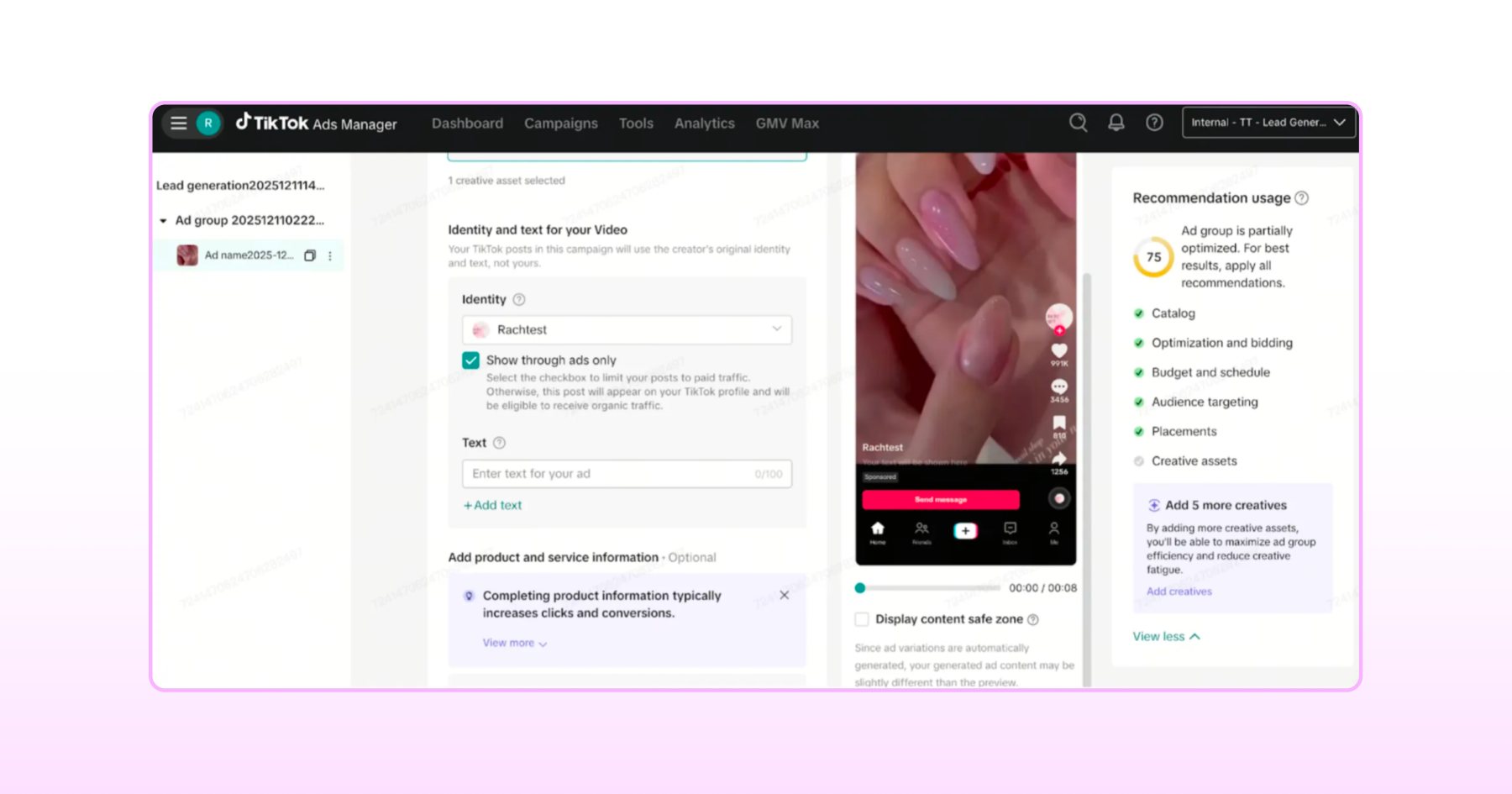
- Click Publish All when ready
Good to know: Newly created ads can take up to 24 hours to sync with Wati, so don't worry if conversations don't show up right away. |
How Do You Test a TikTok Click to WhatsApp Ad Before Launch?
Skipping this step is the easiest way to launch a TikTok Instant Messaging Ads campaign that quietly doesn't work. It only takes a few minutes, so don't rush past it.
1. Generate And Scan A Test QR Code
- Hover over the "Check if the ID opens properly" link in Ads Manager to generate a QR code.
- Scan it with your phone (make sure the correct OS is selected, iOS or Android, and that WhatsApp is installed).
If everything's set up correctly, WhatsApp will open automatically with a pre-filled message referencing your ad.
2. Test The Live Ad Flow
- Preview your ad in TikTok and tap the Click-to-WhatsApp button
- Confirm it opens WhatsApp with the connected number and a pre-filled message
- Send that message exactly as it appears and don't edit it
- Check Wati's Team Inbox to confirm the conversation lands with the right tag
3. Confirm The Event Fired
- Log in to TikTok Events Manager, go to Tools > Data Sources
- Check that your event appears under your Event Set
- Give it 5 to 10 minutes to show up, as it's not always instant
Once all three checks pass, your instant messaging ads to WhatsApp setup is ready to go live.
What to Expect Once Conversations Start Rolling In
A live TikTok Instant Messaging Ads campaign sends every conversation into Wati automatically tagged and attributed, with no manual setup required to see it.
Conversations are Tagged Automatically
Every conversation that comes through TikTok Click to Whatsapp Ads appears in your Team Inbox tagged T-CTWA, so agents can immediately tell it came from a TikTok ad rather than an organic WhatsApp message.
Contact Attributes Fill in On Their Own
- Open any tagged conversation, and you'll see tiktok_ad_id under Contact Attributes, confirming exactly which ad drove the conversation
- Once your team sends the qualifying template, Wati automatically updates the tiktok_ad_qualified_lead attribute. There’s no manual tracking needed on your end.
This means lead qualification isn't something your team has to track manually. It happens automatically the moment the right template goes out.
Where to Check Performance
- In Wati: TikTok ad reporting isn't available inside Wati yet. It's on the way
- In TikTok Ads Manager: check Cost Per Result to see how much each started conversation is costing you, or add Custom Columns > Messaging Event > Conversations (Instant Messaging App) for a deeper breakdown
For now, TikTok Ads Manager is where you'll want to keep an eye on performance while Wati's native reporting catches up.
What Are the Most Common TikTok Click to WhatsApp Ads Mistakes?
A few small missteps account for most TikTok Click to WhatsApp Ads setups that don't work as expected. Watch for these before you launch your TikTok Instant Messaging Ads campaign.
1. Reusing A WhatsApp Number That's Already Active Elsewhere
Your WhatsApp number must be unique to this integration. If it's currently active on any other WhatsApp Personal or Business app, the connection won't go through at all.
2. Forgetting The Purchase Value Variable
If you're tracking Purchase events, skipping the value variable (like [[value]]) in your template means TikTok has no way to calculate ROAS. The event will still fire, but the data that actually matters for measuring return won't be there.
3. Choosing Click When You Actually Wanted Conversations
It's an easy setting to breeze past, but Click optimization only tracks whether someone tapped the ad, not whether a real conversation happened. If conversation-depth tracking and ROAS are the goal, Conversations is the optimization goal you want.
4. Skipping Dayparting
Running instant messaging ads to WhatsApp around the clock without matching them to your team's actual working hours means conversations can sit unanswered for hours. Dayparting exists specifically to prevent this so don't skip it.
Catch these four, and your setup should run exactly as intended.
Tips to Get More From Your Campaign
Getting the setup right is what makes the campaign work at all. These four habits are what separate a live campaign from a genuinely productive one.
- Match your CTA to the format. “Message us” or “Chat now” outperforms vague CTAs because it tells people exactly what happens after the tap: a chat opens, not a page load.
- Keep creative native to TikTok. Ads that look like polished landing-page banners tend to underperform authentic, low-production video on this platform. Save the polish for your WhatsApp replies, not the ad itself.
- Test Conversations against Clicks early. Run both optimization goals in parallel for the first week if budget allows, then shift spend to whichever is actually producing qualified leads in your Team Inbox, not just clicks.
- Revisit Dayparting as your team's hours change. A schedule that made sense at launch can quietly go stale. Check it monthly against your team's actual response times so conversations don't sit unanswered.
Your TikTok Click to WhatsApp Ads Setup Is Live. Now What?
You've now got everything needed to turn a TikTok ad tap into a real WhatsApp conversation, connected, configured, tested, and ready to run. The setup work is done.
What happens next comes down to how quickly and consistently your team responds once those conversations start coming in.
That's exactly where Wati keeps working for you. Every TikTok Click to Whatsapp Ads conversation lands in the same Team Inbox as the rest of your WhatsApp messages, tagged, attributed to the right ad, and ready for your team to jump on without missing a beat.
If you haven't set up Wati yet, get started with Wati and have your first TikTok Instant Messaging Ads conversation running within the day.
Frequently asked questions
1. Can I use any WhatsApp number for TikTok Instant Messaging Ads?
No. The number must be unique and not currently active on any other WhatsApp Personal or Business app.
2. Why isn't my conversion event showing up in TikTok Events Manager?
Give it 5 to 10 minutes after sending the template; events aren't always instant. If it still doesn't appear, double-check your template and Event Set configuration in Wati.
3. Where do I see my TikTok ad performance data?
Wati's native TikTok ad reporting isn't available yet. For now, check Cost Per Result and custom Messaging Event columns directly in TikTok Ads Manager.
4. Does every WhatsApp platform support TikTok Instant Messaging Ads?
No. Not every WhatsApp Business Solution Provider has built a TikTok integration, so it's worth checking before you commit to a platform. Wati supports TikTok Instant Messaging Ads to WhatsApp on the Pro and Business plans, with automatic conversation tagging, contact attributes, and conversion event tracking built in.
Related posts
- How to Create Personalized AI Videos with Wati’s AI Video Generator
Transform your marketing with Wati’s AI video generator. Create personalized, professional videos at scale without technical expertise or expensive equipment.
- How to Set Up Auto Reply in WhatsApp Business?
Master WhatsApp auto-reply for your business: improve response times, customer service, and communication.
- How to Add a WhatsApp Chat Button On Website: 2026 Guide
Discover how to add a WhatsApp chat button on your website effortlessly. Create real-time connections, improve support, and convert visitors with Wati.
- How to Set Up an Instagram Chatbot to Answer FAQs Automatically (2026 Guide)
Learn how an Instagram FAQ chatbot works, which questions to automate, and how to set one up in Wati without code, from your first button template to a live keyword rule.