
Too Long? Read This First
- Click-to-WhatsApp ads on Instagram (Instagram CTWA) send someone from your ad straight into a WhatsApp conversation instead of a website.
- Removing the landing-page step can reduce friction for conversation-led sales, though results depend on your industry and offer.
- You need a WhatsApp Business API, an Instagram professional account linked to a Facebook Page, a connected WhatsApp number, and admin access in Meta Business Manager.
- Campaign performance depends on audience quality, creative, message flow, and how fast you reply, not just budget.
- Proper attribution means tracking the conversation back to the specific ad, which standard website conversion tracking doesn't do on its own.
Instagram is one of the biggest places people go to find brands and products. Meta says businesses now see more than a billion active conversation threads a day across WhatsApp, Messenger, and Instagram combined.
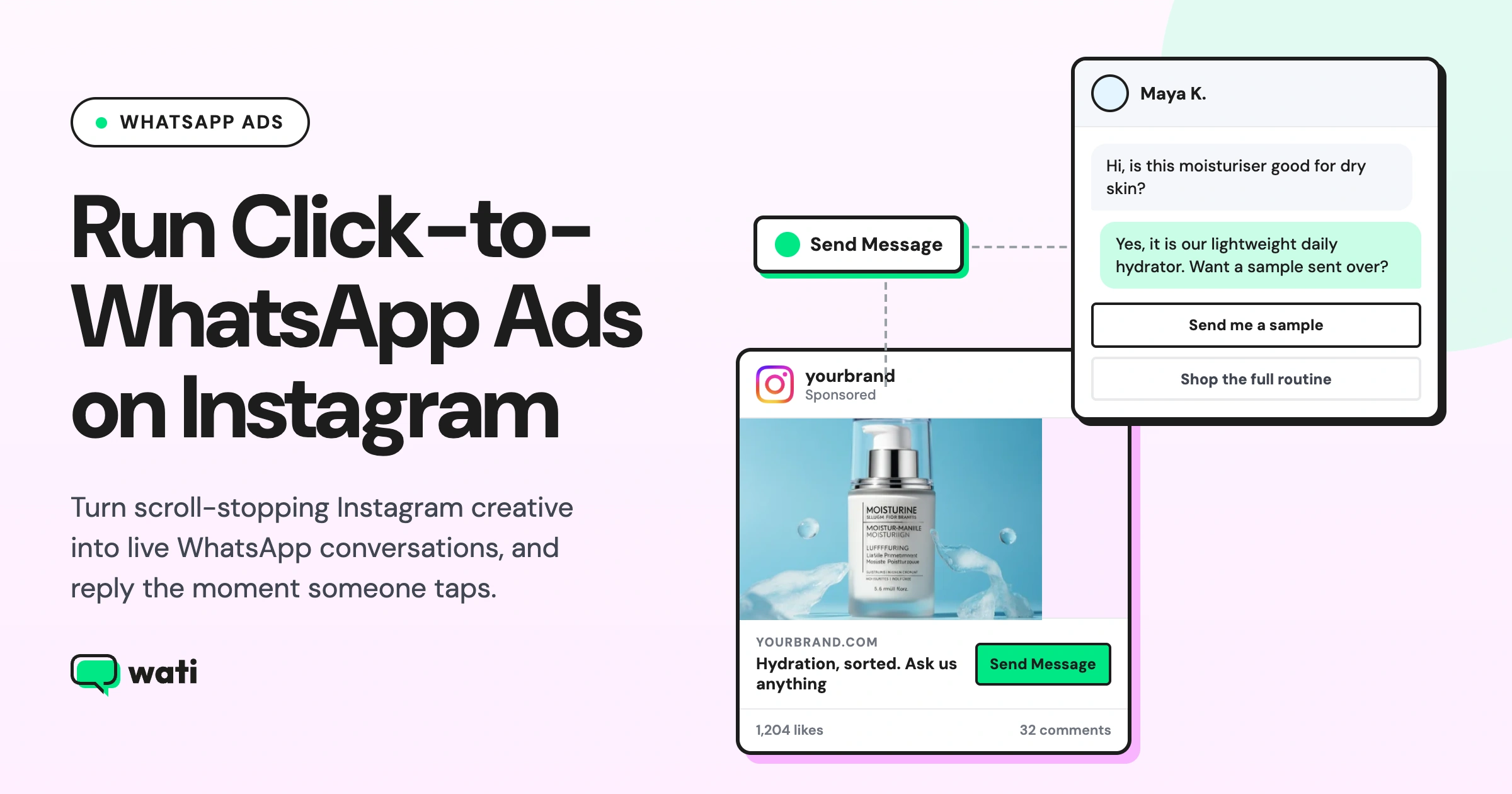
Click-to-WhatsApp Ads (CTWA) use that habit directly. Instead of sending someone to a landing page, the ad opens a WhatsApp chat (CTWA) the moment they tap it.
This guide covers what CTWA on Instagram is, how attribution works, how to test and optimize your campaigns by placement and conversation opener, what to track, mistakes to avoid, and where Wati fits in.
What are Click-to-WhatsApp Ads on Instagram?
A Click-to-WhatsApp ad is a paid Instagram ad with a "Send Message" button instead of the usual "Learn More" or "Shop Now."
Once someone taps it, a WhatsApp chat opens with a pre-filled message set by the business, already typed in and ready to send.
These ads run through Meta Ads Manager and can show up in Instagram Feed, Stories, Reels, or Explore.
CTWA is different from the free WhatsApp button on an Instagram business profile. The profile button is organic and reaches people who visit your profile, while CTWA is a paid ad shown to an audience you choose.
If you also want to turn Instagram comments into conversations, not just ad clicks, see our guide to Instagram comment automation.
Account Requirements to Run Click-to-WhatsApp Ads on Instagram
- A WhatsApp Business Platform (API) setup. Move to the API once you're automating replies or handling real volume.
- An Instagram professional account, Business, or Creator. Personal accounts can't run CTWA.
- That Instagram account is linked to a Facebook Page. Ads Manager routes ad approval through the Page.
- Admin access in Meta Business Manager for both the Page and the WhatsApp Business Account.
- A WhatsApp Business number connected to that Page.
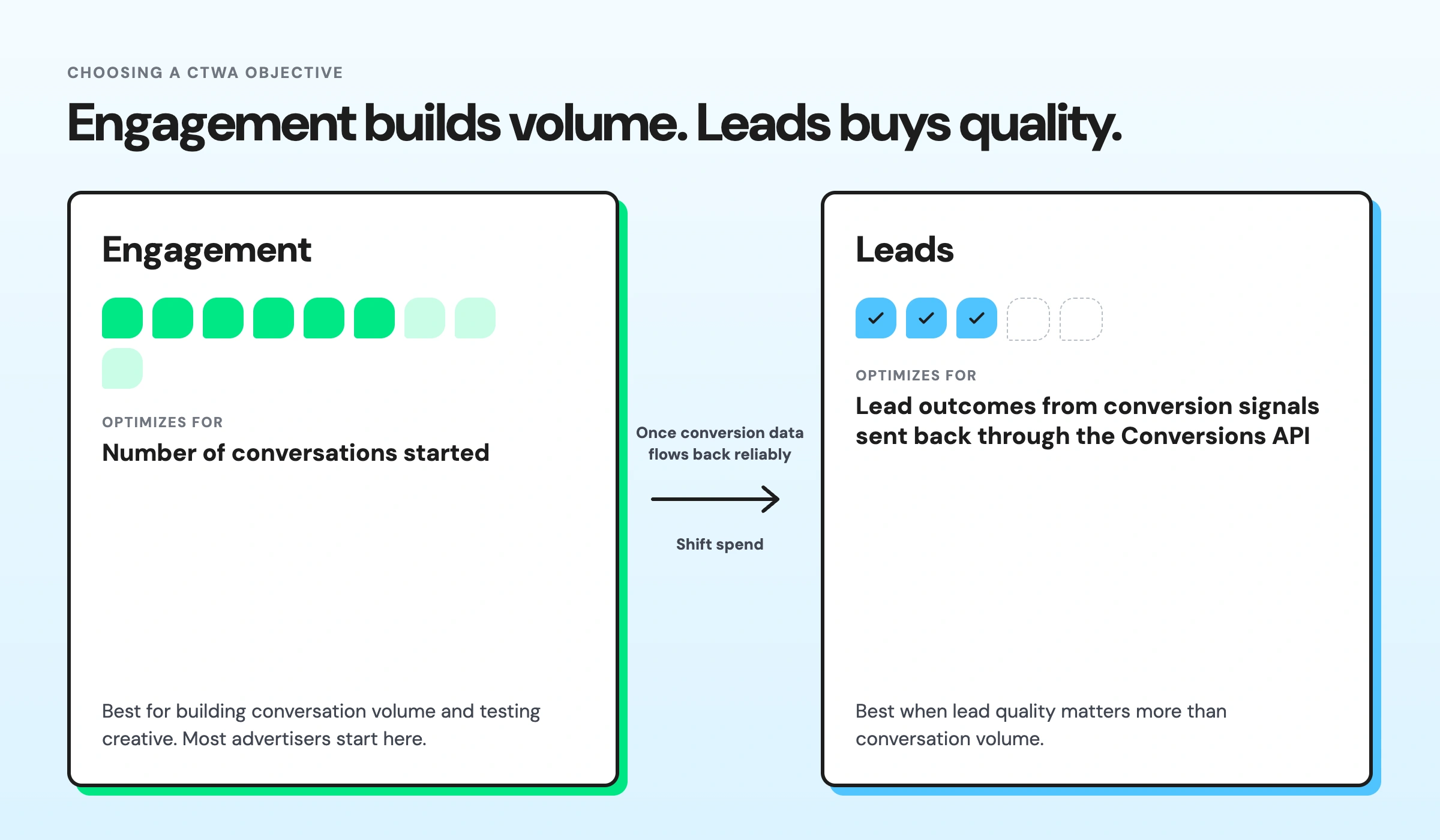
Engagement vs. Leads: Which CTWA Objective Fits Instagram Traffic
Objective | Best for | Optimizes for |
Engagement | Building conversation volume and testing creative | Number of conversations started |
Leads | Prioritizing lead quality over conversation volume | Lead outcomes based on conversion signals sent back through the Conversions API |
Most advertisers start with Engagement. It builds volume quickly and shows how the creative performs before shifting spend to Leads.
Once conversion data flows back reliably, Leads gives Meta a stronger signal to optimize for people more likely to become qualified leads.
How to Test Instagram CTWA Campaigns
Testing shows what is working and what needs to change. For CTWA campaigns, test one variable at a time: creative, conversation opener, or campaign objective.
Pick the metric that matches the goal. For conversation volume, look at cost per conversation started. For lead quality, look at qualification rate and cost per qualified lead.
Keep the other campaign settings the same. If the creative and audience change together, it is harder to tell what caused the result.
What to test:
- Creative: Test different hooks, formats, visuals, or offers with the same audience.
- Conversation opener: Test a generic pre-filled message against one that mentions the product or offer.
- Objective: If comparing Engagement and Leads, run them separately. Overlapping delivery on the same audience means you can't tell which objective produced the result.
Give each version enough budget and time to collect useful data before choosing a winner. Use the winning version as the starting point for the next test.
Testing Creative by Instagram Placement
For CTWA ads, in addition to getting the click, the creative needs to set the right expectation for the WhatsApp conversation that follows.
Test the same ad creative across placements, but adapt the creative to how people see and interact with each placement.
- Feed: People are scrolling through posts, so the CTA needs to give them a clear reason to leave Instagram and start a WhatsApp conversation. Test a specific CTA such as “Get a quote on WhatsApp” against a generic “Send Message” CTA. Measure cost per conversation and first-reply rate, not CTR alone.
- Stories: Stories give you only a few seconds to make the offer clear. Keep the ad and WhatsApp opener consistent. If the Story promotes a discount, for example, the conversation should open with that offer rather than a generic greeting. Test different offers and openers together to see which combination drives more replies.
- Reels: Reels are built around fast-moving, entertainment-led content, so the opening needs to earn attention quickly. Test different hooks and CTAs, then look at how many of those clicks turn into conversations and replies. A creative that gets views and clicks but few replies may be attracting curiosity rather than purchase intent.
- Explore: Test a direct, product-specific CTA that matches the intent of someone browsing the Explore grid.
Compare placement-level results to see which formats deserve more testing and which need a creative change. Use the strongest placement as a benchmark when developing the next round of ads.
Improving the Conversation Opener
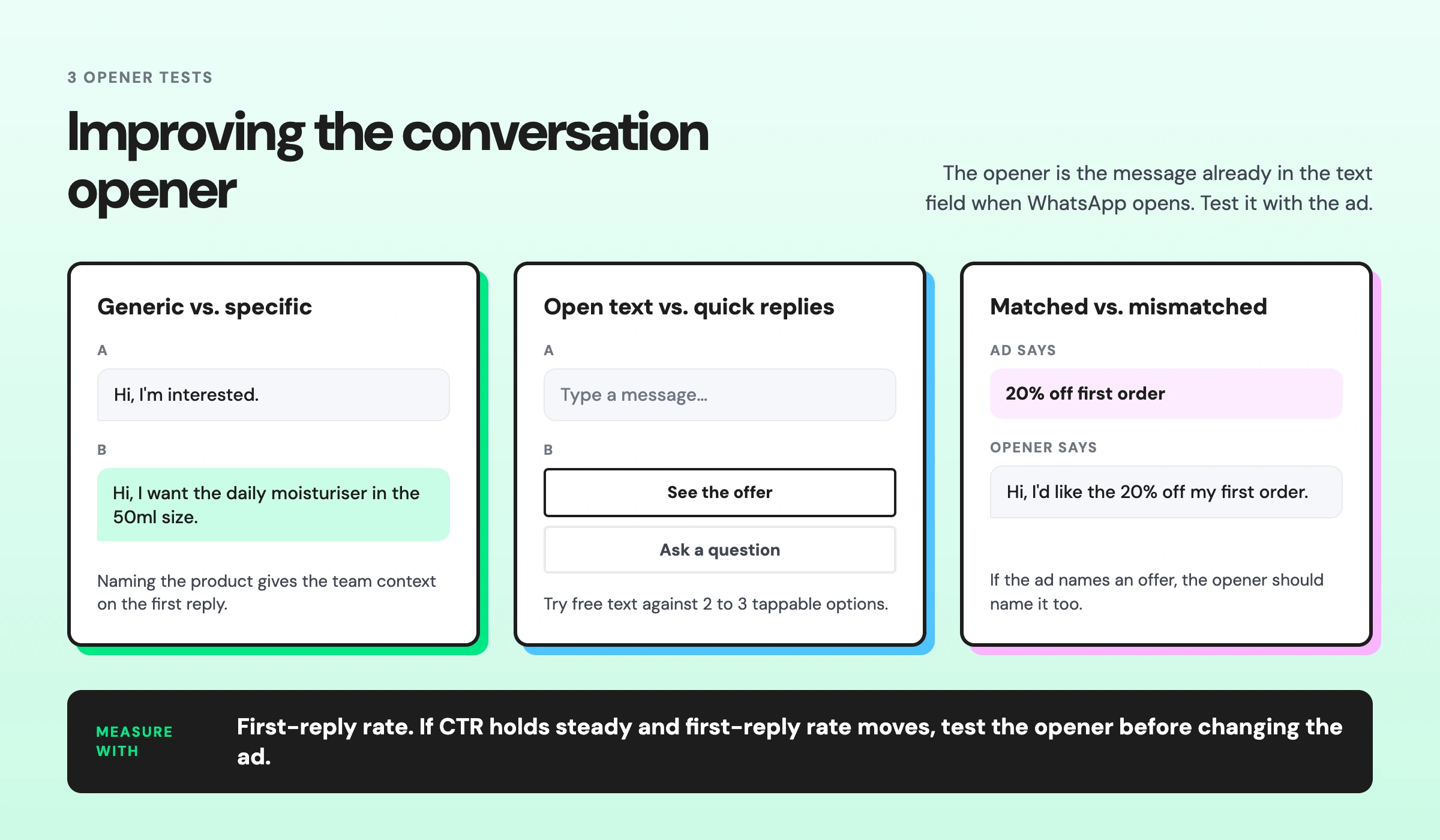
The opener is the message already in the text field when WhatsApp opens. Include it when testing CTWA ads. Changing it means updating the ad, so test the new version against the original.
Compare:
- Generic vs. specific: Meta's default might say, "Hi, I'm interested." An opener that names the product or offer gives the team more context.
- Open text vs. quick-reply buttons: Test a free-text opener against 2 to 3 tappable options.
- Matched vs. mismatched offer: If the ad mentions a discount or specific product, the opener should mention it too.
Use first-reply rate to compare versions. If CTR stays similar but first-reply rate changes, test the opener before changing the ad.
How Attribution Works: ctwa_clid and the Conversions API for Business Messaging
ctwa_clid is a unique ID Meta creates for every tap on a Click-to-WhatsApp Ad.
This ID is passed into the WhatsApp conversation and appears in the webhook payload when the chat opens.
Your WhatsApp Business Platform provider extracts the ID and sends it back to Meta through the Conversions API. It links the conversation and subsequent conversion events to the original ad.
To send that data back to Meta, the Conversions API for Business Messaging requires two specific fields:
- action_source: "business_messaging", which tells Meta that this is a messaging conversion.
- messaging_channel: "whatsapp", which separates CTWA conversions from Messenger or Instagram Direct ads.
If action_source is left as "website", the generic default, Meta won't associate the conversion with the CTWA. Check this setting first. It's the most common thing people miss.
5 Metrics That Tell You if Your Instagram CTWA Ad is Working
Each metric points to a different stage of the funnel, and each one tells you exactly what to test next.
What you're seeing | What it tells you | Try |
Click-through rate | Whether the ad and audience are a fit | A new hook or a different placement |
Cost per conversation started | How efficiently the ad generates chats | A stronger offer, or narrow the audience |
First-reply rate | Whether the welcome message matches what the ad promised | A more specific conversation opener |
Qualification rate | Whether conversations turn into real leads | Adjust the offer or target audience |
Cost per qualified lead | Budget efficiency by lead quality, not just volume | Revisit creative or audience |
If more than one metric looks weak, don't change everything at once. If CTR and first-reply rate are both low, test the opener first.
It's quicker to test and easier to measure. Once the opener is working, you will have a clearer read on whether the creative still needs work.
Common Mistakes to Avoid
These are the mistakes that quietly eat into CTWA performance, and they're easy to miss.
Using Generic Welcome Message Templates
If the first reply doesn't reference the ad or the offer someone tapped, it will leave the customer clueless. Start with a solid welcome greeting, then tie it to the specific campaign instead of reusing the same message everywhere.
Templates also go through Meta's approval process, and messaging rules vary by region. Check the current WhatsApp Business Messaging Policy before scaling volume, and see this guide on WhatsApp API compliance for the account-level risks to watch for.
Missing the 72-Hour Window
When someone messages you from a Click-to-WhatsApp ad, replying within 24 hours activates a 72-hour window of free messaging (Free Entry Point). If you miss that 24-hour mark, the window never opens, and every message after that gets billed as a normal conversation.
Starting October 1, 2026, Meta begins charging for free-form replies sent inside the standard 24-hour service window. That's the window you fall back to if you miss the 72-hour one. The 72-hour CTWA window stays free regardless, so responding fast in that first 24 hours matters even more after October.
Relying only on Manual Replies
Manual replies work at low volume, but they become harder to manage as conversations pile up. Delayed responses can cost warm leads. Use a chatbot or AI agent to handle the first response, then hand the conversation to an agent when human support is needed.
Running Engagement and Leads on the Same Audience
If both target the same audience at the same time, it becomes harder to tell which objective is driving the results. Run them one at a time so you can compare performance more clearly.
Bonus read: CTWA fixes the drop-off between an ad click and a conversation. If your organic comments and DMs have the same problem, see why Instagram engagement isn't converting into leads.
How Wati Helps With CTWA
Setting up the ad is the easy part. Wati handles what happens after someone taps it by tracking where each conversation came from, qualifying it, and following up before the lead goes cold.
- Precise attribution: Wati captures CTWA source details such as source_id and source_url, helping you identify which ad generated a conversation and connect it to downstream lead or purchase outcomes.
- WhatsApp-specific analytics: Track metrics such as ad spend, qualified leads, purchases, cost per qualified lead, cost per purchase, and ROAS to understand how your CTWA campaigns are converting inside WhatsApp.
- Automated lead qualification: A chatbot can engage when someone messages, ask qualifying questions, and collect key details before an agent steps in.
- Automated follow-ups: Automate follow-ups for leads who stop responding, so conversations don't depend on agents remembering to follow up manually.
- Remarketing within the free window: When applicable, the 72-hour free entry point lets you re-broadcast to qualified leads or past purchasers without standard WhatsApp messaging charges.
- Better optimization with conversion data: Send qualified lead and purchase events back to Meta through the Conversions API, giving its ad delivery system stronger signals for optimizing future campaigns toward people more likely to convert.
Ready to Turn Instagram Clicks into Conversations?
Click-to-WhatsApp ads on Instagram get someone from an ad into a real conversation in one tap. But a chat that opens and a chat that converts aren't the same thing; that gap is attribution, fast replies, and knowing which conversations actually turned into revenue.
That's the part Wati handles by efficiently tracking each conversation back to the ad that started it, qualifying leads before an agent even opens the chat, and feeding purchase data back to Meta so your next campaign performs better than this one.
Book a demo and see how Wati turns your Instagram CTWA ads into tracked, qualified conversations.
Frequently asked questions
Do I need the WhatsApp Business API to run CTWA ads on Instagram?
No. The free WhatsApp Business app can work for lower volume. The API, through a provider like Wati, is more relevant once you need automation, multiple agents, or higher message volume.
Can I create a Click-to-WhatsApp ad directly from my phone?
In some regions, yes, tap Advertise in the app's Settings tab to create an ad directly from your phone. Ads Manager gives more targeting and reporting options.
How long does Instagram CTWA ad approval take?
Most ads go through Meta's standard review within a few hours, though this can extend during periods of high review volume.
Is CTWA available on Instagram Reels?
Yes, alongside Feed, Stories, and Explore.
What's the difference between CTWA and the WhatsApp button on my Instagram profile?
The profile button is free and organic, reachable only by people who visit your profile. CTWA is a paid ad targeted to an audience you define.
Related posts
- How to Send Bulk Messages on WhatsApp Without Getting Blocked
Learn how to send bulk WhatsApp messages without getting blocked. Compare the WhatsApp Business app and API, messaging limits, costs, templates, and best practices for safe, compliant bulk messaging.
- Complete Guide to Instagram Automation
Instagram comment automation auto-replies to comments and DMs commenters within seconds via Meta's API. Covers strategy, use cases, and Wati setup.
- How to Set Up a TikTok Business Account: Step-by-Step Guide
Set up a TikTok Business Account step by step: switch from personal, pick a category, add your profile, and unlock ads and analytics.
- TikTok for Business: How to Set Up, Market, Advertise & Grow (2026)
Learn how to use TikTok for Business to build your brand, create content, run ads, manage customer messages, and turn views into growth.