
Too Long? Read This First
- An Instagram booking system for a service firm should qualify leads before it offers a slot, because every consultation costs a partner's time.
- Ask two button questions in the DM, one about the service the person needs and one about when they need it.
- Tag "This month" answers as hot leads and assign them to the partner who owns that service, while everyone else gets a nurture tag and a useful resource.
- Confirm the slot and send reminders on WhatsApp, since Instagram DMs can't hold a calendar.
- Wati runs the questions, tags, assignment, and WhatsApp follow-up from one Team Inbox.
A new DM arrives: "Hi, what do you charge for a consultation?" Is it a founder with an audit due next month, or someone collecting quotes from five firms?
Your Instagram booking system needs to tell the difference before a partner gives up an hour.
Wati's Instagram automation helps it do that. It asks two quick questions in the DM, sends ready leads to the right partner, and lets that partner confirm the slot on WhatsApp.
Speed matters as much as sorting. Someone asking you about a consultation may be asking other firms too, so a fast, useful reply gives you the best chance of winning the call.
Most firms are stuck: a Book button gives every inquiry a slot, while replying by hand leaves hot leads waiting.
In this guide, we cover why a booking button falls short, the two questions to ask, how to route the answers, how to lock in the time, and the mistakes to avoid.
Why a Book Button Isn't Enough: An Instagram Booking System That Qualifies First
A Book button gives a slot to anyone who taps it. That suits a haircut or a fitness class, but not a free consultation that takes a senior person an hour.
Instagram's Book action button connects your profile to a scheduling partner, such as Setmore or Appointy. Some booking pages add intake questions, but the answers usually aren't reviewed until after the slot is taken.
Qualification-first booking is a DM flow that asks a few fixed questions before offering a slot, so only leads who match a service and timeline reach a partner's calendar.
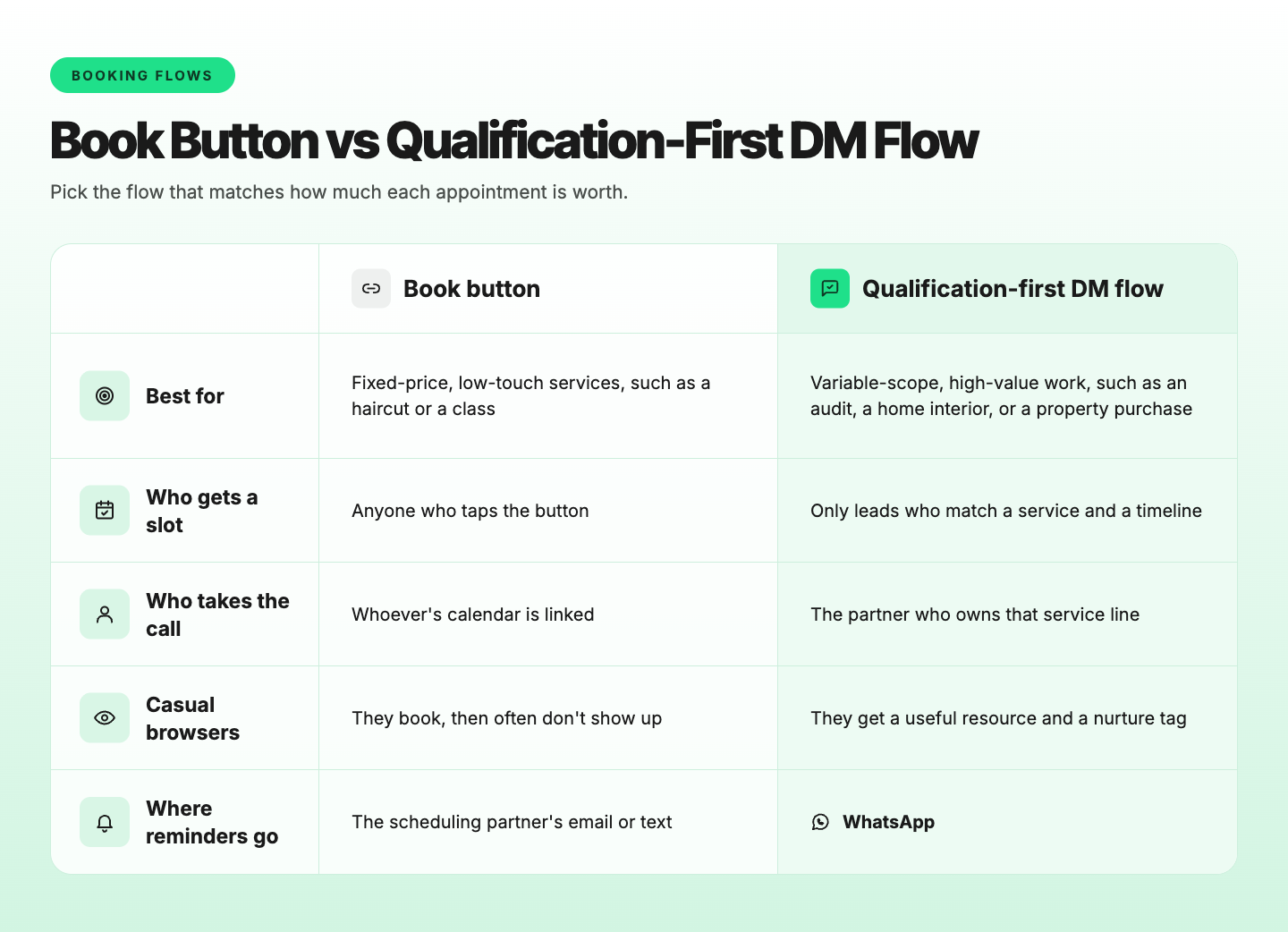
The rest of this guide builds the right-hand column. New to DM flows? Start with our guide to Instagram DM automation.
Which Lead Qualification Questions Should You Ask in Instagram DMs?
Ask two questions: what service the person needs, and when they need it. The service answer tells you which partner should take the call, and the timeline answer tells you whether that call should happen this week.
Two is the right number for three reasons:
- One tap each. An Instagram message can carry up to three buttons with titles of up to 20 characters, so each question fits in a single message.
- Less drop-off. Every extra question gives the person another reason to leave the chat. Two taps keep the flow short enough to finish on a phone.
- Budget can wait for the call. Asking about budget in the first DM reads as a filter, and good leads go quiet.
Open with one line that sets expectations: "Thanks for reaching out to [Firm]. Two quick taps and we'll get you to the right person."
Then send the service question with three buttons, keeping the third as "Something else." Follow with the timeline question, using "This month," "In 1-3 months," and "Just exploring" as the buttons.
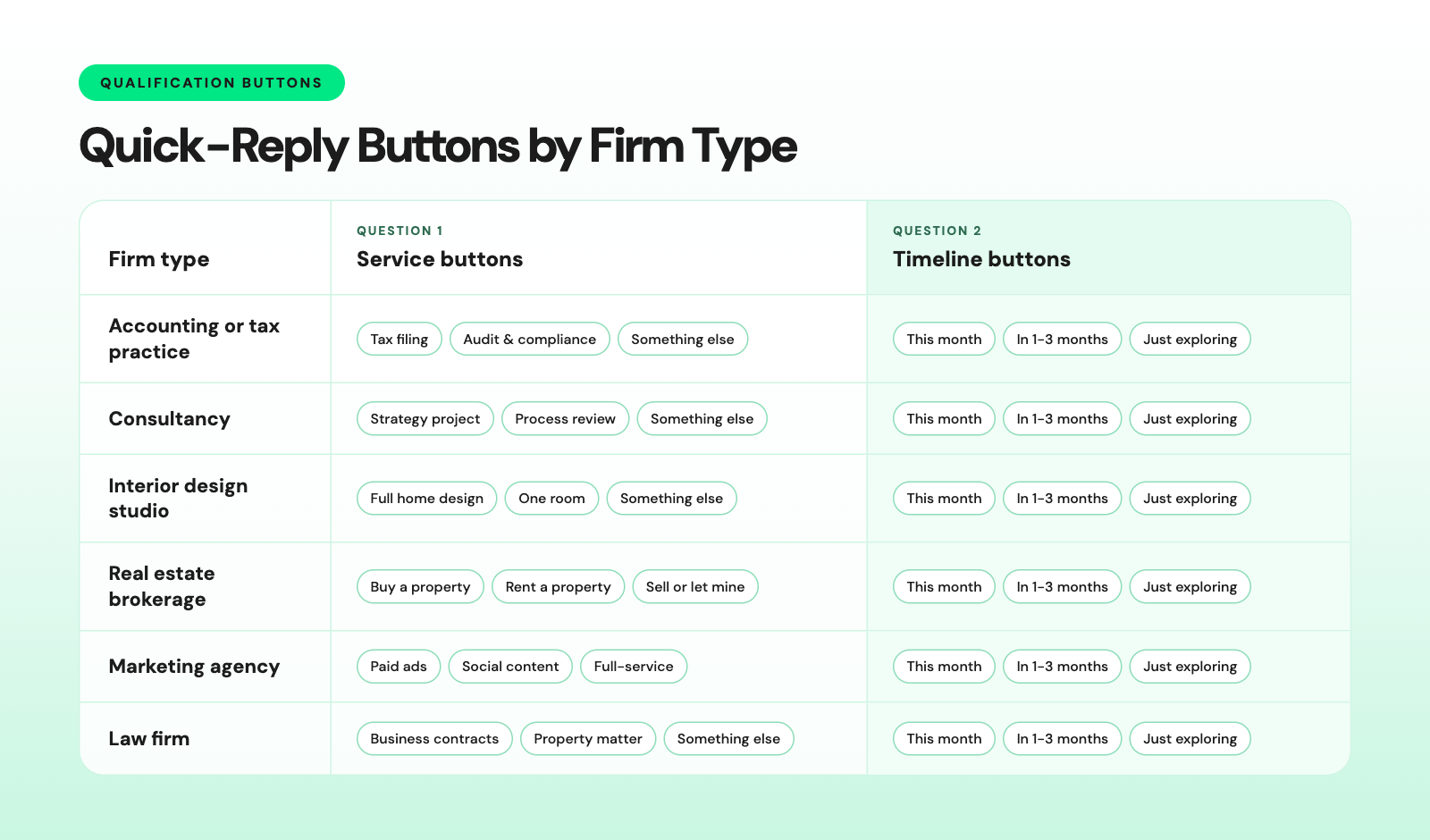
Every label fits the 20-character limit. Any "Something else" tap should go straight to a person.
Brokerages and agencies can skip "Something else" because their service lists are short.
How to Route the Answers: Hot Leads to a Partner, the Rest to Nurture
Route on the timeline answer. "This month" is a hot lead for the partner who owns the service, "In 1-3 months" gets a nurture tag, and "Just exploring" gets a polite close with the door left open.
Answer | Tags | Assign to | Next message | What the team does |
|---|---|---|---|---|
This month | hot-lead + service tag | Partner for that service | "Great, [Partner] handles this. What's the best WhatsApp number to confirm a time?" | Offers two times on WhatsApp the same working day |
In 1-3 months | Nurture + service tag | Associates team | Shares one relevant guide or checklist and asks for a WhatsApp number for updates | Follows up by hand within 7 days of the lead's last message, then on WhatsApp if the lead shared a number |
Just exploring | explore + service tag | No one | "No rush. Here's our [guide]. Message us anytime, and we'll pick it up." | Nothing until the lead messages again |
Something else | needs-review | Front-desk team | "Got it. A team member will reply here shortly." | Replies during working hours |
On Instagram, Set Tags, Assign User, Assign Team, and Wati AI Assist are available on the Pro and Business plans. On Growth, your team tags and assigns chats from the Team Inbox.
The "Just exploring" exit is your tire-kicker filter. It stays polite, gives the person something useful, and costs no partner time.
The same matrix works for agencies, where "Full-service" plus "This month" goes to an account director. See how Wati supports marketing agencies.
Example: An Interior Studio Routing by Move-In Date
"Full home design" plus "This month" goes to the principal designer, who offers a site-visit slot on WhatsApp. "One room" plus "Just exploring" gets a mood-board guide, so the principal only sees near-term projects.
Example: A Brokerage Separating Buyers From Browsers
"Buy a property" plus "This month" goes to a senior agent, who offers a viewing slot. "Rent a property" plus "In 1-3 months" gets new listings on WhatsApp as they come in.
For listing updates and site-visit reminders, see WhatsApp for real estate.
Bonus Read: How to capture phone numbers in Instagram DMs
Give every partner a clear lead queue. Wati's Team Inbox lets you assign chats by service, add internal notes, and filter by Open, Pending, or Solved. Explore the Team Inbox
How to Confirm the Consultation Slot on WhatsApp
Instagram DMs can't hold a calendar, and an automated reply can't reach someone more than 24 hours after their last message.
Confirm the slot on WhatsApp instead, where reminders arrive in a chat the person already reads.
Follow these four steps:
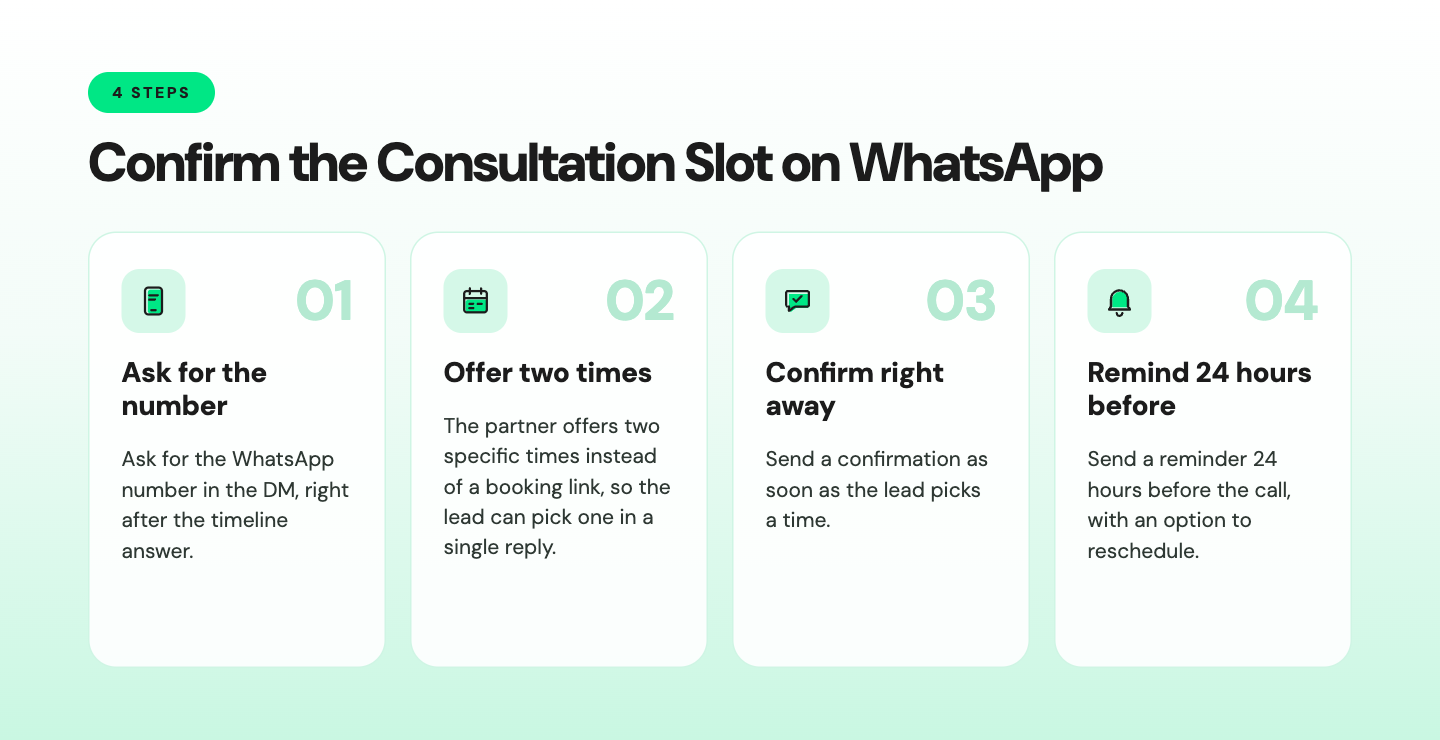
The partner can use three concise messages to reach out, confirm the booking, and remind the customer about the consultation.
Initial outreach:
Hi [Name], it's [Partner] from [Firm]. I can do Tuesday at 11 a.m. or Wednesday at 4 p.m. for a 30-minute call. Which works for you? |
Confirmation:
You're booked with [Partner] on [day, date] at [time] ([time zone]). We'll call you on this number. Please have [documents, floor plan, or brief] ready. Reply RESCHEDULE if you need another time. |
24-hour reminder:
Reminder: your consultation with [Partner] is tomorrow at [time]. Tap Confirm to keep the slot or Pick another time to reschedule. |
Set a WhatsApp keyword rule so "RESCHEDULE" or "Pick another time" starts a reschedule flow or assigns the chat to the partner. Otherwise, those replies simply land in the inbox.
Your first message to a new contact and any WhatsApp appointment-booking message sent after WhatsApp's 24-hour customer service window must use a Meta-approved template.
The person must also opt in to hear from you, so read Meta's messaging policy before sending reminders.
How AsiaBC Cut the Time Spent Finding Real Clients
AsiaBC helps more than 5,000 entrepreneurs in Hong Kong and Singapore set up companies, open bank accounts, and plan taxes. As WhatsApp inquiries grew, the team struggled to spot real potential clients.
The firm used a Wati chatbot to handle incoming inquiries, flag new business, use keyword actions to answer common questions instantly, and send personalized messages via broadcasts. AsiaBC saw:
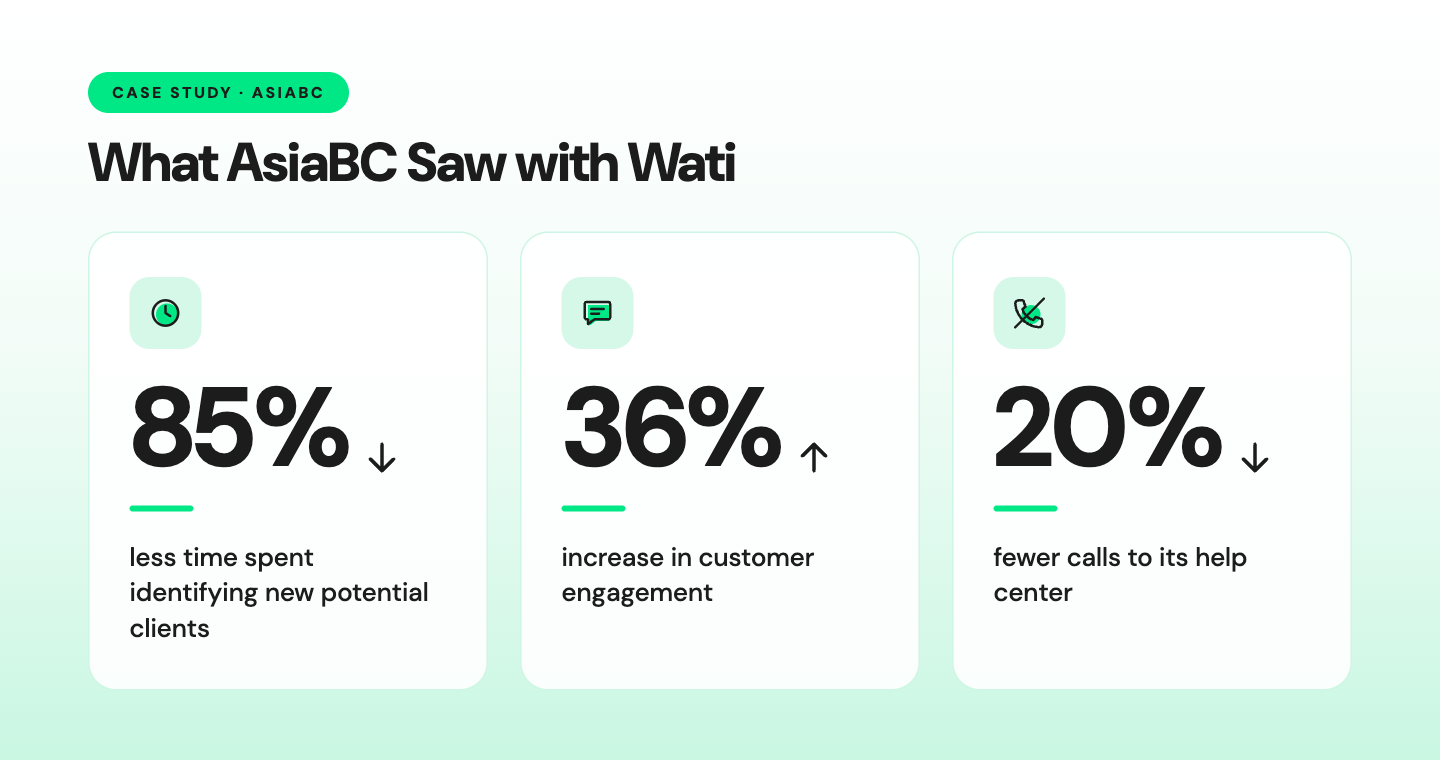
AsiaBC sorted inquiries on WhatsApp, but the same rule holds when the first message arrives on Instagram. Sort first, then hand over.
How Wati Runs a Qualification-First Instagram Booking Flow
Wati is an agentic customer engagement platform that turns conversations into revenue growth across marketing, sales, and support.
For service firms, it runs the whole booking flow from one Team Inbox: the button questions on Instagram, the tags and partner assignment, and the slot confirmation on WhatsApp.
- Guided chatbot flows send the two questions as button templates, with up to three quick-reply buttons per message.
- Set a Condition and Set Tags read which button the person tapped and add a hot-lead, nurture, or explore tag, plus a service tag.
- Assign User and Assign Team sends a "This month" lead to the right partner by service line and routes other answers to the relevant team.
- Wati AI Assist asks for the person's WhatsApp number inside the Instagram chat and saves it to their Instagram contact.
- Astra AI Agent answers off-script questions on Instagram from your website and FAQs, and hands the chat to the right partner.
- The Team Inbox shows both the Instagram thread and the WhatsApp chat, and the WhatsApp number saved on the Instagram contact shows which lead each WhatsApp follow-up belongs to.
Build the flow in the chatbot builder, using the steps marked as supported on Instagram.
Set Tags, Assign User, Assign Team, and AI Assist are available on the Pro and Business plans. Our walkthrough for setting up an Instagram chatbot covers each step.
What Mistakes Break an Instagram Booking Flow?
Most broken booking flows fail on timing or on asking too much.
- Replying after the window closes. A chatbot can reply for 24 hours after the person's last message, and a team member gets 7 days. Ask for the WhatsApp number early so the conversation can continue there.
- Putting buttons in the wrong step. On Instagram, buttons belong in a template message. A question step that waits for typed text can't show them.
- Asking about budget first. It reads as a filter, and serious leads drop off. Save it for the call.
- Leaving hot leads unassigned. A lead that sits in a general inbox goes cold. Assign by service, and use a shared team inbox so everyone can see who owns it.
- Promoting instead of replying. Lawyers and accountants in many markets face strict rules on advertising and unsolicited contact. Replying to people who contact you first is generally allowed, but check your regulator's rules.
If many of your inquiries arrive in the evening, pair this flow with our guide to after-hours Instagram lead generation.
Once the flow is running smoothly, the next step up is an AI agent that books appointments inside WhatsApp.
Start Booking Consultations Worth a Partner's Time
Your partners should spend their hours with people ready to hire this month, not on every "how much?" DM. Two questions, clear routing, and a WhatsApp confirmation get you there.
Book a demo to see the qualification-first flow running on your own Instagram account.
Frequently asked questions
Can Instagram connect to my booking calendar?
No, Instagram DMs don't sync with a calendar. Collect the request in the DM, then confirm the time on WhatsApp, where you can also send reminders.
Should I ask about budget in an Instagram DM?
Usually not in the first message. The service and timeline answers are enough to route the lead to the right partner. Budget belongs on the call, where the partner can explain scope and give a realistic range.
What happens if a lead stops replying mid-flow?
A chatbot can keep replying for 24 hours after the lead's last message, and a team member can reply for 7 days. Tag partial answers so the right person can follow up inside that window, or continue on WhatsApp if you have the number.
Is it allowed to automate replies to Instagram DMs?
Yes, as long as the person reaches out first with a DM, a comment, or a tap on a Click-to-Instagram ad. Instagram only lets businesses message people who started the conversation, so cold outreach isn't an option.
What about DMs that arrive after office hours?
The same two questions run at any hour, so leads are tagged and assigned by the next morning. Add evening ads and an out-of-office reply to capture even more after-hours enquiries.
Related posts
- How to Send Bulk Messages on WhatsApp Without Getting Blocked
Learn how to send bulk WhatsApp messages without getting blocked. Compare the WhatsApp Business app and API, messaging limits, costs, templates, and best practices for safe, compliant bulk messaging.
- Instagram Comment Automation: How It Works and How to Set It Up in Wati
Instagram comment automation auto-replies to comments and DMs commenters within seconds via Meta's API. Covers strategy, use cases, and Wati setup.
- Shared Team Inbox for Instagram: A Buyer’s Checklist for 2026
Use this fastest checklist to evaluate any shared team inbox for Instagram, which covers DMs, comments, automation, and multi-channel support.
- How to Set Up a TikTok Business Account: Step-by-Step Guide
Set up a TikTok Business Account step by step: switch from personal, pick a category, add your profile, and unlock ads and analytics.