
Too Long? Read This First
- Give every stage of the student journey one automation and one human handoff.
- Send the brochure as a fee-card image or a link that opens in the chat. Keep the full PDF for WhatsApp.
- Collect a WhatsApp number (the parent's, for school students) before Instagram's 24-hour automation window closes.
- Switch your rules on a week before results day and batch launches, not after.
What happens to the 180 "fees?" comments under your dropper-batch reel on the evening NEET results come out?
If your team answers them the next afternoon, most of those families have already spoken to two other institutes. That gap is what Instagram marketing for education has to close: turning reel comments, DMs, and story replies into admission inquiries, demo-class bookings, and counselor calls.
For coaching institutes and edtechs in India, the reel is rarely the problem. The reply is. Wati, an agentic customer engagement platform, uses Instagram automation to give every comment and DM an instant answer and a clear path to a counselor.
This guide maps the six stages of an Instagram admission inquiry to the automation and the human handoff each stage needs. It also includes a keyword library, an FAQ question bank, and an exam-calendar trigger sheet you can copy.
Why do Instagram Inquiries Slip Away from Coaching Institutes?
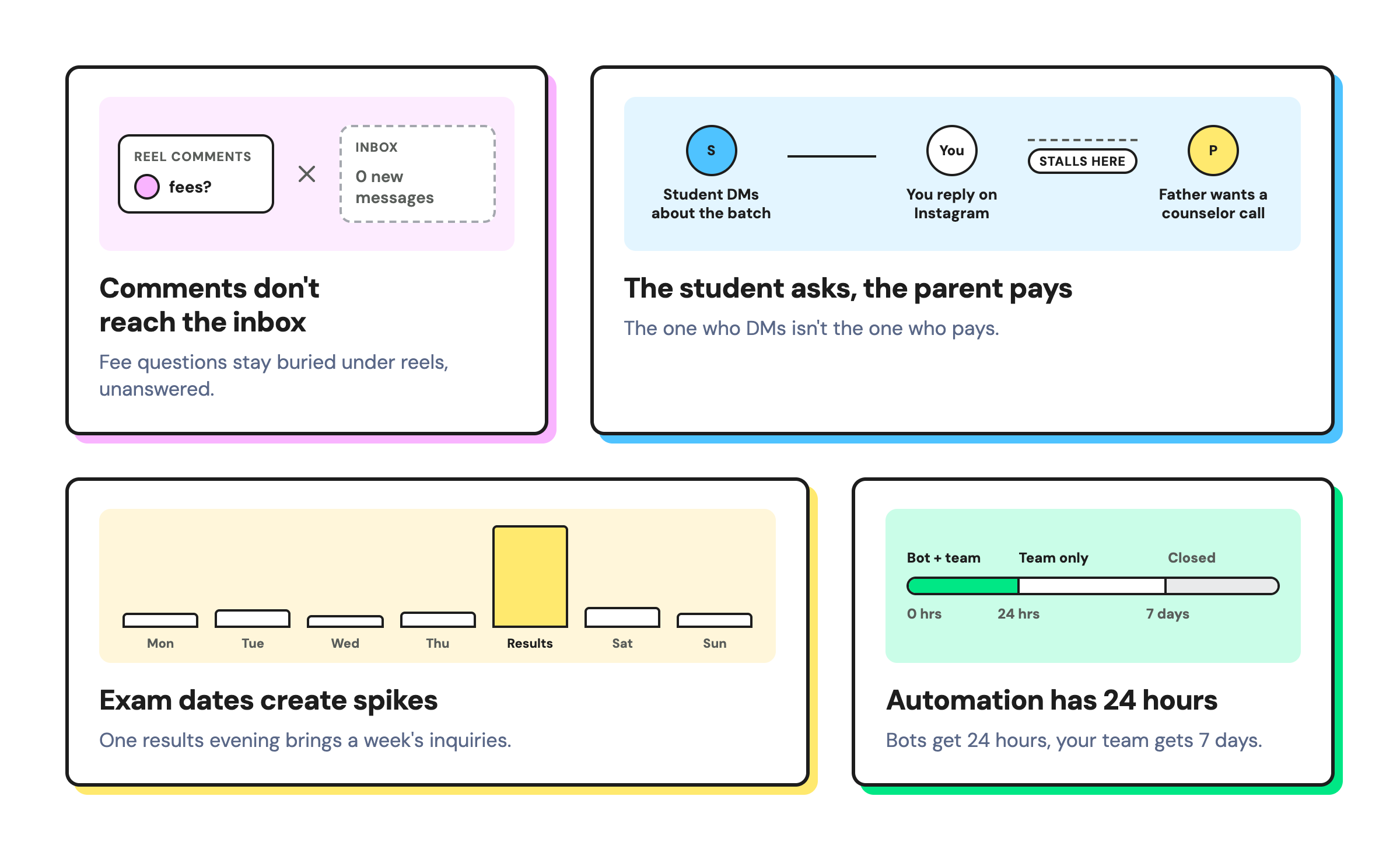
Instagram inquiries slip away because they arrive in bursts, the student asks while the parent decides, and the window to reply automatically is short.
Coaching demand isn't the issue: 27% of students in India were taking or had taken private coaching in the current academic year (30.7% urban, 25.5% rural), according to MoSPI's Comprehensive Modular Survey: Education 2025.
Four things are specific to Instagram:
For leaks across calls, forms, and portals, see our education lead generation playbook.
How Instagram Marketing for Education Turns Inquiries into Admissions
Instagram marketing for education converts when each stage of the student journey has one automation and one person who takes over. The table below is your build sheet, and the six stages that follow walk through each row in order.
Stage | What the student or parent sends | What runs automatically | Who takes over | Where follow-up happens |
|---|---|---|---|---|
1. Interest | Comments "NEET27" on a reel, replies "DEMO" to a story | Comment-to-DM with a public reply; story reply rule | — | Instagram DM |
2. Questions | "How much are the fees?" "When does the batch start?" | Keyword DM rule or FAQ chatbot | Counselor for exceptions | Instagram DM |
3. Qualification | Exam, class, city, online or offline | Lead-qualification chatbot + AI Assist | — | Instagram, then WhatsApp |
4. Demo class | Asks for a demo slot | Demo-request chatbot | Front desk confirms the slot | WhatsApp reminder |
5. Counseling | "Can someone call my father?" | Tag and assign to Admissions | Counselor | Call or WhatsApp |
6. Enrollment | Goes quiet after the demo | — | Counselor | WhatsApp templates |
Here's how it plays out (illustrative). Aarav, a NEET dropper in Jaipur, comments "NEET27" at 9:40 p.m. and gets the fee card and batch dates by DM in seconds.
He answers three questions and shares his mother's WhatsApp number. By 9:50 p.m., a demo request sits in the Admissions queue.
Stage 1: How do You Turn Reel Comments into Brochure DMs?
To start qualification straight from the comment, set the rule’s action to Start a chatbot. The chatbot must open with an Instagram button template.
Ask viewers to comment one batch keyword. A comment-to-DM rule then replies publicly under the comment and sends the brochure in a DM within seconds.
Read our guide to comment-to-DM automation for how the rule works.
What makes it work for coaching:
- One keyword per batch: use NEET27, JEE27, FOUNDATION, CUET, or DROPPER, not a generic "INFO." Each reel's keyword shows which batch drives inquiries, and nobody gets the wrong fee card.
- The brochure as a link or image: a fee-card image or a brochure-page link opens right in the chat, with no download. Keep the full PDF for WhatsApp.
- A short public reply: "Sent you the batch details 📩" tells other viewers the DM works. One line is enough.
- Posts and Reels both count: the same rule answers comments on organic posts and Reels.
- Stories: add "Reply DEMO for a free demo class" to a story. Story reply rules cover all your stories, so the keyword is what limits a rule to one campaign. Emojis such as 🔥 can be keywords too.
Copy this keyword library and add your city and branch names:
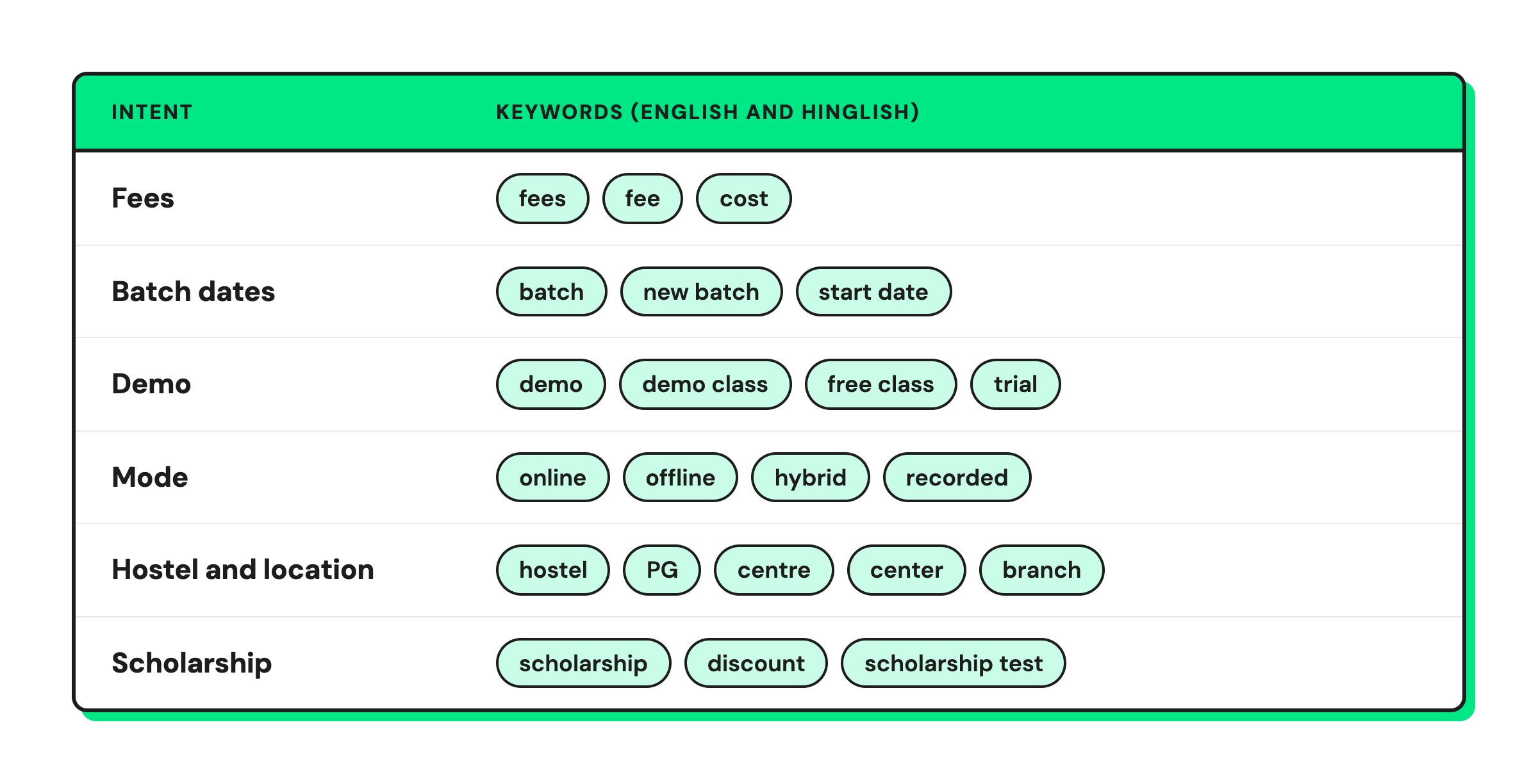
Turn on fuzzy matching to catch typos such as "feess" and "scolarship."
Stage 2: How do You Answer Fee, Batch, and Eligibility Questions Instantly?
Use a keyword DM rule when every student gets the same answer. Use an FAQ chatbot with buttons when the answer depends on the course.
The decision is simple:
- Same answer for everyone → keyword rule: "Our center is near the Malviya Nagar metro" works for every "location" DM.
- Answer depends on the course → chatbot: "fees?" means one thing for a JEE dropper and another for a Class 9 foundation student. The bot opens with an Instagram button template (JEE, NEET, Foundation), then sends that course’s fee card and start dates.
Instagram bots can’t start other bots, so build FAQ, qualification, and demo booking as branches of one flow, or start each with its own keyword rule (e.g., a DM containing ‘DEMO’).
A course inquiry from Instagram usually falls into one of five groups. Build your bot's answers around them:
- Fees and payment: total fee, installments, refund policy
- Batches: start dates, timings, weekend and dropper batches
- Mode and medium: online or offline, Hindi or English medium, recorded lectures
- Logistics: hostel, center address, study material
- Admission: eligibility, scholarship test, documents needed
Keep a "Talk to a counselor" button on the first screen of every bot. Parents asking about fee concessions or hostel safety want a person, not a menu. For setup steps, follow our FAQ bot guide.
After hours, Wati's Welcome and Out of Office rules tell families when a counselor will reply. Set your working hours once, and update them for Diwali closures.
Stage 3: How do You Qualify a Student and Reach the Parent?
Ask three qualifying questions, then collect a WhatsApp number before Instagram's 24-hour automation window closes. For school students, collect the parent's number.
The three questions:
- Which exam and year? (NEET 2027, JEE 2027, CUET)
- Which class are you in, or are you a dropper?
- Online or offline, and which city?
Tag the chat with the exam and class, so the counselor sees them at a glance.
Student or parent? Use this routing rule:
- Class 9 to 12 students: ask for a parent's WhatsApp number. Parents decide and pay, and most of these students are minors. India's DPDP Rules will require verifiable parental consent for anyone under 18 by May 2027, so build that consent into the flow now.
- Graduates and skill-course learners: ask for the learner's own number.
AI Assist asks for the number in a natural conversation instead of a rigid form. Each node collects one detail, so use one node for the WhatsApp number and an optional second node for email.
Add the AI Assist node inside the same bot where your comment rule starts, rather than as a separate rule
If the student shares the number, the Success path thanks them and tags the chat. If they don't, the Failure path hands the chat to Admissions while a person can still reply. AI Assist is available on the Pro and Business plans.
A number isn't consent. Add a consent line to the prompt, such as "By sharing your number, you agree to receive batch updates on WhatsApp." Our guide to phone number capture covers the full flow.
Stage 4: How do You Book Free Demo Classes from Instagram DMs?
A demo-request chatbot collects the course, a preferred day and time, and the student's name. It then hands the request to your front desk to confirm.
The flow:
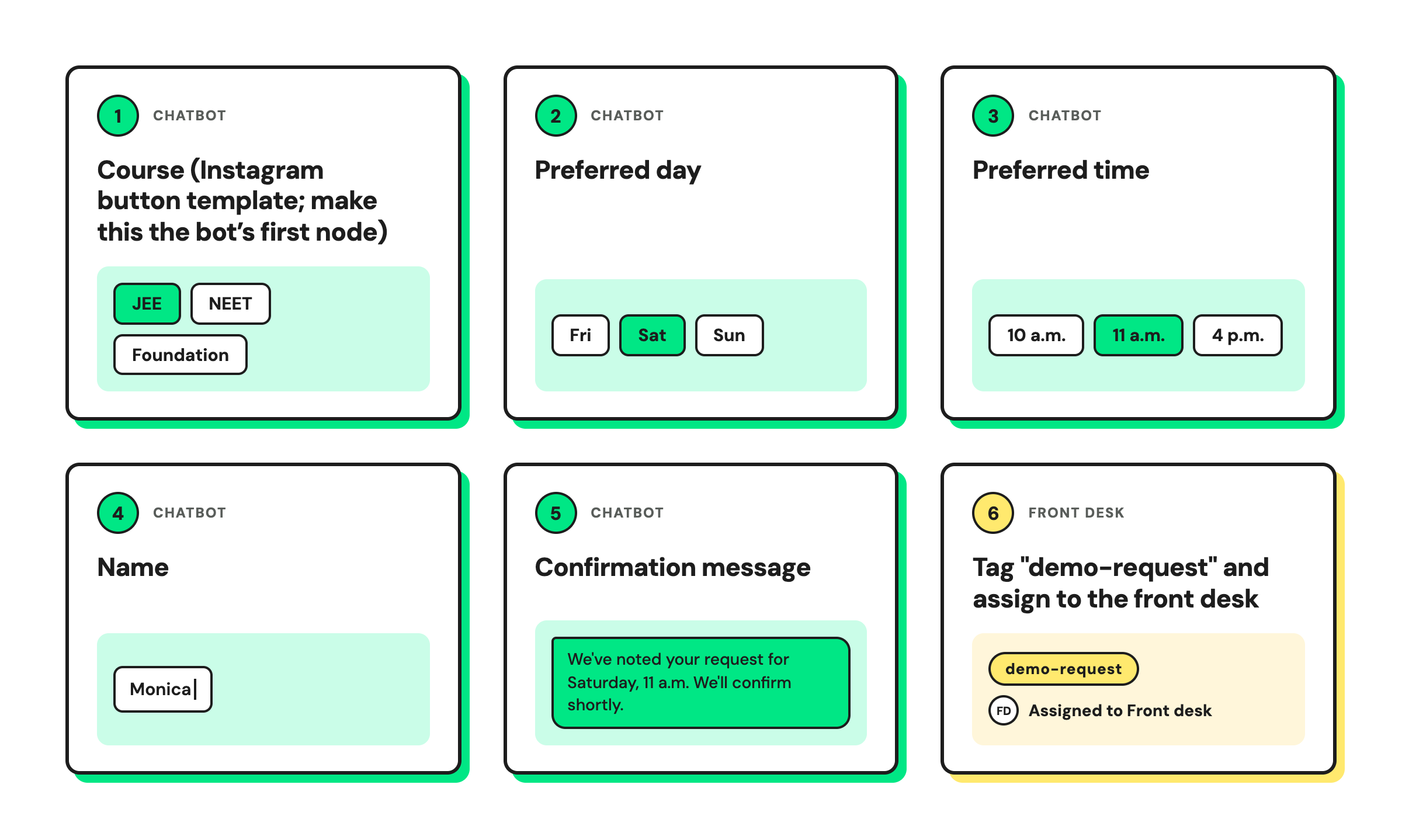
Instagram has no calendar sync, so treat every free demo class booking as a request your team confirms in the inbox.
Once confirmed, send the reminder on WhatsApp to the number from stage 3.
Remind families the day before and an hour before, because demo no-shows usually come from families who forgot, not families who changed their mind.
Stage 5: How should Counselors Manage Instagram Inquiries?
Counselors should work Instagram inquiries from one shared inbox, with tags that show each student's stage and notes that carry what the family has said.
Set four tags and use them every time:
- hot: exam this year, offline, asked about fees
- demo-booked: confirmed slot
- parent-contact: parent's number collected
- nurture: next year's exam, still exploring
Notes like "Father prefers a call after 7 p.m." stop the next counselor from calling at the wrong time. Public questions under posts land in the inbox's Comments tab. Answer them there, or move the conversation to a DM.
Good student inquiry management on Instagram is mostly this: an owner for every chat and a stage for every student. A shared inbox covers most single-city institutes. Add an inquiry management system or CRM when you run many centers and need reporting across them.
Stage 6: How do You Follow Up after Instagram's 24-Hour Window?
Follow up on WhatsApp with approved templates, using the number collected in stage 3.
Wati can merge a student's Instagram and WhatsApp profiles into one contact using the Linked Chats feature, so the counselor knows who they're talking to when follow-up moves to WhatsApp.
Three follow-ups earn their place:
- Demo reminder: the day before and an hour before
- Batch-start alert: seats left, start date, fee deadline
- Scholarship-test date: registration link and syllabus
Send these as WhatsApp broadcasts or campaigns to the families who opted in. For a full two-week nurture cadence, use the one in our education lead generation playbook.
When do Coaching Inquiries Spike, and What Should You Switch On?
Coaching inquiries spike around results, exam notifications, and batch launches. Once your six stages are built, switch the matching automation on a week before each moment.
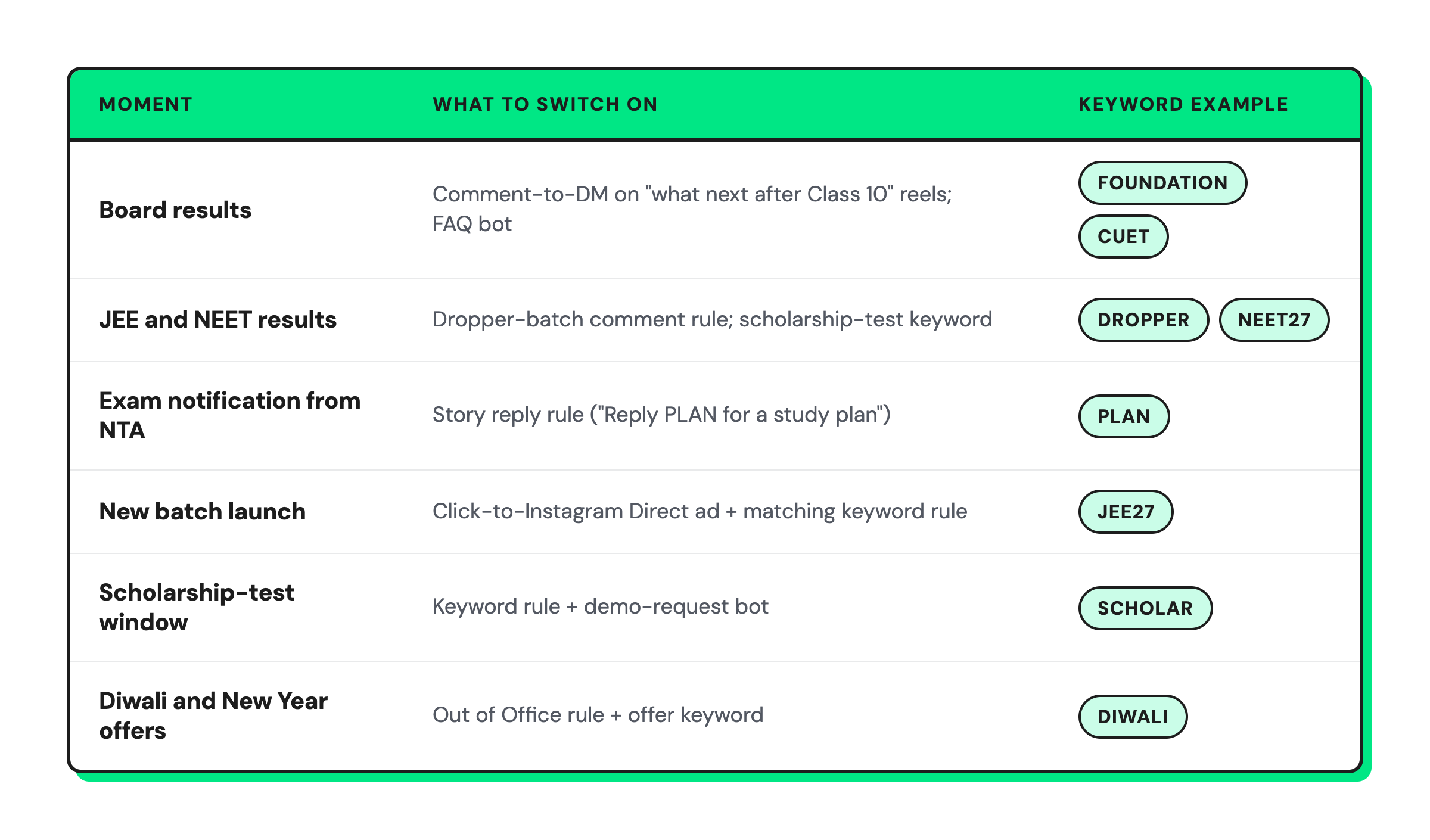
Check exact dates against official NTA and board notices each year. For the campaigns that run alongside these automations, see the admissions campaign calendar.
For batch launches, run Click-to-Instagram Direct ads. They add a Send message button that opens a DM with your institute. Write the ad's tappable questions to match your keyword rules, such as "What are the fees?", so every tap gets an instant answer.
Wati labels chats that start from these ads, so you can see which batch ad drove each inquiry. With no ad budget, put your ig.me/m/yourusername link in your bio or on a QR code at the center.
How do You Know Instagram is Filling Batches?
Track four numbers each week, one per stage. Each number points to the stage to fix.
- Comment-to-DM rate: low means the keyword isn't clear in the reel.
- Number capture rate: low means the AI Assist prompt needs a better reason, such as "batch-start alerts."
- Demo show-up rate: low means reminders go out too late or to the wrong person.
- Demo-to-enrollment rate: low means counselor follow-up is slow.
How Wati Runs the Instagram Admissions Funnel
Wati is an agentic customer engagement platform that turns conversations into revenue growth across marketing, sales, and support. For coaching institutes, it covers every stage of the Instagram admission journey:
- Comment and story rules: a batch keyword on a reel gets a public reply and the brochure link by DM in seconds, at any hour. Story replies get the DM.
- Instagram chatbots: FAQ, lead-qualification, and demo-request bots use buttons, tag the chat, and assign it to Admissions or the front desk.
- AI Assist: collects the WhatsApp number (or the parent's) in a natural conversation, with a human fallback if the student doesn't share it.
- Astra AI Agent: answers course questions in Instagram DMs in plain text and hands the chat to a counselor when a family needs a person.
- One Team Inbox: Instagram DMs and comments sit next to WhatsApp and Messenger, with assignments, tags, and notes.
- Merged Instagram and WhatsApp contacts: the counselor knows which student a WhatsApp follow-up belongs to.
- Multiple Instagram accounts: on the Business plan, run multiple center or city handles from one workspace, with rules set per account or shared across accounts.
Fill Your Next Batch from the Comments You Already Get
Your reels already bring the inquiries. Answer every comment in seconds, get each serious student to a counselor the same evening, and keep the conversation going on WhatsApp after Instagram's window closes.
Book a demo to see the flow on your own Instagram account.
Frequently asked questions
What counts as an admission inquiry on Instagram?
An admission inquiry on Instagram is any comment, DM, story reply, or ad tap asking about fees, batches, eligibility, or a demo class. Treat each one as a lead. Reply within minutes, ask which course they want, and get a WhatsApp number while automation can still reply.
Should I send a course brochure PDF in an Instagram DM?
Send a fee-card image or a link to your brochure page first, because both open inside the chat without a download. A short video of the center works too. Save the full PDF for WhatsApp once you have the family's number.
Should coaching institutes message the student or the parent?
Coaching institutes should message the parent for school students and the learner for adult courses. Students in Class 9 to 12 usually start the inquiry on Instagram, but parents decide and pay. Collect the parent's WhatsApp number in the chat and route fee and counseling conversations to them.
How many keywords should one reel use?
One reel should use one primary keyword, such as NEET27 or JEE27, written clearly in the caption. A single batch keyword tells you which reel drives inquiries and stops the wrong brochure from going out. Fuzzy matching then catches common typos without you adding every variation.
Related posts
- How to Send Bulk Messages on WhatsApp Without Getting Blocked
Learn how to send bulk WhatsApp messages without getting blocked. Compare the WhatsApp Business app and API, messaging limits, costs, templates, and best practices for safe, compliant bulk messaging.
- Instagram Comment Automation: How It Works and How to Set It Up in Wati
Instagram comment automation auto-replies to comments and DMs commenters within seconds via Meta's API. Covers strategy, use cases, and Wati setup.
- Shared Team Inbox for Instagram: A Buyer’s Checklist for 2026
Use this fastest checklist to evaluate any shared team inbox for Instagram, which covers DMs, comments, automation, and multi-channel support.
- How to Set Up a TikTok Business Account: Step-by-Step Guide
Set up a TikTok Business Account step by step: switch from personal, pick a category, add your profile, and unlock ads and analytics.