
Too Long? Read This First
- Festive sales flood Instagram DMs with order status, delivery delay, COD, and return queries.
- Instagram’s messaging rules limit automation since shoppers must message first and automated replies are restricted to 24 hours.
- A five-step tracking flow automates order updates by collecting order IDs, checking orders through webhooks, and replying with status or handing over exceptions.
- Even without a connected order system, automation saves time by collecting order IDs, tagging chats, and assigning them to the right team.
- Dedicated routing handles exceptions like returns, refunds, COD queries, and courier delays with context.
- Wati streamlines the process with Instagram automation, webhook lookups, team assignments, a shared inbox, and Astra AI Agent.
Is your team ready for the “where is my order?” DMs that arrive with every festive sale? Without Instagram order tracking, those messages bury the chats from people who still want to buy.
Shoppers expect fast answers when it’s busy. 88% of consumers expect brands to reply within 24 hours during peak season, according to Emplifi’s 2026 US and UK survey.
Instagram order tracking is a DM flow that collects a shopper’s order ID, looks it up in your order system, and replies with the live status. Wati’s Instagram automation runs this flow for D2C brands.
In this guide, you’ll learn why order status DMs spike, how the tracking flow works, what to do before your order system is connected, how to route returns and COD, and how to prepare your team for the rush.
Why do Order Status DMs Spike on Instagram during Sales?
Shoppers ask where they discovered you. Every sale adds more orders, slower couriers, and more COD doubts, and all of it lands in the same Instagram inbox.
What Shoppers Ask After They Order
Post-purchase DMs fall into four groups. Each needs a different reply:
- Status: "Where is my order?" or "When will it arrive?"
- Delay: "Tracking hasn't moved in three days."
- COD: "Is my cash-on-delivery order confirmed?"
- Returns and exchanges: "The size doesn't fit. Can I exchange it?"
Social media is now a support channel. 57% of consumers have contacted a brand through its social account for customer service.
Slow replies cost sales too. 73% of social users say they would buy from a competitor if a brand doesn't respond on social.
The same questions show up on every channel. This is the wider WISMO problem, but Instagram adds its own limits.
Why Order Tracking is Harder on Instagram than on WhatsApp
On Instagram, the shopper always starts the chat. You can't prevent questions with proactive updates, so you have to answer them fast.
These rules shape your order tracking flow:
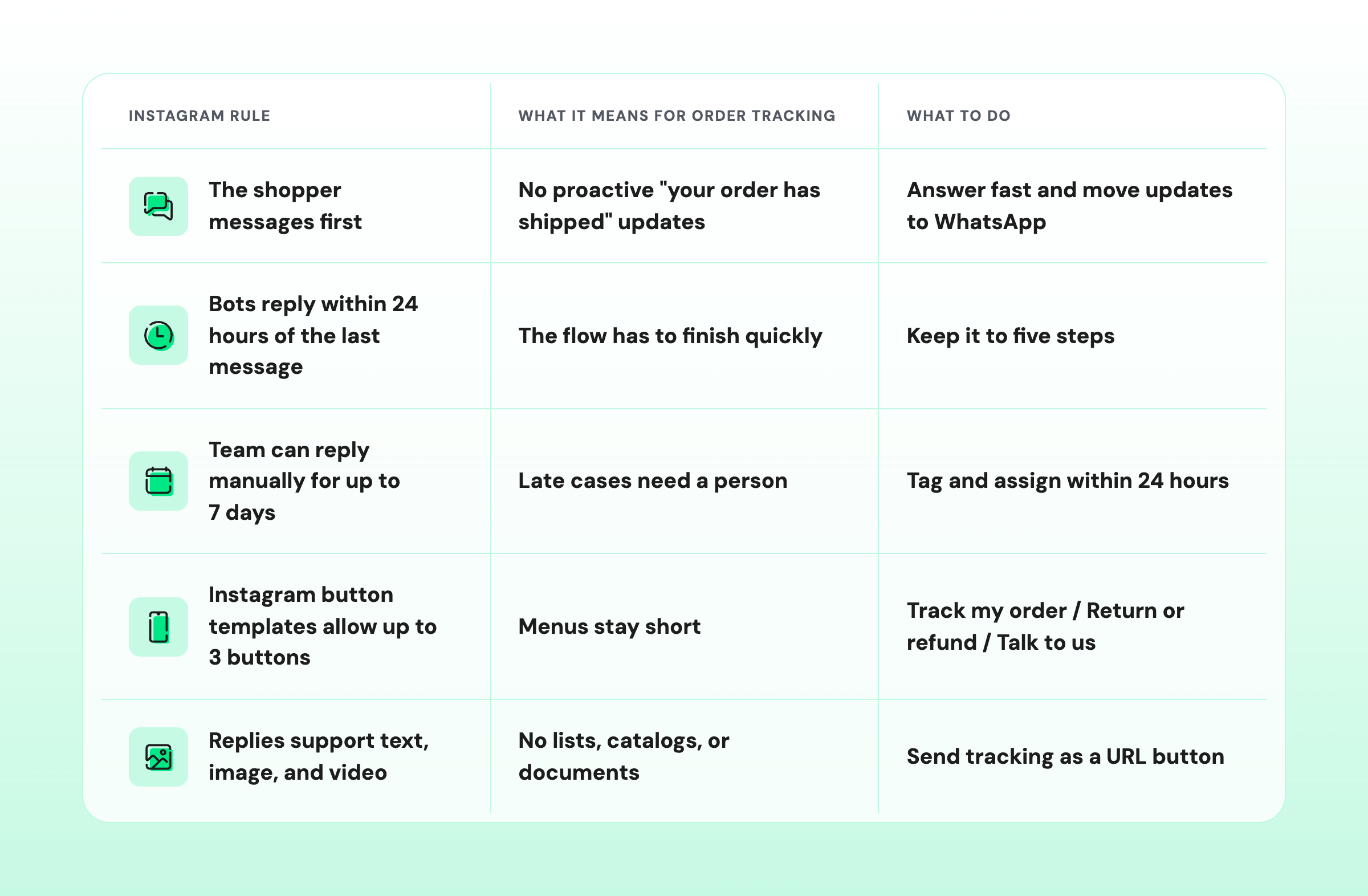
These limits apply to any Instagram chatbot, not just order tracking.
You can't stop these DMs from arriving. The next best thing is a flow that answers them in seconds.
How does Instagram Order Tracking Work?
Instagram order tracking works in one loop. A bot collects the order ID, sends it to your order management system through a webhook, then shares the result.
When the order can't be found, the bot hands the chat to your team instead.
i. The 5-Step Order Tracking Flow
An order tracking chatbot on Instagram needs five building blocks:
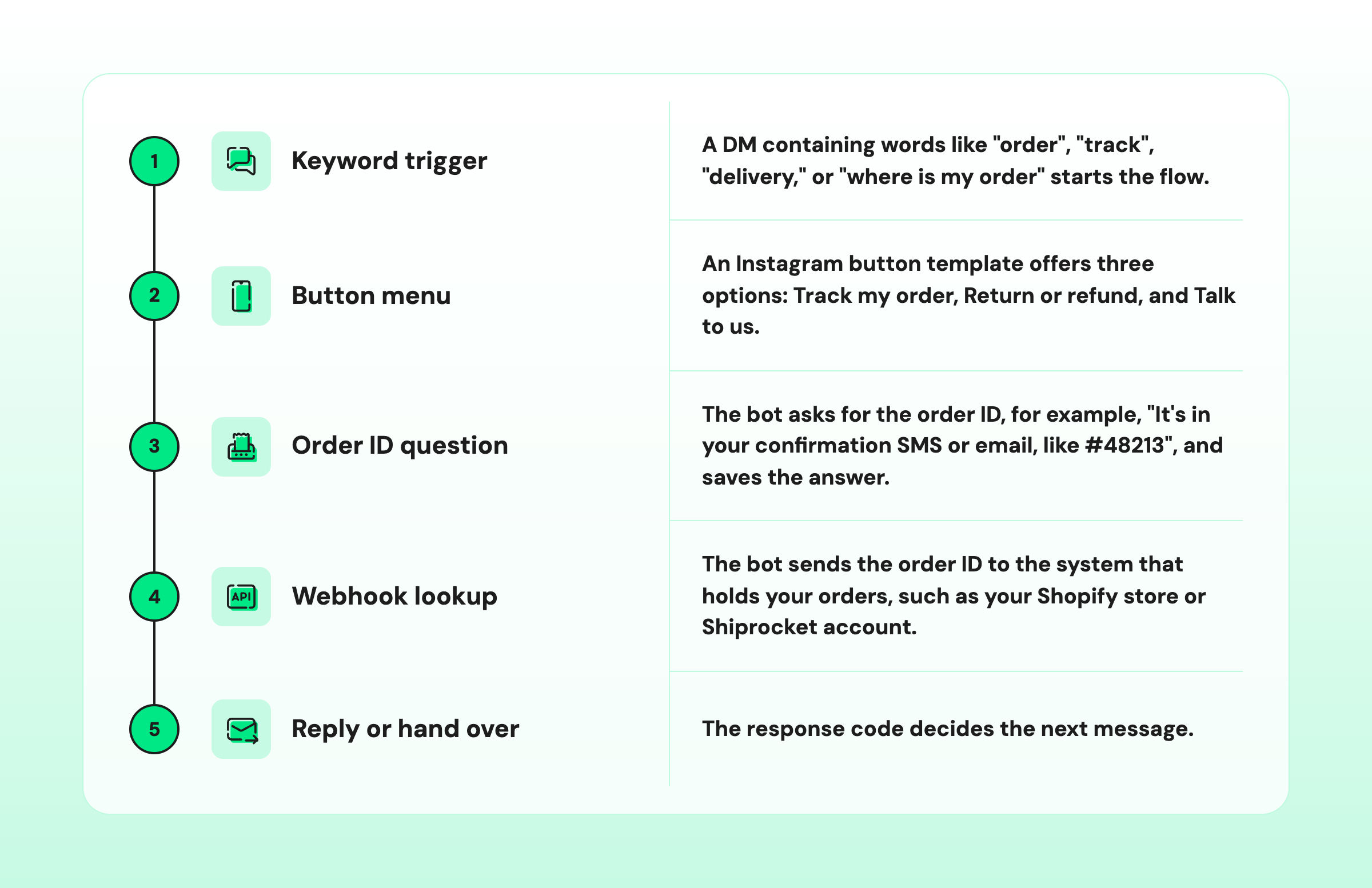
Your developer only needs to expose one lookup. For example:
GET https://your-store.com/api/orders/{{order_id}}Map from the response: status, courier, AWB number, expected date, tracking URLii. When the Order is Found (200 Response)
A 200 response means the order exists. The bot maps the response fields into a short reply:
"Your order #48213 has shipped with Delhivery. Expected delivery: 6 November. Tap below to track it."
Add a "Track parcel" URL button and an "Anything else?" menu. The shopper gets an answer in seconds, and nobody on your team touches the chat.
iii. When the Order isn't Found (404 Response)
A 404 response means the order system couldn't match the ID, often because of a typo. The bot asks once more and shows where to find the order ID.
If the second try also fails, the bot tags the chat "order-not-found" and assigns it to support. The order ID the shopper typed is already saved, so the support rep starts with context.
Never let the bot loop more than once. After two failed tries, a person can sort it out faster than another automated message.
iv. What if Your Order System isn’t Connected Yet?
You can still automate the first half of the conversation. Until your order system is connected, the bot can’t fetch the status, but it can collect the order ID, tag the chat, and assign it.
Your setup | What the bot does | What your support team gets |
|---|---|---|
Order system connected by webhook | Looks up the order and replies with the status | Only exceptions, like not-found orders |
Order system not connected yet | Collects the order ID, tags, and assigns | Order ID, reason tag, and the full chat |
Even this simpler flow saves time. Your support team replies in one message instead of starting with “Can you share your order number?”
The trigger is the same in both setups. For setup steps, see keyword-triggered Instagram automation.
Status questions are the easy part. Returns, refunds, and late parcels need a person, and that’s where routing matters.
How do You Route Returns, Refunds, COD, and Courier Delays?
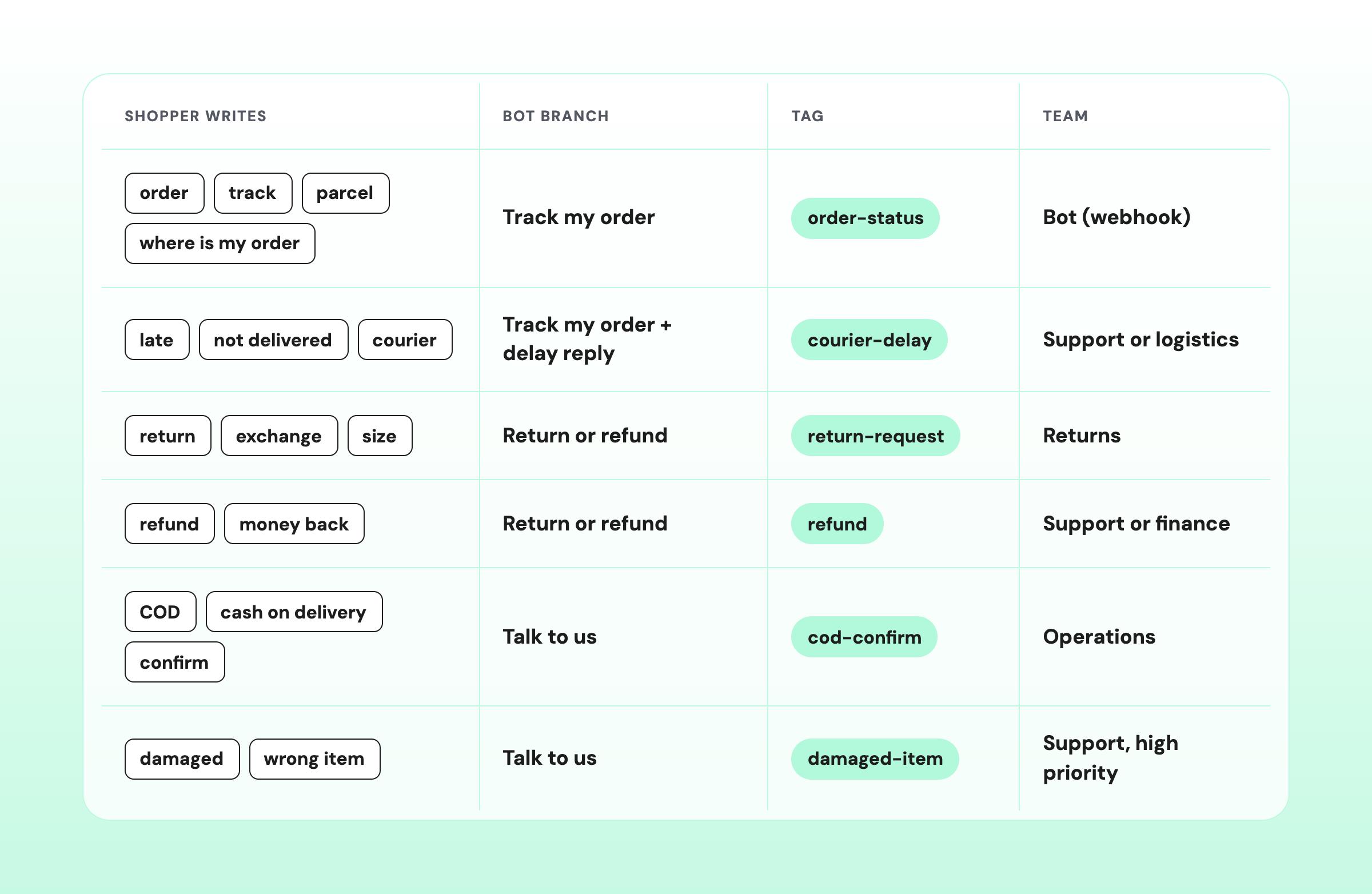
Give each post-purchase question its own keyword, tag, and team. Save the order ID before the handoff so your team has the context.
i. Match Each Keyword to a Tag and a Team
Start with this map. Each keyword sends the shopper to a bot branch, adds a tag, and assigns the right team:
Shopper writes | Bot branch | Tag | Team |
|---|---|---|---|
order, track, parcel, where is my order | Track my order | order-status | Bot (webhook) |
late, not delivered, courier | Track my order + delay reply | courier-delay | Support or logistics |
return, exchange, size | Return or refund | return-request | Returns |
refund, money back | Return or refund | refund | Support or finance |
COD, cash on delivery, confirm | Talk to us | cod-confirm | Operations |
damaged, wrong item | Talk to us | damaged-item | Support, high priority |
After each sale, add the words shoppers used in real DMs. Their phrasing beats any keyword list you write in advance.
ii. Hand over with Context so Your Team Never Asks Twice
A handover only saves time if the team sees what the bot already collected. Three rules keep context intact:
- Save the order ID first: store it as a variable before the chat is assigned.
- Tag the reason: the tag tells the team why the shopper is waiting.
- Keep one thread: the bot conversation and the rep reply stay in the same chat.
Your team can then work from one queue in a shared team inbox. If the shopper shares their phone number, it’s saved to their Instagram contact, so your team can match the WhatsApp chat to the same shopper.
With the flow and routing designed, the last step is getting them live before order volumes peak.
How should Your Support Team Prepare for the Festive Rush?
Test the flow before the sale, watch the not-found and delay tags during it, and switch the menu to returns after it.
1. Before the Sale
- Test the webhook: use real order IDs in every format shoppers might type.
- Load your keywords: include regional-language phrases and common typos.
- Set up tags and teams: create every tag from the routing map.
- Write the delay reply: prepare it now, not when a courier backlog hits.
2. During the Sale
- Check the not-found queue: review "order-not-found" chats at least twice a day.
- Update the delay reply: change it the moment a courier reports a backlog.
- Collect phone numbers: move shipping updates to WhatsApp, where you can message first.
3. After the Sale
- Lead with returns: move "Return or refund" to the top of the menu.
- Share refund timelines: add them to the refund reply so shoppers don't chase.
- Review your tags: fix keywords that sent shoppers down the wrong branch.
Mistakes to Avoid
- Strict ID formats: accept order IDs with and without "#", and strip spaces.
- Slow order systems: test lookup response times before the sale, when traffic is still low.
- Wrong inputs: if a shopper sends a phone number instead of an order ID, ask again once.
- Endless loops: re-ask once, then hand over to a person.
Every block in this flow, from the keyword trigger to the handover, runs inside one tool in Wati.
How Wati Handles Instagram Order Tracking
Wati runs the whole flow in one place. A keyword rule starts an Instagram chatbot that looks up the order by webhook, then tags and assigns anything it can't close.
Wati is an agentic customer engagement platform that turns conversations into revenue growth across marketing, sales, and support. Here's how each block maps to Wati:
- Keyword DM rules: start the flow when a DM contains order, track, delivery, or refund keywords.
- Instagram button templates: add quick-reply and URL buttons to the chatbot menu.
- Question and Webhook steps: collect the order ID and look it up, with separate 200 and 404 paths.
- Set tags and Assign team: route every exception with the order ID already saved.
- Team Inbox: Your team handles Instagram, WhatsApp, and Messenger chats in one view.
- Astra AI Agent on Instagram: answers open questions like "Do you ship to Pune?" and hands over to a teammate. Order lookups stay in the chatbot flow.
- Phone number capture: capture phone numbers in the DM so shipping updates can continue on WhatsApp.
Answer Every Order Status DM before the Festive Rush
Every festive sale brings more orders, more delivery questions, and more pressure on your support team. But answering every “Where is my order?” DM manually doesn't have to be part of the deal.
With Wati, you can automate order status replies, route delivery issues to the right team, and give shoppers the answers they need without adding to your team's workload.
Whether you're connecting your order system through an API or starting with a simpler handover flow, you can build a process that keeps conversations moving and your team focused on customers who need a human touch.
Ready to see how Wati can simplify Instagram order tracking for your business? Book a demo
Frequently asked questions
What is Instagram Order Tracking for Brands?
Instagram order tracking for brands is an automated DM flow that answers order status questions. An order tracking chatbot asks for the order ID, checks your order system by webhook and replies with the status. When it can't find the order, it hands the chat to your team.
Can Customers Track an Instagram Order by Order ID?
Yes, if the brand has an order tracking bot. Instagram's built-in tracking is for purchases made in a shop on Instagram. For orders placed on your website, shoppers share the order ID in a DM, and your bot looks it up.
Can an Instagram Chatbot Check Order Status Automatically?
If your order system isn’t connected yet, the bot collects the order ID, tags the chat, and assigns it to an agent.
Can Brands Send Shipping Updates on Instagram without the Customer Messaging First?
No. On Instagram, the shopper has to message the brand first. To send proactive updates like "your parcel is on its way", collect the shopper's phone number in the DM and continue on WhatsApp.
How Long can a Brand Reply to an Instagram DM?
Bots and automated replies can respond within 24 hours of the shopper's last message. After that, a human rep can still reply manually for up to 7 days. Tag and assign order issues early so your team reply inside that window.
Can AI Answer Order Status Questions on Instagram?
AI can answer general questions, but order lookups work best in a chatbot flow. Wati's Astra AI Agent answers open questions in Instagram DMs and hands over to a teammate. The order status lookup runs through the chatbot's webhook step.
Related posts
- How to Send Bulk Messages on WhatsApp Without Getting Blocked
Learn how to send bulk WhatsApp messages without getting blocked. Compare the WhatsApp Business app and API, messaging limits, costs, templates, and best practices for safe, compliant bulk messaging.
- Instagram Comment Automation: How It Works and How to Set It Up in Wati
Instagram comment automation auto-replies to comments and DMs commenters within seconds via Meta's API. Covers strategy, use cases, and Wati setup.
- Shared Team Inbox for Instagram: A Buyer’s Checklist for 2026
Use this fastest checklist to evaluate any shared team inbox for Instagram, which covers DMs, comments, automation, and multi-channel support.
- How to Set Up a TikTok Business Account: Step-by-Step Guide
Set up a TikTok Business Account step by step: switch from personal, pick a category, add your profile, and unlock ads and analytics.