
Too Long? Read This First
- E-commerce personalization for Shopify means sending each customer messages, offers, and product suggestions based on their purchase history and preferences.
- You don’t need a data team because Shopify already tracks the order count, spend, and last order date you need to start.
- Start with 5 segments built from order data, including new buyers, quiet one-time buyers, customers due to reorder, VIPs, and lapsed customers.
- Give each segment one WhatsApp trigger, one template, one goal, and a frequency cap.
- Let AI calculate purchase intervals, value tiers, and favorite products, while your team approves every offer and message.
- Hold back 10% of each segment and compare their sales with the customers you messaged before you scale.
Returning customers are a sign of loyalty, and bringing them back is a skill.
Shopify stores have plenty of opportunities to bring customers back, but sending the same offer to everyone rarely works.
For small teams, e-commerce personalization can feel out of reach without a data analyst or a complicated tech setup.
That gap shows up in customer perceptions: brands estimate they personalize 62% of customer experiences, but customers say only 44% of their experiences feel personalized.
In this guide, we cover
- What e-commerce personalization means for a Shopify store,
- The five customer segments to start with, and a 5-step WhatsApp playbook
- How AI does the analyst's work for you, and how to measure results.
- You'll also see how Wati's Shopify integration turns those segments into personalized WhatsApp journeys.
Let's get started.
What is E-commerce Personalization for a Shopify Store?
E-commerce personalization for a Shopify store means tailoring messages, offers, and product recommendations to shoppers based on their purchase history, browsing behavior, and stated preferences.
On WhatsApp, this could mean sending a reorder reminder before a customer runs out, suggesting a product that pairs with their last purchase, or giving loyal customers early access to a new collection instead of sending everyone the same discount.
i. E-commerce Personalization vs. Product Customization
Personalization and customization are often confused, especially on Shopify. Personalization means the store adapts the message to the shopper. Customization means the shopper changes the product, such as adding engraving, a monogram, or a custom size.
This guide covers personalization only: how to send the right marketing message to the right customer at the right time.
ii. Why Segment-Level Personalization Works Best for Small Shopify Stores
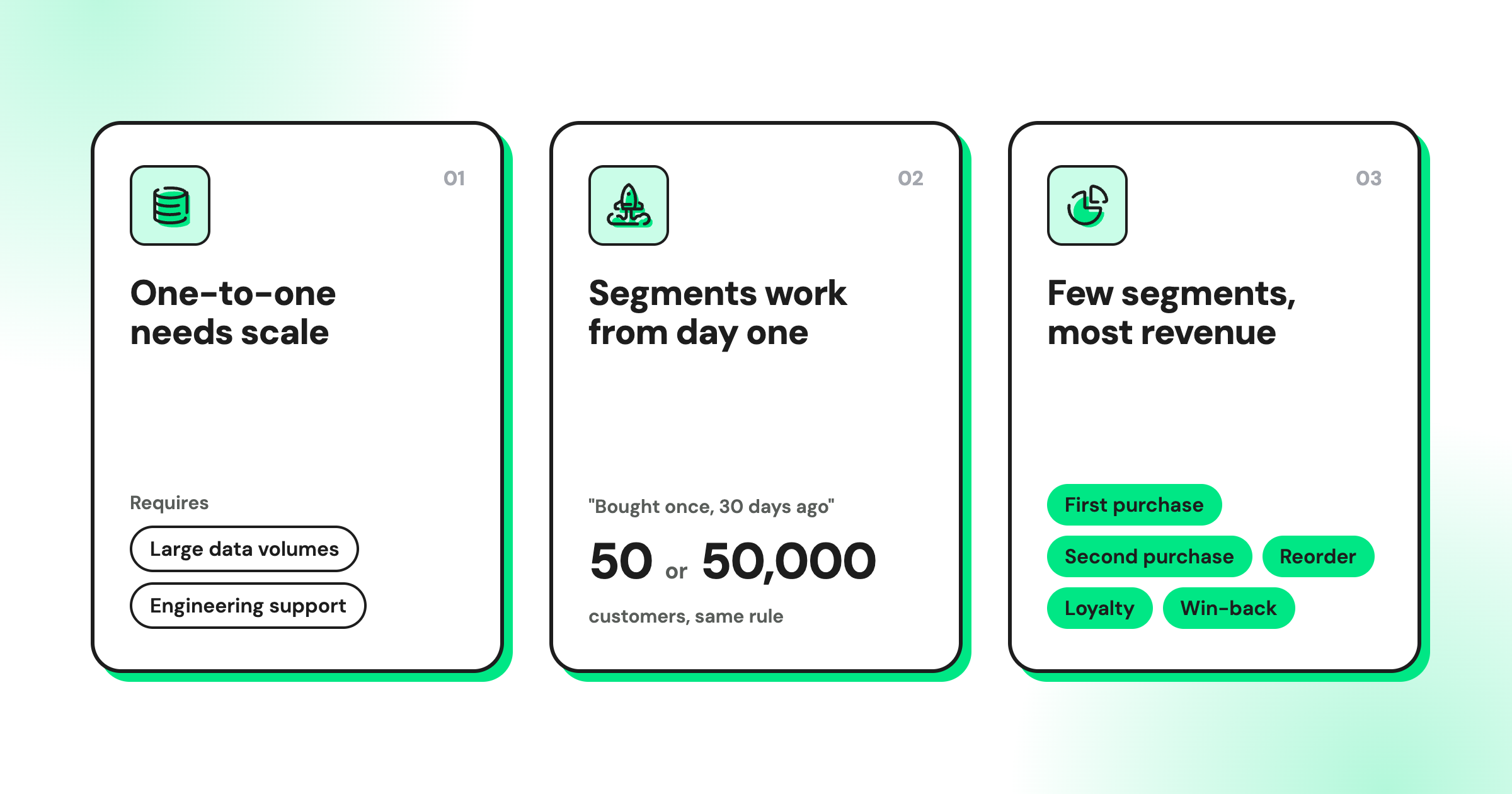
Segment-level personalization groups customers by shared behavior and sends each group a tailored message. It's the right starting point for small stores for three reasons:
Why Personalized Marketing Drives Repeat Sales for Shopify Stores
Personalized marketing drives repeat sales when it saves shoppers time or money, and it hurts sales when it feels intrusive or irrelevant. Research from Deloitte Digital, Gartner, and Search Engine Journal shows both sides:
- Purchase intent: 52% of US consumers are more likely to buy from brands that personalize, and they spend about 30% more with them.
- Conversion: brands with advanced personalization see a 16-percentage-point increase in conversions compared with brands doing the basics.
- What shoppers value: consumers say personalization is most useful when it proactively resolves an issue (67%), saves them money (61%), or delivers loyalty benefits that make them feel seen (58%).
- The risk: personalized marketing creates a negative experience for 53% of customers, who become 44% less likely to buy again.
For Shopify stores, the lesson is to personalize only where it helps the shopper. A well-timed reorder reminder helps, while a message that mentions data the shopper never knowingly shared drives them away.
What Shopify Customer Data Can You Use for Personalization?
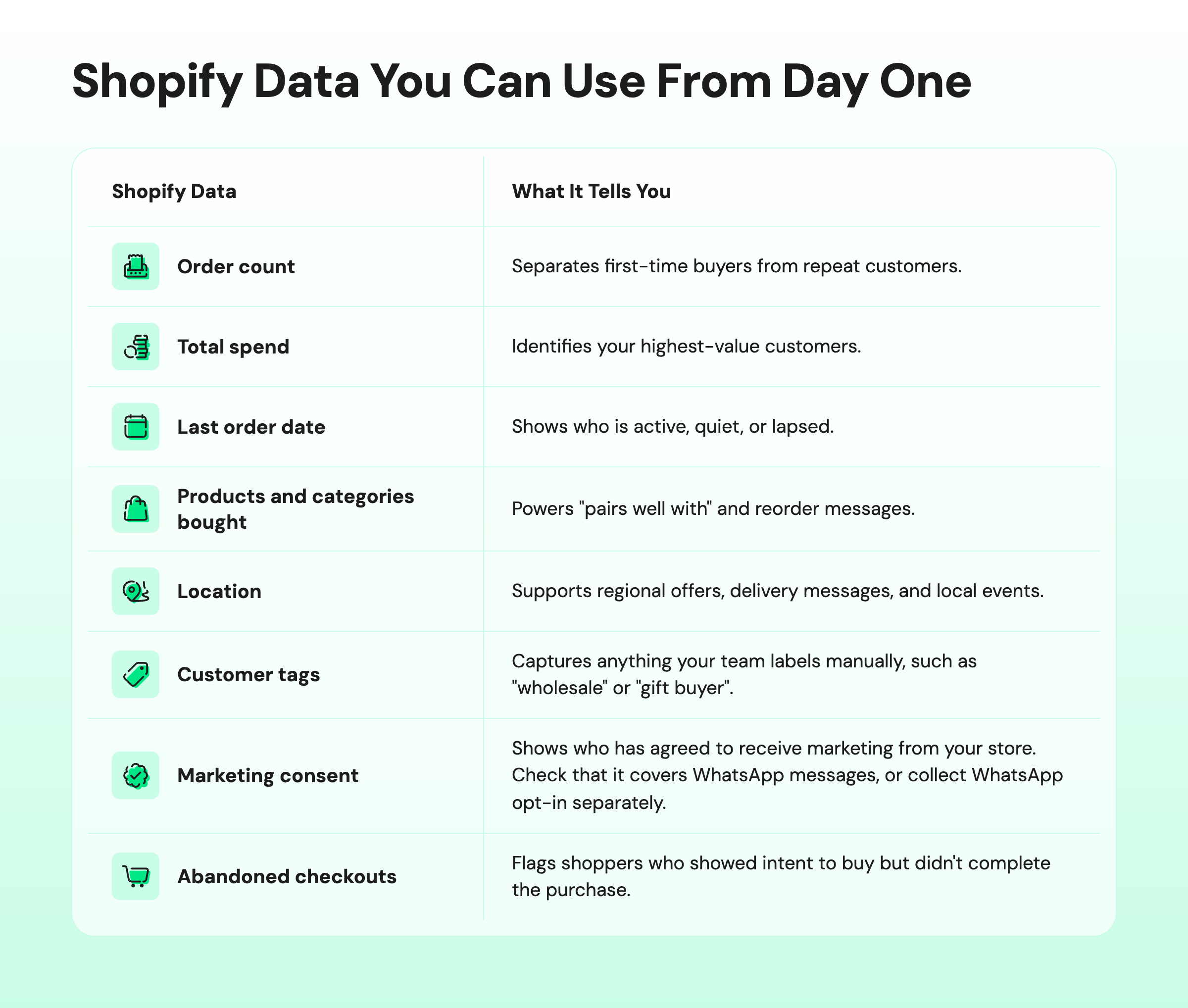
You don't need to collect new data to start personalizing. Shopify already records the signals that power most personalized marketing, and every new order adds to them.
i. Shopify Data You Can Use From Day One
ii. What You Can Personalize at 50 Orders vs. 5,000 Orders
The data you can use grows as your store grows. Match your personalization to the data you have, so you don't build segments too small to matter.
Store stage | Data you have | What to personalize |
|---|---|---|
0–100 orders | Names, first product bought, consent | Thank-you and how-to-use messages, one preference question |
100–1,000 orders | Repeat vs. one-time buyers, days since last order | Second-purchase nudges, simple win-back messages |
1,000–5,000 orders | Purchase intervals, favorite categories, spend tiers | Reorder reminders, VIP early access, category-based suggestions |
5,000+ orders | Discount behavior, lifecycle stage, predicted value | Offer-or-no-offer logic, AI-written message variants per segment |
Shopify Personalization in 5 Steps (No Data Team Required)
Shopify personalization works in five steps: build a few segments, fill one data gap, set one trigger per segment, write personalized templates, and launch one journey at a time. Each step uses data your store already collects.
Step 1: Build 5 Starter Customer Segments From Order Data
Start with segments defined by plain rules you could read out loud to a colleague. These five cover the moments that matter most for repeat revenue:
Segment | Rule (plain language) | WhatsApp message angle | Goal metric |
|---|---|---|---|
New first-time buyers | 1 order, placed in the last 10 days | Thank-you plus a tip to get the most from the product | Second-purchase rate |
Quiet one-time buyers | 1 order, placed 30–60 days ago | "Pairs well with [last product]" suggestion | Second-purchase rate |
Due to reorder | 2+ orders, days since last order close to their usual interval | One-tap reorder reminder | Reorder rate |
VIP customers | Top spend tier or 4+ orders | Early access or a new-arrival preview, no discount | Revenue per message |
Lapsed customers | 2+ orders, none in the last 90 days | "New in your favorite category", with an offer only for discount-driven buyers | Reactivation rate |
You can build four segments directly in Shopify using order count, last order date, and total spend: first-time buyers, quiet one-time buyers, VIPs (based on a spend threshold), and lapsed customers.
For the due-to-reorder segment, you need each customer’s average purchase interval, which Shopify doesn’t calculate natively.
Wati’s Shopify Customer Intelligence (beta) calculates it for every customer. Abandoned checkouts work as a separate trigger, not a segment.
💡 See our guide to Shopify abandoned cart recovery for that flow, or explore these e-commerce customer segments for more ideas.
Step 2: Ask One Preference Question on WhatsApp to Fill Data Gaps
When order data can't tell you something important, ask the customer once and save the answer. Skin type, shoe size, pet age, or coffee roast preference all make your next message more relevant.
Data a customer gives you on purpose is called zero-party data. It's the most trusted kind, because the shopper knows exactly why you have it. Follow these rules to collect it well:
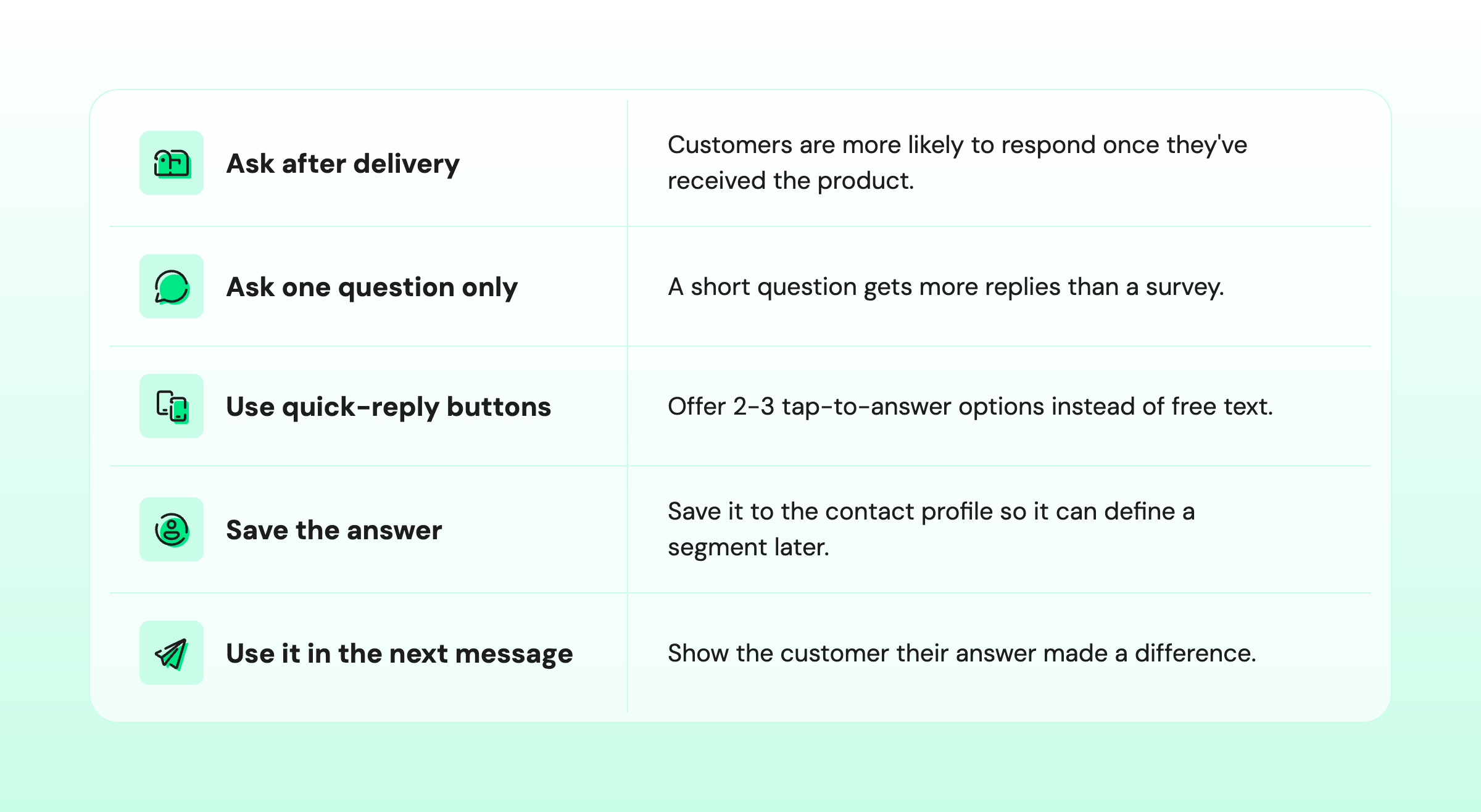
Here's what that looks like in a WhatsApp conversation:
Store: Hi Priya, glad your cleanser arrived! What's your skin type so we can recommend products that suit you? Buttons: Dry · Oily · Combination. Priya: Combination. Store: Thanks, Priya! We'll tailor our recommendations to your skin type. |
|---|
Step 3: Set One WhatsApp Trigger for Each Segment
Each segment needs one trigger that decides when its message goes out. A trigger is either an event, such as an order being fulfilled or a product being viewed, or a time rule, such as 45 days since the last order.
Segment | Trigger type | Suggested timing | Frequency cap |
|---|---|---|---|
New first-time buyers | Event: order fulfilled | 3–5 days after fulfillment | Once per order |
Quiet one-time buyers | Time: days since first order | Day 30, with one follow-up at day 45 | 2 messages max |
Due to reorder | Time: purchase interval | 3–5 days before the usual reorder date | Once per cycle |
VIP customers | Event: new collection launch | 24 hours before public launch | 2 per month |
Lapsed customers | Time: days since last order | Day 90, with one follow-up at day 120 | 2 messages max |
Behavioral events like product viewed or checkout abandoned can add a sixth journey once the first five are running.
For the full channel picture, read our complete WhatsApp for Shopify guide.
WhatsApp rules to follow: Send marketing messages only to customers who have opted in. Outside the 24-hour customer service window, businesses can only send pre-approved message templates, so get each segment's template approved before launch. See Meta's WhatsApp Business Messaging Policy for the full rules.
Already on Shopify? See how your Shopify segments sync into WhatsApp campaigns when you connect Shopify to WhatsApp.
Step 4: Write Personalized WhatsApp Templates With Variables
Write one template per segment, and let variables handle the personalization. A variable is a placeholder, such as the customer's first name or the last product, that automatically fills in for each person.
Keep every template short and focused:
- Use 2–3 variables: [first name], [last product], [favorite category], or [reorder link].
- Stay under about 60 words: WhatsApp messages are read on a phone screen.
- Give one call to action: one link or one button per message.
- Add quick-reply buttons: let customers answer or opt out in one tap.
Here's a starter library, one template for each segment:
1. New First-Time Buyers
Hi [first name], your [last product] should have arrived! Here's one tip to get the best results: [tip]. Questions? Just reply here. |
|---|
2. Quiet One-Time Buyers
Hi [first name], customers who loved [last product] often pair it with [suggested product]. Want to take a look? [product link] |
|---|
3. Due to Reorder
Hi [first name], you're probably running low on [last product]. Reorder in one tap: [reorder link] |
|---|
4. VIP Customers
Hi [first name], you're one of our favorite customers, so you get a first look at our new [favorite category] collection, 24 hours before everyone else: [collection link] |
|---|
5. Lapsed Customers
Hi [first name], it's been a while! We've added new [favorite category] pieces since your last order. See what's new: [collection link] |
|---|
Personalized post-purchase messages also cut support work. Bahrain-based jewelry brand Aisha Jewels uses personalized WhatsApp thank-you messages that include care instructions and product suggestions, which have helped reduce post-purchase customer queries by 60%.
For more message ideas, browse these ready-made Shopify WhatsApp templates.
Step 5: Launch One Journey, Measure It, Then Add the Next
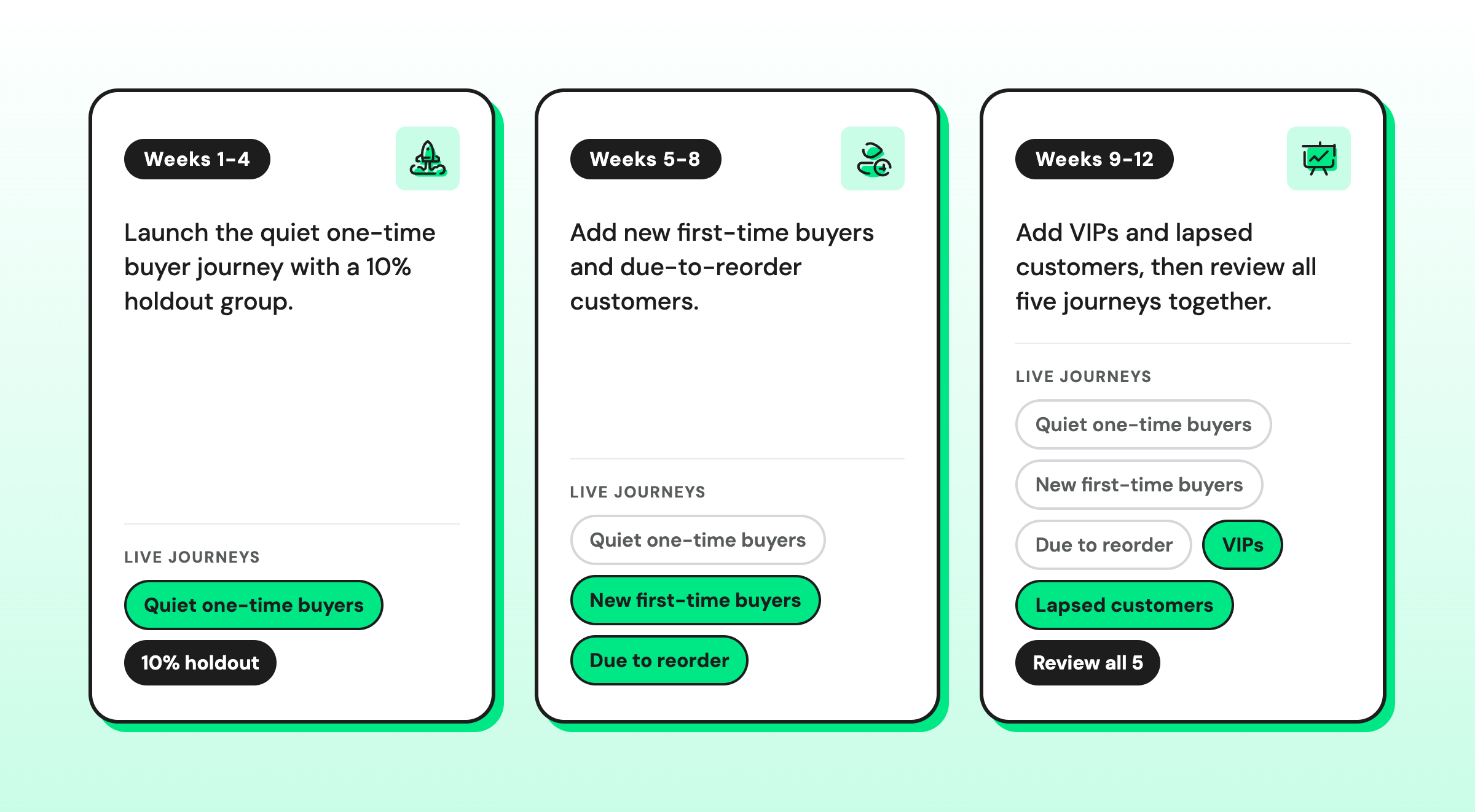
Start with the segment closest to revenue, usually quiet one-time buyers, and run it for 30 days before adding the next.
Launching one journey at a time shows you exactly what works.
AI Personalization for E-commerce: How AI Replaces the Analyst
AI personalization for e-commerce uses your order data to calculate who's due to buy, what they prefer, and how valuable they are.
Calculating purchase timing, preferences, and customer value used to be an analyst’s spreadsheet work. AI now updates it automatically after every order.
i. What AI Calculates for You Automatically
Each calculation below once needed exports, formulas, and someone to keep them up to date. AI tools connected to Shopify can now keep them up to date for every customer.
What an analyst used to calculate | What AI produces | How you use it |
|---|---|---|
Average days between each customer's orders | Average purchase interval | Timing reorder reminders |
Spend rankings across customers | Customer value tier | Defining your VIP segment |
Category and product analysis | Favorite product and category | "Pairs well with" suggestions |
Discount usage analysis | Discount dependency | Deciding who gets an offer |
Lifecycle tagging | Lifecycle stage | Choosing which journey a customer enters |
Writing copy variations | Message variants per segment | Drafting templates faster |
ii. Where Human Judgment Still Matters in AI Personalization
Keep people in charge of offers, tone, and consent. AI is best used behind the scenes, because shoppers are wary of AI in brand messaging: 50% of US consumers say they prefer brands that avoid generative AI in customer-facing content.
- Approve every offer: decide discount levels and who qualifies yourself.
- Review AI-written copy: check every template for brand voice before it goes out.
- Keep consent rules fixed: never let an automated model decide who has opted in.
- Check the segments monthly: make sure the rules still match how customers buy.
To see how this scales as your store grows, read about personalization at scale.
How to Measure Personalization Results Without an Analyst
You can measure personalization with a single comparison: customers who received the message versus similar customers who didn't.
i. Use a Holdout Group to Prove Incremental Revenue
Hold back 10% of each segment, message the other 90%, and compare their purchase rates after 30 days.
The difference is the revenue your personalization created, not revenue that would have happened anyway.
Incremental revenue = (conversion rate of messaged group − conversion rate of holdout group) × customers messaged × average order value. |
|---|
Example: Your quiet one-time buyer segment has 2,000 customers. You message 1,800 and hold back 200.
After 30 days, 6.5% of the messaged group bought again, compared with 4.0% of the holdout group.
With a $45 average order value: (6.5% − 4.0%) × 1,800 × 2,025 in incremental revenue from one journey in one month.
These numbers are illustrative, not a benchmark.
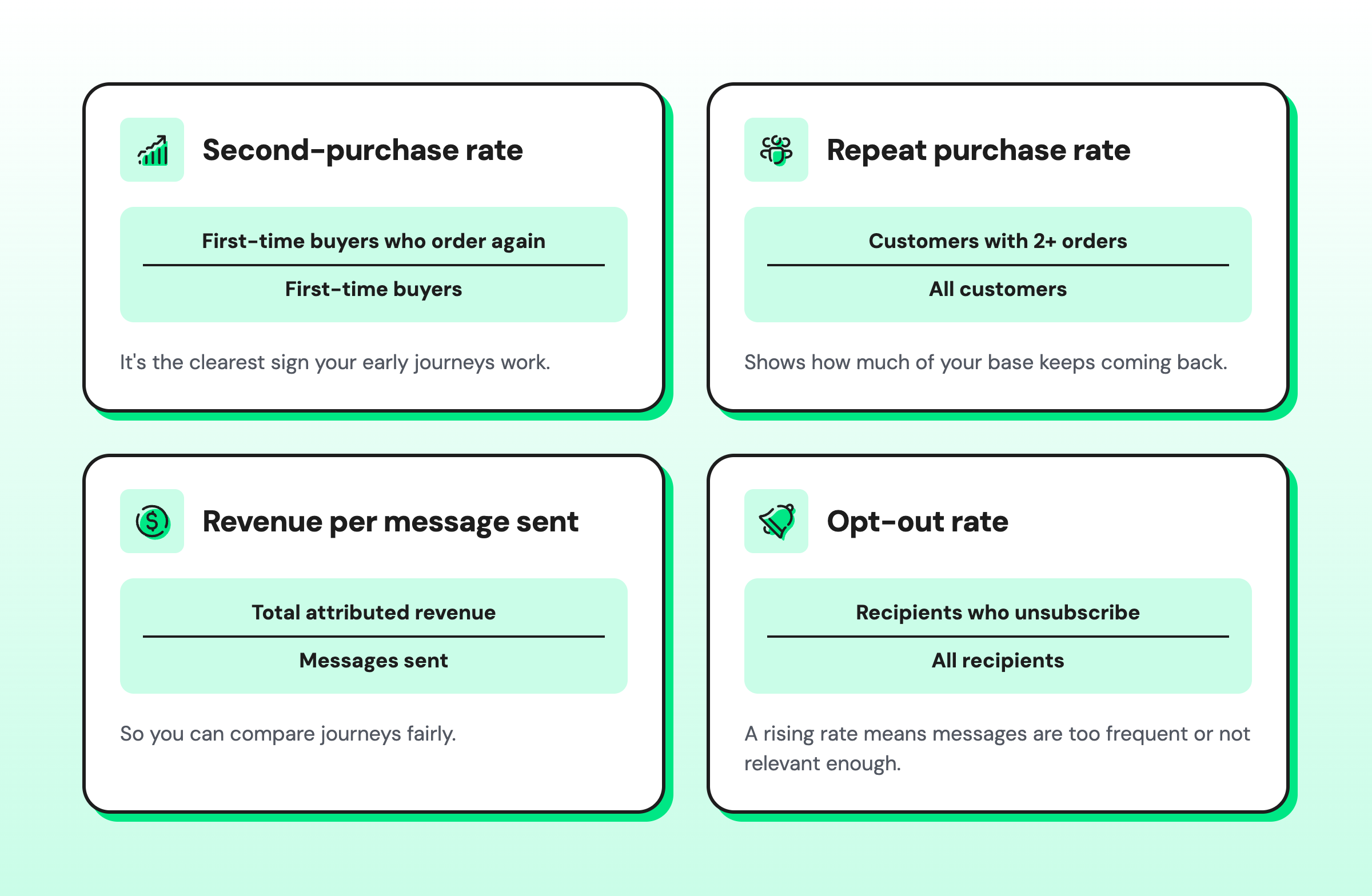
ii. 4 Metrics to Track for Personalized WhatsApp Campaigns
What to Look for in a Shopify Personalization Tool
The right tool automatically syncs Shopify data, keeps segments and customer attributes up to date, triggers WhatsApp templates based on store events, and shows which messages drove orders. It should also include an AI agent to answer the replies your messages start, day or night.
Common E-commerce Personalization Mistakes and How to Avoid Them
Most personalization fails because it feels intrusive, arrives too often, or leans too hard on discounts. Each mistake below has a simple fix you can apply before your first journey goes live.
Avoid these six mistakes:
- Referencing data shoppers didn't knowingly share: use purchases and stated preferences only; never infer personal details.
- Discounting every segment: reserve offers for customers who usually buy on discount, and give VIPs access instead.
- Messaging too often: set a weekly frequency cap per customer across all journeys.
- Letting segments go stale: use segments that update automatically, and review the rules every month.
- Skipping opt-in or template approval: collect WhatsApp consent on your store first, for example with a WhatsApp opt-in widget, and get templates approved before launch.
- Running too many disconnected apps: keep one source of customer data so every message tells the same story.
Shopify Personalization Checklist
Use this checklist before you launch your first personalized journey:
- WhatsApp opt-in is collected on your store
- The Starter 5 segments are built from order data
- One preference question is live after delivery
- Each segment has one trigger and a frequency cap
- One approved template exists per segment
- Variables are tested with real customer data
- A 10% holdout group is set for each journey
- Second-purchase rate, repeat rate, revenue per message, and opt-out rate are tracked
- Offers and AI-written copy are reviewed by a person
- A 30-day review date is on the calendar
How Wati Personalizes Shopify Marketing on WhatsApp
Wati is an agentic customer engagement platform for revenue growth. For Shopify stores, it turns store data into personalized WhatsApp campaigns and automations, and it handles the segment, trigger, and template work described in this guide:
- Shopify segment sync: your existing Shopify customer segments appear in Wati as WhatsApp audiences and update automatically.
- Two-way customer profile sync: each Shopify customer tag becomes a Wati contact attribute, and new inbound WhatsApp contacts are created or updated in Shopify.
- Shopify Customer Intelligence: Wati calculates days since last purchase, average purchase interval, lifecycle stage, favorite product, value tier, and discount dependency. You can use these attributes in segments, campaigns, and automations.
- Shopify event triggers: order, checkout, page-viewed, product-viewed, and customer-created events can start WhatsApp journeys.
- Personalized templates: add variables, product images, and discount codes to Shopify messages.
- Opt-in popups: collect WhatsApp consent from shoppers on your store before you message them.
- Campaign ROI tracking: see which WhatsApp campaigns drove Shopify orders.
Note: Feature availability varies by plan, and some features need extra setup. For example, page-viewed and product-viewed triggers need the Wati app embed on your store, and Shopify Customer Intelligence needs Wati's Customer Data Platform. Check the Wati pricing page to see what each plan includes.
To see the full feature set, explore Wati's WhatsApp for e-commerce solutions.
Start Personalizing Your Shopify Store With One Segment This Week
E-commerce personalization doesn't need a data team. It needs five segments built from the orders you already have, one WhatsApp trigger per segment, templates that use each customer's details, and a holdout group to prove what works.
Let AI handle the calculations, and keep people in charge of offers, tone, and consent.
Start with your quiet one-time buyers this week, and add the next journey once you see results. Start your free Wati trial and connect your Shopify store.
Frequently asked questions
What Is E-commerce Personalization?
E-commerce personalization is the practice of tailoring messages, offers, and product suggestions to each shopper based on their purchase history, behavior, and stated preferences. For a Shopify store, it usually means grouping customers into segments, such as first-time buyers or lapsed customers, and sending each group a message that fits where they are in their buying journey.
Can You Personalize Shopify Marketing Without a Developer or Data Team?
Yes. You can personalize Shopify marketing without a developer or data team by using segments built from order count, last order date, and spend, which Shopify already tracks. Tools that sync with Shopify can calculate purchase intervals and favorite products automatically, so a small team can run personalized WhatsApp journeys without spreadsheets or code.
How Many Orders Does a Shopify Store Need Before Personalization Works?
A Shopify store can start personalizing from its first orders. With under 100 orders, send personalized thank-you messages and ask one preference question. Between 100 and 1,000 orders, add second-purchase and win-back messages. Reorder timing and VIP segments become reliable once you have a few thousand orders and enough repeat buyers.
How Is AI Personalization Different From Rules-Based Personalization?
AI personalization calculates customer attributes and predictions from data, while rules-based personalization follows conditions you set yourself. A rule might say "message customers 45 days after their first order." AI can instead learn each customer's usual purchase interval, favorite category, and discount habits, then time and tailor messages to each person. Most stores combine both.
Is Personalized WhatsApp Marketing Allowed?
Yes, personalized WhatsApp marketing is allowed when customers have opted in to receive messages from your business. Outside the 24-hour customer service window, you must use message templates approved by Meta. Follow WhatsApp's Business Messaging Policy, honor opt-out requests promptly, and check the privacy rules that apply in each market you sell to.
How Do You Know If E-commerce Personalization Is Working?
You know e-commerce personalization is working when customers who receive personalized messages buy more than a similar holdout group that doesn't. Compare the two groups' conversion rates after 30 days, then track the second-purchase rate, repeat purchase rate, revenue per message sent, and opt-out rate to see whether results last.
Related posts
- WhatsApp Marketing: Tips, Benefits and Use Cases (2026)
WhatsApp marketing guide for 2026: how it works, what it costs, best practices, and how to choose WhatsApp marketing solutions, with real brand examples.
- How to Send Bulk Messages on WhatsApp Without Getting Blocked
Learn how to send bulk WhatsApp messages without getting blocked. Compare the WhatsApp Business app and API, messaging limits, costs, templates, and best practices for safe, compliant bulk messaging.
- Instagram Comment Automation: How It Works and How to Set It Up in Wati
Instagram comment automation auto-replies to comments and DMs commenters within seconds via Meta's API. Covers strategy, use cases, and Wati setup.
- Shared Team Inbox for Instagram: A Buyer’s Checklist for 2026
Use this fastest checklist to evaluate any shared team inbox for Instagram, which covers DMs, comments, automation, and multi-channel support.