
Too Long? Read This First
- Shopify marketing automation runs on triggers, conditions, and actions, and Shopify now handles email and SMS automations inside Shopify Messaging.
- Shopify Flow adds custom logic, such as tagging customers or alerting your team, at no extra cost on paid plans.
- AI helps with four jobs: choosing who to target, timing each send, writing the message, and answering replies.
- Repeat revenue comes from journeys built around the second order, timed to how often your category gets bought again.
- Measure time to second order and repeat purchase rate, and use holdout groups to prove real lift.
Shopify marketing automation sends the right message after a customer does something, such as placing a first order, leaving a checkout, or going quiet for two months.
Add AI, and the system also helps decide who should get a message, when to send it, and what it should say. With Wati's Shopify integration, those messages can reach customers on WhatsApp as well as email and SMS.
The goal that matters most is repeat revenue. Many Shopify stores spend heavily to win a first order, then let that customer drift away. Well-built automation closes the gap between the first purchase and the second.
This guide maps the Shopify automation stack, explains where AI adds real value, and walks through second-order journeys for different product categories. You'll also find five Shopify Flow examples, a channel and consent guide, and the metrics that prove automation is paying off.
What is Shopify Marketing Automation?
Shopify marketing automation is the practice of sending marketing messages automatically when a customer takes, or doesn't take, a specific action in your store. Every automation has three parts:
- A trigger: what starts it, such as a first order, an abandoned checkout, or a new subscriber.
- A condition: who qualifies, such as customers who spent over $100 or haven't ordered in 60 days.
- An action: what happens next, such as sending an email, adding a tag, or alerting your team.
Shopify's built-in tools changed recently. Email and SMS automations now live in Shopify Messaging, which is free to install and includes 10,000 free emails each month, with paid sends after that. Shopify Flow, Shopify's automation builder, handles custom trigger, condition, and action logic. Shopify's AI assistant, Sidekick, can also help write messages and build workflows.
Shopify email automation covers the essentials well. The gaps appear when you want smarter targeting, more channels, or conversations instead of one-way messages.
What Does the Shopify Automation Stack Look Like?
Most Shopify stores run marketing automation across four layers. Knowing what each layer does helps you avoid paying twice for the same job.
Layer | What It Does | Channels | Best For | Limits |
|---|---|---|---|---|
Shopify Messaging | Ready-made marketing automations | Email, SMS | Welcome, abandoned checkout, first purchase upsell, post-purchase thank you and upsell, winback | Template-led, limited branching |
Shopify Flow | Custom trigger, condition, action workflows | Works across Shopify and connected apps | Tagging, alerts, segment logic, app actions | Not a messaging tool on its own |
Third-party marketing apps | Advanced email, SMS, and loyalty programs | Email, SMS, push | Complex flows, deeper reporting | Extra cost, another dashboard |
Messaging platforms | Conversational and broadcast messaging | WhatsApp, Instagram, Messenger | High-visibility updates, two-way conversations | Needs separate opt-in for WhatsApp |
The layers work best when they share data. Shopify holds the orders, products, and customer records. Flow turns events into tags. Messaging tools read those tags and customer details to decide who gets which message.
When each tool keeps its own customer list, journeys overlap and customers get mixed messages.
For many stores, a sensible starting stack is Shopify Messaging for core email flows, Shopify Flow for logic, and a messaging platform for the moments customers need to see quickly. If you're starting with WhatsApp, these WhatsApp automation templates for Shopify give you five messages you can launch quickly.
Where Does AI Fit in Shopify Marketing Automation?
AI marketing automation doesn't replace triggers and rules. It improves the decisions around them. Think of AI as handling four jobs.
Job | What Rules Do | What AI Adds | Example |
|---|---|---|---|
Who to target | Fixed filters, such as "ordered once" | Spots engagement patterns and groups customers by behavior | Wati's predefined segments group contacts as Highly Engaged, At Risk, or Winback |
When to send | Fixed delays, such as "7 days after order" | Suggests what to send next and plans around seasonal moments | Wati's AI Campaign Calendar and Wati Recommended Campaigns queue holiday and seasonal sends early |
What to say | One template for everyone | Drafts copy and adapts tone for different segments | Shopify's Sidekick helps write emails; Wati AI helps draft campaign messages |
How to answer | No reply, or "contact support" | Responds to replies in real time | Astra AI Agent answers questions when a customer replies to a campaign |
The fourth job is where most Shopify automation falls short. An email gets a reply like "Does this come in blue?" and nobody answers for a day. When Astra handles replies on WhatsApp, a campaign becomes a conversation that can end in a sale.
Shopify AI marketing works best when you treat AI as a decision-maker inside a clear structure. Keep your triggers simple, then let AI handle targeting, timing, wording, and replies.
How Do You Turn First-Time Buyers Into Repeat Customers?
You turn first-time buyers into repeat customers by building a second-order journey that matches how often your category gets bought again. A moisturizer runs out in weeks. A sofa might not need replacing for years. The journey should follow that rhythm.
Category | Typical Second-Order Trigger | Best Nudge | Timing to Test |
|---|---|---|---|
Consumables (beauty, supplements, coffee) | Product running out | Replenishment reminder with a one-tap reorder | Just before the expected run-out date |
Fashion and footwear | Style interest or new season | "Complete the look" or new-drop preview | 2 to 4 weeks after delivery |
Electronics | Accessory or protection need | Matching accessories or extended warranty | 1 to 2 weeks after delivery |
Gifting | Next occasion | Reminder before birthdays, anniversaries, or festivals | 2 to 3 weeks before the date |
Whatever your category, most second-order journeys share the same shape:
- Thank you: confirm the order and set expectations for delivery.
- Usage or care tip: help the customer get value from the product a few days after it arrives.
- Review request: ask once the product has had time to work.
- Second-order nudge: time it to the category, and make reordering easy.
- Win-back: if the customer goes quiet past the normal buying window, try a different angle or offer.
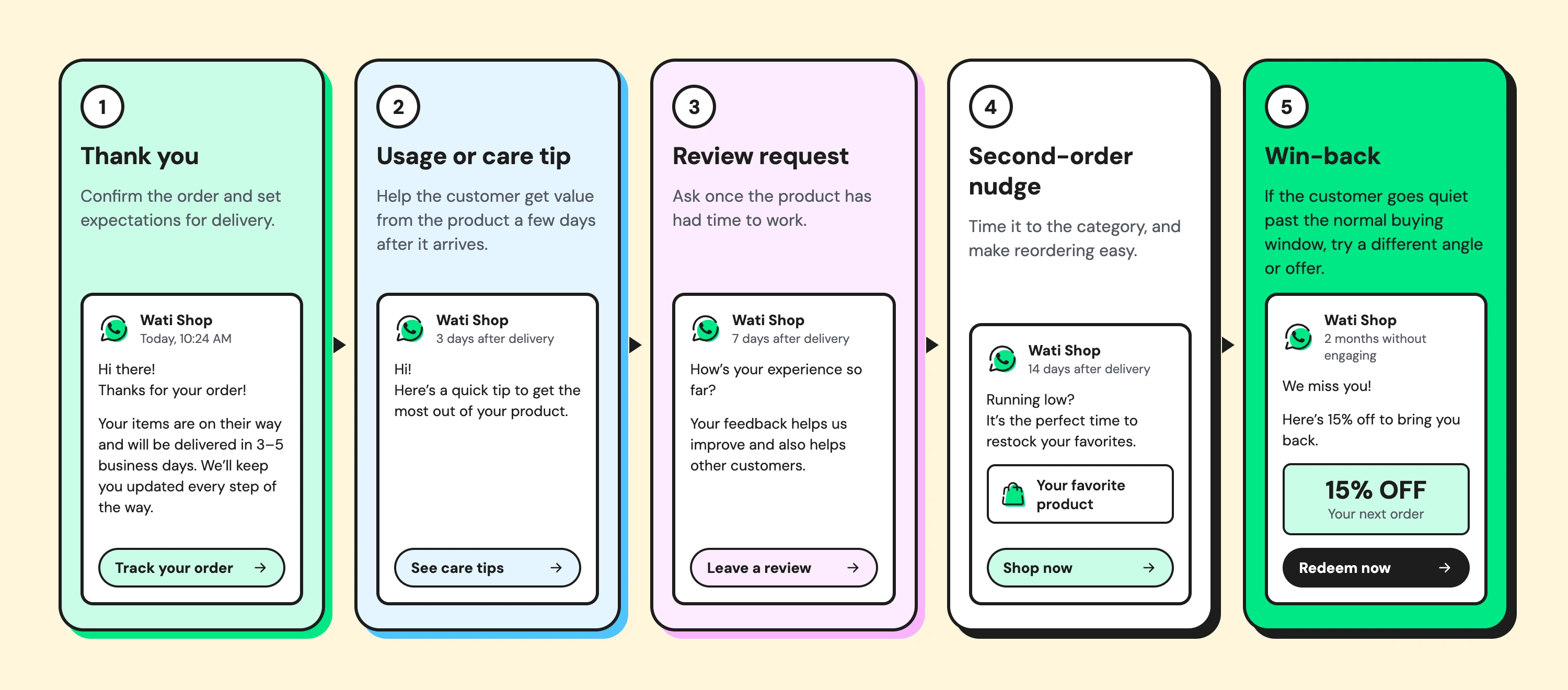
Here's how that looks for a coffee brand whose bags last about three weeks:
- Day 0: order confirmation with brewing tips for the roast they chose.
- Day 5: a short message asking how the first cup turned out.
- Day 12: review request, now that they've had a few brews.
- Day 18: reorder reminder with a one-tap link, just before the bag runs low.
- Day 35: if no second order, a win-back message suggesting a different roast.
Shopify Messaging covers the thank-you and first purchase upsell steps by email. Wati's Shopify integration can run the same moments on WhatsApp, triggered by Shopify order events.
Abandoned checkouts are a separate journey with their own playbook, covered in our guide to Shopify abandoned cart recovery.
Let AI plan what to send next. Wati's AI Campaign Calendar shows what's sent, scheduled, and recommended, so seasonal moments are planned well ahead. Explore Wati Campaigns
Which Segments Power Repeat Revenue?
Segments decide who enters each journey. Shopify customer segmentation lets you filter customers by order count, last order date, total spend, products bought, location, and tags. Start with five segments built around the second order:
- First-time buyers: one order, placed recently. They need the thank-you and usage steps.
- Second-order candidates: one order, now inside the category's repeat window. They're ready for the nudge.
- VIPs: high spend or several orders. They deserve early access and recognition, not discounts.
- Lapsing customers: past their normal repeat window but not yet gone. A reminder can bring them back.
- Lapsed customers: well beyond the window. They need a stronger reason to return.
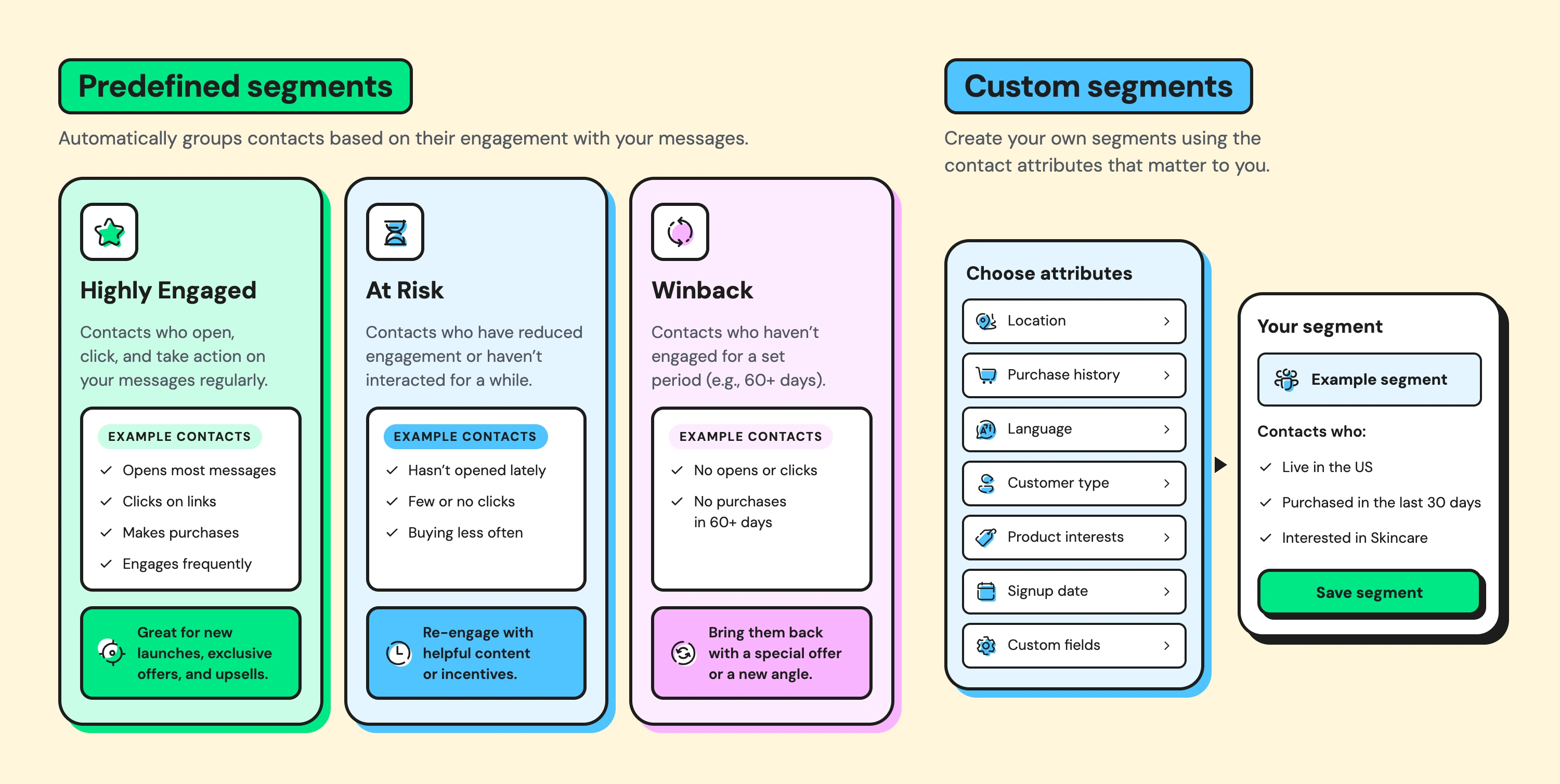
Wati adds an engagement view on top of Shopify's purchase data. Predefined segments group contacts as Highly Engaged, At Risk, and Winback based on how they respond to messages, and custom segments can use contact attributes you choose.
Both are available on Pro and Business plans. Combining purchase data with engagement data shows not just who should hear from you, but who is still listening.
Clean data keeps segments accurate. Use consistent tag names, such as "repeat-buyer" rather than a mix of "repeat" and "returning." Store consent separately for each channel. Remove test orders and staff purchases, so they don't distort your repeat rates.
How Do You Use Shopify Flow for Marketing?
Shopify Flow is free on Shopify's paid plans, and it handles the logic that sits behind your marketing. Here are five Shopify Flow examples that support repeat revenue.
1. Tag customers after their second order
- Trigger: order created
- Condition: customer's order count equals 2
- Action: add a "repeat-buyer" tag
- Why it matters: your segments and messages can now treat repeat buyers differently from first-timers.
2. Flag VIPs as they cross a spend threshold
- Trigger: order created
- Condition: customer's total spend passes your VIP level
- Action: add a "VIP" tag and alert your team
- Why it matters: your best customers get recognition at the right moment.
3. Prepare a review request after delivery
- Trigger: order fulfilled
- Condition: first order for that customer
- Action: add a tag that enrolls them in your review-request flow after a set wait
- Why it matters: reviews arrive once customers have actually used the product.
4. Spot customers who are starting to lapse
- Trigger: a scheduled check that runs daily
- Condition: days since last order passes your repeat window
- Action: add a "lapsing" tag
- Why it matters: win-back journeys start on time, not months too late.
5. Alert your team about high-value first orders
- Trigger: order created
- Condition: first order above a set value
- Action: notify your team in Slack or email
- Why it matters: a personal thank-you to a big first-time buyer can secure the second order.
Tags created in Flow can feed segments in Shopify and in the tools connected to your store, so one workflow can shape every channel.
Which Channel Should Each Message Use?
Each channel works best for a different kind of message. Match the channel to how quickly the customer needs to see it and how personal it should feel.
Message Type | SMS | ||
|---|---|---|---|
Newsletters and stories | Best fit | Too long | Short version only |
Order and delivery updates | Works | Works | Best fit, often seen fastest |
Replenishment reminders | Works | Works | Best fit, easy one-tap reply |
Win-back offers | Good for detail | Short and direct | Personal, allows a conversation |
Questions and support | Slow | Limited | Best fit, two-way |
Consent works differently by channel, and it's easy to get wrong:
- Email and SMS: Shopify records marketing consent at checkout and in forms.
- WhatsApp: requires its own explicit opt-in. Email or SMS consent doesn't count.
- All channels: keep a shared frequency limit across tools. A customer shouldn't get an email, an SMS, and a WhatsApp message about the same offer on the same day.
When a WhatsApp message can't be delivered, Wati can fall back to email, SMS, or RCS on supported plans and markets.
For the full WhatsApp side of the strategy, including list building and broadcast best practices, see our guide to WhatsApp marketing for Shopify. For journeys that span many channels beyond Shopify, our guide to omnichannel marketing automation goes further.
How Do You Measure Repeat Revenue From Automation?
You measure repeat revenue by tracking how quickly and how often customers come back, then proving that automation caused the change. Focus on four numbers:
- Time to second order: the average number of days between first and second purchase. Automation should shorten it.
- Repeat purchase rate: the share of customers with two or more orders.
- Revenue per recipient: revenue from each journey divided by the people who entered it.
- Unsubscribe and block rate: a warning sign that a journey sends too much or too often.
To prove real lift, use a holdout group. Leave a small, random share of eligible customers out of a journey, then compare their repeat rate with customers who received it. The difference is what the journey actually adds.
Shopify Messaging shows performance data for its automations, and Wati's campaign reports show reads, replies, and clicks for every WhatsApp send. Review both monthly, and retire journeys that don't beat their holdout.
What Should You Set Up First? A Checklist
Use this checklist to launch Shopify marketing automation in a sensible order:
- Turn on abandoned checkout and welcome automations in Shopify Messaging.
- Add a post-purchase thank you for first and second orders.
- Build the five core segments: first-time, second-order candidates, VIPs, lapsing, and lapsed.
- Create Shopify Flow workflows to tag repeat buyers, VIPs, and lapsing customers.
- Map your category's repeat window and build one second-order journey around it.
- Collect WhatsApp opt-in at checkout or in chat before adding WhatsApp steps.
- Set a shared frequency limit across email, SMS, and WhatsApp.
- Record baseline numbers for time to second order and repeat purchase rate.
- Set up a holdout group for each new journey.
- Review results monthly and retire journeys that don't beat their holdout.
Work through it in order. Each step builds on the one before, and the first five can usually go live within a couple of weeks.
How Does Wati Add AI and WhatsApp to Shopify Automation?
Wati is an agentic omnichannel customer engagement platform that turns conversations into revenue growth across marketing, sales, and support. For Shopify stores, it adds the WhatsApp channel and AI decisions on top of Shopify's native automation.
Shopify order events trigger WhatsApp journeys automatically, from order updates and cart reminders to post-purchase follow-ups. The AI Campaign Calendar and Wati Recommended Campaigns suggest what to send and when, with seasonal moments queued early.
Segments and retargeting based on reads, replies, and clicks keep each journey aimed at the people most likely to act.
When customers reply, Astra answers their questions and recommends products, handing complex conversations to your team. Wati AI helps your team draft campaign messages and summarize long chats.
If a WhatsApp message can't be delivered, it can fall back to another channel on supported plans and markets. See how other online stores put this together on the Wati for e-commerce page.
Build Automation That Brings Buyers Back
Shopify gives you the triggers. AI and the right channels turn them into repeat revenue. Start with one second-order journey for your best-selling category, measure it against a holdout, and expand from there.
Ready to turn first orders into repeat revenue? Start your free Wati trial to plan your Shopify automations.
Frequently asked questions
What is Shopify marketing automation?
Shopify marketing automation sends marketing messages automatically when a customer takes an action, such as placing an order or leaving a checkout. Each automation uses a trigger, a condition, and an action, and runs without manual work.
Is Shopify Flow free?
Yes. Shopify Flow is included at no extra cost on Shopify's paid plans, from Basic upward. It isn't available on the Starter plan.
Can Shopify send WhatsApp messages automatically?
Shopify's built-in marketing tools focus on email and SMS. To automate WhatsApp messages from Shopify events, you need a WhatsApp Business Platform provider connected to your store, and customers must opt in to WhatsApp separately.
What is the difference between Shopify Messaging and Shopify Flow?
Shopify Messaging sends marketing emails and SMS, including ready-made automations like welcome and winback flows. Shopify Flow builds custom workflows that tag customers, alert your team, or trigger actions in connected apps.
Which automations should a new Shopify store start with?
Start with abandoned checkout, a welcome message for new subscribers, and a post-purchase thank you. Then add a second-order nudge timed to your product category and a win-back journey for customers who go quiet.
Related posts
- Instagram Comment Automation: How It Works and How to Set It Up in Wati
Instagram comment automation auto-replies to comments and DMs commenters within seconds via Meta's API. Covers strategy, use cases, and Wati setup.
- Shared Team Inbox for Instagram: A Buyer’s Checklist for 2026
Use this fastest checklist to evaluate any shared team inbox for Instagram, which covers DMs, comments, automation, and multi-channel support.
- How to Send Bulk Messages on WhatsApp Without Getting Blocked
Learn how to send bulk WhatsApp messages without getting blocked. Compare the WhatsApp Business app and API, messaging limits, costs, templates, and best practices for safe, compliant bulk messaging.
- How to Set Up a TikTok Business Account: Step-by-Step Guide
Set up a TikTok Business Account step by step: switch from personal, pick a category, add your profile, and unlock ads and analytics.