
Too Long? Read This First
- An AI shopping assistant answers product, sizing, delivery, and policy questions on your Shopify store and chat channels at any hour, and then sends shoppers to checkout.
- An AI shopping assistant sells in six stages, starting with working out what the shopper wants and ending with a handover to your team.
- Clean catalog data, written guardrails, and clear handover rules stop it from inventing prices or making promises your store can't keep.
- To prove it adds revenue, compare sales on nights when the assistant is switched on with nights when it is switched off, rather than counting chats.
- The Astra AI Agent answers your shoppers, shares your Shopify catalog in the chat, and hands risky chats to your team with the full conversation attached.
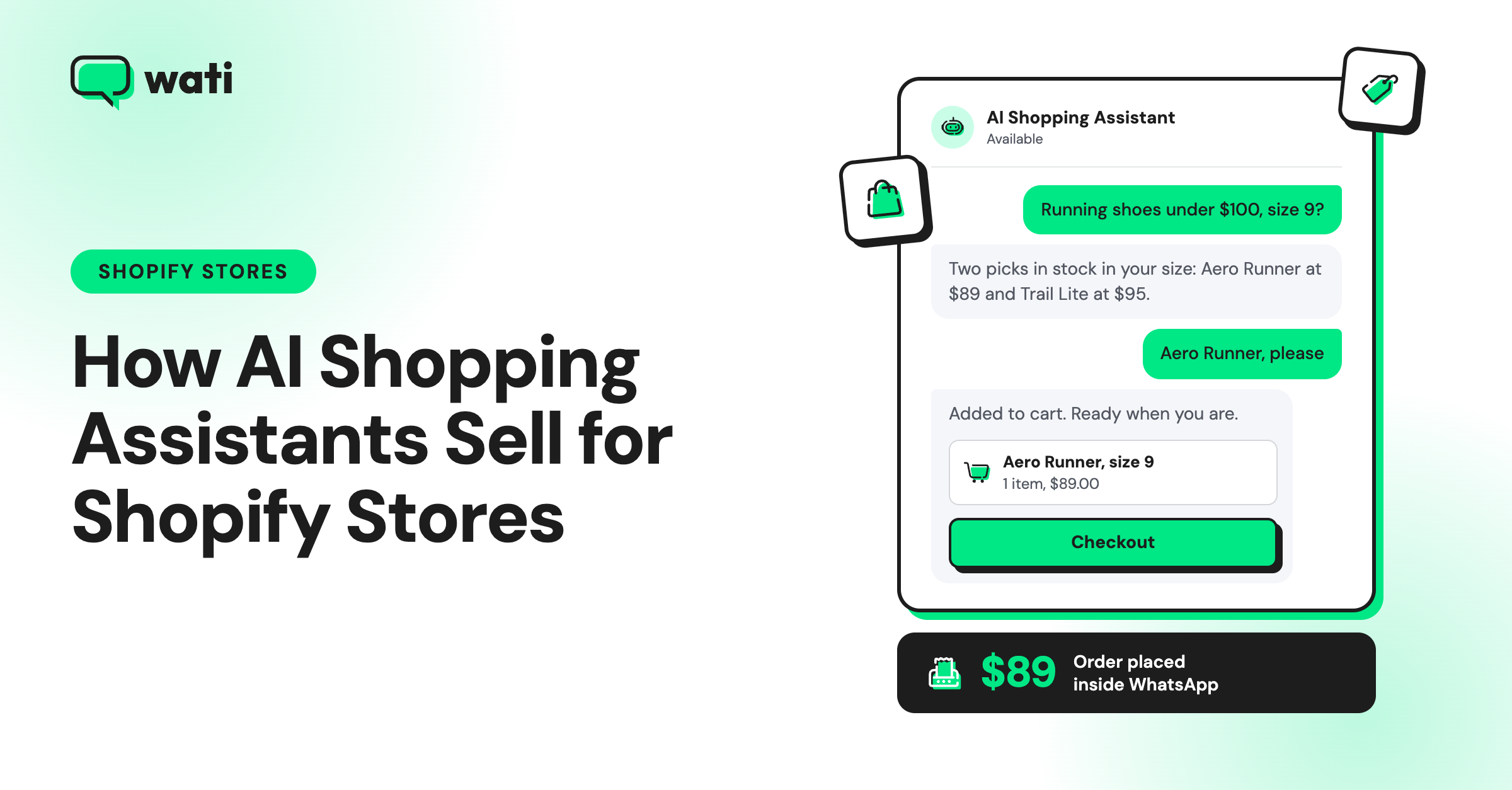
It’s 11:40 pm, and a shopper is on your Shopify product page. She wants to know if a linen shirt runs small, but your team logged off hours ago.
If nobody replies, she closes the tab and buys from a store that answered. If you have an AI shopping assistant, it answers her right away, suggests the right size, and sends her a checkout link.
Shoppers are already starting to shop this way. In Capgemini's 2026 survey of 12,000 consumers across 12 countries, one in four used generative AI shopping tools in 2025, and a further 31% plan to start.
Wati is an agentic customer engagement platform that brings AI shopping assistance to WhatsApp. Its Astra AI Agent answers shoppers from your store pages and policies at any hour, and the Wati Shopify integration shares your catalog on WhatsApp and brings back abandoned carts.
You'll learn how an AI shopping assistant differs from a chatbot, the six stages it follows to sell after hours, what to set up before launch, when to hand chats to your team, and how to measure the revenue it adds.
What is an AI Shopping Assistant, and How is It Different from a Chatbot or Shopping Agent?
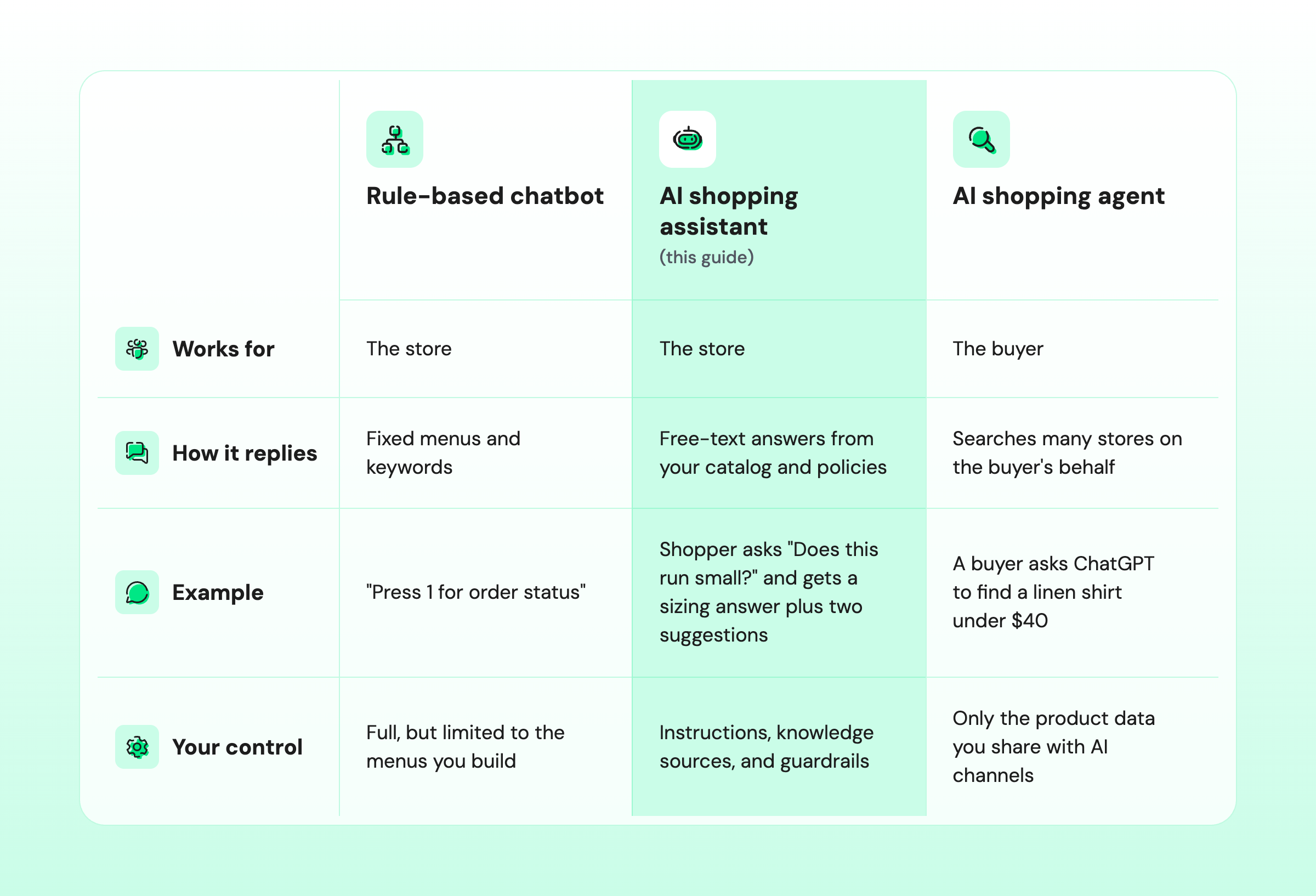
An AI shopping assistant is a conversational tool that answers shoppers’ questions, recommends products from a store’s catalog, and guides shoppers to purchase, around the clock.
Unlike a rule-based chatbot, it understands questions written in the shopper’s own words, so it doesn’t break when someone asks something that wasn’t scripted.
An AI shopping agent works the other way around: it shops for the buyer, not the store. It searches many stores for the buyer and can sometimes complete the purchase, which is the core idea behind agentic commerce.
The store-versus-buyer difference decides how much control you have. You set an AI shopping assistant’s knowledge, tone, and limits directly, but you can influence a buyer’s agent only through accurate product data.
The table below compares the three tools on who each works for, how it replies, and how much control you have.
Some vendors also call an AI shopping assistant an AI sales assistant. In B2B sales, though, that term usually means a tool that helps sales reps find leads and follow up.
Why does After-Hours Selling Matter for Shopify Stores Now?
After-hours selling matters because more shoppers now find products through AI tools and expect an answer the moment they ask. A pre-sale question left until 9 am can turn into a competitor's sale.
Three recent data points show how fast shoppers are moving to AI-led shopping:
- Adobe found that traffic from generative AI tools to US retail sites rose 693% year over year in the 2025 holiday season.
- Shopify reports that AI-referred orders on its stores grew nearly 13 times year over year in Q1 2026.
- On Shopify, AI-referred visits that began on a product page converted about 49% better than organic search in the same quarter.
The Adobe and Shopify figures describe shoppers arriving from AI tools, not chats with your own assistant.
They show that more shoppers now start with a question instead of a search filter, often landing straight on a product page, and an unanswered pre-sale question is one of the main places where e-commerce sales leak.
How does an AI Shopping Assistant Sell 24/7? The Six Stages
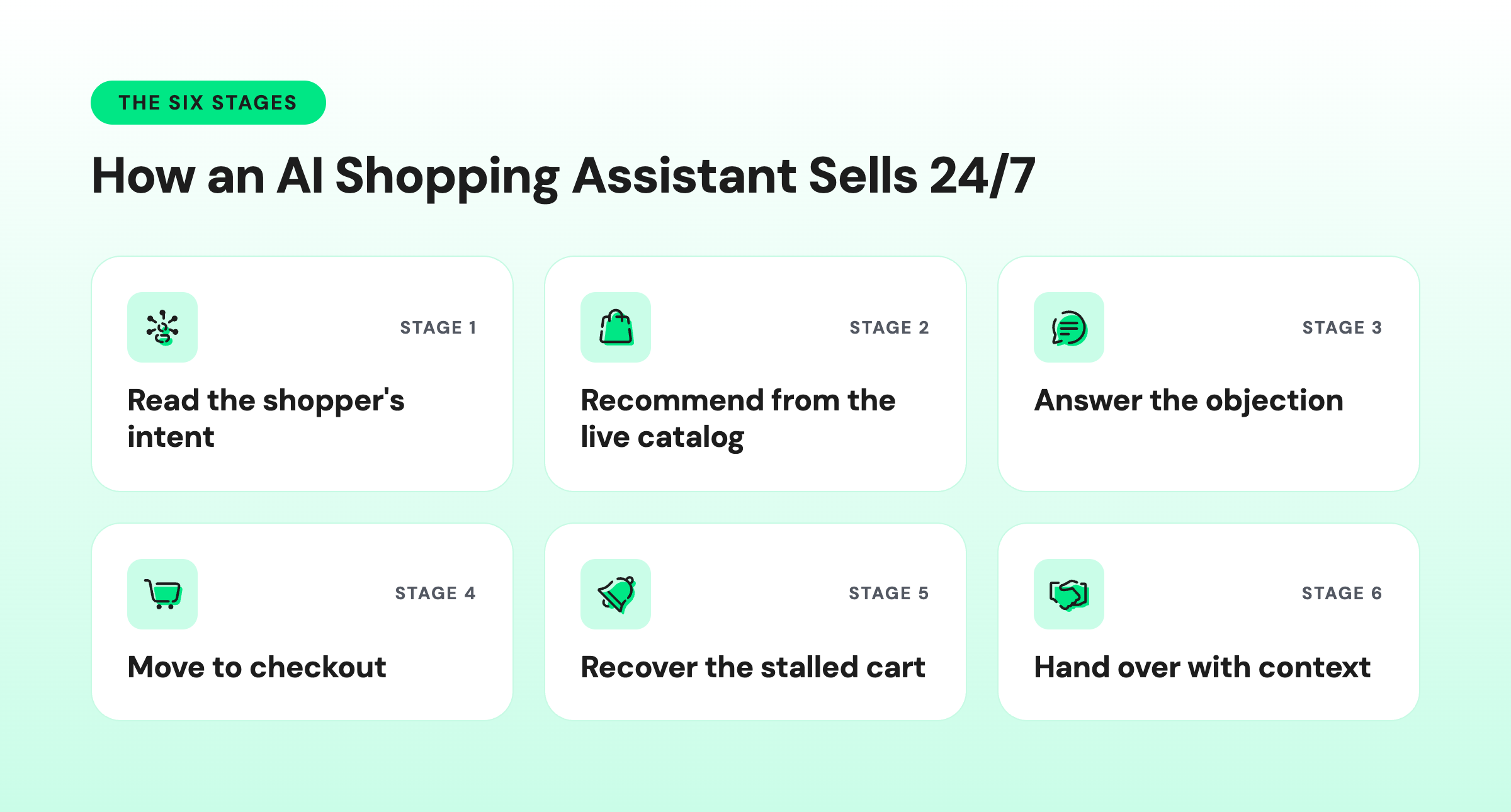
An AI shopping assistant sells 24/7 by running the six-stage conversation a good store associate would, from reading the shopper's intent to handing the chat to your team. Each stage has one job and one common mistake to avoid.
Stage 1: Read the Shopper's Intent
The assistant first works out whether the shopper wants to buy a gift, replace an item, compare products, or browse.
It asks one clarifying question at most, such as "Is this for you or a gift?", and uses where the chat started, such as a product page or an ad, as context.
The mistake to avoid is asking five questions before giving a single answer.
Stage 2: Recommend from the Live Catalog
The AI assistant suggests two or three products and gives a one-line reason why each one fits. For example, "The relaxed-fit shirt works well if you're between sizes" is more useful than a list of ten links.
Every recommendation must come from the current catalog, with the right variants in stock.
Our guide to conversational product search explains how natural-language questions replace search filters.
The mistake to avoid is recommending a size or color that sold out the day before.
Stage 3: Answer the Objection That Stops the Sale
Most shoppers who ask a question are one answer away from buying. The usual blockers are size and fit, materials, delivery time, COD availability in markets such as India and the Gulf, and returns.
Every answer must come from your written policies and product pages.
Avoid promises your store can't keep, such as "It'll arrive by Friday" when your shipping policy says five to seven days.
Stage 4: Move the Shopper to Checkout
When the shopper is ready to buy, the AI assistant shares the product as a catalog message or product link and sends the shopper to your Shopify checkout. Payment stays on Shopify, where your discounts, taxes, and shipping rules already apply.
Avoid asking for card details, because no AI assistant should collect payment information in chat.
Stage 5: Recover the Stalled Cart
Some shoppers still leave before paying. An approved WhatsApp reminder can bring them back to their cart, and if they reply, you have 24 hours to answer them in a free-form chat.
At this stage, the reply should answer the question that made the shopper hesitate, not repeat "You left something behind."
Timing and wording for reminders are covered in our guide to Shopify abandoned cart recovery.
Stage 6: Hand Over with Context
The AI assistant passes any risky, emotional, or high-value chat to a support rep, together with a summary of the conversation.
A good handover means your team never has to ask the shopper to repeat themselves.
What does an AI Shopping Assistant Handle Overnight?
Overnight, an AI shopping assistant answers the questions shoppers ask most often, such as how to use a product, which size to pick, whether a discount is possible, and what to do about a damaged order. It closes the simple sales itself and passes the rest to your team with notes.
Here are four example chats from one night and how the assistant handles each one. The Stage column shows which selling stage each chat falls under.
Time | Shopper asks | Stage | What the AI shopping assistant does | Result |
|---|---|---|---|---|
9:52 pm | "Is this serum OK to use with retinol?" | 3 | Answers from the product page, makes no medical claims, and shares the brand's patch-test advice | Shares the product link, and the shopper buys |
11:40 pm | "Does the linen shirt run small? I'm usually an M." | 2 and 3 | Shares the size chart and suggests a size L, plus a similar relaxed-fit shirt | Sends a checkout link, and the shopper buys |
1:15 am | "Can I get 30% off if I buy three?" | 3, then 6 | States the current offer only, invents no discount, and offers a call-back | Tags the chat "discount request" for the morning team |
6:30 am | "My order arrived damaged." | 6 | Apologizes, collects the order number and a photo, and hands the chat over | Assigns the chat to support with a summary |
By 9 am, when your team logs in, the assistant has closed two sales. One discount request is waiting for a reply, and one damaged-order case is ready with the photo attached.
Guardrails stop this kind of mistake. If the AI assistant had offered the 1:15 am shopper 30% off on its own, your store would have to honor a discount nobody approved or upset the shopper by taking it back.
What Should You Set Up Before Your AI Shopping Assistant Goes Live?
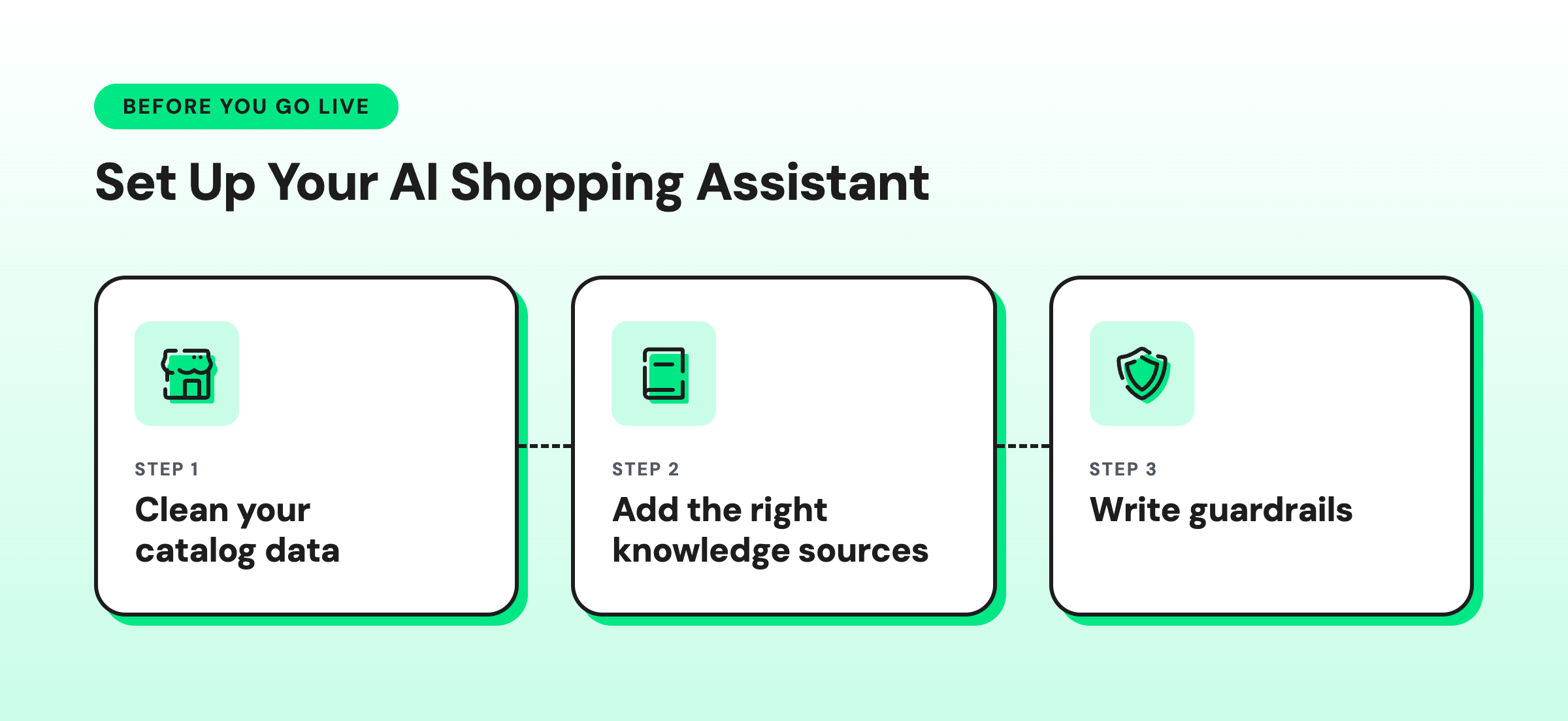
Three things decide whether an AI shopping assistant sells well or embarrasses your store: clean catalog data, the right knowledge sources, and written guardrails.
Set up all three before the first shopper talks to it.
1. Clean Your Catalog Data
An AI shopping assistant can only recommend products that your catalog describes clearly. Check these five areas first:
- Product titles: use the words shoppers type, such as "linen shirt," not internal product codes.
- Variant names: name sizes and colors the same way across all products.
- Sizing: add size charts as text, because the assistant may not be able to read images.
- Stock status: make sure sold-out variants are marked as unavailable.
- Product FAQs: add care instructions, materials, and compatibility notes to each product page.
2. Give It the Right Knowledge Sources
Product data tells the assistant what you sell, while your policies tell it how you deliver, charge, and handle returns. Add these sources:
- Shipping: delivery times for each region and the daily cut-off time for same-day dispatch.
- Returns: the return window, the condition rules, and who pays for return shipping.
- Payment: cash-on-delivery rules, if you offer it.
- Promotions: a list of current offers, with their end dates.
- Brand voice: a few lines on tone, with example replies.
Before launch, test the assistant with the 20 most common pre-sale questions from your past chats.
3. Write Guardrails Your AI Shopping Assistant Must Follow
Guardrails are rules that limit what your AI shopping assistant can say and do. Copy these ten rules into your assistant’s instructions, and replace the part in brackets with your own value.
- Quote prices and offers only from the catalog or the approved promotions list.
- Never create, promise, or negotiate a discount.
- Check stock and variant availability before recommending a product.
- Promise delivery times only as written in the shipping policy.
- Say "I don't know" and offer a person when the answer isn't in your sources.
- Hand refunds, returns, damaged items, and complaints to a person.
- Offer a person for any cart worth more than [your threshold].
- Never ask for card numbers, passwords, or one-time codes in chat.
- Confirm that you are an AI assistant when asked, and say so at the start of each chat if your market requires it.
- Reply in the shopper's language and keep using that language for the whole chat.
In Wati, these rules go into the Astra AI Agent's instructions. For step-by-step setup, see how to build a WhatsApp AI agent.
When Should an AI Shopping Assistant Hand Over to a Human?
An AI shopping assistant should hand over to a human whenever a chat involves money back, risk, or strong emotion, and always when the shopper asks for a person.
Set the assistant to hand over in these situations:
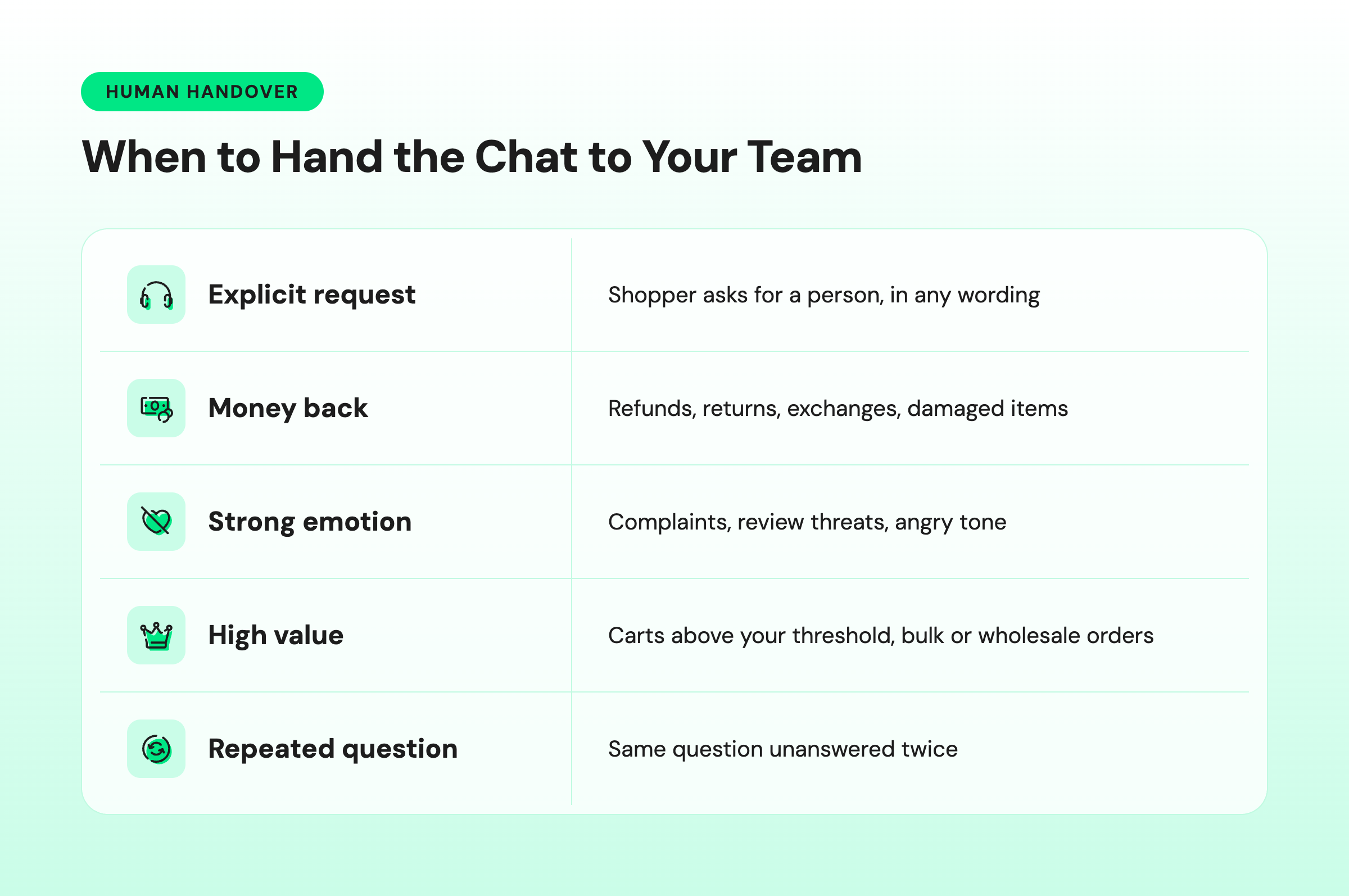
At night, a handover means the AI shopping assistant tells the shopper when someone will reply. It should leave the following things for the morning team:
- Tags: each chat is labeled by outcome, such as sale, open cart, lead, or support case.
- Summaries: every handed-over chat has a summary, so no one reads the full thread.
- Open carts: each open cart is listed with the product and the question that stalled it.
- Promised call-backs: every call-back is listed with the time promised to the shopper.
- Unanswered questions: questions the assistant couldn’t answer are logged, so you can add the answers to its knowledge sources.
Which Channel Should Your AI Shopping Assistant Use: Website Chat, WhatsApp, or Instagram?
Your AI shopping assistant should start on the channel where shoppers already ask you the most questions. Store chat reaches shoppers while they're on your site, WhatsApp lets the conversation continue after they close the tab, and Instagram DM catches shoppers who discover you through posts and ads.
Here's how the three channels compare on where chats start, follow-up, reply formats, and best use.
Store chat widget | Instagram DM | ||
|---|---|---|---|
Where the chat starts | On your site | Site button, ads, QR codes, and replies to broadcasts | Comments, story replies, DMs, and ads |
Follow-up after the shopper leaves | Only while the shopper is still on the site | Yes, with the shopper's opt-in and approved message templates | Only within Instagram's messaging time window |
Reply formats | Depends on the chat app | Images, buttons, lists, and catalog messages | Text, images, video, and up to 3 buttons |
Best for | Browsing questions on product pages | Considered purchases, cash-on-delivery markets, and repeat buyers | Discovery from posts and ads |
On WhatsApp, a business can message a shopper first only if the shopper has opted in, and only with a template that WhatsApp has approved. Free-form replies are allowed within 24 hours of the shopper's last message.
Our WhatsApp for Shopify guide explains opt-in and templates in detail, and our Shopify WhatsApp integration guide shows how to connect your store.
How do You Measure Whether an AI Shopping Assistant Adds Revenue?
You measure an AI shopping assistant's revenue by comparing orders and sales from periods with the assistant against periods without it. Chat volume shows how busy the assistant is, not how much it sells.
Track these six metrics, each of which answers a different question about the assistant's impact.
Metric | What it tells you |
|---|---|
Assisted orders | The number of orders placed after a conversation with the AI shopping assistant |
Assisted conversion rate | The share of AI assistant conversations that end in an order |
Assisted average order value | Whether the AI assistant's recommendations increase basket size |
After-hours revenue share | How much of your revenue arrives while your team is offline |
Handover rate | How often the AI assistant needs a person (a high rate usually means missing knowledge) |
Wrong-answer rate | The share of errors you find when you review 50 conversations each week |
To find the revenue the assistant adds, rather than the revenue it is merely involved in, run a holdout test.
Switch the assistant on for half of your after-hours periods, such as alternate nights, and compare the results with the nights it's switched off.
Incremental revenue = (conversion rate with the assistant − conversion rate without it) × number of conversations with the assistant × average order value |
|---|
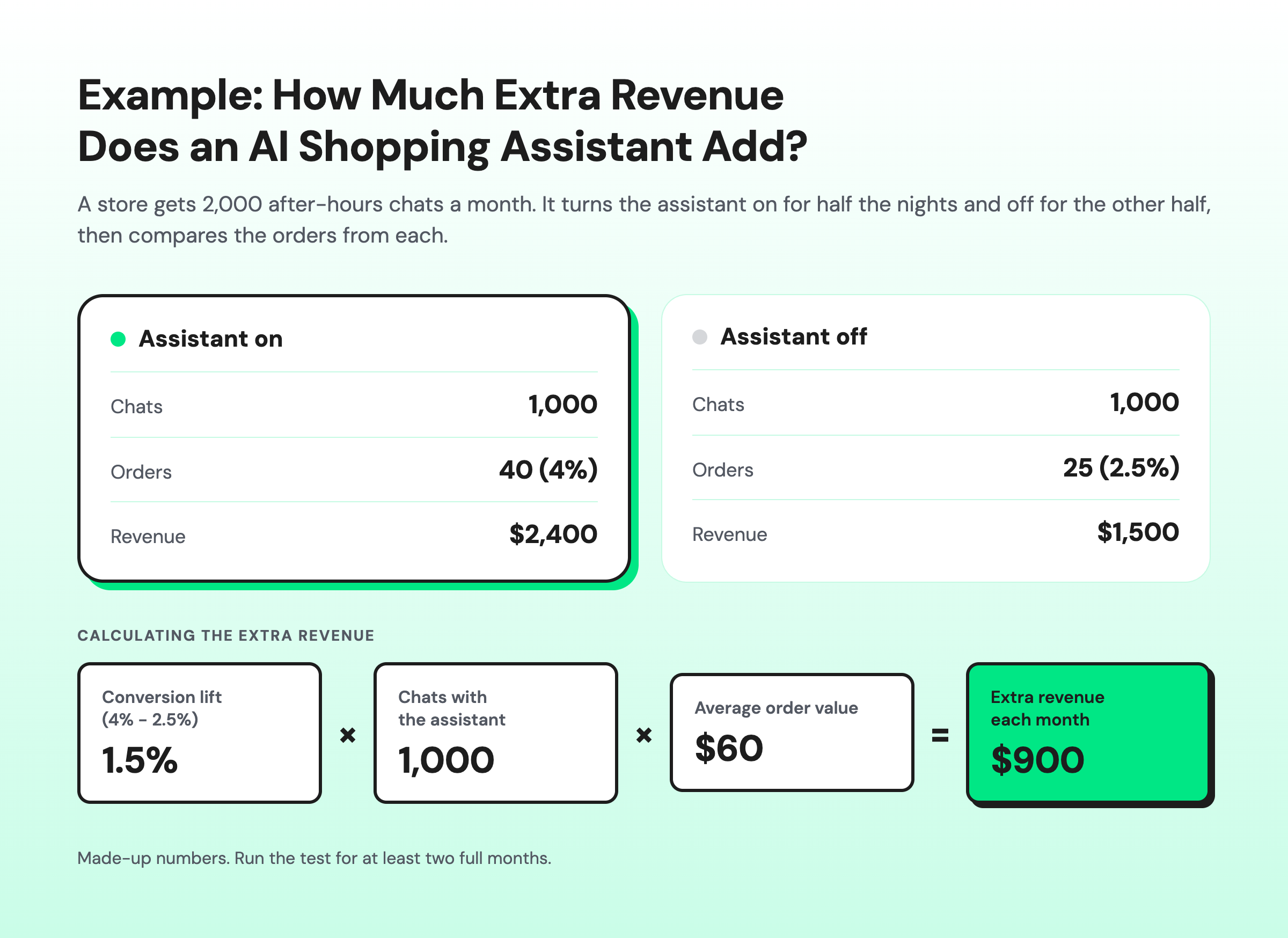
Run the test for at least two full months, because a holiday week or a large promotion can distort a shorter test.
How do You Choose an AI Shopping Assistant for Your Shopify Store?
Choose an AI shopping assistant by checking how accurately it uses your catalog, which channels it covers, how it hands chats to your team, and whether you can predict the monthly bill.
The scorecard below lists the questions to ask in a demo and the answers that should worry you.
Factor | Question to ask | Warning sign |
|---|---|---|
Catalog accuracy | How does it learn your products, variants, and stock levels? | The vendor can't explain how stock updates reach the assistant |
Channels | Does it work on your website and WhatsApp? | It works on one channel only and can't follow up after the shopper leaves |
Guardrails | Can you write rules about prices, discounts, and topics to avoid? | The vendor says the AI handles it but offers no controls |
Handover | Where does a handed-over chat go, and what context comes with it? | Handover means sending an email to a shared address |
Analytics | Can you export conversations and see assisted orders? | It reports only chat counts, with no revenue figures |
Pricing model | Is pricing per resolved chat, per usage credit, or a flat plan, and what happens in a peak month? | You can't estimate next month's bill |
Setup | Can your team set it up and change it without developers? | Every change needs a support ticket |
What Mistakes Cost Shopify Stores Sales with AI Shopping Assistants?
Most AI shopping assistant failures come from launching on too many channels, with too little product data, and with no way to reach a human. Avoid these five mistakes:
- Launching on every channel at once: start with your busiest pre-sale channel and expand once the assistant performs well there.
- Letting it improvise offers: one invented discount can cost more than a month of assisted sales.
- Using stale stock data: recommending sold-out variants loses shoppers who were ready to buy.
- Leaving no human option at night: a shopper stuck in a loop at 1 am may post a bad review by morning.
- Judging it only by chats handled: track revenue and read transcripts, because chat counts alone don't show sales.
How does Wati Help Your Shopify Store Sell Around the Clock?
Wati helps your Shopify store sell 24/7 with the Astra AI Agent, which answers shoppers, shows your catalog in the chat, and hands risky chats to your team. Here’s what you get:
- Answers to shopper questions: product, sizing, shipping, and policy questions are answered on WhatsApp and your website, using your store pages and documents as knowledge sources.
- Testing before launch: an automated evaluation reviews the agent's answers and finds gaps in its knowledge before it talks to shoppers.
- Your guardrails, written once: the rules from this guide go into the agent's instructions.
- Wati Shopify app: shows your catalog on WhatsApp and sends shoppers to your Shopify checkout. It also sends order confirmation, shipping, and cash-on-delivery confirmation messages.
- Cart and checkout recovery: approved WhatsApp reminders bring shoppers back to the carts they left.
- Escalation to Team Inbox: the agent assigns the chat to the right person or team, with the full conversation attached.
- Conversation Summary: part of Wati AI, it condenses a long overnight thread into a short recap for whoever picks up the chat.
- Wati AI Agents (beta, rolling out in phases): they find shoppers showing buying intent and chats still waiting on a reply, then wait for your approval before acting, so your team knows where to start each morning.
Learn more about how Wati supports e-commerce businesses.
Start Selling 24/7 on Shopify with Wati
Your Shopify store doesn’t have to stop selling when your team logs off. The 11:40 pm shopper gets an answer, the right product, and a checkout link, instead of a reason to buy from a competitor.
Anything risky waits for your team with the full conversation attached, so every morning starts with closed sales and clear next steps.
Ready to turn more Shopify conversations into sales? Book a demo with Wati and see how AI shopping assistants can help your store sell 24/7.
Frequently asked questions
Do AI Shopping Assistants Increase Conversion?
AI shopping assistants can increase conversion, but only a test on your own store can prove it. Run the assistant on alternate nights and compare conversion and order value between the two groups.
Can an AI Shopping Assistant Replace My Support Team?
No, an AI shopping assistant can't replace your support team. It handles repeat pre-sale questions about sizing, delivery, and stock, so your team can focus on refunds, complaints, and high-value buyers. In a good setup, the assistant hands those cases over with a summary, so your team starts each morning knowing what every shopper needs.
How Much does an AI Shopping Assistant Cost?
AI shopping assistant pricing usually follows one of three models: a fee per resolved conversation, a charge per usage credit, or a flat plan fee. Your cost depends on your chat volume, the channels you use, and how busy your peak months are. Ask every vendor what a peak month would cost. In Wati, Astra AI Agents on WhatsApp is available on the Pro and Business plans.
Will an AI Shopping Assistant Give Wrong Prices or Discounts?
An AI shopping assistant can give wrong prices or discounts if it is allowed to improvise. Limit it to prices from your catalog and an approved promotions list, ban it from creating discounts, and hand any price negotiation to a person. Review a sample of conversations every week. Guardrails reduce the risk of errors, but no assistant is error-free.
Can an AI Shopping Assistant Sell in Arabic, Hindi, or Spanish?
Most AI shopping assistants can reply in many languages, including Arabic, Hindi, and Spanish. Before launch, test two things: whether the assistant keeps using the shopper's language for the whole chat, and whether your policies and product details translate accurately. Add region-specific answers, such as cash-on-delivery rules, to its knowledge sources.
Does an AI Shopping Assistant Work Alongside Shopify's Own Chat?
Yes, an AI shopping assistant can work alongside Shopify's own chat. Use the store chat for questions shoppers ask while browsing your site, and use WhatsApp to follow up after they leave. Make sure only one assistant answers each conversation, and send both channels into the same team inbox where possible.
Related posts
- Best AI Sales Agents for Shopify (2026): Astra vs Rep AI vs Relish AI vs Zipchat
Looking for the best AI chatbot for Shopify? Compare Astra, Rep AI, Relish AI, and Zipchat on channels, selling features, pricing models, and Shopify fit.
- Upselling and Cross Selling on Shopify With AI: Timing, Scripts, and Workflows
Upselling and cross-selling on Shopify work best while a shopper is deciding. See how AI times offers in chat, with scripts, workflows, and a checklist.
- How to Recover Abandoned Carts on Shopify With AI and WhatsApp?
Discover easy ways to recover Shopify abandoned carts using WhatsApp, automation, and data-driven strategies that turn lost carts into sales.
- WhatsApp Automation Templates for Shopify: 5 Templates You Can Launch Today
Effortlessly streamline your messaging process with WhatsApp Automation Message Templates. Enhance your communication and save time today.