
Too Long? Read This First
- Parents, not students, ask most admission questions on Facebook, usually about fees, transport, safety, and visits.
- Use Facebook ads to start Messenger conversations during admission season, not just to collect form leads.
- Ask "parent or student?" first, then send each to the right answers.
- Move visit confirmations and admission updates to WhatsApp, with consent.
- Never let a bot make admission decisions, grant fee waivers, or discuss a specific child's concerns.
A Class 9 student watches a coaching institute's results reel on Instagram and sends "Is there a weekend batch?"
An hour later, their parent sees the institute's ad on Facebook. The parent's message is different: "What are the fees, is there an installment plan, and how do children get home after the evening class?" Two people, two channels, two very different conversations.
Wati's omnichannel inbox brings Facebook Messenger, Instagram, and WhatsApp into one place, as part of how Wati for education helps institutions manage admissions conversations.
This guide covers why parents use Facebook, what ads should do during the admissions season, and what parents ask.
It then walks through which conversations to automate, when to move to WhatsApp, and what a school bot should never answer.
Why Do Parents Message Schools on Facebook?
Parents are the decision-makers and, in most cases, the fee payers.
They also tend to spend more of their social time on Facebook than their children do, which makes the school's Facebook Page the natural place for their questions.
Those questions are practical. Parents want to know the fee structure and whether installments are possible.
They ask how children travel to and from school, what supervision looks like, and how the school compares with the one down the road. Timing matters too. Most parents message in the evening, after work, when the admissions office has closed.
A reply the next afternoon can feel slow when they've messaged three schools the same night.
If you already reach students on Instagram, this is a different journey. Our guide to Instagram marketing for education covers the student side, from reel comments to demo classes.
What Should Facebook Ads for Schools Do in Admission Season?
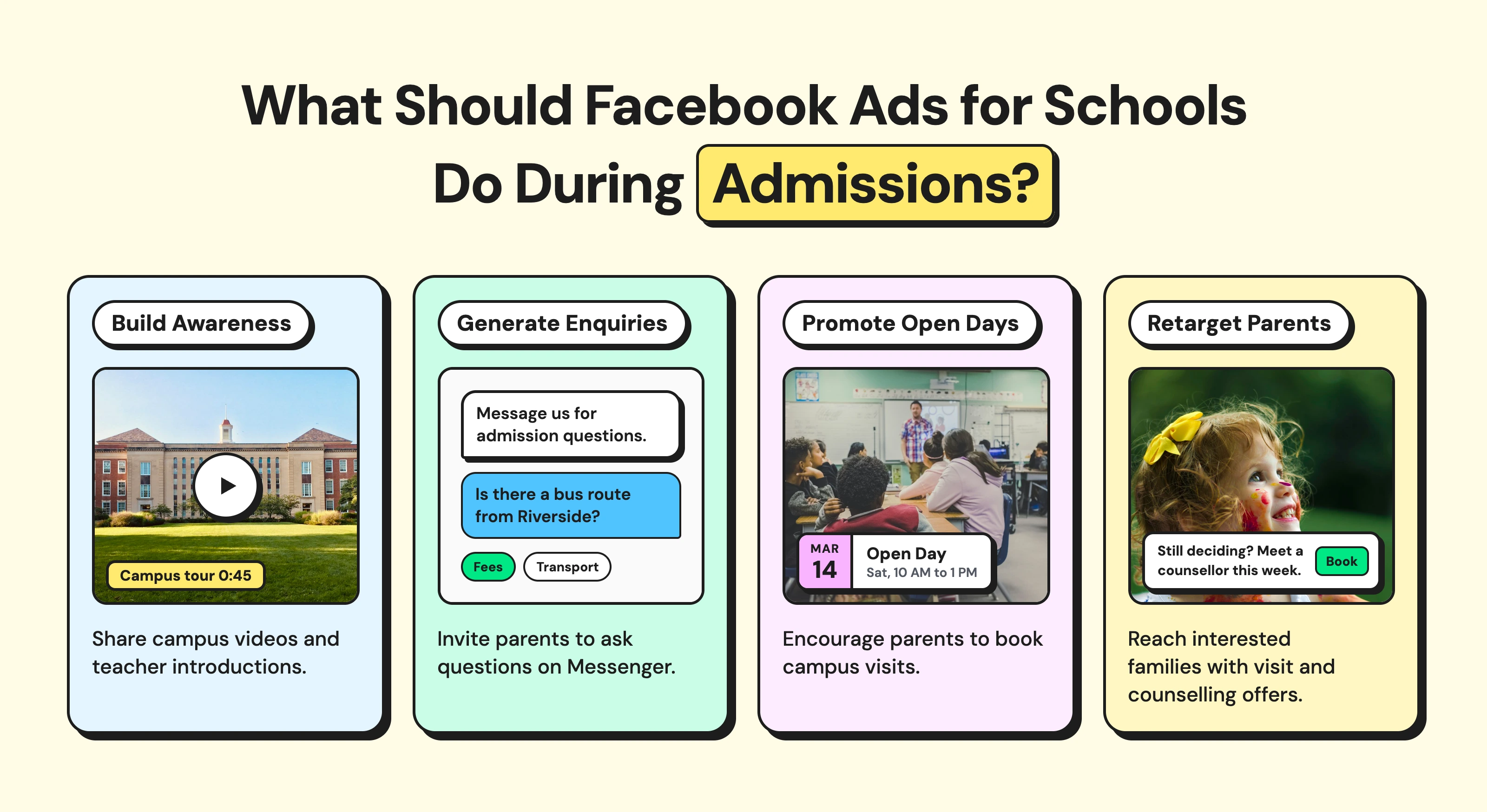
Good school marketing ideas start with matching each ad to a stage of the admission journey:
- Awareness: short campus videos and teacher introductions that build familiarity before admissions open.
- Inquiry: Click-to-Messenger ads that invite a specific question, such as "Message us for the fee structure."
- Open days and campus visits: ads that promote the date and invite parents to message for a slot.
- Retargeting: ads for parents who watched the campus video or visited the admissions page, offering a visit or a counseling call.
Lead Ads, which use instant forms, can work for large campaigns when a team is ready to call every lead quickly.
💡Our guide to WhatsApp lead generation covers that route. For most schools, though, a Messenger conversation tells you more about the family than a form ever will.
Admission seasons differ by market, so plan ads around the local calendar:
Market | When admission questions peak | What parents focus on |
|---|---|---|
India | Board results and the new academic session, typically spring to early summer | Fees, results, entrance tests, transport |
Latin America | Before the school year: February or March in Brazil and much of South America, late August in Mexico | Fees, uniforms, schedules, location |
Middle East | Before the main intake in late summer, plus January for some schools and universities | Curriculum, fees, transport, campus visits |
Answer parent messages from one Team Inbox. Assign admission chats, add notes, and keep every parent conversation in one shared view. Explore Wati's Team Inbox
How Do Schools, Coaching Institutes, and Universities Differ?
The parent-led pattern holds across education, but the balance shifts by institution.
K-12 schools.
Parents do almost all the asking. Transport, safety, after-school care, and fees dominate, and many families compare three or four schools before visiting one. Campus visits and open days are the key conversion step.
Coaching and test-prep institutes.
Both parents and students message, often about the same course. Students ask about batches, teachers, and results. Parents ask about fees, installments, and how their child gets home after evening classes. Results season brings a sharp spike in both.
Universities and colleges.
Students lead more of the conversation, but parents still ask about fees, scholarships, hostels, and safety, especially when the student will move to another city or country. Counseling calls matter more than campus visits for students who live far away.
Set up your first reply and FAQ menus to match the mix you actually see.
A school might send parents straight to a fees and transport menu, while a university might start with courses and only then ask about accommodation.
What Do Parents and Students Ask in Messenger?
Parents and students often ask about the same school, but rarely the same things:
Topic | What parents ask | What students ask |
|---|---|---|
Fees | Fee structure, installments, sibling discounts | Scholarship tests |
Transport | Bus routes, pick-up times, safety on the way home | Rarely |
Safety | Supervision, CCTV, staff checks | Rarely |
Timings | School hours, after-school care | Batch timings, weekend classes |
Results | Past board results, university placements | Toppers, teachers |
Admissions | Documents, age criteria, entrance tests | Test syllabus, test dates |
Campus life | Facilities, food, hostel rules | Clubs, sports, events |
This split matters for automation. A single FAQ that mixes bus routes with weekend batches serves neither audience well.
How Should Your First Messenger Reply Work?
Start by finding out who's messaging. Use a numbered question:
"Thanks for contacting us! Reply 1 if you're a parent or guardian, or 2 if you're a student."
From there, each path gets its own questions and answers. Parents might choose between fees, transport, admission process, and booking a visit. Students might choose between courses, scholarship tests, and batch timings.
Keep the reply window in mind. Automation can respond for 24 hours after the person's last message, and your team can reply for up to 7 days. Aim to answer the main question and capture the next step in the first conversation.
Which Admission Conversations Can You Automate?
Four types of conversations take up most of an admissions team's time on Facebook.
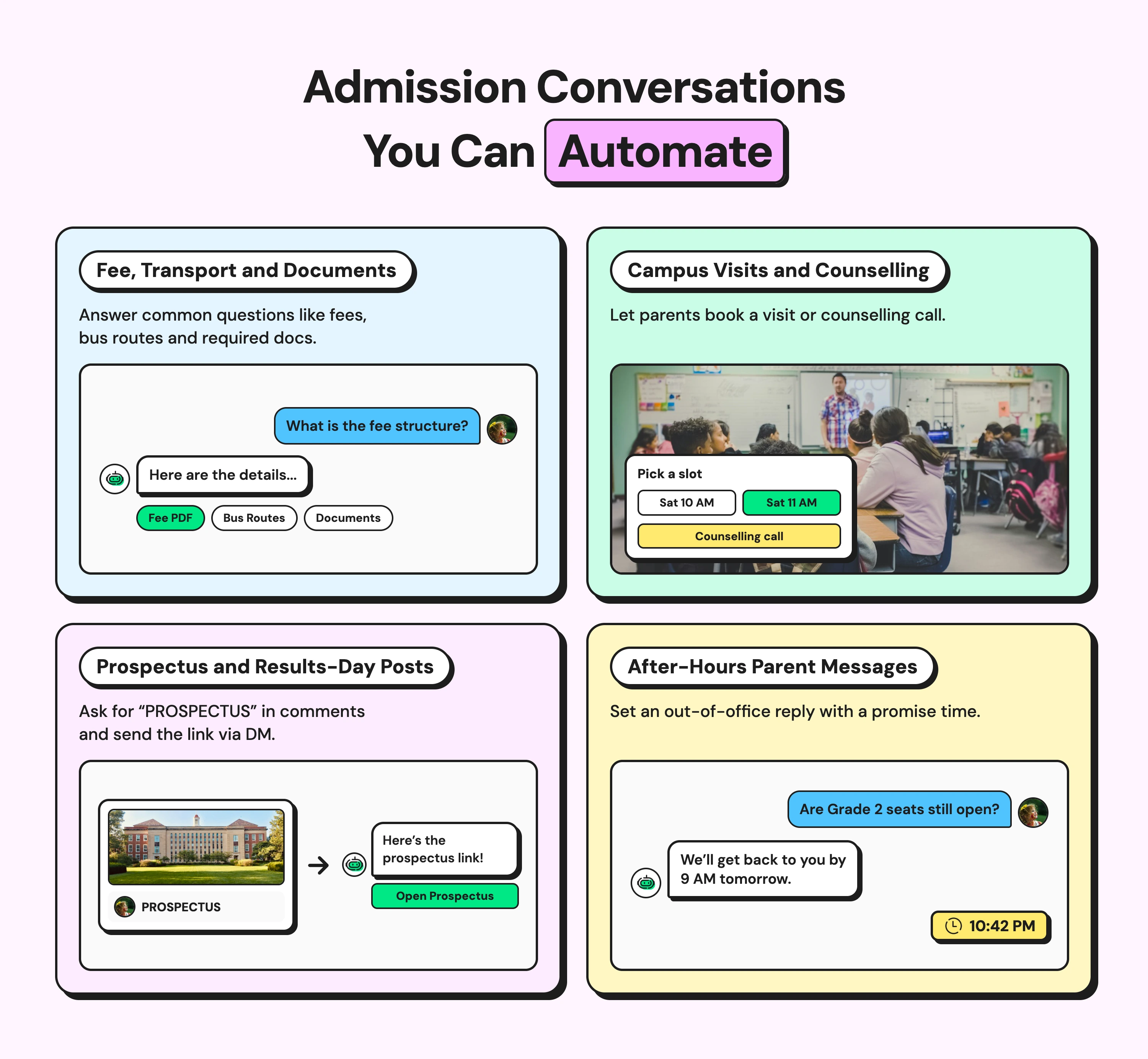
Fee, Transport, and Admission-Process Questions
Keyword rules can answer the questions with fixed answers: fee structure, installment options, bus routes, required documents, and age criteria. Add the words parents actually use, including Hindi, Spanish, or Portuguese terms for "fees."
Questions about fee hardship or special circumstances should always go to a person.
Campus Visits and Counseling Calls
Messenger doesn't connect to your calendar, so use "request" and "confirm". The bot asks for the preferred day, time, and how many family members will attend. A counselor then confirms the slot.
Prospectus and Results-Day Posts
Ask followers to comment "PROSPECTUS" on an admission post, and a comment rule sends each one a Messenger DM with the link. Meta allows one private reply per comment, so end the DM with a question.
After-Hours Parent Messages
Wati creates an out-of-office rule when you connect your Facebook Page, but it stays off until you switch it on.
Set it to promise a reply by a specific time the next morning, and adjust your working hours for holidays and exam breaks.
When Should an Admission Inquiry Move to WhatsApp?
Messenger is great for the first conversation, but once the reply window closes, you can't follow up freely there. Admissions run over weeks, so you need a channel for updates.
Ask for a WhatsApp number when the parent wants something that needs a later message:
- A confirmed campus visit time and a reminder the day before
- Entrance test dates and results
- Admission decisions and next steps
Give a clear reason and get consent: "Share your WhatsApp number, and we'll send the visit confirmation and test dates there." Only message parents about what they agreed to.
💡 Our guide to education lead generation covers how to nurture those inquiries through to enrolment.
What Should a School Chatbot Never Answer?
A school bot handles facts well. It should not handle decisions or sensitive concerns. A school chatbot should never:
- Promise admission or comment on a specific child's chances
- Grant fee waivers, discounts, or special payment terms
- Respond to concerns about a specific child, such as bullying, health, or a safety incident
- Give advice that needs a teacher, counselor, or principal
When any of these come up, the bot should say that a staff member will reply and pass the chat along with the parent's details attached.
Collect only what admissions needs.
A parent's name, contact details, and the grade or course they're interested in are usually enough at the inquiry stage. Avoid asking a child for personal details through a bot.
How Do You Run the Page Inbox During Admission Season?
Admission season compresses months of inquiries into a few weeks. A simple routine keeps parents from waiting:
- Give the inbox an owner.
One person or team checks Messenger every day and makes sure nothing sits unassigned.
- Sweep after-hours chats first thing.
Start each morning with chats tagged overnight, since those parents were promised a reply.
- Route by grade or course.
Assign chats so each counselor handles the same grades or courses, and parents don't have to repeat themselves.
- Staff up for peak days.
Results days, open-day weekends, and the week before a deadline bring the most messages. Plan cover in advance.
- Review the week's questions.
Every Friday, look at what parents asked that the bot couldn't answer, and add keyword rules for anything that keeps coming up.
Track a few numbers to see whether it's working: how quickly parents get a first reply, how many inquiries turn into visit requests, how many visits lead to applications, and how many parents opt in to WhatsApp updates.
Which Mistakes Cost Schools Admissions on Facebook?
- Running ads with nobody answering
Admission-season ads bring evening messages. Switch on the out-of-office rule and FAQ menu before the ads go live.
- One reply for parents and students
Mixing both audiences into one menu confuses everyone. Ask who's messaging first.
- Sending parents to the website for fees
If a parent asks about fees in Messenger, answer there. Share the link after.
- Long menus
Eight options feel like a form. Keep the menu to four or five topics.
- Asking for details you don't need
Collecting a child's date of birth or school records via a bot poses a risk without helping the inquiry.
How Does Wati Help Schools Turn Facebook Inquiries Into Admissions?
Wati is an agentic customer engagement platform that turns conversations into revenue growth across marketing, sales, and support.
For a school, that means every parent who messages your Facebook Page gets an answer, a label, an owner, and a next step, even after the admissions office has closed.
Here's how one admission-season week runs at a school using Wati, from the setup before the first ad to the Saturday campus visits.
1. Friday Before Launch: Build the System Before the Ads Go Live
The admissions lead connects the school's Facebook Page in Settings › Channels. Wati creates the Welcome and Out-of-office rules automatically.
She sets working hours to match the office, turns on Holiday Mode for the upcoming exam break, and writes an after-hours reply that promises an answer by 10 am.
Next, she fills Reply Material with the answers parents ask for most: the fee structure, installment options, required documents, and an image of the bus route map.
Each answer becomes a keyword rule. She uses "contains" matching so that "what are the fees for grade 6?" still triggers the fees reply, and she keeps keywords specific, because if two rules match, both reply.
Last, she builds the first-reply chatbot and starts it from the Welcome rule. It asks "Reply 1 if you're a parent or guardian, or 2 if you're a student," since Messenger chatbots use typed replies instead of buttons.
Then it asks for the grade and saves both answers. She tests every rule from a second Facebook account before anything goes live.
2. Monday: The Open-Day Ad Goes Live
The Click-to-Messenger ad runs with three suggested questions: "What are the fees?", "Is there school transport?" and "Can I book a campus visit?"
Each one matches a keyword rule, so a parent who taps a question gets the answer instantly. Every chat from the ad is tagged "ad-openday," so the team can see exactly what the campaign brought in.
The same afternoon, the school posts its admission announcement with "Comment PROSPECTUS and we'll send you the brochure" in the caption.
A comment-to-DM rule sends each commenter a private Messenger message with the prospectus link and posts "Check your Messenger inbox!" under their comment. The DM ends with "Which grade are you looking at?", so the parent replies and the conversation keeps going.
For families who never see the ad, the school prints its m.me link as a QR code on the admissions banner at the gate. One scan opens the same Messenger chat.
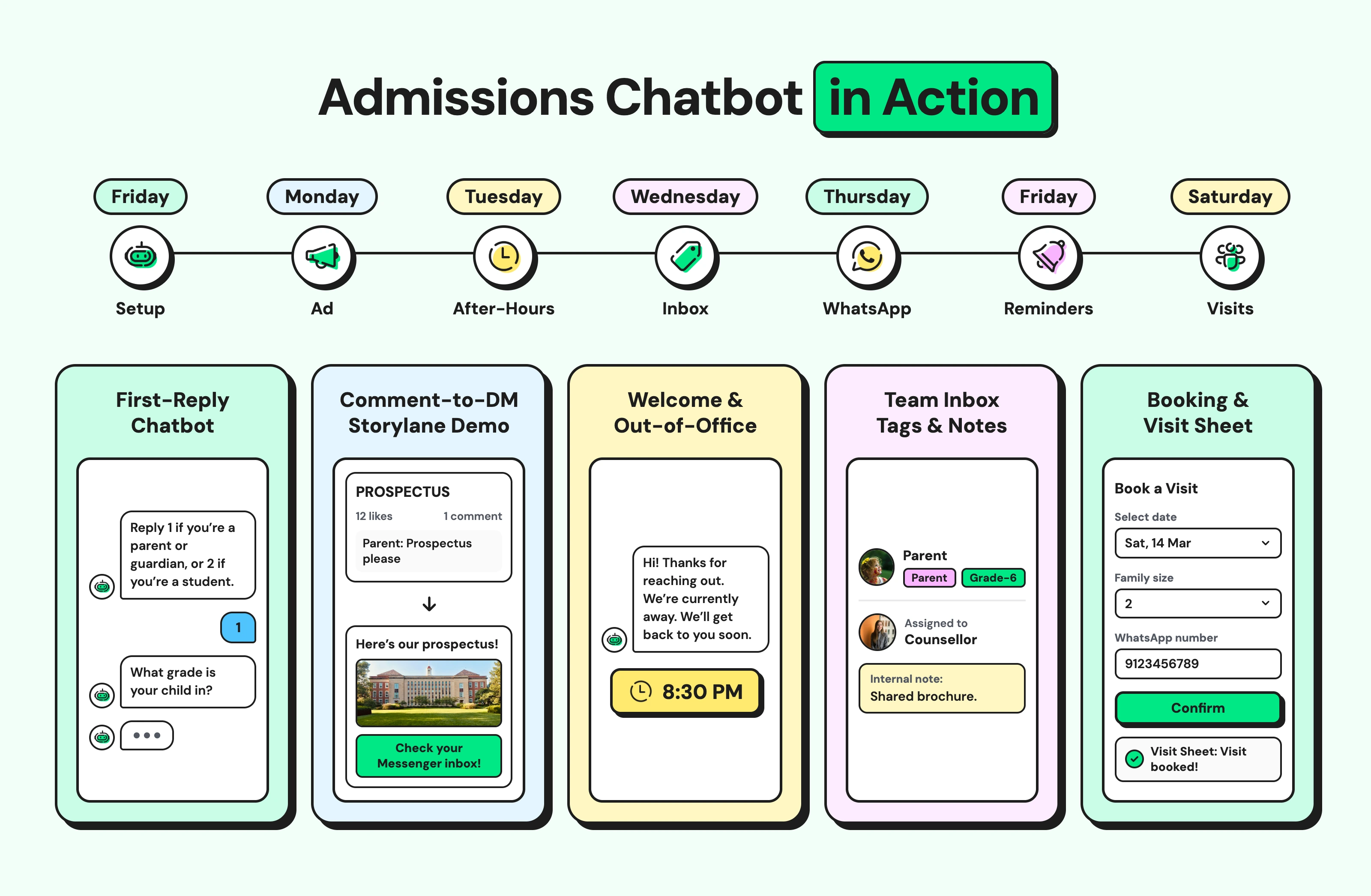
3. Tuesday Evening: Forty Parents Message After Work
It's 8:30 pm and the office is empty. A parent's first message gets the after-hours reply, so they know when a person will follow up.
Meanwhile, the keyword rules keep working: "fees" brings the fee structure, "installment" brings the payment options, and "bus" brings the route map image.
Parents who messaged during the day already went through the chatbot. It tagged each chat "parent" and "grade-6" and assigned it to the middle school admissions team.
A question about a fee waiver or a specific child's situation doesn't match any keyword, so it waits in Team Inbox for a counselor, exactly where it should be.
4. Wednesday Morning: Counselors Start with a Sorted Inbox
No one spends the morning sorting forty chats. Each counselor filters Team Inbox to their own chats and starts replying. They set chats to Pending while waiting on a parent and to Solved once a visit is booked.
Wati AI sums up long threads, so a counselor can see in one line that a parent asked about Grade 6 fees and the Sector 12 bus.
It also translates a message written in Hindi or Spanish. Counselors leave internal notes for each other, such as "Sibling already in Grade 3, mention the sibling discount."
In the Facebook Comments section, they answer questions left on the open-day post publicly, or move a commenter into a private DM.
Each commenter who gets a DM becomes a contact, with their chat history saved for the next counselor who picks it up.
5. Thursday: Visit Requests Move to WhatsApp
When a parent types "visit," a keyword rule starts the booking chatbot. It asks for a preferred date and time, how many family members are coming, the parent's name, and a WhatsApp number for confirmation.
A Google Spreadsheet step logs every request in the school's visit sheet, so the front desk sees Saturday's list fill up in real time.
The chat is tagged "visit-request" and assigned to the front desk, which confirms each slot on WhatsApp, where the school can stay in touch for the weeks an admission takes.
6. Friday Evening: Reminders Go Out
Every confirmed family gets a WhatsApp reminder with the visit time, which gate to use, where to park, and which documents to bring. Replies like "Running 15 minutes late" land in the same Team Inbox the counselors already work from.
7. Saturday: Campus Visits Go Ahead
Families arrive prepared, and counselors walk in knowing each family's grade, questions, and concerns from the chat history. After the visit, parents get the application link and next steps on WhatsApp.
8. The Following Friday: Teach the System What It Missed
The admissions lead reviews the week's chats that no rule answered. Hostel rules and uniform costs keep coming up, so she adds keyword replies for both and tests them from the second account.
Then she checks four numbers: how fast parents got a first reply, how many chats became visit requests, how many visits led to applications, and how many parents opted in to WhatsApp updates.
For a wider marketing picture, read our guide to omnichannel marketing for education.
Answer the Parent, Win the Admission
Facebook ads for schools bring parents to your Page. What happens next decides whether they visit. Answer their practical questions quickly, separate parents from students, and move to WhatsApp when there's something worth sending later.
Ready to turn parent inquiries into admissions? Start your free Wati trial.
Frequently asked questions
Do Facebook ads work for schools?
Yes, especially when they start a conversation. Parents can ask about fees, transport, and visits straight away, which helps schools turn interest into campus visits and applications.
Why do parents use Facebook to contact schools?
Parents are usually the decision-makers and fee payers, and many spend more time on Facebook than on Instagram. They use the school's Page to ask practical questions before visiting.
Can a school automate replies to parents on Messenger?
Yes. Keyword rules can answer common questions about fees, transport, and documents, and chatbots can guide parents through a numbered menu. Sensitive questions should go to staff.
What should a school chatbot not answer?
It shouldn't promise admission, grant fee waivers, or respond to concerns about a specific child. Those conversations need a staff member.
Can parents book a campus visit through Messenger?
Parents can request a visit by sharing a preferred day and time. A counsellor then confirms the slot, often on WhatsApp with the parent's consent.
Related posts
- How to Send Bulk Messages on WhatsApp Without Getting Blocked
Learn how to send bulk WhatsApp messages without getting blocked. Compare the WhatsApp Business app and API, messaging limits, costs, templates, and best practices for safe, compliant bulk messaging.
- Instagram Comment Automation: How It Works and How to Set It Up in Wati
Instagram comment automation auto-replies to comments and DMs commenters within seconds via Meta's API. Covers strategy, use cases, and Wati setup.
- Shared Team Inbox for Instagram: A Buyer’s Checklist for 2026
Use this fastest checklist to evaluate any shared team inbox for Instagram, which covers DMs, comments, automation, and multi-channel support.
- How to Set Up a TikTok Business Account: Step-by-Step Guide
Set up a TikTok Business Account step by step: switch from personal, pick a category, add your profile, and unlock ads and analytics.