
Too Long? Read This First
- Festive shoppers find products in Reels but decide in chat, so the DM is where the sale happens.
- Give each festive reel its own comment keyword, like DIWALI or GIFTING, that sends a DM with the collection link and a code.
- Add a short public reply so other viewers comment too.
- Ask for a WhatsApp opt-in in the DM before Instagram's 24-hour automation window closes.
- With Wati, you set this up once per reel: a comment rule sends the DM and public reply, and AI Assist collects the shopper's WhatsApp number.
What happens to the 300th person who comments "price?" on your Diwali reel?
Usually, nothing. By the time your team reaches that comment, the shopper has already bought the gift somewhere else.
Festive season marketing on Instagram is how retail brands turn that rush of Reels comments into orders. The brands that sell most move shoppers from comments into DMs, then onto WhatsApp.
According to Meta, 85% of global holiday shoppers use its apps (Facebook, Instagram, WhatsApp) every week, and 78% of these shoppers have bought directly in-app
Wati is an agentic customer engagement platform that turns conversations into revenue growth. With Wati's Instagram automation, every festive reel can answer its own comments with one keyword, one DM with the collection and a code, one public reply, and one WhatsApp opt-in.
In this guide, we'll cover how to turn festive Reel comments into sales with comment-to-DM automation, from setting up keywords and automated replies to WhatsApp follow-ups, story mentions, and campaign tracking.
Why does Festive Season Marketing on Instagram Need a DM Plan?
Festive season marketing on Instagram needs a DM plan because the comment section is where buying intent shows up first. Without one, festive reels collect hundreds of "price?", "pp", and "link?" comments that get answered too late, or never. Keyword rules can answer price questions automatically.
That's the classic case of Instagram engagement that never turns into leads.
Festive shopping creates a big opportunity for retail brands:
- Shoppers look to social media for inspiration: Meta found that 94% of shoppers on its apps look to creators for festive guidance. Another study found that 78% of festive shopping conversations in India happened on Meta's apps, particularly WhatsApp.
- Festive shopping lasts beyond Diwali: Wedding season, Black Friday, Christmas, and year-end sales bring more opportunities for brands to promote products through Instagram Reels.
- India has a large Instagram audience and retail market: The country has around 514.7 million Instagram users. CAIT estimates that Diwali 2025 trade reached ₹6.05 lakh crore, with jewellery accounting for 10%, apparel 7%, gifts 7%, and home décor 5%.
When festive Reels attract hundreds of comments, manual replies become difficult. Comment-to-DM automation helps brands respond faster, share product details, and turn interested shoppers into leads.
What is Comment-to-DM Automation for Festive Reels?
Comment-to-DM automation for a festive reel asks viewers to comment one keyword, then sends each commenter a DM with the collection, a code, and a link.
It also posts a public reply and asks for a WhatsApp number to keep the conversation going.
Every festive reel campaign has five parts:
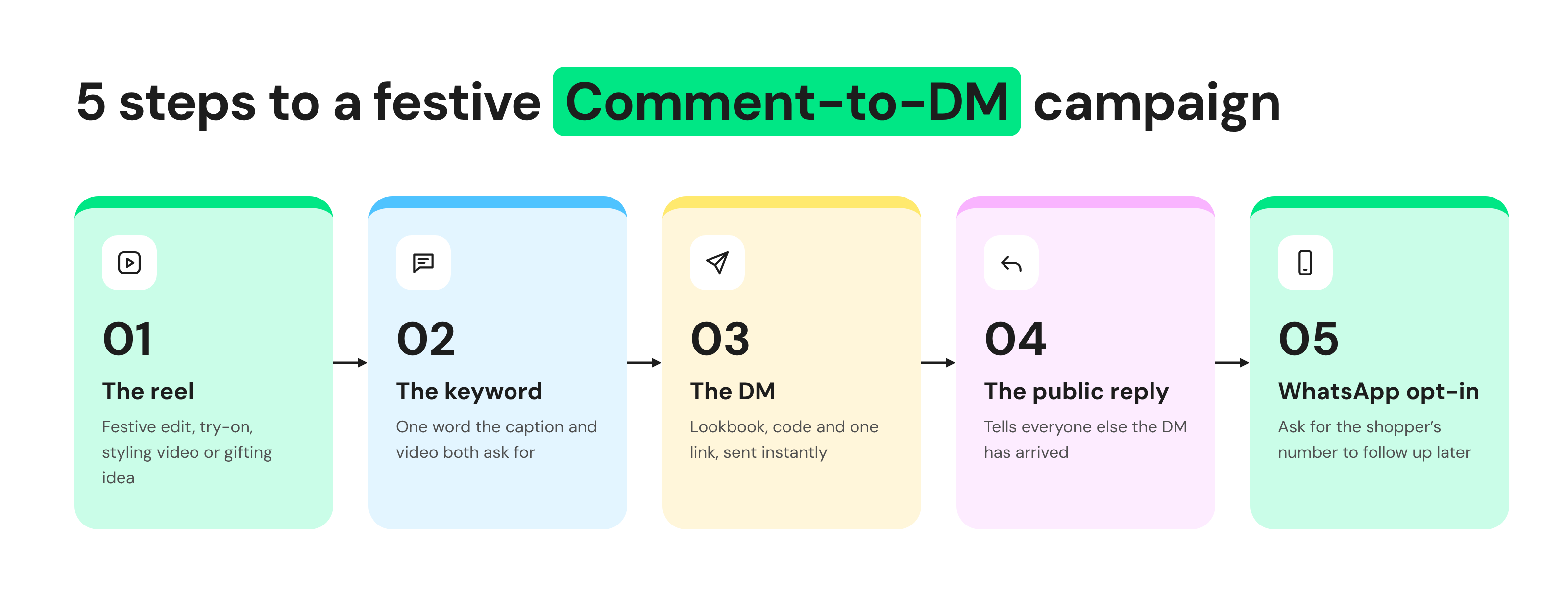
This keeps the shopper inside Instagram instead of sending them to a link in bio. The brand also gets a one-to-one conversation it can continue, which a link click never gives.
How to Build a Comment-to-DM Flow for a Festive Reel?
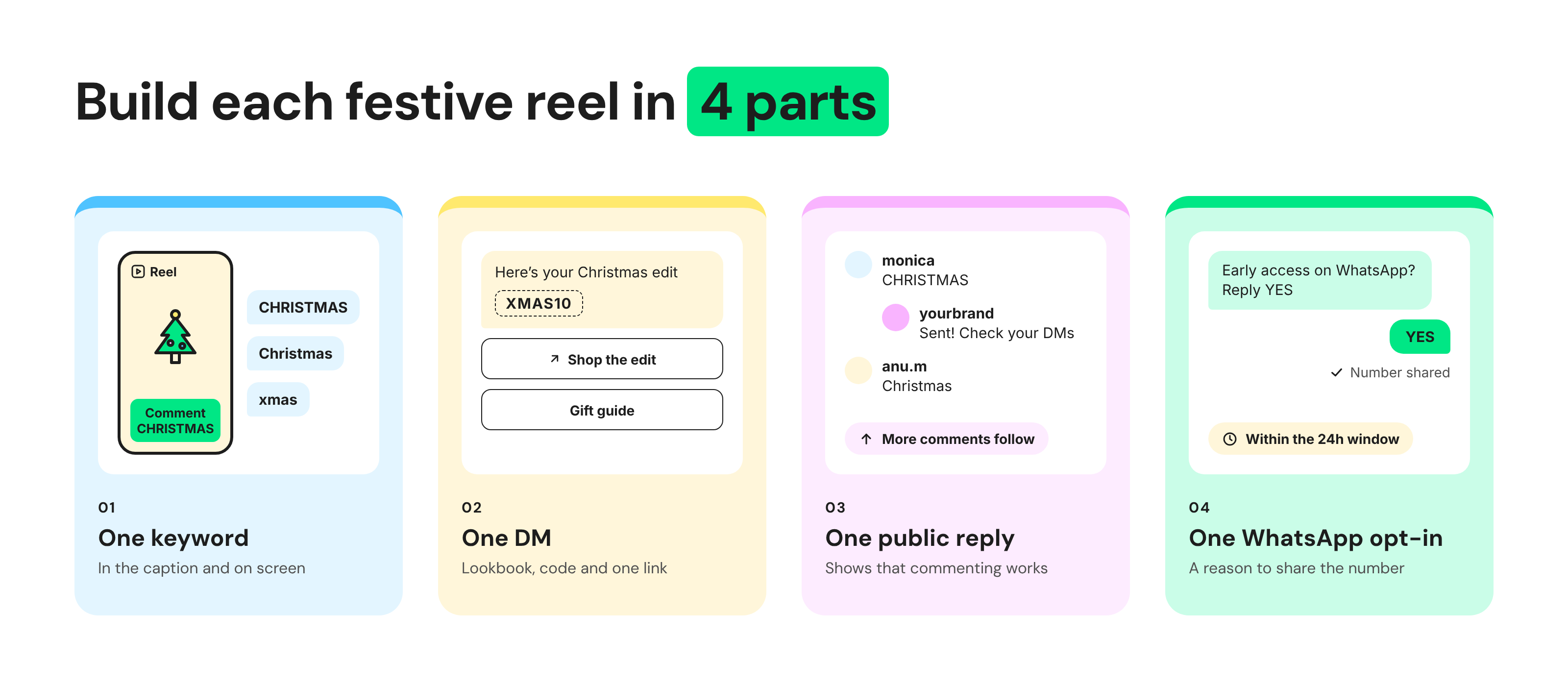
Build each festive reel in four parts: one keyword, one DM, one public reply, and one WhatsApp opt-in request. Write all four before the reel goes live, so the first comment gets the same experience as the five-hundredth.
1. Pick One Keyword per Reel
A good keyword is short, easy to type on a phone, and tied to the moment. CHRISTMAS, DHANTERAS, BRIDAL, and GIFTING all work because shoppers already think in those words.
Say the keyword twice, once in the caption and once on screen in the last few seconds of the reel. Add common spellings, such as "Christmas" and "christmas," as extra keywords in the same rule.
One keyword per reel also keeps reporting clean, because every DM traces back to a single reel.
2. Write the DM: Lookbook, Code, and One Link
The festive DM should deliver everything the comment asked for in one message. Add a line about the collection, the discount code, and a button to the collection page.
In Wati, that message is an Instagram button template, which can carry quick-reply buttons and "Visit website or URL" buttons. Keep heavier content, such as full catalogues, for WhatsApp, which is another reason to ask for the number.
Here's an example DM for a Dhanteras jewellery reel. It's one message, with both buttons under the text:
Here's the Christmas edit you asked for Use code XMAS10 for 10% off until 25 Dec. Want early access to our bridal collection on WhatsApp? Reply YES. [Shop the edit] [Gold under cost] |
3. Add a Public Reply under Each Comment
The public reply is the Instagram comment auto-reply posted under each keyword comment. It tells other viewers that commenting works, which pulls in more comments.
One short line is enough. Vary the wording from reel to reel, so hundreds of identical replies don't look scripted to your followers:
- "Sent! Check your DMs for the Christmas edit"
- "Your lookbook is in your inbox ✨"
- "Done! The code is waiting in your DMs."
4. Ask for the WhatsApp Opt-In before the Window Closes
Instagram automation can only reply within 24 hours of the customer's last message, and a team member can reply manually for up to 7 days. After that, the conversation on Instagram is closed until the customer writes again.
Ask for the WhatsApp number inside the first DM, and give a reason to share it, such as restock alerts, early access to the wedding collection, or order updates. The opt-in must be explicit: the customer chooses to share the number for those messages.
To design that conversation, see how to capture phone numbers from Instagram DMs.
Ready to set up the trigger itself? Follow the step-by-step guide to keyword-triggered DMs.
Festive Keyword Library for Ethnic Wear, Jewellery, and Décor Brands
Use a different keyword for each festive moment and product line, so every reel has its own trigger, DM, and code. Copy and adapt the library below.
i. Ethnic Wear
Moment | Keyword | Reel idea | DM delivers | WhatsApp opt-in ask |
Diwali | DIWALI | Three Diwali looks, one dupatta | Diwali lookbook and code | Early access to the wedding edit |
Wedding season | BRIDAL | Sangeet to reception looks | Wedding lookbook and stylist chat | Restock alerts for sizes |
Christmas and New Year | PARTY | Party-wear edit | Party edit and code | Delivery-date alerts |
ii. Jewellery
Moment | Keyword | Reel idea | DM delivers | WhatsApp opt-in ask |
Dhanteras | DHANTERAS | Pieces to buy on Dhanteras | Dhanteras edit and code | Gold-rate and new-drop alerts |
Diwali gifting | GOLD | Gifting under ₹5,000 | Price-band list and link | Gift-wrapping and delivery updates |
Wedding season | BRIDAL | Bridal set reveal | Bridal catalogue and appointment request | Appointment confirmation |
iii. Décor
Moment | Keyword | Reel idea | DM delivers | WhatsApp opt-in ask |
Diwali | DIYA | Styling a Diwali corner | Décor lookbook and code | Restock alerts for best-sellers |
Christmas and Hanukkah | GIFTING | Gift boxes by budget | Gift guide by price band | Delivery-date alerts |
Corporate gifting | HAMPER | Hamper unboxing | Bulk-order form link | Quote follow-up |
When you write your own festive keywords, keep each one to a single word with no special characters. Test it by typing it on your phone with one thumb: if it takes more than two seconds, shorten it.
Which Festive Moments Should Get a Reel, from Dhanteras to New Year?
Plan one reel per buying moment. Dhanteras and Diwali carry gifting and gold, while wedding season, Christmas, and year-end sales give a longer tail of reels.
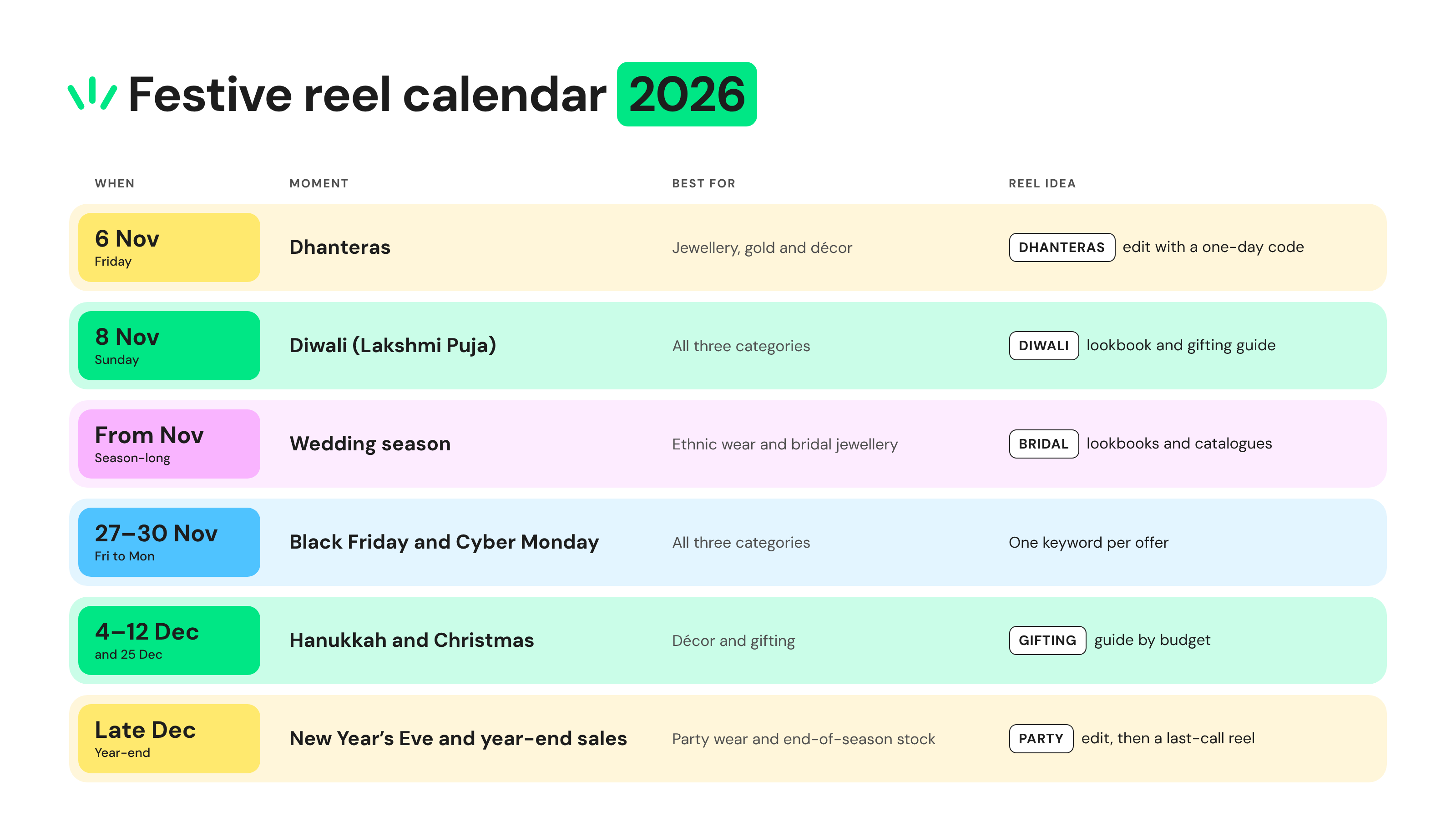
Post each festive reel 10 to 14 days before the date, so the comment rush peaks while buyers still have time for delivery. Then use the WhatsApp list for final-week reminders, such as delivery cut-offs and last-minute gifting.
Bonus Read: the same approach works for the year-end sale rush, as shown in this guide to Instagram DMs for Black Friday.
What Can You Send, and When? The Instagram-to-WhatsApp Window Map
Instagram gives you a short window after each customer message: automated replies for 24 hours, and manual replies from your team for up to 7 days.
On WhatsApp, you can message an opted-in customer with an approved template at any time, subject to Meta's marketing message limits (marketing templates to US numbers are currently paused). Free-form replies work within 24 hours of their last message.
Time since the customer's last message | Instagram automation | Instagram team reply | WhatsApp (after opt-in) |
0 to 24 hours | Yes | Yes | Yes |
24 hours to 7 days | No | Yes, manual only | Yes, with an approved template |
After 7 days | No | No | Yes, with an approved template |
That's why the WhatsApp opt-in matters for anything after the first exchange. Once shoppers opt in, plan one WhatsApp message per festival, and use the 3-touch WhatsApp follow-up to time each one.
Approved templates take time and budget, so check how WhatsApp campaign costs work before the festive rush.
WhatsApp follow-up fits best where WhatsApp is the everyday chat app, such as India, Brazil, Indonesia, and the Middle East. In other markets, keep the follow-up inside Instagram's reply windows.
Bonus Read: Instagram Order Tracking for D2C Brands: Cut Order Status DMs before the Festive Rush
How to Handle Story Mentions, UGC, and the Comment Rush?
Thank every customer who mentions your brand in a story, ask permission before you reshare it, and route festive comment spikes into one shared inbox, so no question is missed.
Story mentions are free festive social proof. A short thank-you DM that asks "Can we share your look?" turns a mention into user-generated content (UGC) with consent.
In Wati, a story mention rule sends that thank-you automatically, on every mention. To check what Instagram allows, see whether Instagram story automation is allowed.
Festive reels also attract comments that no keyword covers: sizes, delivery dates, and custom orders. Send those to a team member instead of a bot.
A shared team inbox for Instagram keeps comments and DMs in one place, so two people never answer the same customer.
Which Festive Comment-to-DM Mistakes Should You Avoid?
Most festive reels that underperform make one of five mistakes: identical public replies, a keyword that's hard to type, codes that don't work, messages to people who never commented, or a launch without a test.
- Identical replies at volume: hundreds of copies of one reply look automated to followers. Vary the wording across reels.
- Keyword friction: long words, hashtags, or special characters reduce comments. Keep one short word, and add common spellings as extra keywords.
- Expired or shared codes: a code that expires before the shopper checks out breaks trust. Give each reel its own code, valid until your last delivery date.
- Cold DMs: only message people who commented, replied, or mentioned your brand. Instagram doesn't let brands start conversations with strangers.
- No test: comment the keyword from a second account before posting. Check the public reply, the DM, and every button.
Also scope each rule to the reel it belongs to rather than to all posts, so an old keyword never fires on the wrong reel.
How to Measure a Festive Comment-to-DM Campaign?
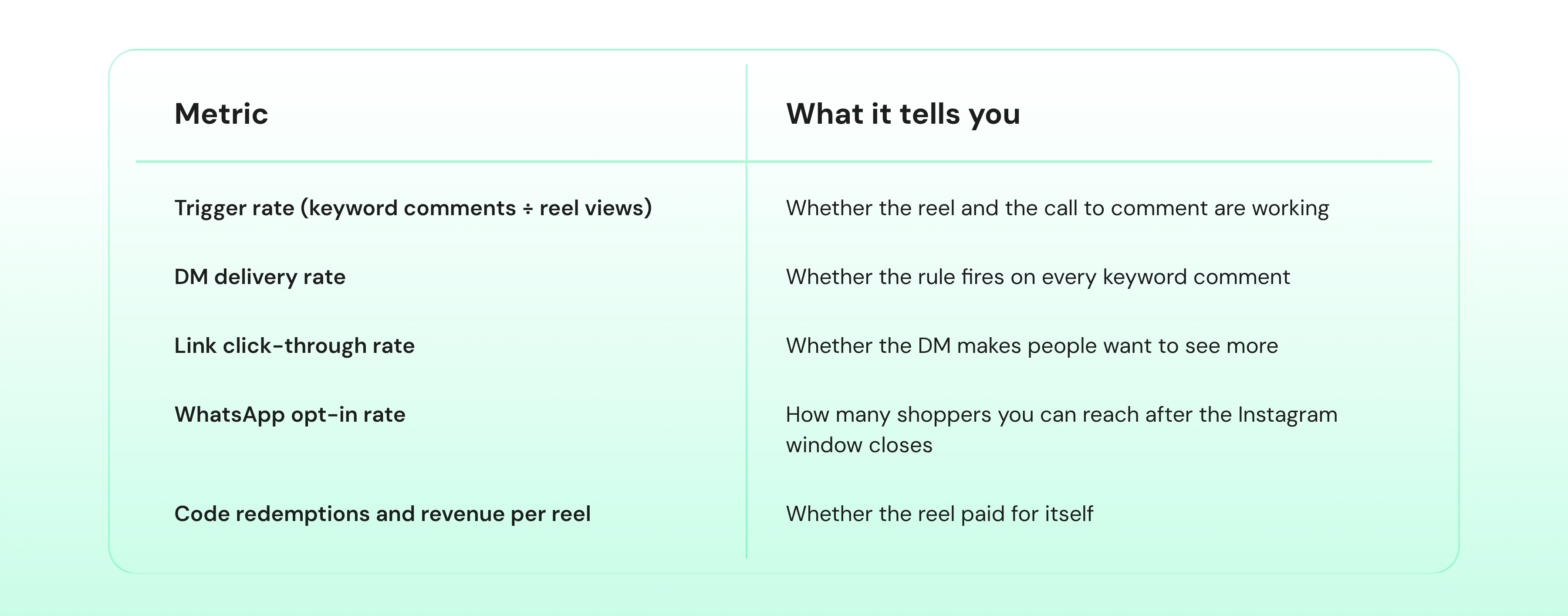
Measure each festive reel with its own keyword and its own code. Track keyword comments, DMs delivered, link clicks, WhatsApp opt-ins, and code redemptions, then compare reels with each other.
Treat your first reel as the baseline, and judge each later reel against it.
How Wati Automates Festive Comments, DMs, and WhatsApp Follow-Ups
Wati turns each part of the festive setup into a rule you set once per reel. The rule then runs on its own while your team handles the conversations that need a person.
- Comment rule: the "New Instagram Comment is Received" trigger works on all posts and reels or on one specific post or reel. A Keyword Match condition can hold several keywords.
- DM and public reply: the rule sends a reply template from the Reply Material Library and, if you choose, a public reply to the comment.
- Lookbook button: a rule can start a chatbot that opens with an Instagram button template, using quick replies or a "Visit website or URL" button.
- Story mention rule: the "New Instagram story mention is received" trigger sends the thank-you DM.
- AI Assist: collects the shopper's WhatsApp number in the DM and saves it to their contact.
- Comments section: in Team Inbox, the Instagram Comments section lets agents reply publicly or by DM to bridal enquiries and custom-size requests.
Once a shopper has opted in, their saved number can join your WhatsApp campaigns, so follow-ups run on the same platform.
Run Your Festive Season Marketing on Instagram with Wati
This season, each reel can reply to its own comments, and every opt-in adds to a WhatsApp list you can use from Diwali to New Year.
Pick one reel, one keyword, and one code, and go live at least 10 days before Black Friday or the wedding-season drop. Then repeat it for Christmas and New Year.
Book a demo to see comment-to-DM automation set up in Wati.
Frequently asked questions
When Should Retail Brands Start Festive Season Marketing on Instagram?
Start festive season marketing on Instagram 10 to 14 days before each date, so the comment rush peaks while delivery is still possible. In 2026, that means reels live by mid-November for Black Friday (27 Nov) and by early December for Christmas (25 Dec). For Dhanteras (6 Nov) and Diwali (8 Nov), go live as soon as you can.
Can I Reply Publicly and Send a DM to the Same Reel Comment?
Yes. A Wati comment rule can send a DM and post a public reply to the same comment at once. The DM carries the collection link and code, and the public reply tells other viewers to comment too. Keep prices and codes out of the public reply.
Can I Message Instagram Shoppers after 24 Hours?
Automated replies can only go out within 24 hours of the shopper's last message, and a team member can reply manually for up to 7 days. After that, follow up on WhatsApp, as long as the shopper shared their number and opted in during the first DM.
Should Festive Reels Show Prices or Say "DM for Price"?
Show a price band in the caption or on screen. Many shoppers won't message just to ask a price, so a hidden price can cost you the sale. Use the DM for the lookbook, the code, and the delivery cut-off, not for the first price.
How do I Stop Festive Discount Codes from Leaking?
Make a separate code for each reel, send it only in the DM, and end it on your last delivery date. Never post codes in captions or public replies. Reel-level codes also show which reel drove each order.
Related posts
- How to Send Bulk Messages on WhatsApp Without Getting Blocked
Learn how to send bulk WhatsApp messages without getting blocked. Compare the WhatsApp Business app and API, messaging limits, costs, templates, and best practices for safe, compliant bulk messaging.
- Instagram Comment Automation: How It Works and How to Set It Up in Wati
Instagram comment automation auto-replies to comments and DMs commenters within seconds via Meta's API. Covers strategy, use cases, and Wati setup.
- Shared Team Inbox for Instagram: A Buyer’s Checklist for 2026
Use this fastest checklist to evaluate any shared team inbox for Instagram, which covers DMs, comments, automation, and multi-channel support.
- How to Set Up a TikTok Business Account: Step-by-Step Guide
Set up a TikTok Business Account step by step: switch from personal, pick a category, add your profile, and unlock ads and analytics.